
Pinterest Infographic Pin Generator
Turn your tips, steps, and guides into stunning Pinterest infographic pins. Pick a template, choose your palette, add your content and download as ZIP.
How to Use the Free Pinterest Infographic Generator
Creating eye-catching infographic pins has never been easier. Whether you are a Shopify merchant highlighting product benefits or a Pinterest content creator sharing a new guide, our free Infographic Generator lets you design professional-quality pins in minutes - without any design skills or expensive software. Everything happens securely in your browser, ensuring complete privacy.
Step 1: Write Your Headline and Content
Enter a compelling headline - the main title of your infographic. Then, add 3 to 7 bullet points, where each becomes a numbered step or tip in your infographic layout.
- Pinterest Infographics for Shopify Merchants: Use titles like "5 Ways to Style Our Summer Dress" or "3 Key Benefits of Organic Skincare".
- Pinterest Infographics for Pinterest Content Creators Users: Use titles like "7 Steps to Start a Successful Blog" or "Top 5 Travel Hacks for 2024".
Step 2: Choose Your Infographic Template
Select from our professionally designed layouts tailored for different types of content:
- Numbered List: A clean vertical layout with numbered circle badges. Perfect for "5 Tips", "7 Mistakes", or "Top Reasons" style content.
- Timeline Steps: An alternating left/right zigzag layout - ideal for step-by-step guides, tutorials, and processes.
- Split Card: A two-panel design with an optional product image on top and numbered bullet points below. Great for product-focused infographics.
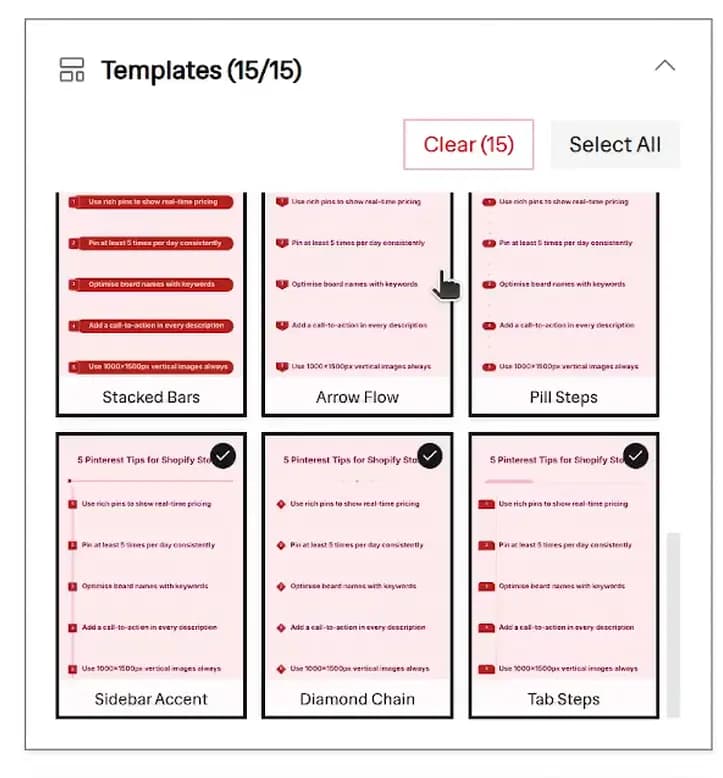 Choose from 15 infographic templates including Stacked Bars, Arrow Flow, Pill Steps, Sidebar Accent, Diamond Chain, and Tab Steps
Step 3: Customize Typography and Branding
Personalize your creations! Choose your preferred fonts and customize text alignment to match your brand's unique identity. Select from our font presets or use fully custom combinations.
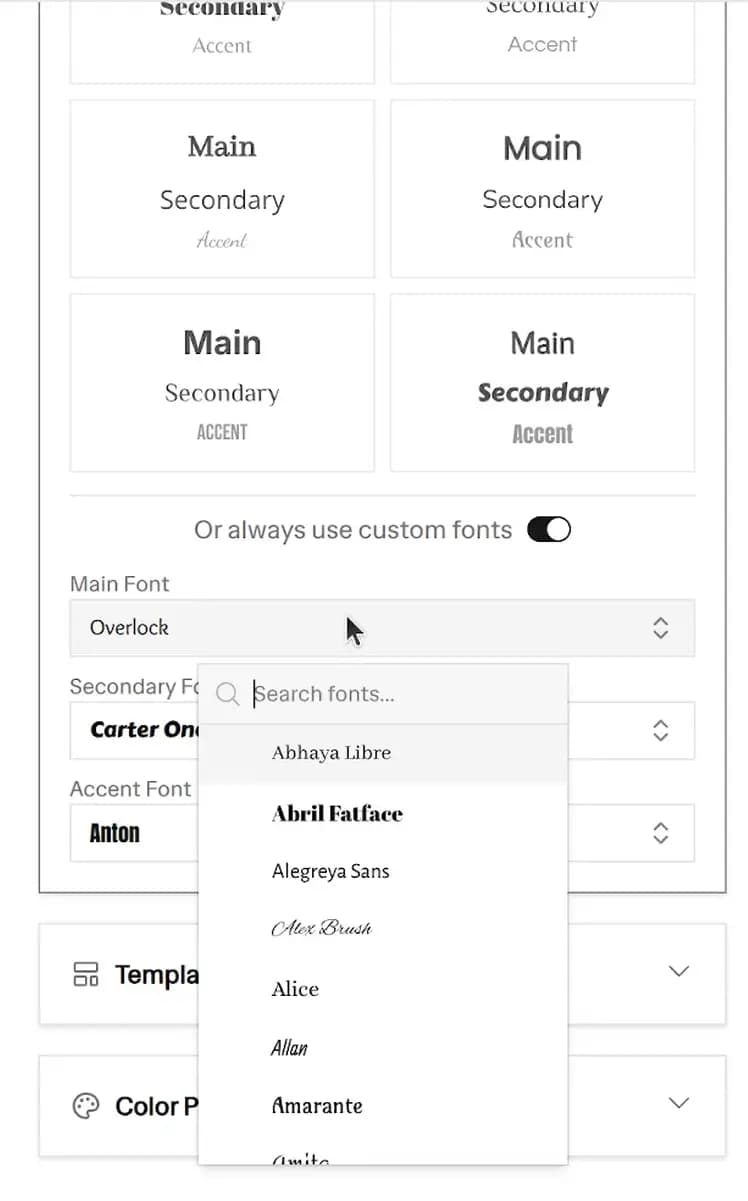 Custom Font Selection
Step 4: Pick Color Palettes
Browse 28 curated color palettes across 6 categories, or use custom color controls to perfectly match your brand aesthetic. Built-in palettes are crafted for optimal contrast, guaranteeing that every text element remains highly readable against its assigned background. When using these palettes, keep our 6 key color roles in mind:
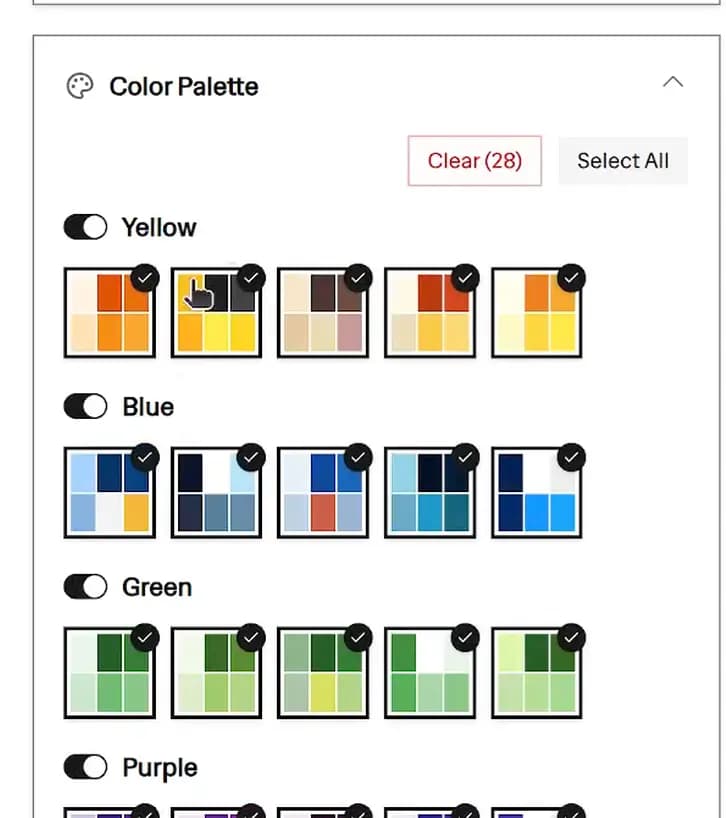 Color Palette Selection
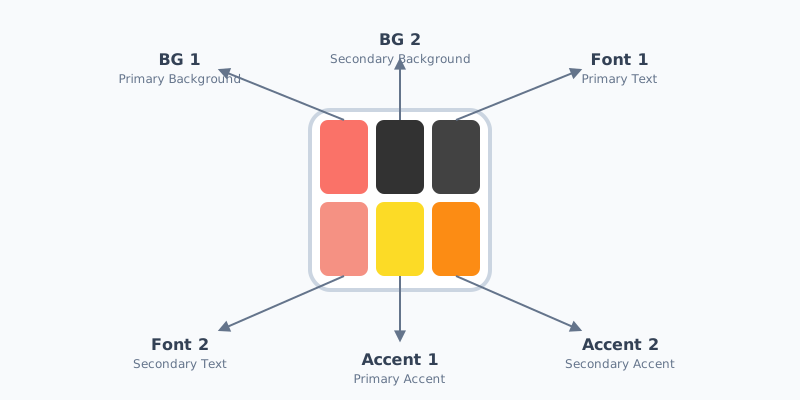 Color Palette Anatomy
- BG 1 (Primary Background): Main canvas and primary text areas
- BG 2 (Secondary Background): Panels, badges, and secondary text areas
- Font 1 (Primary Text): Headlines and bullets on BG 1
- Font 2 (Secondary Text): Text on BG 2 and watermarks
- Accent 1 (Primary Accent): Number badges and key highlights
- Accent 2 (Secondary Accent): Minor decorative accents
Step 5: Preview and Batch Download
Review the massive grid of generated infographic pins. Because this is a genuine Pinterest Infographic Creator, all images generated are in the perfect Pinterest resolution: 1000 x 1500 px (2:3 aspect ratio). When you're ready, hit "Download All as ZIP" to export all template and palette combinations instantly!
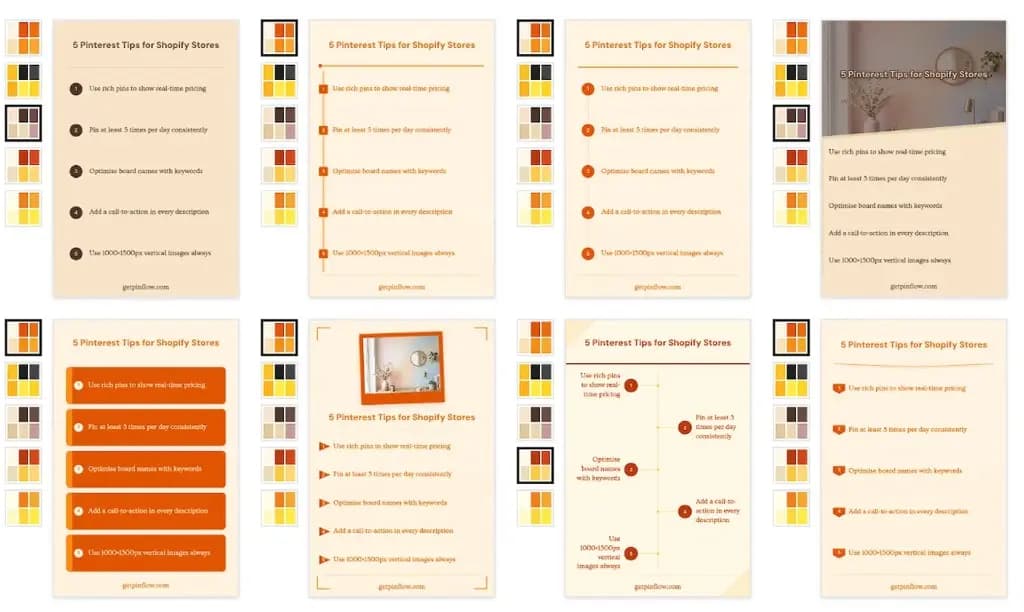 Preview grid showing infographic pins across multiple templates and color palette combinations at 1000x1500px
Why Choose Our Pinterest Infographic Creator?
The Best Tool for Shopify Merchants
Standard product pins showing a product against a plain white background often blend into the crowded Pinterest feed. Our Pinterest infographic generator for Shopify merchants helps you break the mold by sharing highly visual styling tips, detailed ingredient breakdowns, step-by-step product setup guides, or feature comparisons.
By offering educational value rather than just a simple product shot, you build brand trust, significantly increase your save rates, and drive targeted buyer traffic directly to your Shopify store. For example, if you sell organic skincare, instead of just pinning a picture of a serum, you can generate a "5-Step Evening Skincare Routine" infographic. If you sell apparel, you can create a "3 Ways to Style a Denim Jacket" listicle. These educational infographics perform incredibly well on Pinterest because users use the platform to plan purchases and learn new ideas.
Essential Tool for Pinterest Content Creators Users
For Pinterest content creators users, bloggers, influencers, and niche website owners, listicles and step-by-step pins are the absolute lifeblood of Pinterest growth. Our generator helps you instantly turn your blog post headers, recipe steps, DIY instructions, or quick tips into highly clickable, shareable infographic pins.
These formats dominate search results, boost your profile authority, and drive massive organic traffic to your articles. Whether you're in the travel niche sharing "Top 5 Packing Hacks," the food niche sharing "7 Substitutes for Baking Powder," or the finance niche breaking down "3 Steps to Budgeting," turning your written content into visual infographics is the fastest way to capture attention on Pinterest. Instead of spending hours in complex design tools, you can simply type your text and generate dozens of variations instantly.
High Save Rates & Engagement
Infographics consistently outperform standard pins. People love saving "how-to" and "tips" content, making them evergreen assets that bring traffic for months or years.
No AI Slop – No Punishment
Avoid the algorithmic penalties associated with low-effort AI-generated content. This tool is a true Pinterest Infographic Generator that uses your actual content and proven, handcrafted design principles to assemble authentic pins that Pinterest loves.
100% Browser-Based & Privacy Focused
Your data never leaves your device. The image processing, template generation, and ZIP creation all happen securely right inside your web browser. No uploads to third-party servers, guaranteeing absolute privacy for your brand assets.
Perfect Pinterest Resolution
Every image generated is precisely 1000 x 1500 px. No more worrying about awkward cropping or blurry images; you get the optimal 2:3 aspect ratio required for maximum visibility on Pinterest feeds.
Key Benefits Summary
- High-Converting Formats: Built-in Numbered List, Timeline Steps, and Split Card templates.
- Privacy First: Everything happens in the browser.
- No AI Slop: Genuine pins using your real text and trusted templates.
- Brand Customization: Custom color palettes, font choices, and templates to match your brand.
- Perfect Dimensions: Output strictly at the optimal 1000 x 1500 px resolution.
- Batch Download: Get everything neatly packaged as a ZIP file in one click.
- 100% Free: No signup, no watermarks, no limits.
Pinterest Infographic Design Best Practices
To get the most out of your generated pins, keep these proven Pinterest marketing strategies in mind:
- Keep your headline punchy and benefit-driven: Numbers and power words work best to stop the scroll. Headlines like "5 Secret Ways", "7 Critical Mistakes", or "How to Fix" perform significantly better than generic titles.
- Keep bullets short and scannable: 8–12 words per bullet is the ideal length. Pinterest feeds are scanned quickly on mobile devices, so large blocks of text will be ignored. Focus on the core value of each step.
- Use consistent brand colors: Select palette combinations that match your brand identity. Over time, Pinterest users will begin to recognize your brand's unique visual style in their feeds before they even read the pin.
- One infographic per product or topic angle: Create separate infographics for different topics rather than cramming too much information into one image. If your blog post has 15 tips, break it down into three separate "5 Tips" infographics to maximize your content output.
- Use vertical layouts: The Pinterest algorithm heavily favors vertical imagery. Our tool naturally outputs the perfect 2:3 aspect ratio (1000×1500px), ensuring you never have to worry about your pins getting truncated in the feed.
- Include a call to action (CTA): While the infographic provides value, the ultimate goal is the click. Make sure your final bullet point or your pin description encourages the user to "Click to read more," "Shop the look," or "Get the full guide."
Understanding Pin Anatomy
Optimizing your pin data is just as crucial as the design itself. When uploading your exported infographics to Pinterest, keep these elements in mind:
- Image Text: The eye-catching headline that appears on the Pin graphic.
- Pinterest Title: The title representing your Pin, optimizing it for Pinterest search (up to 100 characters). Draft titles with our Pinterest Title Generator.
- Description: A detailed description of your Pin, providing context and utilizing keywords (up to 500 characters).
- Alt Text: Text optimized for visually impaired users and SEO. Defaults to matching the description.
Posting Strategy & Avoiding Spam Policies
Generating dozens of infographic variations is powerful, but posting them requires a smart strategy:
- Space Out Your Pins: Since all your infographic pins link to similar pages, space them at least 15 days apart. Using pins pointing to the same URL in a short timeframe might go against Pinterest's spam policy.
- Vary Your Content: Two pins pointing to the same URL should ideally focus on slightly different angles or variations to remain fresh.
Note: The full PinFlow app takes care of these things automatically in the background. It introduces controlled randomization while preparing and scheduling the pins.
Frequently Asked Questions
How does the free Pinterest Infographic Generator work?
Write your headline, add 3-7 bullet points, and choose your preferred templates and brand colors. Our Infographic Generator instantly formats your text into beautiful listicles and step-by-step guides. You can preview them in real-time and download them as a ZIP file containing perfectly optimized images ready for uploading.
How much does it cost to use the Infographic Creator?
This online Pinterest Infographic Creator is a 100% free utility tool. There are absolutely no hidden costs, no premium tiers, no watermarks, no credit limits, and no account sign-ups required. It's built to be a frictionless tool for marketers and creators.
Do I need a Canva or Photoshop account?
No! That is the primary benefit of this tool. You do not need any external design software, nor do you need to know how to use layers, alignment tools, or typography pairing. Our generator handles all the heavy lifting of design programmatically.
Are my images and content secure?
Yes, your privacy is our top priority. The entire generation process happens locally within your web browser using modern web technologies. We never upload, store, or transmit your text, data, or photos to external servers. Your assets are 100% safe and remain exclusively on your device.
What is the ideal resolution for Pinterest infographics?
The optimal size for a Pinterest pin is 1000 x 1500 pixels, which provides a perfect 2:3 aspect ratio. Our tool automatically ensures every image you download strictly adheres to this ideal resolution to maximize your visibility and prevent awkward algorithmic cropping.
Can I use these infographics on other platforms like Instagram or Facebook?
While the 1000x1500px resolution is specifically optimized for Pinterest, these vertical dimensions also work exceptionally well for Instagram Stories, Facebook Stories, and TikTok image carousels. They are versatile marketing assets.
How many infographic pins can I create?
With our expanding library of base templates and 28 color palettes, you can create up to 84 unique infographic pins from a single set of content. The "Download All" button exports every selected template and palette combination instantly into a neat folder.
How is this different from the Pinterest Pin Generator?
The Pinterest Pin Generator is designed for product images with text overlays, usually featuring a single large background photo. The Infographic Pin Generator is tailored for content-first pins - numbered lists, step guides, and tip sheets - where the text itself is the primary visual focus and structure of the pin.
More FREE Pinterest Marketing tools
Generate pins, titles, boards, and hashtags that drive Pinterest traffic.
Pinterest Pin Title Generator
Generate 10 Pinterest pin titles, 5 SEO descriptions, and 10 keyword ideas from your Shopify product. 100% free. Boost your Pinterest traffic today.
Pinterest Board Name Generator
Generate 10 Pinterest board names and 5 SEO-optimised board descriptions for your Shopify store. 100% free. Organise your Pinterest strategy today.
Pinterest Hashtag Generator
Generate relevant Pinterest hashtags for your Shopify products. Customise tone, language, and count. 100% free.
Free Pinterest Pin Generator & Creator
Instantly turn 1 product into 1000s of unique Pinterest pin ideas. Select templates, custom color palettes, typography, and batch download perfectly sized 1000x1500px pins as a ZIP. Free, no signup, no AI slop.