
Free Pinterest Pin Generator & Graphic Maker
Turn your product photos into standard 2:3 Pinterest pins at 1000 x 1500 px. Pick from 35 templates and 28 color palettes, add your headline, and download every design as a ZIP of PNG files. No signup, no watermark.
How to make Pinterest pins with the generator
This Pinterest graphic maker is built for product pins. You bring the photo and a headline, and the tool places them into ready-made layouts, colors them with the palettes you pick, and exports every design at Pinterest's recommended size. It runs in your browser, with no design software and no account.
Step 1: Upload your product photos
Click the upload area under Product Images and add your photos (the box takes up to 10). Each photo is scaled and cropped to fit the template's photo frame.
The tool spreads your photos across the pins. The first pin opens with your first photo, the second pin with your second photo, and so on, starting again at photo 1 after your last one, so every photo you upload is the main photo on some of the pins. Twelve of the 35 templates are collages with two to four photo frames, and they fill the extra frames with the photos that come after that pin's main photo. If you upload fewer photos than a collage needs, the empty frames show the tool's sample photos. Upload at least four photos, or untick the collage templates in Step 4.
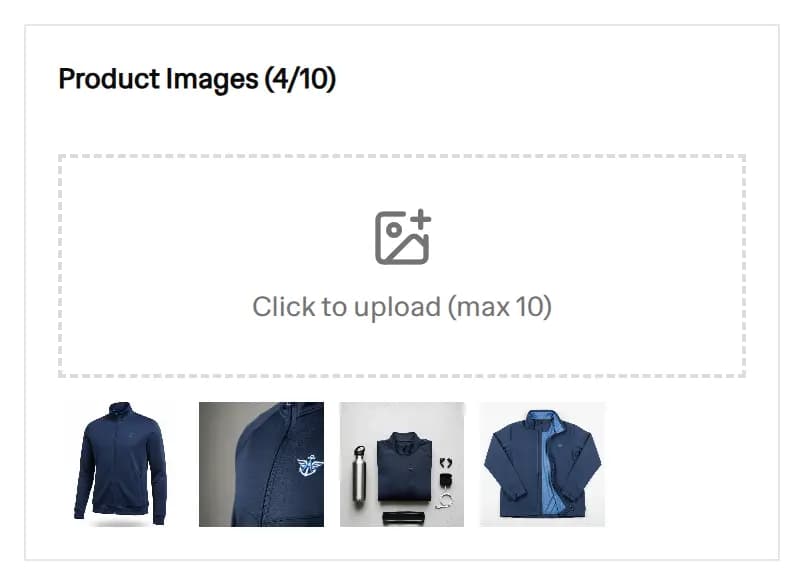 The Product Images upload box with four product photos added and the 4/10 counter
Step 2: Write the overlay text and your domain
Type your headline in Image Overlay Text. This is the big text printed on the pin, and it can be up to 100 characters. The text size adjusts by itself to fill the space each template gives it, so a short headline prints larger than a long one.
The second field takes your store domain or Pinterest handle, such as yourstore.com or @yourhandle. Eighteen of the 35 templates print it in small text so viewers know where the pin comes from. If you leave it empty, those templates show "yourstore.com", so fill it in before you download.
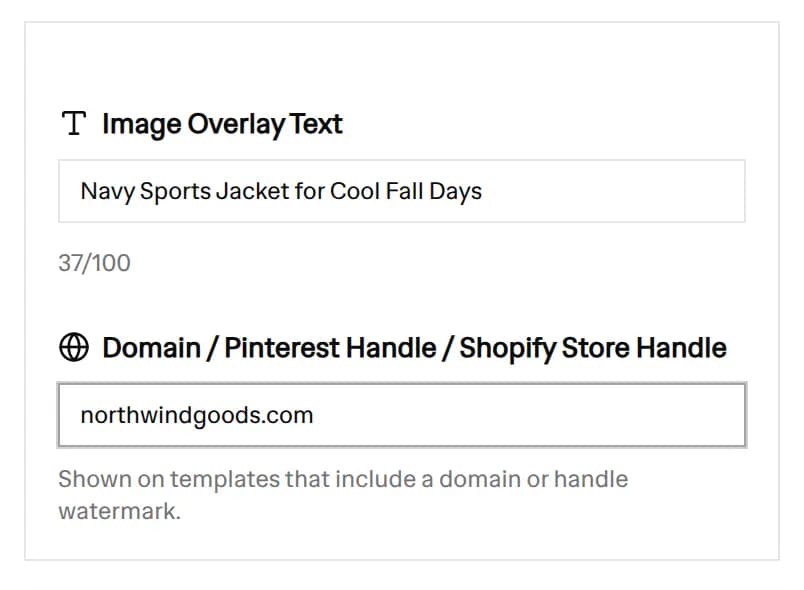 The Image Overlay Text field with a product headline and the domain field with a store address
Step 3: Choose your fonts
Open Fonts and pick one of the 6 font pairings. Each pairing sets three fonts: the main font for the headline, a secondary font for smaller text such as your domain, and an accent font used for the short captions on a few templates. To use your own mix, turn on Or always use custom fonts and choose each of the three from 78 fonts.
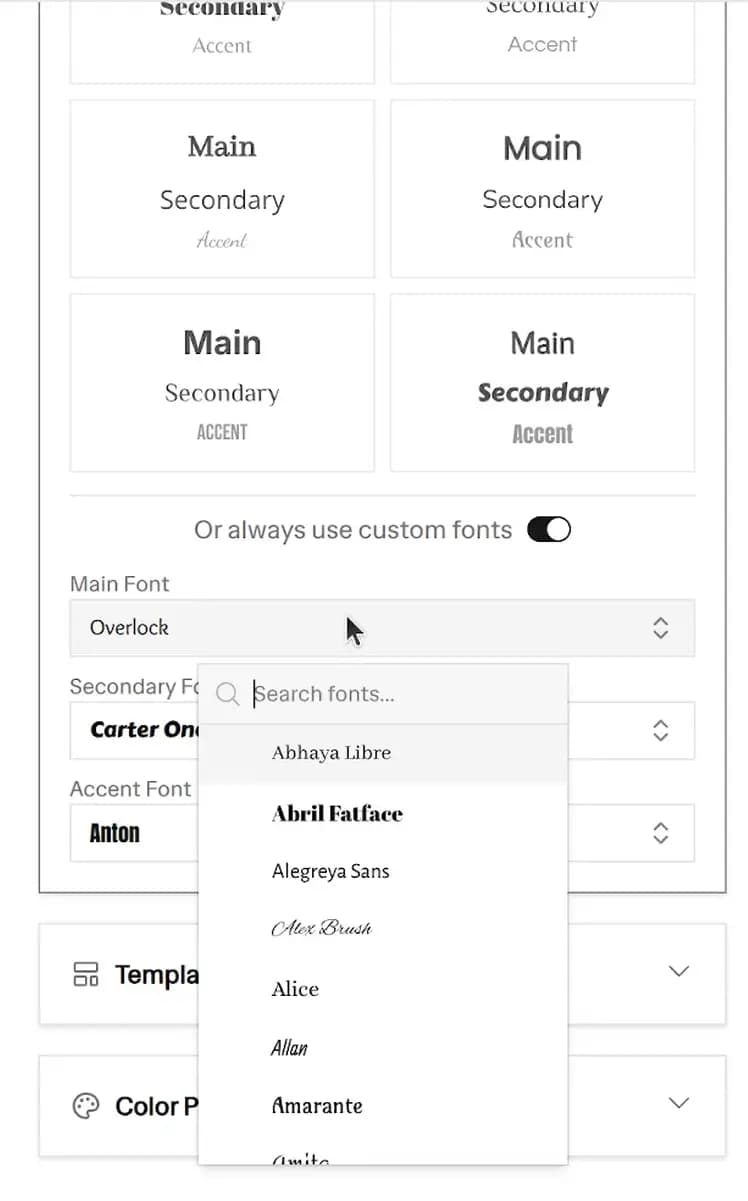 Custom Font Selection
Step 4: Pick your templates
Open Templates. All 35 are selected when the page loads. Click a template to drop it, use Clear to start from none, or Select All to get them all back. Each template has its own layout, photo frame and text position.
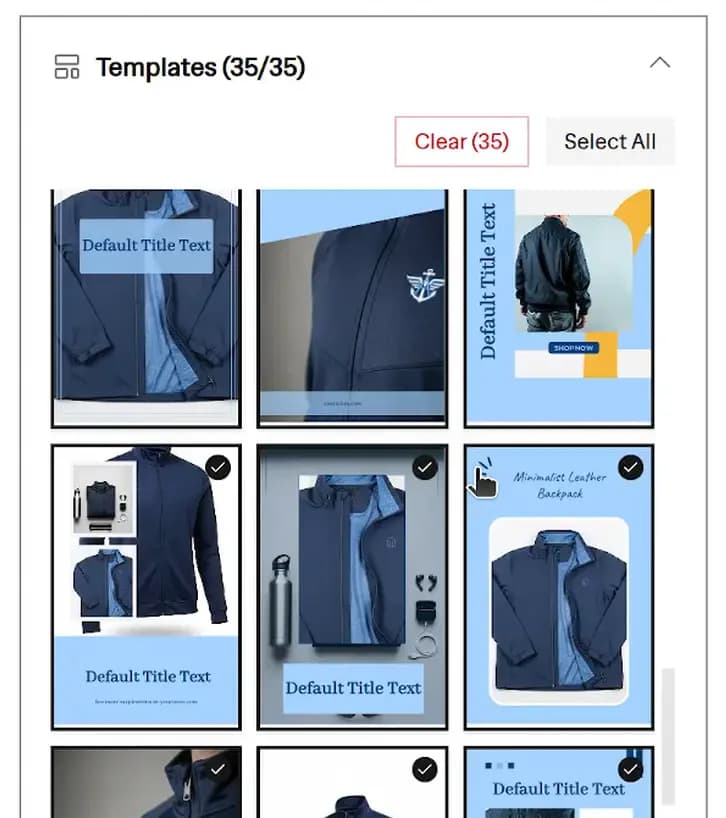 Template Selection
Step 5: Pick color palettes
Open Color Palette. No palette is selected when the page loads, so pick at least one before the previews appear (or click Fill Example to see a full demo). The 28 palettes sit in six color groups: Yellow, Blue, Green, Purple, Red and Other. The switch next to a group name selects the whole group.
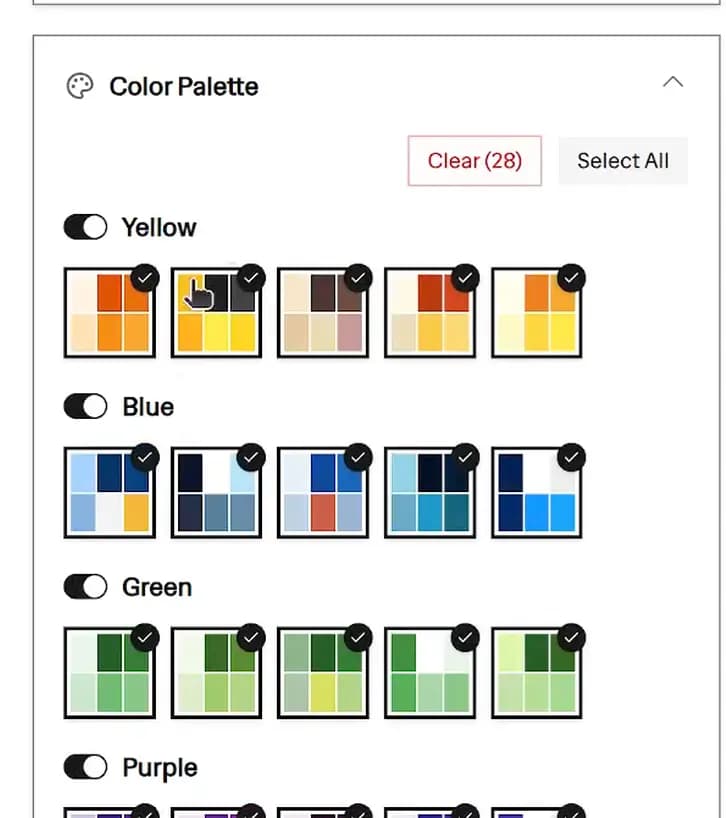 Color Palette Selection
Each palette holds six colors: two backgrounds, two text colors and two accents. Each template decides which of the six goes where, so the same palette looks different across templates. The swatch shows them in this order:
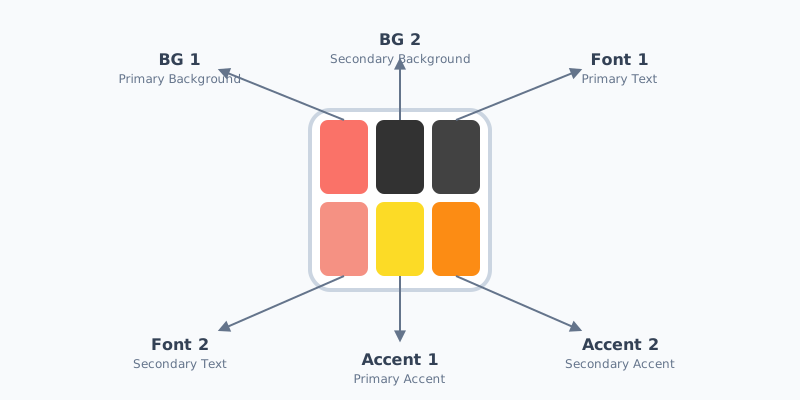 Color Palette Anatomy
- BG 1: primary background
- BG 2: secondary background
- Font 1: primary text
- Font 2: secondary text
- Accent 1: primary accent
- Accent 2: secondary accent
The palettes are fixed sets. There is no color picker for your own brand hex codes, so choose the palette closest to your brand colors.
Step 6: Preview, shuffle and download the ZIP
The preview shows 8 pins at a time. Click Shuffle to see other template and palette pairs. The small swatches beside each pin switch that pin to another of your selected palettes, and clicking a pin opens a larger view.
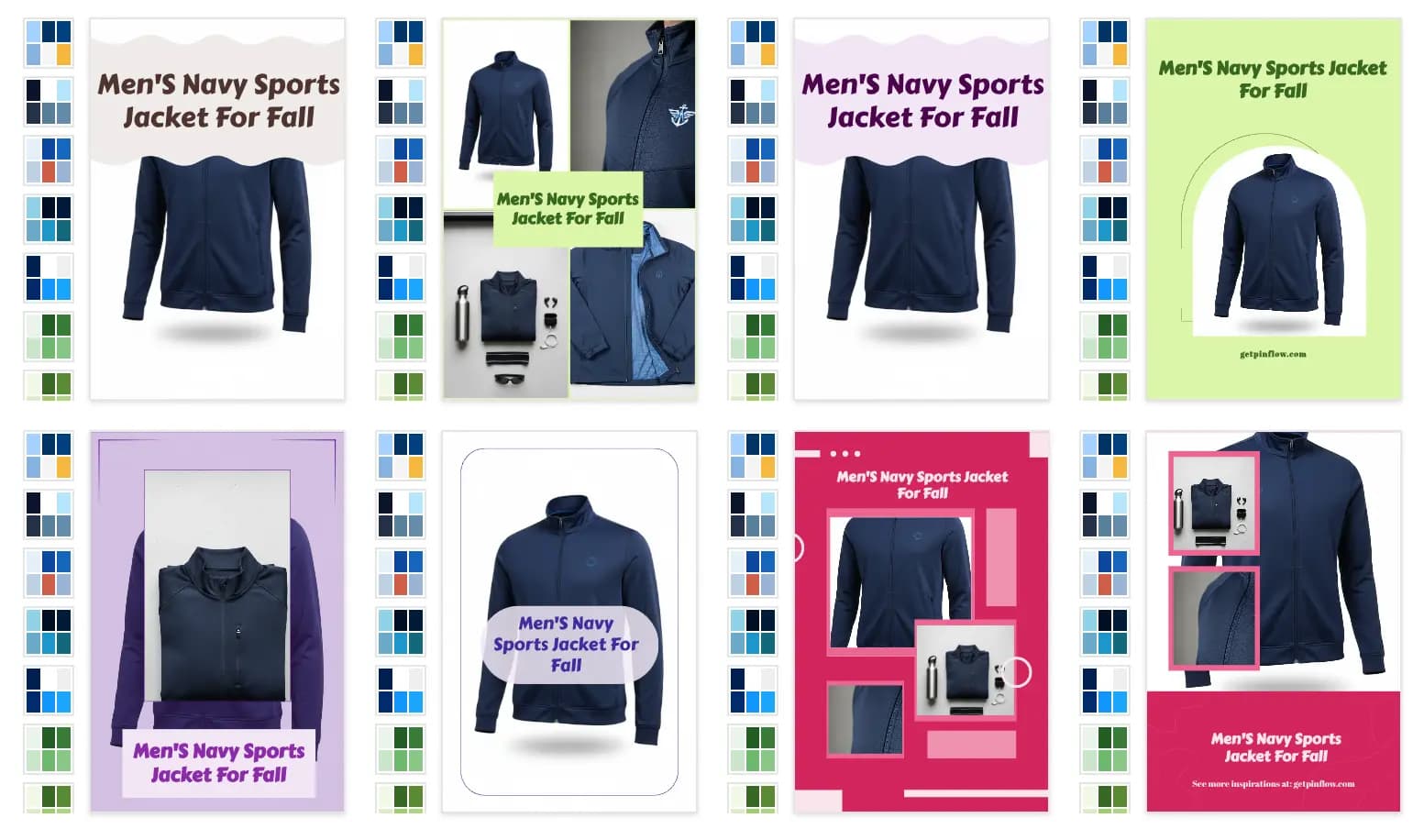 Diversified Generated Pins
When you are ready, click Download All as ZIP. The number on the button is your template count times your palette count, and the ZIP holds one PNG file for each of those pins. A progress bar shows the pins as they are drawn, so keep the tab open until the ZIP downloads. The files are named by template and palette, for example pin-template12-palette5.png, so you can find the same design again later.
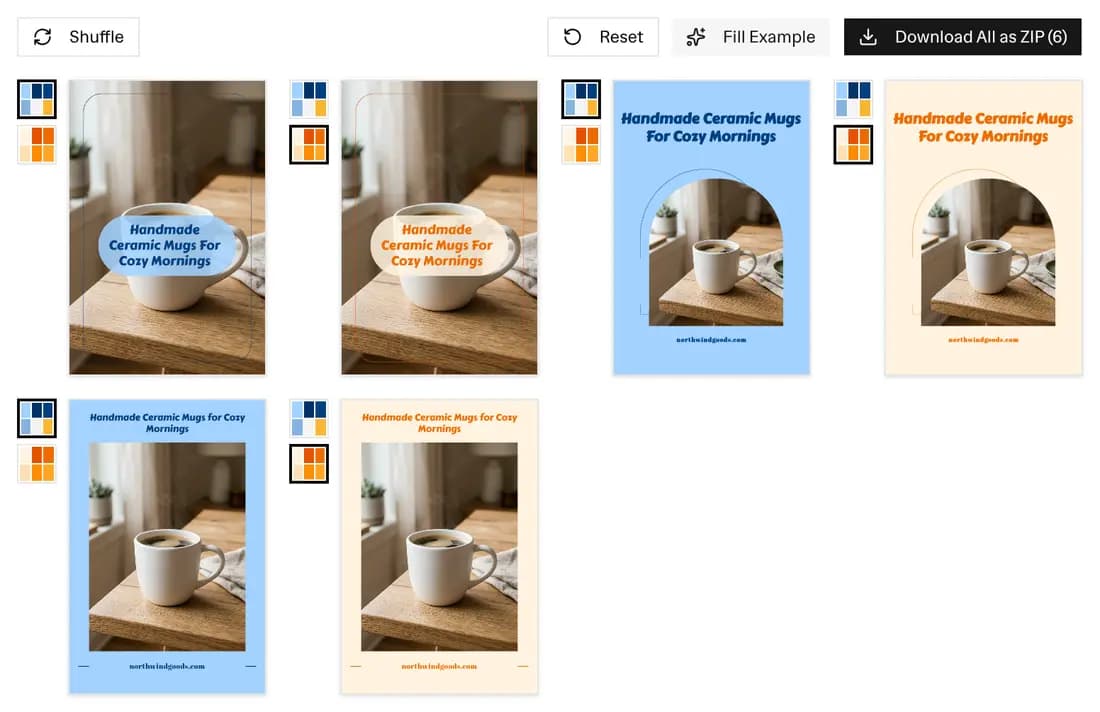 The preview panel with the Download All as ZIP (6) button above six pins: three templates in two palettes
To download a single pin, select one template and one palette. The ZIP then holds just that pin.
Standard Pinterest pin size: 1000 x 1500 px (2:3)
Pinterest's own product specs give the standard image pin size: "We recommend using a 2:3 aspect ratio, or 1000 x 1500 pixels." An aspect ratio is the shape of the image, here 2 units wide for every 3 units tall. Pinterest's creative best practices say most people use Pinterest on mobile devices, so aim for a vertical 2:3 aspect ratio.
Every pin this generator exports matches that spec:
| Pinterest standard pin spec | What the generator exports | |
|---|---|---|
| Aspect ratio | 2:3 recommended | 2:3 |
| Pixel size | 1000 x 1500 px | 1000 x 1500 px |
| File type | PNG or JPEG | PNG |
| Max file size | 20 MB on desktop, 32 MB in the app | Well under the limit |
Pinterest also warns that "Pins with an aspect ratio greater than 2:3 might get cut off in people's feeds." Keeping to 2:3 avoids that.
Upload the downloaded PNGs to Pinterest as they are. If you also want your raw product photos at the standard size, the Free Image Resizer crops them to 1000 x 1500 px.
A free Pinterest graphic maker for product photos
A canvas editor starts you from a blank page, one design at a time. This tool lays one photo and one headline into every template and palette you selected at once, which suits a store owner who wants many pin designs for the same product.
What is free:
- No signup. Open the page and start.
- No watermark. Nothing from this site is printed on your pins. Three templates carry a short fixed caption (such as "Shop Now"), so untick them if you do not want it.
- No download limit. Download as many ZIPs as you like.
- No uploads. Your photos stay in your browser. The pins are drawn and zipped on your own device, so your images are never sent to a server.
What it does not do: you cannot drag elements around, resize the text by hand or start from a blank layout. If you need a one-off custom design, a canvas editor is the better fit. If you need a batch of on-brand pins from product photos, this generator is quicker.
How many pins can you make from one product photo?
The number of pins in a download is simply templates times palettes:
| Templates selected | Palettes selected | Pins in the ZIP |
|---|---|---|
| 1 | 1 | 1 |
| 1 | 28 | 28 |
| 35 | 1 | 35 |
| 35 | 28 | 980 |
So one headline gives you up to 980 different pins in a single download. The 12 collage templates need two to four photos, so with a single photo, untick them and you get up to 644 (23 templates x 28 palettes). Change the headline or the font pairing and download again for a fresh set built on the same photo. A 980-pin download takes a while because each pin is drawn one after another in your browser, so try a smaller selection first.
You will rarely want all 980. A better use is to pick the 5 to 10 templates that suit your product, choose two or three palettes close to your brand colors, and download 10 to 30 pins to post over the coming weeks.
Pinterest pin design tips
These tips come from Pinterest's creative best practices and match what the templates already do:
- Put the key message at the top. Pinterest suggests "stacking text overlay with key messaging at the top and extra details at the bottom." Keep your headline short and lead with the product or the benefit.
- Show your brand. Pinterest says your logo or brand name should be clearly visible, but should not take over the pin. The domain field puts your store name on 18 templates in small text.
- Make the product the star. Pinterest suggests showing people using your products in realistic settings.
Pin title, description and alt text
The graphic is only part of a pin. When you upload each PNG to Pinterest, you also fill in:
- Title: up to 100 characters, per Pinterest's product specs. Depending on the device, only the first 40 characters may show in feeds, so put the main keyword first. The Pinterest Title Generator drafts keyword-rich titles and descriptions.
- Description: up to 800 characters. Descriptions do not show in the home feed, but Pinterest uses them to decide who sees the pin. Add a few relevant tags with the Pinterest Hashtag Generator.
- Alt text: a short description of the image for people who use screen readers. Describe the product in plain words.
- Board: save the pin to a board with a clear, searchable name. The Pinterest Board Name Generator suggests names.
Posting many pins without looking like spam
Pinterest's Community Guidelines list repetitive content made to earn money as spam. A batch of near-identical pins for one product page, posted on the same day, is the kind of repetition to avoid.
- Spread them out. Post a few pins for each product per week rather than the whole ZIP at once.
- Vary the template, not just the color. Two pins with the same layout in different palettes look almost the same. Mix layouts for pins that point to the same product page.
The full PinFlow app handles this for Shopify stores. It makes pins from your products, varies the designs and schedules them over time.
Other sizes from the same templates
The same design engine makes graphics for other formats:
- Instagram Post Generator: the same kind of templates at a 4:5 portrait shape, 1080 x 1350 px.
- Pinterest Infographic Generator: numbered list, step and checklist pins at the same 1000 x 1500 px size.
Frequently asked questions
Is this Pinterest pin generator free?
Yes. It is free with no signup, no watermark and no download limit. You can make and download as many pins as you need.
What is the standard Pinterest pin size?
Pinterest recommends a 2:3 aspect ratio, which is 1000 x 1500 pixels. Pinterest says pins with an aspect ratio greater than 2:3 might get cut off in feeds. Every pin this generator exports is exactly 1000 x 1500 px.
What file format are the downloaded pins?
PNG. Each pin is a 1000 x 1500 px PNG file, and all of them come in one ZIP file. Pinterest accepts PNG and JPEG for standard pins.
How many pins can I make from one product photo?
Up to 980 per download (35 templates x 28 palettes). With a single photo, untick the 12 collage templates and you get up to 644. Change the headline or fonts and download again for more.
Why do some pins show photos I did not upload?
Twelve templates are collages with two to four photo frames. They fill the extra frames with the photos that come after the pin's main photo in your upload order. If you uploaded fewer photos than a collage has frames, the empty frames show sample photos. Upload at least four photos, or untick the collage templates before you download.
Can I use my brand colors and fonts?
You can pick any of 6 font pairings, or choose your own main, secondary and accent fonts from 78 fonts. For color, choose from 28 built-in palettes. There is no picker for custom hex codes.
Can I download just one pin?
Yes. Select one template and one palette, then click Download All as ZIP. The ZIP holds that single pin.
Are my product photos uploaded anywhere?
No. The pins are drawn and zipped in your browser, so your photos never leave your device.
Does the generator use AI to make the pins?
No. It places your own photo and headline into hand-built templates. Nothing is generated by AI, so the pins show your real product.
More FREE Pinterest Marketing tools
Generate pins, titles, boards, and hashtags that drive Pinterest traffic.
Pinterest Pin Title Generator
Generate 10 Pinterest pin titles, 5 SEO descriptions, and 10 keyword ideas from your Shopify product. 100% free. Boost your Pinterest traffic today.
Pinterest Board Name Generator
Generate 10 Pinterest board names and 5 SEO-optimised board descriptions for your Shopify store. 100% free. Organise your Pinterest strategy today.
Pinterest Hashtag Generator
Generate relevant Pinterest hashtags for your Shopify products. Customise tone, language, and count. 100% free.
Free Pinterest Infographic Pin Generator
Create stunning infographic Pinterest pins: numbered lists, step-by-step guides, and tip sheets. Pick from 3 templates, 28 color palettes, custom fonts, and download 1000×1500px pins as ZIP. Free, no signup.