
Shopify Horizon Theme: Product Hotspot Not Clickable
The product card in Horizon's hotspot section closes the moment you move onto it, so the link never gets clicked. The asymmetric pointerleave check behind it, and a snippet that fixes it without editing theme files. Tested on Horizon 4.1.1.
By AjayCodeWiz · July 20, 2026 · 8 min read
The problem
A merchant posted this on the Shopify Community. They run the Shopify Horizon theme, they added the hotspot section to their homepage, and the product cards will not open.
The dot works. You hover it and the little product card appears exactly like it should.
Then you move your mouse toward the card to click the product, and the card vanishes before you get there. Your click lands on the background image instead of the product link.
They called the section "Spotlight". The theme calls it "Product hotspots". Same thing, and the same bug.
This is not an app conflict, not a z-index overlay, and not anything you did to your store. It is a bug in the theme's own JavaScript, and it affects the whole Horizon family. I reproduced it on a clean Horizon 4.1.1 install with no apps and no customisation at all.
Here is what actually goes wrong, and the fix that does not involve editing theme files.
What the Shopify Horizon theme is
Horizon is Shopify's flagship free theme, introduced in 2025 as the successor generation to Dawn. It is the default theme on new stores and it is free.
The important difference for this problem is architectural. Dawn is built from Liquid sections with jQuery-free vanilla JS bolted on. Horizon is built from web components: custom HTML elements like <product-hotspot-component> that own their own behaviour in a matching JavaScript file.
That matters here because the bug lives inside one of those components, not in your theme settings. There is no toggle to fix it.
Several paid themes are built on Horizon's architecture, which is why this reaches further than one theme. The merchant who posted the thread believed they were on Horizon. Their store's source actually reported Atelier 3.4.0, a different theme built on the same foundation, shipping the same component with the same defect.
Check which theme you are actually on
Do this before anything else, because "I am on Horizon" is often wrong and the fix below is specific.
Open your storefront, view source, and search for Shopify.theme. You get something like:
Shopify.theme = {"name":"My Store","schema_name":"Horizon","schema_version":"4.1.1",...}schema_name is the real theme. schema_version is the version. Write both down.
The merchant in the thread had "schema_name":"Atelier","schema_version":"3.4.0". The thread had not spotted it, and it changes which fix path is available to you.
Why the card disappears
The hotspot is two elements. There is the trigger, the dot you hover. And there is the dialog, the product card that appears.
The theme has to keep the card open while your pointer travels from the dot to the card, and close it when you leave properly. It does that in a pointerleave handler in assets/product-hotspot.js.
Here is the logic, from Horizon's own source:
const isLeavingTrigger = e.target === trigger;
const isLeavingDialog = e.target === dialog;

const isGoingToDialog =
  e.relatedTarget === dialog ||
  (e.relatedTarget instanceof Element && e.relatedTarget.closest('dialog') === dialog);

const isGoingToTrigger = e.relatedTarget === trigger;

if ((isLeavingTrigger && !isGoingToDialog) || (isLeavingDialog && !isGoingToTrigger)) {
  this.closeDialog();
}
Look carefully at the two checks, because the whole bug is the difference between them.
When you leave the dot, the code asks whether you are heading into the card. It does that properly, with closest('dialog'), which walks up the ancestor chain. So it correctly recognises the card and anything inside the card.
When you leave the card, it only asks whether you are heading back to the dot, using strict identity. It never checks for something inside the card.
Now here is what makes that fatal. The card contains a stretched product link, positioned absolutely across the whole card so that clicking anywhere on the card opens the product. The moment your cursor crosses onto the card, the first thing it touches is that link.
So the browser fires pointerleave on the dialog with relatedTarget set to the link. The link is a child of the dialog, but the code only compares against the trigger. The comparison fails, and the theme closes the card.
The card closes because you moved onto it. That is why it feels like the product link "does not work" rather than like the card is flickering.
I measured this on a real page with a real mouse rather than trusting the reasoning. The trace is unambiguous:
LEAVE  related=a.hotspot-dialog__link  isDescendant=true
OPEN=false                             (13ms later)
Two separate hovers, same signature, thirteen and fourteen milliseconds from the boundary event to the card closing.
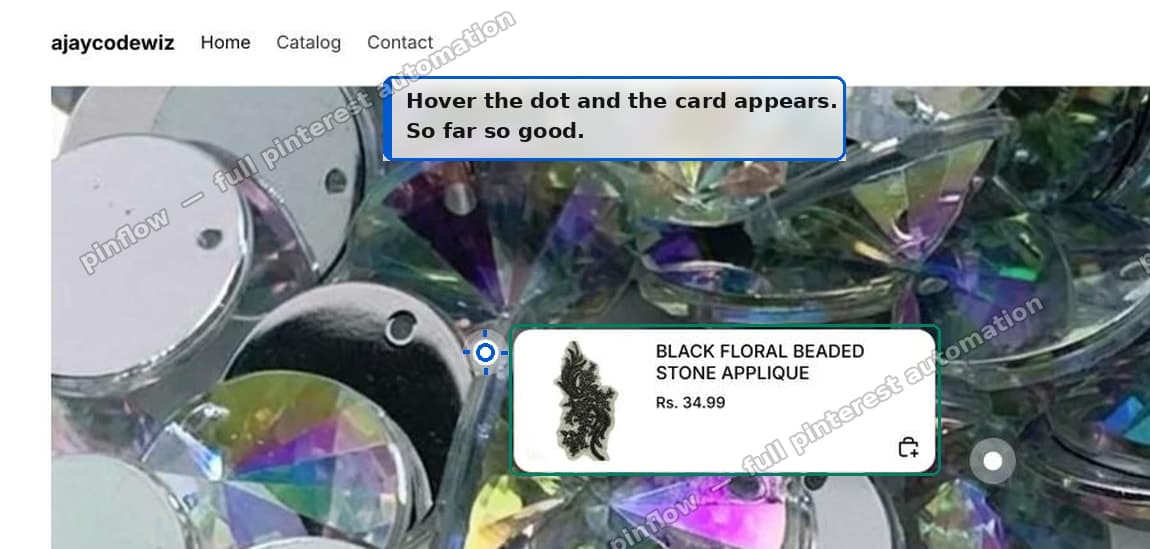 Hover the dot and the card appears
Move onto the card, and it is gone, with the cursor still sitting where the card was:
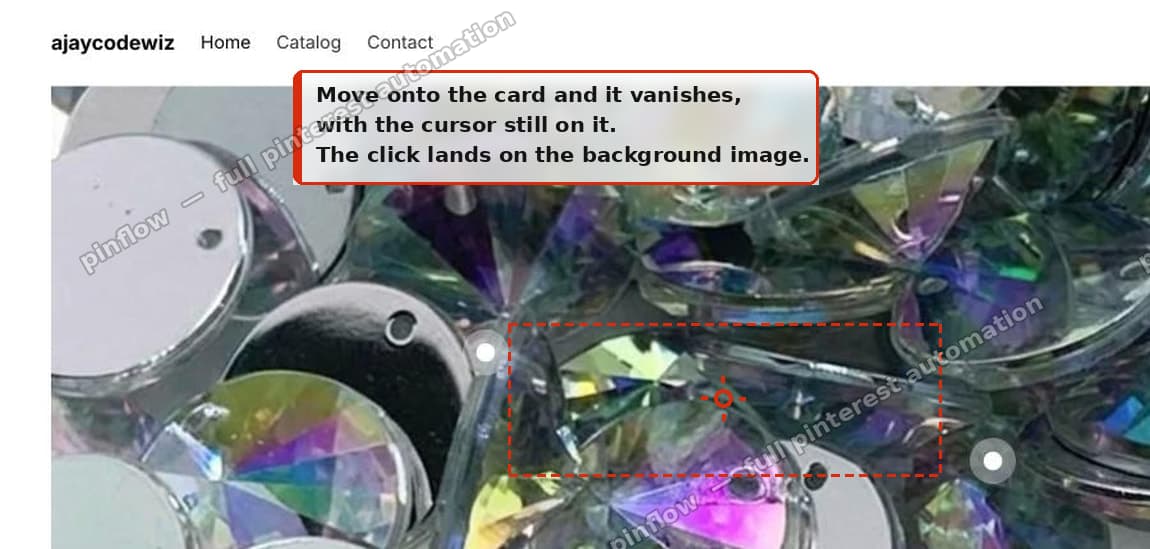 Move onto the card and it vanishes
This is desktop only
Do not waste time trying to reproduce this on your phone.
The theme attaches the hover listeners only above the 751px breakpoint. On a touch device, tapping a hotspot opens the quick add modal instead of the hover card, which is an entirely different code path. The failing code never runs.
So if a customer reports it and you cannot repeat it on mobile, that is expected, not evidence that it is fixed.
The fix, without editing theme files
Add a Custom Liquid section to the same template as your hotspots section and paste this in.
<script>
  document.addEventListener('pointerleave', function (event) {
    var dialog = event.target;
    if (!(dialog instanceof HTMLDialogElement)) return;
    if (!dialog.classList.contains('hotspot-dialog')) return;
    // moving onto the card's own child is not "leaving the card"
    if (event.relatedTarget instanceof Node && dialog.contains(event.relatedTarget)) {
      event.stopImmediatePropagation();
    }
  }, true);
</script>
pointerleave does not bubble, but it does capture. Running the listener in the capture phase on document means it runs before the theme's own handler and can stop that handler from ever seeing the event.
It only ever blocks the one wrong event, the case where you moved onto a child of the card. Leaving the card outward still closes it normally, so you are not trading one bug for a card that sticks open forever.
Nothing in the theme is overridden or edited, so a theme update will not wipe it.
Where to put it
In the theme editor, under Template, click Add section.
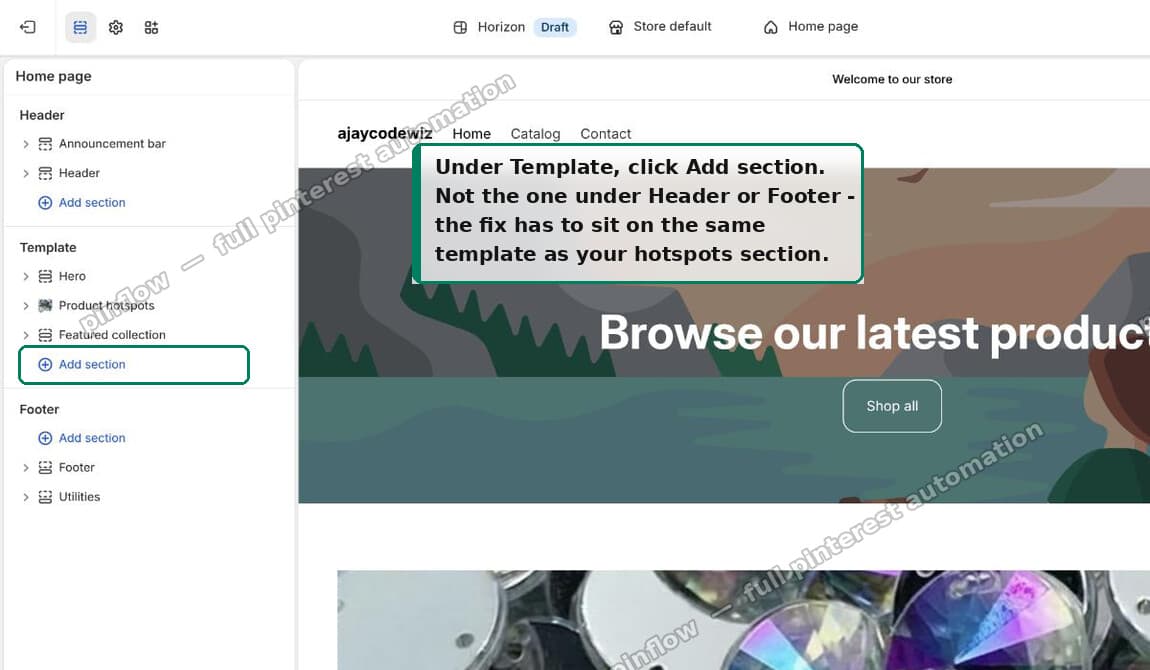 Under Template, click Add section
Type "custom" and choose Custom Liquid. There is a "Custom section" directly below it in the list, which is a different thing.
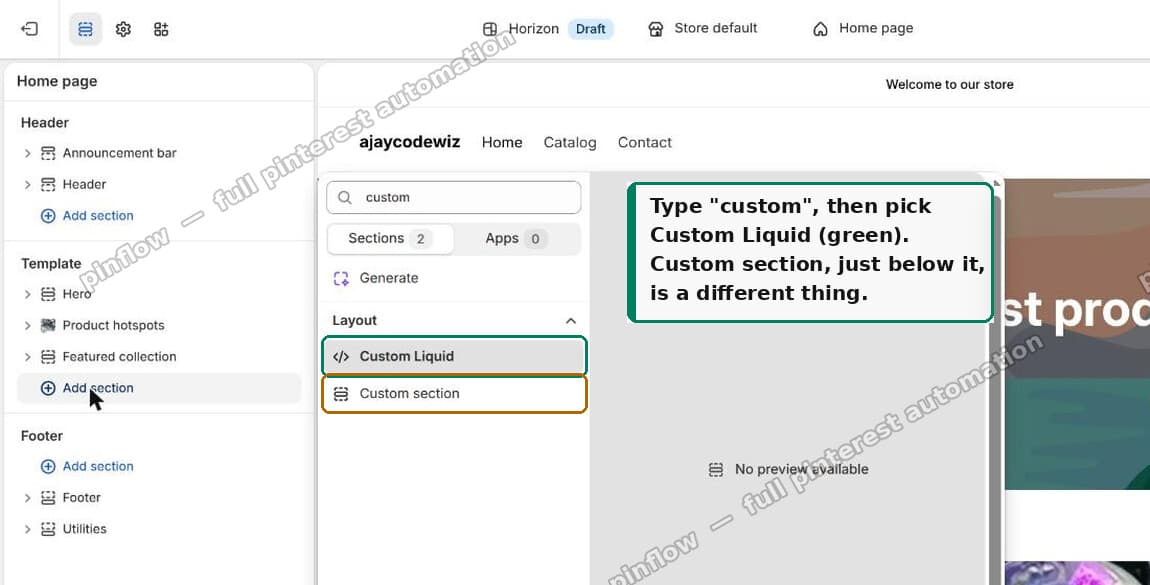 Search custom and pick Custom Liquid
Paste the snippet into the Liquid code box and hit Save.
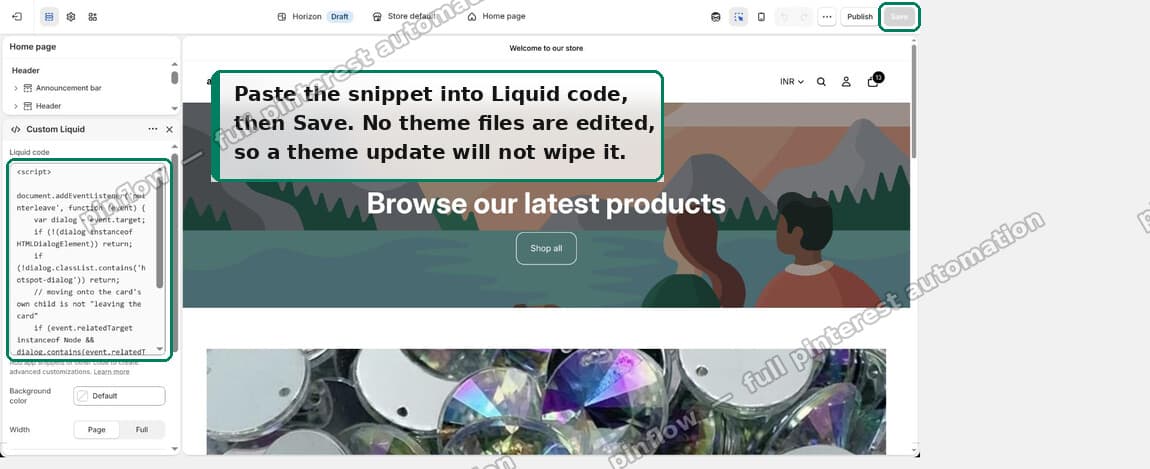 Paste the snippet into Liquid code, then Save
Same movement afterwards, and the card holds still long enough to click:
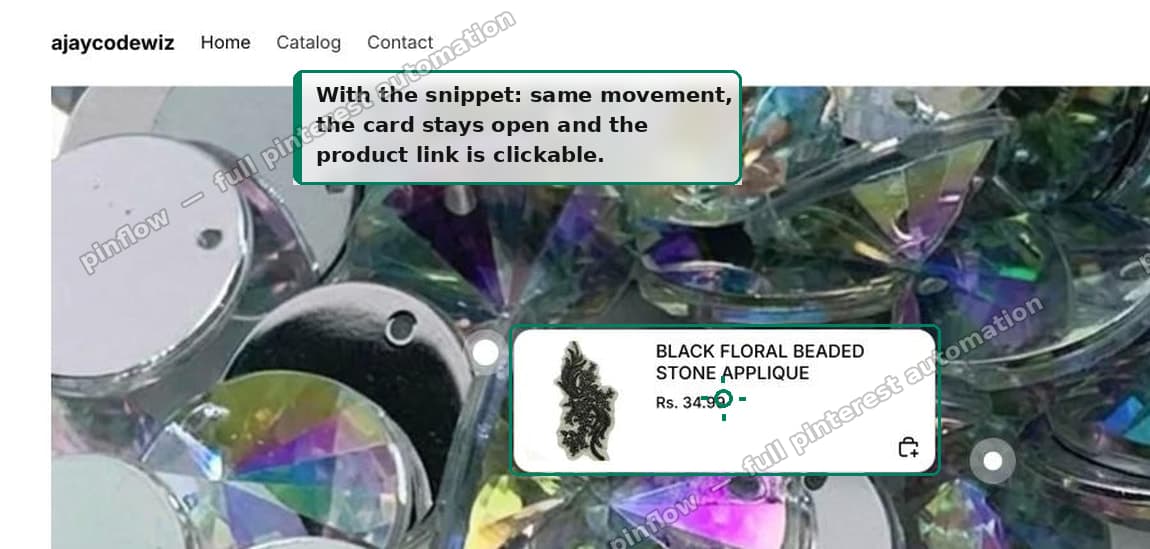 With the snippet the card stays open and the link is clickable
The alternative: update the theme
Another responder in the thread said Shopify addressed this in Horizon 4.1.3, so updating may resolve it without any snippet at all.
I could not verify that version claim independently. There is no public Horizon repository to check a changelog against, and my test store is on 4.1.1. What I did verify first hand is that 4.1.1 has the bug and that the snippet fixes it. Treat 4.1.3 as a strong lead rather than a promise, and test it on an unpublished copy first.
Two caveats before you reach for the update button.
Updating Horizon across that range also migrates colour schemes to colour palettes, which can disturb styling you have already tuned. Always duplicate your live theme and update the copy.
And if you are on a theme built on Horizon rather than Horizon itself, like Atelier, you are waiting on that theme's developer to pick up the upstream fix. The snippet works today regardless.
The one line version, if you do edit theme code
If you would rather patch the theme directly, the fix in assets/product-hotspot.js is to make the trigger check mirror the dialog check that already exists:
const isGoingToTrigger =
  e.relatedTarget === trigger ||
  (e.relatedTarget instanceof Node && dialog.contains(e.relatedTarget));
That is the whole defect. One check walks the ancestor chain, the other does not.
I would still use the snippet. Edited theme JavaScript is overwritten the next time you update the theme, and this is exactly the kind of one line change that is easy to forget to reapply.
If it still does not work
Check the section is on the right template. The Custom Liquid section has to be on the same template as your hotspots. If your hotspots are on the homepage, the snippet goes on the homepage template.
Check you are on desktop. Below 751px the hover path does not run at all, so there is nothing for the snippet to fix.
Check the class name. The snippet targets hotspot-dialog. If a theme built on Horizon renamed that class, inspect the card in dev tools and swap the name in.
Check it is really this bug. Open the card, then move the pointer onto it slowly. If the card survives the journey and the click still does nothing, you have a different problem, most likely a genuine overlay. Right click the card: if you get the browser's link menu with a real product URL, the link is fine and reachable.
Spotlight, hotspots, shop the look
These names all describe the same pattern and merchants use them interchangeably, which makes searching for help harder than it should be.
Product hotspots is Horizon's own name for the section, and the one you will find in the Add section list.
Spotlight is what several themes call their version, and what the merchant in this thread called it.
Shop the look is the general ecommerce term for the pattern: one lifestyle photo, several products marked on it, each opening a card.
If you are searching for a fix, try all three. The underlying section is the same.
When was Horizon released
Horizon arrived in 2025 and became the default theme for new Shopify stores, replacing Dawn in that role. Dawn is still supported and still free.
The practical difference for a store owner is that Horizon leans on blocks and web components, so more of the behaviour lives in JavaScript files rather than in Liquid you can read at a glance. That is faster and more flexible, and it also means bugs like this one are harder to diagnose from the theme editor, because there is no setting involved anywhere.
Spending too long on manual Shopify busywork?
PinFlow turns your Shopify catalog into Pinterest pins and posts them on a schedule, automatically. Same idea as the rule above, let the system handle the repetitive part.
Get PinFlow on the Shopify App StoreMore Shopify fixes
More community-sourced Shopify guides, tested on a live store.
Themes & Storefront
Shopify Wishlist App: Add a Free Wishlist to Your Store
A free Shopify wishlist app: hearts on product cards, a Wishlist button on product pages and a wishlist page. Guest lists follow shoppers when they log in.
Themes & Storefront
Shopify Payment Icons: Fix a Footer That Shows None
The payment icons in a Shopify footer come from your payment provider, not from the theme. When the provider sends none, the row stays empty. Here is how to add the icons yourself on Refresh, Dawn and similar themes.
Themes & Storefront
Shopify Order Notes: Turn On the Cart Note Box
Let customers leave order notes and special instructions on your Shopify cart page. Turn on the built-in cart note in Theme settings, rename its label, and find each note on the order. Tested on Dawn, no code.