
Shopify Pre Order Emails: Recurring Updates With Flow
Flow has no action that emails a customer freely, but it can read a product metafield off an order line item. A six-step workflow that sends an ETA update every five days, per order.
By AjayCodeWiz · July 28, 2026 · 11 min read
The problem
A merchant on the Shopify Community sells pre-orders and wanted to keep buyers informed automatically. Their requirement was specific:
- Every open pre-order gets an update email
- The email contains the current estimated ship date, which lives on a product metafield
- It repeats roughly every five days
- It stops when the order ships or is cancelled
Three people replied. All three converged on the same conclusion: Shopify Email cannot render a product metafield, so move the whole journey to Klaviyo or Listrak.
That conclusion is half right, and it is right for the wrong reason. The wrong reason matters, because it pushes you into a migration you may not need.
I built the whole thing in Shopify Flow to find out where the real wall is.
Flow can read the metafield. That is not the blocker.
The premise the thread was built on is that the ETA is hard to get at. It is not.
Flow reads a product metafield straight off an order line item. In the Flow editor, add a variable and walk the path lineItems / product / metafield, then enter your namespace and key.
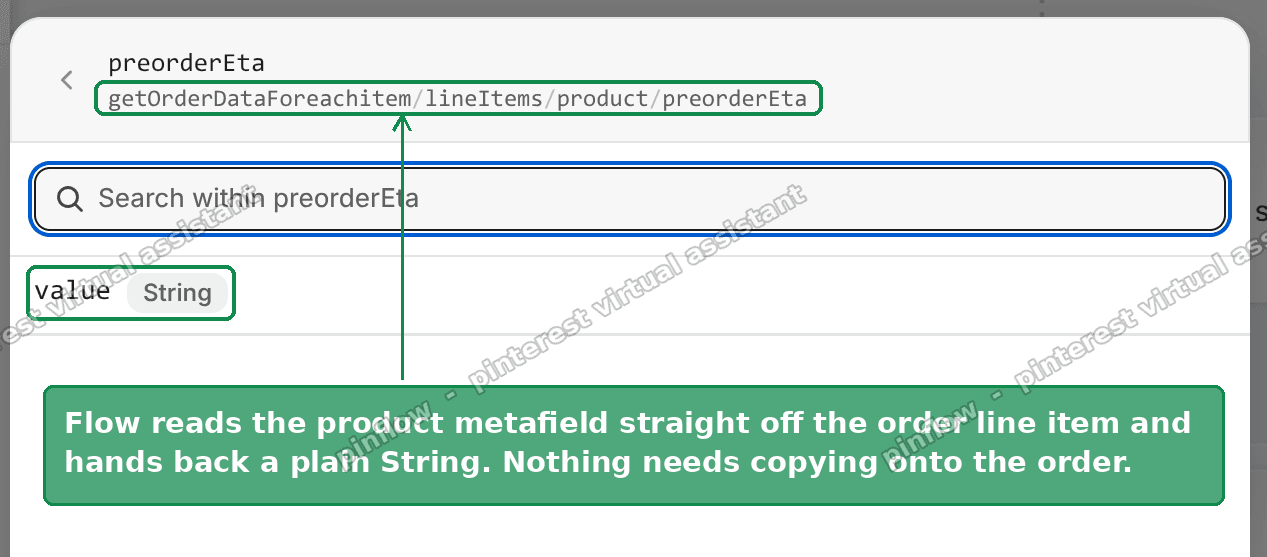 Flow resolving a product metafield off an order line item into a plain String
An unstructured entry of custom.preorder_eta yields a variable at getOrderDataForeachitem/lineItems/product/preorderEta with a value of type String.
This matters more than it looks, because it settles a debate the thread spent several replies on: whether you need to copy the ETA onto an order metafield at checkout so the email has something to read.
You do not, and you should not. Copying it at checkout takes a snapshot. Move the product's ETA from Early August to Late September and order #1041 still says Early August, until you build a second workflow to go back and re-sync every open order. Read it live off the product and there is nothing to re-sync: one edit on the product updates every future email for every buyer.
The real blocker is the send
Search Flow's action list for "email". You get exactly five results, and not one of them sends a custom email to a customer.
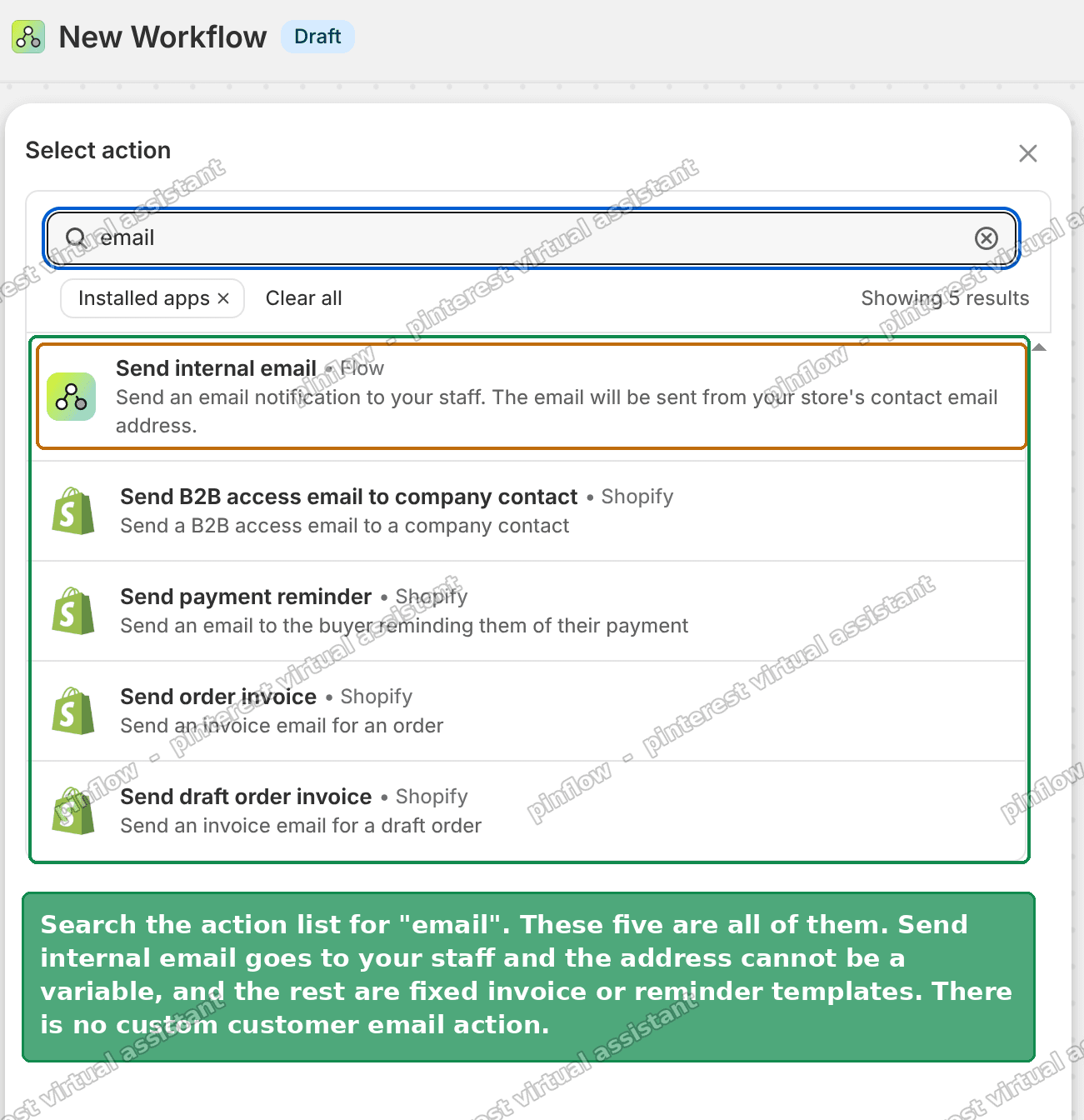 All five email actions in Shopify Flow, none of which emails a customer freely
- Send internal email goes to your staff. Shopify's own documentation states you cannot use variables to customise the email address, so you cannot point it at the buyer.
- Send B2B access email to company contact is a fixed template for a specific purpose.
- Send payment reminder is a fixed template.
- Send order invoice is a fixed template.
- Send draft order invoice is a fixed template.
So the delivery genuinely does have to leave Shopify. The thread's conclusion was correct on that point.
But "delivery leaves Shopify" is a much smaller statement than "move the journey to another platform". Flow has a Send HTTP request action. Any transactional email provider will send a message from a single POST. So Flow can keep the selection, the schedule, the state and the data, and hand off only the rendering.
The build
Six steps. Trigger, query, loop, gate, send, write back.
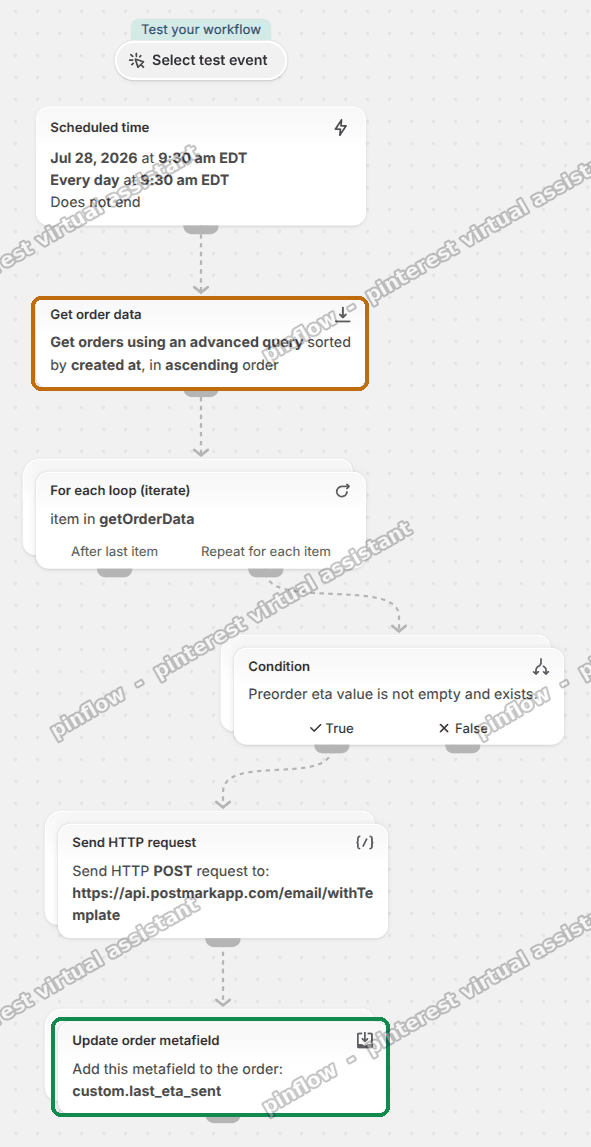 The finished workflow, ending with the step that writes the send date back to the order
1. Scheduled time, daily
Flow's Scheduled time trigger runs once per occurrence, with a minimum interval of ten minutes. Set it to daily.
Run it daily even though you want a five day cadence. The reason is in the cadence section below and it is the single most important design decision here.
2. Get order data
This is the selection step. One query picks the orders that still need chasing.
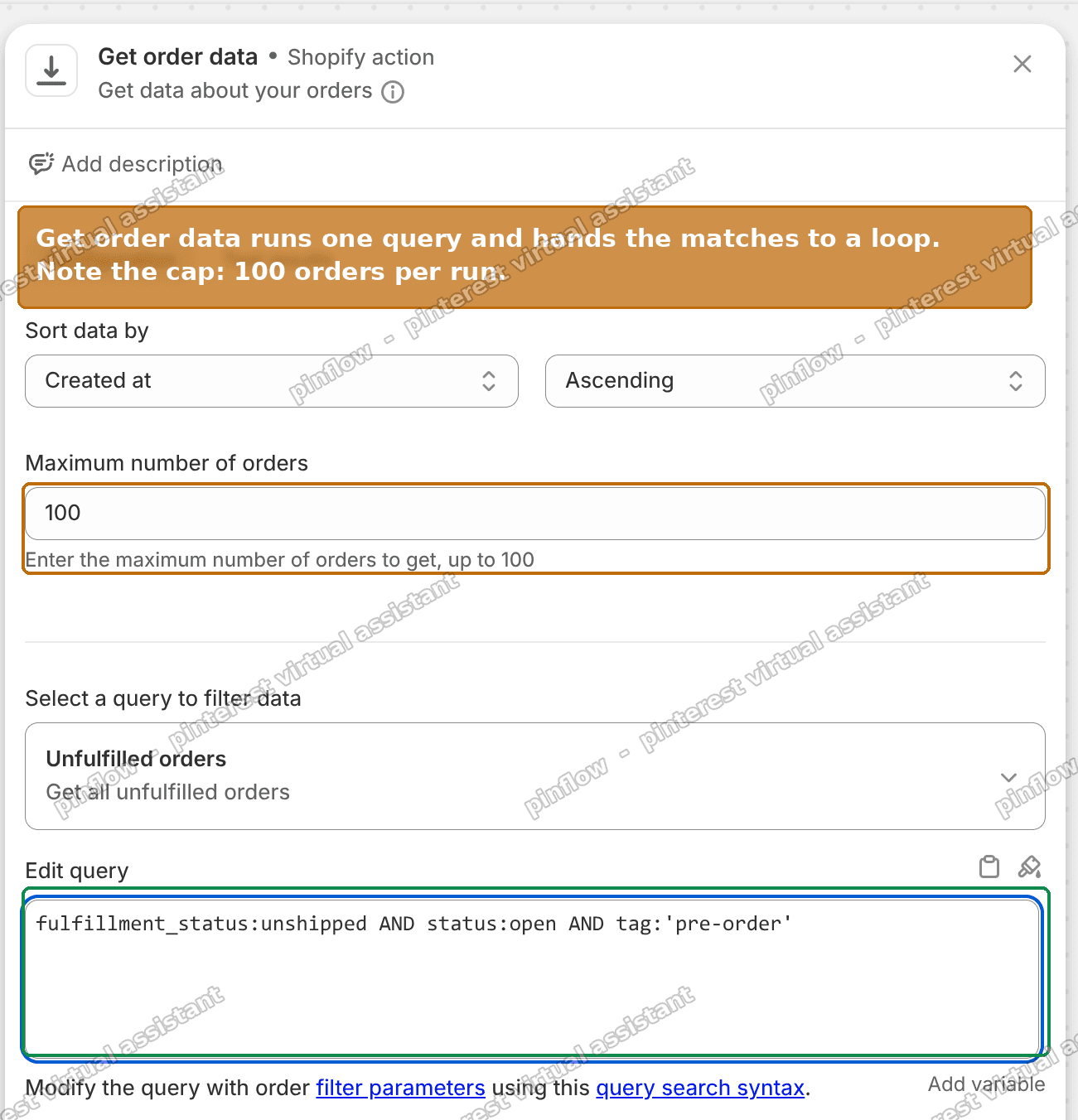 The Get order data step with the pre-order query and the 100 order cap
fulfillment_status:unshipped AND status:open AND tag:'pre-order'
  AND updated_at:<'{{ scheduledAt | date_minus: "5 days" }}'
Note the cap: Get order data returns at most 100 orders per run. The field is capped at 100 in the UI and the helper text says so. Past that, narrow the query or run the workflow more than once a day.
3. For each loop
The trigger fires once. The query returns a list. The For each loop runs the rest of the workflow once per order in that list.
4. A condition
Gate on the metafield existing, so an order containing a product with no ETA set does not send a blank email.
Preorder eta value is not empty and exists.
5. Send HTTP request
POST to your email provider's send endpoint. The body carries the customer's email, the order name, and the ETA.
One thing will bite you here. Inside the request body, the condition's lineItems_item variable does not resolve. Flow rejects it with "lineItems_item is invalid. Replace this variable." Use the documented loop form instead:
{% for li in getOrderDataForeachitem.lineItems %}{{ li.product.preorderEta.value }}{% endfor %}That validates.
6. Update order metafield, last
Write the send date back to the order. Namespace custom, key last_eta_sent, type Date and time, value {{ scheduledAt }}. Flow auto-binds the order for you inside the loop.
This step must sit after the send, not before. If it runs first and the send then fails, the order is marked as done and that buyer misses their update.
Send it transactional, not marketing
Worth being explicit about, because it is a failure mode with no alert behind it.
If you route these through a marketing stream, the send gates on marketing consent. In Flow you see it as Customer does not accept marketing for customer id=[ID], and the email is simply not sent.
A pre-order ETA update is a transactional message about an order the customer has already paid for. It is not marketing, and it should not be filtered by a marketing subscription checkbox. Use your provider's transactional stream, not its campaign or marketing stream.
Every provider separates these. On most of them it is a different API endpoint or a different message stream ID, so getting it right costs nothing at setup time and everything if you get it wrong.
The cadence has to be per order, not per schedule
This is the part that decides whether the whole thing feels right to your customers.
The obvious build is to set the schedule itself to every five days. Do not do that. It mails every customer on the same days, regardless of when they ordered. Someone who bought yesterday gets an ETA update tomorrow, then nothing for five days.
You want each order on its own five day clock, counted from its own last email.
And the gap has to live in the query, not in a condition. This is a hard limitation worth knowing before you build it the other way round.
A metafield comes back to Flow as a String, and a condition on a String only offers string operators. The full list Flow gives you is: equal to, not equal to, includes, does not include, is at least one of, is not any of, starts with, does not start with, ends with, does not end with, empty or does not exist, not empty and exists.
There is no "is before" and no "less than". You cannot compare dates in a Flow condition.
So the recency test goes into the search query, using updated_at:
updated_at:<'{{ scheduledAt | date_minus: "5 days" }}'That returns only orders nothing has touched for five days. And because step 6 writes a metafield, it touches the order and bumps updated_at. Each order therefore pauses for its own five days after its own email, and the schedule can run daily to catch whichever orders have come due.
Still write the metafield, even though the query is what does the gating. It is a readable record of when each order was last emailed, which you will want the first time a customer asks.
Stopping needs no exit logic
A nice property of doing the selection in the query: you do not have to build an unsubscribe or a stop condition.
fulfillment_status:unshipped AND status:open stops matching the moment an order ships or is cancelled. The order drops out of the result set on the next run and the emails stop on their own.
That is one fewer piece of state to maintain, and one fewer way for a customer to keep getting emails about an order that already arrived.
What this costs versus a platform migration
The thread's recommendation was to move to a marketing automation platform. Worth comparing what each option actually asks of you.
Flow plus an HTTP call. Flow is free and already installed. You need a transactional email provider, which for this volume is usually free or a few dollars a month. You verify a sending domain once. Total setup is an afternoon.
A marketing automation platform. You rebuild the customer data sync, learn a second templating system, pay a monthly fee that scales with contact count, and now maintain order state in two places. You also inherit the marketing consent problem above unless you are careful to use their transactional path.
The migration is the right answer if you also want campaigns, segmentation and flows for everything else. It is a large answer to the narrow question of "how do I send a templated email from an automation".
On the sending domain
Whichever provider you pick, you verify your domain with them and add two DNS records. Using Postmark as the example, since that is what I set up:
- DKIM as a
TXTrecord - Return-Path as a
CNAME, hostnamepm_bounces, valuepm.mtasv.net
The from address stays yours, so customers see your domain rather than the provider's.
One thing to plan for: Shopify keeps sending its own order and shipping confirmations through Shopify. So you end up with two sending paths on the same domain. Most people point the new one at a subdomain, so this mail builds its own reputation without affecting the main domain.
Common questions
Can I do this without a metafield at all?
Yes, if the ETA is the same for everything. Put the date in the email body as literal text and edit the workflow when it changes. The metafield earns its place when different products have different dates.
What if an order contains several pre-order products with different ETAs?
The Liquid loop above prints all of them. If you want one line per item, put the surrounding markup inside the loop rather than around it.
Does the 100 order cap mean this breaks at scale?
It means you need more than one run per day past 100 open pre-orders. Splitting the query by tag or by product, and scheduling each variant at a different hour, is the usual answer.
Can Flow send the email itself if I only need internal notifications?
Yes. Send internal email is fine when the recipient is your team. It is only customer-facing sends that need the HTTP hand-off.
Why not use the Order paid trigger and skip the schedule?
Because you want a repeating email, not a one-off. A trigger-based workflow fires once per event. The schedule plus query pattern is what gives you recurrence.
If it did not work
Flow rejects a variable in the request body. The lineItems_item form does not resolve inside an action. Use the {% for li in ... %} loop shown above.
{{scheduledAt}} autocompletes to something malformed. The editor closes Liquid braces for you. Type {{scheduledAt and let it finish, rather than typing both closing braces yourself.
Emails go to some customers and not others. You are on a marketing stream and non-subscribers are being dropped. Switch to the transactional stream.
Every order gets an email every day. The updated_at clause is missing, or step 6 is not running, so nothing is touching the order to reset its clock.
Nothing sends at all. Check the workflow is turned on, then check the run history. Flow logs each run and shows which step failed and why.
Tested on
Built end to end in Shopify Flow on a dev store: confirmed the product metafield resolves off the order line item as a String, confirmed the search query and the 100 order cap behave as described, confirmed the request body validates once the Liquid loop replaces lineItems_item, and confirmed the condition operator list for a String metafield contains no date comparison. The workflow was left as a draft and not wired to a live email provider, so the send itself was validated at the request level rather than by receiving mail.
Automating one repetitive job at a time?
PinFlow is the same idea applied to marketing: your Shopify catalog becomes Pinterest pins, posted on a schedule, with nothing to remember.
Get PinFlow on the Shopify App StoreMore Shopify fixes
More community-sourced Shopify guides, tested on a live store.
Notifications & Emails
How to Edit the Shopify Gift Card Email
Shopify sends the same stock gift card picture to every recipient, whatever product they bought. Here is the one edit that makes each gift card email show its own product image, tested end to end.
Notifications & Emails
Shopify Inbox Notifications Not Working? How to Fix It
Who gets a Shopify Inbox alert, why there is no admin recipient list, how chat routing really works through assignment, and how to fix desktop push in Chrome on Windows. Tested, with screenshots.
Notifications & Emails
Shopify Order Confirmation Email: Logo by Location
A merchant wanted a different brand logo on the order email for each POS location. The location logic came back blank in the Order confirmation email. Here is why, and the template that actually works, with screenshots.