
Is t.shopifyemail.com or shopifyemail.com Legit or a Scam?
Yes, t.shopifyemail.com and g.shopifyemail.com belong to Shopify, and the store+ number identifies the shop. Three checks verify who sent the email.
By AjayCodeWiz · July 22, 2026 · 10 min read
The problem
You bought something. The confirmation landed in your inbox. Then you looked at the sender and it said something like this:
No shop name. No brand. A random-looking number bolted onto the word "store". It looks exactly like the kind of address a scammer would generate.
A buyer posted almost that exact question on the Shopify Community in July 2026, and the same question shows up there several times a month in English, French, German ("ist t.shopifyemail.com seriös?") and Italian. So it is worth answering properly rather than with "yes it is fine".
Is t.shopifyemail.com or g.shopifyemail.com a scam?
The addresses themselves are not a scam: both belong to Shopify. When a store has not set up email on its own domain, Shopify sends that store's emails from shopifyemail.com instead. Its Help Center says the sender email is "rewritten to [email protected]" and that "the string of numbers (123) ... is unique to your store". The t. and g. versions are subdomains of that same Shopify domain.
The word store at the start is the same for every shop. Searches for [email protected] or [email protected] are usually about an address like [email protected], and the digits after the plus sign are what tell one shop from another.
Shopify's Help Center and developer docs do not say what t. and g. are each used for. The public DNS records (the internet's address book, which anyone can query) showed this on 14 October 2026:
t.shopifyemail.comandg.shopifyemail.comare subdomains ofshopifyemail.com, which the domain registry lists as registered to Shopify Inc., and opening either one in a browser redirects to shopify.com.- Both have a
mailer.subdomain wired to the same SendGrid mail server (SendGrid is an email delivery service) asmailer.shopifyemail.com, the "mailed-by" name in the Gmail screenshot further down. shopifyemail.compublishes a DMARC policy ofp=reject, and neither subdomain has a policy of its own, so the same rule covers them. DMARC is a public request to receiving mail servers: here it asks them to refuse mail that shows these addresses in the From line but cannot prove Shopify allowed it to be sent.
Shopify also runs a marketing email app called Shopify Email. Its Help Center says that if a store has not authenticated its own domain, "Shopify sends your emails from a fully authenticated shopifyemail.com subdomain". So a shop's newsletter can also come from a shopifyemail.com address, not only its order emails.
So the address is not the scam. The two open questions are whether the email really came through Shopify, and whether the shop behind it will deliver. A fake email can type any address into the From line, and a real Shopify email can come from a shop that never ships. The three checks below answer both: the first two prove the email came from the shop you paid, and the third shows who runs that shop.
What that address actually is
Every Shopify store has a sender email set under Settings, then Notifications. The merchant types in the address they want customer emails to come from.
The catch is that Gmail, Yahoo, Outlook and other free providers publish DMARC policies that forbid other services from sending as them. Shopify cannot send as [email protected] without those emails landing in spam. So it does not try.
Instead it substitutes its own address and puts the merchant's real one in the reply-to field. Shopify says so directly in the admin:
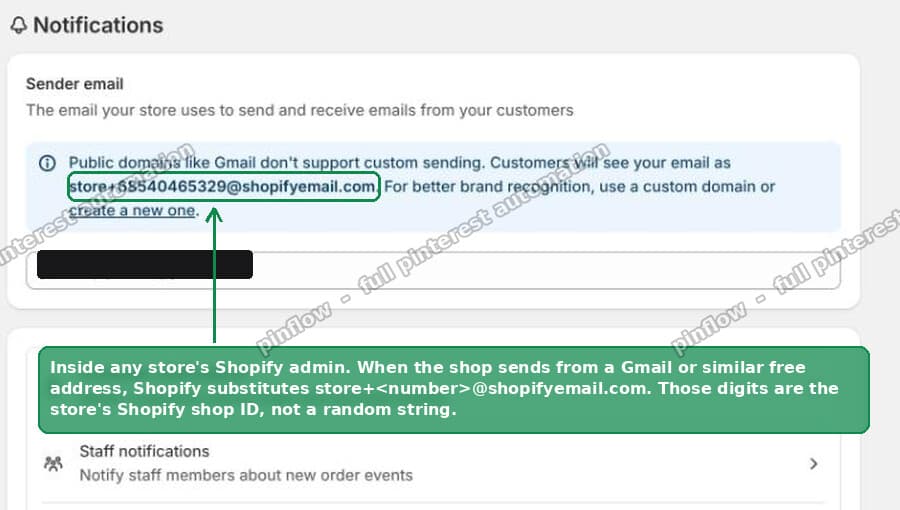 The Shopify admin explaining that customers will see [email protected] as the sender
"Public domains like Gmail don't support custom sending. Customers will see your email as [email protected]."
That is a screenshot of my own test store's admin. Which brings us to the interesting part.
Those digits are the store's Shopify shop ID
The number is not random and it is not a tracking code. It is the store's Shopify shop ID, the internal numeric ID Shopify assigns to every shop.
I verified this rather than assuming it. I sent myself an order confirmation from a store I control. The sender was:
That store's shop ID is 68540465329. Every Shopify storefront prints its own shop ID in the page source, inside the analytics config, as "shopId":68540465329.
Then I checked it against a store I have nothing to do with. Back in 2025 someone on the Shopify Community posted about an order email from [email protected] and named the shop it came from. I pulled that shop's homepage today. Its page source reads "shopId":61122347259. Same number, an unrelated store, a year apart.
So the digits identify the exact Shopify account that sent the mail. That is a lot more useful than "the domain is legit".
How to prove the email came from the shop you paid
You do not need to view page source for this. Your own email already contains the second copy of the number.
Open the confirmation and look at where the "View your order" button points. Do not click it yet, just hover it or long-press to copy the link. A real Shopify order status URL looks like this:
https://theshop.com/68540465329/orders/<token>/authenticate?key=<key>That first path segment is the shop ID again. So you have two things to compare, both sitting in the same email:
- The digits in the sender address.
- The digits at the start of the order status link.
They must match. And the domain in that link must be the site you actually typed your card into. If someone builds a convincing fake order email, getting both of those to line up with a real store is not something they can fake casually.
If the numbers disagree, or the link goes to a domain you have never seen, treat the email as hostile and do not click anything in it.
The From line can be faked. The signature cannot.
This is the check the reassuring forum answers usually skip, and it is the one that actually decides the question.
Anyone can put [email protected] in the From header. The From header is just text. It is not authenticated by anything on its own.
What cannot be forged is the DKIM signature. DKIM signs the message with a private key held by the sending service, and the receiving mail server checks it against a public key published in DNS. No key, no pass.
In Gmail: open the email, click the three-dot menu, choose Show original. You get this.
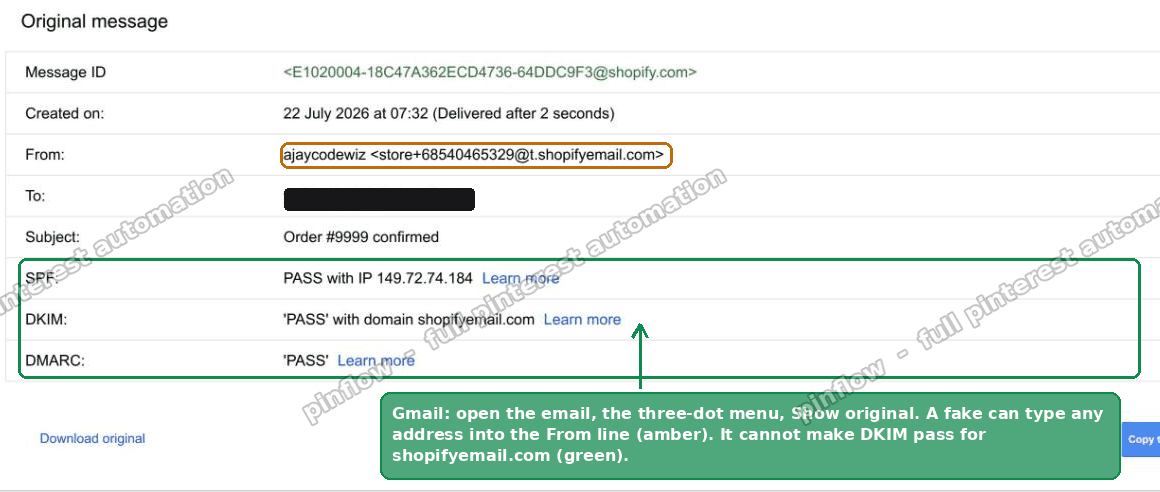 Gmail Show original showing SPF PASS, DKIM PASS with domain shopifyemail.com, and DMARC PASS
That is the real order confirmation from my test store. The three lines that matter:
- SPF: PASS means the server that sent it is allowed to send for that domain.
- DKIM: 'PASS' with domain shopifyemail.com means the message carries a valid signature from Shopify's email infrastructure.
- DMARC: PASS means the authenticated domain lines up with the visible From address.
A phishing copy that simply types the same address into the From line fails DKIM. It cannot do anything else, because it does not have Shopify's signing key.
On Outlook the equivalent is View, then View message source, and you look for the Authentication-Results header. On Apple Mail it is View, Message, All Headers.
If DKIM fails or is missing on an email claiming to be an order confirmation, stop there.
Find out who the merchant actually is
The third check takes about five seconds and tells you something the shop's own website often hides.
In Gmail, click the small arrow under the sender name. The details panel opens:
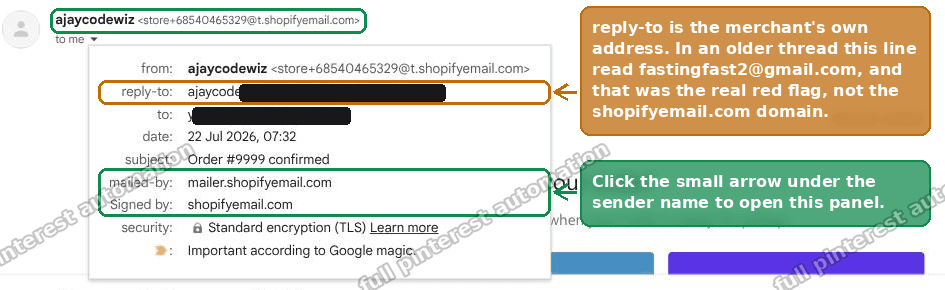 The Gmail details panel showing reply-to, mailed-by and Signed by for a Shopify order email
Note the reply-to line. Because Shopify had to replace the sender address, it puts the merchant's real address there instead. So this line reveals the human behind the shop.
That matters. In a long Shopify Community thread from 2024, someone posted an order confirmation from [email protected] asking whether it was a scam. The reply-to on that email was [email protected], and the body invited them to contact the same free Gmail address.
The shopifyemail.com domain was not the red flag in that thread. The reply-to was.
A real brand with a warehouse and a support team almost always has support@ their own domain. A dropshipper who spun up a store last Tuesday has a Gmail. Neither is proof by itself, but combined with the rest it tells you a lot.
What the address does not prove
All three checks have a limit. They prove the email is real. They prove which Shopify account sent it. They prove nothing about whether the parcel will arrive.
Shopify is a platform. It does not vet merchants, it does not vouch for them, and having a Shopify checkout is not a quality signal. Anyone with a card and 20 minutes can open a store.
The Shopify Community has plenty of threads where all of this was true and the buyer still got nothing. One person in 2025 posted about a real, well-known consumer electronics brand and received an empty box. Another posted about a store that later went offline completely. In a French thread from July 2026, a buyer was charged three times for one order.
So the email being real and the shop being trustworthy are two separate questions. Answer the first with the checks above. Answer the second with the ones below.
Checking the shop itself
Once you know which Shopify account sent the email, you can do something useful with it.
Compare it to the official store. In the thread that prompted this article, the buyer had ordered a band's new album from a French site. The band's own store is on Shopify and its shop ID is 73158885695. The label's European shop is a different Shopify store with ID 22808743. The buyer's email said 86183936294, which is neither. That does not make the shop a scam, but it does mean the band's own customer service cannot help, and it is worth knowing before you wait six weeks.
Check the domain age. Look the domain up on a WHOIS service. A store registered three weeks ago running heavy ads on a hyped product is the single most common pattern in these threads.
Check the legal page. In the EU this is not optional. A French site must publish mentions légales with a company name, address and SIREN number. You can put that SIREN into the French government's own company directory at annuaire-entreprises.data.gouv.fr and see whether the company exists. No legal page, or a number that returns nothing, and you have your answer.
Look for a real phone number and a physical address. Then search the brand name plus the word "reviews" and skip the first page of results, which is usually affiliate content.
Why your own store's emails say shopifyemail.com
If you found this page as a merchant rather than a buyer, the fix is straightforward and worth doing.
Go to Settings, then Notifications, then Sender email, the field in the screenshot near the top. Enter an address on a domain you own, such as [email protected]. Shopify will then ask you to authenticate the domain by adding CNAME records at your DNS provider.
Once those records verify, your customer emails go out from your own address instead of store+<shop id>@shopifyemail.com. If you bought your domain through Shopify, the records are added for you.
This is worth ten minutes of your time. Every thread linked in this article exists because a customer could not tell whether an order email was real. A branded sender address removes that doubt, and it measurably helps deliverability too, since receiving servers trust a consistent authenticated domain more than a shared one.
Note that the reply-to substitution goes away as well, so support replies land where you expect them. If you are changing what the email says as well, see how to edit the Shopify order confirmation email.
The lookalike problem
One last thing, because it is where people actually get caught.
shopifyemail.com, t.shopifyemail.com and g.shopifyemail.com are Shopify's real domains. mailer.shopifyemail.com appears as the "mailed-by" value and is also real.
What is not real is any of the near misses. Look carefully at the characters. A domain like shopify-email.com, shopifyemails.com or t-shopifyemail.com is not where Shopify sends store emails from. Phishing kits lean on exactly this, because the eye reads the shape of a word rather than its letters.
This is also why the DKIM check beats reading the address. You are not asked to judge a string of characters at a glance. The mail server does the comparison for you and prints the answer.
Real Shopify emails about your Shopify account, as opposed to a store's order emails, come from shopify.com addresses. Shopify will never ask for your password by email.
Quick checklist
If you are staring at one of these emails right now:
- Open Show original. Confirm DKIM says PASS with domain shopifyemail.com.
- Compare the digits in the sender address to the digits at the start of the order status link.
- Confirm that link's domain is the site you actually bought from.
- Check the reply-to address in the details panel and judge it.
- Look up the shop's domain age and its legal or contact page.
- Keep the confirmation and the invoice.
If the parcel never turns up, the confirmation email is your evidence. Card issuers accept "goods not received" disputes, commonly up to 120 days from the date delivery was expected, and PayPal's buyer protection window is 180 days. Check your own provider's terms, because the windows vary.
Shopify will not refund you, since it is not the seller. It does take reports about merchants at its report an issue page, which is worth filing so the store gets looked at.
Three checks, about a minute, and you will know a great deal more than "the domain looks weird".
Buyers trust a brand they have already seen
A shopper does not google "is this legit" about a shop they recognise. PinFlow turns your Shopify catalog into Pinterest pins and posts them on a schedule, so your products are familiar long before the confirmation email lands.
Get PinFlow on the Shopify App StoreMore Shopify fixes
More community-sourced Shopify guides, tested on a live store.
Notifications & Emails
How to Edit the Shopify Gift Card Email
Shopify sends the same stock gift card picture to every recipient, whatever product they bought. Here is the one edit that makes each gift card email show its own product image, tested end to end.
Notifications & Emails
Shopify Inbox Notifications Not Working? How to Fix It
Who gets a Shopify Inbox alert, why there is no admin recipient list, how chat routing really works through assignment, and how to fix desktop push in Chrome on Windows. Tested, with screenshots.
Notifications & Emails
Shopify Order Confirmation Email: Logo by Location
A merchant wanted a different brand logo on the order email for each POS location. The location logic came back blank in the Order confirmation email. Here is why, and the template that actually works, with screenshots.