
How to Add Metafields in Shopify Without an App
Metafields let you store custom data per product or collection and render it in your theme. Here is the setup, plus a tested limit worth knowing - Liquid inside a metafield does not run.
By AjayCodeWiz · July 9, 2026 · 10 min read
What metafields are actually for
Shopify gives every product, collection, customer and order a fixed set of fields. Title, description, price, images. That covers most of what a store needs and none of what makes your store specific.
Metafields are the escape hatch. They are custom fields you define yourself, attached to any of those records, and readable from your theme.
A size chart per product. A care instructions block. A "harvested in" date on coffee. A different photo gallery on every collection page. All of it lives in a metafield instead of being hardcoded into your theme or pasted into the description.
The value is not really the storage. It is that your theme stops needing to know about individual products. You write the template once, and every product or collection fills in its own value.
A merchant asked how to use metafields to put a different gallery on each of their collections. Their app produced an embed code, and pasting it into a custom Liquid block worked, but doing that per collection meant editing the theme every time they added one.
That is precisely the problem metafields solve. But there is a limit on what you can store in one, and I want to cover that first, because it is the thing that will waste your afternoon.
The limit: Liquid in a metafield does not run
I tested three kinds of content in a multi-line text metafield and rendered them on a Dawn collection page.
HTML renders. A <div> with inline styles came out as a real styled element.
JavaScript runs. A <script> tag in the metafield executed normally.
Liquid does not. It prints as literal text.
Here is the metafield holding an embed that contains a Liquid object, {{ collection.title }}:
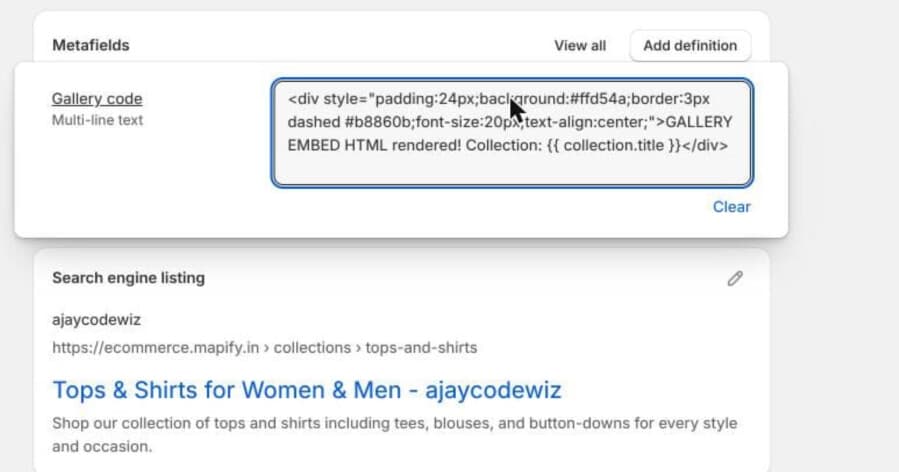 A multi-line text metafield holding an HTML embed with a Liquid tag inside it
And here is that same value rendered on the storefront:
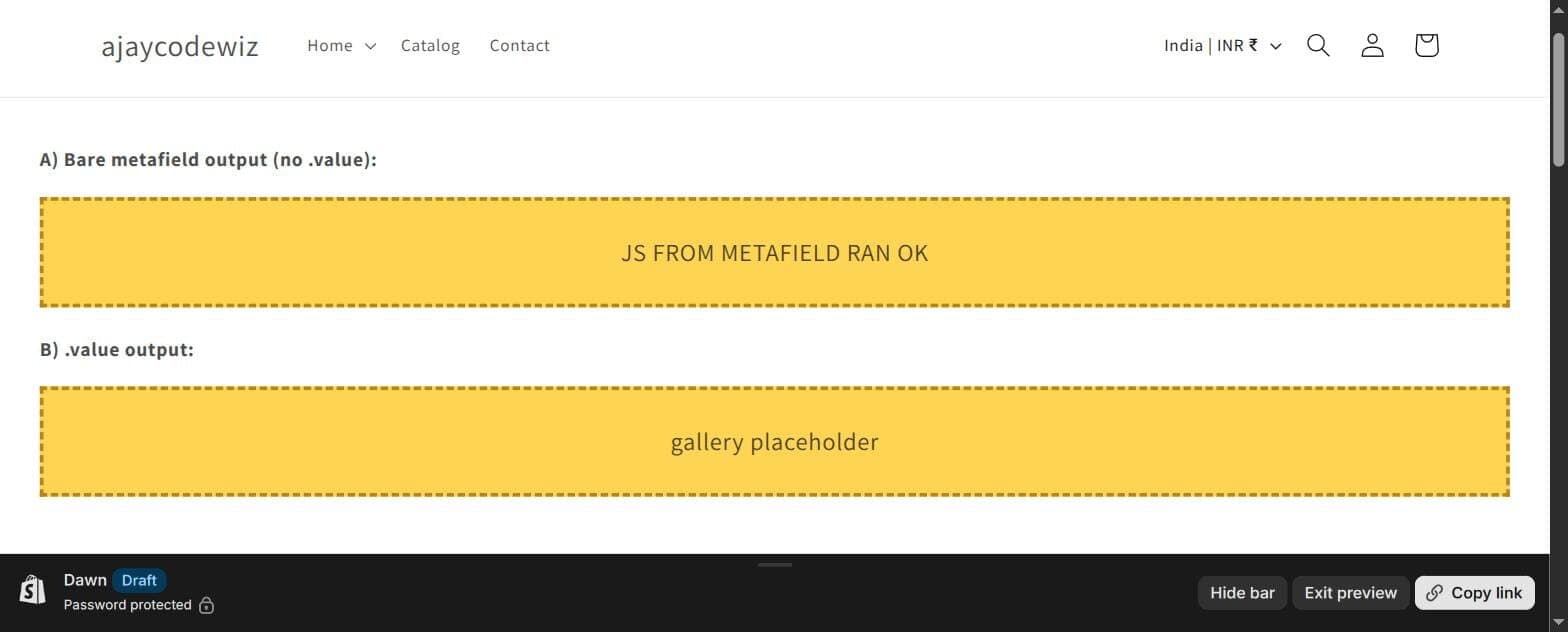 The HTML renders and the JavaScript runs, output from a metafield
The HTML box is drawn. The script ran. But look at the text:
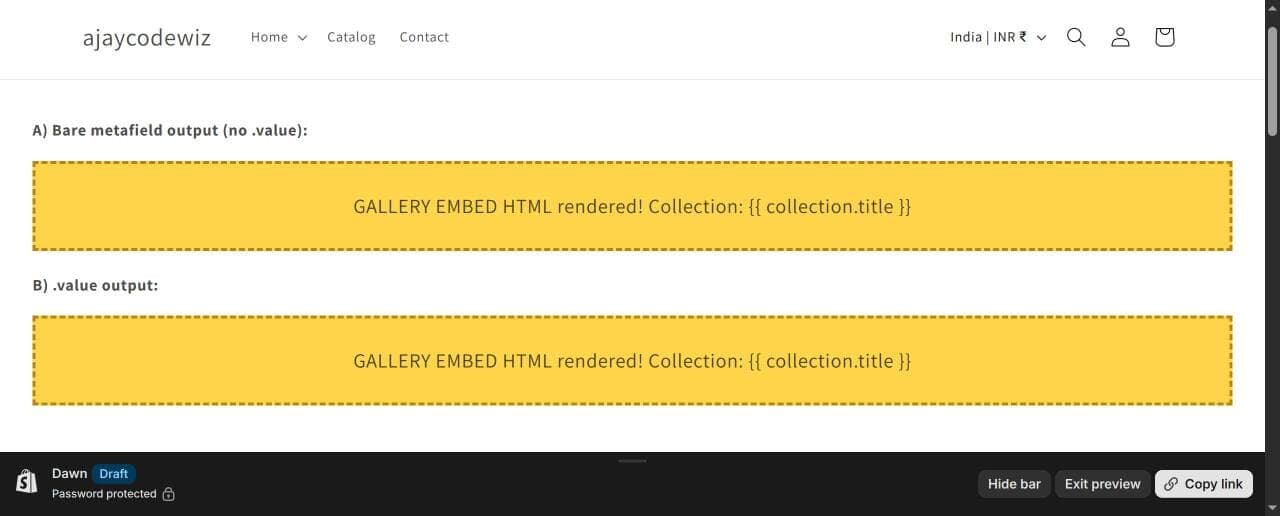 The Liquid tag printing literally as collection.title instead of executing
It says {{ collection.title }}, literally, on the page. It did not resolve to the collection's name.
That is the whole rule, and it follows from how Shopify renders a page. Liquid is evaluated once, when the template is compiled. By the time your metafield's value is fetched and printed, that pass is finished. The string goes to the browser as-is. The browser knows what to do with HTML and JavaScript. It has never heard of Liquid.
So, practically:
- Your app gives you a plain HTML/JS embed, a
<div>plus a<script>? A metafield works perfectly. - The code contains any Liquid (
{% ... %}tags,{{ ... }}objects, or an app snippet reference)? That part prints as text instead of running.
Knowing this up front saves you from concluding that metafields are broken. They are doing exactly what they should.
Step 1: define the metafield
A metafield needs a definition before you can put values in it. The definition sets the name, the type, and which records it attaches to.
Go to Settings > Custom data. You will see the record types: Products, Collections, Customers, Orders, Variants and more.
Pick Collections, then Add definition.
Fill in:
- Name:
Gallery code - Type: Multi-line text
The namespace and key are generated from the name, giving you custom.gallery_code. That is how you will refer to it in Liquid, so glance at it before saving. You can set it manually if you want something tidier.
Save.
Choosing the right type
The type matters more than it looks, because it decides both the admin input and what you get back in Liquid.
- Single line text for short values. Renders an input box.
- Multi-line text for anything long, including HTML embeds. Renders a textarea.
- Rich text gives merchandisers a formatting toolbar. Convenient, but it returns structured content, and outputting it needs
| metafield_tagrather than a bare print. - File for a PDF or an image. Returns a file object, not a string.
- Integer, Decimal, Date, True/False are validated on input, which prevents a lot of nonsense reaching your theme.
- List of ... variants hold multiple values, which is how you build an image gallery from real file uploads rather than an embed.
For pasting an embed, Multi-line text is right. It accepts anything and returns a plain string.
If you are storing something with a genuine shape, such as a date or a number, resist the urge to use text for everything. A Date metafield stops someone typing "next Tuesday" into a field your theme will try to format.
Step 2: put values in
Open a collection in your admin and scroll to the bottom. Your Gallery code field is there.
Paste that collection's embed in and save. Repeat per collection, filling in only the ones you want a gallery on.
Products work the same way, with the field appearing at the bottom of each product page.
Step 3: render it in your theme
Add one Custom Liquid block or section to your Collection template in the theme editor, containing only:
{{ collection.metafields.custom.gallery_code.value }}That is the entire theme change.
Every collection now renders its own gallery. Collections with an empty field render nothing at all, so there is no placeholder or broken markup to hide. Add a collection next month, paste its embed into the field, and the theme keeps working untouched.
The address is predictable: collection (or product, customer, shop), then .metafields, then the namespace, then the key, then .value.
The .value part
.value returns the content. Leaving it off returns the metafield object, which prints inconsistently depending on type and is a common source of "why is my metafield showing as an object".
Always use .value unless you specifically need the object, which mostly happens with | metafield_tag on rich text.
Guarding against empty
If your markup wraps the metafield in anything, wrap the whole thing in a check so empty collections do not render an empty container:
{%- if collection.metafields.custom.gallery_code.value != blank -%}
  <div class="collection-gallery">
    {{ collection.metafields.custom.gallery_code.value }}
  </div>
{%- endif -%}
!= blank catches both "never set" and "set then cleared", which != nil does not.
When your code is Liquid after all
If the gallery code your app gives you contains Liquid, the metafield cannot execute it. But you can still drive the gallery per collection.
Keep the Liquid in a Custom Liquid block where it will actually run, and store only a small value in the metafield: a gallery ID, a handle, a layout name. Then branch on it:
{%- assign gallery_id = collection.metafields.custom.gallery_id.value -%}
{%- if gallery_id != blank -%}
  {% comment %} the app's Liquid goes here, using gallery_id {% endcomment %}
{%- endif -%}
The theme holds the logic, the metafield holds the data. That is the cleaner separation anyway, and it is worth doing even when an embed would have worked.
One more caveat: if your gallery is an app block rather than a plain embed, it may need the app's own section or block to initialise. Apps often register a block that loads scripts and passes settings in a specific order. Pasting the visible markup into a metafield gets you the markup without the wiring. In that case add the app block through the theme editor and use metafields for its per-collection settings if it supports them.
Where metafields are worth it
Some patterns that pay off repeatedly:
Per-product specifications. Material, dimensions, care instructions. Define once, render in a table on the product template, fill in per product. No more spec tables pasted into descriptions where they cannot be styled or filtered.
Collection page content. A banner image, an intro paragraph, a size guide that differs per category.
Values driving logic, not display. A custom.badge_text metafield lets merchandisers set a badge per product without touching code.
Search and Discovery filters. Some metafield types can back storefront filters, which turns custom data into real navigation.
The common thread: metafields are for data that varies per record but is presented identically. If the presentation varies too, you want template logic, not a metafield full of markup.
If it is not rendering
Nothing appears. Check the namespace and key match your definition exactly. custom.gallery_code and custom.gallery-code are different fields, and a wrong key fails with no error rather than erroring.
It prints as [object Object] or similar. You left off .value.
Your Liquid prints as text. That is the limit described above. Move the Liquid into a Custom Liquid block.
HTML shows as escaped text with visible tags. Some contexts escape output. Multi-line text printed with {{ }} should render, but rich text needs | metafield_tag.
It works on one collection and not another. The other collection's field is empty. Metafield definitions are global; values are per record.
What I confirmed on a Dawn store
- Pasting an HTML/JS embed into a
custom.gallery_codemulti-line text metafield and outputting it on the collection template rendered the HTML and ran the<script>normally. - Dropping a Liquid tag,
{{ collection.title }}, into the same metafield printed it literally instead of executing it. - One Custom Liquid block on the template served every collection, each with its own value, with empty collections rendering nothing.
The summary: metafields are a data store, not a template. Anything the browser can execute will work when you print it. Anything Shopify's renderer needs to execute will not, because that stage has already finished. Keep Liquid in the theme, keep values in metafields, and the per-collection problem solves itself.
Custom data is only useful once people find the product
PinFlow turns your Shopify catalog into Pinterest pins and posts them on a schedule, so the products you have carefully described reach people outside your store.
Get PinFlow on the Shopify App StoreMore Shopify fixes
More community-sourced Shopify guides, tested on a live store.
Shopify Admin
How to Edit a Packing Slip on Shopify to Show Big Product Photos
Shopify's order page shows each item as a 40 pixel thumbnail with no way to enlarge it. Here is how to edit the packing slip template so every line prints that exact variant's photo at 1000 pixels, including the one-line fix Shopify's default template needs.
Shopify Admin
Shopify Shipping Zones: Fix Products Sold Out in One Country
Products show Sold out for customers in one country while your admin shows stock. The cause is a shipping profile with no zone for that country. How Shopify shipping zones and profiles decide what a customer can buy, and the six-click fix, with screenshots.
Shopify Admin
Shopify Translate: Fix Mixed Languages on Product Pages
A Swedish Shopify store showed English words on translated product pages. The titles were translated, so the English came from option names and theme text. How to fix each one in Translate & Adapt, with screenshots.