
Shopify Shipping Zones: Fix Products Sold Out in One Country
Products show Sold out for customers in one country while your admin shows stock. The cause is a shipping profile with no zone for that country. How Shopify shipping zones and profiles decide what a customer can buy, and the six-click fix, with screenshots.
By AjayCodeWiz · September 29, 2026 · 9 min read
The problem: sold out in one country, in stock everywhere else
A UK merchant asked about this on the Shopify Community. Their admin showed stock for a group of products. They could add those products to the basket themselves. Then a customer in Ireland sent a screenshot of the same products marked Sold out.
The quantities were not zero. The merchant had recently added Ireland as a country they ship to. They wanted to know which setting they had missed.
Three replies in the thread gave long checklists: markets, locations, inventory, catalogs. Each item on those lists is a real setting. None of them told the merchant which one to open first.
I rebuilt the problem on a test store. A tote bag with 25 in stock showed Add to cart for UK visitors and could not be bought from Ireland. One setting fixed it: the shipping zone inside the product's shipping profile.
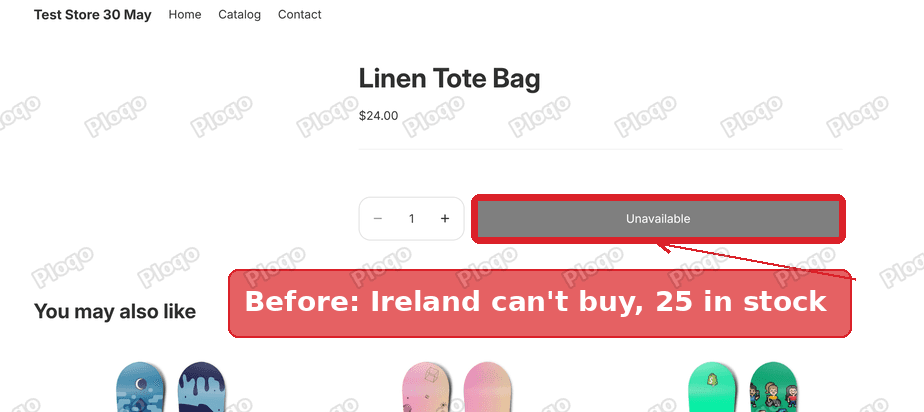 Before: the product page for a visitor from Ireland, with the buy button disabled although 25 are in stock
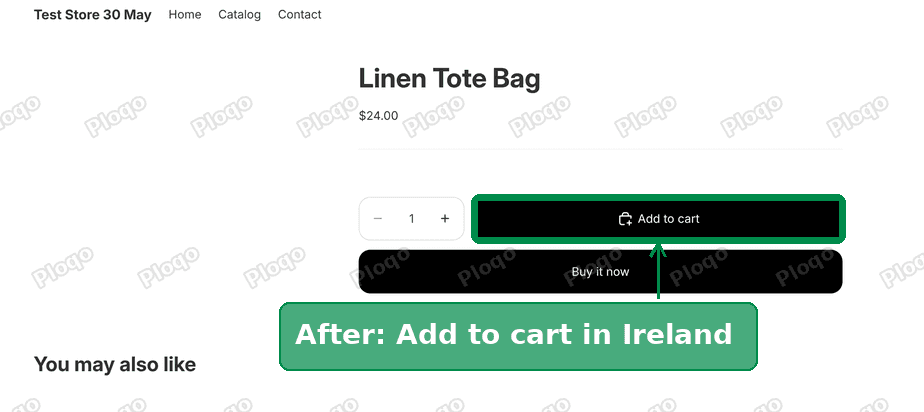 After: the same product page for a visitor from Ireland, now showing Add to cart
How Shopify decides a product is sold out for a customer
Shopify does not only ask "is there stock?" It asks "is there stock this customer can receive?"
To answer that, it looks at three things together:
- The customer's market. A market is a group of countries you sell to, set up under Settings > Markets. Each visitor is placed in one market based on their country.
- The location holding the stock. A location is any place that holds your inventory, such as your shop, a warehouse or a supplier.
- The shipping profile of the product. A shipping profile is a set of shipping rules that applies to a group of products. It says which locations ship those products, and to which countries.
Inside each shipping profile are shipping zones. A shipping zone is a list of countries plus the rates you charge to ship there. If a product's profile has no zone covering the customer's country, no rate exists. Shopify then treats the product as unavailable for that customer, even with stock on the shelf.
The button label depends on your theme. Some themes say Sold out, others say Unavailable. Both mean the same thing here.
Why adding Ireland did not fix it
Most stores start with one profile, the General profile. Every product lands there by default. When a merchant adds a new country under Shipping and delivery, they usually add it to the General profile.
Products in a custom profile do not see that change. A custom profile is a second profile you create for products that ship differently, such as heavy items, fragile items or print-on-demand goods. Each custom profile has its own zones. Adding Ireland to the General profile leaves every custom profile exactly as it was.
That explains the pattern in the thread. Some products sold to Ireland fine. The products in a separate profile showed Sold out. The UK kept working because the custom profile already had a UK zone.
Check this first: which profile holds the product?
Go to Settings > Shipping and delivery. The Shipping profiles card lists every profile, with how many products and zones each one has.
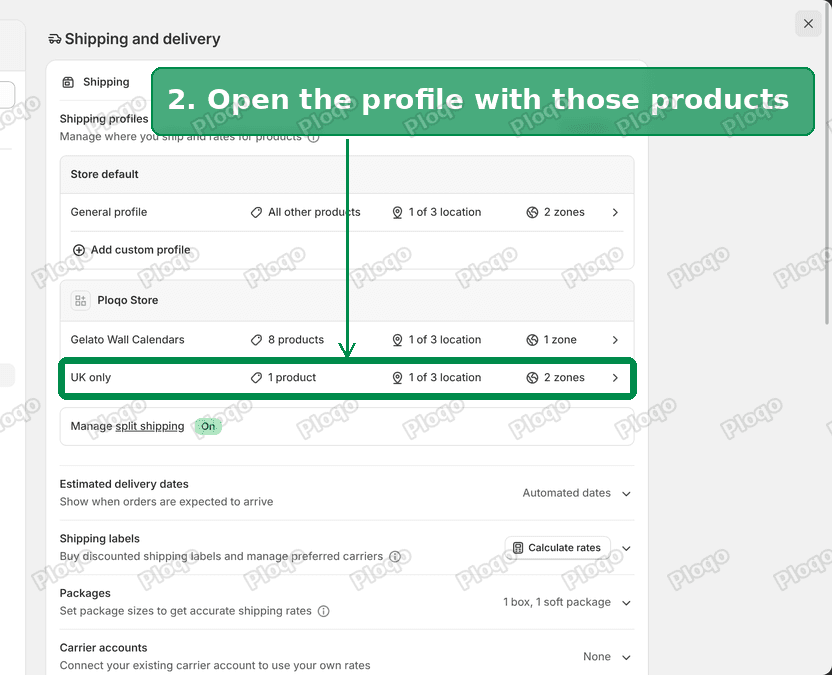 The Shipping profiles card, listing the General profile and the custom profiles with their product and zone counts
- If you only see the General profile, open it and check that Ireland (or your new country) sits in a zone with a rate.
- If you see custom profiles too, the sold out products are almost certainly in one of them.
To find a product's profile, open each custom profile and read its product list.
The fix: add the country to the profile, step by step
These are the same steps I posted on the Community thread, with the same screenshots.
1. Go to Settings, then Shipping and delivery.
2. Click the shipping profile that holds the sold out products. On my test store it was a custom profile called UK only, with 1 product and 1 zone.
Settings, Shipping and delivery: the Shipping profiles card with the custom profile highlighted
3. Click Add zone. The profile page lists its products, the location it ships from, and its zones. Mine had one zone, United Kingdom, with a Standard rate of $4.95. There was no zone for Ireland.
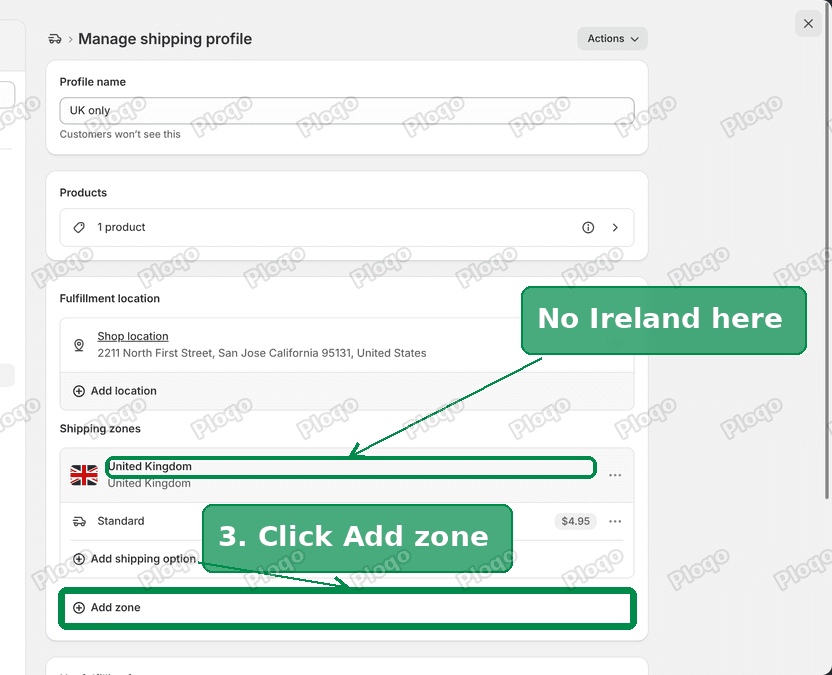 The shipping profile page with only a United Kingdom zone, and the Add zone button
4. Name the zone Ireland, tick Ireland in the country list, and click Done. You can also add Ireland to an existing zone if you want the same rate as another country.
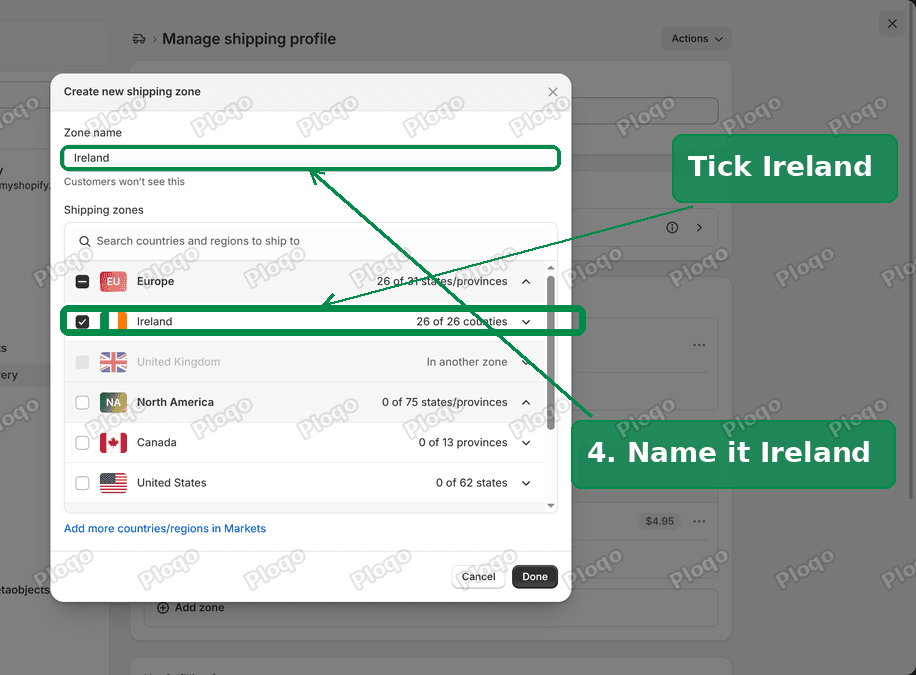 The Create new shipping zone dialog, with the zone named Ireland and Ireland ticked
5. Click Add shipping option under the new Ireland zone. Enter a name and a price. Shopify also asks for a transit time, and will not let you click Done without one. I used $6.95 and 3 to 5 business days.
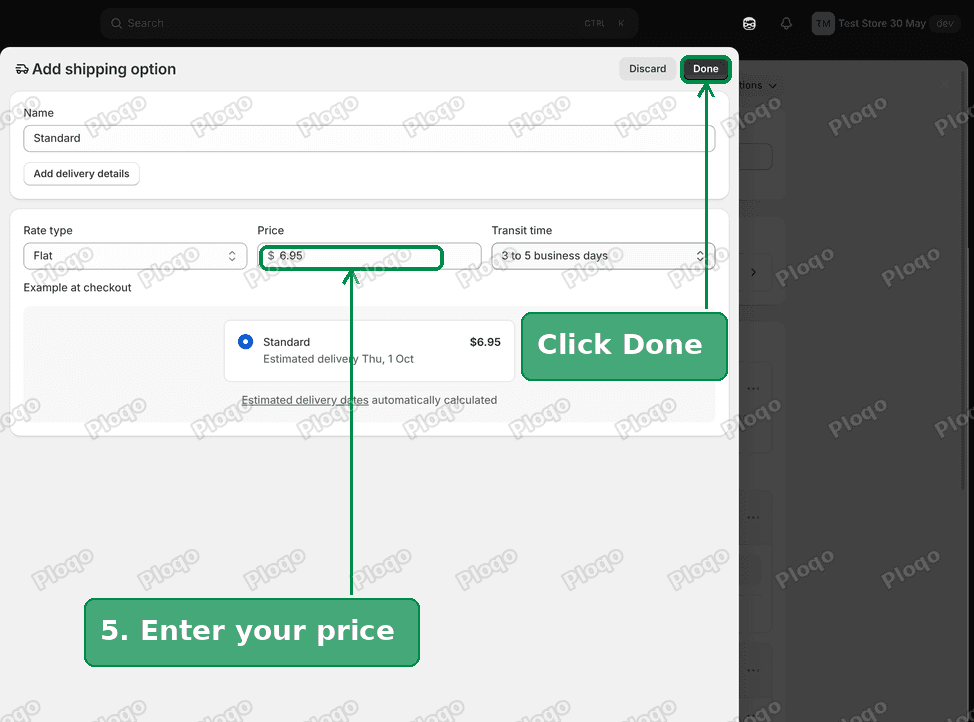 The Add shipping option page with a price of 6.95 and the Done button
6. Click Save. The profile now shows two zones, Ireland and United Kingdom, each with its rate.
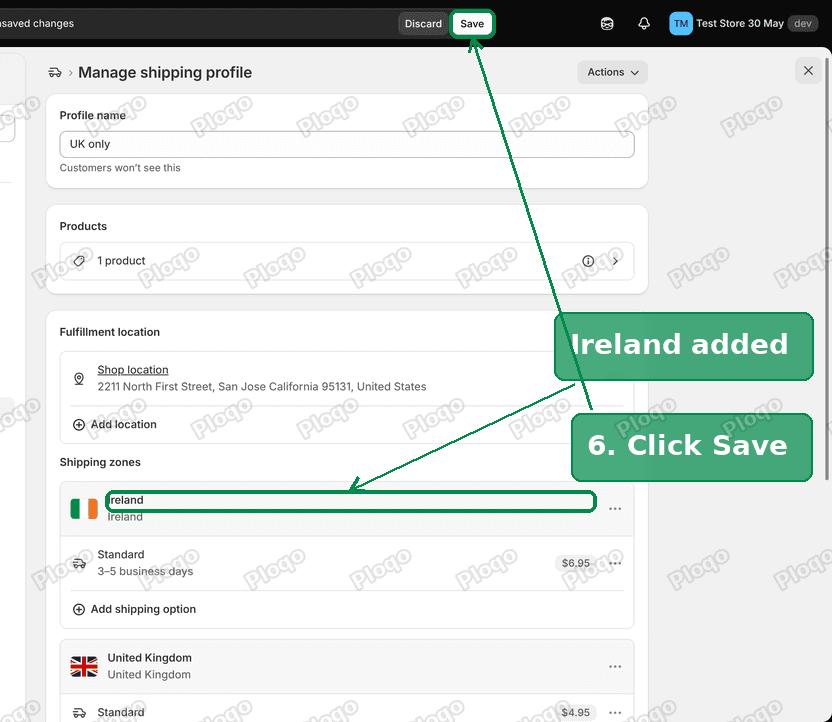 The profile with the new Ireland zone and the Save button
About ten seconds after saving, the tote bag showed Add to cart for a visitor from Ireland. Nothing else changed: same stock, same location, same market.
Repeat the steps for every custom profile that holds products you want to sell in the new country.
Shipping zones vs shipping profiles
These two terms get mixed up, and the Shopify admin puts them on the same page.
| Shipping profile | Shipping zone | |
|---|---|---|
| What it is | A group of products with shared shipping rules | A list of countries inside a profile |
| What it holds | Products, the locations that ship them, and zones | Countries and the rates for them |
| How many | One General profile, plus any custom ones you add | As many as you like per profile |
| Where to edit | Settings > Shipping and delivery | Inside a profile, under Shipping zones |
A zone never exists on its own. Each zone belongs to one profile, for one set of locations. So "we ship to Ireland" is only true per profile.
Markets and shipping zones work together
Adding a country in Markets and adding it to a shipping zone are two separate jobs.
- Markets decide the currency, language and prices a visitor sees, and which products are listed for them.
- Shipping zones decide whether a product can actually reach them.
My test store showed one more detail. Before I set up a UK market, UK visitors were placed in the store's main market, the United States. The UK only profile had no US zone, so the tote bag showed as unavailable in the UK as well. Once the UK had its own market, UK visitors saw Add to cart.
So when a product is unavailable in one country, check two things:
- The country sits in an active market under Settings > Markets.
- Every profile holding the products has a zone for that country, with a rate.
The same rule, used on purpose
Some merchants use this behaviour deliberately. On my test store a wall calendar sits in a profile whose only zone is Australia. Visitors from Australia can buy it. Visitors from the US, the UK and Ireland see it as unavailable.
That is how you limit a product to certain countries without an app. Put the products in their own profile and only add zones for the countries you want to sell them in.
A profile with no shipping rates at all makes products pickup only. I covered that in how to make a product pickup only on Shopify.
Still sold out after adding the zone?
Is the zone missing a rate? A zone with no shipping option does not count. The admin shows a warning on zones without rates.
Is the right location in the profile? The profile page lists the locations it ships from. If the location holding your stock sits under Not fulfilling from, add it to the profile.
Does the location sell online? Under Settings > Locations, the location needs Fulfill online orders turned on. If this is off, the product is sold out in every country, not just one. I covered that case in Shopify shows sold out but it's in stock.
Is Managed Markets on for that market? Shopify Managed Markets will not ship products fulfilled by some apps, such as print-on-demand apps. Customers then see "Shipping not available" at checkout. See Shopify Managed Markets: shipping not available.
Is the product listed in that market? Under Settings > Markets, open the market and check that its product list includes the item.
Is the customer on an old page? A customer who still has the product open may need to refresh it. On my test store the change showed up within ten seconds of saving.
How to test what a customer in another country sees
You do not need a VPN to check. Add ?country=IE to the end of a product link, using the two-letter code of the country you want to test. For example:
your-store.com/products/linen-tote-bag?country=IE
The page loads as a visitor from Ireland would see it, including their market's currency and the product's availability. Swap IE for GB, US or any other code to compare.
Common questions
Does adding a country in Markets turn on shipping to it? No. Markets control what the visitor sees. Shipping zones control whether the order can be delivered. You need both.
Do I need a separate zone for every country? No. One zone can hold many countries with the same rate. A single "Europe" zone with Ireland, France and Germany works.
Why does the General profile not cover every product? Products moved into a custom profile leave the General profile. They follow only the zones of their new profile.
Can one product be in two profiles? No. Each product variant belongs to one shipping profile at a time.
This article is based on my answer to a question on the Shopify Community: <a href="https://community.shopify.com/t/products-show-as-sold-out-for-customers-in-ireland-but-i-have-stock/688952" rel="nofollow">Products show as sold out for customers in Ireland, but I have stock</a>.
Spending too long on manual Shopify busywork?
PinFlow turns your Shopify catalog into Pinterest pins and posts them on a schedule, automatically. Same idea as the rule above, let the system handle the repetitive part.
Get PinFlow on the Shopify App StoreMore Shopify fixes
More community-sourced Shopify guides, tested on a live store.
Shopify Admin
How to Edit a Packing Slip on Shopify to Show Big Product Photos
Shopify's order page shows each item as a 40 pixel thumbnail with no way to enlarge it. Here is how to edit the packing slip template so every line prints that exact variant's photo at 1000 pixels, including the one-line fix Shopify's default template needs.
Shopify Admin
Shopify Translate: Fix Mixed Languages on Product Pages
A Swedish Shopify store showed English words on translated product pages. The titles were translated, so the English came from option names and theme text. How to fix each one in Translate & Adapt, with screenshots.
Shopify Admin
Shopify B2B Discounts: How to Turn Them On and Set Them Up
Shopify B2B discounts are off until Shopify Support enables them. Here is how to ask, how to build a B2B market, and how to give company buyers automatic free shipping.