
Fix Narrow App Blocks in Shopify Horizon
Shopify Horizon shrinks embedded app blocks to their content width. Here is the one-block CSS fix that makes an app section span full width.
By AjayCodeWiz · August 4, 2026 · 11 min read
The problem
A merchant asked about this on the Shopify Community. They were new to Shopify and building a store on the Horizon theme.
They added a booking calendar to a page. The app was BTA (Book That App), and it dropped its calendar in as an app block. But the calendar rendered far too small. It sat squashed in a narrow column on the left of the page.
The app's support told them it was a Shopify problem, not an app problem. That left the merchant stuck in the middle, sure it was an easy fix but with no idea where to start.
I reproduced it on a test store on the Horizon theme. The result was exactly what they described.
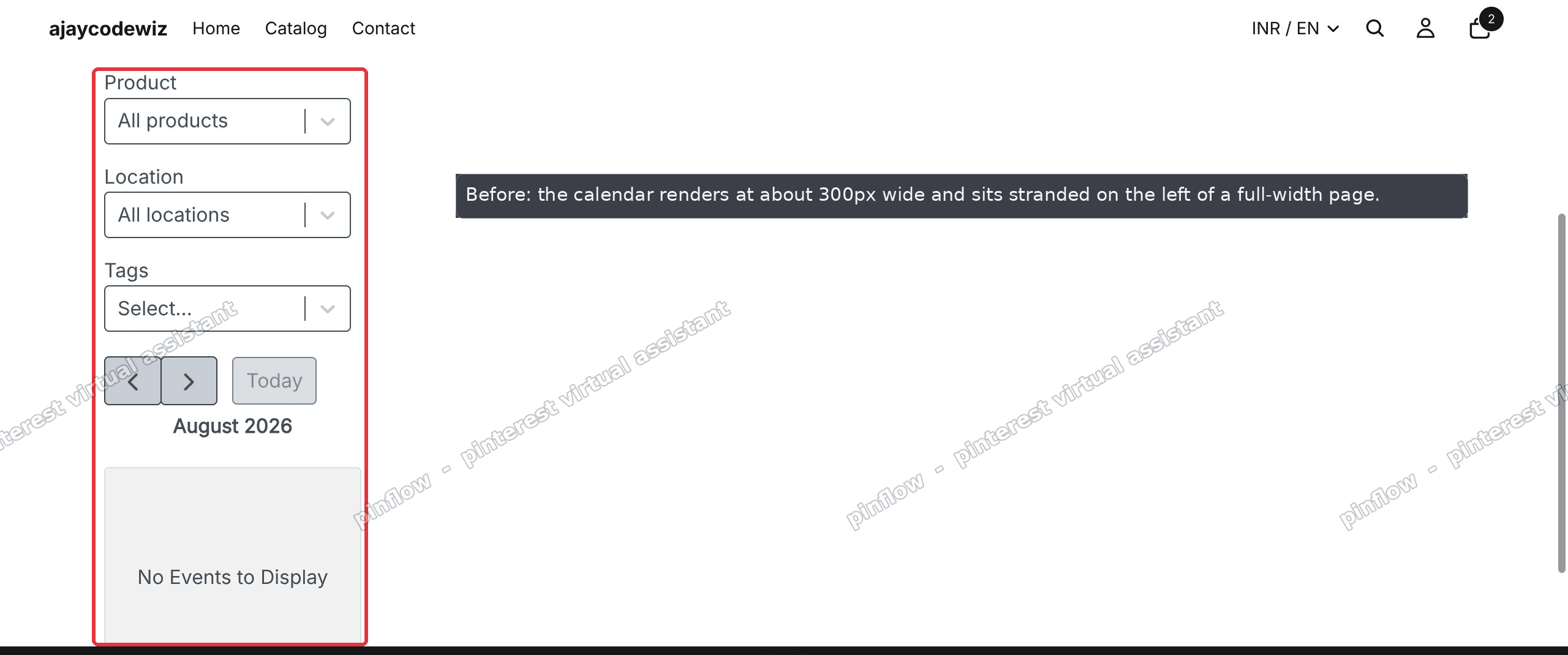 Before: a BTA booking calendar app block rendering at about 300px wide, stranded on the left of a full-width Shopify Horizon page
The calendar was about 300px wide. The page around it was more than 2000px wide. So most of the page was empty white space, and the calendar looked broken even though it worked fine.
An "app block" here just means a piece of an app that you drop into your theme through the theme editor. You do not touch code. You click Add block and pick the app. The app then renders its own content, in this case a calendar, inside your page.
The merchant had already tried the obvious thing. They set the BTA widget to Full-Width in the app's own settings. It still showed small on the page. That is the tell that the width is not coming from the app at all.
Why it happens
This is the part most forum answers skip, and it is worth understanding because it tells you why the fix works.
Horizon is Shopify's newer theme. It is built on blocks and web components. One of the ways it differs from older themes like Dawn is how it sizes each block.
Horizon sizes each block to its own content width. In plain words: a block is only as wide as the stuff inside it needs to be. If the content does not declare a width, the block does not stretch to fill the space. It shrinks to fit.
Most app embeds do not set a fixed width on themselves. They expect the theme to give them room and they fill it. That works on older themes. On Horizon it backfires.
The BTA calendar has no fixed width of its own. So Horizon has nothing to size the block against. The block falls back to a small default, around 300px, and the calendar sits there squashed.
That is the whole mechanism. It is not a bug in BTA and it is not a setting you missed. It is Horizon's content-width sizing meeting an app embed that does not ask for space.
This is why the shopify horizon app block width problem shows up with all kinds of embeds, not just booking calendars. Review widgets, forms, maps, and any third-party section can hit the same wall. The moment an app block does not declare its own width, Horizon keeps it narrow.
It also explains why the app's own Full-Width toggle did nothing. That toggle controls the layout inside the app's iframe or container. It does not change the width of the theme block that Horizon draws around it. The constraint is one level up, in the theme, so the fix has to live in the theme too.
The fix
The fix is one small piece of CSS. You add it through the theme editor. There are no code files to edit and nothing to download.
CSS is the language that controls how things look on a web page, including how wide they are. You are going to tell the browser: make the app block, and the calendar inside it, take the full width available.
You add that CSS through a Custom Liquid block. A Custom Liquid block is an empty box in the theme editor where you can paste your own code. It is built into Horizon, so you do not need any app for it.
Here are the steps.
Step 1. In your Shopify admin, go to Online Store, then Themes. Find your live Horizon theme and click Customize. On some stores the button reads Edit theme instead. Both open the same theme editor.
Step 2. Open the page that has the calendar. Use the page dropdown at the top of the editor to navigate to it.
Step 3. Find the section that holds the Event Calendar app block. Click Add block inside that section.
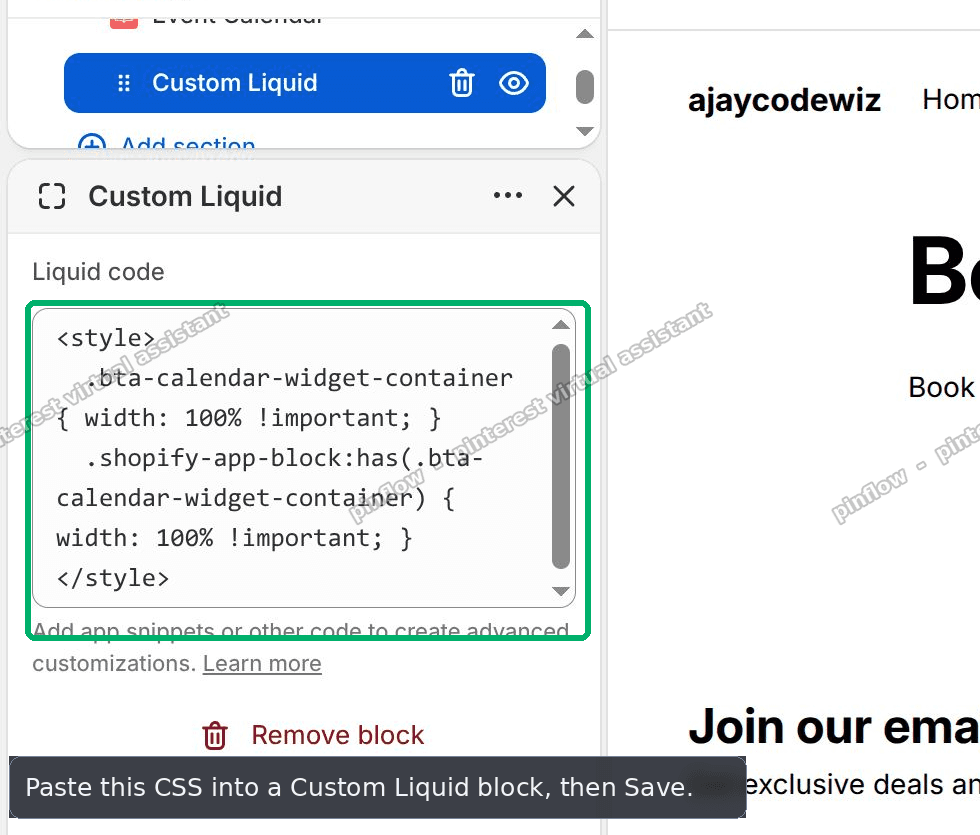 The Shopify Horizon theme editor with a Custom Liquid block added and the width CSS pasted into the Liquid code box
Step 4. In the block picker, type liquid in the search, then choose Custom Liquid.
Step 5. Paste this code into the Liquid code box:
<style>
  .bta-calendar-widget-container { width: 100% !important; }
  .shopify-app-block:has(.bta-calendar-widget-container) { width: 100% !important; }
</style>
Step 6. Click Save in the top right.
That is it. Two lines do the work.
The first line targets the calendar itself and forces it to 100% width. The second line targets the wrapper Horizon draws around every app block, the .shopify-app-block element, but only when it contains the calendar. The :has() part means "the app block that has the calendar inside it", so you only widen that one block and leave every other block alone.
The !important keyword tells the browser to use your width even if the theme or app tries to set a different one. It is the reliable way to win this specific fight.
I tested this on a Horizon store. The calendar went from about 300px wide to the full width of the section, on desktop and on mobile.
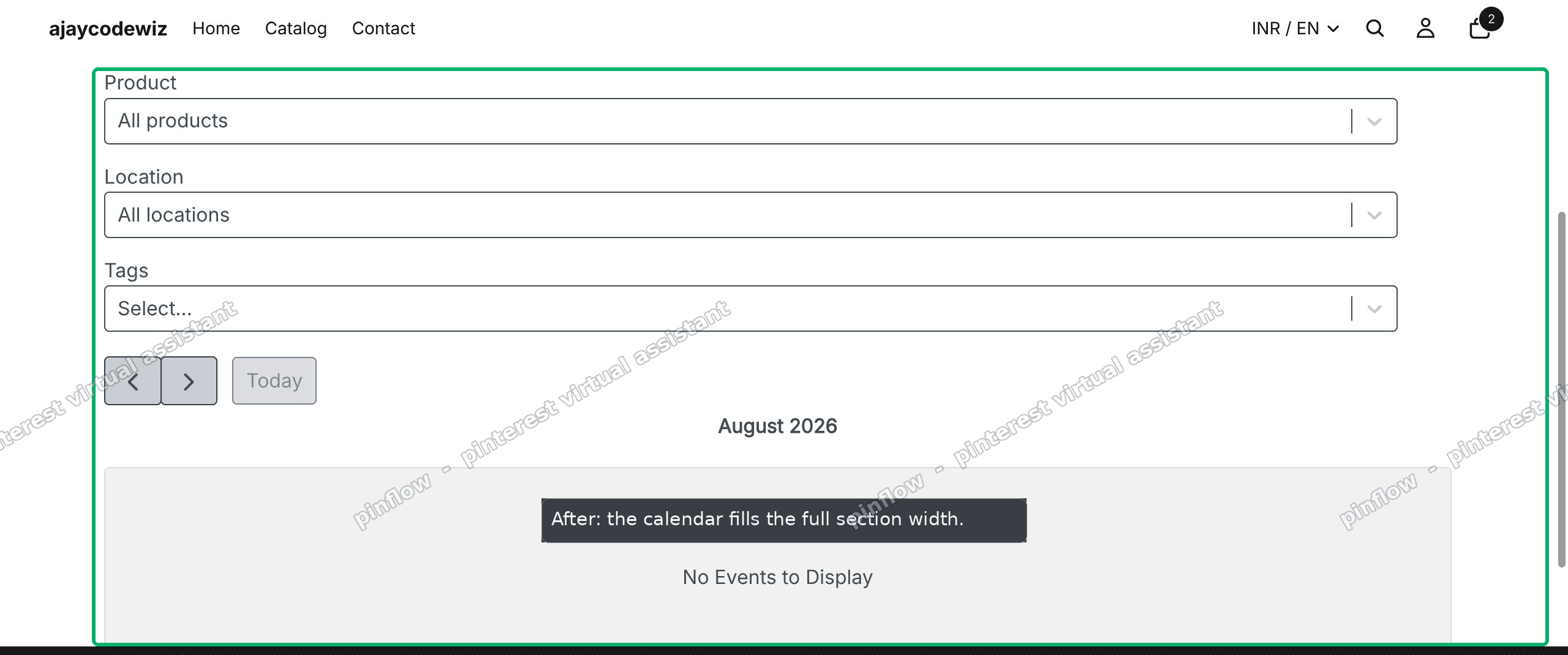 After: the BTA booking calendar now fills the full width of the section on the Shopify Horizon page
The merchant confirmed the same. In their words, it worked beautifully, and they marked it as the solution.
If your app is not BTA, the fix is the same shape but with a different target. Right-click the narrow widget on your live page, choose Inspect, and find the class name on the app's outer container. Swap that class into both lines in place of bta-calendar-widget-container. The .shopify-app-block:has(...) wrapper line stays, because that wrapper is the same for every Horizon app block.
An alternative: no code at all
Some merchants do not want to touch CSS, even one block of it. There are two lighter options worth trying first.
The first is the section's own width setting. In Horizon, click the section that holds the app block, open its settings, and look for a Width option. Set the section to full width or a wider maximum. This alone will not fix a truly narrow app block, because the block still shrinks to its content, but it removes any extra margin the section was adding and sometimes that is enough for a widget that was only slightly boxed in.
The second is to move the embed. Horizon lets you add an app block directly as a section on the page, not only nested inside another section. A block placed as its own full-width section has more room to breathe than one crammed into a column alongside other blocks. If your app offers both an app block and an app section, try the section version.
Neither of these beats the CSS fix when the app block ignores width entirely, as BTA does. But they cost nothing to try and they keep your page code free of custom snippets. If they do not work, the Custom Liquid block above always does.
Does Full-Width in the app fix the narrow app block?
No, and this trips up most people. The Full-Width toggle inside the app controls the layout inside the app's own container. The Shopify embedded app narrow problem comes from the theme block that wraps that container. The app cannot widen a block it does not control.
Our merchant had the BTA widget set to Full-Width and it still showed small. That is the expected result. Fix the width at the theme level, with the CSS block, not inside the app.
How do I make a Shopify app block full width in Horizon?
Add a Custom Liquid block in the same section and force the app block wrapper to 100% width with CSS. The two-line snippet above does exactly that. The key line is the one that targets .shopify-app-block, the wrapper Horizon puts around every app block. Set it to width: 100% !important and the block stops shrinking to its content.
This is the general answer to shopify app block full width on Horizon. Find the app's container class, then widen both the container and its .shopify-app-block wrapper.
Why does Horizon make embeds narrow when Dawn does not?
Dawn and older themes let block content stretch to fill the space by default. Horizon sizes each block to its content width instead. So an embed that does not declare its own width gets a small fallback on Horizon but a full-width slot on Dawn.
Same app, same embed code, different result, purely because the theme's sizing rule changed. This is the shopify horizon custom liquid width situation in a sentence: the theme changed how width is decided, so the width now has to be stated explicitly, and a Custom Liquid block is the cleanest place to state it.
Where do I put the CSS, and will it slow my site down?
Put it in a Custom Liquid block in the same section as the app block. It loads with that page only, it is a few lines, and it has no measurable effect on speed. You are not adding a file or an app. You are adding a tiny style rule scoped to one block.
Keeping the CSS next to the block it fixes also makes it easy to find later. If you ever remove the app, you delete its Custom Liquid block in the same place and the CSS goes with it.
If it did not work
A few things to check if the calendar is still narrow after you save.
First, confirm the class name. Open your live page, right-click the narrow widget, and choose Inspect. Read the class on the app's outer element. If it is not bta-calendar-widget-container, your CSS is aiming at nothing. Update both lines with the real class.
Second, make sure you pasted the whole snippet, including the opening <style> and closing </style> tags. Without those tags the browser treats your CSS as plain text and ignores it.
Third, check you added the block to the right section. The Custom Liquid block does not have to sit next to the app block, but keeping them in the same section is the simplest way to be sure the CSS is on the same page as the calendar.
Fourth, clear your cache or open the page in a private window. Themes cache aggressively, and an old copy of the page can hide a fix that is actually live.
Fifth, if the block is still boxed by the section, widen the section too. Select the section, open its settings, and raise its Width or maximum width. The CSS widens the block; the section setting makes sure the section gives it room.
Definitions people confuse
App block versus app section. An app block is a piece of an app you nest inside an existing section. An app section is a whole section the app provides on its own. Sections have more room by default. Some apps offer both; if yours does, the section is often the easier full-width path.
App block versus Custom HTML block. Our merchant noted that on Horizon, BTA would only let them use the app block. They could not add the calendar through a Custom HTML block. That is common. Many apps require their own app block on newer themes so the app can render and update itself correctly. If your app forces the app block route, the CSS fix here is the way to widen it.
Custom Liquid block versus editing theme code. A Custom Liquid block lives in the theme editor and is safe to add and remove. Editing theme code means opening the code editor and changing files like theme.liquid or a CSS asset. For this fix you want the Custom Liquid block. It is contained, reversible, and does not risk the rest of your theme.
Content width versus full width. Content width means a block is as wide as its contents. Full width means it fills the space it is given. The shopify app block not full width issue on Horizon is simply content width winning when you wanted full width. The CSS snippet flips that one block back to full width.
Once you see it as a theme sizing rule rather than an app fault, the fix is quick and it sticks. One Custom Liquid block, two lines, and the embed fills the page the way it should.
Spending too long on manual Shopify busywork?
PinFlow turns your Shopify catalog into Pinterest pins and posts them on a schedule, automatically. Same idea as the rule above, let the system handle the repetitive part.
Get PinFlow on the Shopify App StoreMore Shopify fixes
More community-sourced Shopify guides, tested on a live store.
Themes & Storefront
Shopify AI Section: Fix a Price Badge Hidden Behind the Image
You built a section with Shopify's AI section generator, but the price badge on each card sits behind the photo. Here is the Custom Liquid fix that brings it to the front without regenerating anything. Tested on a Dawn store.
Themes & Storefront
Hide Shipping Calculated at Checkout on One Shopify Product
The line under Add to cart that says shipping is calculated at checkout shows on every product, gift cards included. Here is how to hide it on one product only, with the code, screenshots and the Eclipse theme steps.
Themes & Storefront
Shopify Dropdown Menu Behind Page Content (Z-Index Fix)
Your Shopify dropdown or mega menu opens, but the page title and products sit on top of its links and the menu closes before you can click. The fix is one Custom CSS rule in Theme settings. Tested on a Rebel store.