
Shopify B2B on Basic: What You Get, What Needs Plus
B2B on Shopify is no longer Plus only. Here is exactly what works on the Basic plan, the three limits that still need Plus, and which apps close the gap for around $25 a month.
By AjayCodeWiz · September 7, 2026 · 8 min read
The problem
A merchant asked on the Shopify Community whether to move his wholesale store off WordPress. He got two replies. Both said Shopify has "B2B features and apps" and left it there.
That is the answer most people get, and it is not useful. It does not tell you the one thing that decides the whole question: which parts of B2B need Shopify Plus, and which do not.
Get that wrong and you either pay for Plus you did not need, or you migrate onto Basic and discover halfway through that your pricing model does not fit.
So here is the actual boundary, checked on a live store.
What happened to the Shopify wholesale channel
If you have read older guides, you will have seen the Wholesale Channel mentioned. It is gone.
Shopify discontinued the Plus Wholesale Channel on 28 June 2024. The reason was technical: the channel ran as a separate password-protected storefront and depended on third-party cookies to keep buyers signed in. Browsers stopped supporting those, so the channel could not keep working.
What replaced it is B2B on Shopify, and it is a completely different design. Instead of a separate wholesale storefront, your B2B buyers log into your normal store and see their own prices.
This matters when you are researching, because a lot of the advice still online was written for the old channel. If an article tells you wholesale on Shopify means a second storefront, it is out of date.
The big change: B2B is not Plus only any more
This is the part that trips people up.
For years, B2B on Shopify meant Shopify Plus. Most blog posts, most forum answers, and most agency pages still say so.
It is no longer true. Company accounts and most B2B features now work on Basic, Grow and Advanced.
Here is a company record on a store with no wholesale app installed at all.
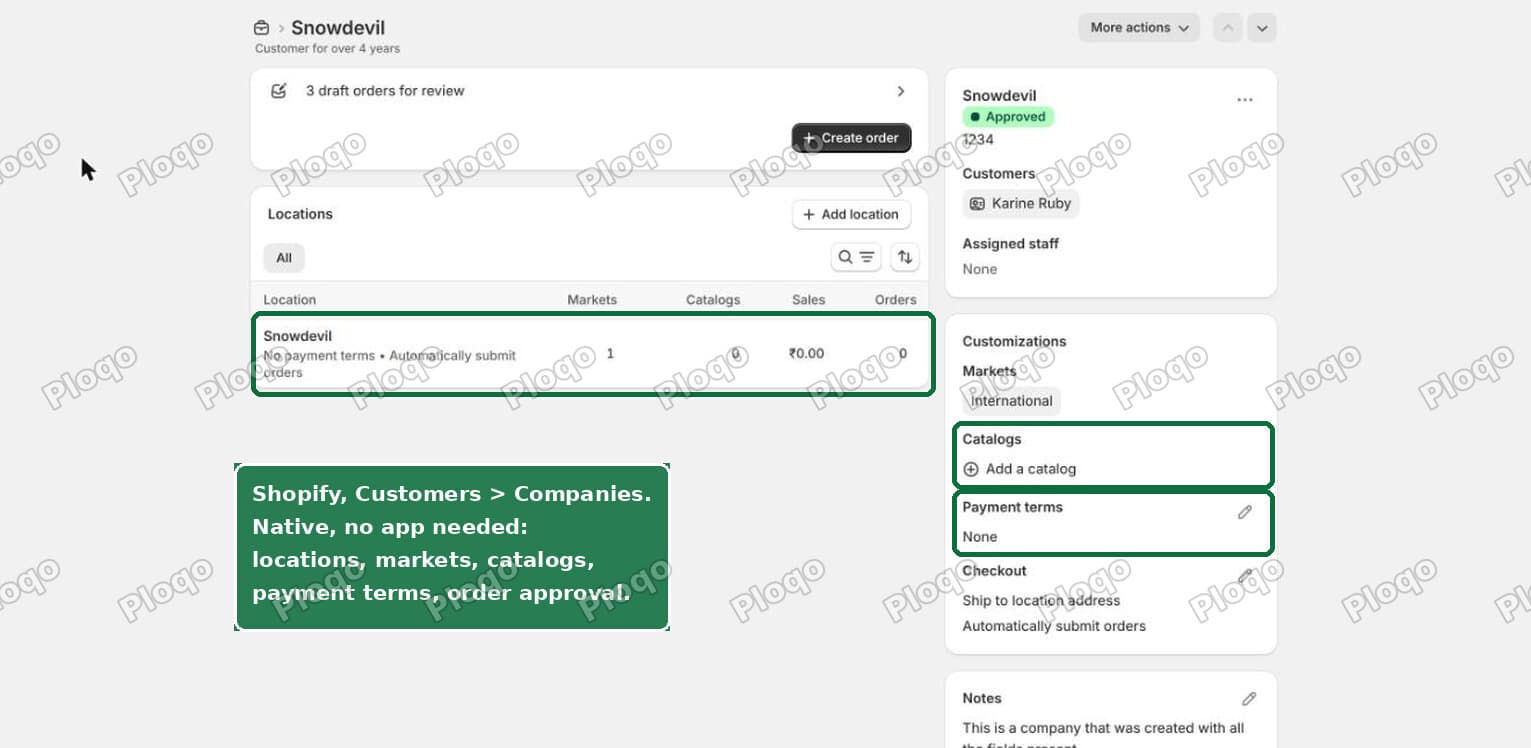 A B2B company record in the Shopify admin showing locations, markets, catalogs, payment terms and orders awaiting approval
That is native Shopify. No app, no Plus.
What you get on Basic
All of this works on the Basic plan:
- Companies and locations. A business is a company. It can have several locations, each with its own address and settings.
- Customer accounts tied to a company. Buyers log in and Shopify knows which business they are buying for.
- Ordering approval. New companies can be held for approval before they can order.
- Net terms. Invoice now, get paid in 30 days. Shopify tracks the due date and sends the reminders.
- Payment reminders, so you are not chasing manually.
- Quantity rules. Minimums, maximums and multiples. Sell only in cases of 12 if you want.
- Quantity price breaks. Cheaper per unit as the order gets bigger.
- Purchase order numbers on orders.
- Quick order lists, so a buyer can type SKUs and quantities instead of browsing.
- Easy reorders from past orders.
- The Trade theme, free, built for B2B.
- Shopify Flow automations.
 The Companies list in the Shopify admin, showing approval status for each business
For a lot of wholesale businesses, that list is the entire requirement.
What still needs Plus
Three things. Only one of them usually matters.
1. More than 3 active catalogs. On Basic, Grow and Advanced you can have up to three active catalogs across all your B2B markets. On Plus it is unlimited.
2. Assigning a catalog directly to one company. This is the important one, and it is explained below.
3. Split payments. Deposits, partial payments, and payment requests per fulfillment are Plus only.
Note what is not on that list. Net terms is on Basic. Delaying a payment is free. Only splitting a payment costs Plus.
What is a catalog?
A catalog is a price list with a product list attached. It answers two questions at once: which products can this buyer see, and what does each one cost them.
Say you sell a phone case at $10 retail. Your wholesale buyers do not pay $10:
- Acme Ltd, your biggest account, pays $4
- Bravo Ltd, mid sized, pays $6
- every other wholesale buyer pays $8
"Acme pricing" is one catalog. "Bravo pricing" is a second. Your general wholesale list is a third.
That is three catalogs, and you have just hit the Basic cap with three customers.
The limit that actually decides it
Here is the part that matters more than the cap itself.
On Basic, a catalog attaches to a market. A market is a group of buyers, normally by country. So every buyer in your "B2B UK" market sees the same prices.
On Plus, a catalog attaches directly to one company.
So on Basic you cannot give Acme a private price without giving it to every other UK buyer. The only workaround inside Shopify is to create a separate market per buyer, which becomes unmanageable quickly.
Individually negotiated pricing per customer is the normal way wholesale works. It is also the exact thing Basic cannot do natively.
That single sentence decides your plan.
How apps close the gap
This is where the answer stops being "upgrade to Plus".
Several apps do per-customer pricing with no cap on how many price tiers you can have. In their own words:
- BSS B2B Wholesale Pricing (4.9 stars, 1,094 reviews, from $29/month) offers "custom pricing, price lists, registration forms, net terms and tax control".
- Sami B2B Wholesale Pricing (4.9 stars, 926 reviews, from $24.90/month) offers "wholesale and volume pricing, tax-exempt checkout, multi-currency, quick order forms, and net term payments".
- Wholesale Pricing Discount B2B (4.9 stars, 691 reviews, from $24.99/month) runs "wholesale and retail in one store with tiered pricing, volume discounts, customer tags, net terms".
They all sell the same core thing: unlimited per-customer price lists. That covers both catalog limits, the cap and the per-company assignment, for roughly $25 to $30 a month instead of a Plus upgrade.
What the apps do not fix
Be clear about this before you commit.
They do not give you split payments. Nothing in those listings offers deposits, instalments, or invoicing per shipment. Those are checkout mechanics and an app cannot split a Shopify checkout payment. The usual workaround is draft orders and manual invoicing, which is work rather than a feature.
Check how the pricing is applied. Many wholesale apps historically worked by tagging customers and rewriting displayed prices on your ordinary storefront, rather than plugging into Shopify's native company accounts. If that is how the one you pick works, you get unlimited price tiers but you may not get the company, location and approval structure alongside them.
Ask that question on a trial before you migrate. It is the difference between one system and two.
Tax control, and why wholesale needs it
"Tax control" appears in every wholesale app listing and rarely gets explained.
Wholesale buyers often should not be charged tax at the point of sale. A US reseller with a resale certificate does not pay sales tax, because tax is collected later when they sell to the public. A VAT-registered business buying across a border is handled by reverse charge, so you invoice at zero percent.
So you need to mark a company as tax exempt and have checkout honour it. Get it wrong and you either overcharge your customers or owe money you never collected.
Shopify quantity breaks and volume pricing
These two terms get used interchangeably and they are the same idea: the unit price drops as the quantity rises. Buy 10 and pay $9 each, buy 100 and pay $7 each.
Both are on Basic. You set them per catalog, so every buyer on that catalog sees the same ladder.
Quantity rules are a separate setting and worth turning on at the same time. They let you enforce a minimum order, a maximum, and an increment. If you only ship in cases of 12, set the increment to 12 and the store will not let anyone order 7.
Do you need the Trade theme?
Trade is Shopify's free theme built for B2B. It is on every plan.
It ships with the B2B pieces already built: a quick order list, quantity rules displayed properly, volume pricing tables, and company account requests.
You can run B2B on other themes. Dawn shows volume price breaks, and Horizon is compatible. But a theme has to do real work to support B2B: it needs to read which company and which location the buyer is ordering for, and show a location picker when a buyer belongs to more than one. Miss that and a multi-location buyer gets the wrong prices.
Trade already does it. Starting anywhere else means rebuilding what Trade gives you free.
Which route to pick
Work down this list and stop at the first one that matches.
- Three or fewer price tiers, buyers grouped by region: Basic covers you natively. No app.
- Every buyer has their own negotiated prices: Basic plus a wholesale app at around $25 to $30 a month.
- You need deposits or instalment billing: that is Plus, and there is no way around it.
Notice that the plan question is really a pricing-model question. Answer "how many distinct price lists do I need, and are they per customer or per region" and the plan chooses itself.
That is a much easier question than "should I move to Shopify".
Spending too long on manual Shopify busywork?
PinFlow turns your Shopify catalog into Pinterest pins and posts them on a schedule, automatically. Same idea as the rule above, let the system handle the repetitive part.
Get PinFlow on the Shopify App StoreMore Shopify fixes
More community-sourced Shopify guides, tested on a live store.
Shopify Admin
Shopify New Admin (2026): Where Search, Sidekick and Settings Went
Shopify's new admin moved search, alerts, the store switcher and Settings into the black sidebar, and Sidekick to a bar at the bottom. Where each one is now.
Shopify Admin
How to Use the New Shopify Admin (2026): Every Main Screen
A tour of the new Shopify admin: the black sidebar, search and Ctrl K, Home, Orders, Products, Settings and Sidekick, with where to click on each screen.
Shopify Admin
Schedule a Black Friday Sale in Shopify (Auto Start and End)
Give the discount its own start and end date and put the sale banner in an Event rollout with the same dates. Both start at midnight and end after Cyber Monday.