
Shopify Cart Drawer Pushes the Page? Fix It on Horizon
On Shopify's Horizon theme the cart drawer shoves the whole page sideways on desktop instead of floating over it. Here is the free, one-file fix to bring back the flyover cart.
By AjayCodeWiz · August 14, 2026 · 8 min read
The problem
You add something to the cart on your Shopify store, the cart drawer opens, and the whole page jumps sideways to make room for it. It does not float over the page like it used to. It shoves everything left.
A merchant hit exactly this on the Shopify Community. They were on the Horizon theme and asked for the "normal flyover cart" back, the kind that slides in over the page instead of pushing it.
I reproduced it on a test store running Horizon, found why it happens, and built a small fix. The page stops moving, and the cart floats over a dimmed page again. It is free, it is one block of code, and it does not need an app.
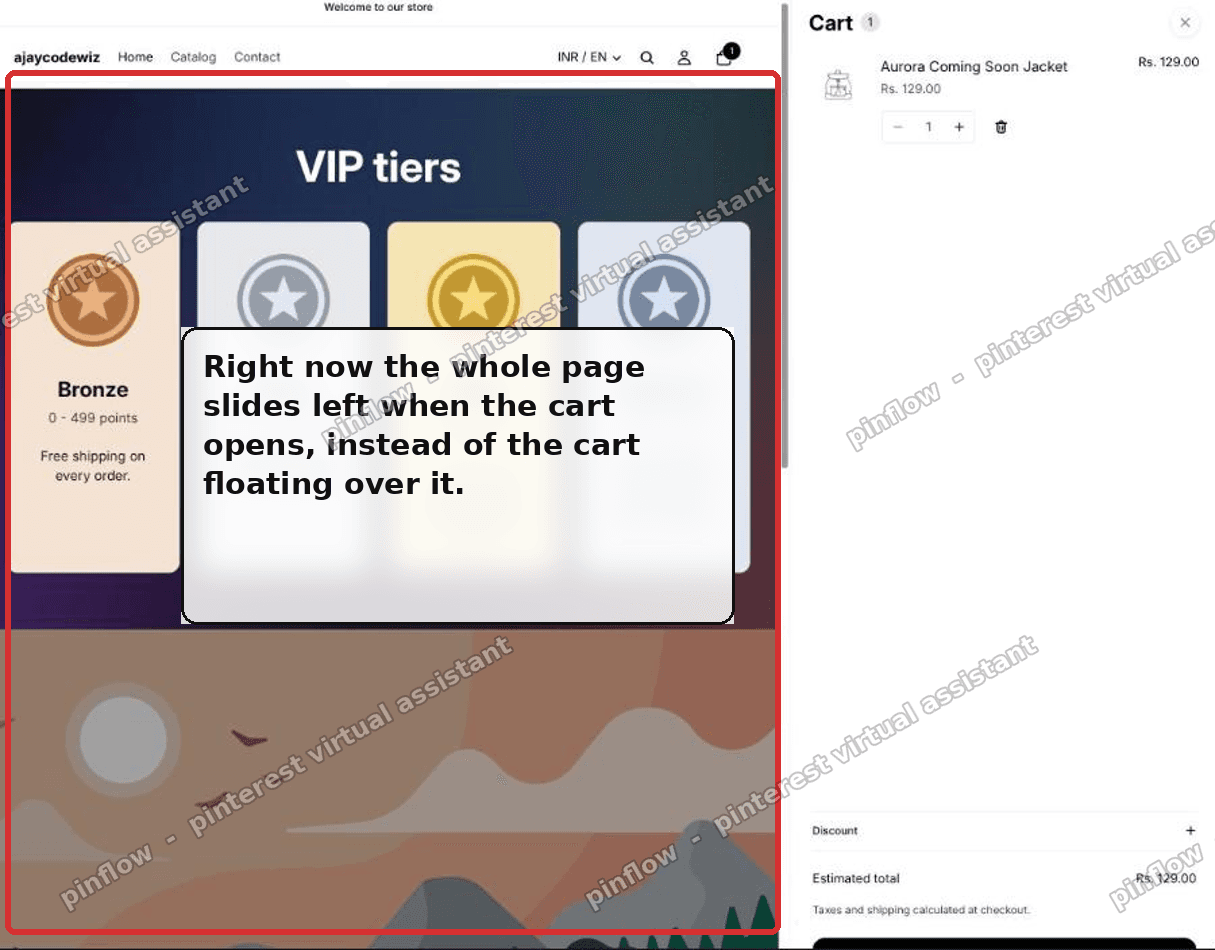 The Horizon cart drawer pushes the whole page sideways when it opens
What a cart drawer is
Quick definition, because it matters here.
A cart drawer is the little cart panel that slides out from the side when you add a product, so shoppers can see their cart without leaving the page they are on. Shopify themes also call it a slide cart, side cart, or mini cart.
The alternative is a cart page, where clicking the cart takes the shopper to a full /cart page and away from what they were browsing. Drawer keeps them on the page. That is why most stores prefer it.
Why Horizon pushes the page instead of floating over it
This is the part forum answers skip, so here is the mechanism in plain words.
Horizon has two different behaviors for the cart drawer, and it switches between them based on screen width.
- On phones and narrow screens (under 990 pixels wide), the cart opens as an overlay. It floats over the page and dims everything behind it. This is the classic flyover.
- On desktop (990 pixels and wider), Horizon does something different. It slides the cart in and pushes the whole page sideways to sit next to it. No overlay, no dim. The page just shifts.
So nothing is broken. This is how the current Horizon theme is built. The desktop cart is a "squeeze" drawer by design, and there is no setting in the theme editor to turn it back into an overlay.
That is the whole reason merchants feel like the flyover cart "disappeared." On a wide monitor they only ever see the squeeze version.
I checked this against the latest Horizon release, and the behavior is the same there. It is not something that only happens on old copies of the theme.
First, a quick check before you touch code
Before the fix, rule out the simplest cause. Your cart might be set to open as a full page instead of a drawer.
- In your admin, go to Online Store, then Themes, then Customize.
- Open Theme settings, then Cart.
- Look at the Type setting. If it is set to Page, switch it to Drawer.
If Type was already set to Drawer and the page still slides sideways on desktop, that confirms you are seeing the squeeze behavior. The code below fixes that.
The fix: bring back the flyover cart on Horizon
The fix does two things. It stops the page from shifting, and it adds the dim overlay back so the cart reads as a floating panel. It only changes desktop, because your mobile cart already floats.
Here is where the code goes.
- In your admin, go to Online Store, then Themes.
- Next to your Horizon theme, click the three dots, then Edit code.
- Open the file
layout/theme.liquid. - Scroll to the very bottom and paste the block below just before the closing
</body>tag. - Click Save.
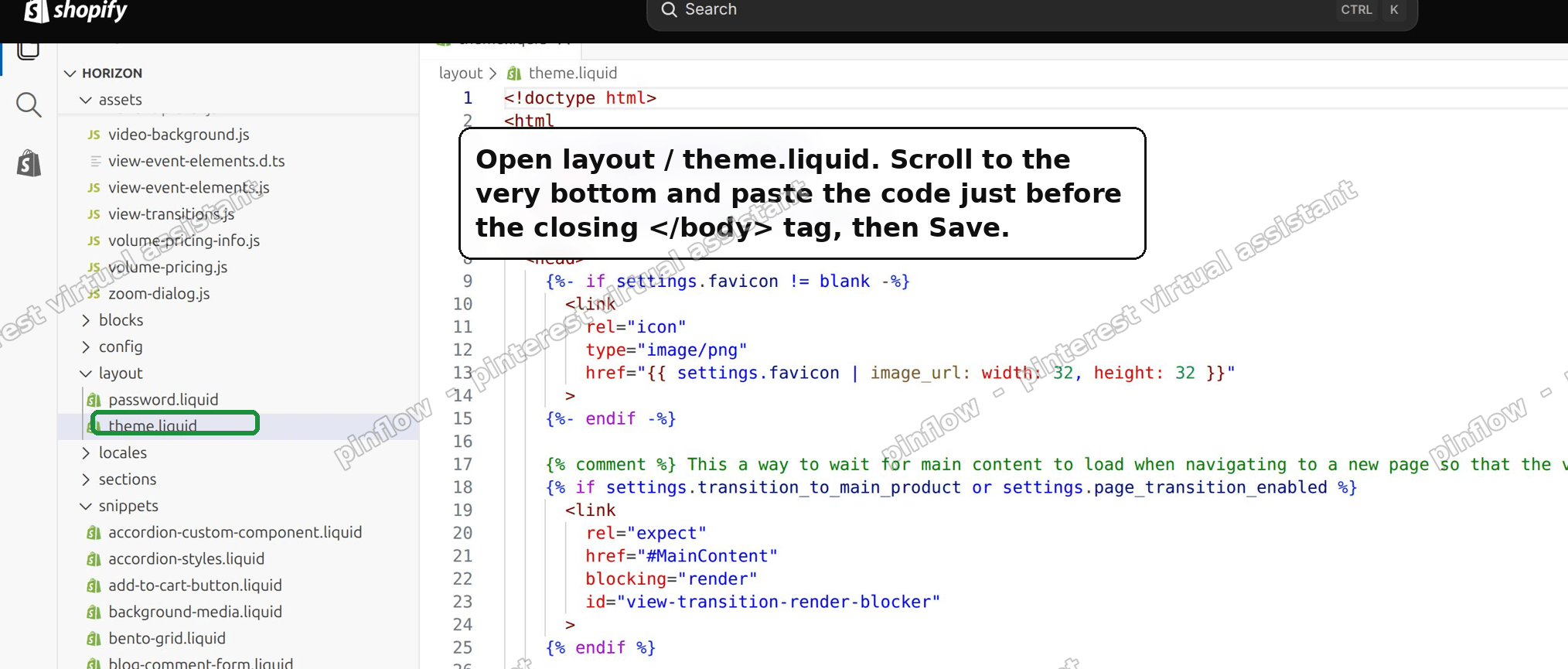 Open layout/theme.liquid in the code editor and paste before the closing body tag
This is the code to paste:
{%- comment -%} Flyover cart drawer on desktop {%- endcomment -%}
<style>
  @media screen and (min-width: 990px) {
    .page-wrapper--drawer-open { margin-right: 0 !important; }
    .flyover-scrim {
      position: fixed;
      inset: 0;
      opacity: 0;
      pointer-events: none;
      background: rgba(0, 0, 0, 0.5);
      z-index: calc(var(--layer-sticky, 8) - 1);
      transition: opacity 0.25s ease;
    }
    .flyover-scrim.is-visible { opacity: 1; pointer-events: auto; }
  }
</style>
<script>
  (function () {
    var wide = window.matchMedia('(min-width: 990px)');
    var scrim = document.createElement('div');
    scrim.className = 'flyover-scrim';
    scrim.addEventListener('click', function () {
      var d = document.querySelector('theme-drawer[open]');
      if (d && typeof d.close === 'function') d.close();
    });
    document.body.appendChild(scrim);
    document.addEventListener('theme-drawer:open', function () {
      if (wide.matches) scrim.classList.add('is-visible');
    });
    document.addEventListener('theme-drawer:close', function () {
      if (!document.querySelector('theme-drawer[open]')) scrim.classList.remove('is-visible');
    });
    if (wide.matches && document.querySelector('theme-drawer[open]')) scrim.classList.add('is-visible');
  })();
</script>
The first line inside the style block is the important one. It stops the page from being pushed to the side. The rest adds a dark, see-through layer behind the cart so the page dims, and lets a shopper click that dim area to close the cart.
Save it, then open your store on a desktop screen and add something to the cart. The page should stay put, and the cart should slide in over a dimmed page.
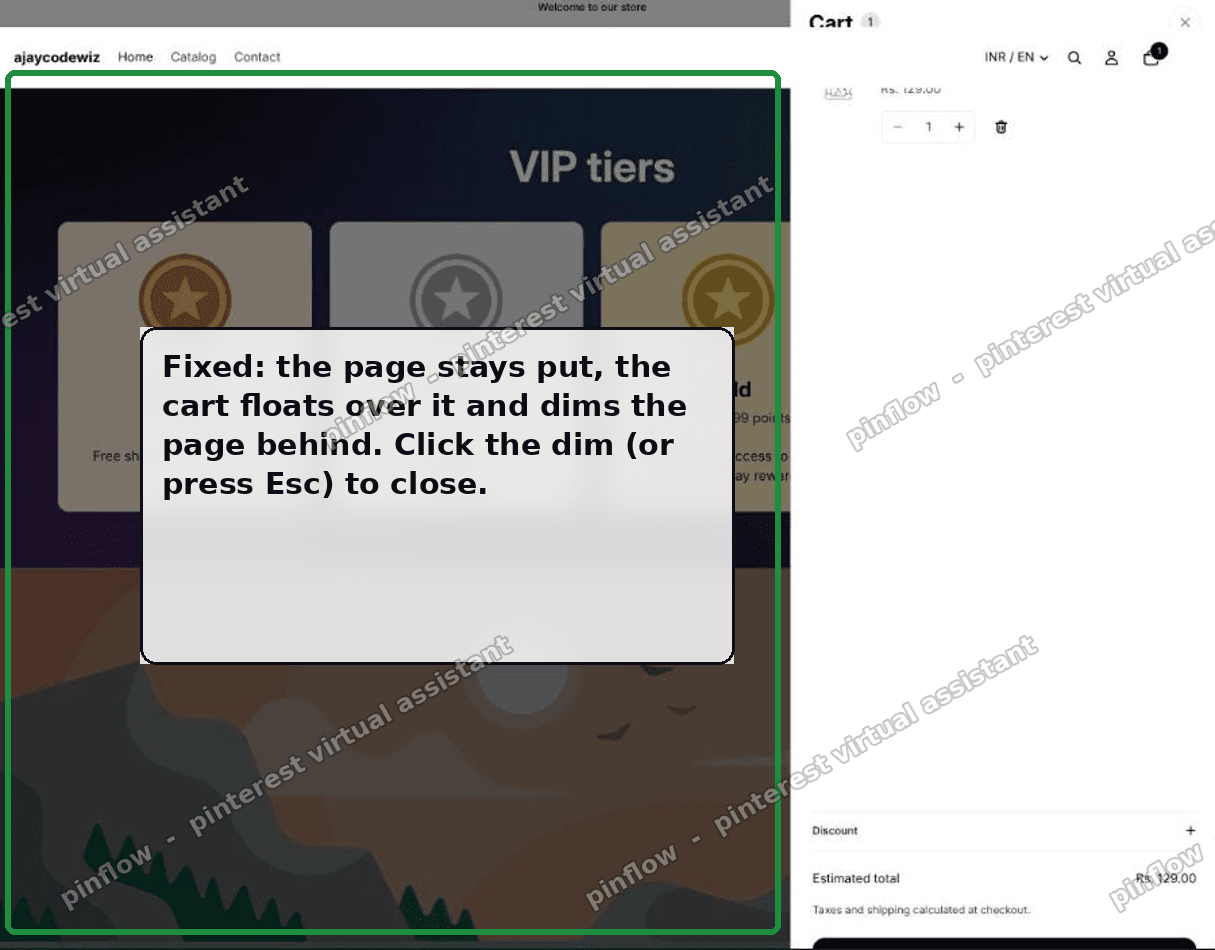 Fixed: the cart floats over the page and dims it, and the page no longer shifts
On my test store this behaved exactly as expected. The page stopped moving, the cart floated over it, and clicking the dim closed it.
How to adjust it
Two things are easy to tweak.
- Darkness of the dim. Change the
0.5inrgba(0, 0, 0, 0.5). Use0for no dim at all, or a higher number up to1for a darker, more dramatic overlay. Something like0.4is a gentle dim. - If you do not want the dim or the click-to-close at all, keep only the
.page-wrapper--drawer-open { margin-right: 0 !important; }line and delete everything else. That alone stops the page from shifting, and the cart simply floats over without dimming anything.
Horizon 4.2: the cart opens over the page, but nothing dims
Newer versions of Horizon add a second version of this problem. A merchant on Horizon 4.2.0 reported it on the Shopify Community: the cart drawer opened, the page behind it did not dim, and the page could still be scrolled.
They had already followed another reply and changed two theme files so the cart opens as an overlay on desktop too. That part worked. On their store the page behind the cart was locked, so it no longer scrolled. But the dark layer that should sit behind the cart never appeared. The page looked exactly as it did before, just frozen, so it seemed like the edits had failed.
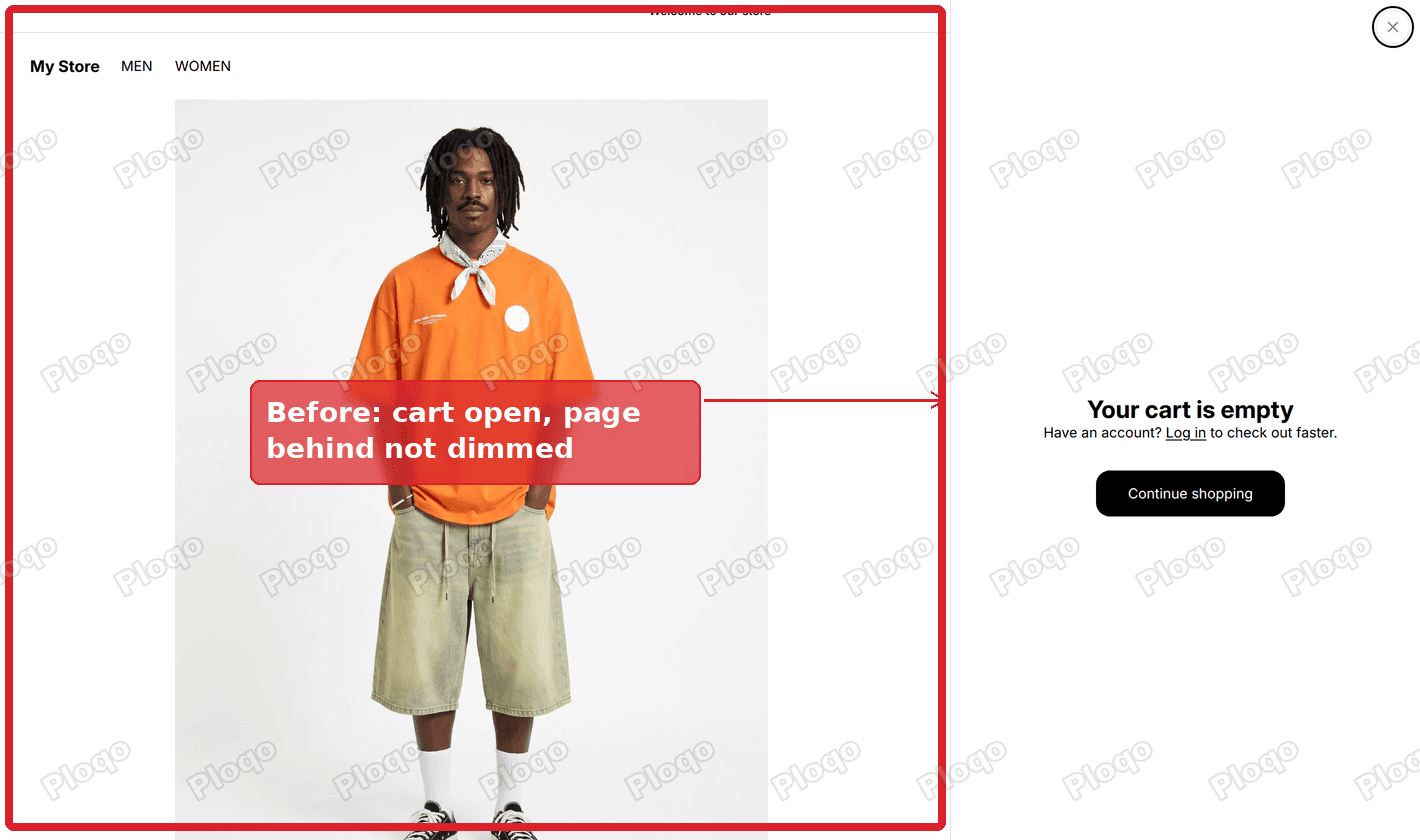 Horizon 4.2 cart drawer open on desktop, with the page behind it not dimmed
The dark layer is there. It is transparent. Horizon 4.2 colours that layer from the theme's shadow colour setting, and on this store that value came out empty, so the layer was drawn with no colour at all. The theme's own default is also very light, about 15 percent black, so even when it works it is easy to miss.
The fix is one line of CSS that gives the layer a real colour. CSS is the styling code that controls how a theme looks. You do not need to open the code editor for this one, because Shopify has a Custom CSS box in the theme editor that applies to the whole store.
Add the overlay colour in Custom CSS
- Go to Online Store in your Shopify admin.
- Click Edit theme on your Horizon theme.
- Click the Theme settings icon at the top of the left-hand icon bar. It looks like a gear.
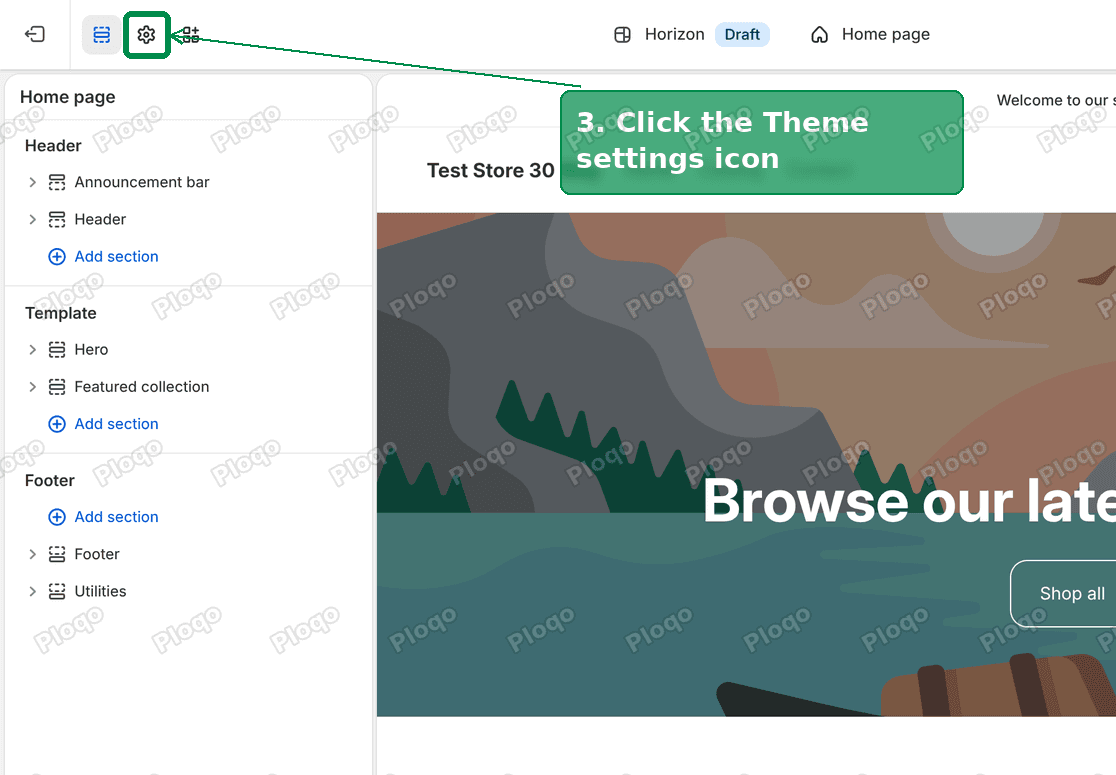 Theme settings icon in the Horizon theme editor
- Scroll to the bottom of the list and click Custom CSS.
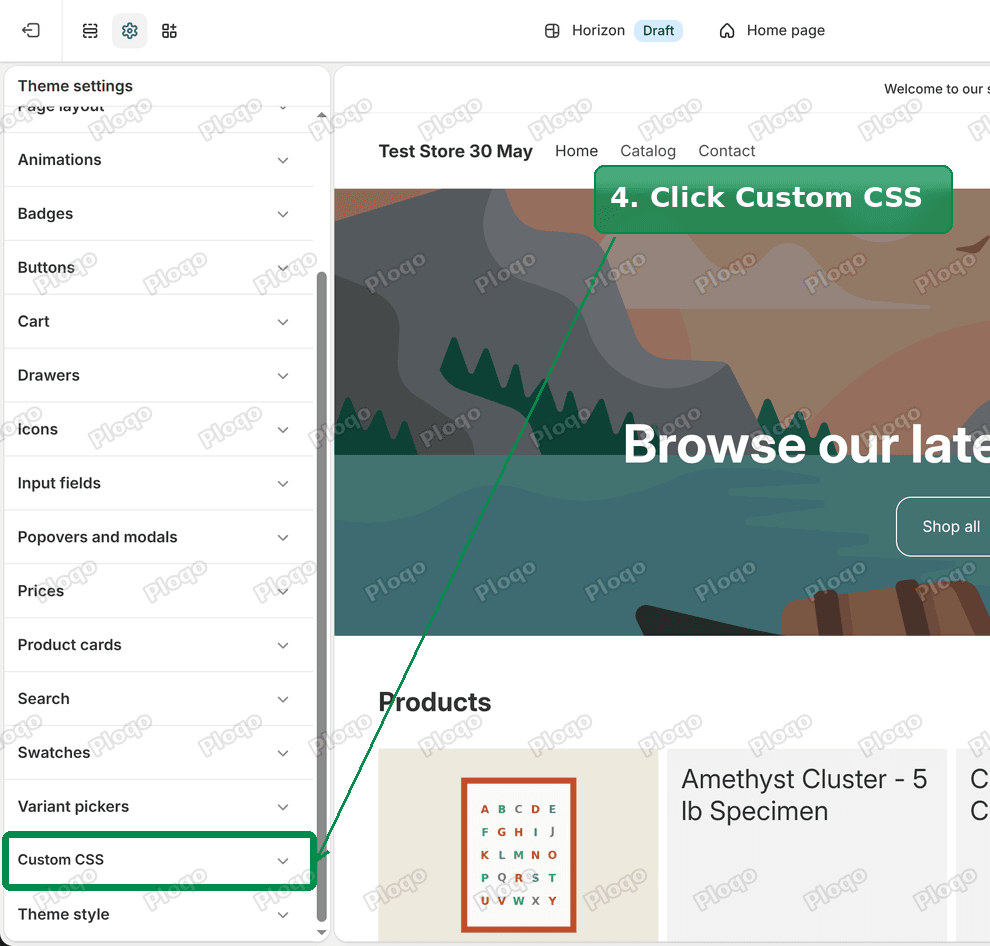 Custom CSS at the bottom of the Theme settings list
- Paste this line into the box:
.theme-drawer__dialog::backdrop { background: rgb(0 0 0 / 0.5); }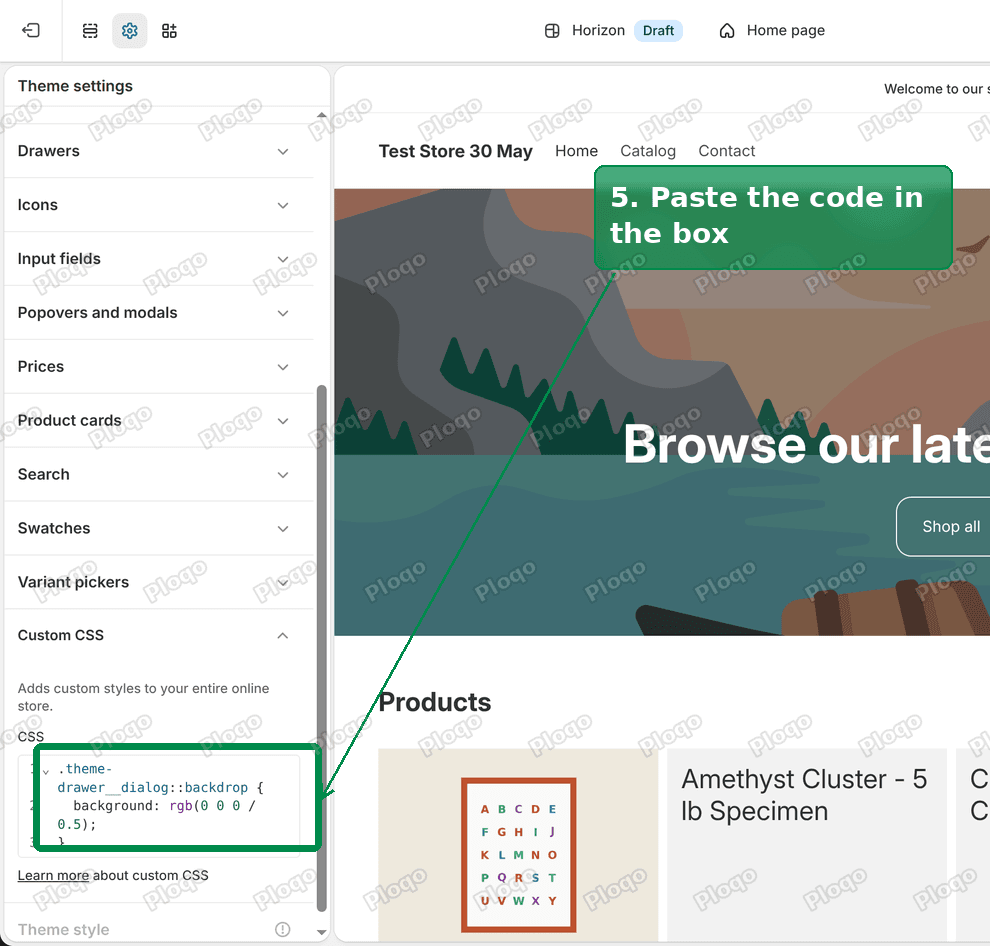 The overlay line pasted into the Custom CSS box
- Click Save in the top right corner.
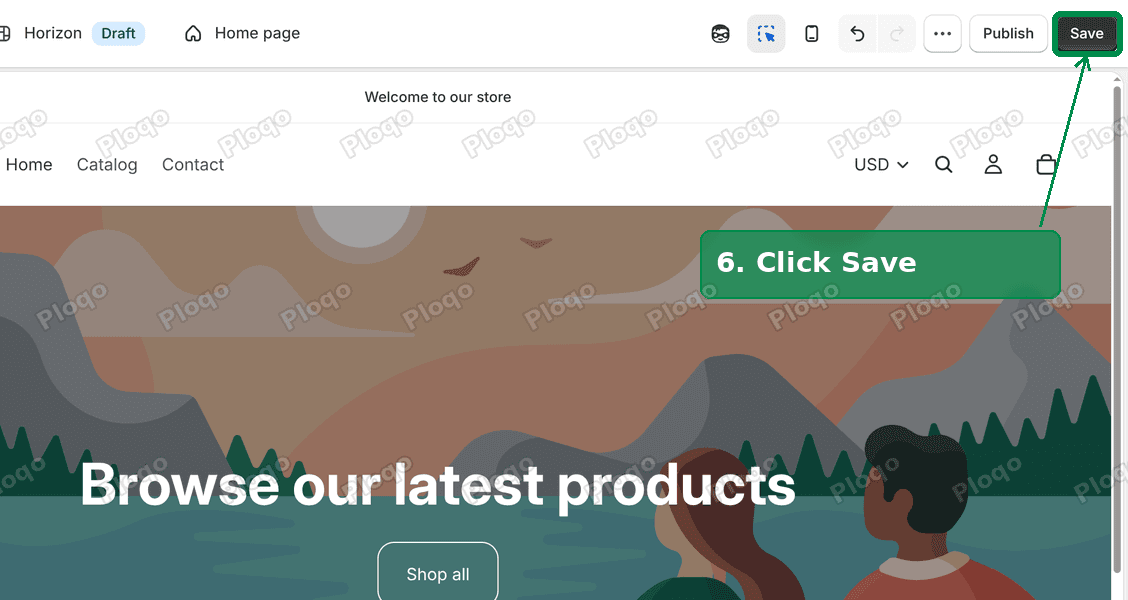 Save button in the theme editor
Open your store on a desktop screen and click the cart. The page behind it now dims.
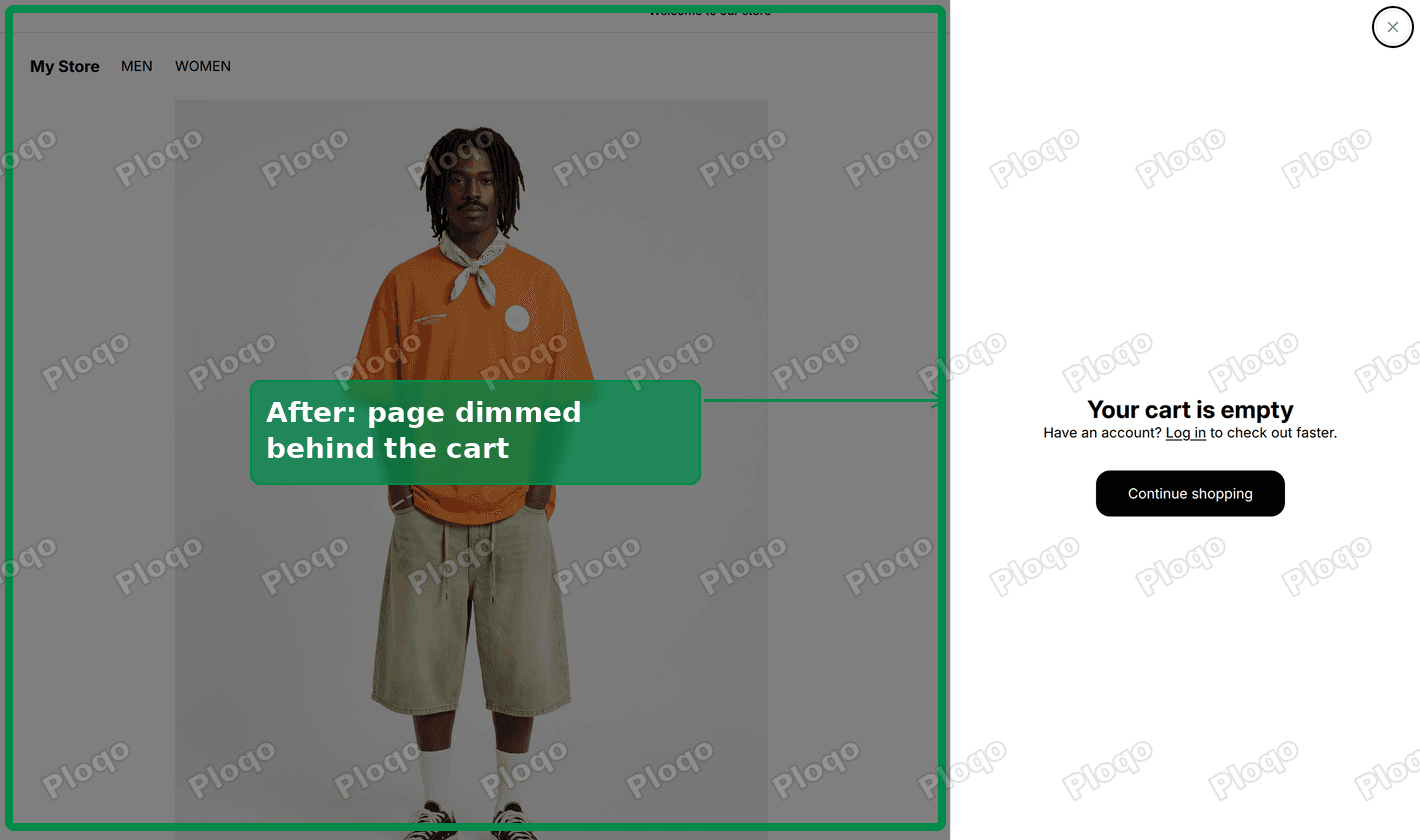 After: the page is dimmed behind the Horizon 4.2 cart drawer
We tested the line on the merchant's own live store, which runs Horizon 4.2.0. The overlay went from fully transparent to 50 percent black, and the page behind the cart stayed locked.
A few notes on this version of the fix:
- The
0.5sets how dark the overlay is.0.3gives a light dim and0.7a heavy one. - The line also darkens the page behind Shopify's chat drawer, if you use Shopify Inbox. Horizon 4.2 builds both drawers the same way.
- On older Horizon versions (3.x) the cart uses a different name for this layer. If the line does nothing on your store, add
.cart-drawer__dialog::backdropto it, like this:.theme-drawer__dialog::backdrop, .cart-drawer__dialog::backdrop { background: rgb(0 0 0 / 0.5); }. - Custom CSS is a theme setting, not a code file, so you never have to open the code editor to change or remove it.
Which fix do you need?
Open your cart on a desktop screen and look at the page behind it.
- If the page slides sideways to make room for the cart, use the
layout/theme.liquidblock earlier in this article. It stops the push and adds its own dim layer. - If the page stays still and locks in place but does not darken, use the Custom CSS line in this section.
The Horizon 4.2 case came from <a href="https://community.shopify.com/t/problem-with-my-cart-drawer/688769" rel="nofollow">this Shopify Community thread</a>.
The no-code alternative: a slide cart app
If you would rather not edit theme code, a slide cart app replaces the built-in drawer with its own overlay cart. Popular ones include Slide Cart, Corner, and iCart.
These usually add more than just the overlay. Most of them bundle a free-shipping progress bar, upsell and cross-sell offers inside the cart, and a sticky cart button. If you want those extras anyway, an app can be a good trade. If all you want is the flyover behavior, the code above does it for free.
Will this slow my store down?
No. The code is tiny. It is a small block of CSS and a few lines of JavaScript that only run when the cart opens. There is no external file to load and no app to install, so there is nothing measurable to slow a page down.
Does the fix affect mobile?
No. The whole block is wrapped in a rule that only applies at 990 pixels and wider. On phones and small tablets your cart already opens as an overlay, and this leaves that untouched. You are only changing the desktop behavior that was pushing the page.
Why is there no setting for this in the theme editor?
Horizon exposes a Cart Type setting for Page versus Drawer, but it does not expose a separate control for overlay versus push-style drawer. The push behavior on desktop is baked into the theme, not offered as an option.
That is common with newer Shopify themes. They ship with fewer visual toggles and expect this kind of change to be a small code customization or an app. It is why both the merchant and the people replying on the forum landed on "it needs a code edit."
Will a theme update undo this?
It can. Because the code lives in layout/theme.liquid, updating Horizon to a newer version replaces that file with a fresh copy, which would remove your added block.
Two things help. First, theme updates are not automatic, so this only happens when you choose to update. Second, keep a copy of the code block somewhere safe, so that after an update you can paste it back in a minute. If you use a slide cart app instead, an update will not remove it, since the behavior lives in the app rather than the theme file.
Cart drawer terms people mix up
- Cart drawer. The cart panel that slides out from the side and keeps the shopper on the page.
- Slide cart, side cart, mini cart. Different names for the same cart drawer.
- Flyover or overlay cart. A cart drawer that floats over the page and dims it, rather than pushing the page aside.
- Push or squeeze drawer. A cart drawer that shifts the page sideways to sit next to it. This is Horizon's desktop default.
- Cart page. A full separate
/cartpage, the opposite of a drawer, which takes the shopper off the page they were on.
The short version
On Horizon, the desktop cart drawer pushes your whole page sideways by design, and there is no theme setting to change it. Below 990 pixels it already floats over the page like a normal flyover cart.
To bring the flyover back on desktop, paste one block into layout/theme.liquid before </body>. It stops the page shifting and dims the page behind the cart, and mobile is left alone.
Tested on a Horizon store: with the block in place the page no longer moves, the cart slides in over a dimmed page, and clicking the dim closes it. No app, no monthly fee, one file changed.
Spending too long on manual Shopify busywork?
PinFlow turns your Shopify catalog into Pinterest pins and posts them on a schedule, automatically. Set it once and let the system handle the timing, the same way a small code tweak can handle the rest.
Get PinFlow on the Shopify App StoreMore Shopify fixes
More community-sourced Shopify guides, tested on a live store.
Themes & Storefront
Shopify AI Section: Fix a Price Badge Hidden Behind the Image
You built a section with Shopify's AI section generator, but the price badge on each card sits behind the photo. Here is the Custom Liquid fix that brings it to the front without regenerating anything. Tested on a Dawn store.
Themes & Storefront
Hide Shipping Calculated at Checkout on One Shopify Product
The line under Add to cart that says shipping is calculated at checkout shows on every product, gift cards included. Here is how to hide it on one product only, with the code, screenshots and the Eclipse theme steps.
Themes & Storefront
Shopify Dropdown Menu Behind Page Content (Z-Index Fix)
Your Shopify dropdown or mega menu opens, but the page title and products sit on top of its links and the menu closes before you can click. The fix is one Custom CSS rule in Theme settings. Tested on a Rebel store.