
How to Create a Discount Code in Shopify
Create a working Shopify discount code, from one code to bulk-generated codes, plus the shareable link that applies it, no app needed.
By AjayCodeWiz · July 27, 2026 · 10 min read
The problem
A merchant asked about this on the Shopify Community.
They were planning a new online store. They wanted to offer their own voucher codes to customers. They had looked at a coupon site and started listing features they thought they would need to build: a copy-code button, campaign tracking, a page that lists active codes, and more.
The worry is common. It feels like running your own discount codes needs custom development or a paid app.
It does not. Almost all of it is already in Shopify.
I reproduced the whole thing on a test store. Below is how to create a discount code, how to hand it to customers without a copy-code button, and where people get stuck.
Why it happens
Shopify keeps discounts in one place, and it is easy to miss how much is packed into it.
A "discount code" in Shopify is a rule attached to the cart. When a shopper enters the code, or arrives through a link that carries it, Shopify checks the rule and takes money off the order total. You do not host the coupon anywhere. You do not write any code. You create the rule once, and Shopify enforces it everywhere: online store, checkout, and even a shareable link.
Because it is a cart rule, everything you would expect to build yourself is a setting on that rule instead. Start and end dates, minimum spend, usage caps, and whether codes can stack are all checkboxes. The mechanism the short forum answers skip is this: you are configuring a rule, not building a coupon system.
Before you start: code or gift card?
Settle this first, because the two things do not carry over.
A discount code (in German, Gutscheincode) is a rule on the cart. It takes a set amount or a percentage off, or gives free shipping. It costs nothing to issue. You can make as many as you like.
A gift card (Geschenkgutschein) is a prepaid balance. It is sold as a product, or issued to a customer. It has its own rules and its own balance tracking. It is money the customer already paid for.
If you mean "take 10 percent off with WILLKOMMEN10," you want a discount code. If you mean "here is a 50 euro voucher the customer can spend," you want a gift card. This article is about discount codes.
The fix: create a discount code
Here is the full path I tested on a store.
Step 1. Open Discounts.
In your Shopify admin, go to Discounts in the left menu. Click Create discount.
Step 2. Pick the discount type.
Shopify offers four types:
- Amount off products - money or percent off specific products or collections
- Amount off order - money or percent off the whole order
- Buy X get Y - a free or discounted item when they buy something
- Free shipping - drops the shipping cost
For a simple "10 percent off everything" welcome code, choose Amount off order.
Step 3. Choose "Discount code," not "Automatic."
Near the top, Shopify asks whether this is a Discount code or an Automatic discount. A discount code needs the shopper to enter or carry a code. An automatic discount applies with no code at all. Choose Discount code here.
Step 4. Name the code.
Type the code customers will use, for example WILLKOMMEN10. Keep it short and easy to type. Shopify shows a Generate button if you want a random code instead.
The code is not case sensitive. willkommen10 and WILLKOMMEN10 both work.
Step 5. Set the value.
Set Percentage to 10, or set a fixed amount like 5 euros off. Choose whether it applies to the whole order or only certain collections.
Step 6. Set the rules (all optional).
This is where Shopify replaces the features people think they must build:
- Minimum purchase requirement - require a minimum spend or minimum quantity before the code works
- Maximum discount uses - cap the total number of uses, and limit it to one use per customer
- Combinations - decide whether this code can stack with product, order, or shipping discounts
- Active dates - set a start date and time, and an end date and time
Step 7. Save.
Click Save. The code is live.
That is the entire creation flow. No app, no code, no developer.
Hand the code to customers without a copy-code button
The merchant thought they needed to build a button that copies the code to the clipboard. They do not. Shopify generates a link that applies the code by itself.
Open the code, then Promote, then Get a shareable link.
Go back into Discounts, open the code you made, click Promote, then Get a shareable link.
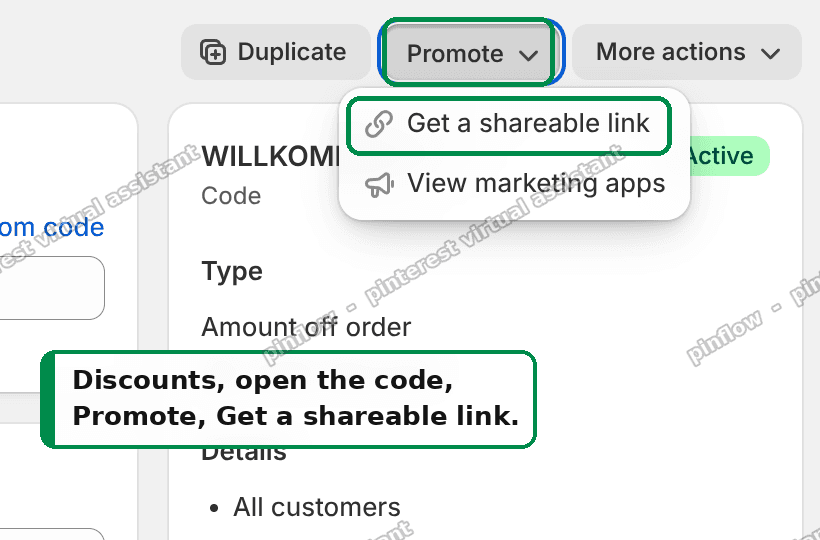 Shopify Discounts, open the code, then Promote, then Get a shareable link
Shopify gives you a link like https://yourshop.de/discount/WILLKOMMEN10, plus a QR code you can print.
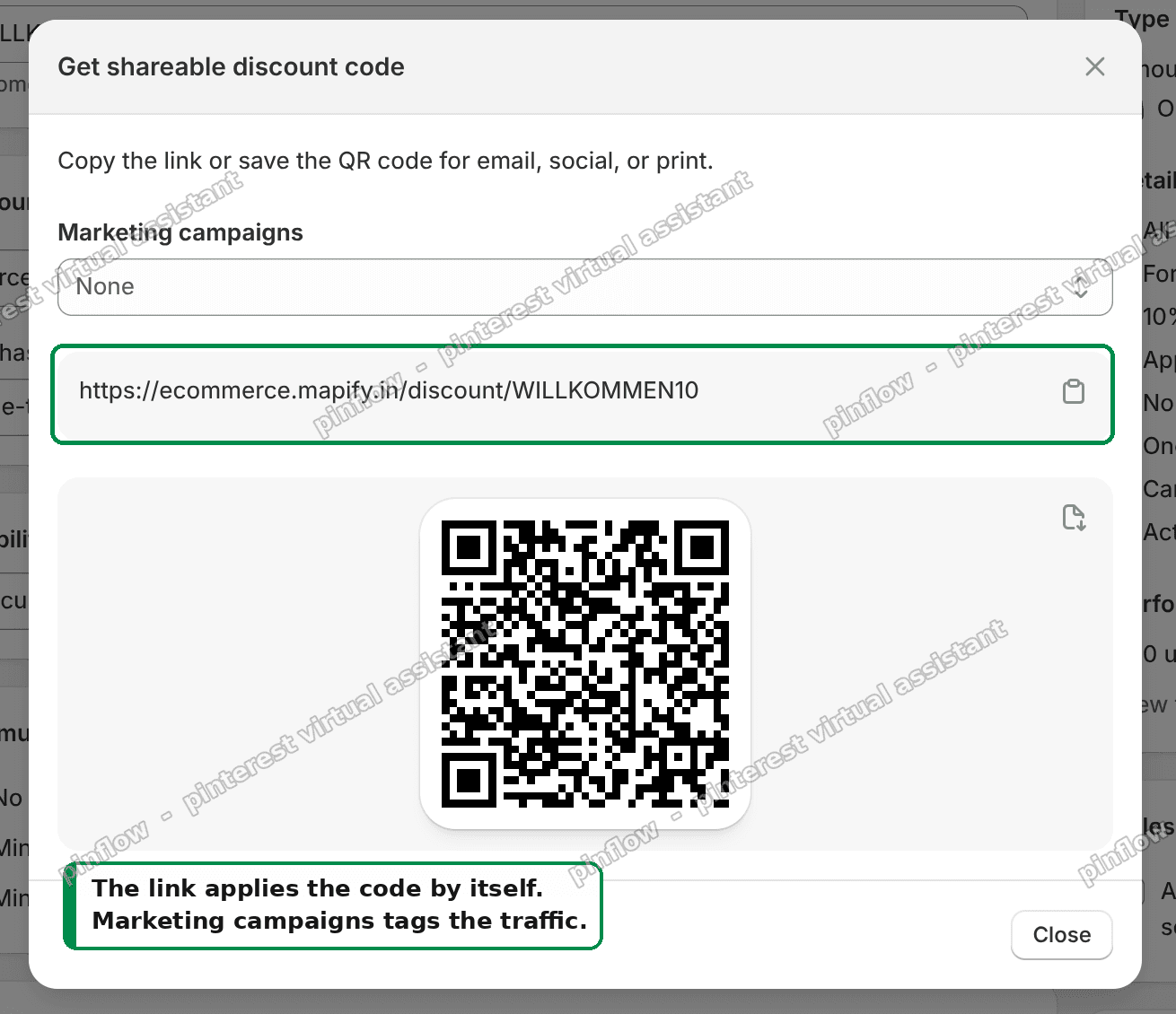 The shareable discount link, a QR code, and the Marketing campaigns dropdown
Two things about that link:
- Add
?redirect=/collections/saleto the end to land people on a specific page. The full link becomeshttps://yourshop.de/discount/WILLKOMMEN10?redirect=/collections/sale. - The code in the link is not case sensitive, same as typing it.
I tested this on a dev store. I opened the link, added one item, and went to the cart. The total went from 525.00 to 472.50, with the code already attached. Nothing was typed at any point.
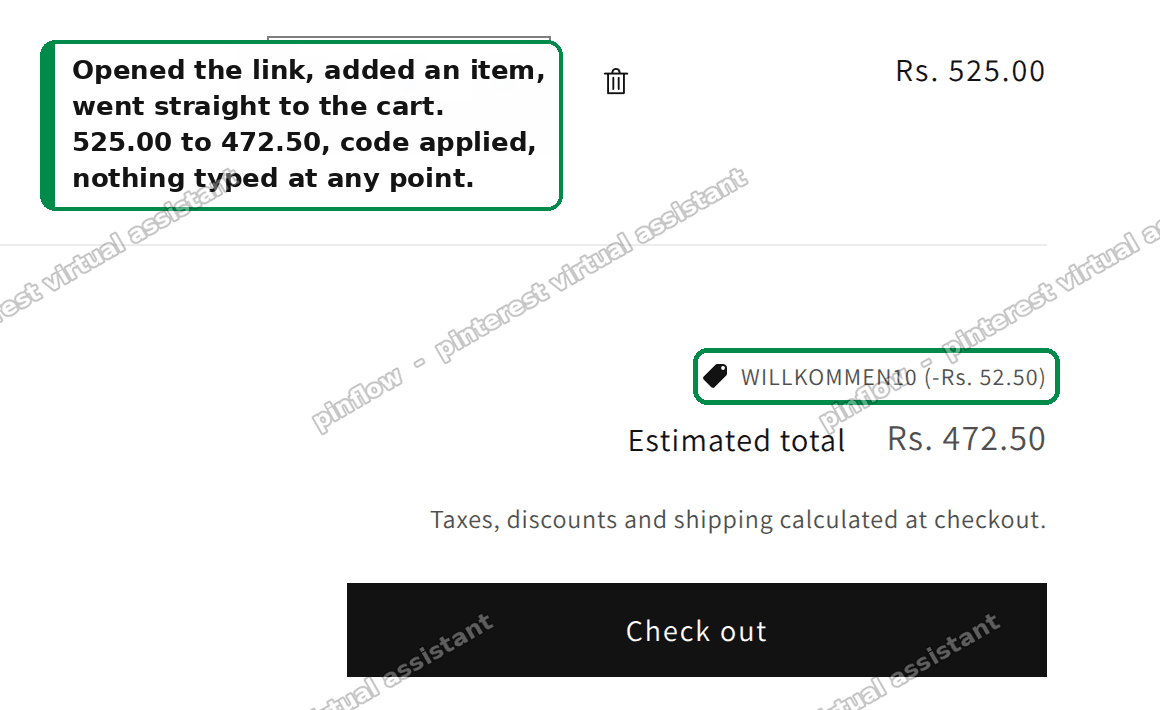 Cart with the discount code applied, total dropped from 525.00 to 472.50, nothing typed
That is a Shopify discount code before checkout, applied for the customer, with zero custom work.
Campaign tracking is built in too
The merchant also wanted to know which code came from which campaign and which source. Shopify tracks that for you.
The same Get a shareable link dialog has a Marketing campaigns dropdown. Attach the link to a campaign there, and Shopify tags the traffic. Then, on the discount page, click View the sales by discount report. You get which code, which campaign, and which source, with no analytics app.
So the list of "features to build" shrinks to almost nothing. Dates, minimum spend, usage caps, combinations, shareable links, QR codes, and campaign tracking are all already there.
An alternative: a Shopify bulk discount code generator
One code is easy. But sometimes you need hundreds of unique codes, for example one per influencer, one per printed flyer, or one per customer so a single code cannot be shared around.
Shopify has a bulk option built in.
When you create a discount and reach the code field, click Generate code to get a random one. For many codes at once, create the discount, save it, then use the bulk actions on the discount to generate multiple unique codes under the same rule. Each shopper gets their own code, but they all point at the same discount settings.
If you need thousands of codes exported to a spreadsheet, there are free apps in the Shopify App Store built only for this, like a bulk discount code generator. They create the codes, hand you a CSV, and still ride on Shopify's native discount rules underneath. You do not lose the built-in dates, caps, or reporting.
For most small stores, a handful of hand-named codes is plenty. Reach for a bulk generator only when you genuinely need many unique codes.
How to make a discount code on Shopify for a specific product
A common follow-up: you want the code to work only on one product or one collection.
Do it at Step 2. Choose Amount off products instead of Amount off order. Then Shopify lets you pick the exact products or collections the code applies to. Everything else in the flow is the same. The code will only reduce the price of the items you selected.
This is how "20 percent off summer dresses" codes are built. The rule is scoped to the collection, and the rest of the cart pays full price.
Can customers apply a Shopify discount code before checkout?
Yes. There are two moments a code can go in.
- In the cart. Most themes show a discount field on the cart page or in the cart drawer. The shopper types the code, and the total updates before they reach checkout.
- At checkout. Shopify's checkout always has a discount code box, even if your theme hides the cart one.
The shareable link method from above applies the code even earlier, the moment they click the link. So a Shopify discount code before checkout is normal and expected. If your theme is missing the cart field, the checkout field is still there as a fallback.
What Shopify does not give you
One thing is not built in: a public page that lists your active codes, like the coupon site the merchant looked at.
There is no native "here are all our codes" page. That is a normal page you build yourself.
If you want one, the clean way is metaobjects. A metaobject is a custom content record in Shopify. Create one entry per code, publish the entries as web pages, and point them all at one shared template. You get a tidy, repeatable deals page without a plugin. But this is optional, and most stores never need it. The codes work whether or not you list them on a page.
If it did not work
A few things trip people up:
- The code does nothing at the cart. Check the Active dates. If the start date is in the future, or the end date has passed, the code is inactive.
- "This code is not valid." Check the Minimum purchase requirement. If the cart is below the minimum, Shopify refuses the code. Also check whether you scoped it to products the cart does not contain.
- The code will not stack with another discount. Look at Combinations on the discount. By default, codes do not combine. Turn on the specific combination you want.
- The shareable link 404s. Make sure the discount is a Discount code, not an Automatic discount. Only code discounts get a
/discount/CODElink. - One customer used it many times. Set Limit to one use per customer under maximum uses. This needs customers to be logged in to be fully enforced.
Definitions people confuse
- Discount code vs automatic discount. A code needs the shopper to enter or carry it. An automatic discount applies with no code. Same discount engine, different trigger.
- Discount code vs gift card. A code is a rule that reduces a price. A gift card is prepaid money sold as a product. They share almost nothing.
- Amount off order vs amount off products. Order-level takes off the whole cart. Product-level takes off only the items or collections you picked.
- Percentage vs fixed amount. Percentage scales with the cart, for example 10 percent of anything. Fixed takes a set amount off, for example 5 euros, no matter the cart size.
- Usage limit vs per-customer limit. The usage limit caps total redemptions across all customers. The per-customer limit stops one person redeeming it repeatedly. You can set both.
That is how to create a discount code on Shopify, how to make a discount code on Shopify for a single product, and where to reach for a Shopify bulk discount code generator. The short version: it is all native, so build the rule and share the link.
Spending too long on manual Shopify busywork?
PinFlow turns your Shopify catalog into Pinterest pins and posts them on a schedule, automatically. Same idea as the rule above, let the system handle the repetitive part.
Get PinFlow on the Shopify App StoreMore Shopify fixes
More community-sourced Shopify guides, tested on a live store.
Shopify Admin
How to Edit a Packing Slip on Shopify to Show Big Product Photos
Shopify's order page shows each item as a 40 pixel thumbnail with no way to enlarge it. Here is how to edit the packing slip template so every line prints that exact variant's photo at 1000 pixels, including the one-line fix Shopify's default template needs.
Shopify Admin
Shopify Shipping Zones: Fix Products Sold Out in One Country
Products show Sold out for customers in one country while your admin shows stock. The cause is a shipping profile with no zone for that country. How Shopify shipping zones and profiles decide what a customer can buy, and the six-click fix, with screenshots.
Shopify Admin
Shopify Translate: Fix Mixed Languages on Product Pages
A Swedish Shopify store showed English words on translated product pages. The titles were translated, so the English came from option names and theme text. How to fix each one in Translate & Adapt, with screenshots.