
Shopify Password Page: Schedule It for Early Access
Can you schedule the Shopify password page to lock and unlock on its own? What it can and cannot do, and the free native way to run a VIP early-access launch instead.
By AjayCodeWiz · August 14, 2026 · 8 min read
The problem
A merchant asked about this on the Shopify Community. They wanted their store to run a timed launch on its own.
The idea was a VIP window. From 8am to noon, only their email and SMS list could shop, with exclusive early pricing. At noon, the store would open to the public at normal prices. All of it automatic, and all of it free.
Their first instinct was the Shopify password page. Lock the store, hand the password to the list, then unlock at noon. The question was simple: can Shopify flip that password on a schedule by itself, for free?
I dug into this on a test store. The short answer is no, the password page cannot be scheduled natively. The longer answer is that you do not need it, and there is a cleaner free way to get exactly what they wanted.
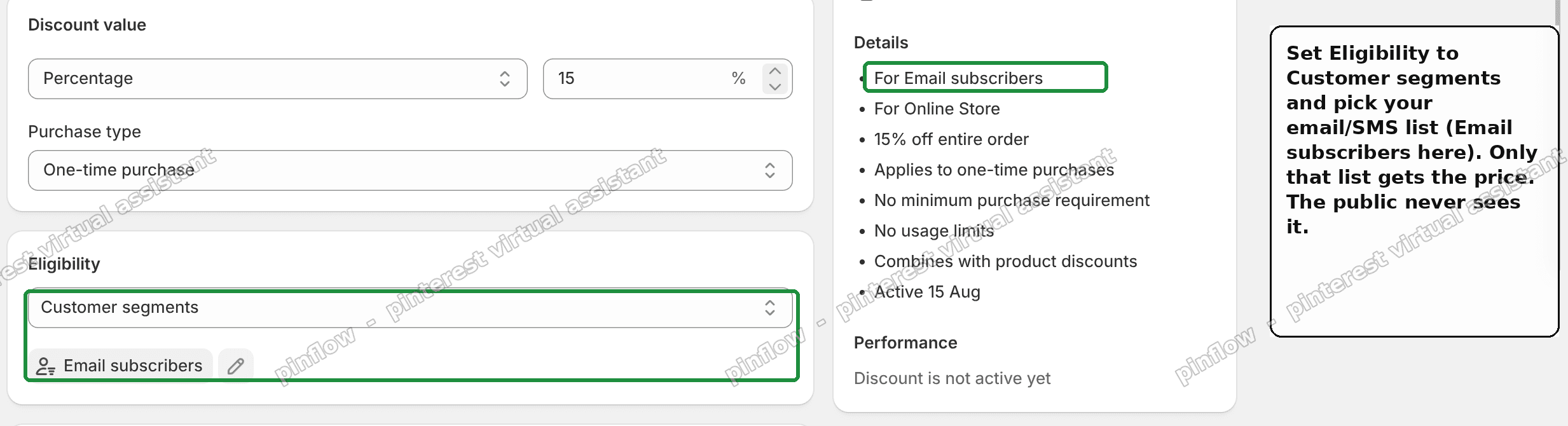 Restricting a Shopify discount to the Email subscribers customer segment, so only that list gets the price
What the Shopify password page actually is
Let me keep this in plain words, because the password page is often misunderstood.
The password page is a single gate over your whole online store. You turn it on in Online Store, then Preferences, under Password protection. When it is on, every visitor sees a login screen and must type one shared password to get in.
Three things follow from that, and they matter for a launch:
- It is one password for every visitor. It is not a per-customer login. Anyone you give it to can get in, and anyone they forward it to can get in.
- It hides the entire store. Not one page, the whole thing. Search engines cannot crawl it while it is on.
- It is a manual on and off switch. You tick a box to enable it, and untick it to disable it.
That last point is the whole issue. There is no schedule field next to that box.
Can you schedule the Shopify password page?
Not with a native setting, and not for free with built-in tools.
Shopify does not give the password page a start time or an end time. There is no calendar, no automation trigger, and no way to say turn off at noon. You either flip it by hand, or something outside Shopify flips it for you.
People often ask whether Shopify Flow can do it. It cannot. Flow automates orders, customers, inventory, and tags. It has no action that toggles the store password or the online store status.
So a truly free, native, self-unlocking password page does not exist. If you must hide the whole store on a timer, you need an app that schedules a password or coming-soon page, or you flip the switch manually at the set time.
But hiding the whole store is usually the wrong tool for a launch. Here is why, and what to do instead.
The better way: gate the price, not the store
Go back to what the merchant actually wanted. Early pricing for their list, then public pricing for the rest of the list at noon. That is a pricing rule with a schedule, not a locked store.
Shopify does pricing rules with schedules natively, for free, and they run themselves. The tool is a discount.
Two settings make it do everything they asked:
- Restrict the discount to a customer segment, so only the list gets the price.
- Give the discount a start and end time, so it turns on and off on its own.
No password. No app. No manual step at noon.
Step 1: restrict the price to your list
Create the discount in Discounts, then Create discount. Set your early-access deal, a percentage or an amount off the bundle.
Then set Eligibility to Customer segments and choose your email and SMS audience. Shopify has a built-in Email subscribers segment, or you can build your own from a customer tag.
Now the discount only applies to people in that segment. The public browsing your store sees normal prices, even on the product page. The early price is never exposed to them.
This is the part that answers the real worry with a plain discount code. A code with All customers eligibility is not shown to the public, but a guessable code can leak to a coupon site. Restricting to a segment removes that risk, because there is no code to share.
Step 2: put it on a schedule
Scroll to Active dates. Set the Start date and time to your opening, for example 8am. Tick Set end date and set the End to noon.
That is the automation. The discount switches on at your start time and off at your end time, with nothing for you to do. When it ends, prices return to normal, which is your public release.
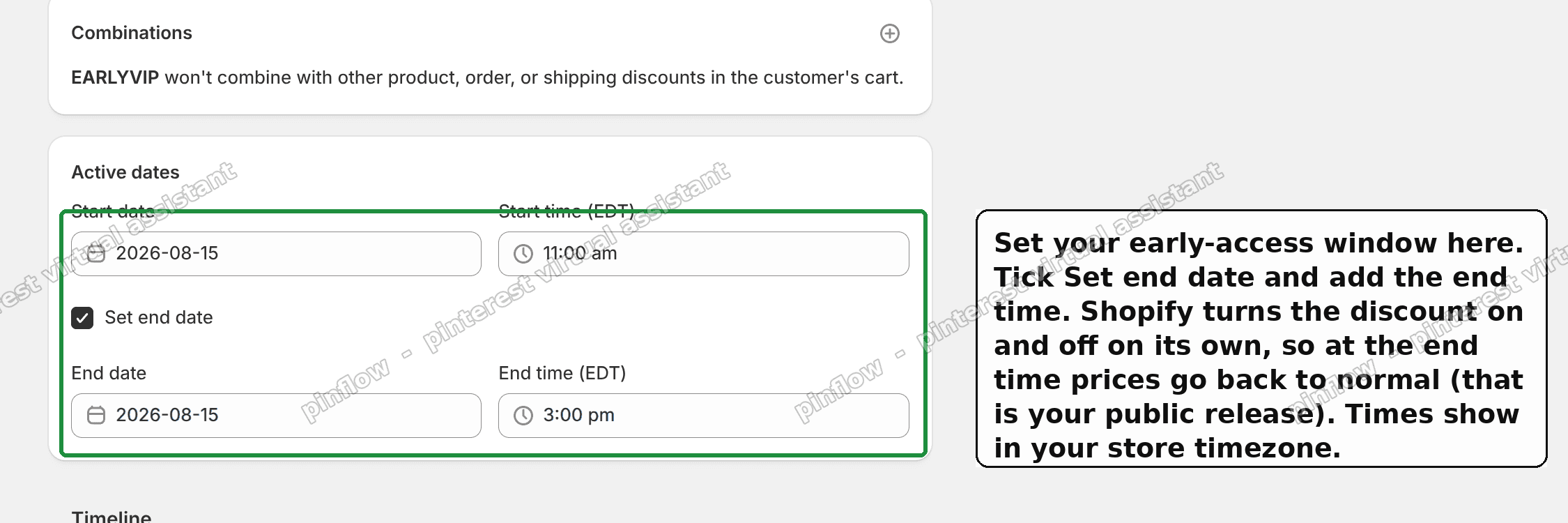 The Active dates section of a Shopify discount, with a start and end time so it turns on and off automatically
Save, and the discount shows as Scheduled. It sits inactive until the start time, applies only to your list during the window, and deactivates itself at the end. On my test store it behaved exactly like that.
Getting your list into a segment
The one requirement is that your list exists as customers, because a segment is a group of customers.
- Your email and SMS platform, like Klaviyo, Postscript, or Shopify Email, syncs subscribers into Shopify as customers. The Email subscribers segment is then ready to use, or you can tag them and build a segment from the tag.
- Customer segment pricing applies when the shopper is signed in, so their account is recognised. Send a sign-in link in your campaign so the price applies the moment they land.
- If your list are not account holders, use a discount code instead. Put the code in the email or SMS. Only people with it get the price. Make it a random string, not a guessable word, and set a usage limit so it cannot spread.
Does the password page hurt SEO?
While the password page is on, search engines cannot see your store, so nothing gets indexed. That is fine for a store that has not launched.
But for a live store running a short VIP window, locking everything for a few hours also hides you from Google and from every non-VIP shopper for that time. That is a lot of collateral damage for a four hour sale. Gating the price leaves the store open and visible the whole time, which is another reason it is the better fit.
How do I find or change my Shopify password page password?
It is in Online Store, then Preferences, under Password protection. Enable the toggle, and the password field appears there. You set or change the shared password in that same spot, and untick the box to remove the page.
Remember it is one shared password for the whole store, so treat it like a key you are handing to a group, not a personal login.
Can I password protect only one page in Shopify?
Not with the native password page, which is all or nothing for the whole store.
If you need to lock a single page or collection, that is an access-control job for an app like Locksmith, which can hide specific pages behind a customer login, a tag, or a passcode. For a launch, though, the scheduled discount above usually does what you need without locking anything.
What if I really do want the store hidden first?
Then accept that the timing is the manual part. Turn the password page on before the window, hand the password to your list, and turn it off at noon yourself, or use a coming-soon or password app that adds a schedule.
Just know the trade-offs going in. One shared password, the whole store hidden, no free native timer, and no SEO while it is on. For most VIP launches, the scheduled discount is simpler and does more.
Quick distinctions people mix up
- Password page. One shared password over the whole store. Manual on and off. No schedule.
- Coming soon page. Usually the same password page, sometimes dressed up by an app that can schedule it.
- Discount, scheduled. A price rule with a start and end time. Runs itself, free, native.
- Customer segment. A group of customers, like your email subscribers, that a discount can be limited to.
- Locksmith and similar apps. Lock specific pages by customer, tag, or passcode, rather than the whole store.
The short version
The Shopify password page cannot be scheduled natively, and Flow cannot toggle it. A free, self-running, hidden-then-public store is not something Shopify does on its own.
You almost certainly do not need it. For a VIP early-access launch, create a discount, restrict Eligibility to your customer segment, and set Active dates for the window. Only your list gets the price, the store stays open and indexable, and the discount turns itself off at your set time.
Tested on a store: a scheduled discount limited to the Email subscribers segment shows as Scheduled, applies only to that list, and deactivates on its own at the end time. No app, no password, nothing to switch at launch.
Spending too long on manual Shopify busywork?
PinFlow turns your Shopify catalog into Pinterest pins and posts them on a schedule, automatically. Same idea as the scheduled discount above, let the system handle the timing.
Get PinFlow on the Shopify App StoreMore Shopify fixes
More community-sourced Shopify guides, tested on a live store.
Shopify Admin
How to Edit a Packing Slip on Shopify to Show Big Product Photos
Shopify's order page shows each item as a 40 pixel thumbnail with no way to enlarge it. Here is how to edit the packing slip template so every line prints that exact variant's photo at 1000 pixels, including the one-line fix Shopify's default template needs.
Shopify Admin
Shopify Shipping Zones: Fix Products Sold Out in One Country
Products show Sold out for customers in one country while your admin shows stock. The cause is a shipping profile with no zone for that country. How Shopify shipping zones and profiles decide what a customer can buy, and the six-click fix, with screenshots.
Shopify Admin
Shopify Translate: Fix Mixed Languages on Product Pages
A Swedish Shopify store showed English words on translated product pages. The titles were translated, so the English came from option names and theme text. How to fix each one in Translate & Adapt, with screenshots.