
Shopify Digital Downloads App: Fix the Download Button
Buyers keep emailing to say they cannot download the file they just paid for. What the Digital Downloads app actually sends them, why the Download Now link looks dead, and the four changes that stop the emails.
By AjayCodeWiz · September 12, 2026 · 9 min read
Buyers say they cannot download the file they just bought
A merchant selling printable mahjong cards described it perfectly on the Shopify Community: "The gray bar doesn't look like they can click on it. We get several emails with confused customers thinking that they cannot download the item."
That is not a broken app. The file is there, the link works, and the download is one click away. The click target just does not look like a click target.
I installed Shopify's own Digital Downloads app on a test store, attached a PDF to a product, placed a real order and followed the file all the way to the buyer. Here is what actually reaches them, and the four changes that stop the support emails.
 The Download Now link with the app's default styling, and the same link after adding CSS
Top: what most themes render. Bottom: the same link, after the one CSS rule further down this page.
The app is called Digital Products now
Small thing, but it wastes people's time in the admin. Shopify's free first-party download app was called Digital Downloads for years. It is now listed as Shopify Digital Products, and it appears in your Apps menu as Digital Products. The App Store address is still /digital-downloads, so old links and old tutorials still work.
Everywhere below, "the app" means that one. It is free, it is made by Shopify, and it has around 1,200 reviews at 4.7.
What your buyer actually receives
This is the part almost every tutorial skips, and it is the whole reason for the confusion.
A digital order sends two separate emails:
- Order confirmation. Shopify's normal receipt. No download in it.
- "Your downloads are ready". Sent by the app, a few seconds later.
The second email is plain text only. No buttons, no styling, nothing you can design. The download arrives as a bare web address on its own line, like this:
Pattern Pack 2026 (PDF)
pattern-pack-2026.pdf
Download Link: https://yourstore.com/a/downloads/-/7b47ec72cc/35c0646f09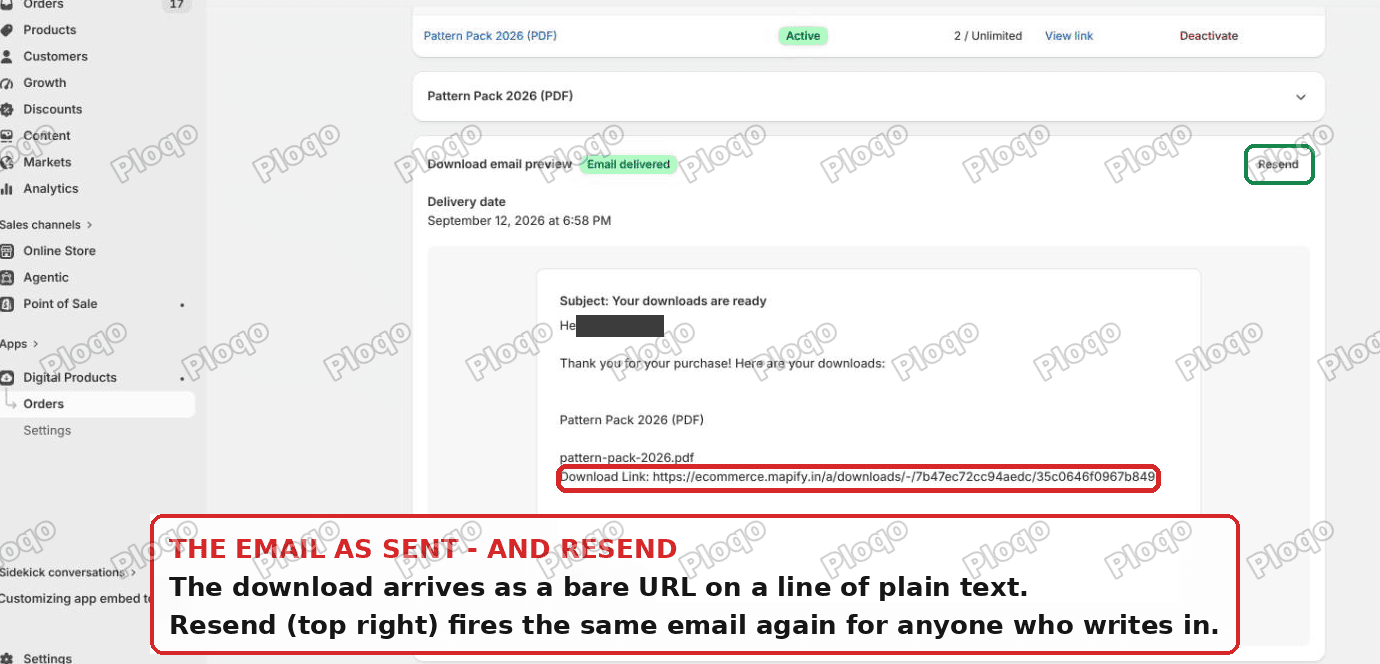 The download email exactly as the customer receives it, with the Resend button in the app
Then, and this is the bit people do not expect, that link does not download anything directly. It opens a page on your own store, wearing your own theme, with a Download Now link on it. So the buyer has to click twice: once in the email, once on the page.
If the second click does not look like a click, they stop there and email you.
Why the Download Now link looks dead
The download page is drawn by the app but rendered inside your theme. The app supplies a small block of styling with it, and the download control is a single link:
<a class="sdd-download-button" href="...">Download Now</a>The app's own styling for that link ends with this line:
.sdd-download-button {
  font-weight: bold;
  font-size: 24px;
  padding: 12px 24px;
  background: revert;
}
background: revert means "whatever the theme would normally give a plain link". The app is deliberately staying out of your theme's way. The catch is that most themes give a plain link inside page content nothing at all.
I checked this against a real store running Fashionopolism. The Download Now link came out with a transparent background, zero border, no underline, and the same dark grey as the body text. It renders as a bold word sitting under the file name, indistinguishable from a caption.
That is the gray bar people describe. Nothing is broken. There is simply no button there.
Fix 1: give the download link a real button
One rule, in a box Shopify gives every modern theme. No theme files, no code editor, nothing that survives a theme update badly.
Go to Online Store > Themes > Customize, click the gear icon for Theme settings, scroll to the bottom and open Custom CSS.
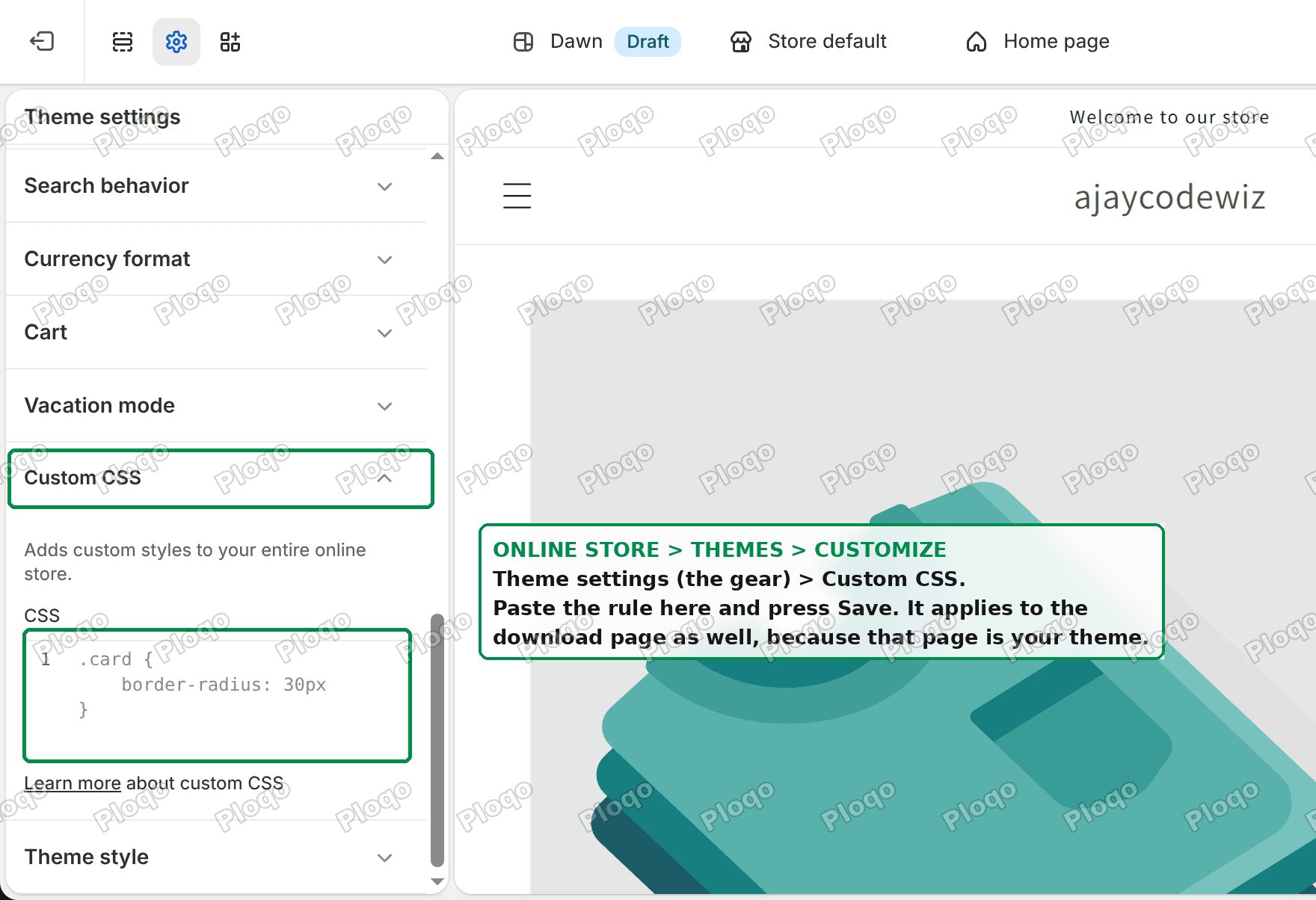 The Custom CSS box in Shopify theme settings
Paste this and press Save:
.sdd-download-button {
  display: inline-block;
  background: #b11116;
  color: #ffffff !important;
  padding: 16px 40px;
  border-radius: 4px;
  text-decoration: none;
  font-size: 20px;
}

.sdd-download-button:hover {
  opacity: 0.9;
}
Change #b11116 to your own button colour. If you do not know it, open any product page, right-click your Add to cart button and pick Inspect, and read the background colour off it.
Two things worth knowing:
- Custom CSS applies to your whole online store, and the download page is part of your online store. That is exactly why this works without touching any app setting.
- The
!importantoncoloris there because some themes set link colours with a more specific rule of their own. Leave it in.
If your theme has no Custom CSS box (anything built before late 2021), the same rule goes at the bottom of base.css or theme.css under Online Store > Themes > ... > Edit code > Assets.
Fix 2: put the download on the Thank you page
The best download email is the one the buyer never has to hunt for. The app can put the file on the page the buyer is already looking at when they finish checkout.
Go to Apps > Digital Products > Settings. Under Digital products at checkout, find Digital product at checkout in your online store and click Add.
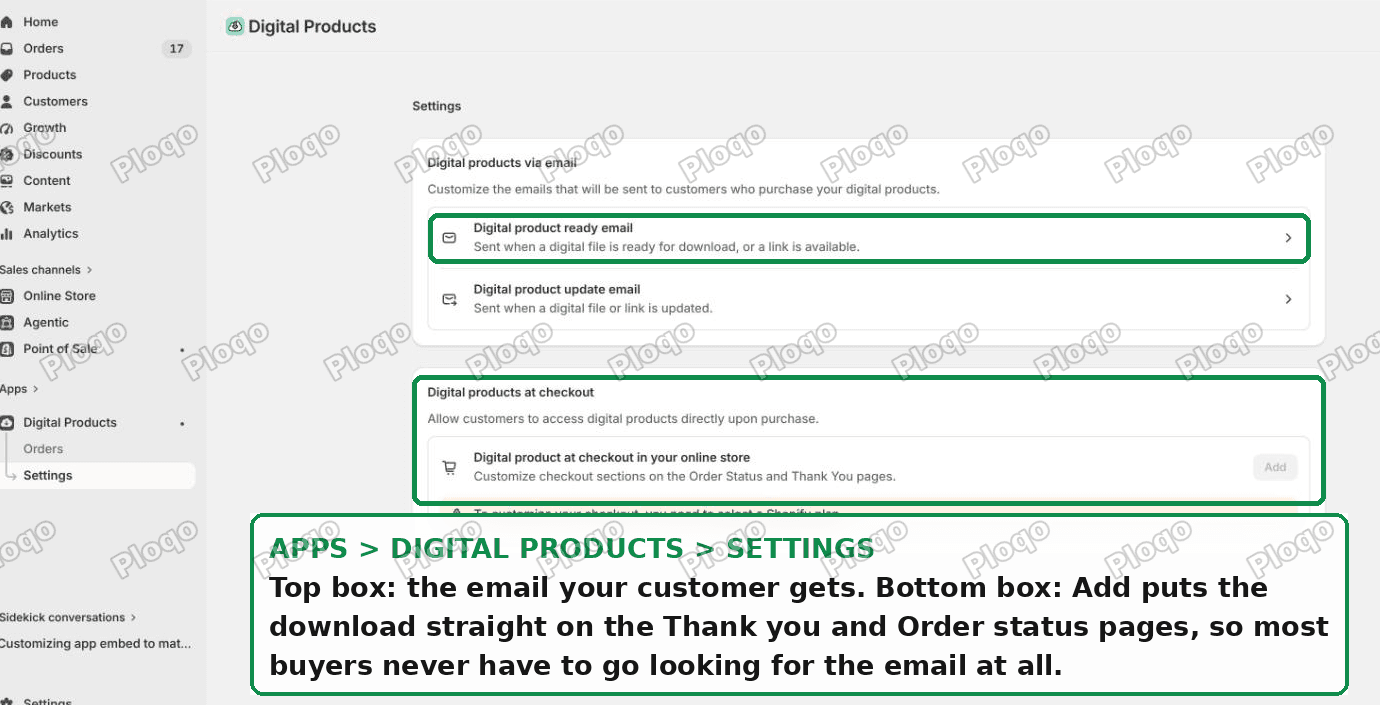 Digital Products app settings, showing the email templates and the checkout download block
That adds a Digital downloads block to your Thank you and Order status pages. Most buyers download there and then, and never open the email at all.
This is off by default, so if you have never been into this screen, it is off on your store right now.
Fix 3: rewrite the download email so it explains itself
Same Settings screen, top box: Digital product ready email.
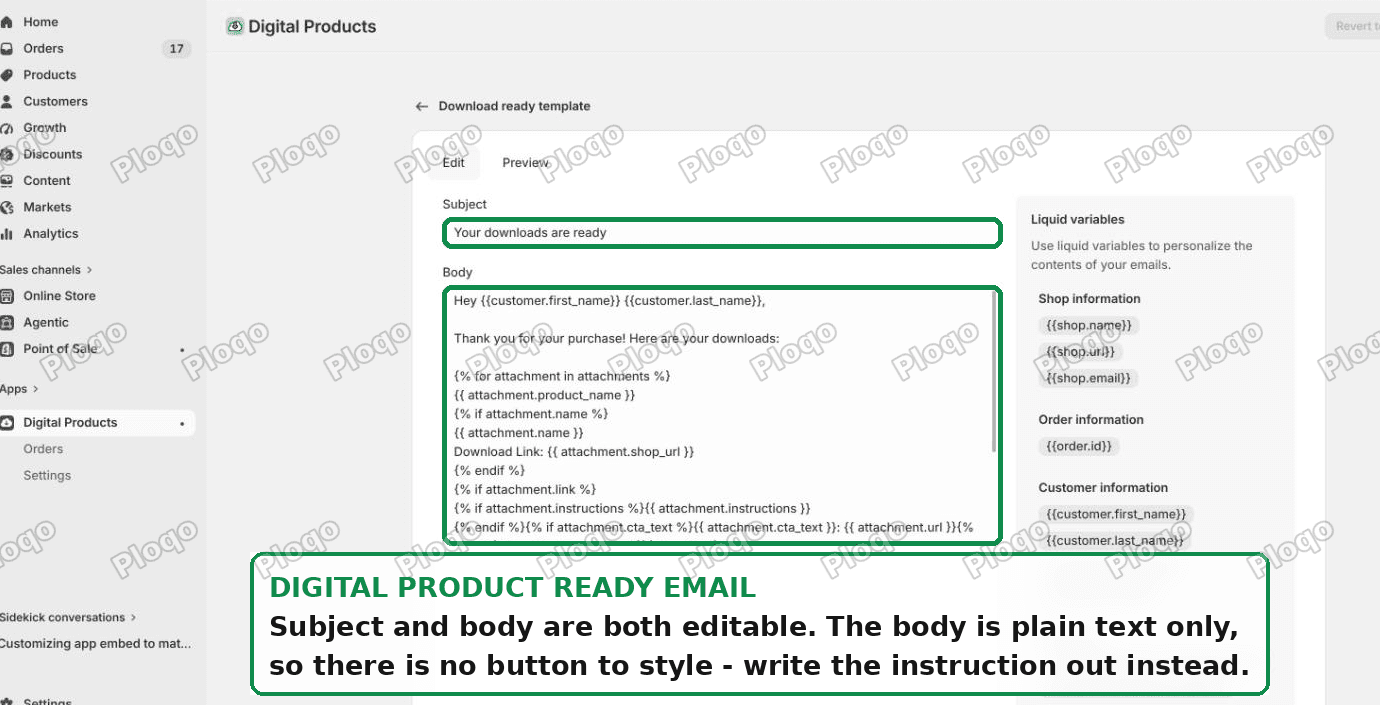 The Download ready email template, with subject and body fields
The subject and body are both yours to edit. The body is plain text, so there is no button to add. What you can do is stop relying on the link looking clickable and just say what happens:
Your download is ready.

Open the link below. It opens a page on our store with a
big Download Now button on it. Click that button and the
file saves to your device.

If you are on a phone, the file lands in your Downloads
folder or in Files.
Two small pieces of Shopify's template language are worth keeping when you rewrite it:
{{customer.first_name}}prints the buyer's first name.- The block starting
{% for attachment in attachments %}repeats once per file on the order. Leave that loop intact or buyers who bought two files will only get one.
There is a Revert to default template button in the top right if you make a mess of it.
Fix 4: set the expectation before they buy
The merchant who raised this already does it on one product. Their free Charleston card description says: "You will first get a confirmation email and then a separate email with the download."
That single sentence pre-empts the whole problem, because the confusion is almost always "I got a receipt and no file". Their paid PDF listing has no line like it.
Put it on every digital product, not just the ones you remembered. Something like:
This is an instant download. After checkout you will get two emails: your receipt first, then a separate email with the download link.
How to add digital downloads to Shopify in the first place
If you are setting this up rather than fixing it, the whole flow is three steps.
- Create the product as normal, then untick Shipping > This is a physical product. The app only lists products that do not need shipping.
- Open Apps > Digital Products, find the product in the list and click Add asset.
- Choose File and upload, or Link if the "download" is really a link to somewhere else, such as a course or a shared folder.
 Attaching a file to a product, with the fulfilment and access limit settings
Each attached file carries two settings, shown as chips under the file list:
- Fulfilled: Automatically sends the download email the moment the order is paid and marks the order fulfilled. Switch it to Manually if you want to approve each one.
- Access limit: Unlimited is the default. Set a number here if you want the link to expire after, say, three downloads.
You can mix a file with a physical product too. A pattern with a printed booklet, a book with its audio version.
Can you sell digital downloads on Shopify without an app?
Not really, and you should not try. Shopify has no built-in file delivery, so the file has to come from somewhere.
The three routes people attempt:
- The free Digital Products app. Made by Shopify, no monthly fee, hosts the files, handles the emails, tracks downloads. This is the right answer for most stores.
- A link in the order confirmation or thank-you page. Works, but the link is public forever and gets shared. Fine for a free lead magnet, bad for anything you charge for.
- Emailing files by hand. Fine at two orders a week, miserable at twenty.
If you outgrow the free app, the usual paid alternatives are Digital Downloads PDF Pendora (free, about 1,200 reviews), Digital Downloads Filemonk and Sky Pilot. They ship their own styled download page, which means you skip Fix 1 entirely, plus extras like PDF stamping and drip delivery.
Someone still cannot get their file
Work down this list before you email the file manually.
They say they never got the email. Open Apps > Digital Products > Orders, find the order and click Resend. The same email goes out again. Check the address on the order first, since a typo at checkout is the single most common cause.
 The app's order screen, with Resend, the download counter and Deactivate
They hit the download limit. The order row shows a counter like 2 / Unlimited. If it is capped and they have used it up, raise the limit on the product or resend.
The link says the file is not found. The asset was removed or replaced after the order. Re-upload it and use Resend.
They clicked and nothing happened. Usually a phone. The file downloaded straight into Files or Downloads with no prompt. Ask them to look there before assuming it failed.
They want it deactivated. The order screen has a Deactivate control per file, which kills that buyer's link. It is reversible.
Two things people mix up
The app's email is not your order confirmation. Editing Settings > Notifications > Order confirmation in the Shopify admin does nothing to the download email, and vice versa. They are two templates in two different places. The order confirmation is full HTML and you can style it freely; the app's download email is plain text and you cannot.
The download page is not an app page. It lives on your domain, under /a/downloads/, and it renders with your header, your footer and your fonts. That is why your theme's CSS reaches it, and it is also why it looks half-finished if you have never styled it.
What changed on my test store
Concrete numbers from the run, so you know what to expect:
- Order paid, two emails delivered within 6 seconds of each other.
- The download email arrived as 8 lines of plain text with one bare URL.
- The Download Now link computed to
background-color: rgba(0, 0, 0, 0),border-width: 0px,text-decoration: none. After the CSS above, a solid filled button at 16px by 40px padding. - The app's order screen showed the download counter incrementing with each visit to the link.
The gray bar is a styling gap, not a bug, and it takes one rule to close.
Spending too long on manual Shopify busywork?
PinFlow turns your Shopify catalog into Pinterest pins and posts them on a schedule, automatically. Same idea as the CSS above, set it once and stop answering the same email.
Get PinFlow on the Shopify App StoreMore Shopify fixes
More community-sourced Shopify guides, tested on a live store.
Shopify Admin
Shopify New Admin (2026): Where Search, Sidekick and Settings Went
Shopify's new admin moved search, alerts, the store switcher and Settings into the black sidebar, and Sidekick to a bar at the bottom. Where each one is now.
Shopify Admin
How to Use the New Shopify Admin (2026): Every Main Screen
A tour of the new Shopify admin: the black sidebar, search and Ctrl K, Home, Orders, Products, Settings and Sidekick, with where to click on each screen.
Shopify Admin
Schedule a Black Friday Sale in Shopify (Auto Start and End)
Give the discount its own start and end date and put the sale banner in an Event rollout with the same dates. Both start at midnight and end after Cyber Monday.