
No Shopify Flow Trigger for Cancellation Requests
Shopify Flow has no trigger, no staff notification, and no Order field for self-serve cancellation requests. How to detect them with the Admin API events query, plus a zero-code saved-view stopgap. Verified against Shopify's trigger reference.
By AjayCodeWiz · July 21, 2026 · 8 min read
The problem: a cancellation request comes in and no alert goes out
You turned on self-serve order cancellations. A customer opens their account, asks to cancel an order, and nothing happens on your side. No email. No Slack ping. No Shopify Flow workflow kicks off. The order keeps moving toward fulfilment while a cancellation request sits in the admin, unseen.
A merchant raised exactly this on the Shopify Community. Returns get a "Return requested" trigger and a staff notification. Cancellations get neither. That is the gap.
It matters because of the clock behind the feature. Shopify added self-serve cancellations to comply with EU Directive 2023/2673, live 19 June 2026, and that rule requires merchants to process a cancellation promptly, with refunds inside 14 days. A request that sits unseen for a week has already eaten half your window.
I went through Shopify's own trigger reference and the Admin API to see what is and is not exposed. Here is the honest state, and the ways to close the gap today.
Why nothing fires
Three things people reasonably expect, none of which exist:
- No Flow trigger for a customer cancellation request.
- No staff-notification event for it.
- No field on the Order object that says a cancellation is pending.
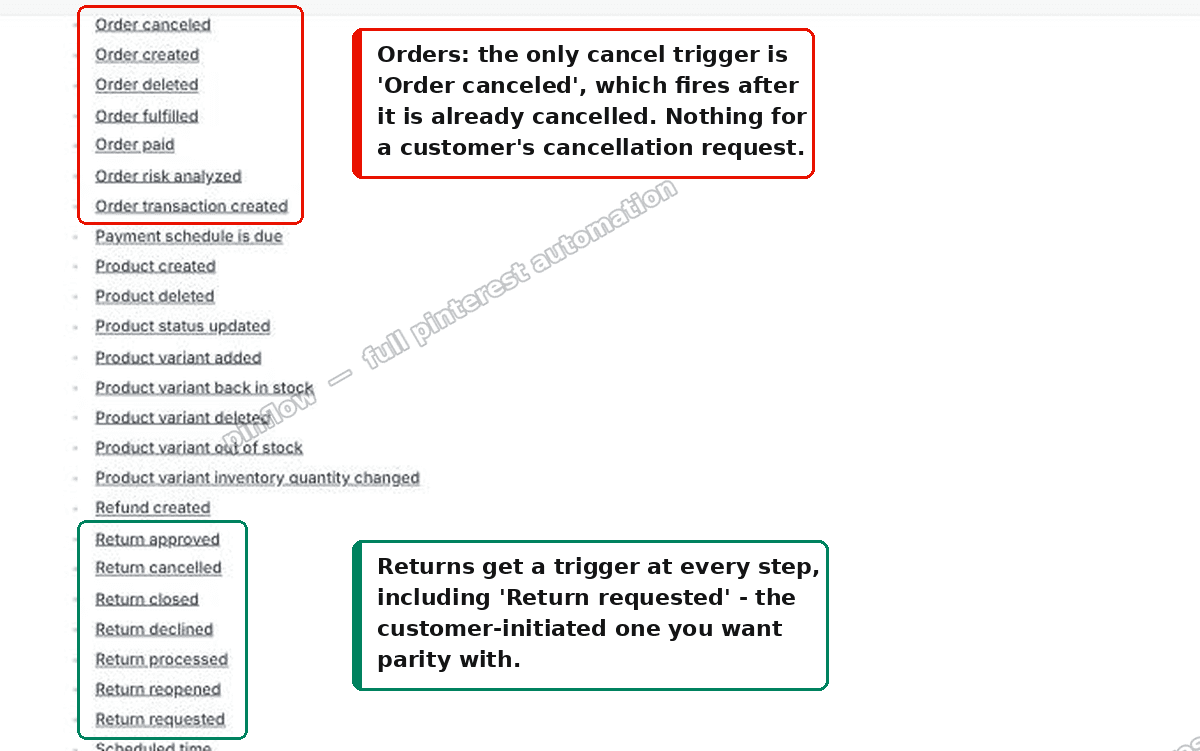 Shopify Flow trigger reference: orders have only Order canceled, returns have the full request lifecycle
That is Shopify's trigger reference. Look at the two families side by side. Returns fire at every step: Return requested, approved, declined, processed, closed, cancelled, reopened. Orders get exactly one cancel-related trigger, "Order canceled," and it fires after the order is already cancelled, not when a customer asks.
So the moment you actually care about, the request, has no hook. That is the whole reason "just build a Flow" does not work here.
It is an event, not a field
Here is the part that the "there is no way to detect it" answers miss.
A self-serve cancellation is implemented as a customer-requested order edit. Nothing new lands on the Order object, which is why merchants who go looking in the API find nothing. But it does write a timeline event.
The request shows up as a BasicEvent on the order, with action: requested_edit_requested and a message like "Jane requested cancellation of 3 items."
You can read it today with the Admin GraphQL events connection:
{
  events(first: 50, query: "action:requested_edit_requested subject_type:ORDER") {
    edges {
      node {
        __typename
        ... on BasicEvent {
          id
          createdAt
          message
          subject { ... on Order { id name } }
        }
      }
    }
  }
}
The message text is what confirms the event is a cancellation. That one action covers customer edit requests in general, so either filter on the wording or treat every hit as a request that needs a human to review. To poll without re-seeing the same rows, add created_at:> your last run time to the query string.
I confirmed the same signal from a second angle. On a test store I applied the Orders "Customer request" filter set to "Cancellation requested," and the URL Shopify generated was customer_request:"edit". Same edit-request concept, surfaced through the admin UI instead of the API. Two doors, one room.
Do not wire up the fulfillment triggers
This is the part that catches people, so it is worth being blunt about it.
There are triggers and a webhook that look exactly right by name: the "Fulfillment order fulfillment cancellation request submitted" Flow trigger, the REST CancellationRequest resource, and the fulfillment_orders/cancellation_request_submitted webhook.
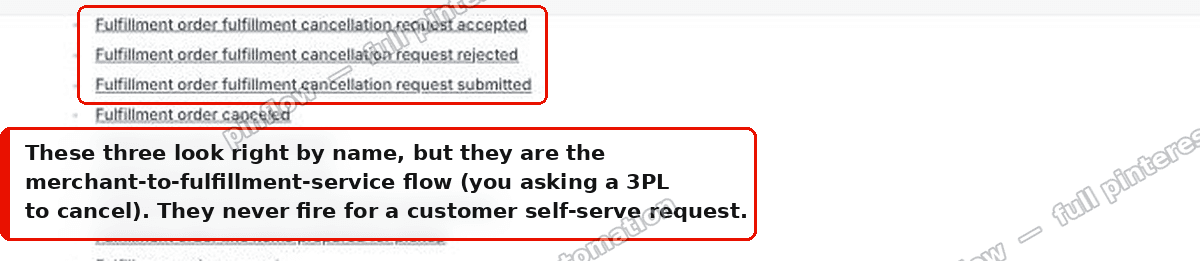 The fulfillment order cancellation request triggers are the merchant-to-3PL flow, not customer self-serve
They are not it. Those are the merchant-to-fulfillment-service flow: you asking a third-party logistics provider to cancel a fulfillment order it already accepted. They never fire when a customer submits a self-serve cancellation. Shopify's docs are explicit that this is the 3PL path. I checked, because the naming is close enough to cost you an afternoon.
The zero-code stopgap: a saved Orders view
Before you build anything, there is a one-minute stopgap that closes the worst part of the risk, which is your team not knowing a request is waiting.
The Orders page has a "Customer request" filter, and one of its values is "Cancellation requested." Filter by it, save the result as a view, and your staff get a one-click tab straight to the queue.
Open the Orders search and filter bar and pick Customer request:
 Orders search and filter bar with the Customer request filter
Set it to Cancellation requested, and leave the operator on Is:
 Setting the Customer request filter to Cancellation requested
Then Save the view and give it a name, so it becomes a tab your team can open in one click:
 Saving the filtered Orders view as a one-click tab
It is not automation, and it will not ping anyone. But it turns "did we miss one?" into a single click, which is often enough to stay inside the 14-day window while you build the real thing. I set this up on a test store to confirm the filter exists and that "Cancellation requested" is a first-class value, not something you have to fake with tags.
Getting an actual alert: poll, because there is no push
Since nothing pushes, the reliable pattern is a small scheduled job that pulls.
Run the events query every few minutes. Key it off created_at so you only ever act on new requests. For each new one, send your team an email or a Slack message with the order name, the request message, and a direct link to the order in admin. That is the whole shape of it.
Shopify Flow cannot run that events query as a step, so this is not a Flow-only build, and there is no point pretending otherwise. When I described the exact goal to Shopify's Sidekick AI, it reached the same conclusion and offered to scaffold a serverless function instead of a Flow. That is the honest answer, and it is a useful one to have on record when you file the feature request.
The job itself is about thirty lines wherever it runs: a Cloudflare Worker on a cron trigger with the last-run timestamp in KV, a Vercel cron function, or a background task inside an app you already operate. The events query is the engine. The rest is "diff against last run, then notify." Pick whichever platform you already pay for, because none of this needs a new server.
The good news is that this holds up even after Shopify ships a native trigger, so it is not throwaway work. If a real "cancellation requested" trigger arrives, you swap the poller's front end for it and keep the notification half untouched.
What Shopify Flow triggers exist for orders
People search for the list, so here is the order-related set as it stands: Order canceled, Order created, Order deleted, Order fulfilled, Order paid, Order risk analyzed, and Order transaction created.
Notice what is not there. No "order edited." No "order on hold." No customer-request trigger of any kind. If your automation depends on one of those moments, you are in workaround territory, the same as this cancellation case.
Returns, by contrast, expose the full lifecycle, which is precisely why "return requested" automations are trivial to build and "cancellation requested" ones are not. The asymmetry is not a bug you are missing. It is the current state of the platform.
Is there a webhook for order cancellation requests?
Not for the customer self-serve request. The webhook topics that mention cancellation, the fulfillment_orders/cancellation_request_* family, are the fulfillment-service flow described above. The orders/cancelled webhook fires only once the order is actually cancelled, which is downstream of the request and after you have already acted.
So if the moment you want is the request itself, the timeline event is the only signal Shopify emits, and the events query is how you read it. There is no webhook shortcut hiding in the docs. I looked.
Self-serve cancellations and the EU directive, in plain terms
A little context for why this landed in 2026 and why it stings.
Shopify introduced self-serve order cancellations to meet EU Directive 2023/2673, which took effect on 19 June 2026. Customers in scope can submit a cancellation straight from their account page, and the merchant is expected to process it promptly, with refunds inside 14 days.
The deadline is the whole reason the notification gap is more than a nice-to-have. High-volume stores cannot babysit the Orders page all day, and a request that sits for a week burns most of the legal window before anyone touches it. The saved view gives you a fast manual check. The poller gives you the push notification Shopify does not. Together they keep you compliant while the platform catches up.
If it still does not work
A few things to check when your detection comes back empty:
- You are reading events, not order fields. The request is a
BasicEvent. Nothing on the Order object changes, so an Order query will always look blank. - The action string is exact. It is
requested_edit_requested, and the human-readable confirmation lives in themessage, not in a status field. - You are not on the fulfillment path. If the webhook or trigger name contains "fulfillment," it is the 3PL flow, not the customer one.
- Customer accounts are the newer type. Self-serve cancellations come through new customer accounts, so confirm those are enabled on your store.
Cancellation request vs order canceled vs fulfillment cancellation
Three things share a word and get mixed up constantly. Keeping them separate makes the whole API stop feeling contradictory.
A cancellation request is the customer asking to cancel. It is a timeline event, it waits for you to review it, and it has no native Flow trigger.
An order canceled is the end state, after you accept a request or cancel an order yourself for any reason. This one does have a Flow trigger and a webhook, because it is a completed action rather than a pending ask.
A fulfillment cancellation is you asking a third-party logistics provider to stop a fulfillment it already accepted. It is a separate system with its own triggers and its own webhook, and it has nothing to do with the customer.
Once those three are straight in your head, the "why are there cancellation triggers that never fire for me" confusion disappears, and you know exactly which signal to build on.
Automating the busywork is the easy win. Getting found is the hard one.
PinFlow turns your Shopify catalog into Pinterest pins and posts them on a schedule, so the store you are keeping compliant also gets in front of people who are not on it yet.
Get PinFlow on the Shopify App StoreMore Shopify fixes
More community-sourced Shopify guides, tested on a live store.
Shopify Admin
How to Edit a Packing Slip on Shopify to Show Big Product Photos
Shopify's order page shows each item as a 40 pixel thumbnail with no way to enlarge it. Here is how to edit the packing slip template so every line prints that exact variant's photo at 1000 pixels, including the one-line fix Shopify's default template needs.
Shopify Admin
Shopify Shipping Zones: Fix Products Sold Out in One Country
Products show Sold out for customers in one country while your admin shows stock. The cause is a shipping profile with no zone for that country. How Shopify shipping zones and profiles decide what a customer can buy, and the six-click fix, with screenshots.
Shopify Admin
Shopify Translate: Fix Mixed Languages on Product Pages
A Swedish Shopify store showed English words on translated product pages. The titles were translated, so the English came from option names and theme text. How to fix each one in Translate & Adapt, with screenshots.