
Work Around Shopify's Metafield Source Limit
Hit the dynamic-source cap in the Shopify theme editor? Render your metafields with a Custom Liquid section instead, with no per-template limit.
By AjayCodeWiz · August 7, 2026 · 11 min read
The problem
A merchant asked about this on the Shopify Community. They were rebuilding a camera store onto a new Online Store 2.0 theme called Surveillance (an Electro-family theme). They had 40+ camera models, each with a lot of detailed, model-specific text.
They did everything right. They set up product metafields to hold all that detail. A metafield is just an extra custom field on a product, like "Night vision range" or "Weatherproof rating", that Shopify does not give you by default.
Then they wired those fields into the product page one by one, using the theme editor. And they hit a wall.
Two walls, actually. First they maxed out the metafields on the product. Then they hit the Shopify dynamic source limit of 100 when connecting the metafields to the theme. The 101st connection simply would not save.
Their real worry was SEO. They needed unique, model-specific text on every product for search and AI answer engines (what they called GEO/AEO/SEO). They did not want to strip that detail out just to fit under a limit.
So they asked for an expert who knew the Surveillance theme.
I reproduced the whole thing on a test store on the Surveillance (Electro) theme. The good news: this is not a Surveillance bug, and your metafields are fine. You have hit a theme-editor limit, and there is a clean way around it that keeps every word of your custom text.
Why it happens
This is the part most forum answers skip, so let me explain the mechanism.
There are two different limits here, and it helps to keep them apart.
Limit one: how many metafield definitions a product can have. Shopify caps the number of metafield definitions you can create. If you make a separate field for every tiny spec, you burn through that budget fast. This is the "too many metafields" side.
Limit two: dynamic sources in the theme editor. This is the one that stopped the merchant cold. A dynamic source is the little "Insert dynamic source" or "Connect dynamic source" link you click in the theme editor to point a text block at a metafield instead of typing text. It looks like a small database icon next to a field.
Each time you click that icon and connect a metafield, that is one dynamic source. The theme editor allows only 100 dynamic sources per template, and 50 per static section. Wire 100 fields by hand and the 101st connection is blocked.
So the shopify metafield dynamic source workflow does not scale. It is fine for a handful of fields. It falls apart at 40 models with rich specs each.
Here is the important insight: the 100 limit is a theme-editor limit, not a limit on your data. Your metafields still exist. Your text is still saved. The only thing that ran out is the number of times you can point-and-click a connection in the editor.
That means the fix is to stop connecting fields through the editor at all. Read them straight from code instead.
The fix: one Custom Liquid section
The trick is to print every field with a single Custom Liquid section.
Custom Liquid is a section (and block) that Shopify ships in almost every 2.0 theme. It lets you paste your own Liquid and HTML. Liquid is Shopify's templating language; it can read your product metafields directly. And code that reads a metafield does not count as a dynamic source. So there is no 100 limit on it.
One section can print as many fields as you want. Your per-product text stays exactly where it is, still editable per model in the admin. You are only changing where the theme reads the data from.
Step 1: add one Custom Liquid section
- Go to Online Store, then Themes, then Customize on your Surveillance theme.
- Open a product template. Under Template on the left, click Add section.
- Choose Custom liquid.
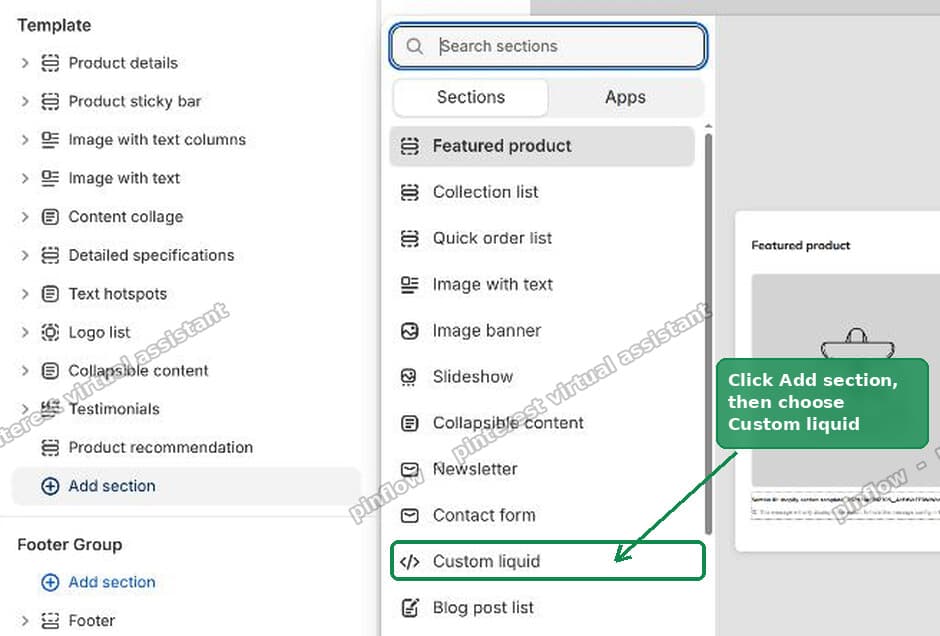 Adding a Custom Liquid section to a Shopify product template in the theme editor
Step 2: paste code that prints your fields
Put your fields in the Liquid box. Swap specs for your own namespace (the group your metafields live in) and swap the keys for your own field names:
{%- assign s = product.metafields.specs -%}
<div class="spec-sheet">
  {% if s.resolution != blank %}<p><strong>Resolution:</strong> {{ s.resolution }}</p>{% endif %}
  {% if s.field_of_view != blank %}<p><strong>Field of view:</strong> {{ s.field_of_view }}</p>{% endif %}
  {% if s.night_vision != blank %}<p><strong>Night vision:</strong> {{ s.night_vision }}</p>{% endif %}
</div>
Add one line per field. Then Save.
The if blank check is the part that makes this scale. It says: only print this row if the product actually has a value for it. So a model that has no night-vision spec just skips that line. The exact same section works for all 40+ models with no edits. Each product shows only its own fields.
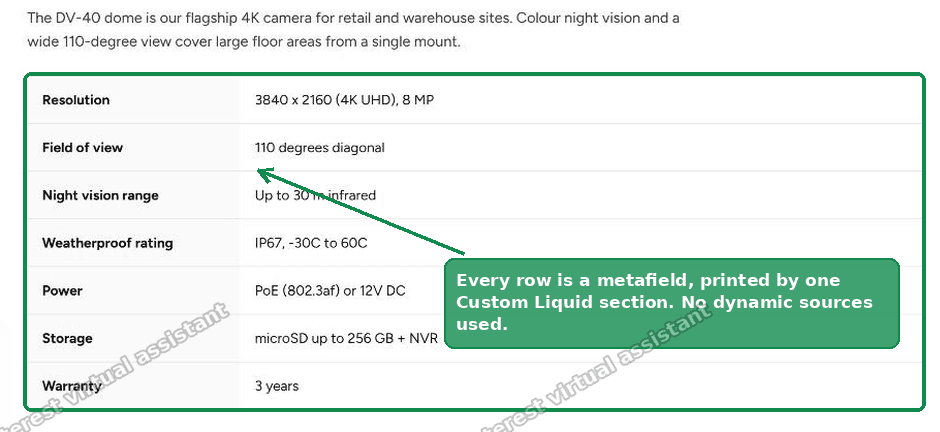 One Custom Liquid section printing every product metafield with no dynamic sources used
That one section replaces every dynamic source you were wiring by hand.
I tested this on the Surveillance theme. Seven camera specs plus a custom overview paragraph all rendered from metafields through one Custom Liquid section, with zero dynamic sources used. The dynamic-source count went from full back to empty.
You do not have to redesign your page
The merchant had a real follow-up worry. They had built their page out of existing blocks and sections (from the theme and the section store), including a Collapsible content block. The page had taken a long time to build. Would this force a redesign?
No. Custom Liquid is additive. You keep every section and block you already built. You are only changing where the data comes from, not your layout.
For most stores, one move fixes it: drop a single Custom Liquid section wherever the detailed content sits, and move the bulk of your fields into it. That reads its metafields in code with no dynamic-source limit, which frees up your count. Your other blocks keep working, untouched. For most stores, that one change alone gets you back under 100.
One honest limitation: you cannot paste Liquid inside a Collapsible content row itself. That row field only accepts typed text or one connected metafield. So you have two choices.
- Leave those few collapsible rows as they are. They cost you a tiny slice of your 100.
- Or, if the collapsible rows are what is eating your 100, rebuild that one accordion in Custom Liquid.
The rebuild uses the browser's native collapsible element (the HTML <details> tag), so it looks and behaves the same: click a heading, it opens. But it pulls unlimited metafields.
I tested that too on Surveillance: a two-row accordion, every value coming from metafields, zero dynamic sources.
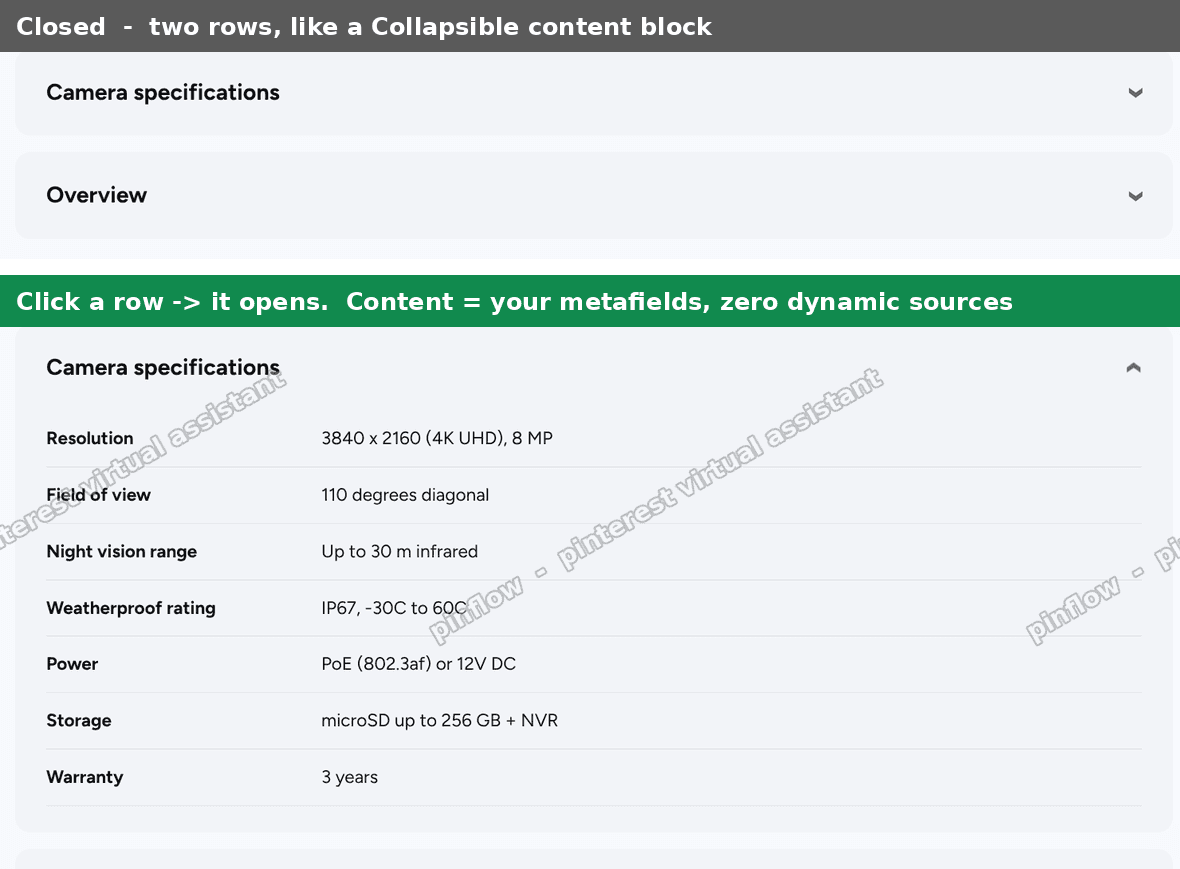 A native details accordion on a Shopify product page built entirely from metafields
An alternative: consolidate with a Metaobject
The Custom Liquid section fixes the display limit. If you also ran out of metafield definitions on the product itself, there is a second move: a Metaobject.
A Metaobject is a custom data type you define once, with its own set of fields. Think of it as a reusable mini-record. You build one "Camera specs" metaobject definition with fields like resolution, field of view, night vision, and so on. Then each product points to a metaobject entry through a single metafield.
The win is the count. Instead of 15 separate metafields on the product, you have one metafield that references a metaobject holding all 15 fields. Many fields, one definition, still editable per product.
To set it up: go to Settings, then Custom data, then Metaobjects, and add a definition. Then add a single product metafield of type "Metaobject" that references it.
You still print it with the same Custom Liquid approach. You just walk one level deeper to reach the values. This shopify metaobject metafields pattern is the cleanest way to model repeated, structured specs across many similar products.
So the two moves stack:
- Custom Liquid section: removes the shopify dynamic source limit on display.
- Metaobject: removes the pressure on how many metafields a product can hold.
What counts against the Shopify dynamic source limit?
Anything you connect through the theme editor's "Connect dynamic source" icon counts. That includes a text block pointed at a metafield, a heading pointed at a metafield, an image or button linked to a metafield, and each connected field inside a block.
What does not count: anything you read in code. A Custom Liquid section that references product.metafields.namespace.key is invisible to that counter. This is exactly why moving your fields into code resets your budget.
The numbers to remember: 100 dynamic sources per template, 50 per static section.
Does removing dynamic sources hurt SEO?
No, and this was the merchant's main fear. It is worth being clear.
Your text still lives in metafields. The Custom Liquid section prints that text into the real page HTML that search engines and AI answer engines read. Unique, model-specific copy stays unique and model-specific.
If anything, this is better for SEO than making everything generic to stay under the limit. You keep every distinct spec on every model. You are just rendering it a different way.
If you want the specs to also power rich results, you can add JSON-LD structured data inside the same Custom Liquid section, built from the same metafields. One place, one source of truth.
Is the 100 limit a Surveillance theme bug?
No. It is a Shopify theme-editor limit, and it is the same on Dawn, Horizon, Electro, Surveillance, and every other Online Store 2.0 theme. The merchant assumed the theme was broken because they hit the wall inside the Surveillance editor. The wall belongs to Shopify, not the theme. That also means the fix (Custom Liquid) works on any of these themes, since they all ship the Custom Liquid section.
If it did not work
A few things to check if the section renders blank or wrong.
- Nothing shows up. Your namespace or key is wrong. Confirm the exact namespace and key in Settings, then Custom data, then the metafield definition.
product.metafields.specs.resolutionmust match the definition exactly, and it is case sensitive. - Raw code shows on the page. You pasted into a text block, not a Custom Liquid block. Liquid only runs inside a Custom Liquid section or block.
- A value prints as
<p>...</p>text. The metafield is a rich text or multi-line type. Add| metafield_tagor output it as-is; rich text fields render their own HTML. - A metaobject field is blank. You are one level too shallow. From the product you reach the entry first, then its fields:
product.metafields.custom.specs.value.resolution. - The section shows on every product but one is empty. That is the
if blankcheck doing its job. That product has no value for that field. Add the value in the admin and it appears. - Save is greyed out. Click into the Liquid box, press Space then Backspace to register a change, then Save.
Definitions people confuse
A few terms get mixed up in these threads. Here is the plain-English version.
- Metafield. An extra custom field on a product, like "Warranty" or "Power". It holds one value per product.
- Metafield definition. The setup for that field: its name, its namespace, and its type. You create it once; every product can then fill it in.
- Metaobject. A custom data type with several fields grouped together, defined once and reused. Good for a full spec sheet.
- Namespace and key. The address of a metafield. Namespace is the group (
specs), key is the field (resolution). Together they are how Liquid finds the value. - Dynamic source. The point-and-click connection in the theme editor that links a block to a metafield. Capped at 100 per template. This is the one that runs out.
- Custom Liquid. A section or block where you paste your own Liquid and HTML. It reads metafields in code, so it ignores the dynamic-source cap.
Once you see that a dynamic source is a theme-editor connection and not the data itself, the whole problem gets smaller. The data was never the limit. The click-to-connect workflow was. Move the reading into a Custom Liquid section and the shopify metafield limit stops being your ceiling.
Spending too long on manual Shopify busywork?
PinFlow turns your Shopify catalog into Pinterest pins and posts them on a schedule, automatically. Same idea as the rule above, let the system handle the repetitive part.
Get PinFlow on the Shopify App StoreMore Shopify fixes
More community-sourced Shopify guides, tested on a live store.
Shopify Admin
How to Edit a Packing Slip on Shopify to Show Big Product Photos
Shopify's order page shows each item as a 40 pixel thumbnail with no way to enlarge it. Here is how to edit the packing slip template so every line prints that exact variant's photo at 1000 pixels, including the one-line fix Shopify's default template needs.
Shopify Admin
Shopify Shipping Zones: Fix Products Sold Out in One Country
Products show Sold out for customers in one country while your admin shows stock. The cause is a shipping profile with no zone for that country. How Shopify shipping zones and profiles decide what a customer can buy, and the six-click fix, with screenshots.
Shopify Admin
Shopify Translate: Fix Mixed Languages on Product Pages
A Swedish Shopify store showed English words on translated product pages. The titles were translated, so the English came from option names and theme text. How to fix each one in Translate & Adapt, with screenshots.