
Shopify Multi Language Links Going to /en? Here Is the Fix
On Shopify multi language stores, links on main-language pages started pointing to the /en English version. How to check your store, the script that puts the links back, and what to send Shopify Support.
By AjayCodeWiz · September 28, 2026 · 8 min read
The problem
You run a Shopify multi language store: two or more languages on the same domain. The main language sits at the root of your domain, and English lives in a subfolder, so English pages start with /en. Then one morning the links on your main-language pages start pointing at the English pages instead.
A banner button, a slideshow link, a menu item, a link inside a paragraph of text: every one of them now goes to /en/.... A shopper reading your store in Turkish or German clicks a product and lands on the English version. You never changed a single link.
That is exactly what an agency reported on the Shopify Community on 28 September 2026. They saw it on most of their multi-language client stores, and a second merchant replied within minutes with the same problem on several of theirs.
We checked it on live stores. On one of them, 322 links on the Turkish homepage pointed to /en. On another, 121 did. A German store with no connection to that agency showed the same thing: 164 links on the German homepage pointed to the English pages.
What is going wrong
A theme builds every internal link from one starting address that Shopify gives it for the page being shown. On a main-language page that starting address should be /. On an English page it should be /en/.
On the affected stores, Shopify is handing the theme /en/ while the page itself is still in the main language. The page text is Turkish or German, but every link the theme writes starts with /en. Menus, buttons, sliders and rich text links are all built the same way, which is why every kind of link is affected at once.
Two details make it confusing to chase:
- It does not happen on every visit. We fetched the same page many times with different tools. Some requests came back with correct links and some came back with
/enlinks. Browsers like Chrome were getting the broken version. - It is not your theme. We saw it on stores running Prestige, Symmetry and other themes. Nothing in the theme changed.
So you did not break anything in your settings. The fix belongs to Shopify. Until they ship it, a small script can put the links back.
How to check if your store is affected
You can confirm it in under a minute.
- Open your store's homepage in the main language, in Chrome.
- Hover over a menu link or a banner button and look at the address that appears in the bottom corner of the window.
- If it starts with your domain followed by
/en/(or your second language's code) while the page is in your main language, your store is affected.
Check two or three links in different places: the menu, a slideshow button, and a link inside a text block. On affected stores they all show the same /en prefix.
The fix: a script that puts the links back
The script below runs in the shopper's browser after the page loads. It only acts when the page is in one language and the links point to another. In that case it removes the wrong language prefix from each link, so /en/collections/summer becomes /collections/summer again.
It leaves everything else alone:
- English pages are not touched. On an English page the links are supposed to start with
/en, and the script sees that the page and the links agree. - The language switcher keeps working. The switcher is a small form, and the script skips it.
- Market folders are not touched. If your store uses folders like
/en-usfor a market, the script sees that the page language matches the folder and does nothing.
Where to paste it
The code goes into theme.liquid, the file that wraps every page of your store. You open it from the theme code editor.
- Go to Online Store in your Shopify admin.
- Click the three dots next to your live theme, then click Edit code.
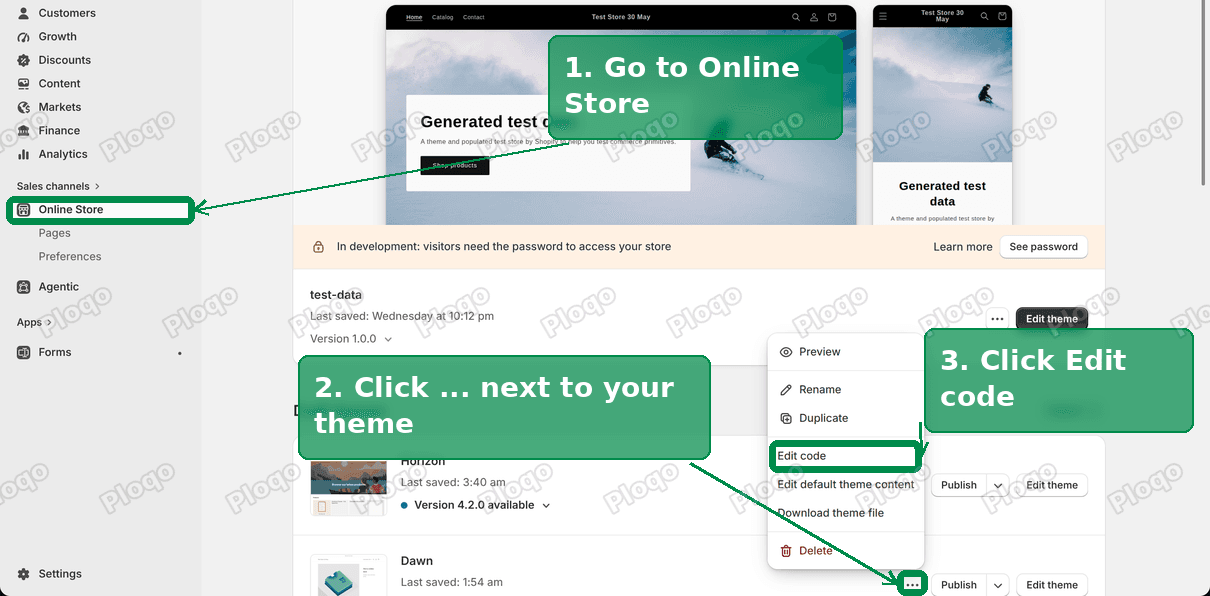 Online Store, the three-dot menu on the theme, and Edit code
- In the file list on the left, open
layout/theme.liquid.
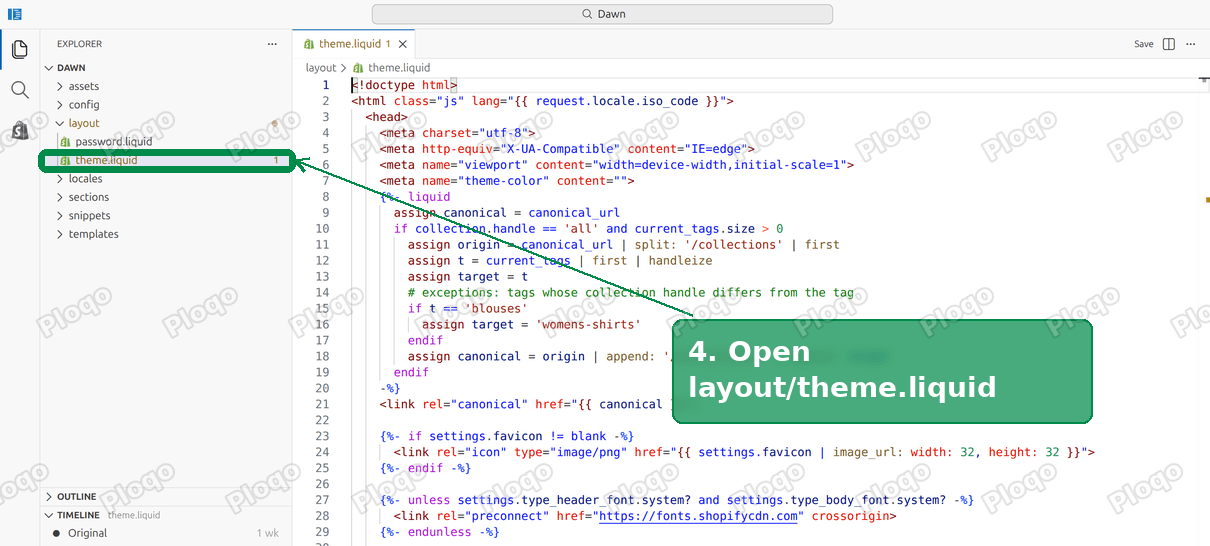 layout/theme.liquid open in the code editor
- Find the line that says
</body>. It is near the bottom of the file. Paste the code just above it.
<script>
document.addEventListener('DOMContentLoaded', function () {
var s = window.Shopify || {};
var root = (s.routes && s.routes.root) || '/';
var prefix = root.replace(/\/$/, '');
var lang = (s.locale || '').split('-')[0].toLowerCase();
if (!prefix || !lang || prefix.slice(1).split('-')[0].toLowerCase() === lang) return;
var host = location.origin;
document.querySelectorAll('a[href]').forEach(function (a) {
if (a.hasAttribute('hreflang') || a.closest('form[action*="localization"]')) return;
var href = a.getAttribute('href');
var abs = href.indexOf(host) === 0;
var path = abs ? href.slice(host.length) : href;
if (path === prefix || path.indexOf(prefix + '/') === 0 || path.indexOf(prefix + '?') === 0 || path.indexOf(prefix + '#') === 0) {
a.setAttribute('href', (abs ? host : '') + (path.slice(prefix.length) || '/'));
}
});
});
</script>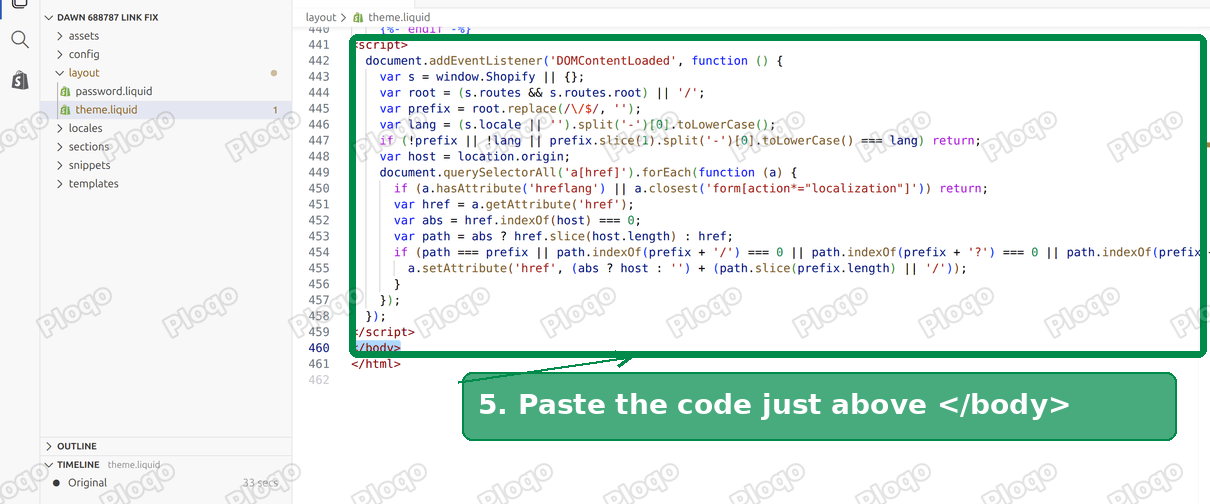 The script pasted above the closing body tag
- Click Save.
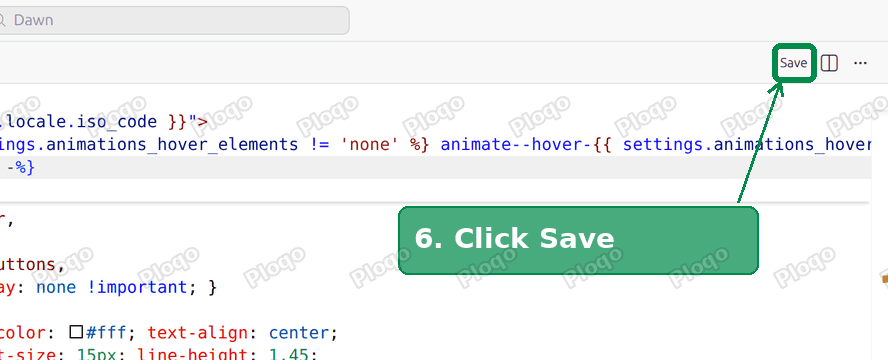 Save in the code editor
Open your homepage again in Chrome and hover over the same links. They should show your domain without /en in front.
What we saw when we tested it
We ran the script on three affected stores, on their main-language homepages:
- A Turkish store on the Prestige theme went from 121 links pointing at
/ento none. - A Turkish store on the Symmetry theme went from 315 to none.
- A German store went from 164 to none.
On the English version of the same pages, the number of /en links stayed exactly the same before and after, because those links are correct there.
Report it to Shopify Support
The script hides the problem for shoppers, but Shopify has to fix the cause. When you contact Shopify Support, give them enough to reproduce it quickly:
- Your store URL and your main language.
- One page and one link on it, with the address it should have and the address it has now.
- The time you first noticed it. For the stores we checked it was 28 September 2026.
- That the page is in the main language while the links carry the second language's prefix, and that it happens in Chrome but not on every request.
If you manage several stores, list them all in one ticket. It shows the problem is not tied to one store's setup.
Remove the script once Shopify fixes it
The script is a stopgap. When Shopify fixes the bug, the links will be correct without it, and the script will simply find nothing to change. It is still good practice to remove it so your theme has no leftover code.
To remove it, open layout/theme.liquid again, delete the block from <script> to </script> above </body>, and click Save.
A quick way to know the fix has landed: comment out the script, hover over a few links on your main-language homepage, and check that they no longer start with /en.
Questions merchants ask about this
Will this hurt my SEO?
While the bug is live, search engines crawling your main-language pages see links pointing at the English pages. That can send crawlers to the wrong language version. Your hreflang tags, the tags that tell search engines which page is which language, are not part of the problem, so the language versions stay correctly paired. The script corrects the links for shoppers. For crawlers, the lasting fix is Shopify's, which is one more reason to report it.
Does it slow the store down?
No. The script is a few lines that run once when the page loads and only loop over the links on that page. There is nothing to download.
I use a translation app. Does this still apply?
If the second language comes from Shopify's own language settings and lives in a subfolder like /en, yes. Translation apps that write their own links may behave differently, so check a few links after adding the script.
Could this be something I changed?
On the stores we checked, nothing changed on the merchant side. The same pages served correct links on some requests and broken links on others, which a store setting cannot cause.
Terms used in this article
- Subfolder. The part of the address after your domain that marks a language, like
/eninyourstore.com/en/products/mug. - Main language. The language your store shows at the root of the domain, with no subfolder.
- The
theme.liquidfile. The theme file that wraps every page of your store. Code placed here runs on every page. - Theme code editor. The editor you reach from Online Store, the three-dot menu, then Edit code.
- hreflang. Tags in the page head that tell search engines which page is the same content in another language.
The thread this came from: <a href="https://community.shopify.com/t/all-the-links-are-added-en/688787" rel="nofollow">All the links are added /en</a> on the Shopify Community.
Spending too long on manual Shopify busywork?
PinFlow turns your Shopify catalog into Pinterest pins and posts them on a schedule, automatically. Set it up once and let it run.
Get PinFlow on the Shopify App StoreMore Shopify fixes
More community-sourced Shopify guides, tested on a live store.
Themes & Storefront
Shopify AI Section: Fix a Price Badge Hidden Behind the Image
You built a section with Shopify's AI section generator, but the price badge on each card sits behind the photo. Here is the Custom Liquid fix that brings it to the front without regenerating anything. Tested on a Dawn store.
Themes & Storefront
Hide Shipping Calculated at Checkout on One Shopify Product
The line under Add to cart that says shipping is calculated at checkout shows on every product, gift cards included. Here is how to hide it on one product only, with the code, screenshots and the Eclipse theme steps.
Themes & Storefront
Shopify Dropdown Menu Behind Page Content (Z-Index Fix)
Your Shopify dropdown or mega menu opens, but the page title and products sit on top of its links and the menu closes before you can click. The fix is one Custom CSS rule in Theme settings. Tested on a Rebel store.