
Shopify Shipping Carriers List and Tracking URLs
Shopify's carrier list is fixed and there is no custom carrier setting. Here is the full list of carriers Shopify recognises, what the Other option changes, and three ways to stop pasting tracking links.
By AjayCodeWiz · September 17, 2026 · 8 min read
The problem
Your courier is not in Shopify's shipping carrier list.
So every order goes the same way. You pick Other, you type the tracking number, then you paste the whole tracking link on top of it. Thirty orders a day and that is thirty pasted links.
What most merchants want instead is a prefix. Save the first part of the link once, type only the number, and let Shopify glue them together.
Shopify has no setting for that. The carrier list is fixed, you cannot add to it, and there is nowhere to store a link pattern.
There are still three ways to stop pasting links, and one of them is probably sitting in the dropdown you already use.
What the shipping carrier field actually does
The carrier box is not decoration. It decides whether Shopify builds the tracking link for you.
Shopify keeps a list of carriers it recognises. Pick one of those and Shopify takes the tracking number you typed, drops it into that carrier's tracking address, and turns the number into a working link on the order page and in the shipping confirmation email.
Pick Other and Shopify has nothing to build from, so it asks you for the finished link instead.
That is the whole mechanism. The carrier name is the instruction, not a label.
There is a third case worth knowing about. If you leave the carrier blank, Shopify will try to guess the courier from the shape of the tracking number. Several couriers use similar number formats, so the guess is often wrong and the link lands on the wrong tracking page. Do not rely on it.
Check the list before you reach for Other
The carrier list is longer than the dropdown makes it look, and it is searchable. Start typing and it filters.
On a test store I typed dpd into the Shipping carrier box. Six entries came back.
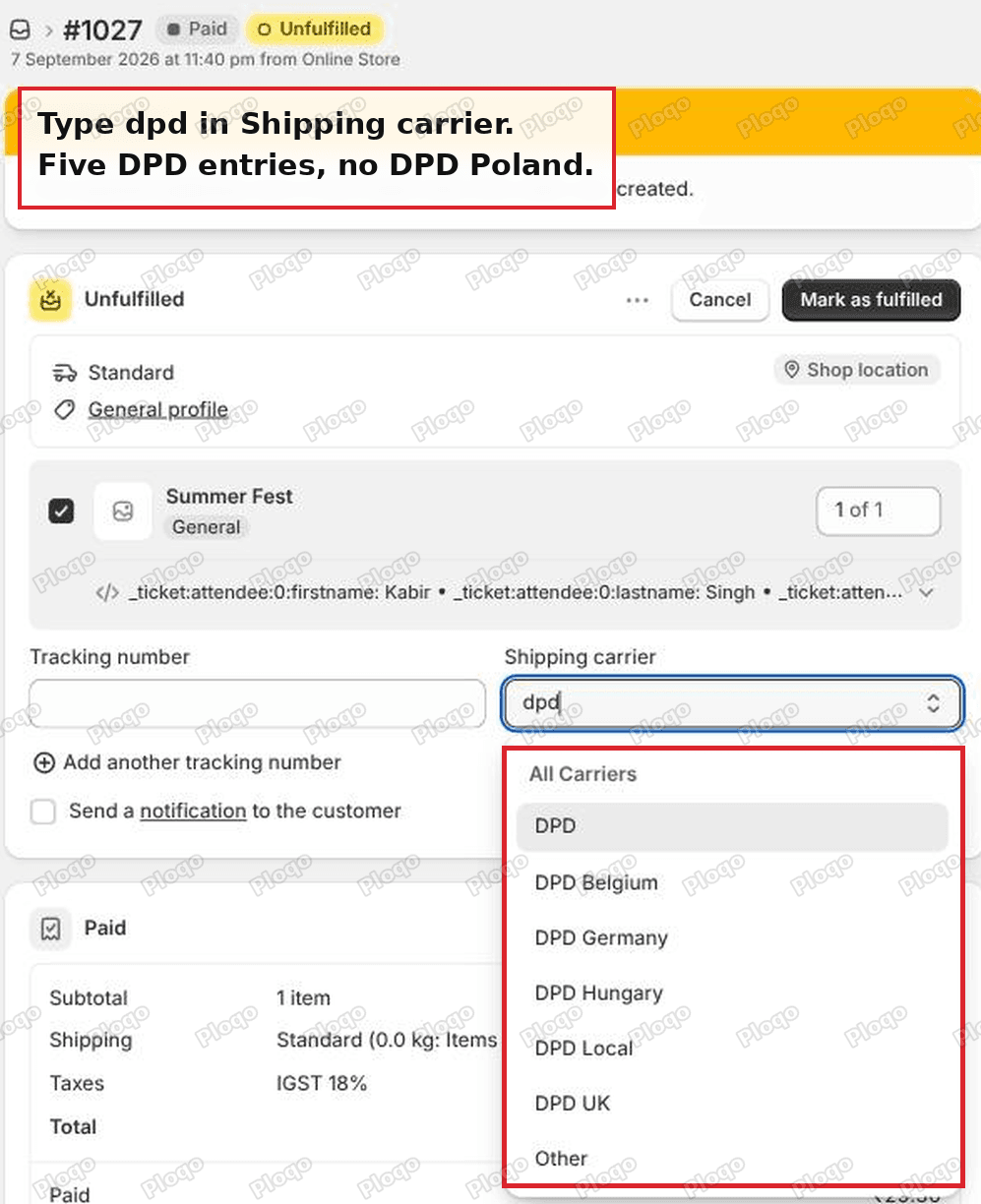 The Shopify shipping carrier dropdown filtered to dpd, showing DPD, DPD Belgium, DPD Germany, DPD Hungary, DPD Local and DPD UK
DPD, DPD Belgium, DPD Germany, DPD Hungary, DPD Local, DPD UK. No DPD Poland.
That is the shape of the problem for most merchants outside the big five markets. The parent brand is there. The national arm is not.
Before you write the list off, try the parent entry on one real parcel. Fulfil with the plain carrier name, open the order, and click the tracking number. If the link opens your parcel, you never have to paste a link again. If it opens a tracking page that cannot find the number, you have your answer in ten seconds and you have lost nothing.
The Shopify shipping carriers list
Two lists apply to your store at once.
The first shows for shops in any country. It is the long one, and it covers the large international couriers plus a lot of regional ones: DHL Express, DHL eCommerce, FedEx, UPS, USPS, Royal Mail, Evri, GLS, DPD, Chronopost, Colissimo, PostNL, PostNord, Poste Italiane, Correos, CTT, Canada Post, Australia Post, Japan Post, China Post, SF Express, Sendle, Mondial Relay, Packeta, Venipak, Whistl and roughly a hundred more.
The second is country specific and much shorter. Shopify adds a handful of local couriers based on where your shop is located:
- Australia: Australia Post, Sendle, Aramex Australia, TNT Australia, Hunter Express, Couriers Please, Bonds, Allied Express, Direct Couriers, Northline, GO Logistics
- Austria: Osterreichische Post
- Bulgaria: Speedy
- Canada: Intelcom, BoxKnight, Loomis, GLS
- Czechia: Zasilkovna
- France: Colissimo, Mondial Relay, Colis Prive, GLS
- Germany: Deutsche Post, DHL, DHL Express, Swiship, Hermes, GLS
- Greece: ACS Courier
- India: DTDC, India Post, Delhivery, Gati KWE, Professional Couriers, XpressBees, Ecom Express, Ekart, Shadowfax, Bluedart
- Ireland: Fastway, DPD Ireland
- Italy: BRT, GLS Italy
- Netherlands: DHL Parcel, DPD
- Norway: Bring
- Poland: Inpost
- Spain: SEUR
- Turkey: PTT, Yurtici Kargo, Aras Kargo, Surat Kargo
- United Kingdom: Evri, DPD UK, Parcelforce, Yodel, DHL Parcel, Tuffnells
- United States: GLS, Alliance Air Freight, Pilot Freight, LSO, Old Dominion, Pandion, R+L Carriers, Southwest Air Cargo
Poland gets one entry. A Polish merchant shipping with DPD, DHL Parcel or Pocztex is in the same position as the merchant whose thread started this article.
Capitalisation matters if you are sending fulfilments through an app or a script rather than typing them. The carrier name has to match Shopify's spelling exactly or the link is not built.
What Other changes on the screen
Choosing Other adds a field. That is the visible difference.
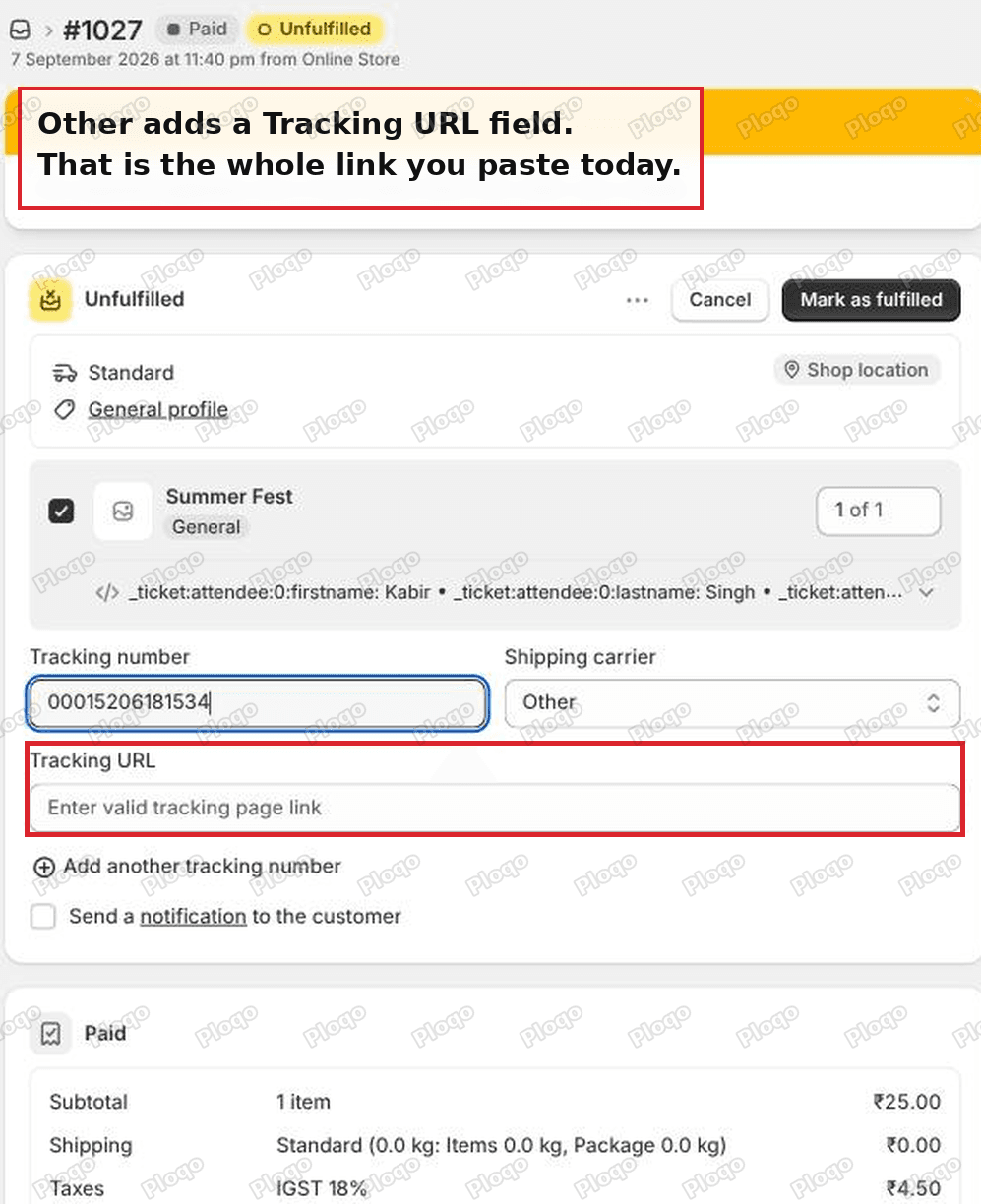 The Shopify fulfilment screen with Other selected, showing an extra Tracking URL field asking for a valid tracking page link
Tracking URL, with the placeholder "Enter valid tracking page link". Shopify wants the finished address, already carrying the number.
Nothing on that screen remembers what you typed last time. There is no default, no recent list and no pattern to save. Every order starts the field empty, which is why the job feels heavier than it is.
Pick a listed carrier and the field goes away
Switch the same order to a carrier Shopify knows and the Tracking URL field disappears.
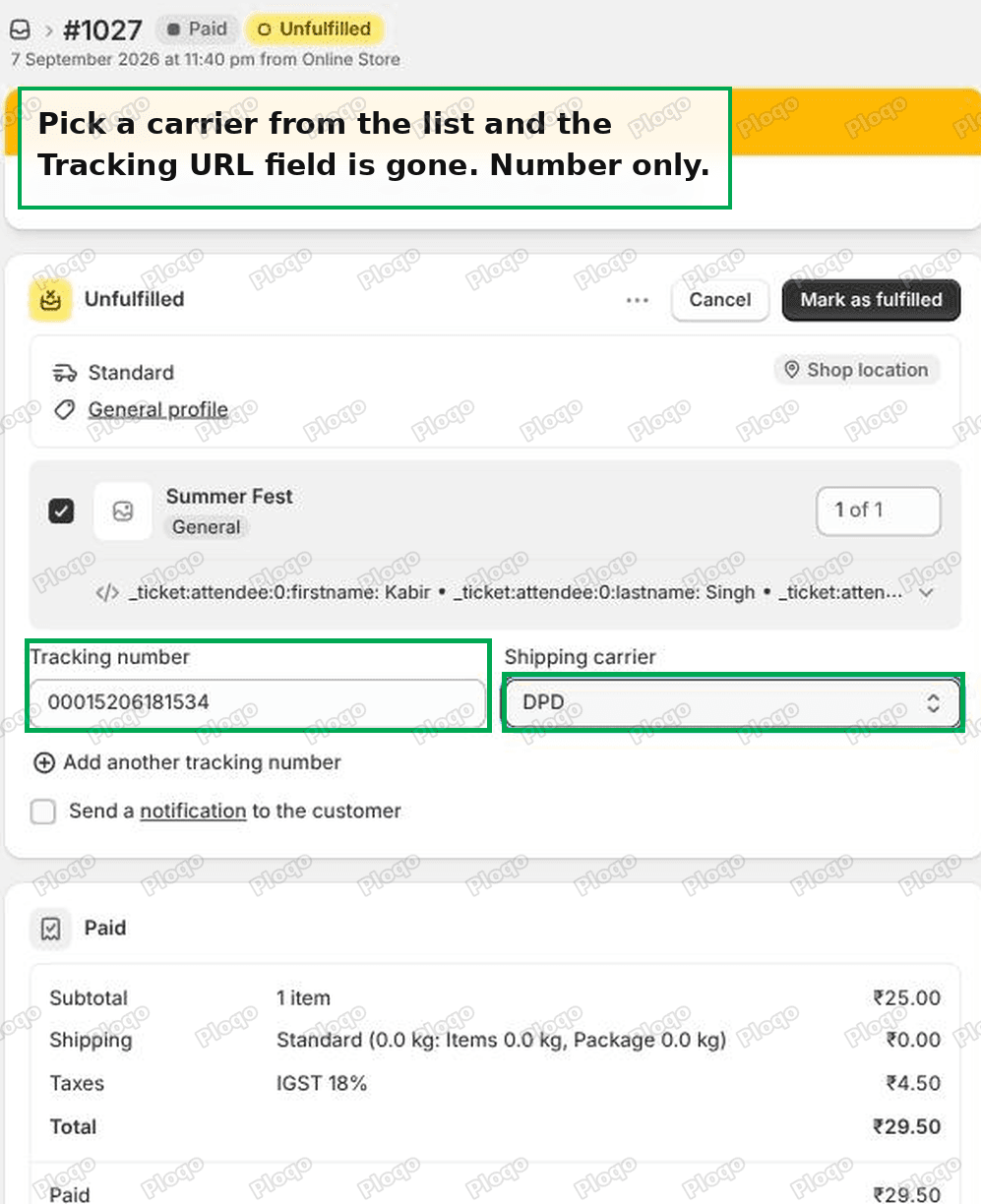 The same fulfilment screen with DPD selected, with only a tracking number field and no Tracking URL field
Tracking number, carrier, done. Shopify builds the rest.
This is the whole reason to test the parent brand entry before building a workaround. One field beats two, and it costs one parcel to find out.
Getting prefix plus number without a setting
If the listed carrier does not resolve your parcels, you can still stop typing the link. The prefix lives in a spreadsheet instead of in Shopify.
Every tracking link is the same two parts: a fixed address, then your number on the end.
https://tracktrace.dpd.com.pl/parcelDetails?typ=1&p1=00015206181534
[--------------- fixed prefix ----------------][--- your number ---]
So build it in a sheet:
- Column A holds the order number.
- Column B holds the tracking number, which is the only thing you type.
- Column C holds a formula that joins your prefix to column B. In Google Sheets or Excel that is
="https://tracktrace.dpd.com.pl/parcelDetails?typ=1&p1="&B2, with your own courier's address in place of that one. - Fill the formula down the column once. It builds every link from then on.
Then upload the sheet with a bulk fulfilment app, which takes a CSV of orders, tracking numbers and tracking links and writes them into Shopify in one go. Search the Shopify App Store for "bulk fulfill" and you will find several, most with a free tier for low volumes.
You have the prefix behaviour you wanted. It just lives one screen to the left.
Where to find your courier's prefix: track one real parcel on your courier's own website, then copy the address out of the browser bar and delete the tracking number off the end. What is left is the prefix.
The better fix: stop fulfilling in the admin
Typing tracking numbers into Shopify by hand is the step worth removing, not the link.
Most couriers outside the Shopify Shipping countries are reached through a shipping platform. You create the label there, and the platform writes the tracking number and the tracking link back into the Shopify order over the API. The order goes from unfulfilled to fulfilled without anybody opening the fulfilment screen.
In Poland that means the local platforms on the App Store, such as Apaczka, Furgonetka or Sendit. Elsewhere the same category exists under different names. Search the App Store for your courier by name first, because national couriers often publish their own app.
Two things to check before installing one:
- Does it write the tracking link back, or only the number? Some only send the number, which leaves you where you started.
- Does it support the specific national arm you use? "DPD" in an app listing does not always mean DPD Poland.
If the tracking link still does not work
A few failure modes come up repeatedly.
The number is right but the page says not found. The parcel is usually not in the courier's system yet. Most couriers publish scan data a few hours after the label is created, not at the moment of creation.
The link goes to a search page instead of the parcel. Your prefix is the search page address, not the parcel address. Track a real parcel, wait for the page that shows that parcel's history, and copy the address from there.
The number is not clickable at all. Either the carrier is Other with the URL field left empty, or the carrier field is blank. Open the order, use Edit tracking on the fulfilment, and set both.
The customer's email had no tracking button. The shipping confirmation carries whatever tracking details existed at the moment you fulfilled. Adding the link afterwards updates the order page, not the email that already went out. Fix the tracking first, then resend the shipment details from the fulfilment menu.
Carrier, tracking number, tracking URL
These three fields get mixed up, and the difference decides whether the link works.
- Tracking number is the courier's reference for the parcel. It is the only part that changes per order.
- Shipping carrier tells Shopify which courier's address pattern to use. Picking a recognised name is what makes the number clickable without any further input.
- Tracking URL is the finished web address for that one parcel. Shopify only asks for it when it cannot build it, which means when the carrier is Other.
Fill in the first two and let Shopify handle the third wherever you can. Fill in all three only when you have to.
What to do now
- Open any unfulfilled order and type your courier's name into Shipping carrier. Check whether the parent brand is listed.
- If it is, fulfil one parcel with it and click the tracking number to see where it lands.
- If it does not resolve, look for your courier's own app or a local shipping platform on the App Store, so the number and the link are written for you.
- If you are staying in the admin, move the prefix into a spreadsheet formula and fulfil in bulk from a CSV.
None of these is a custom carrier setting, because Shopify does not have one. All three remove the pasting.
Spending too long on manual Shopify busywork?
PinFlow turns your Shopify catalog into Pinterest pins and posts them on a schedule, automatically. Same idea as the bar above, let the system handle the repetitive part.
Get PinFlow on the Shopify App StoreMore Shopify fixes
More community-sourced Shopify guides, tested on a live store.
Shopify Admin
Shopify Checkout Customization: Change Checkout Text
Change the text on your Shopify checkout, like the Email me with news and offers checkbox, without code or Plus. Why the pop-up in checkout settings will not save, and the route that does.
Shopify Admin
Avalara Shopify Integration vs Shopify Tax: Which to Use
Moving to Shopify with Avalara? Shopify Tax already calculates US sales tax to the street address. What the Avalara Shopify integration adds, what filing costs, and how to decide.
Shopify Admin
Shopify Discount Limit: One Code for More Than 100 Products
Shopify stops you at 100 items when a discount applies to specific products. There is no setting to raise it, but you do not need one. Point the discount at a collection and one code covers thousands of products. Tested on a store, with the B2B route too.