
How to Show Shopify Variants as Separate Products
Shopify's new collection variant rules surface one card per product, not one per colour. Here is the workaround that gives you a card per colour and still links them, tested on a live store.
By AjayCodeWiz · July 18, 2026 · 9 min read
The problem: one product, one card, no matter how many colours
You sell a tee in four colours. On the collection page you want four cards, one per colour, the way every fashion retailer does it.
Shopify shows one.
The 2026 collections release added variant-targeting rules, which looked like the answer. You can build a collection that says "show the Rose colour" and it works. One colour, one card, correct image.
Then you ask for two colours and it stops behaving.
A merchant documented this carefully on the Shopify Community and the findings are worth repeating, because they define the shape of the problem:
- Target one variant option and it works exactly as expected.
- Target two options in one rule set and the front end still renders a single card. Both options appear in the filter. The product count reads 2, which is technically correct but not what anyone wants to see.
- Build two single-variant collections and combine them with collection rules and Shopify surfaces the products as-is, with every option back in the filter.
So the rules select products, and the variant targeting decides which variant's image represents that product. It does not multiply the product into one card per variant.
I reproduced this on a development store and built a workaround that does produce a card per colour. It is not a theme tweak. It is a modelling change, and it comes with real trade-offs that I will be direct about.
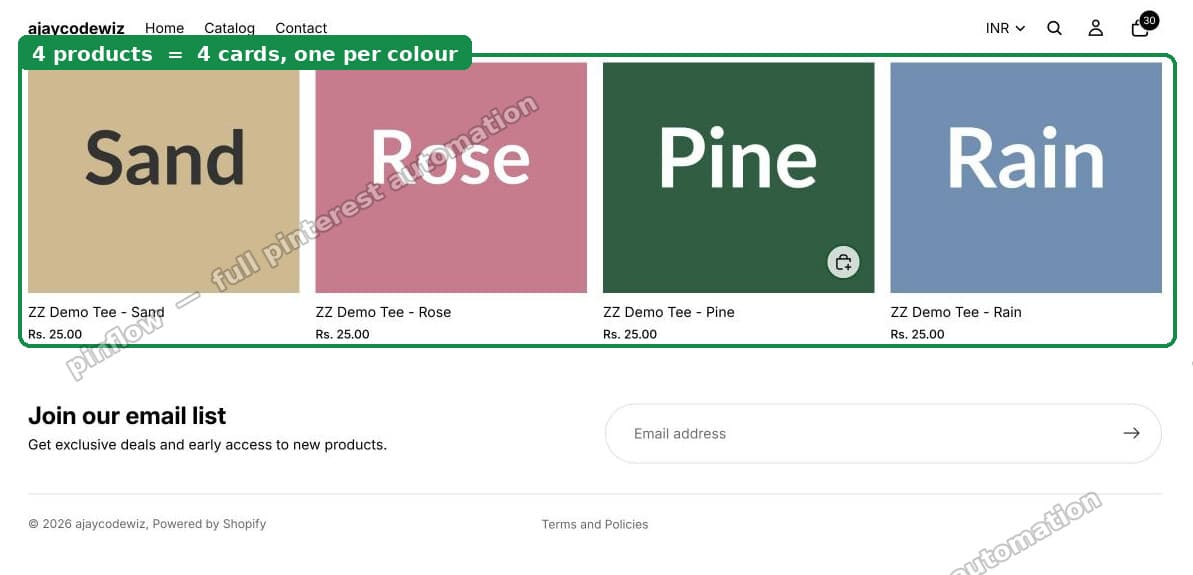 Four colour cards in a collection, one per colour
Why Shopify works this way
Worth understanding, because it tells you which fixes are impossible.
In Shopify's data model, the product is the unit that appears in a collection. A collection is a list of products. Variants are options inside a product, not members of a collection.
Everything downstream inherits that. Collection pagination counts products. The product count reads products. collection.products in Liquid is a list of products. A theme looping over that list can only render what the list contains.
Variant targeting did not change the model. It changed which variant's image and price a product card shows. That is a presentation hint attached to a product entry, not a way to put four things in a list that holds one.
This is why no theme setting, no app that only touches CSS, and no clever Liquid inside the product loop can give you four cards from one product. The loop runs once. You cannot render four cards from one iteration without breaking the count, the pagination, and the filters all at once.
If you want four cards, you need four products.
The approach: four products, made to feel like one
Split the tee into four products, one per colour. Group them with a tag. Then add a colour switcher on the product page so shoppers can move between them without going back to the collection.
That last part is what makes this acceptable rather than annoying. Four separate products with no link between them is a worse experience than one product with a colour picker. Four products with a switcher is close to what large retailers actually ship, and it is why their colour pages rank separately.
Duplicate your theme before editing. Online Store > Themes > ... > Duplicate.
Step 1: one product per colour, grouped by tag
Create a product per colour. Name them consistently, with the colour after a separator:
ZZ Demo Tee - SandZZ Demo Tee - RoseZZ Demo Tee - PineZZ Demo Tee - Rain
The separator matters. The switcher code reads the colour name out of the title by splitting on -, so keep the pattern identical across the group.
Give all four the same tag. Something namespaced and obviously internal, like zz-demo-tee-group.
Then create a smart collection with the condition Tag is equal to zz-demo-tee-group.
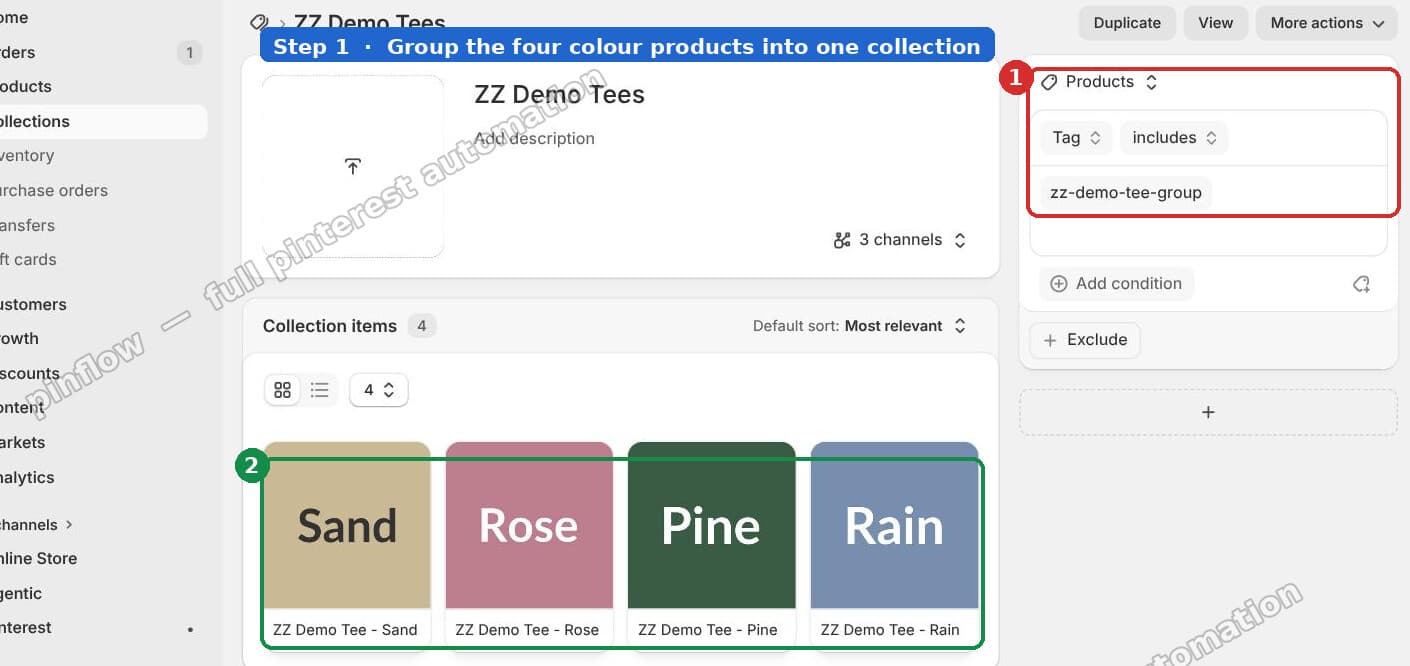 A smart collection built from a tag rule, showing all four colour products
Four products, four cards, each with its own image. The collection page now looks the way you wanted.
Two notes on this step:
- Use a smart collection, not a manual one. New colours join automatically when you tag them.
- The tag is doing double duty. It builds the collection, and in step 2 it is how each product finds its siblings.
Step 2: link the products with a colour switcher
Now the product page. One new snippet, one line in an existing file.
2a: create snippets/color-switcher.liquid
Create the file and paste:
{%- assign collection_handle = 'zz-demo-tee-group' -%}
{%- assign siblings = collections[collection_handle] -%}
{%- if siblings != blank and siblings.products_count > 1 -%}
<div style="margin:0 0 1.5rem;">
<p>Colour: <strong>{{ product.title | split: ' - ' | last }}</strong></p>
<div style="display:flex;gap:1rem;flex-wrap:wrap;">
{%- for sib in siblings.products -%}
{%- assign cname = sib.title | split: ' - ' | last -%}
{%- assign hex = '#cccccc' -%}
{%- case cname -%}
{%- when 'Rain' -%}{%- assign hex = '#6f8faf' -%}
{%- when 'Pine' -%}{%- assign hex = '#2f5d43' -%}
{%- when 'Rose' -%}{%- assign hex = '#c67b8e' -%}
{%- when 'Sand' -%}{%- assign hex = '#cdb891' -%}
{%- endcase -%}
{%- if sib.id == product.id -%}
{%- assign bd = '#111' -%}
{%- else -%}
{%- assign bd = '#ddd' -%}
{%- endif -%}
<a
href="{{ sib.url }}"
title="{{ cname }}"
aria-label="{{ cname }}"
style="width:4.4rem;height:4.4rem;border-radius:50%;background:{{ hex }};display:inline-block;border:3px solid {{ bd }};"
></a>
{%- endfor -%}
</div>
</div>
{%- endif -%}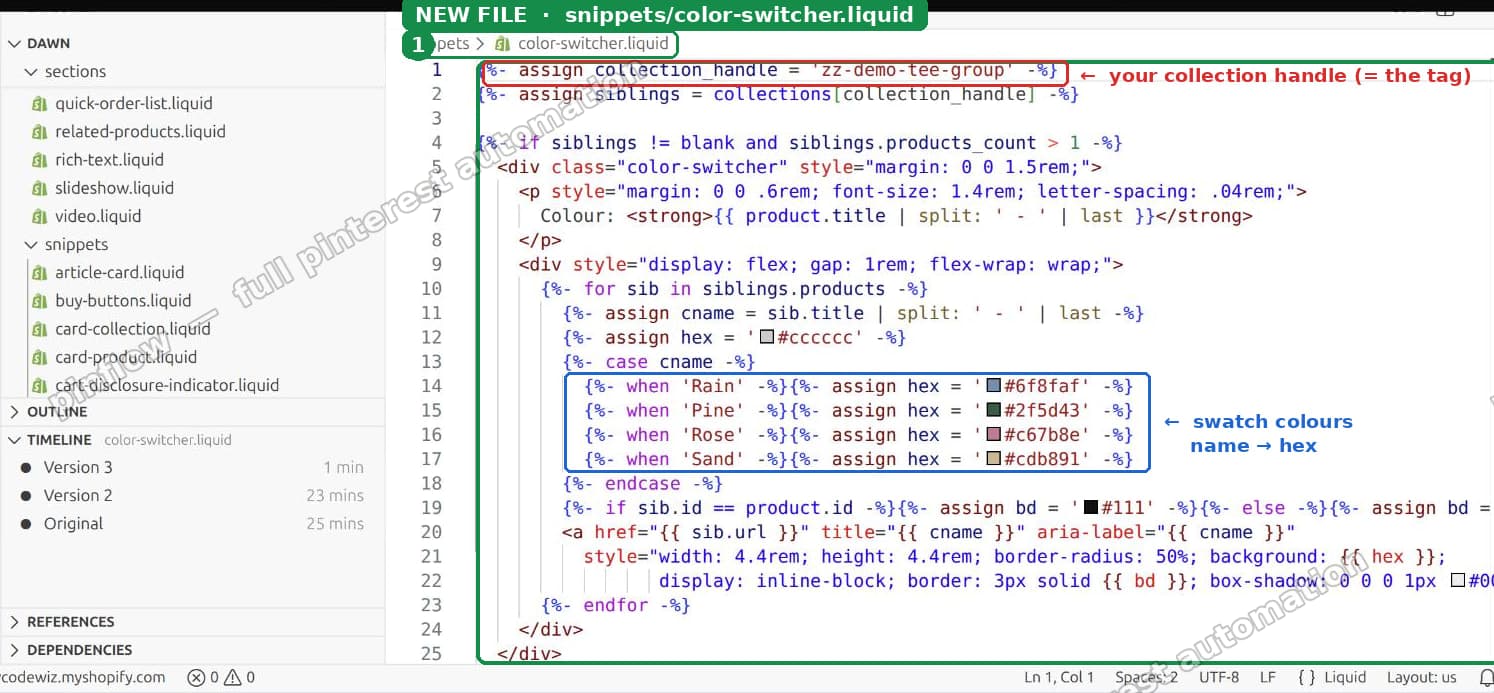 The colour switcher snippet
Three things to change for your store:
- Line 1 is the collection handle, which is the slug in the collection's URL after
/collections/. Here it matches the tag, which keeps things simple, but it does not have to. - The
caseblock maps colour names to hex values. Add awhenfor each colour you sell. Anything unmatched falls back to grey, so a missing entry degrades without breaking the page instead of breaking the page. - The
split: ' - 'separator must match your product titles exactly, spaces included.
The bd variable draws a dark ring around the swatch for the product you are currently on. That is the "you are here" state, and without it shoppers lose track of which colour they are looking at.
2b: render it on the product page
In sections/main-product.liquid, add one line where you want the swatches, inside the product info column:
{% render 'color-switcher' %} The render line added to main-product.liquid
Put it above the variant picker if you have other options like size, so the flow reads colour first, then size.
The result: each colour is its own product and its own URL, and the swatches move between them.
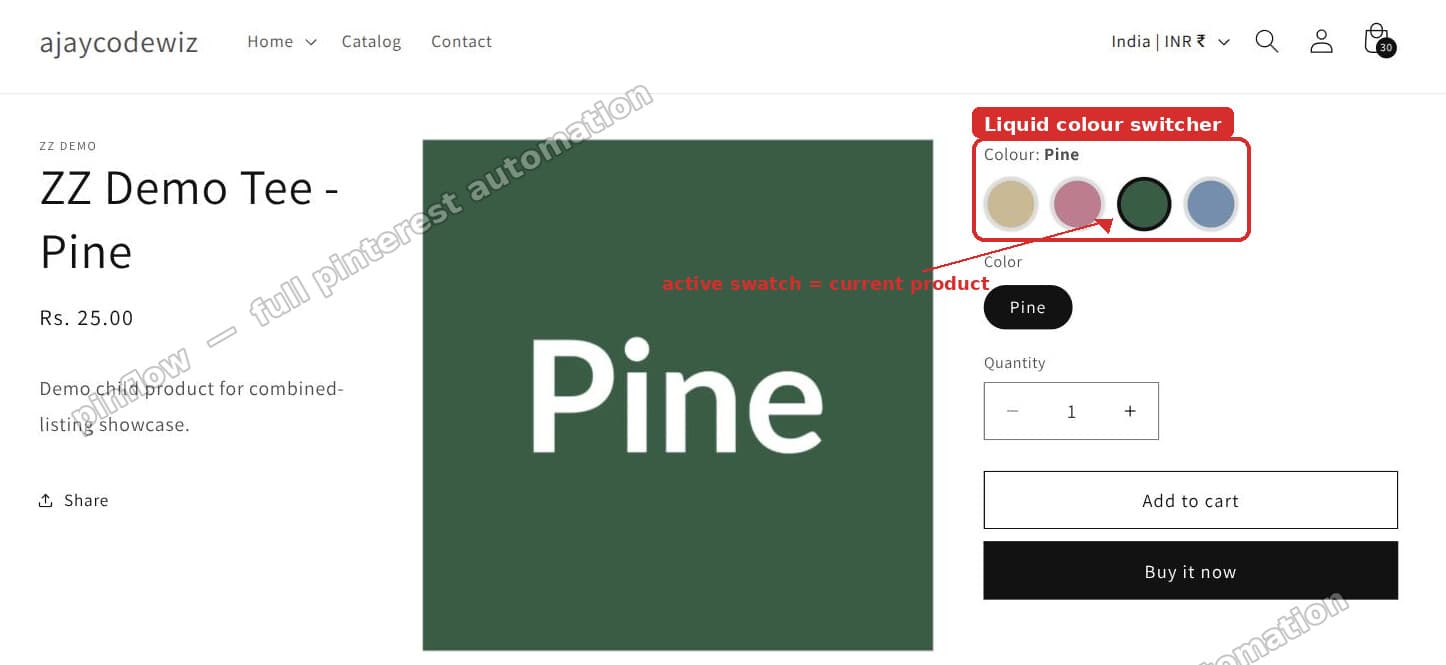 The colour switcher on the product page with the active colour ringed
The trade-offs, stated plainly
This is a real modelling change and it is not free. Know what you are taking on.
Inventory is now per product. Four products means four inventory records instead of one product with four variants. If your 3PL, ERP or POS assumes one SKU per product, check that first.
Reviews and metafields fragment. Reviews attach to a product. Split into four and you have four review counts instead of one. Some review apps support grouping. Many do not.
Every colour is a separate URL. This is the main reason retailers do it: four pages that can each rank for "green tee" rather than one page competing with itself. It also means four sets of images, descriptions and SEO fields to maintain.
The switcher is manual. Adding a fifth colour means a new product, the tag, and a new when line in the case block. Miss the last one and the swatch renders grey.
"Add to cart" adds one colour. Which is correct, but different from a variant picker where the choice happens in place.
If those are acceptable, this works well. If inventory or reviews are dealbreakers, read the next section instead.
The alternative: Combined Listings
If you are on Shopify Plus, use the free Combined Listings app instead of the switcher.
The model is the same, one product per colour, but Shopify handles the grouping natively. You nominate a parent product and attach the children. The storefront renders a real option picker, the URLs stay separate, and you do not maintain a case block.
That is strictly better than the Liquid switcher. The only reason this article leads with the switcher is that Combined Listings is Plus-only, and most people asking this question are not on Plus.
If you are on Plus, do steps 1 and 1 only, then set up Combined Listings and skip step 2 entirely.
What about a filter app?
Apps like Boost AI Search & Filter and Globo Smart Product Filter build their own variant-level index and can show variants as separate cards without splitting your products.
That is a genuinely different trade: you keep one product, one inventory record, one set of reviews, and you pay monthly for an app that renders your collection page.
Choose the app if:
- Your catalog is large and splitting products would multiply it uncomfortably.
- Inventory or reviews cannot fragment.
- You want this behaviour on filters too, not just the grid.
Choose separate products if:
- You want each colour to have its own indexable URL. An app rendering cards client-side does not give you that.
- You do not want a recurring cost or another script on the collection page.
- The number of colour groups is small enough to maintain by hand.
The SEO point is the one people usually miss. A filter app changes what shoppers see. Separate products change what Google sees. Those are not the same goal, and only you know which one you are actually after.
What I confirmed on the test store
The original finding holds: Shopify's variant-targeting rules select products and choose a representative variant. They do not expand one product into several cards, and combining two single-variant collections does not either. That is the data model, not a bug, and it is unlikely to change.
The workaround produced what was actually wanted:
- Four products, four cards, one per colour, each with the right image, in a smart collection driven by a tag.
- A colour switcher linking all four, with the current product ringed, from one snippet and one render line.
- No app, and nothing that breaks the product count or pagination, because the collection genuinely contains four products.
If you take one thing from this: the reason no setting exists is that a collection is a list of products. Once you accept that, the fix stops being a hunt for a toggle and becomes a decision about how you want to model your catalog.
A card per colour is a pin per colour
PinFlow turns your Shopify catalog into Pinterest pins and posts them on a schedule. Separate colour products mean separate pins, each pointing at its own page.
Get PinFlow on the Shopify App StorePart of a complete guide
Shopify Variants: The Complete Guide
Variants are one product sold in several forms. How they work, the 2,048 and 3-option limits, and where each variant fix lives - images, swatches, sorting, hiding and the theme-specific bugs.
More Shopify fixes
More community-sourced Shopify guides, tested on a live store.
Collections & Products
Shopify Unit Pricing: Show a Price per Unit on Each Variant
Set a unit price on every variant and Dawn shows the price per 100 ml or per kg, and updates it when a shopper picks another size. No code needed.
Themes & Storefront
Square Size Buttons on Shopify Dawn (Custom CSS)
Dawn draws size options as round pills. Here is the Custom CSS that turns them into square boxes matching the Add to cart button, tested on Dawn 16.0.0.
Themes & Storefront
Remove the Variant ID From Your Shopify Product URL
Your product link keeps turning into /products/name?variant=43176780890281, before the customer has touched anything. One theme setting stops it, a second switch covers Dawn, and a short snippet cleans the links that already carry the ID.