
Shopify URL Structure: Why /pages/ and /collections/ Appear
Shopify puts /pages/, /collections/ and /products/ in every link, and you cannot turn that off. Here is what you can change - a short /support link, a tidy /collections page and shorter handles - tested on a Dawn store.
By AjayCodeWiz · September 24, 2026 · 8 min read
The problem
You build a Support page, open it on your live store, and the address bar reads yourstore.com/pages/support. You expected yourstore.com/support.
The same thing happens across the site. Collections sit under /collections/, products under /products/, blog posts under /blogs/. A merchant asked about exactly this on the Shopify Community. They added one more worry: if a shopper typed yourstore.com/collections by hand, they would land on a page full of collection images the merchant never meant to show.
Both parts have a fix. The word in the middle of the link stays, but you can make the short link work, and you can decide what the /collections page shows.
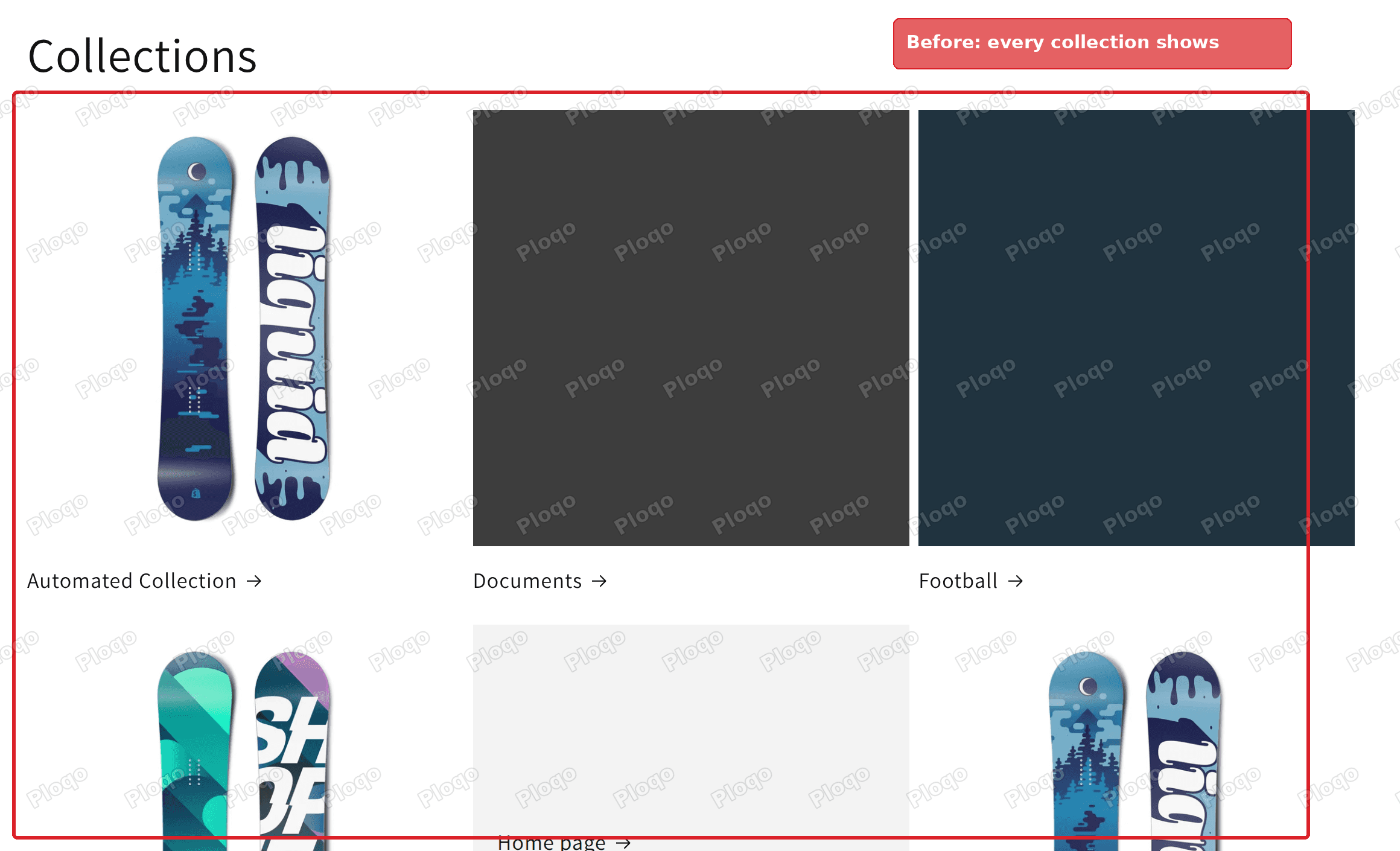 Before: the /collections page on a Dawn store listing every collection, including Documents and Home page
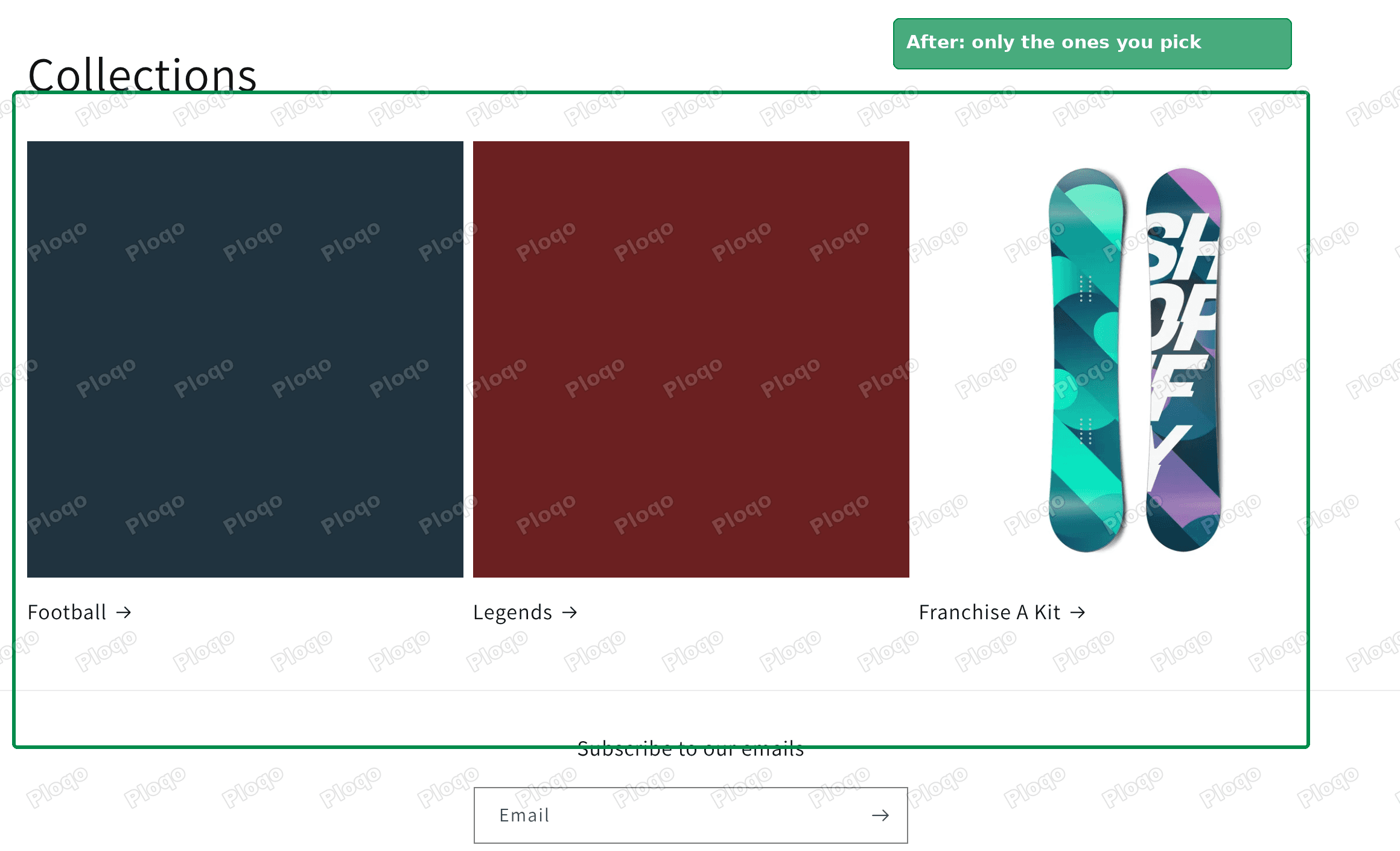 After: the same /collections page showing only Football, Legends and Franchise A Kit
How the Shopify URL structure works
Every Shopify store uses the same fixed layout for its web addresses. The first part after your domain says what kind of content it is. The second part is the handle, which is the short name Shopify uses in the web address for that one item.
| What you created | Where it lives |
|---|---|
| A page (Online Store > Pages) | /pages/<handle> |
| A collection | /collections/<handle> |
| A product | /products/<handle> |
| A blog and its posts | /blogs/<blog>/<post> |
| The list of every collection | /collections |
| Every product in one list | /collections/all |
On my test store the Support page answered at /pages/support, the default blog at /blogs/news, and both /collections and /collections/all loaded without me creating anything. Those last two are built in. Every Shopify store has them.
The first part of each address is fixed. There is no setting in the admin, the theme editor or the theme code that removes /pages/ or /collections/. The part you control is the handle, and whether a short address forwards to the long one.
Can you remove /pages/ from a Shopify URL?
No. Shopify reads that first part to know what to load, so it has to be there. Themes cannot change it either, because the theme is only asked to draw the page after Shopify has already decided which page it is.
What you can do instead:
- Make a short address forward to the real one.
yourstore.com/supportopensyourstore.com/pages/support. This is a URL redirect, covered in the next section. - Shorten the handle. A page called "Customer Support and Returns" gets a long handle by default. You can cut it to
supportorhelp. - Control the built-in pages. The
/collectionslist page can show only what you choose.
For most stores the redirect is what they were after. A shopper can type the short address, and your printed flyers, emails and social bios can use it too.
Make yourstore.com/support work with a URL redirect
A URL redirect tells Shopify: when someone asks for this address, send them to that one instead. It takes about a minute.
- In your Shopify admin, go to Content > Menus.
- Click URL redirects in the top-right corner.
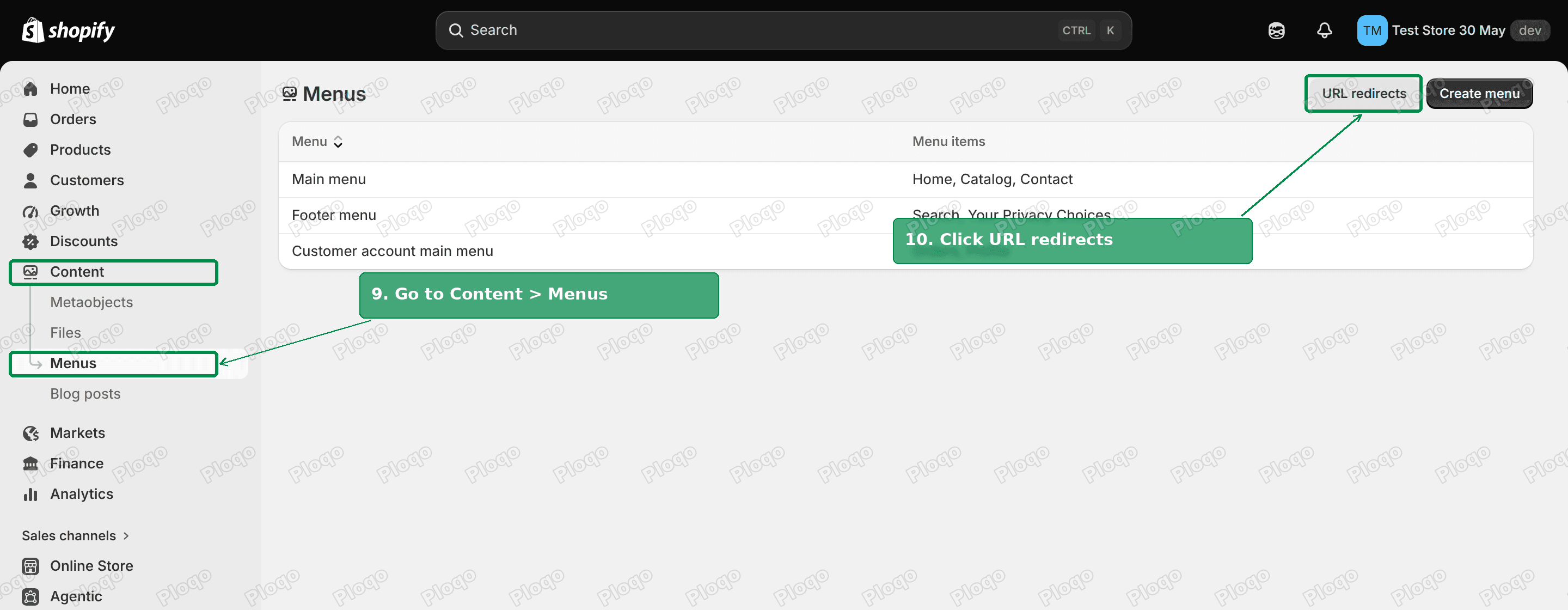 Shopify admin Menus page with Content and Menus highlighted in the left sidebar and the URL redirects button highlighted top right
- Click Create URL redirect.
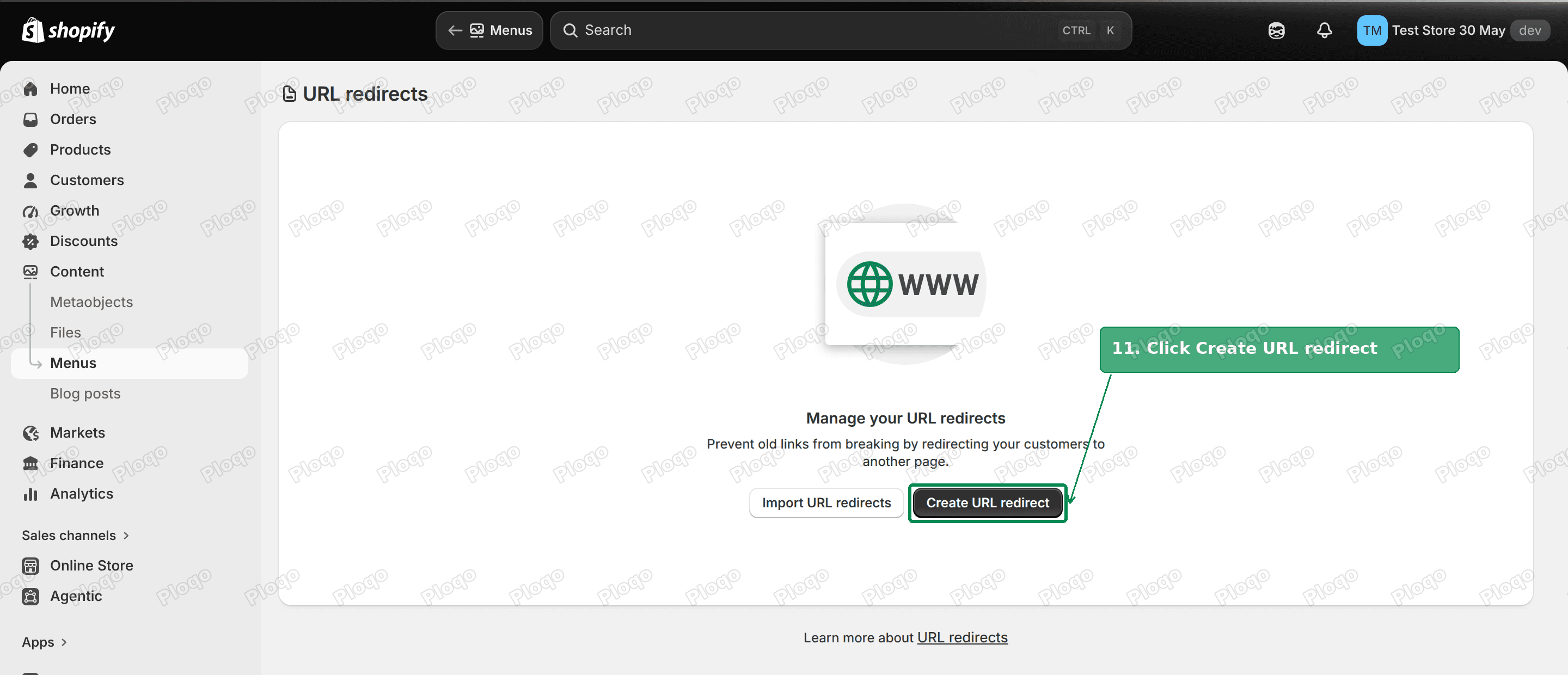 The URL redirects page with the Create URL redirect button highlighted
- Type
/supportin Redirect from and/pages/supportin Redirect to. - Click Save redirect.
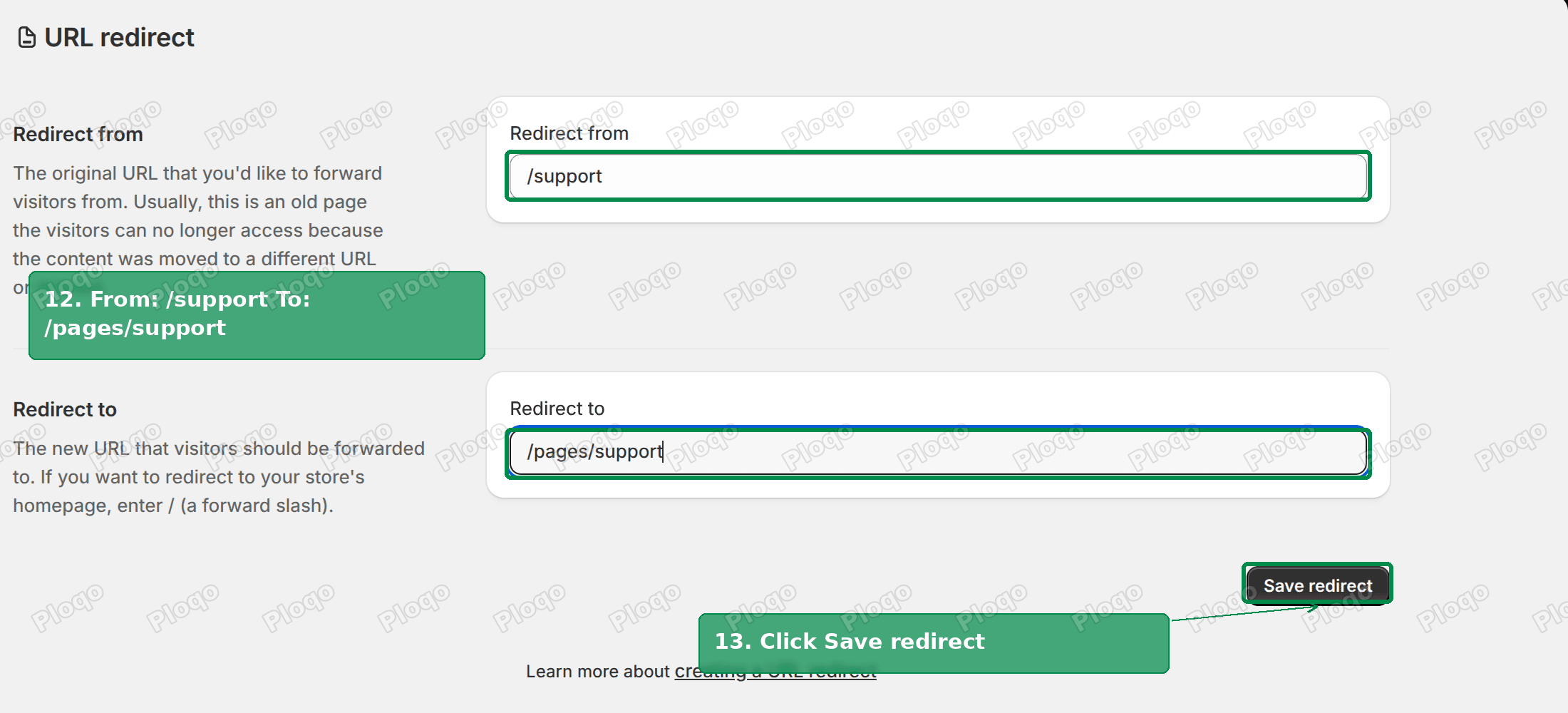 The URL redirect form with /support in Redirect from, /pages/support in Redirect to and the Save redirect button highlighted
On my test store, /support returned a 301 status straight to /pages/support as soon as the redirect was saved. A 301 is a permanent redirect. It tells browsers and Google that the page has one real address, so the short link does not create a duplicate page.
Type only the part after your domain, starting with a /. The form's own example, /shop/shoes, shows the format.
Why you cannot redirect /collections to your home page
The obvious next move is a second redirect: send /collections to your home page, so shoppers never see that list.
I tried it. The admin accepted a redirect from /collections to / with no error. But /collections kept loading the collections page with a normal 200 status, and the redirect never ran.
Shopify only uses a redirect when the address it starts from does not exist. /support did not exist before, so the redirect ran. /collections is a built-in page that always exists, so Shopify shows the page and skips the redirect. The same applies to any page, product or collection you have created: a redirect from its address is saved but has no effect while the item is still there.
So for /collections, the answer is to change what the page shows rather than to hide it.
Clean up the /collections page in the theme editor
The /collections page uses a template called Collections list. A template is the layout Shopify uses for one type of page. By default it shows every collection your store has published, including ones you made only to feed a home page slider or an automated rule.
You can switch off that automatic list and pick the collections yourself. These steps are for Dawn, the free theme Shopify installs by default. Most free Shopify themes have the same template and sections.
- Go to Online Store.
- Click Edit theme on your current theme.
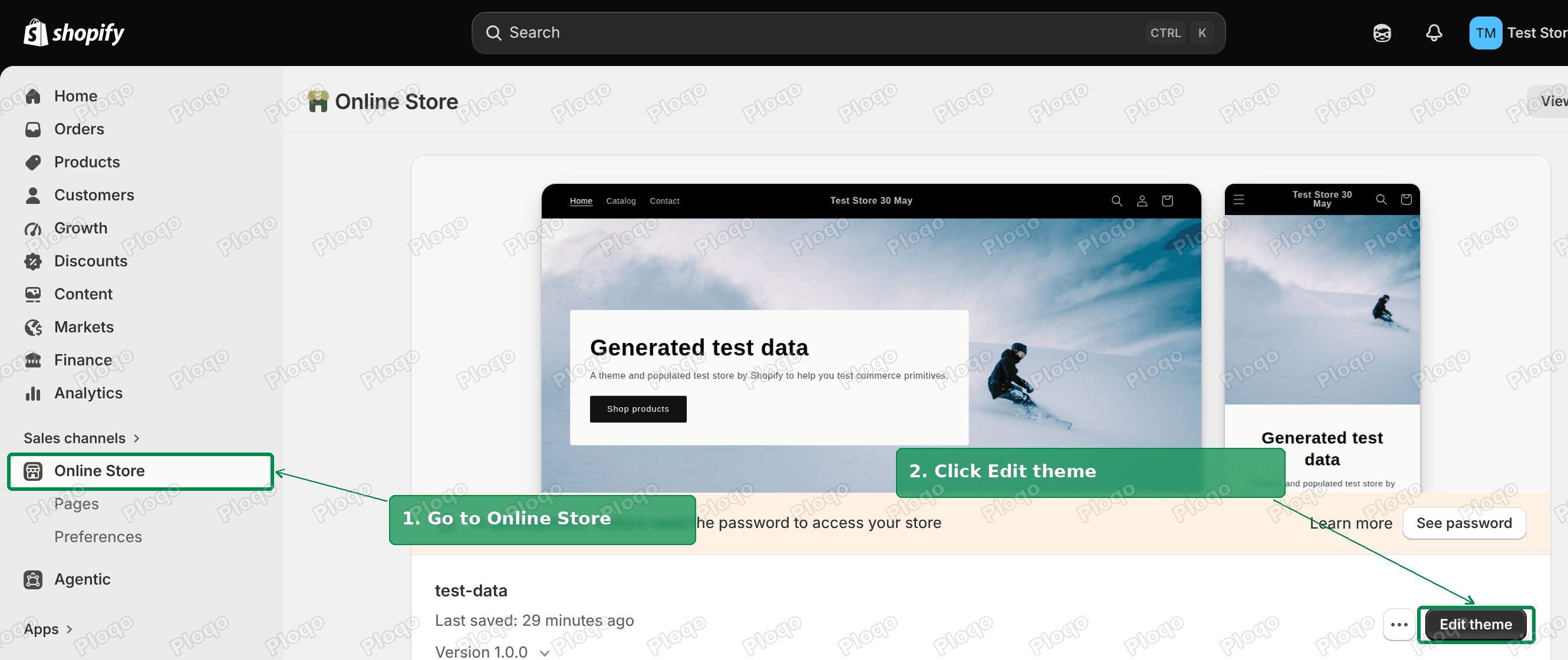 Shopify admin Online Store themes page with Online Store highlighted in the sidebar and the Edit theme button highlighted
- At the top of the theme editor, click Home page and choose Collections list.
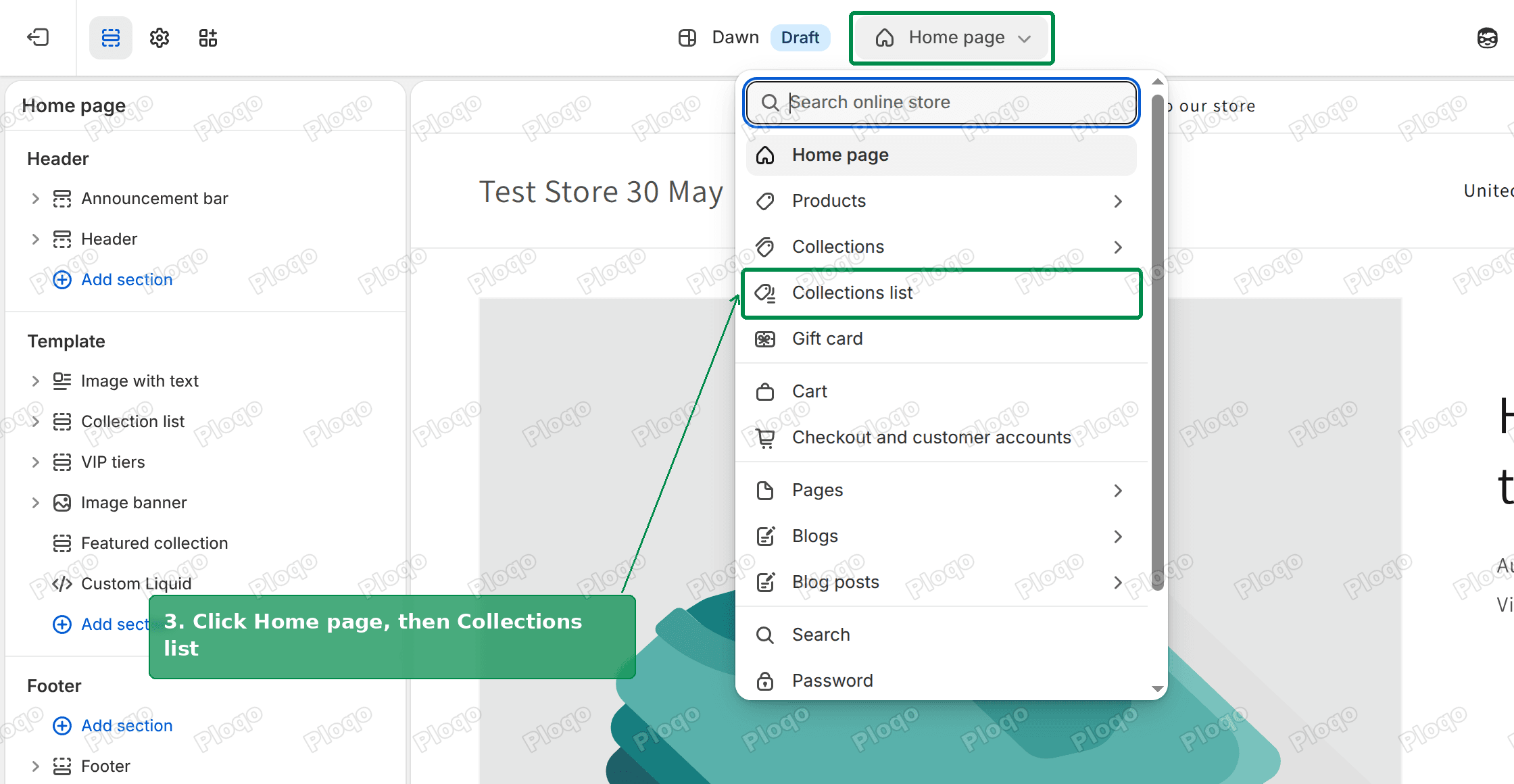 The theme editor template menu opened from Home page, with Collections list highlighted
- In the left sidebar, hover over Collections list page and click the eye icon. This hides the automatic list. The page is still there, it is just empty until you add something.
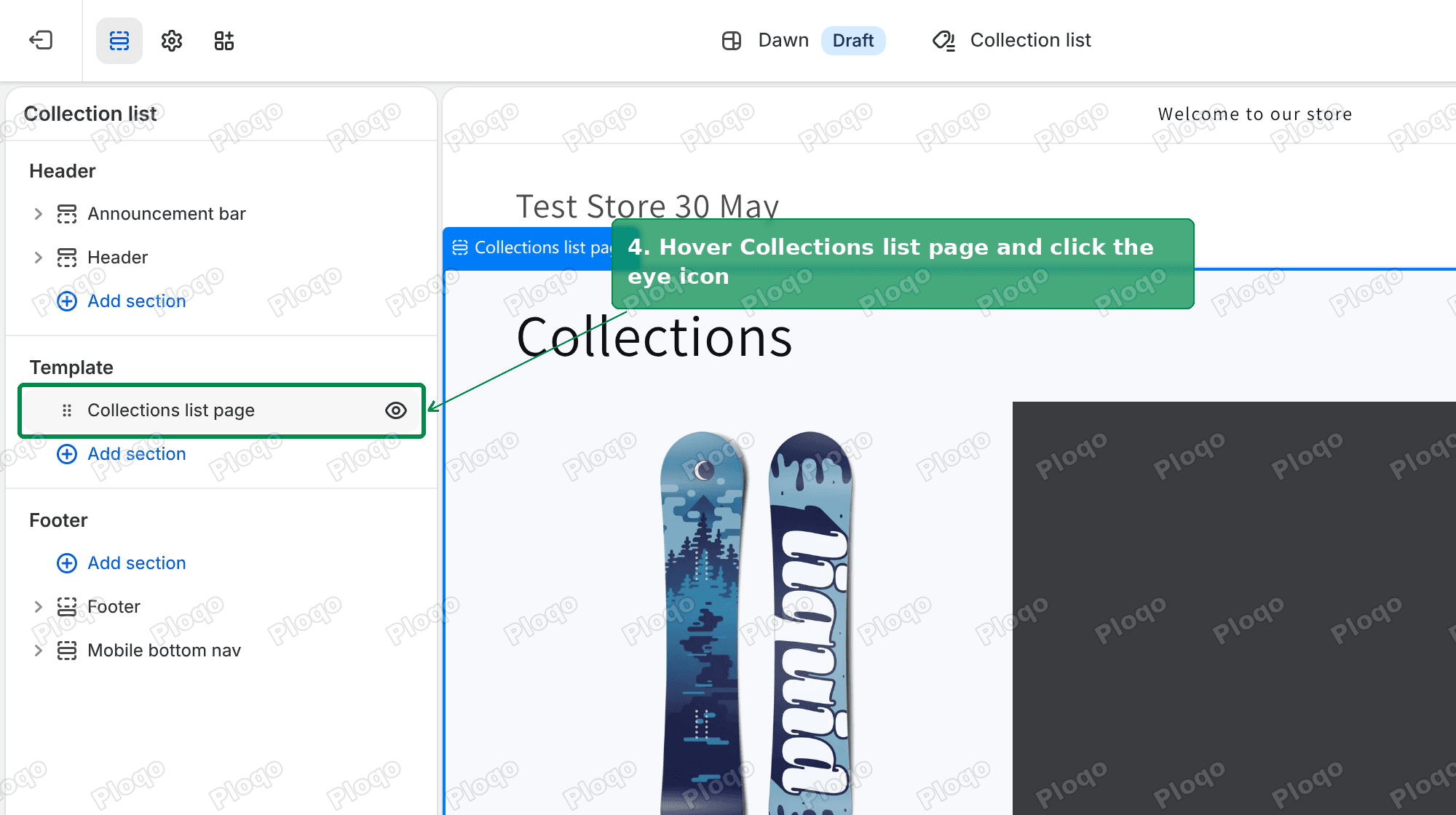 The Collections list template in the theme editor, with the eye icon next to Collections list page highlighted
- Click Add section under it, search for "Collection", and choose Collection list.
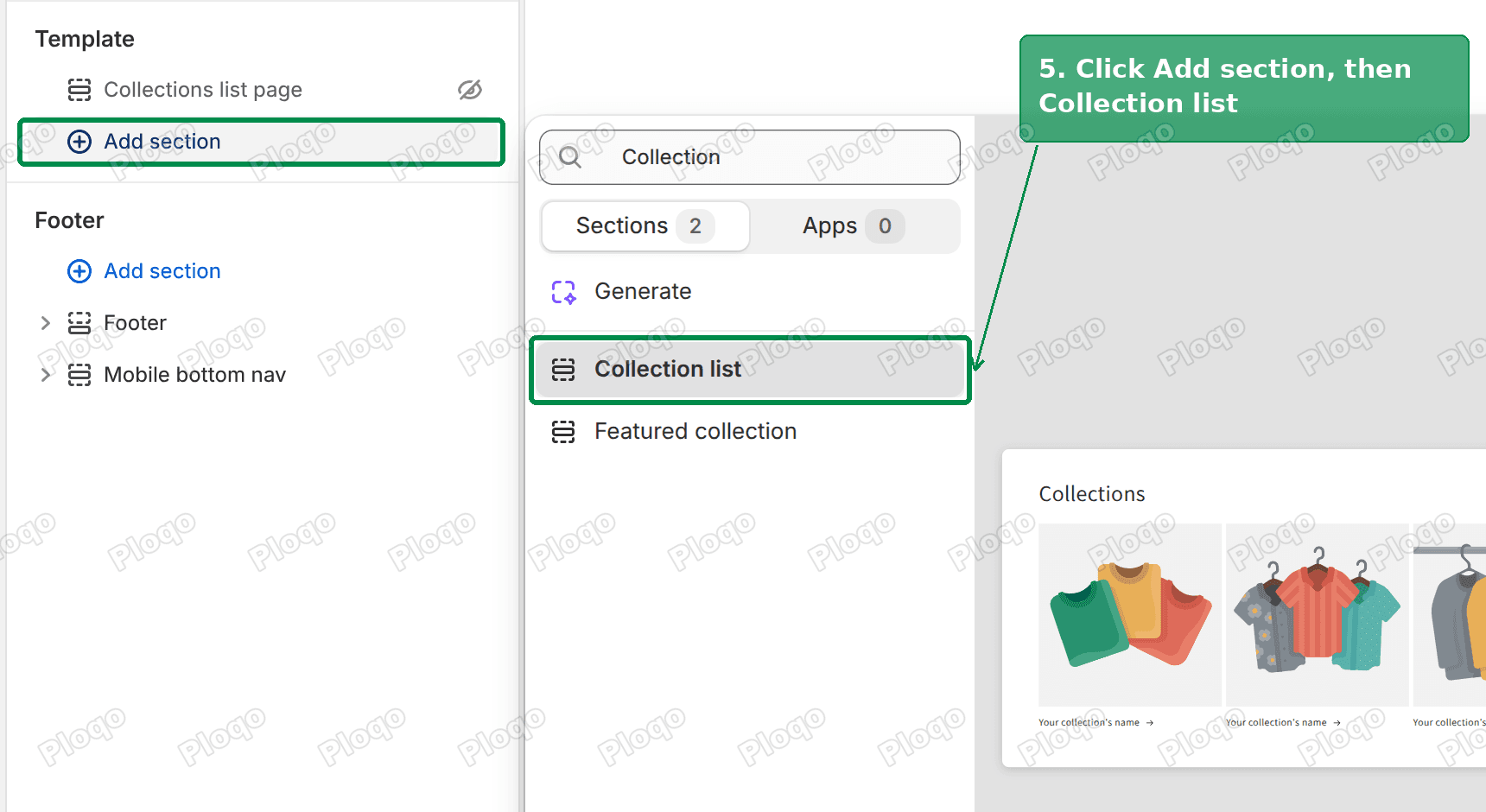 The Add section search showing Collection list and Featured collection, with Collection list highlighted
- The new section arrives with three empty Collection blocks. Click the first one, then click Select.
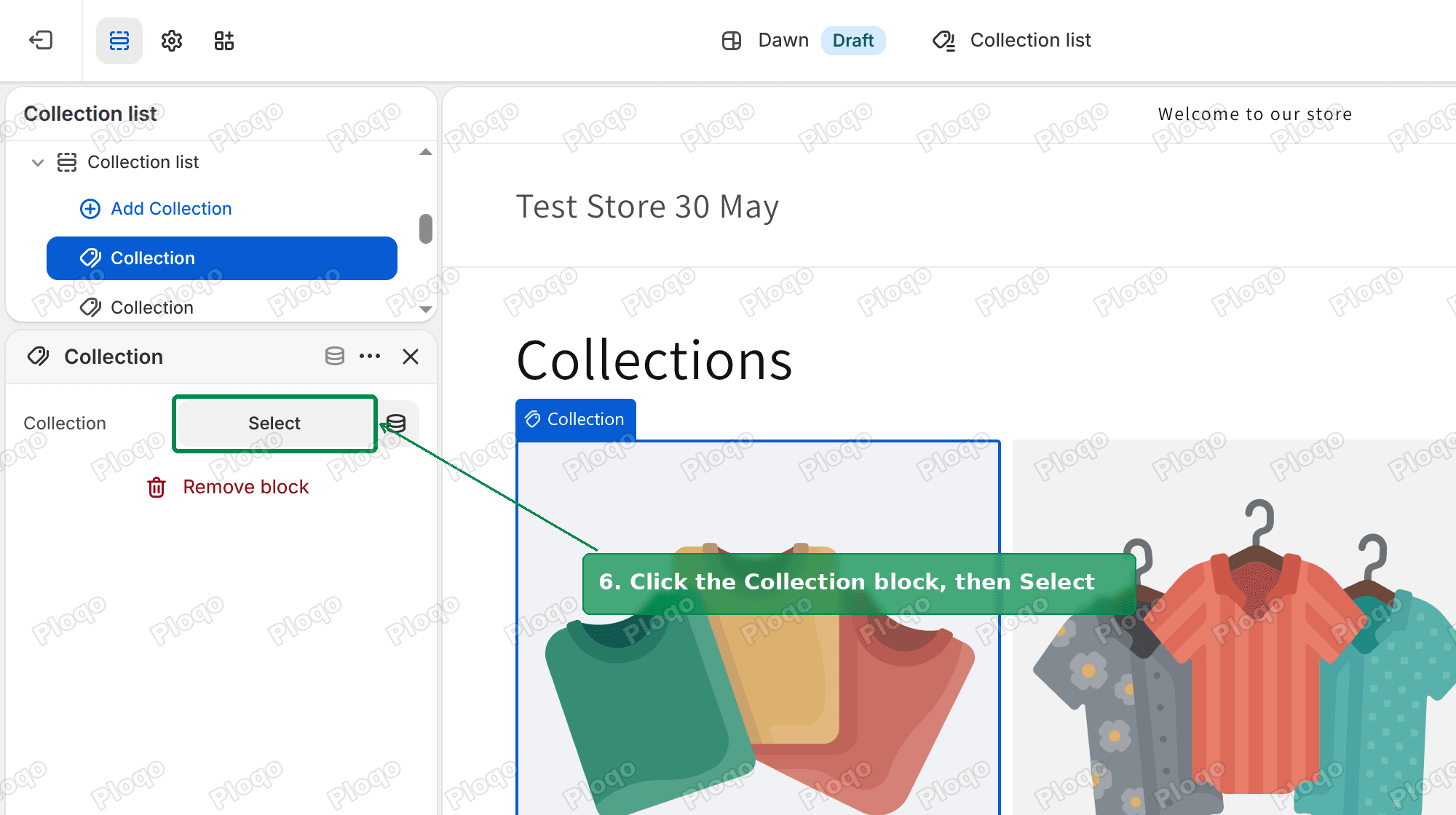 A Collection block's settings in the sidebar with the Select button highlighted
- Pick the collection you want to show. Repeat for the other blocks. Use Add Collection if you want more than three.
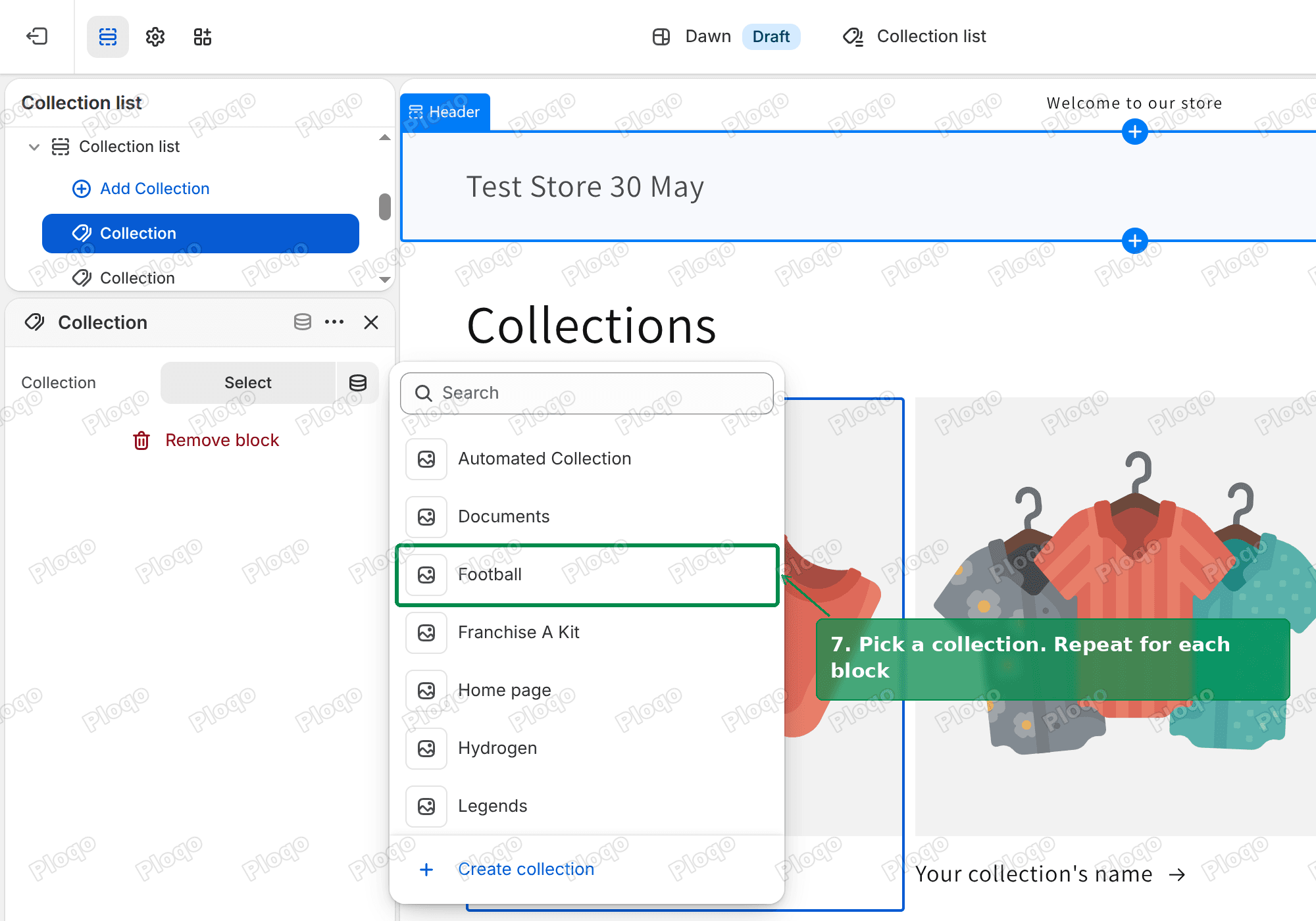 The collection picker listing the store's collections, with Football highlighted
- Click Save.
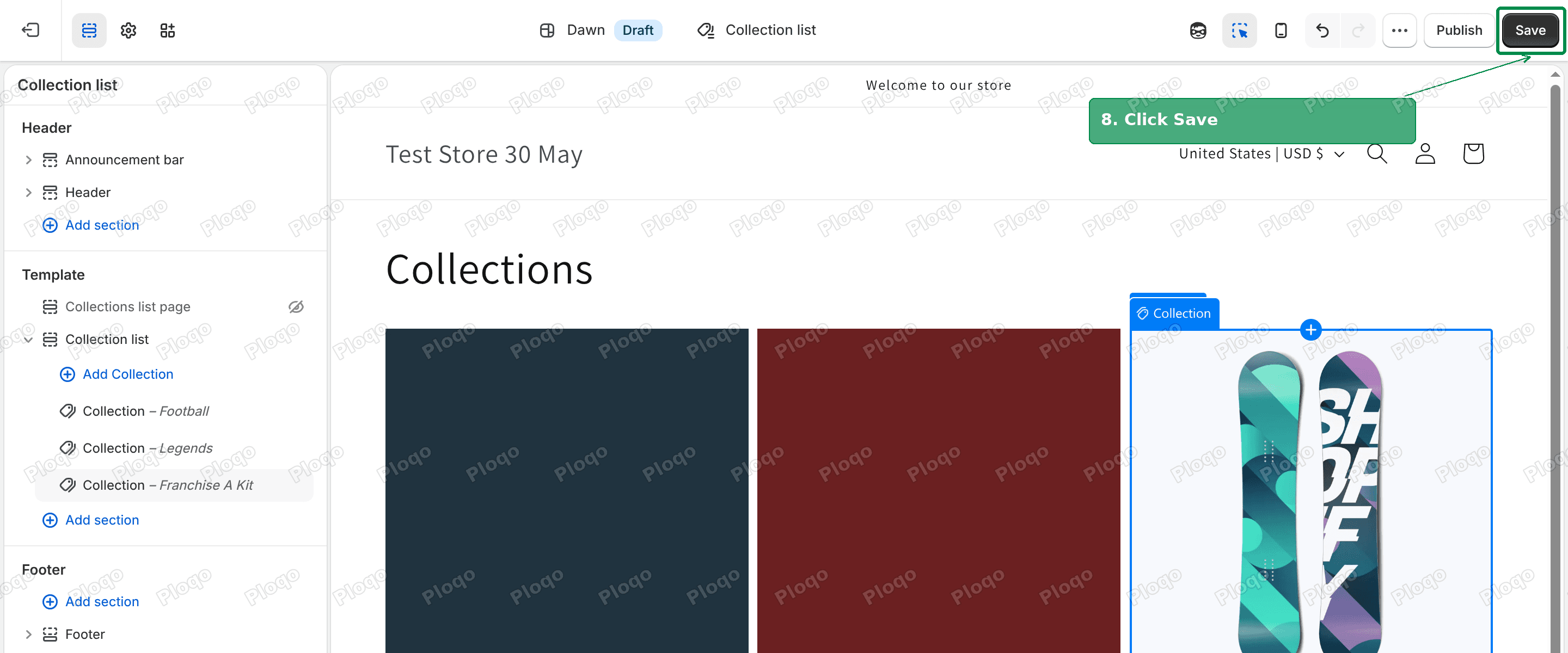 The theme editor with three picked collections in the preview and the Save button highlighted
On my test store the /collections page went from seven collections, including placeholder ones called "Home page" and "Documents", down to the three I picked, in the order I picked them.
You can also give the section a heading, change the number of columns, or add other sections above it, such as a short intro. Anyone who types /collections then lands on a page you designed.
Shorten a page's handle
The handle is the last part of the address. Shopify builds it from the page title when you first save the page, so "Customer Support and Returns" becomes customer-support-and-returns. You can change it.
- Go to Online Store > Pages and open the page.
- Scroll to Search engine listing and click the pencil icon.
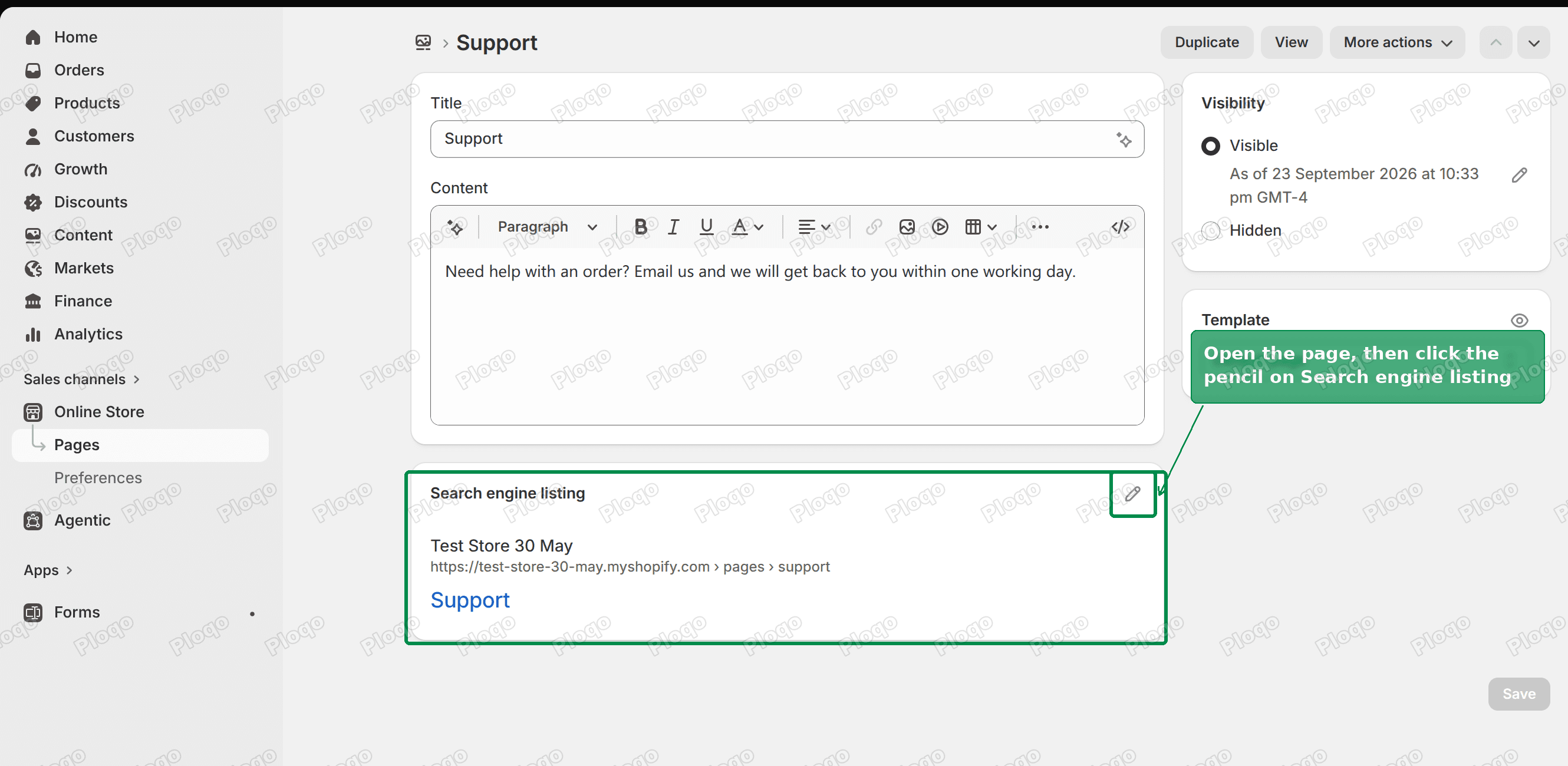 A Shopify page editor with the Search engine listing card and its pencil icon highlighted
- Change the URL handle. The
pages/part is greyed out, because it cannot be changed. - Leave Create a URL redirect ticked. Shopify ticks it for you, so the old address keeps working.
- Click Save.
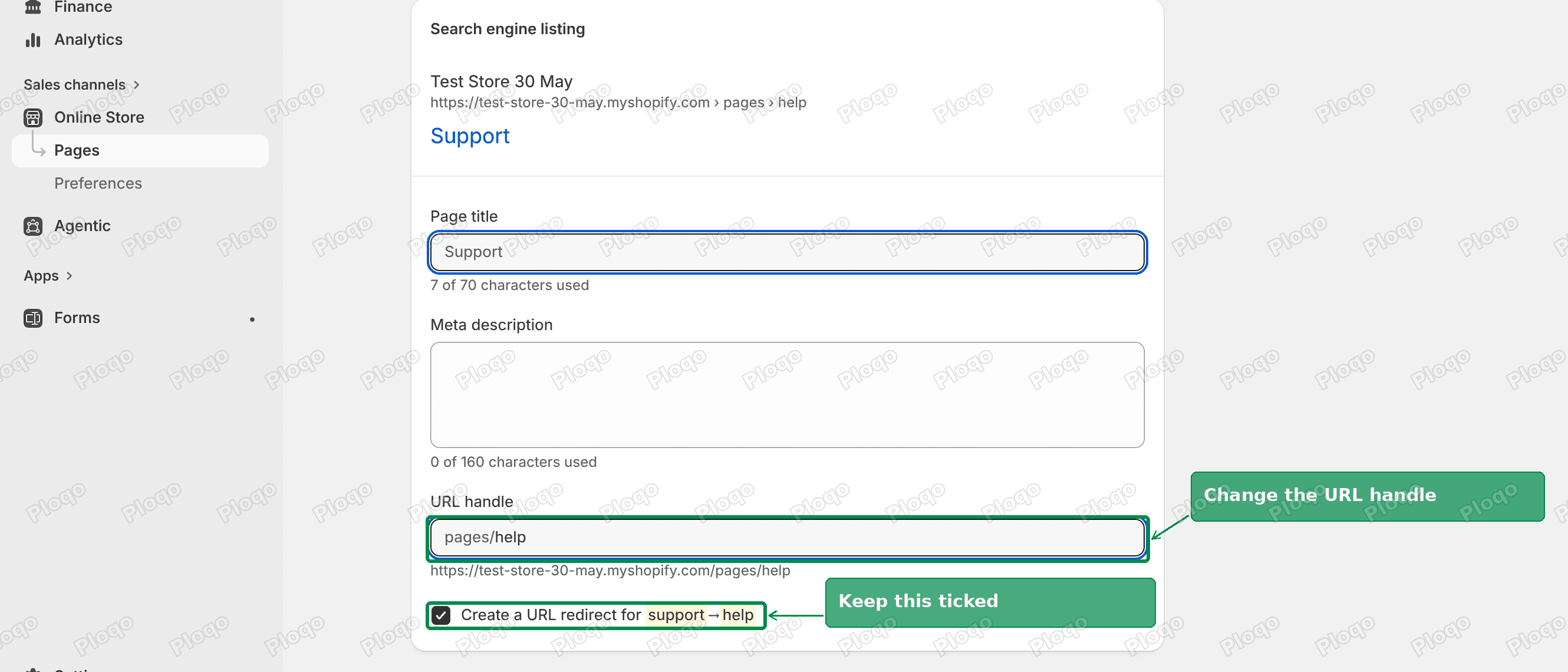 The URL handle field changed from support to help, with the Create a URL redirect for support to help checkbox ticked
Does the /pages/ part hurt SEO?
Every Shopify store has the same /pages/, /collections/ and /products/ structure, so it does not set your store apart from any other Shopify store in search results.
What matters more for search is the part you control:
- Clear handles.
/pages/shipping-policytells a reader and a search engine more than/pages/page-2. - One address per page. Use a 301 redirect for any short link, as above, rather than making a copy of the page.
- No broken links. If you change a handle, make sure the old address redirects to the new one.
If the redirect does not work
- The short address already exists. A redirect only runs when its starting address has nothing on it. If you once made a page with the handle
support, the redirect from/supportis fine, but a redirect from/pages/supportwould be ignored while that page exists. - You typed the full web address in Redirect from. Use only the part after your domain, starting with
/. - You are testing in a preview. A theme preview link carries extra text in the address. The redirect still runs, but it drops that extra text, so you land on your live theme. Test on your normal storefront address.
Related questions
Can I change /collections/ to /shop/? No. The first part of the address is fixed. If you want a short link for your catalogue, see how to make an Instagram bio link land on your products, which covers the addresses Shopify keeps for itself.
What is /collections/all? A built-in collection that lists every product in your store. It exists even if you never created it.
Will changing a handle break old links? Not if you leave Create a URL redirect ticked when you change it. Shopify then points the old address at the new one.
Spending too long on manual Shopify busywork?
PinFlow turns your Shopify catalog into Pinterest pins and posts them on a schedule, automatically. Set it up once and let it run.
Get PinFlow on the Shopify App StoreMore Shopify fixes
More community-sourced Shopify guides, tested on a live store.
SEO & Marketing
Shopify Link in Bio: Show Your Domain, Land People on Products
You want your Instagram bio to read abc.com but send people straight to your products. A redirect will not do it, and /shop is a reserved path on Shopify. Here is the approach that works, and why the usual advice fails.
SEO & Marketing
How to Create a Pop Up Discount on Shopify, Free
Shopify's own free Forms app builds a discount popup in about five minutes. Here is every step, including the theme setting that decides whether it appears at all. Tested live.
SEO & Marketing
Shopify MCP: What Your Store Tells AI Agents
Every Shopify store now publishes a second copy of your catalog for AI agents, and your robots.txt tells them to use it instead of your pages. Here is how to find it and check what it says.