
Shopify Variant Limit: 2,048 Variants and 3 Options
Shopify raised the variant cap to 2,048 in October 2025, but the three-option limit never moved. Here is which one actually blocks you, and how to price by size and quantity without an app.
By AjayCodeWiz · July 21, 2026 · 10 min read
The problem
A merchant asked about this on the Shopify Community, and it is the clearest example I have seen of people worrying about the wrong limit.
They sell acrylic keychains, pins and standees. Until now they took orders over WhatsApp and Instagram, sending each customer a PDF price list based on size and quantity, plus a choice of attachments and finishes.
Now they wanted it on their Shopify store. Their question was which app they needed to buy for tiered pricing by quantity, and for all those customisation options.
The honest answer is that most of it is already built in and free. But there is a real ceiling, and it is not the one people expect.
The two limits, exactly
Shopify has two separate caps on a product, and they get confused constantly.
Options: 3 per product. Size, Colour, Material. That is the whole allowance. When you have three, the admin stops offering "Add another option". The button disappears.
Variants: 2,048 per product. A variant is one combination of your options. Four sizes times six finishes is 24 variants.
That second number changed recently, which is why the search results you find are contradictory. The cap was 100 variants for years. Shopify raised it to 2,000 in a developer preview, then to 2,048 for all merchants in October 2025. If an article tells you 100, it predates the change.
Here is a product with all three options set, on a test store.
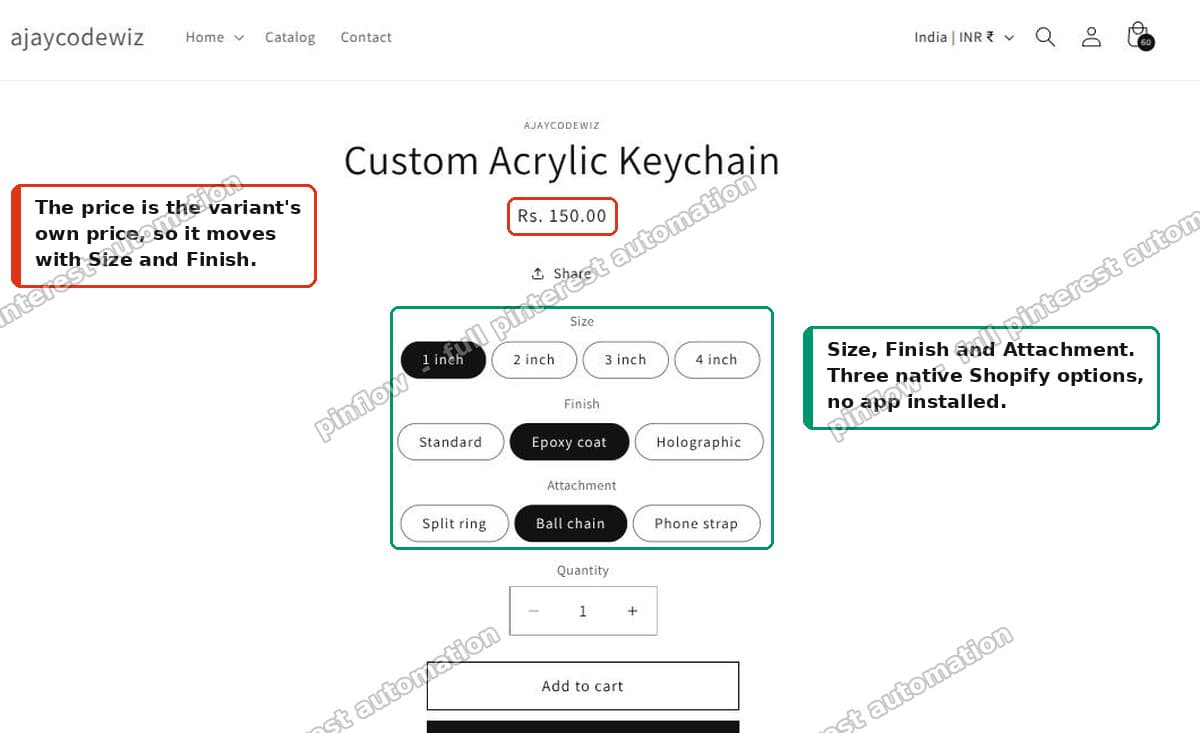 Product page on Dawn showing Size, Finish and Attachment as native Shopify options
Every combination carries its own price. That is native Shopify, no app.
Why 3 options is the real ceiling
Few stores ever hit 2,048 variants. You would need something like eight sizes times eight colours times thirty-two materials.
The option limit is what stops people, and it stops them early. Three is a small number once a product has size, colour, material and a finish.
This is what it looks like when you are out of slots. Three options are set, and there is no fourth to add.
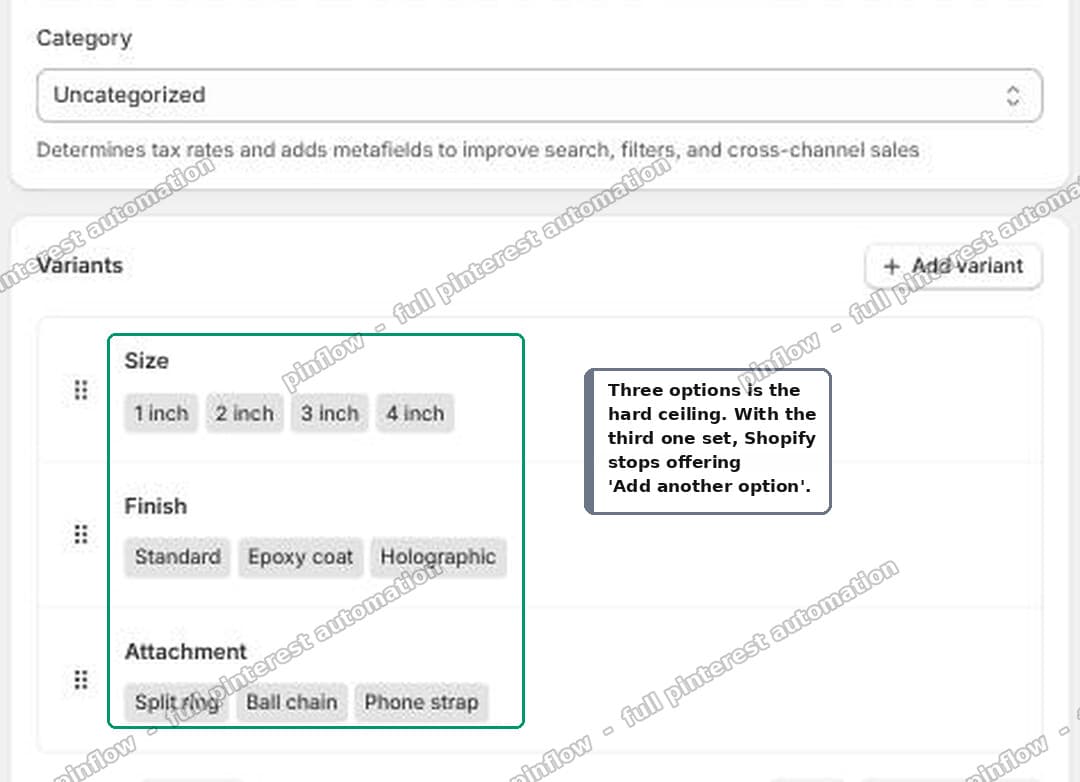 Shopify admin Variants card with three options set and no fourth option offered
So when someone says "I hit the Shopify variant limit", they usually mean the option limit. Those are different problems with different fixes.
If you are genuinely near 2,048 variants, your problem is merchandising, not Shopify. No shopper browses 2,000 combinations.
Fix 1: merge two options into one
If you need a fourth option, merge two existing ones into a single option with combined values.
Say you have Attachment (ball chain, split ring) and Attachment Colour (silver, gold). That is two slots for one idea.
Make it one option called Attachment, with values that read:
- Ball chain - silver
- Ball chain - gold
- Split ring - silver
- Split ring - gold
You have freed a slot. The customer sees one dropdown instead of two, which is arguably better anyway.
One thing to be clear about: merging frees an option slot, it does not save any variants. Two options of 2 and 2 produce 4 combinations. One merged option of 4 values also produces 4. The variant count is identical.
So only merge when you are out of option slots. If you have a spare slot, keep them separate, because two short dropdowns are easier to use than one long one.
Fix 2: anything that does not change the price is not an option
This is the one that saves people, and it is the most commonly missed.
Options exist to drive price and inventory. If a customer choice does neither, it should not be an option at all. It should be a line item property.
Artwork uploads. Gift notes. Name personalisation. Print type, when every print type costs the same. None of these need a variant.
A line item property is a normal form field inside the product form, named like this:
<label for="print-type">Print type</label>
<select id="print-type" name="properties[Print type]">
  <option value="Glossy">Glossy</option>
  <option value="Matte">Matte</option>
</select>
The properties[...] name is the whole trick. Shopify carries anything named that way through to the cart, the order, and your packing slip.
It costs nothing, it needs no app, and it adds zero variants. You can have as many as you like.
The catch: Dawn and most themes give you no admin UI for this, so it means a small theme edit. That is a one-time change to your product template, not a subscription.
Use this rule to decide:
- Does the choice change the price? It needs an option.
- Do you count stock separately for it? It needs an option.
- Neither? Line item property.
That second question catches people. If you stock 40 silver chains and 12 gold chains separately, attachment colour has to be an option even if both cost the same.
Tiered pricing by quantity, without an app
The other half of the question was quantity breaks. Buy 25, get 10 percent off. Buy 100, get 20 percent.
You do not need an app for this either. Use automatic discounts, one per tier, each with a minimum quantity.
 Three automatic discounts in the Shopify admin, one per quantity tier
I set up three on a test store: 25 or more at 10 percent, 50 or more at 15 percent, 100 or more at 20 percent. Then I ran the cart at every boundary to see how they interact.
- 24 items: nothing
- 25 items: 10 percent
- 49 items: 10 percent
- 50 items: 15 percent
- 99 items: 15 percent
- 100 items: 20 percent
Exactly one tier fires at a time, and it is always the best one the cart qualifies for. They do not stack and they do not fight each other. You do not need to write the tiers as ranges or worry about overlap.
A store can have 25 active automatic discounts in total, which is far more than any tier ladder needs.
Mixed variants count together
This is the detail that makes the whole approach work for a size-based catalogue, and it is worth testing yourself.
Quantity is counted across variants of the same product, not per variant.
So 30 of one size plus 30 of another is 60 items. Both lines qualify for the 50+ tier, and each line's discount comes off its own size price.
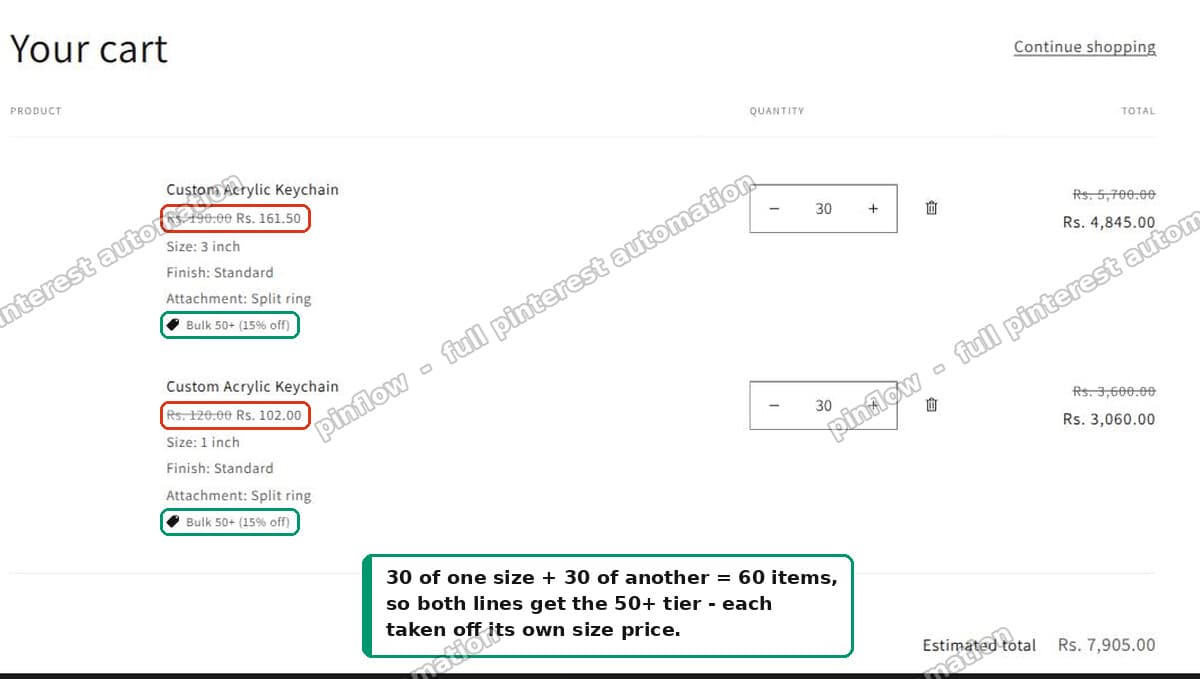 Cart with two sizes, both lines receiving the 50 plus tier off their own price
That is almost always what a merchant means by "tiered pricing by quantity and size". The size sets the unit price. The total quantity sets the discount.
The one real drawback
An automatic discount shows up in the cart, as a discount line. It does not change the price displayed on the product page.
So a customer looking at a product page sees the full unit price with no hint that 50 units would be cheaper.
Publish your price table in the product description. It is not elegant, but it is free, and it is what the discount is actually doing.
A worked example
The merchant came back with their real spec, which is a good test of all of this.
Quantity, size and hooks affect the price. Print type does not. There are also hook colours.
Here is how that maps:
Quantity affects price, so it becomes quantity tiers. Not an option.
Size and hooks affect price, so they become two options. Four sizes times six hook types is 24 variants.
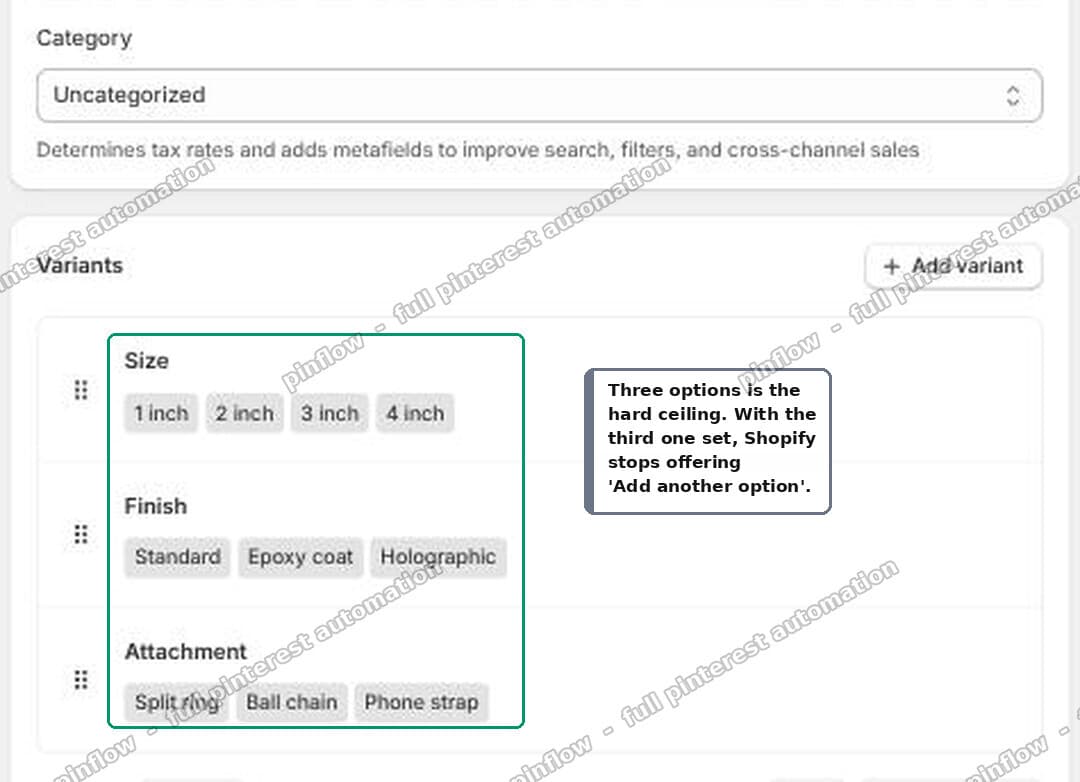 Shopify admin Variants card set up with four sizes and six hook types
Print type does not affect price, so it is a line item property. Still 24 variants.
Hook colour depends. If it does not change the price, make it a property and stay at 24 variants. If it does, it takes the third option slot, and 4 times 6 times 3 is 72 variants. Still nothing next to 2,048.
Either way they are fine. And either way, three options is the ceiling they need to plan around, not the variant count.
When you actually do need an app
There is one thing native options genuinely cannot do: conditional logic.
Only offer a glitter epoxy finish once the size is 2 inch or larger. Hide the attachment picker entirely on standees, because standees do not take a keychain hook.
Shopify's native options cannot express "show this only when that". Every option is always visible. If you need that, a product options app is the right purchase.
That is the test I would apply. Not "do I have lots of choices", but "do my choices depend on each other". If they do not, start free.
I checked the two reference sites the merchant mentioned. One of them, Vograce, runs on Shopify with the Impulse theme. Their acrylic keychain page uses three native options producing 98 variants, each with its own price. No options app. The quantity pricing on top is a private app they built themselves.
Common questions
What is the Shopify variant limit per product? 2,048 variants, and 3 options. Both are per product, not per store.
Was the limit 100 variants? It was, for a long time. It went to 2,000 in a developer preview and then to 2,048 for all stores in October 2025. If you are on a current store you have 2,048.
Can I have more than 3 options in Shopify? Not natively. Merge two options into one with combined values, move any unpriced choice to a line item property, or use an options app if you need conditional logic.
Do line item properties create variants? No. That is the point of them. They are metadata attached to the cart line, so you can add as many as you like without touching either limit.
Do quantity discounts stack? No. One automatic discount applies, and Shopify picks the best one the cart qualifies for. Stacking product discounts on the same item requires Shopify Plus.
Does the discount show on the product page? No, only in the cart. Publish your price table in the description.
If it is not working
"Add another option" is missing. You already have three. That is the limit, not a bug.
Your discount is not firing. Check the minimum quantity, check the discount is active and inside its date range, and check it targets the right collection or product. Also check you are under 25 active automatic discounts.
Two sizes are not combining into one tier. They have to be variants of the same product. Two separate products do not pool their quantities toward a product-level discount. If your sizes are separate products, that is the reason, and merging them into one product with a Size option fixes it.
Your line item property is not showing in the order. The input must be inside the product form and named properties[Something] exactly. A property whose name starts with an underscore is hidden from the customer on purpose.
I tested everything above on a free Dawn theme on a development store, including running the cart at each tier boundary. The measurements in this article are from that store.
Still pricing products by hand?
PinFlow turns your Shopify catalog into Pinterest pins and posts them on a schedule, automatically. Same idea as the discounts above, let the system handle the repetitive part.
Get PinFlow on the Shopify App StorePart of a complete guide
Shopify Variants: The Complete Guide
Variants are one product sold in several forms. How they work, the 2,048 and 3-option limits, and where each variant fix lives - images, swatches, sorting, hiding and the theme-specific bugs.
More Shopify fixes
More community-sourced Shopify guides, tested on a live store.
Collections & Products
Shopify Unit Pricing: Show a Price per Unit on Each Variant
Set a unit price on every variant and Dawn shows the price per 100 ml or per kg, and updates it when a shopper picks another size. No code needed.
Themes & Storefront
Square Size Buttons on Shopify Dawn (Custom CSS)
Dawn draws size options as round pills. Here is the Custom CSS that turns them into square boxes matching the Add to cart button, tested on Dawn 16.0.0.
Themes & Storefront
Remove the Variant ID From Your Shopify Product URL
Your product link keeps turning into /products/name?variant=43176780890281, before the customer has touched anything. One theme setting stops it, a second switch covers Dawn, and a short snippet cleans the links that already carry the ID.