
Avalara Shopify Integration vs Shopify Tax: Which to Use
Moving to Shopify with Avalara? Shopify Tax already calculates US sales tax to the street address. What the Avalara Shopify integration adds, what filing costs, and how to decide.
By AjayCodeWiz · September 23, 2026 · 9 min read
The question: keep Avalara, or switch to Shopify Tax?
A merchant moving a store from Magento to Shopify asked this on the Shopify Community. They had used Avalara on Magento for years. On Shopify, the cost of carrying Avalara across was higher than they expected: a new connector licence, migration work, and a fresh contract.
They wanted two things from any tax setup:
- Rooftop-level calculation. Rooftop means the tax rate is worked out from the buyer's exact street address, not from the ZIP code. One ZIP code can cross several cities and special tax districts, so a ZIP-based rate is sometimes wrong.
- Automatic filing in each US state. Filing means sending the sales tax return to each state and paying what you collected.
Their question was whether Shopify's own tax service is good enough, or whether the Avalara Shopify integration is still worth paying for.
I checked this on a Shopify store with Shopify Tax active. The answer splits cleanly into those two jobs. Shopify covers the first one out of the box. The second one is where you need to spend money, but not necessarily on Avalara.
What Shopify Tax does out of the box
Shopify Tax is the tax service built into every Shopify store. You do not install it. For the US it is switched on under Settings > Taxes and duties.
Open Settings, then Taxes and duties, then click United States in the list of tax regions. The Tax service column already shows Shopify Tax next to the United States.
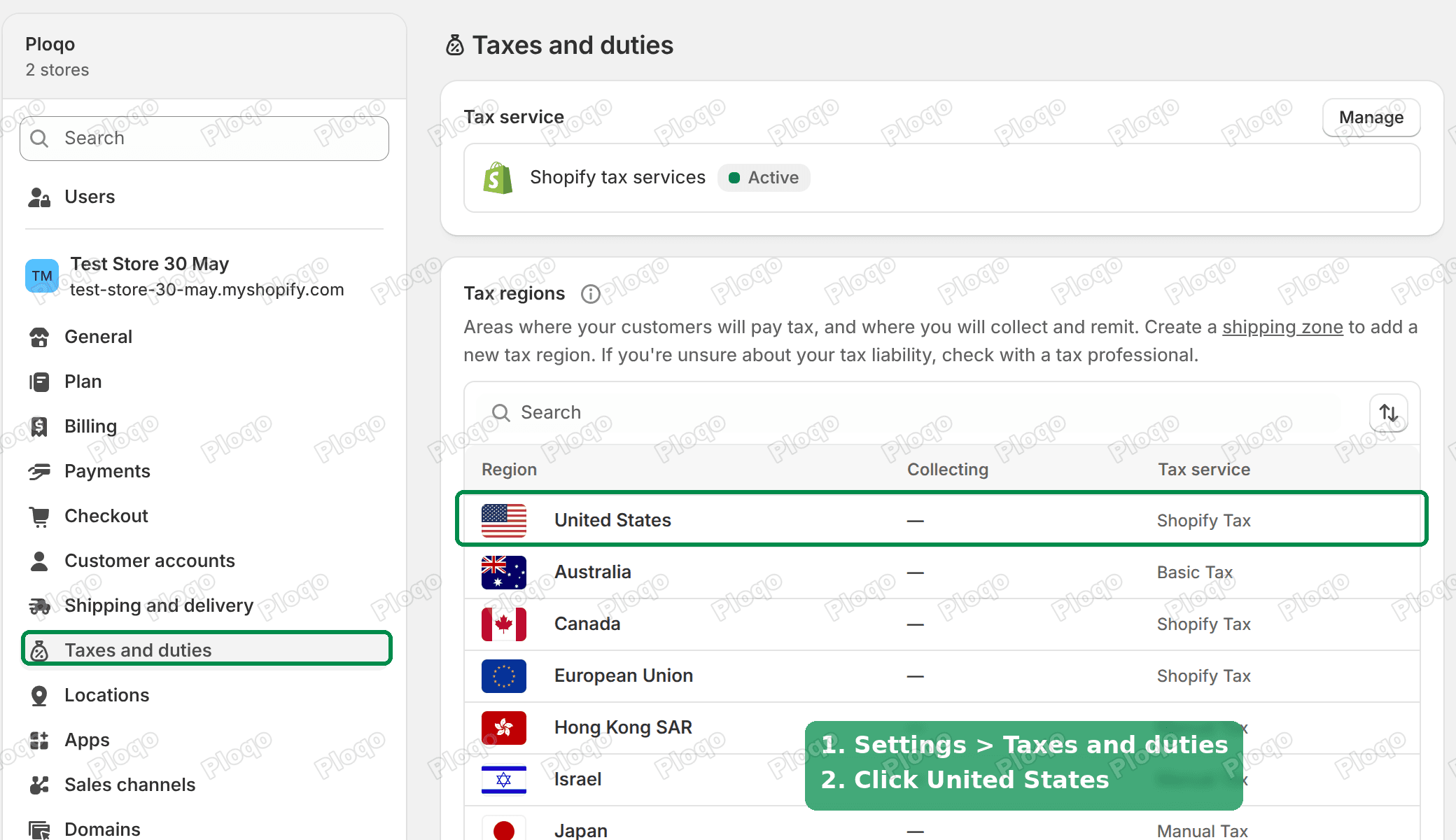 Shopify Settings, Taxes and duties, with the United States region using Shopify Tax
On the United States page, the Tax service box shows Shopify Tax as Active, with its fee printed right under the name.
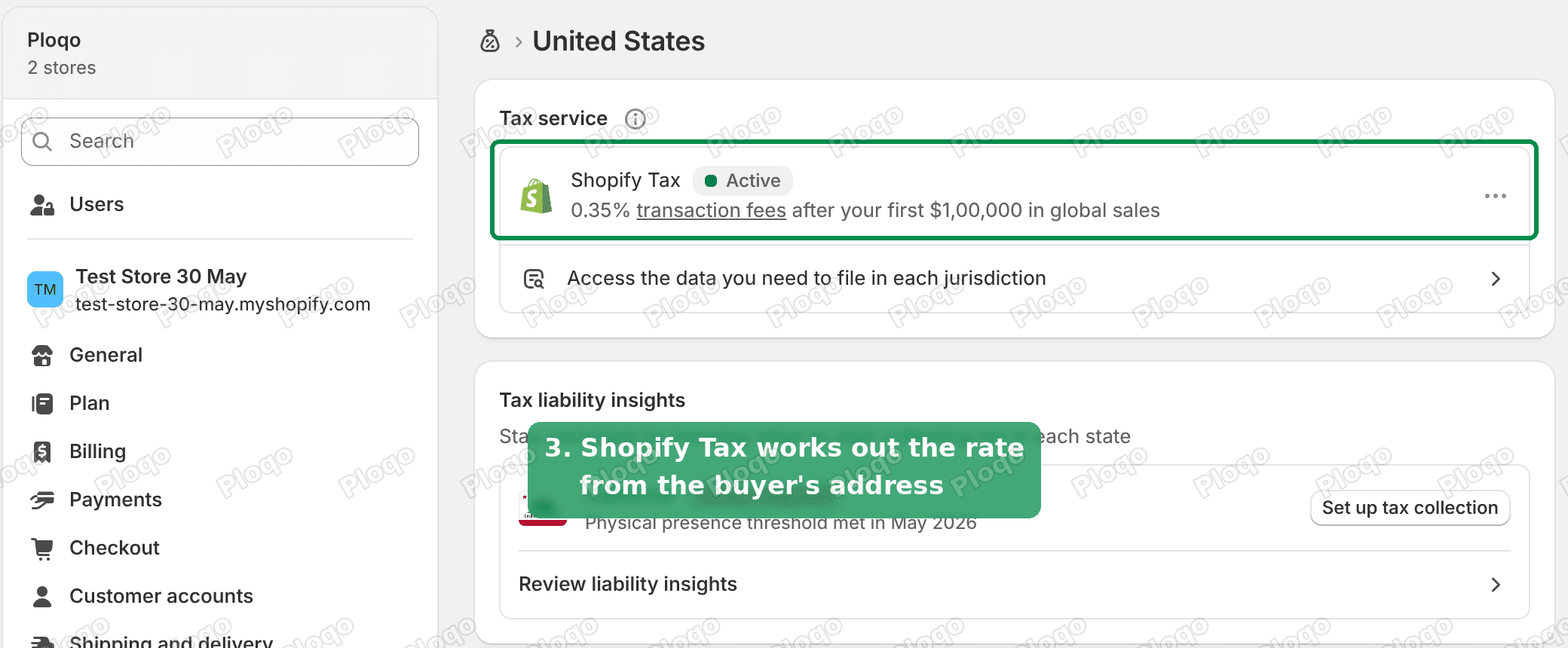 Shopify Tax shown as Active in the United States tax service box
Shopify describes the calculation as rooftop accurate. Its feature page says Shopify Tax works across the more than 11,000 US sales tax jurisdictions, using the buyer's precise address. A jurisdiction is any area that sets its own tax rate: a state, county, city or special district.
So for calculation alone, the merchant's first requirement is already met. You do not need Avalara to get address-level rates on Shopify.
The same page carries two more tools worth knowing about:
- Tax liability insights. Shopify tracks your sales per state and tells you when you have crossed a state's threshold and need to register. On my test store it flagged California with "Action required" because of physical presence. In tax terms this is called nexus: the point where a state says you owe it sales tax.
- Tax rate management. Shopify rates each product by its category. Clothing, food and digital goods are taxed differently in different states. Products with no category are listed so you can fix them. My test store had 27 uncategorised products waiting there.
What Shopify Tax costs
Shopify Tax is not free at scale, but it is cheap next to most tax software contracts. From Shopify's pricing page:
- Free for your first $100,000 in sales.
- Then 0.35% of each order on Basic, Grow and Advanced plans in the US.
- 0.25% on Shopify Plus.
- Capped at $0.99 per order.
One detail matters for stores that are moving over now. For stores created on or after May 13, 2026, the $100,000 is a lifetime threshold. For older stores it resets every year. A merchant migrating from Magento today is opening a new Shopify store, so the free allowance is used once, not every year.
The fee only applies to orders from regions where you have tax collection turned on.
Put a number on it. A store doing $1,000,000 a year in US sales, with an average order of $80, pays about 0.35% of the amount above $100,000. That is around $3,150 a year, and the $0.99 cap per order does not kick in at that order size. Compare that with your Avalara quote before deciding.
Does Shopify file sales tax for you?
Filing is what decides the question for most merchants. Shopify built an automated filing service on top of Shopify Tax. For stores enrolled in it, Shopify prepares and files the monthly, quarterly and annual US sales tax returns.
It is closed to new stores. Shopify's help page on eligibility says automated filing is "closed to new enrollment" and only stores already enrolled can use it. On my test store there is no sign-up for it anywhere on the United States tax page. The only option in the Shopify Tax menu is Downgrade service.
What you do get is the data to file from. Click Access the data you need to file in each jurisdiction under the Tax service box.
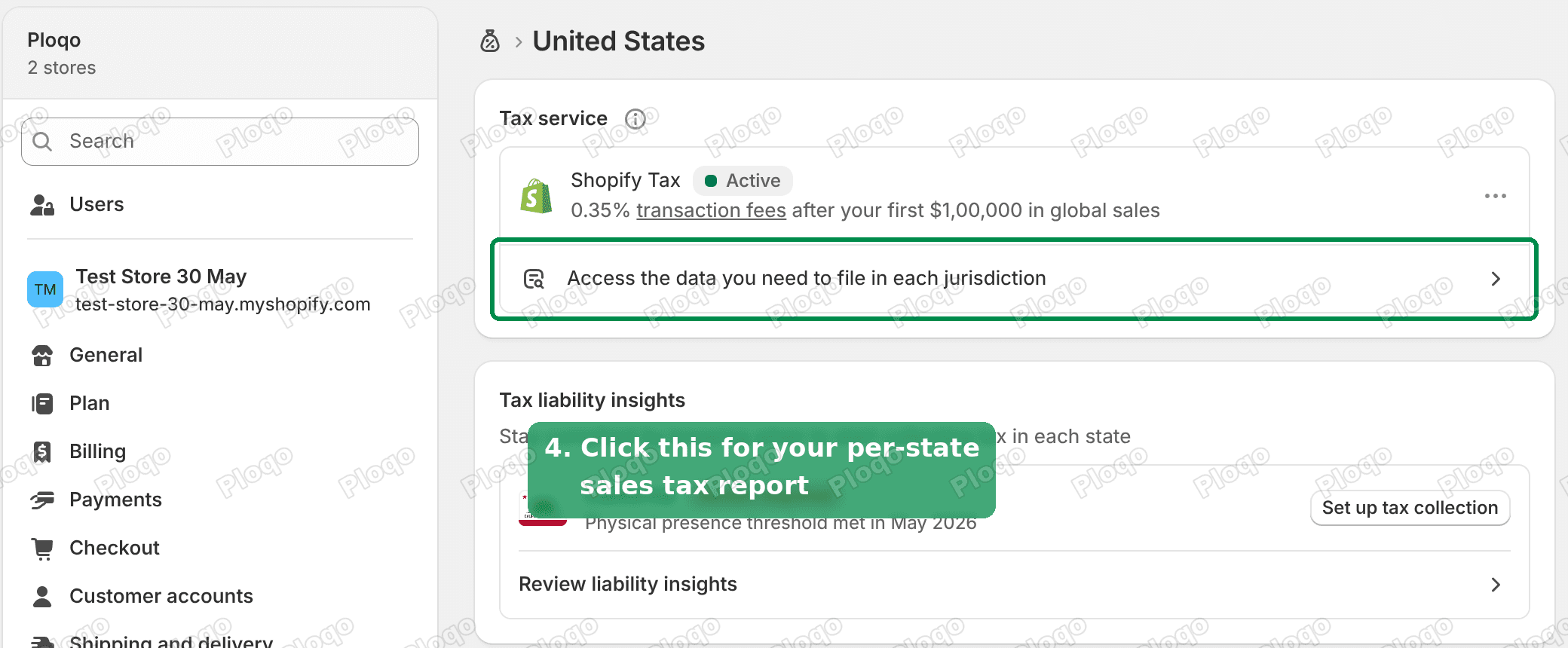 The Access the data you need to file in each jurisdiction link under Shopify Tax
That opens the United States sales tax report. It lists net sales, tax collected, shipping and tax on shipping, grouped by destination state.
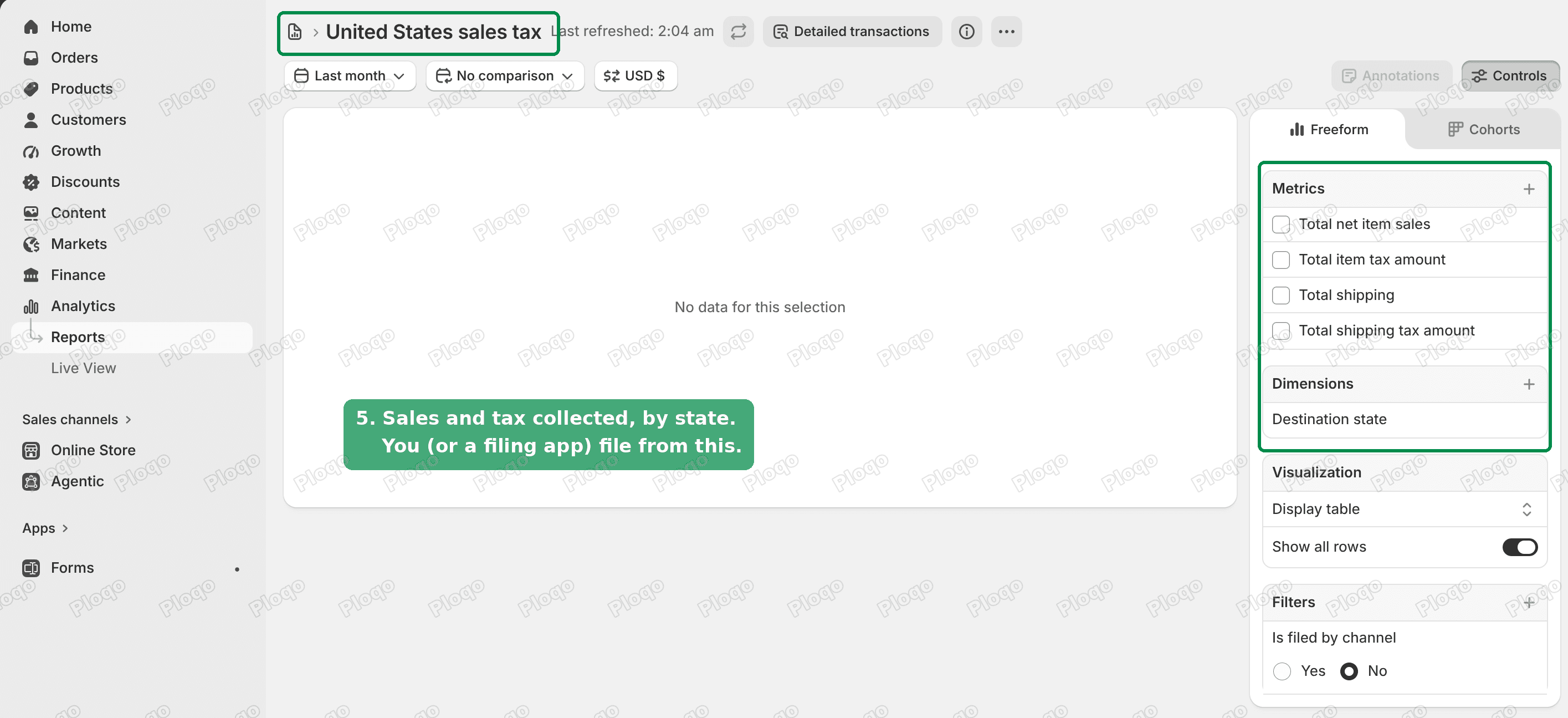 The United States sales tax report in Shopify, grouped by destination state
You, your accountant or a filing app then files each state's return from those numbers. If you need a custom split of the same data, such as taxable and non-taxable sales, the Shopify sales tax report guide shows how to build it.
Does Shopify collect and remit sales tax?
Shopify collects sales tax at checkout once you turn on collection for a state. It does not remit it for a new store. Remitting means paying the collected tax to the state, and it happens when you file the return. The tax sits in your payouts until you pay it.
The one exception is marketplaces that act as the seller for tax purposes, such as Amazon or TikTok Shop. Those platforms collect and remit on your behalf for orders placed there, and Shopify leaves those orders out of its own filing data.
What the Avalara Shopify integration adds
Avalara still has a place, and it is worth being exact about what it adds. Shopify lists Avalara as a tax app you can connect in place of its own tax calculation.
From Shopify's Avalara help page:
- Avalara is a paid service that needs a direct contract between you and Avalara.
- Shopify charges no extra fee for connecting it. The cost is whatever Avalara quotes you.
The things Avalara covers that Shopify Tax does not:
- SST filing. SST is the Streamlined Sales Tax programme, a group of about 24 states that share one registration and offer free filing through certified providers. Shopify's feature page says Shopify Tax does not support SST filing.
- Local returns. A few states, such as Colorado, Louisiana and Alabama, have cities or parishes that collect their own sales tax and want their own returns. Shopify Tax does not file those.
- Your existing setup. If you already have product tax codes, exemption records and filing calendars in Avalara, keeping it avoids re-doing that work.
If none of those apply, the Avalara contract pays for calculation Shopify Tax already does.
The cheaper setup: Shopify Tax plus a filing app
For most US merchants moving to Shopify today, the setup that meets both requirements is:
- Shopify Tax for the calculation at checkout. It is already on.
- A sales tax filing app, or an accountant, to file the returns in each state from Shopify's data.
Sales tax apps on the Shopify App Store with a reasonable number of reviews:
| App | Rating | Reviews | Price |
|---|---|---|---|
| Numeral Sales Tax | 4.4 | 100 | Free to install |
| TaxCloud Sales Tax Automation | 4.8 | 95 | Free to install |
| Kintsugi Sales Tax Automation | 4.7 | 25 | Free plan, then $75/month |
| TaxJar Sales Tax Automation | 2.4 | 64 | From $39/month |
"Free to install" means the app itself is free on the App Store. The filing service is priced by the provider, usually per return or per state. Ask each one for a quote based on the number of states you are registered in.
Before you sign up, ask each app two questions:
- Does it file from Shopify Tax's numbers, or does it replace Shopify Tax at checkout as well?
- Does it file SST and local returns, if you need them?
Avalara vs TaxJar
This comparison comes up a lot for merchants already shopping for tax software.
Both do the same two jobs: calculate tax at checkout and file returns. TaxJar is owned by Stripe and priced by monthly plan. Avalara is sold by contract and aimed at larger or more complex businesses, including those with exemption certificates and many product types.
On Shopify, the comparison has a third option that did not exist on Magento. Shopify Tax already handles calculation, so you may only need the filing half from either company. Price the filing-only option before paying for both halves.
How to decide
Use this as a checklist:
- You only need accurate rates at checkout. Use Shopify Tax. It is already on.
- You need automatic filing, and your store was enrolled in Shopify's filing before it closed. Use Shopify Tax with its filing.
- You need automatic filing on a new store. Use Shopify Tax plus a filing app or accountant. Compare quotes.
- You file SST or local returns, or have heavy exemption needs. Keep Avalara and sign the direct contract.
- You are on Shopify Plus with several business entities. Avalara supports multiple entities on Plus and Enterprise plans. Check that route with Avalara directly.
Common questions after switching
Can I run Shopify Tax and Avalara at the same time? Only one tax service calculates the rate at checkout. Connecting a tax app replaces Shopify's calculation for that region.
What happens to my Magento tax history? It stays in Magento and in Avalara. Shopify's report only covers orders placed on Shopify. Keep the old records for any audit period.
Are imported orders included in Shopify's filing data? Shopify's filing documentation says imported orders are not handled by its automated filing. Plan to file your pre-migration orders from the old system.
Do I need to register in each state myself? Yes. Shopify tells you when you cross a threshold, but registering with the state is on you. The United States tax page has a Register with each state link and a Collect in a new state button for when you have your registration number.
Where do I see if my products are taxed correctly? Under Tax rate management on the United States tax page. Assign a category to every product listed there, especially clothing, food and digital products.
Summary
Shopify Tax already does the rooftop-level calculation the merchant asked for, at 0.35% of each order after the first $100,000 in sales. Shopify's own automatic filing is closed to new stores, so a new store needs a filing app or an accountant to file each state's return from Shopify's sales tax report. Pay for the Avalara Shopify integration when you need SST or local filing, or when your existing Avalara setup is too big to rebuild.
Spending too long on manual Shopify busywork?
PinFlow turns your Shopify catalog into Pinterest pins and posts them on a schedule, automatically. Same idea as the rule above, let the system handle the repetitive part.
Get PinFlow on the Shopify App StoreMore Shopify fixes
More community-sourced Shopify guides, tested on a live store.
Shopify Admin
Shopify Checkout Customization: Change Checkout Text
Change the text on your Shopify checkout, like the Email me with news and offers checkbox, without code or Plus. Why the pop-up in checkout settings will not save, and the route that does.
Shopify Admin
Shopify Discount Limit: One Code for More Than 100 Products
Shopify stops you at 100 items when a discount applies to specific products. There is no setting to raise it, but you do not need one. Point the discount at a collection and one code covers thousands of products. Tested on a store, with the B2B route too.
Shopify Admin
Shopify Shows Sold Out but It's in Stock: The Fix
Your whole store shows Sold Out while the admin shows stock. The cause is a location setting, not your products: the location holding the stock is not set to fulfill online orders. Read the Available column, flip one switch, and check the theme and shipping profile if it persists.