
Shopify Automatic Discount by Collection: What Works
Shopify automatic discounts cannot ask what collections are in the cart. What the admin really offers, the one native rule that reads collections, and when you need an app. Tested, with screenshots.
By AjayCodeWiz · September 10, 2026 · 10 min read
The problem
You want a discount that fires on its own when a shopper mixes categories.
Something like this. One item from Collection 1 plus one item from Collection 2 takes 10% off the whole order. Add a third item from Collection 3 and it becomes 15%.
No coupon code. No bundle product to build. The cart just needs to notice what is in it.
A merchant asked for exactly this on the Shopify Community. Their reason for avoiding bundles was practical. Some of their collections hold ten or more products, and each product has one to three variants. Building a fixed bundle for every possible pairing is hundreds of combinations to create and keep in stock.
So they wanted a rule, not a product.
I went into a Shopify test store and worked through every native discount screen to see how close you can get. The short answer is that Shopify cannot do this on its own, but it can do a useful part of it, and the part it cannot do has a clear name once you know what to ask for.
What a Shopify automatic discount can actually check
Start with the four discount types Shopify gives you. Open Discounts in the admin and press Create discount:
- Amount off products
- Buy X get Y
- Amount off order
- Free shipping
That is the whole native list. Anything else in that menu was added by an app you already installed.
The merchant wanted a percentage off the entire order, so Amount off order is the right type. Set the method to Automatic discount so no code is needed.
Now scroll to the section that decides when it fires. It is called Minimum purchase requirements, and it offers three choices and nothing else:
- No minimum requirements
- Minimum purchase amount
- Minimum quantity of items
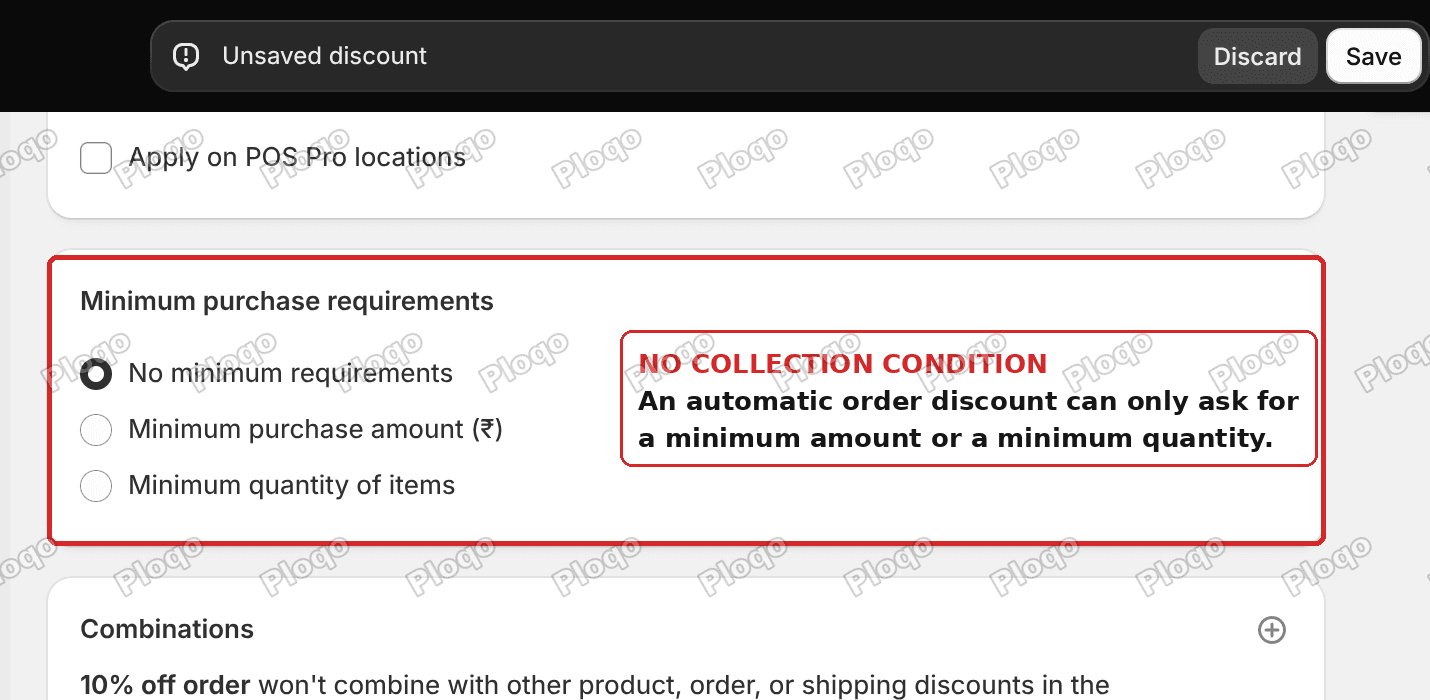 Shopify automatic order discount showing only minimum amount and minimum quantity conditions
There is no collection condition. There is no product condition. An order discount can ask how much money is in the cart, or how many items are in the cart, and that is the end of the list.
This is the thing worth understanding. A shopify automatic discount on the order total is deliberately blunt. It looks at totals, not contents.
Where it goes wrong: "applies to collections" is not a condition
This is where a lot of people lose an afternoon, so it is worth pulling apart.
Open Amount off products instead and you will see an Applies to dropdown with Specific collections in it. That looks like the answer. It is not.
On that screen, the collection decides which items get cheaper. It does not decide whether the discount runs.
Pick "Tops" there and you have said "take 10% off any top in the cart." You have not said "only run this when a top is present alongside something else." A cart with nothing but tops still gets the discount.
Trigger and target are two different jobs. Most native discount screens only let you set the target.
The one native rule that reads collections: Buy X get Y
There is exactly one native discount type where a collection acts as the trigger, and it is Buy X get Y.
Set the method to Automatic discount, then look at the Customer buys block. The Any items from dropdown accepts Specific collections.
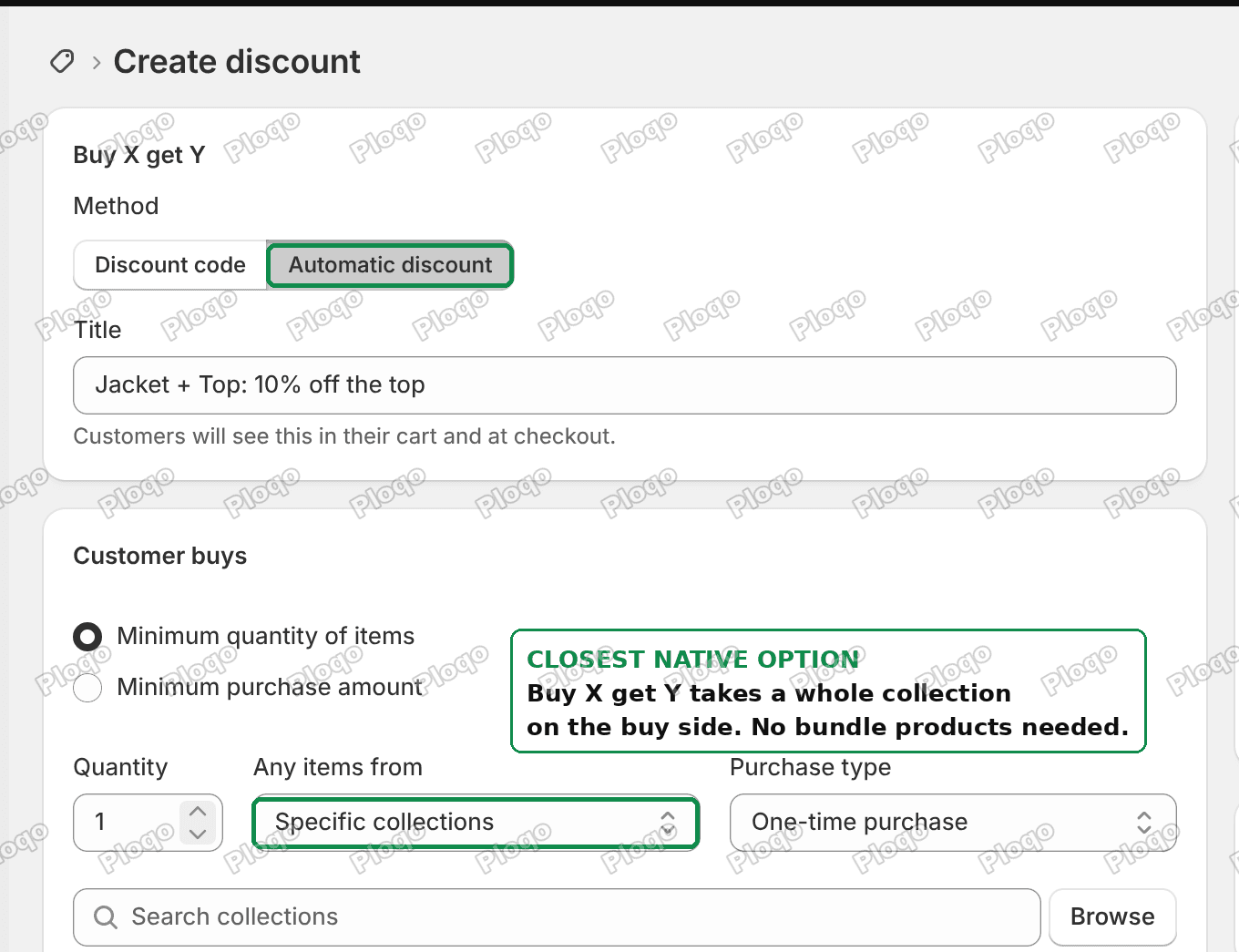 Shopify Buy X get Y set to automatic with a collection on the buy side
I set the trigger to one item from a Jackets collection. Then the Customer gets block takes a collection too, so I pointed it at a Tops and Shirts collection at 10% off.
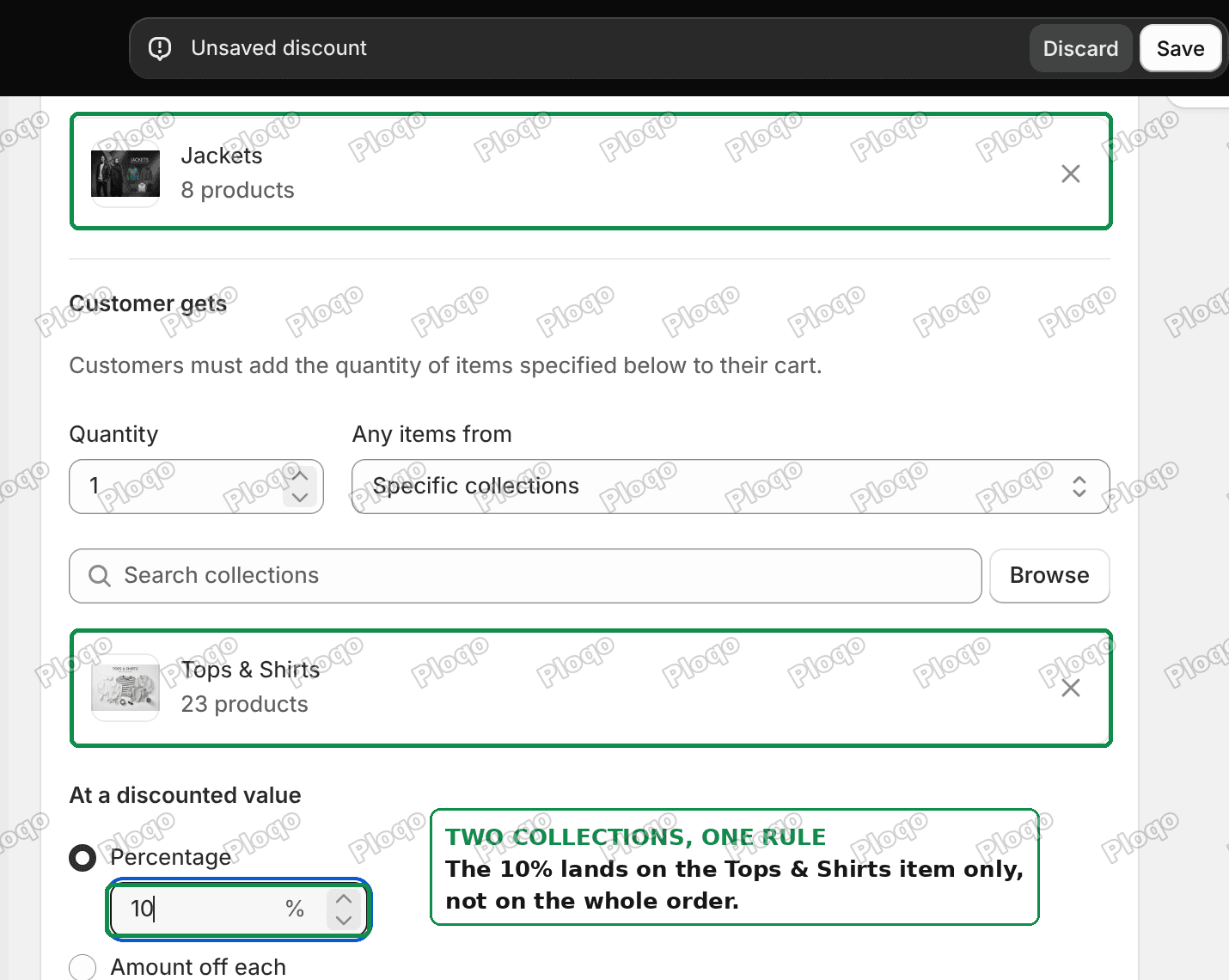 Shopify Buy X get Y reward side set to a second collection at 10 percent off
That rule is genuinely useful and it is free. A shopper who puts a jacket and a top in the cart gets 10% off the top, automatically, with no code.
It also solves the merchant's real objection to bundles. You never name individual products. Both sides read the collection live, so adding a new jacket to the Jackets collection puts it in the promotion straight away. Nothing to maintain, and no variant combinations to build.
If a two-product set is really what you are after, I wrote up the fixed-pair version of this separately in Create an Automatic Bundle Discount in Shopify, including the quantity loophole to avoid.
Where Buy X get Y stops
Two limits, and they are the reason this was not the end of the merchant's problem.
The discount lands on the Y items only. In my test the 10% came off the top, not off the jacket, and not off the order total. The merchant wanted a percentage off the entire order. Buy X get Y cannot do that, because it is a product discount by design.
There is no second tier. Buy X get Y has one trigger and one reward. There is nowhere to say "and if a third collection shows up, make it 15% instead." You would need a second discount, and a second discount does not know what the first one did, so both can fire and stack in ways you did not intend.
So for the exact ask, native Shopify runs out of road.
Why counting collections needs an app
The missing capability has a precise name: a condition that counts how many distinct collections are represented in the cart.
Shopify does expose that kind of logic, but only through Shopify Functions, which is the developer layer that discount apps are built on. Functions are available on every Shopify plan, so this is not a Plus-only feature. You just cannot reach it from the admin without an app in between.
When you go looking, the phrase to search for is "number of unique collections" or "cart contains items from X collections." Several discount apps expose a rule builder with cart conditions like this, usually described as nested logic or a flowchart builder. That is the category you want, not a bundle builder.
Two things to check before you commit to one:
Ask whether the app needs the collections listed. A Shopify Function cannot ask "what collections is this product in?" in the open. It can only ask "is this product in one of these specific collections?" against a list you supply. That means an app doing collection counting almost certainly needs you to name the participating collections in the discount itself. If the app's rule builder does not ask you for that list anywhere, be suspicious of the count.
Check what your products are actually in. This is the one that bites. A product usually belongs to more than one collection, and automated collections add more. On my test store the Zipped Jacket looked like a Jackets product, but it also sat in a second, automated collection built from a sale tag. Any rule counting distinct collections sees two collections there, not one, so a single product can push a cart into a higher tier on its own.
Before you trust a tier, open a few products and look at the Collections box on the product page. Count what is really there.
How to create an automatic discount in Shopify
For the simpler cases, the native flow takes about a minute.
- In the admin, go to Discounts.
- Press Create discount and pick a type. Use Amount off order for a percentage off the whole cart, or Buy X get Y if a collection needs to trigger it.
- Set Method to Automatic discount. The Title field is what shoppers see in the cart and at checkout, so write it for them.
- Set the discount value.
- Set Minimum purchase requirements if you want a floor, remembering these are amount and quantity only.
- Check the Combinations box, covered below.
- Set the start date and save.
The discount is live from the start date. There is no publish step and no theme change.
Do Shopify automatic discounts combine?
By default, no. A new discount is created with combinations switched off, and the summary panel says so in plain words: it "won't combine with other product, order, or shipping discounts in the customer's cart."
That matters a lot here. If you build the two-collection rule as one discount and a three-collection rule as another, they will not politely take turns. You have to open Combinations on each discount and decide explicitly what is allowed to stack with what.
Shopify has a full page on how the stacking rules resolve, and it is worth reading once before you build a ladder of tiers: Combining discounts.
How many automatic discounts can a store have?
This one catches people who try to fake tiers with lots of separate discounts.
Shopify's own documentation is explicit: "You can have a maximum of 25 active automatic discounts. This total includes app-based discounts."
That last sentence is the important half. A discount app does not get its own budget. Every rule it creates counts against the same 25. So a plan of "one automatic discount per collection pairing" hits the ceiling faster than you expect, and it takes your app-based rules down with it.
Source: Automatic discounts in the Shopify Help Center.
Why is my automatic discount not showing in the cart?
A few reasons, in the order worth checking.
The start date has not arrived. Automatic discounts respect the start date and time, including the time zone shown next to the field.
Another discount is blocking it. If combinations are off and a different discount already applied, yours will not.
It is an order discount and your theme does not show it. Order-level discounts reduce the order total. Some themes only surface line-level discounts on the cart page, so the reduction appears at checkout instead. Go through to checkout before deciding it is broken.
The cart does not actually meet the condition. With a minimum purchase amount, remember the check runs on the subtotal before other discounts are applied, not after.
Order discount or product discount: which one you want
These two get mixed up constantly, and picking the wrong one is why a rule "works" but discounts the wrong thing.
An order discount reduces the order subtotal. Use it when the whole cart should get cheaper. It is the right type for "10% off the entire order," and it is the type with only amount and quantity conditions.
A product discount reduces specific line items. Amount off products and Buy X get Y are both product discounts. Use one when only some items should get cheaper. These are the types that can read collections.
The merchant's request sat awkwardly across both. They wanted the trigger behaviour of a product discount and the reward behaviour of an order discount. Native Shopify keeps those in separate boxes, which is the real reason the request needs a Function app rather than a clever setting.
What I would do
If you want this working today without paying for anything, build the Buy X get Y version. It reads collections, it needs no maintenance as your catalog grows, and it is honest about what it does: a discount on the second category when the first one is present.
If the percentage genuinely has to come off the whole order, and it genuinely has to tier as more categories are added, that is app territory. Look for a discount app with a cart-condition rule builder, confirm it can count distinct collections, and check your products' real collection membership before you set the tier numbers.
And whichever route you take, open the Combinations panel. More collection discounts fail from stacking than from the rule itself.
Spending too long on manual Shopify busywork?
PinFlow turns your Shopify catalog into Pinterest pins and posts them on a schedule, automatically. Same idea as the rule above, let the system handle the repetitive part.
Get PinFlow on the Shopify App StoreMore Shopify fixes
More community-sourced Shopify guides, tested on a live store.
Shopify Admin
Schedule a Black Friday Sale in Shopify (Auto Start and End)
Give the discount its own start and end date and put the sale banner in an Event rollout with the same dates. Both start at midnight and end after Cyber Monday.
Shopify Admin
Shopify Discount Limit: One Code for More Than 100 Products
Shopify stops you at 100 items when a discount applies to specific products. There is no setting to raise it, but you do not need one. Point the discount at a collection and one code covers thousands of products. Tested on a store, with the B2B route too.
Shopify Admin
Shopify Discount Types: Amount Off Products vs Order
Shopify has four discount types, and two of them work out a percentage in different ways. One rounds every single unit, the other rounds the order once. On low unit prices that difference is real money. Tested on a live store.