
Shopify Discount Types: Amount Off Products vs Order
Shopify has four discount types, and two of them work out a percentage in different ways. One rounds every single unit, the other rounds the order once. On low unit prices that difference is real money. Tested on a live store.
By AjayCodeWiz · September 16, 2026 · 9 min read
Two discounts, same 10 percent, different totals
Set up a 10 percent code on a product that costs 0.15 a unit. Add 30 units to the cart. You expect 0.45 off.
Depending on which discount type you picked, you get 0.45 or you get 0.30.
Nothing in the discount screen warns you. The code applies, the cart updates, and the number is a third smaller than it should be.
The cause is the discount type, the choice Shopify makes you make before it shows you any settings. Most merchants pick one, never see the other, and never learn that the two calculate differently.
The four Shopify discount types
Go to Discounts > Create discount and Shopify asks for the type first, before it shows you any settings.
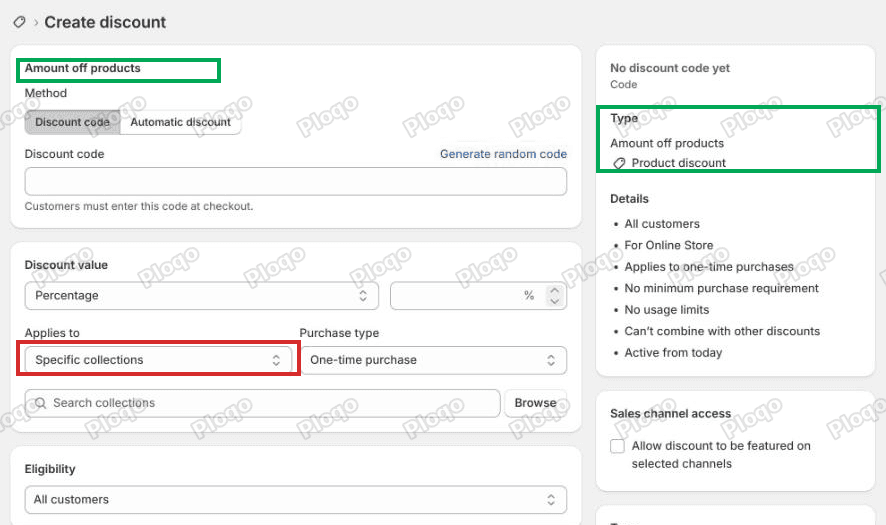 The Create discount screen for Amount off products, with the Type panel naming it a product discount
There are four:
- Amount off products - a set amount or percentage off chosen products or collections. Shopify files this as a product discount.
- Amount off order - a set amount or percentage off the order. Shopify files this as an order discount.
- Buy X get Y - buy some things, get other things cheaper or free.
- Free shipping - removes the shipping charge.
Each type can be a discount code the shopper types at checkout, or an automatic discount that applies on its own. That choice is separate from the type and does not change any of the maths below.
The two that matter here are the first two, because they are the two that can both express "10 percent off" and yet produce different totals.
Why the type changes the amount
A product discount is attached to the line item, the row in the cart for one product. Shopify works out what the discount is worth for one unit, drops anything below a whole cent, then multiplies by the quantity.
An order discount is attached to the order. Shopify works out the discount against the subtotal and rounds that once.
Prices in Shopify carry two decimal places and no more. So the question is only ever where the rounding happens: before the multiplication, or after it.
At normal prices it never shows. Ten percent of 24.99 is 2.499, which rounds to 2.50, and the fraction of a cent goes unnoticed. At 0.15 a unit, ten percent is 0.015. Rounded down to the nearest cent that is 0.01, and a third of the discount is gone before the quantity is applied.
Amount off products, tested
I set up a test product at 0.15 a unit, put it in a collection, and made a 10 percent Amount off products code scoped to that collection. Then I added 30 units to the cart.
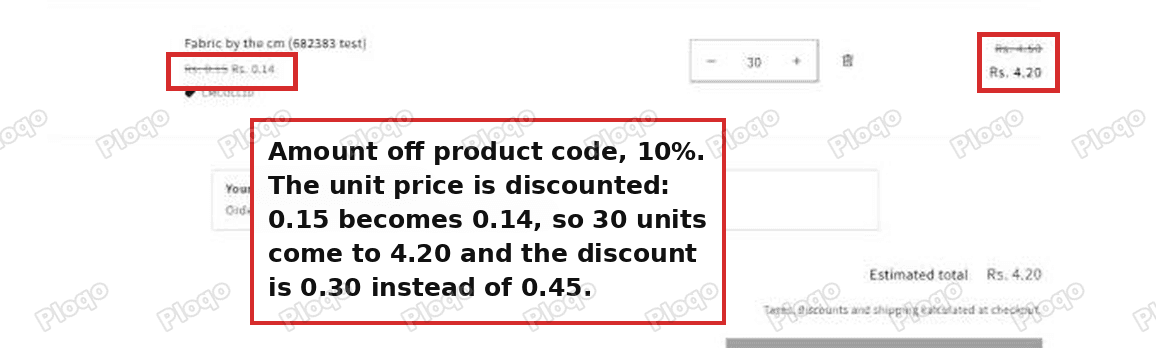 Cart with an Amount off products code: the unit price itself drops from 0.15 to 0.14
The cart shows what happened. The unit price itself is struck through and replaced: 0.15 becomes 0.14. The line total is 30 times the new unit price, so 4.50 becomes 4.20, and the discount is 0.30.
Shopify did not ignore the quantity. It discounted one unit, rounded, and then multiplied.
It always rounds down, never up. I tried 0.19 a unit as well, where 10 percent is 0.019, and the unit price still dropped by exactly one cent.
Amount off order, tested
Same store, same product, same 30 units, same 10 percent. The only change is the type: an Amount off order code.
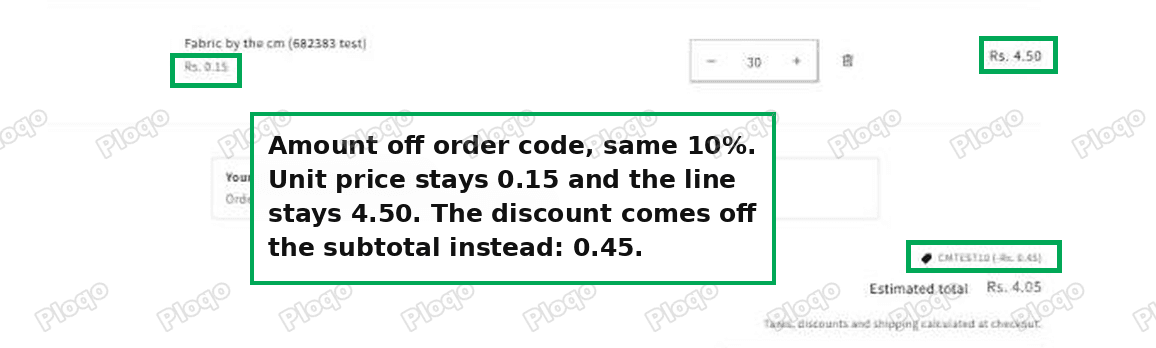 Cart with an Amount off order code: the unit price stays 0.15 and 0.45 comes off the subtotal
The unit price stays at 0.15. The line total stays at 4.50. The discount appears as its own line under the cart totals, 0.45, and the estimated total drops to 4.05.
That is the number most merchants expect, and it comes from rounding once at the end instead of thirty times along the way.
Who this actually costs money
The loss only shows up when the per-unit discount lands on a fraction of a cent, which means one of these:
- You sell by a small unit. Fabric by the centimetre, cable by the foot, ribbon by the metre, beads by the gram. Unit prices sit in the 0.05 to 0.50 range, and quantities run into the hundreds.
- Your percentage is small. Five percent of 0.90 is 0.045, so the same rounding applies at a price that looks perfectly ordinary.
- You run a high-quantity wholesale line. The per-unit error is a cent, but the quantity multiplies it.
Work out the size of it before you change anything. Take your unit price, multiply by the percentage, and look at the third decimal place. If it is not zero, that fraction is what you lose on every unit.
At 0.15 and 10 percent you lose half a cent a unit. On a 300 unit roll that is 1.50 of discount the customer was promised and did not get.
Fix 1: price by a larger unit
The cheapest fix costs nothing and needs no app. Change the unit so that price times percentage lands on a whole cent.
Instead of selling per 1 cm at 0.15, sell per 10 cm at 1.50. Ten percent of 1.50 is 0.15 exactly, and the discount comes out right.
I confirmed the same effect by moving the test product to 0.20 a unit, where 10 percent is 0.02 on the nose. The Amount off products code then gave the full 0.60 on 30 units with nothing lost.
The trade-off is that customers buy in 10 cm steps rather than any number of centimetres. If your cuts are usually round numbers anyway, this is the whole fix.
Update the product title and the unit label on the product page at the same time, so a customer ordering 30 does not expect 30 cm and receive 3 metres.
Fix 2: use an order discount instead
If the discount is meant to apply to the whole basket anyway, switch the type to Amount off order and the rounding problem goes away on its own.
The catch is scope. An order discount applies to the order, so you cannot limit it to one collection the way a product discount can. If your promotion is "10 percent off everything", that is not a limitation. If it is "10 percent off fabric only", it is.
Minimum purchase requirements still work on an order discount, so "10 percent off orders over 50" behaves exactly as you would expect.
Fix 3: an app or a discount function
If you need per-unit pricing, collection scoping and a code, all three at once, no built-in setting covers it.
What does cover it is a discount function, a small piece of custom code Shopify runs at checkout to work out a discount its built-in types cannot. It needs a developer, but the job itself is small: read the line subtotal, take the percentage, round once.
Apps exist that do the same thing. The useful question to ask any of them before you install it is whether it creates an order discount or a product discount. An app that applies its value at order level allocates across the subtotal and gets the right number. An app that creates a product discount inherits the same rounding you already have.
How to tell which type a discount already is
You do not have to open a discount to check. The Type column on Discounts names it.
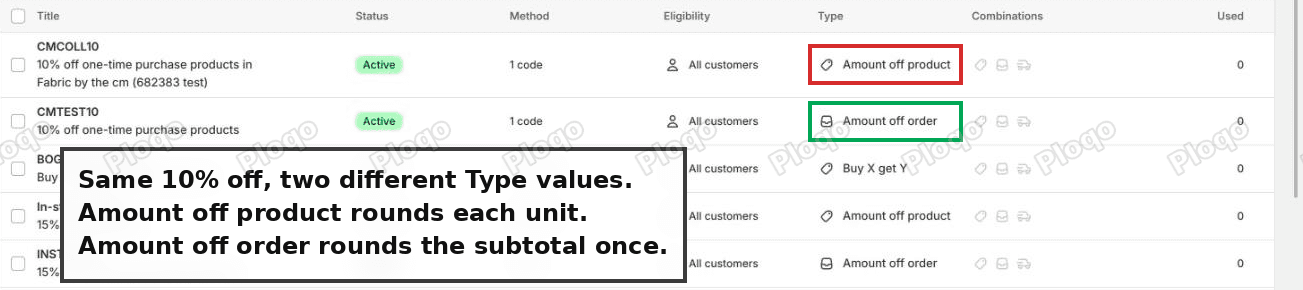 The Shopify Discounts list showing the Type column: Amount off product on one code and Amount off order on another
Both codes in that screenshot are 10 percent off the same product on the same store. The only difference is the Type column, and that difference is worth 0.15 on a 30 unit cart.
The type is fixed once a discount is created. To change it you delete the discount and make a new one, which means the code stops working for anyone holding it, so pick the type before you print anything.
Other reasons a discount gives the wrong amount
Rounding is not the only way a discount ends up smaller than planned. Two more are worth checking before you rebuild anything.
A code can replace your automatic discount. If you run an automatic discount and a shopper enters a code, Shopify applies one or the other unless both are set to combine with each other. The cart total changes to the code's value and nothing on the page says the automatic discount was dropped. Both discounts have to tick each other's class under Combinations. That is covered in full in Shopify discount combinations.
Free shipping thresholds are measured after discounts. A code that lowers the subtotal below your free shipping minimum removes free shipping, so the customer saves on the goods and pays for delivery.
Questions merchants ask
Does the discount type change what the customer types at checkout? No. The code is the code. Type is about how the value is worked out, not how it is entered.
Can one discount be both product and order scoped? No. Each discount is one type. Run two discounts if you need both behaviours, and set Combinations on each so they can apply together.
Does an automatic discount round differently to a code? No. Method (code or automatic) and type are separate settings. An automatic Amount off products discount rounds per unit exactly like the code version.
Why does the unit price change on a product discount? Because the discount belongs to the line item. Shopify shows the reduced unit price with the original struck through, so the cart line and the maths agree.
Does this affect fixed amount discounts too? A fixed amount off products is divided across the units in the line, so it can split unevenly across a large quantity. Percentage discounts are where the per-unit rounding bites hardest, because the fraction repeats on every unit.
If the number is still wrong
Work through these in order.
- Check the Type column on the Discounts list. If it says Amount off product, the per-unit rounding above applies.
- Multiply your unit price by the percentage and look past two decimal places. Anything there is lost per unit.
- Check Combinations on both the code and any automatic discount, if you run both.
- Check the minimum purchase requirement. A cart that drops below it after another discount stops qualifying.
- Check the dates and usage limits. An expired or exhausted code applies nothing at all rather than the wrong amount, so if you are seeing a partial discount this is not it.
- Test in the cart, not in the admin. The discount screen shows what you configured. The cart shows what a customer gets, and those are the numbers that matter.
What I would do
For most stores the answer is Fix 1. Pricing by a unit that divides cleanly costs nothing, keeps the collection scoping, and removes the rounding permanently rather than working around it.
Keep Amount off order for storewide promotions, where it is the right type anyway and happens to round the way people expect.
Reach for a function or an app only when per-unit pricing, collection scoping and a code are all required at the same time.
Spending your week on Shopify busywork?
PinFlow takes one job off the list: getting your Shopify catalog onto Pinterest on a schedule, without a person doing it every week.
Get PinFlow on the Shopify App StoreMore Shopify fixes
More community-sourced Shopify guides, tested on a live store.
Shopify Admin
Schedule a Black Friday Sale in Shopify (Auto Start and End)
Give the discount its own start and end date and put the sale banner in an Event rollout with the same dates. Both start at midnight and end after Cyber Monday.
Shopify Admin
Shopify Discount Limit: One Code for More Than 100 Products
Shopify stops you at 100 items when a discount applies to specific products. There is no setting to raise it, but you do not need one. Point the discount at a collection and one code covers thousands of products. Tested on a store, with the B2B route too.
Shopify Admin
Shopify POS Discount Code: Where the Controls Are
A discount code is Online Store only, and the POS switch lives on the discount, not in POS settings. Here is what each control actually does, checked in a live admin.