
Shopify Barcode Generator: Turn a Number Into a Barcode
Shopify stores a barcode value but never draws the barcode, and the number alone does not tell you the format. How to identify the symbology and generate a printable barcode free.
By AjayCodeWiz · July 7, 2026 · 11 min read
The problem
A merchant on the Shopify Community was handed an 8 digit number and told it was a "Shopify barcode number". They needed the actual barcode, the scannable image, and could not find anywhere in Shopify to produce one.
They were not missing a menu. Shopify stores a barcode value but never generates a barcode image from it. The field in the admin is a text field. It holds a number so that your own scanner, your POS, and your inventory reports have something to match on. It does not draw anything.
So getting from a number to a printable barcode takes two steps: work out which symbology the number is, then render it.
The Shopify barcode field is just text
In your admin, the field lives at Products > select a product > Inventory > Barcode (ISBN, UPC, GTIN, etc.).
Two things follow from it being a plain text field.
Shopify does not validate it. You can put anything in there. It will not tell you that a 12 digit number is not a valid EAN-13, or that a check digit is wrong.
Shopify does not render it. There is no button, no preview, no print action. Shopify POS can scan a barcode into that field, and barcode label apps can print from it, but the core admin does nothing visual with the value.
That is why the merchant could not find the screen. It does not exist.
The number alone does not tell you the format
This is the part that turns a simple question into a real one, and it is why the thread went back and forth.
Different symbologies accept overlapping lengths. An 8 digit number could be:
- EAN-8, a genuine compact retail barcode with a check digit
- Code 128, which accepts any length and any ASCII character
- Code 39, same
- An internal SKU that is not a retail barcode at all
You cannot tell which by looking. And it matters, because scanning behaviour differs. An EAN-8 scanned at a supermarket checkout resolves to a product in a global registry. A Code 128 with the same digits does not; it is just a string your own systems understand.
There is one useful clue. Shopify's own barcode generation, in POS and in most label apps, produces Code 128 by default. So a number described as "a Shopify barcode" is more likely Code 128 than a retail GTIN. That is a guess, not a fact, and it is worth confirming with whoever produced it.
The symbologies worth knowing
Eleven formats cover essentially everything a store encounters:
CODE 128 is general purpose. It supports the full ASCII character set and any length, and it is dense. This is the correct default for internal use: warehouse labels, bin locations, internal SKUs.
EAN-13 is international retail, 13 digits. This is a real GTIN and it is what a supermarket scanner expects outside North America.
EAN-8 is the compact retail version, 8 digits, used on small packaging where EAN-13 will not fit.
UPC-A is US and Canada retail, 12 digits. The North American equivalent of EAN-13.
CODE 39 is alphanumeric: letters, digits, and a few symbols. Older, less dense than Code 128, still common in automotive and defence.
ITF-14 goes on shipping cartons, 14 digits. Encodes the case-level GTIN rather than the unit.
MSI is digits only, used for inventory and shelf labels in some retail systems.
DataMatrix is a 2D matrix. Very high density in a small square, which is why it ends up on tiny electronic components and pharmaceutical packs.
PDF417 is 2D and stores a lot: it is what is on the back of a driving licence and on many shipping labels.
Pharmacode is a pharmaceutical packaging control code, read at high speed on a production line.
Codabar is used by libraries, blood banks, and airbills. Legacy but still in service.
For a Shopify store, three of these matter. Code 128 for anything internal. EAN-13 or UPC-A if you sell through retail channels and need a registered GTIN.
Generating the barcode
I built a free tool for exactly this, because the answer to "I have a number, I need the image" should not be a paid app.
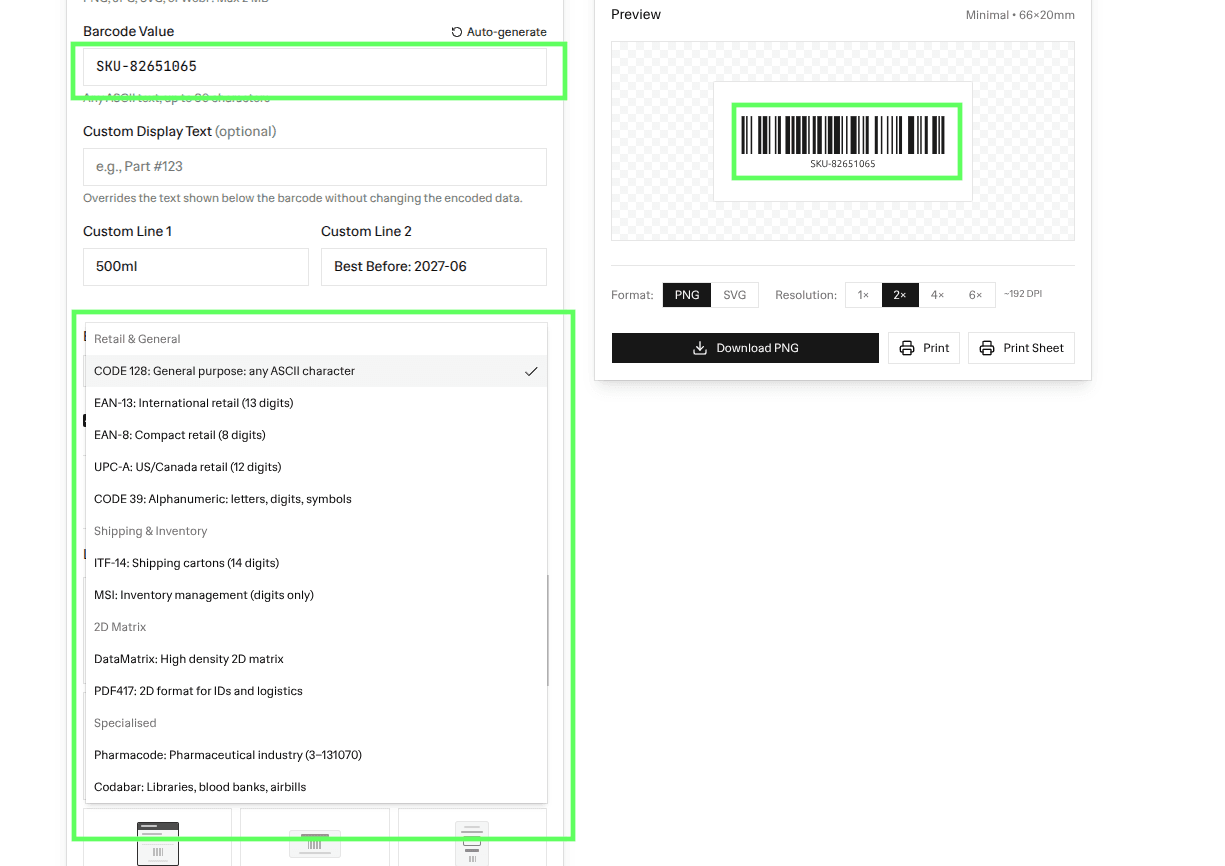 The barcode generator: enter the value, choose the symbology, get a downloadable image
Enter your barcode value, choose the type, and it renders the barcode image for you to download and print.
It runs in your browser, so the value never leaves your machine, and there is no account or sign-up. If your number is a valid EAN-13 or UPC-A the check digit is handled for you; if it is not valid for the format you picked, you will see that immediately, which is itself the fastest way to identify what format a mystery number actually is.
That is the trick for the merchant's situation: try the number as EAN-8. If it validates, it is probably a real EAN-8. If it does not, it is Code 128 or an internal SKU.
Do you need a registered GTIN?
Worth answering directly, because it is the more consequential question hiding behind "how do I make a barcode".
If you only sell through your own store, you do not need a registered barcode at all. Generate Code 128 from your own SKU and use it for picking, packing, and stocktakes. It is never scanned outside your business.
If you sell through retail, physical shops or marketplaces, you almost certainly need a real GTIN, which means EAN-13 or UPC-A registered with GS1. A retailer's POS looks the number up in a global registry; a self-generated Code 128 resolves to nothing and will be rejected at onboarding.
If you sell on marketplaces, Amazon, Google Shopping and others require a GTIN for most categories. Google Merchant Center in particular will disapprove products with an invalid or self-invented GTIN, and it validates check digits.
This is the distinction to get right. A barcode you generated yourself is scannable, and that feels like success. Whether it is meaningful to anyone else is a separate question, and the answer is usually no.
Getting barcodes onto your products
Once you have values, three ways to get them into Shopify.
One at a time, in the product's Inventory section. Fine for a handful.
Bulk edit. From Products, select the products, click Bulk edit, and add the Barcodes column through the Columns picker. One row per variant. This is the right tool for a few hundred, though the cell changed in 2026 and no longer behaves like a plain text box. See the scanning section below.
CSV import. Export your products, fill in the Variant Barcode column, and import the file back. Right for thousands, and it gives you a record of what you set.
Remember that barcode, like SKU and price, lives on the variant, not the product. A product with five sizes needs five barcodes, and each retail size legitimately has its own GTIN.
Scanning barcodes straight in
If you are holding a scanner rather than typing, this section is the one you want. Shopify changed barcode entry in 2026 and it broke the oldest workflow in retail.
A barcode scanner is just a keyboard. It types the digits and then presses a key. The whole receiving workflow depends on that key moving you to the next row, so you can beep an entire delivery in without touching the mouse.
Shopify added support for multiple barcodes per variant, which is genuinely useful. The cost was that the barcode field stopped being a plain text box and became a small popup. Scan and advance stopped working, and a lot of merchants noticed within a day.
Here is how to get it back.
On a single variant, you do not have to pick a type
Open a variant and click Barcodes. The box opens with the cursor already in it and the type already set to Custom.
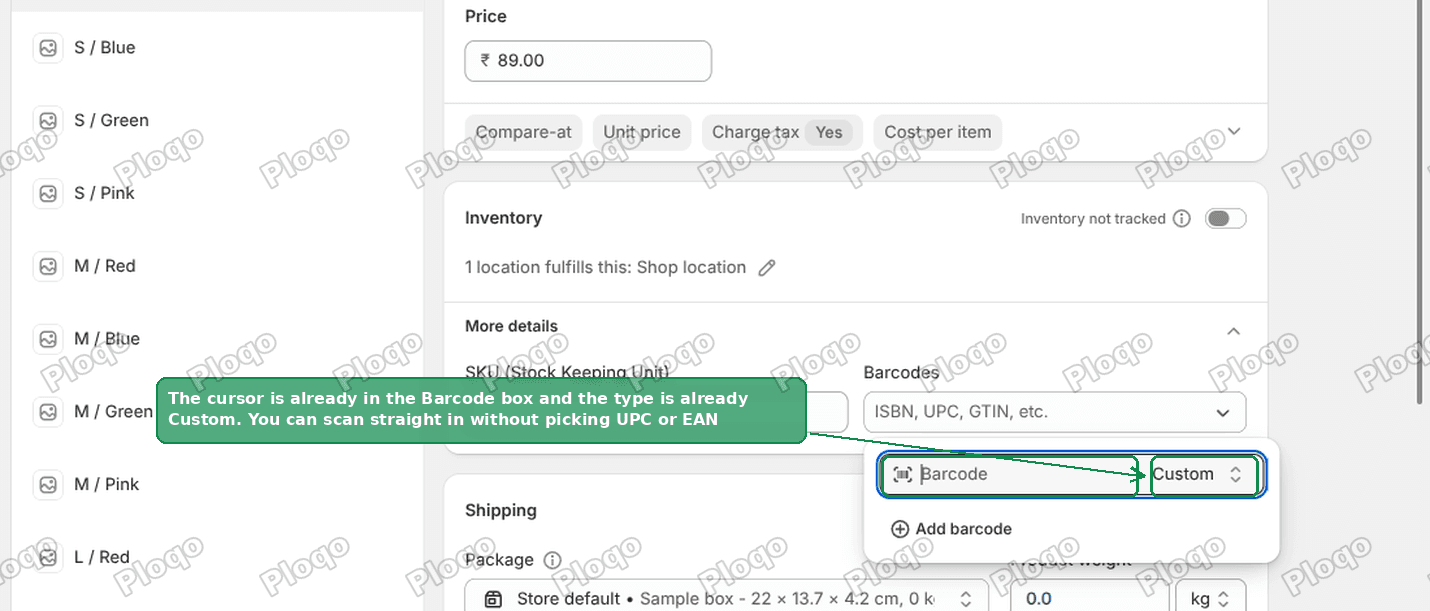 The Shopify variant screen with the Barcodes box open, cursor in the field and the type already set to Custom
You can scan straight in. Choosing UPC or EAN is optional, not a gate. That trips people up because the field looks like it is asking you to choose a format first.
In the bulk editor, four keys do the whole loop
Select your variants and click Bulk edit. Open Columns and tick Barcodes.
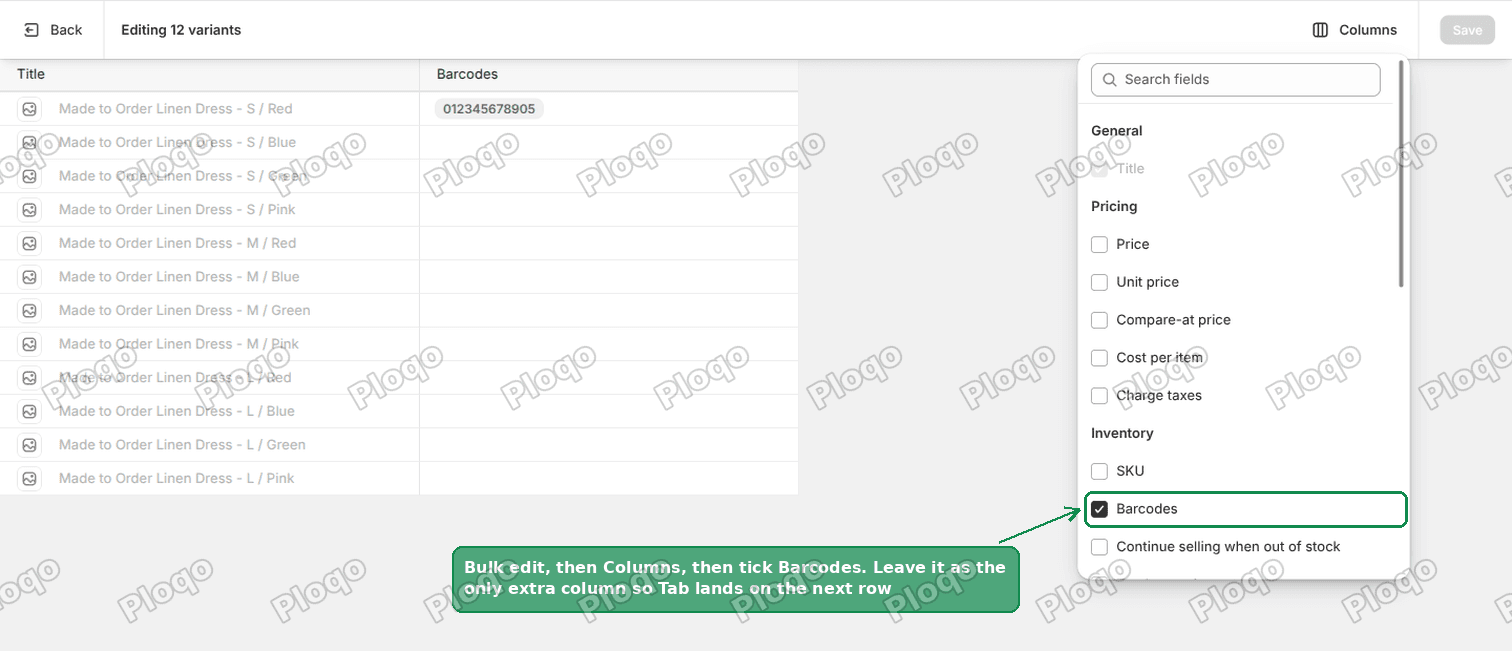 The Shopify bulk editor Columns picker with Barcodes ticked
Leave it as the only extra column. This matters: with one extra column, Tab moves you down to the next row. With several, Tab moves sideways through the columns first.
Click the first Barcodes cell. The popup opens with the cursor already in it.
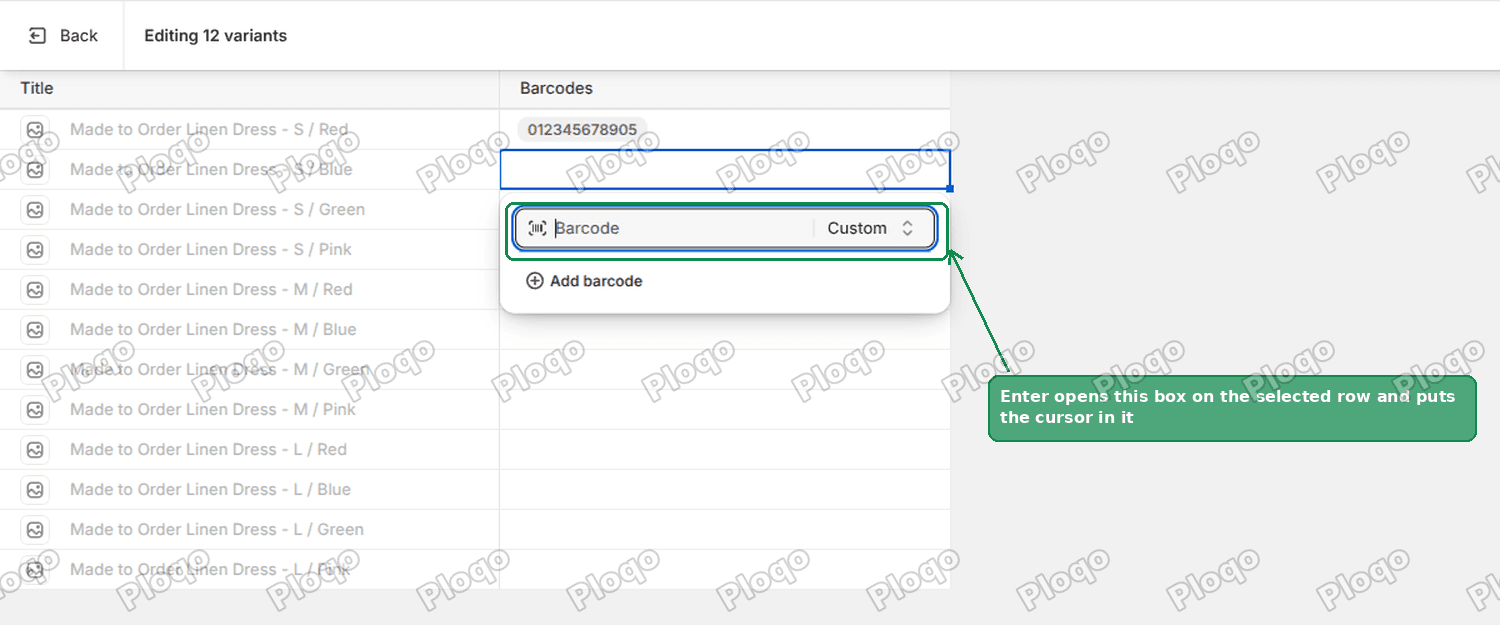 The Barcodes cell in the Shopify bulk editor, open as a small popup with the cursor in the field
Then repeat this loop down the list:
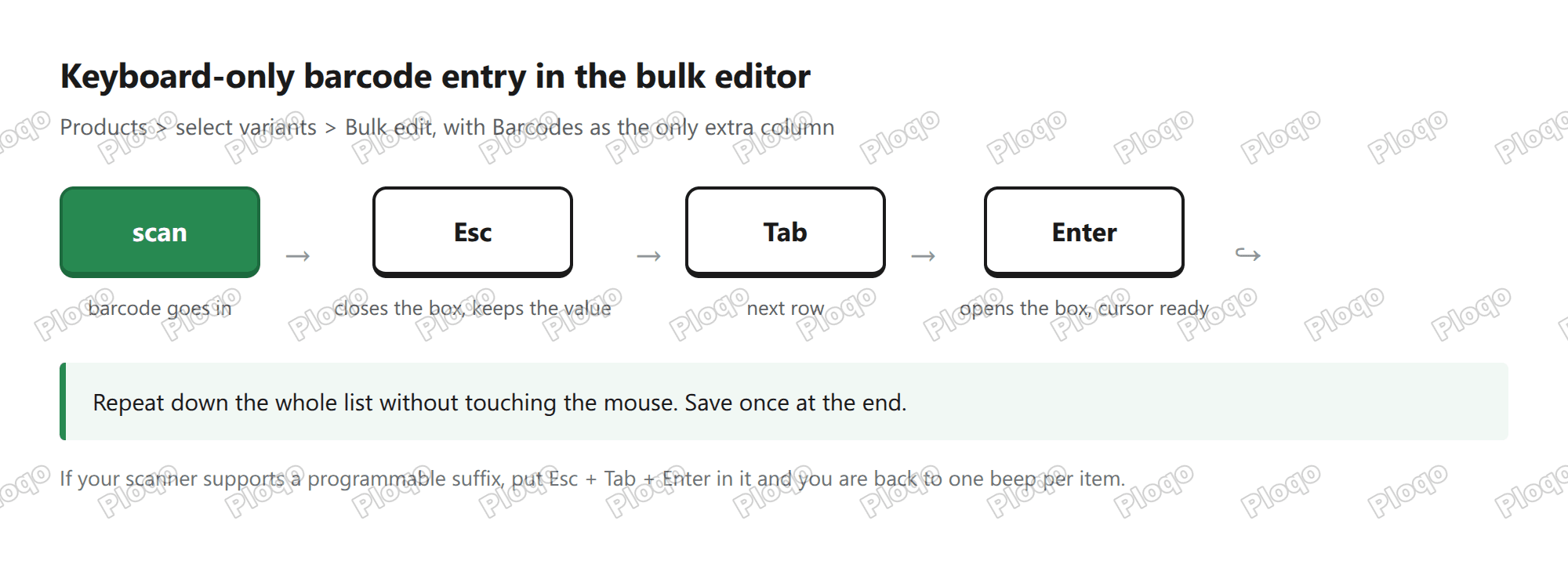 The keyboard loop: scan, then Esc, then Tab, then Enter, repeated down the list
- Scan. The value goes in.
- Esc. Closes the popup and keeps the value.
- Tab. Moves down to the next row.
- Enter. Opens that row's popup with the cursor ready.
Save once at the end, not per row.
Put the loop into the scanner itself
Most 2D scanners can send a programmable suffix, which is a key sequence sent automatically after every scan.
Program Esc Tab Enter as the suffix and you are back to one beep per item, with no keyboard work at all. Zebra scanners do this through 123Scan, Honeywell through EZConfig, and most others through the barcode sheet in the manual.
This is the closest thing to the old behaviour, and it is worth the ten minutes of setup if you receive stock regularly.
Common questions
Why can I no longer paste a column of barcodes in the bulk editor?
Because the Barcodes cell is a popup now rather than a plain text cell, which is a side effect of Shopify supporting several barcodes per variant. Use the keyboard loop above, or a CSV import if you are pasting from a spreadsheet.
Can Shopify print barcode labels?
Not from the core admin. Shopify POS can print labels with compatible hardware, and there are label apps that read the barcode field and lay out sheets. The barcode field itself is only storage.
What if I have no barcode at all?
For internal use, generate Code 128 from your existing SKU. It is the least friction and it means your barcode and your SKU are the same string, which makes stocktakes simpler.
Is the Shopify barcode field the same as SKU?
No, and keeping them distinct is worth the discipline. SKU is your internal identifier. Barcode is what a scanner reads. They can hold the same value, but the fields feed different reports and different integrations.
Can two variants share a barcode?
Shopify allows it, but do not. Scanning becomes ambiguous, and marketplaces reject duplicate GTINs.
Does the barcode field affect my storefront?
No. It is admin and integration data only, not rendered to customers.
How do I check whether an existing number is a valid GTIN?
The last digit of EAN-13, EAN-8 and UPC-A is a check digit computed from the others. Run the number through the generator as that format; if the check digit does not match, it is not a valid GTIN for that symbology.
If it did not work
The generator rejects your number for the format you picked. That is the tool telling you the number is not valid for that symbology, usually a length or check-digit mismatch. Try Code 128, which accepts anything.
Your scanner reads nothing. Print size and quiet zone. A barcode needs blank margin either side, and printing too small breaks the minimum bar width. Print larger and leave white space.
The POS scans the barcode but finds no product. The value in the label does not exactly match the value in the Barcode field. Check for a leading zero or trailing space, which is the usual cause.
Marketplace rejects your GTIN. It is self-generated. Marketplaces validate against the GS1 registry, and there is no way around registering.
Tested on
The symbology list and check-digit behaviour were verified against the generator itself. The Shopify side, that the Barcode field is plain text with no validation and no rendering, was confirmed on a dev store by entering an invalid GTIN and saving it without complaint.
Need more free Shopify tools?
PinFlow also turns your Shopify catalog into Pinterest pins and posts them on a schedule, so your products keep getting found while you work on the store.
Get PinFlow on the Shopify App StoreMore Shopify fixes
More community-sourced Shopify guides, tested on a live store.
Shopify Admin
Shopify New Admin (2026): Where Search, Sidekick and Settings Went
Shopify's new admin moved search, alerts, the store switcher and Settings into the black sidebar, and Sidekick to a bar at the bottom. Where each one is now.
Shopify Admin
How to Use the New Shopify Admin (2026): Every Main Screen
A tour of the new Shopify admin: the black sidebar, search and Ctrl K, Home, Orders, Products, Settings and Sidekick, with where to click on each screen.
Shopify Admin
Schedule a Black Friday Sale in Shopify (Auto Start and End)
Give the discount its own start and end date and put the sale banner in an Event rollout with the same dates. Both start at midnight and end after Cyber Monday.