
Free Barcode & Label Generator
Create professional barcode labels for your products. Choose a template. Customize your colors. Download or print the labels instantly. You need no signup.
How to Use the Free Barcode Generator
This quick video walkthrough shows you how to pick a barcode format. Choose a label template. Customize colors. Download or print your barcode labels. Do it all in seconds.
How to Create a Barcode Label
Creating a professional barcode label takes just 4 steps:
- Enter your product info: Add the Name, price, SKU, vendor, and barcode number. Or use Bulk Upload to generate hundreds of labels from a CSV file.
- Choose a barcode format: Use CODE128 for general use. Use EAN-13 for retail. Use UPC-A for US and Canada. Use CODE39 for warehouses.
- Pick a label template: Choose Classic Retail, Minimal, Full Retail, or Price Tag. Choose Jewelry Tag, Shipping Label, Warehouse, Clothing Hang Tag, Round Sticker, or Asset Tag.
- Customise your colors and print style: Choose from 16 curated palettes. Then print one label or fill a full label sheet.
Hit Download for a high-res PNG or SVG. Hit Print for one label. Hit Print Sheet to create a full page of barcode labels for Avery and A4 sheet layouts.
Print Barcode Label Sheets
Do you need to print multiple barcode labels at once? Use the Print Sheet option. Generate a full page of repeated labels for common sheet layouts. These include Avery 5160, Avery 5163, Avery 5167, and generic A4 label sheets. This is ideal for product packaging, Shopify inventory, warehouse bins, retail shelves, and small batch product labeling.
For the best results, match the template to the physical label size before printing. Larger templates like Full Retail, Shipping Label, Warehouse, and vertical price tags are tricky. They may technically fit on tiny labels such as Avery 5167. However, the text and barcode can become too small to read or scan reliably. For small labels, choose a simple barcode-first template. For detailed retail or shipping labels, use a larger sheet layout. You can also use a dedicated thermal label size.
Bulk Generate from CSV
Do you need to generate distinct barcodes for your entire catalog at once? Use the Bulk Upload feature. Upload a CSV spreadsheet containing your product data. Include names, prices, SKUs, and barcode numbers. The tool parses your file locally. It renders a live row-by-row preview of your labels right in your browser. Once your design settings look perfect, export all your customized barcode label images. Download them as a single ZIP file. Everything processes on your device for maximum privacy and speed.
Supported Barcode Formats
| Format | Digits | Common Use |
|---|---|---|
| CODE 128 | Any ASCII | General purpose, most versatile |
| EAN-13 | 13 digits | International retail products |
| EAN-8 | 8 digits | Small retail packages |
| UPC-A | 12 digits | US and Canada retail |
| CODE 39 | Alphanumeric | Industrial, military, healthcare |
| ITF-14 | 14 digits | Shipping cartons and outer packaging |
| MSI | 1-15 digits | Inventory and warehouse management |
| Pharmacode | 3-131070 | Pharmaceutical packaging |
| Codabar | A-D + digits | Libraries, blood banks, airbills |
Label Templates
Classic Retail
This is a clean, balanced layout. It shows product name, price, SKU, barcode, and vendor. It is perfect for standard shelf labels sized at 2.625" × 1". It is Avery 5160 compatible.
Minimal
This is a barcode-first design with just the essentials. The barcode takes center stage. Name and price sit below. It is great for clean, modern branding.
Full Retail
This is the most detailed template. It features a colored vendor header band. It has prominent pricing, SKU, barcode, and custom text lines. It is ideal for professional retail environments.
Price Tag
This is a compact vertical layout. The price acts as the hero element. It is great for clothing tags, market stalls, and pop-up shops.
Jewelry Tag
This is a tiny, compact label. It is designed for small items like rings, earrings, and bracelets. It fits the standard 1.5" × 0.75" jewelry label size.
Shipping Label
This is a large format (4" × 6") label. It includes a structured FROM header, product details, and a prominent barcode. It is perfect if you need to print standard Zebra labels or Zebra barcode labels. It is fully compatible with DYMO and Brother thermal label printers.
Warehouse
This is a large, scan-friendly layout. It is designed for shelf bins and bulk inventory. It features a prominent SKU and wide barcode format.
Clothing Hang Tag
This is a vertical tag designed for apparel. It features a prominent size or custom badge and bold pricing.
Round Sticker
This is a circular label. It is designed for jars, bottles, and round containers. It features a compact center-aligned layout.
Asset Tag
This is a slim horizontal strip. It is ideal for IT equipment and asset tracking.
Color Palettes
Choose from 16 curated color palettes to match your brand:
- Classic White: Clean retail look with blue accents
- Kraft Paper: Artisan, organic feel with brown tones
- Midnight: Modern dark mode with purple accents
- Rose Gold: Luxury feel with red/pink tones
- Forest: Eco-friendly look with green accents
- Sunset: Warm, vibrant with amber accents
- Ocean: Professional blue theme
- Monochrome: Neutral, minimal greyscale
- Lavender: Soft purple luxury
- Cherry: Bold red energy
- Slate: Dark professional
- Mint: Fresh teal
- Peach: Warm coral
- Coffee: Dark neutral warm
- Neon: Matrix-style green and black
- Pastel: Soft pink and fuchsia
Advanced Barcode Features for Merchants & Enterprise Users
We want to provide the absolute best value to businesses of all sizes. Our free barcode generator goes beyond simple image creation. It includes an extensive array of advanced, professional-grade settings. These are designed specifically for real-world retail environments. They work for complex supply chain logistics and rigorous industrial applications. You might run a small boutique. You might manage a sprawling e-commerce warehouse. You might set up a robust enterprise inventory system. These pro-level features are tailored to optimize your business workflow dramatically. They reduce operational friction. They minimize costly human errors. Here is a deep dive into how these powerful capabilities can revolutionize your daily operations:
Custom Human-Readable Text Overrides
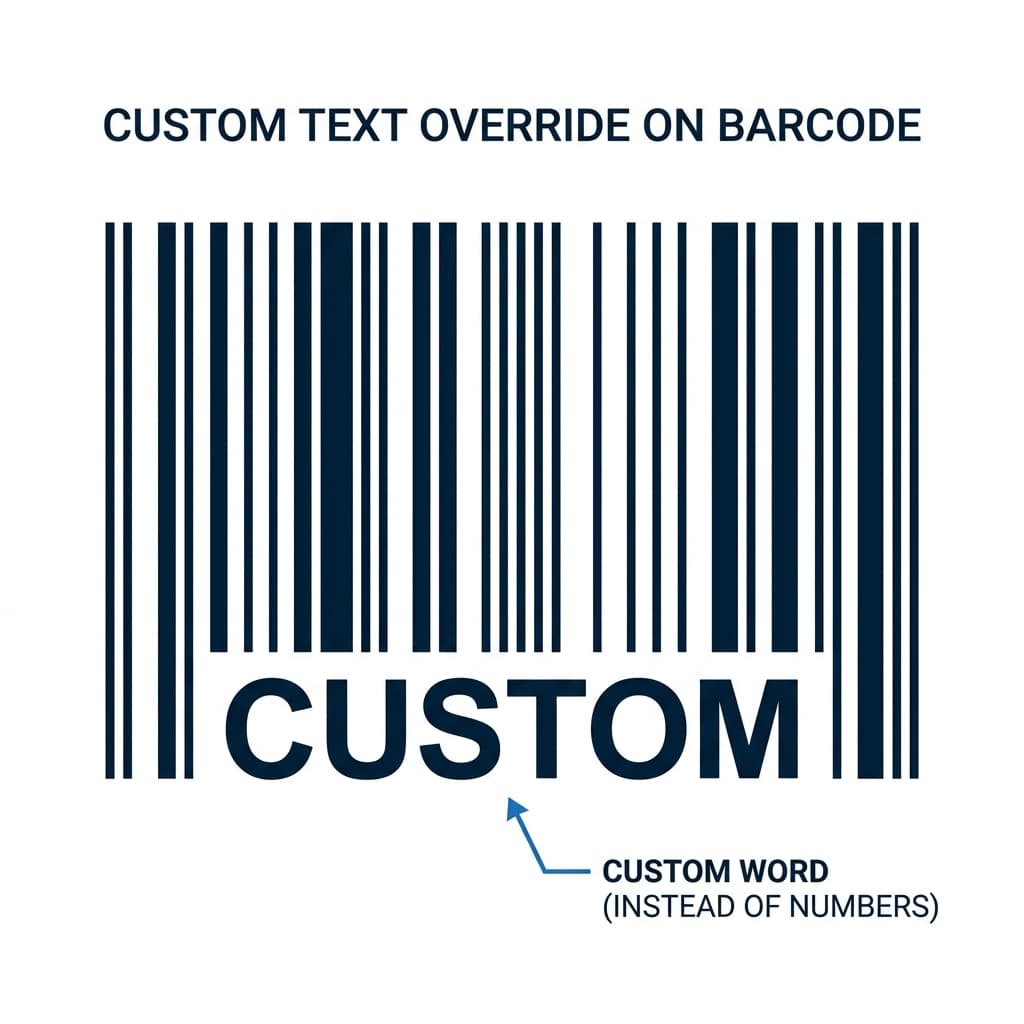 Custom Text Override on Barcode
What it exactly does: This highly requested feature lets you encode a raw, system-friendly numerical identifier (like
Custom Text Override on Barcode
What it exactly does: This highly requested feature lets you encode a raw, system-friendly numerical identifier (like 123456789) inside the scannable barcode. At the same time, it displays a completely different, clear, human-readable string underneath the barcode lines. You can show Part #123-Blue, Size L, or a custom product description.
Why it matters for merchants: In fast-paced retail and warehouse environments, efficiency is key. This feature makes manual inventory checks significantly faster and more accurate. Your warehouse picking staff, stockroom employees, and frontline cashiers can instantly read the product name directly below the barcode. They do not constantly need to rely on a physical scanner. This immediate visual context directly reduces manual picking errors. It streamlines the order fulfillment process. It vastly improves checkout speeds at the point of sale (POS). It bridges the gap between machine-readable data and human-friendly information.
Precision Padding & Quiet Zone Controls
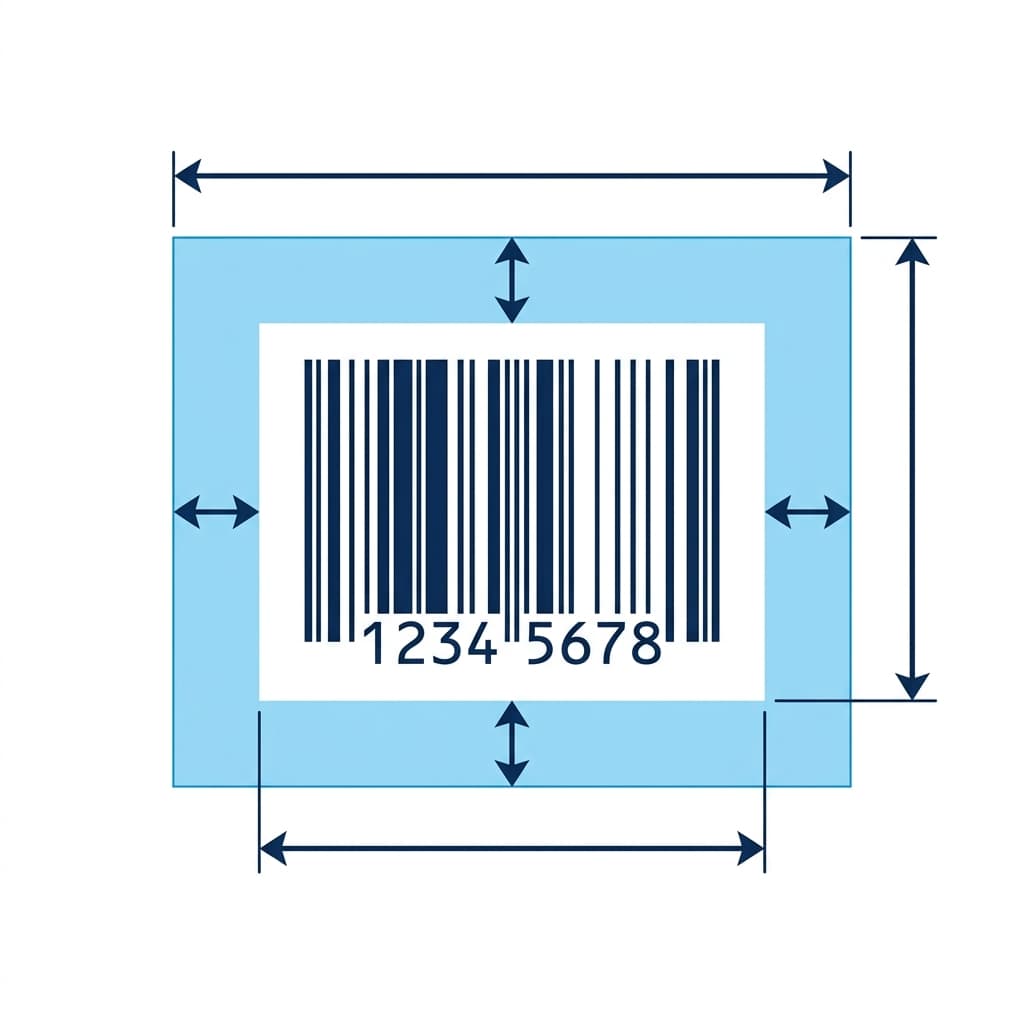 Precision Padding and Quiet Zones
What it exactly does: This granular control mechanism gives you precise, pixel-perfect authority over the blank white space surrounding your generated barcode. This space is often called padding or the "quiet zone". You can adjust it on both the horizontal and vertical axes.
Precision Padding and Quiet Zones
What it exactly does: This granular control mechanism gives you precise, pixel-perfect authority over the blank white space surrounding your generated barcode. This space is often called padding or the "quiet zone". You can adjust it on both the horizontal and vertical axes.
Why it matters for merchants: Reliable scanning is the backbone of any barcode system. All physical barcode scanners strictly require a "quiet zone". This includes handheld laser scanners and automated conveyor belt imagers. A quiet zone is a clear, unprinted border around the barcode. It helps the scanner sensor recognize exactly where the barcode data begins and ends. It prevents interference from surrounding text, graphics, or the edge of the label. Adjusting the padding to optimal levels ensures your barcodes scan reliably and instantly on the very first try. You might print on tiny retail jewelry tags. You might print on massive warehouse bin labels meant for scanning from a distance. Proper quiet zones guarantee flawless scan rates and prevent frustrating delays.
Advanced Barcode Image Rotation
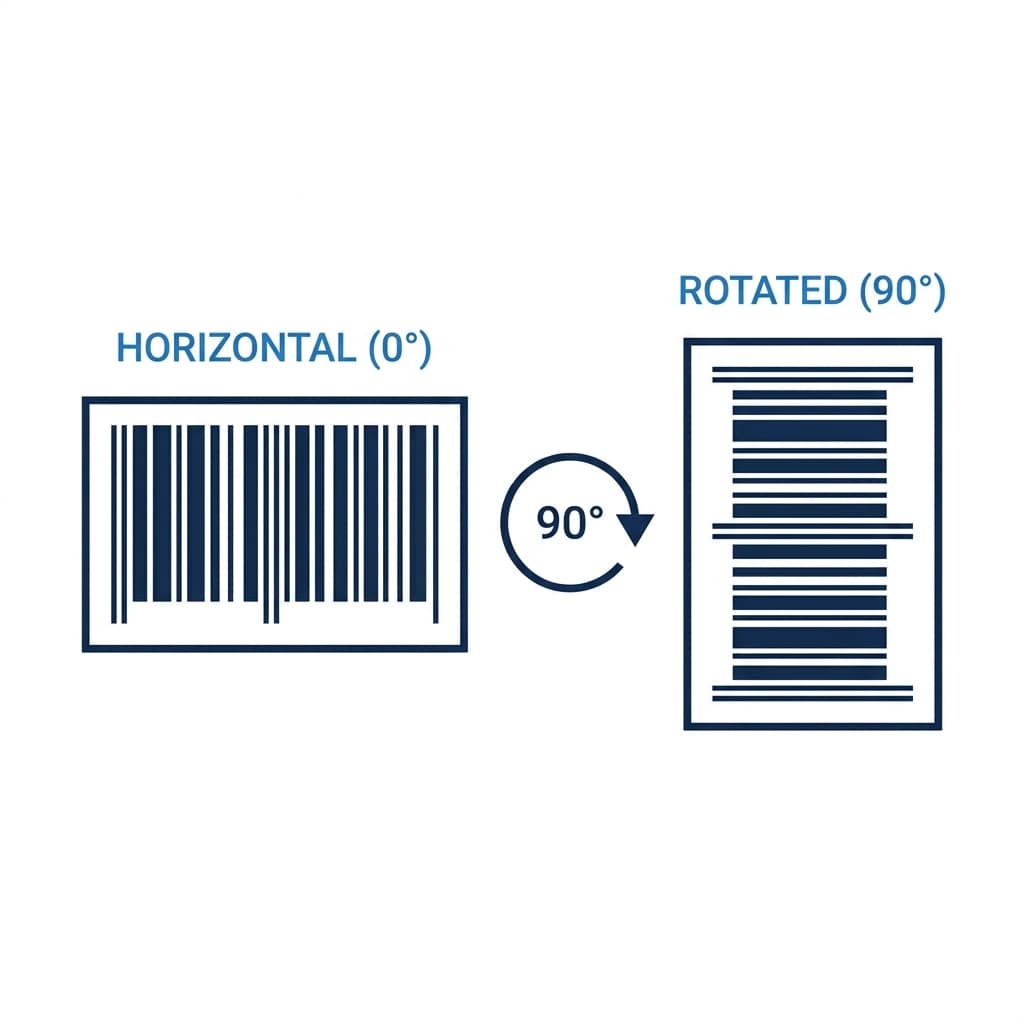 Advanced Barcode Image Rotation
What it exactly does: This flexible formatting option lets you instantly generate and export your barcode images rotated precisely. You can rotate them at 0, 90, 180, or 270 degrees. This adapts to any layout requirement.
Advanced Barcode Image Rotation
What it exactly does: This flexible formatting option lets you instantly generate and export your barcode images rotated precisely. You can rotate them at 0, 90, 180, or 270 degrees. This adapts to any layout requirement.
Why it matters for merchants: Printing hardware and packaging designs are rarely one-size-fits-all. Not all thermal label printers output labels horizontally. You must consider the specific configuration of your Zebra, DYMO, Brother, or Rollo thermal printer. You also must consider the unique physical layout constraints of your custom product packaging. You may frequently need barcodes printed sideways (portrait) or completely inverted. This built-in rotation feature completely eliminates layout alignment headaches. It prevents the need for complex secondary image editing software. It ultimately saves you money by drastically reducing the number of wasted, misprinted label rolls.
Checksum Verification Control
What it exactly does: This technical feature provides a simple toggle to explicitly include or exclude a mathematical check digit (checksum). This works for compatible barcode formats, such as Code 39 or Interleaved 2 of 5.
Why it matters for merchants: Data integrity is critical when tracking inventory or processing sales. A checksum acts as a built-in security measure. It is a calculation that verifies the structural accuracy of a barcode during a scan. It effectively catches and prevents misreads or partial scans (read errors). However, different legacy systems have different requirements. Having explicit control over the checksum calculation ensures your generated barcodes remain 100% compatible. They will work with your specific legacy Point of Sale (POS) systems. They will work with highly customized warehouse management systems (WMS). They will also work with older, proprietary scanning hardware that expects a barcode formatted in a very specific, strict manner.
Comprehensive 2D and Extended Symbology Support
What it exactly does: Beyond standard 1D barcodes, our tool generates highly advanced, data-dense 2D barcodes. These include QR Codes, DataMatrix, PDF417, and Aztec codes. It does this seamlessly alongside extended 1D formats, postal codes, and GS1 DataBar variants.
Why it matters for merchants: The future of retail and logistics lies in rich data. 2D barcodes hold exponentially more data in a fraction of the physical footprint compared to traditional linear 1D barcodes. With a single, compact 2D code, you can encode extensive information. You can include entire website URLs linking to product manuals. You can include complex manufacturing lot numbers. You can add exact expiration dates, serial numbers, or even lengthy product specifications. All this fits neatly into a tiny square. This capability is absolutely ideal. It is often strictly required for compact electronic components. It is used in tightly regulated healthcare and pharmaceutical packaging. It is essential for detailed international shipping manifests and modern interactive marketing campaigns.
Understanding Barcodes
At its core, a barcode translates characters and numbers into a visual pattern. Optical scanners can easily read this pattern. These patterns act as a digital fingerprint for physical items. They might be traditional vertical lines (1D) or complex pixel grids (2D). When scanned at a checkout register or warehouse terminal, they instantly fetch stored database details. These details include pricing, SKU variants, and stock quantity. This completely eliminates the need for manual data entry.
The Value of Generating Your Own Labels
- Cut Overhead Costs: Stop paying recurring software subscription fees just to design and export standard product labels.
- Minimize Human Error: Automating the checkout process prevents cashiers from keying in the wrong price or item number.
- Speed Up Fulfillment: Warehouse workers can locate and verify the right products instantly with a quick scan. This streamlines daily logistics.
- Seamless System Sync: You can upload downloaded barcode images directly into any modern inventory tracker. You can also upload them into Point of Sale software for immediate use.
Best Practices for Scanning Reliability
- Verify Before Printing: Always double-check your encoded text before committing to a massive print run. Pay special attention to long numeric strings.
- Perform Trial Scans: Generate a single test label. Scan it using a smartphone app or a standard laser scanner under typical lighting conditions.
- Mind the Dimensions: Avoid scaling barcodes down too much. If lines become too dense or blurry, scanners will fail to decode them. Give them ample breathing room on the package.
- Invest in Hardware: Thermal label printers (like Dymo or Zebra) generally produce sharper, smudge-proof lines. Standard inkjet office printers cannot match this quality.
How to Use This Barcode Generator With Shopify
If you run an e-commerce store, you might be searching for a Shopify barcode generator. You can seamlessly use our tool alongside your Shopify store. Manage physical inventory without paying for premium apps.
How to add barcode to Shopify product
To link our barcodes to your store, simply generate your barcode number here. You can also use your official GS1 UPC. Log in to your Shopify Admin. Go to Products. Select your product or variant. Paste the number into the Barcode (ISBN, UPC, GTIN, etc.) field located under the Inventory section.
How to print barcode labels on Shopify
Shopify offers a basic Retail Barcode Labels app. However, you can use our tool to generate and print highly customized, high-resolution labels. Simply enter your Shopify SKU, price, and barcode data into our generator. Select a template. Hit Print to send it directly to your Shopify barcode printer.
What barcode scanners work with Shopify POS?
If you run a retail location, you might wonder how to use barcode scanner with Shopify POS. Supported 1D and 2D Bluetooth scanners include the Socket Mobile S700 and S740. Any standard USB or Bluetooth Shopify barcode scanner acts as a keyboard wedge. It will instantly read the labels generated by our tool directly into your Shopify POS app.
FAQ
Is this barcode generator really free?
Yes, completely free. There is no signup. There are no watermarks. There are no limits. Generate as many barcode labels as you need.
What barcode format should I use?
- For retail products: Use EAN-13 (international) or UPC-A (US/Canada).
- For general purpose: CODE128 is the most versatile. It supports letters, numbers, and symbols.
- For shipping cartons: ITF-14 is the standard.
- For inventory management: CODE128 or CODE39 work well.
- For libraries or blood banks: Codabar is the traditional standard.
- For pharmaceutical packaging: Pharmacode is industry-specific.
Can I use these barcodes commercially?
Yes! The barcodes generated here are standard formats. However, for retail barcodes (EAN-13, UPC-A), you need to purchase a valid barcode number from GS1 or an authorized reseller. This tool generates the visual barcode from your number. It does not assign numbers.
What label printers and sheets are compatible?
The labels can be printed on any printer. You can print a single label or use Print Sheet for common Avery and A4 layouts. For dedicated label printers:
- Zebra: Download PNG and print via ZebraDesigner.
- DYMO: Download PNG and import into DYMO Label software.
- Brother: Use the print button or download PNG.
- Avery sheets: Print full sheets for Avery 5160 / 8160, Avery 5163 / 8163, Avery 5167, and generic A4 label sheets.
For tiny sheet labels like Avery 5167, use compact templates. Test-scan one page before printing in bulk. Detailed templates can become hard to read when compressed onto very small labels.
Can I customize the label design further?
Currently, you can choose from 10 professionally designed templates. You can choose from 16 color palettes. We will be adding more templates soon. These will include custom Canva-designed templates. For now, download the SVG version. You can edit it further in any vector editor.
What's the difference between PNG and SVG download?
- PNG: High-resolution raster image at 300 DPI. Best for printing and most label software.
- SVG: Vector format that scales to any size without losing quality. Best for further editing in design tools.
Do barcodes work internationally?
Absolutely. Global retail heavily relies on standardized frameworks (like GS1). Always generate a widely recognized format, such as an EAN-13 or UPC-A. Scanners across different countries and retail chains will have no trouble parsing the symbol. The visual encoding is a universally understood machine language.
How do I acquire an official UPC for retail?
You might be a growing brand needing to register products under your own corporate identity. You should register directly with GS1 to lease an official Company Prefix. However, you might be a smaller seller looking to keep upfront costs low. If you do not strictly require your own prefix, you can legally buy single, ready-to-use UPC codes through verified third-party brokers.
More FREE Product & Catalog tools
Barcodes, QR codes, image optimisation, and AI-readiness for your product catalog.
Free QR Code Generator
Instantly create free, downloadable QR codes for links, phone numbers, texts, and SMS messages without any email signups.
Free WiFi QR Code Generator
Make a WiFi QR code guests scan to join your network. Handles WPA and WPA2, open and hidden networks, and passwords with special characters. No signup.
Free vCard QR Code Generator
Make a QR code that saves your name, phone, email, company and website to a phone in one tap. Handles names and companies with commas or semicolons. No signup.
Free SMS QR Code Generator
Make a QR code that opens a text message with the number and a pre-written message filled in. Works on iPhone and Android. No signup, no watermark.
Free WhatsApp QR Code Generator
Make a QR code that opens a WhatsApp chat with your number and an optional pre-written message. Built on a wa.me click-to-chat link. No signup.
Free Business Card QR Code Generator
Make a QR code for your business card that saves your name, title, company, phone, email and website to a phone as a contact in one tap. No signup.
Free Image Resizer & Optimizer
Resize, compress, and convert images for your Shopify store, Pinterest pins, and social media. Shopify-specific presets, batch downloads, and no signup required.
Free Address Label Template Maker
Make an Avery-compatible address label sheet. Pick a product number (5160, 5167, L7160, and more), type one address or mail-merge a list, then download a print-ready PDF, PNG, or SVG at true size. Free, no signup, no watermark.
Free Name Tag Generator
Make printable name tags and event badges on an Avery sheet. Pick a size (5395, 5390, 5392, 5384, or A4), type one badge or mail-merge a roster, color-code by department, add a scan-to-connect QR, then download a true-size PDF, PNG, or SVG. Free, no signup, no watermark.
Free Price Tag Template Maker
Design printable price tags and shelf labels with a built-in barcode or QR code. Retail and boutique sale templates, real-unit sizes, bulk sheet printing, and PNG/PDF/SVG export. Free, no signup, no watermark.
Free Hang Tag Template Maker
Design printable hang tags (swing tags) with a real punch hole, a built-in barcode or QR code, and real-unit sizing. Apparel, price-sale, and specialty templates, a car parking-permit mirror-slot shape, bulk mail-merge sheets, and PNG/PDF/SVG export. Free, no signup, no watermark.
Free Luggage Tag Template Maker
Design a two-sided printable luggage tag: a name front and an "if found, please return to" contact back, laid out side by side for one-print, cut, and fold. 14 templates (travel, corporate, wedding, kids, medical ID, boarding pass), a reinforced grommet shape, a return QR, real-unit sizing, and bulk family/team sheets. Free, no signup, no watermark.
Free Candle Labels Maker & Warning Label Generator
Design custom candle labels and print an ASTM F-2058 candle warning label carrying all three cautionary statements and all three pictograms. Measure your jar and the tool computes the wrap size (pi x diameter + overlap) and the dual-unit net weight. 6 label types, 14 templates, bulk scent sheets, true-size PDF, transparent PNG and SVG. Free, no signup, no watermark.
Free Soap Label Maker & Custom Soap Labels
Design custom soap labels and build an INCI ingredient list in correct descending order, with saponified oil names (olive oil -> Sodium Olivate) and a true-soap vs cosmetic toggle. Bar, round, oval, belly-band and bottle shapes, 14 templates, dual-unit net weight (oz/g and fl oz/mL), bulk sheets, true-size PDF, transparent PNG and SVG. Free, no signup, no watermark.
Free Care Label Template Maker & Generator
Design a sew-in garment care label with the correct ISO 3758 / ASTM D5489 care symbols, FTC-compliant care text, fibre-content composition, and RN / size / origin fields. Pick a fibre preset, override any axis, and the symbols and text always match. 12 templates, real-unit sizing, bilingual EU option, bulk size-run sheets, true-size PDF, transparent PNG and SVG. Free, no signup, no watermark.
Free Warranty Card Template Maker & Generator
Design a printable warranty card or certificate with the product, warranty period, coverage, and support details, plus a scan-to-register QR. Batch a whole run of cards each with a unique serial and a per-card register QR that pre-fills the serial on your registration page. 12 templates, 16 themes, real insert sizes, fill-in ruled lines, true-size PDF, PNG and SVG, plus Letter and A4 bulk sheets. Free, no signup, no watermark.
Free Nutrition Label Maker & Generator
Create a pixel-accurate FDA Nutrition Facts or Supplement Facts label. Pick from 20+ formats, type your amounts, and get auto %DV and FDA rounding. Download a print-ready PNG or PDF, or copy embed HTML. Free, no signup, no watermark.
Free Size Chart Maker & Generator
Build a branded product size chart. Pick from 13 category presets, edit the table inline, toggle cm and inch, and style it. Copy a self-contained HTML embed for your product page or download a PNG. Free, no signup, no watermark.
Free SKU Generator
Create consistent, human-readable SKU codes for your product catalog. Build a SKU format, bulk-generate from a product list or a size and color variation matrix, and export a CSV. Free, no signup.
Free Price List Template Maker
Build a polished price list one-pager. Paste or import your products, group them into sections, pick from 20 templates, and download a print-ready PNG, PDF, or CSV. Free, no signup, no watermark.
Free Rate Sheet Template Maker
Build a professional service rate sheet one-pager. List services with a rate and a per-service unit like /hr or /project, group them into sections, pick from 20 templates, and download a print-ready PNG, PDF, or CSV. Free, no signup, no watermark.
Free Line Sheet Maker
Build a wholesale line sheet template with product photos, wholesale and MSRP prices, colors, sizes, and MOQ. Pick a grid, list, or lookbook layout and download a print-ready PDF, PNG, or CSV. Free, no signup, no watermark.
Free Meta Description Generator
Write, measure, and preview meta titles and descriptions with a live Google SERP snippet. Pixel-accurate truncation, character and pixel counters, copy-ready meta tags, and bulk CSV export. Free, no signup.
Free llms.txt Generator & Validator
Generate and validate llms.txt files for your ecommerce store. Make your Shopify or Etsy store AI-ready for ChatGPT, Gemini, and Claude. Free, no signup.