
Shopify Customer Tags: Discounts for Tagged Buyers
There is no customer tag option on a Shopify discount. The route from a tag to a discount runs through a customer segment, and here is the exact query. Checked in a live admin.
By AjayCodeWiz · September 10, 2026 · 8 min read
The problem
You tag your best customers vip. You go to build a discount only they can use.
You open the discount, find Eligibility, and there is nothing about tags.
This is one of the most persistent misunderstandings in the Shopify admin, and it has a simple cause: tags and discounts do not talk to each other directly. There is a step in between that is easy to miss because nothing on either page mentions it.
I walked the whole chain in a live admin. Here it is.
What customer tags are
A customer tag is a plain text label on a customer record. vip, wholesale, trade, local, repeat. A customer can carry any number of them.
They are free-form. There is no list to define first; typing a new one creates it. That flexibility is why they are the most useful organising tool in the admin, and also why they get messy: VIP, vip and Vip are three different tags, and nothing warns you.
Pick a convention early. Lower case, hyphens, no spaces is the one that causes fewest problems.
Where they come from
- By hand, on a customer record
- In bulk, by selecting customers on the Customers list and adding a tag
- On import, via a Tags column in a customer CSV
- Automatically, via Shopify Flow, Shopify's free automation app, which can add a tag when something happens such as a first order or a spend threshold
- From a form, since Shopify Forms can attach a tag to each person who signs up
The Flow route is the one worth knowing about. "Tag any customer whose lifetime spend passes 500" is a two-block workflow and it keeps your vip tag up to date without anyone touching it.
The bit in the middle
Here is the discount Eligibility control, opened:
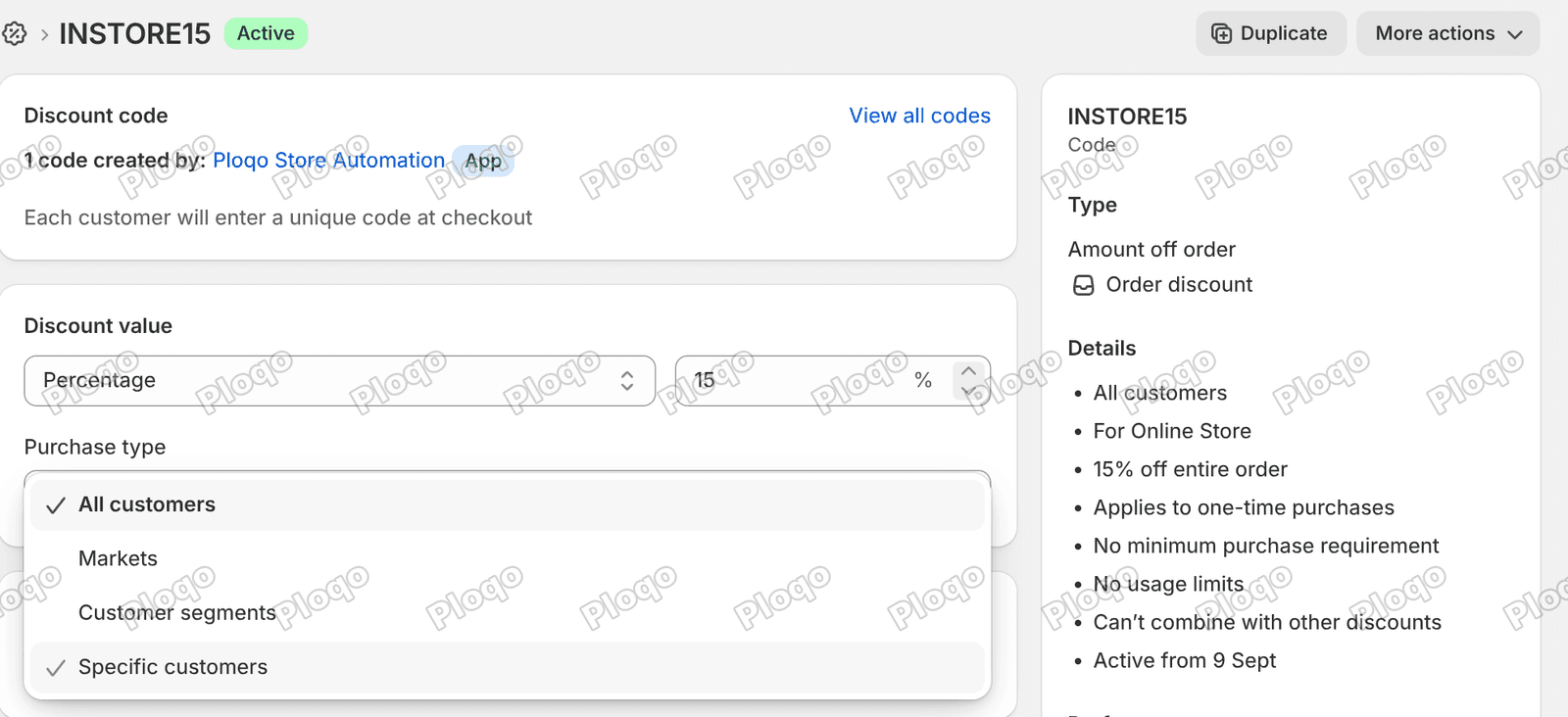 The Eligibility dropdown on a Shopify discount showing four options, All customers, Markets, Customer segments and Specific customers
Four options, and that is the complete list:
- All customers
- Markets
- Customer segments
- Specific customers
There is no "customer tags" entry, and there never has been. That is the whole reason this question keeps coming back.
The route runs through Customer segments. A segment is a saved search of your customer list that keeps itself up to date, and one of the things it can search on is tags. So:
tag → segment → discount
Two steps, not one. Once you know the middle step exists, the rest is easy.
Turning a tag into a segment
Go to Customers → Segments → Create segment.
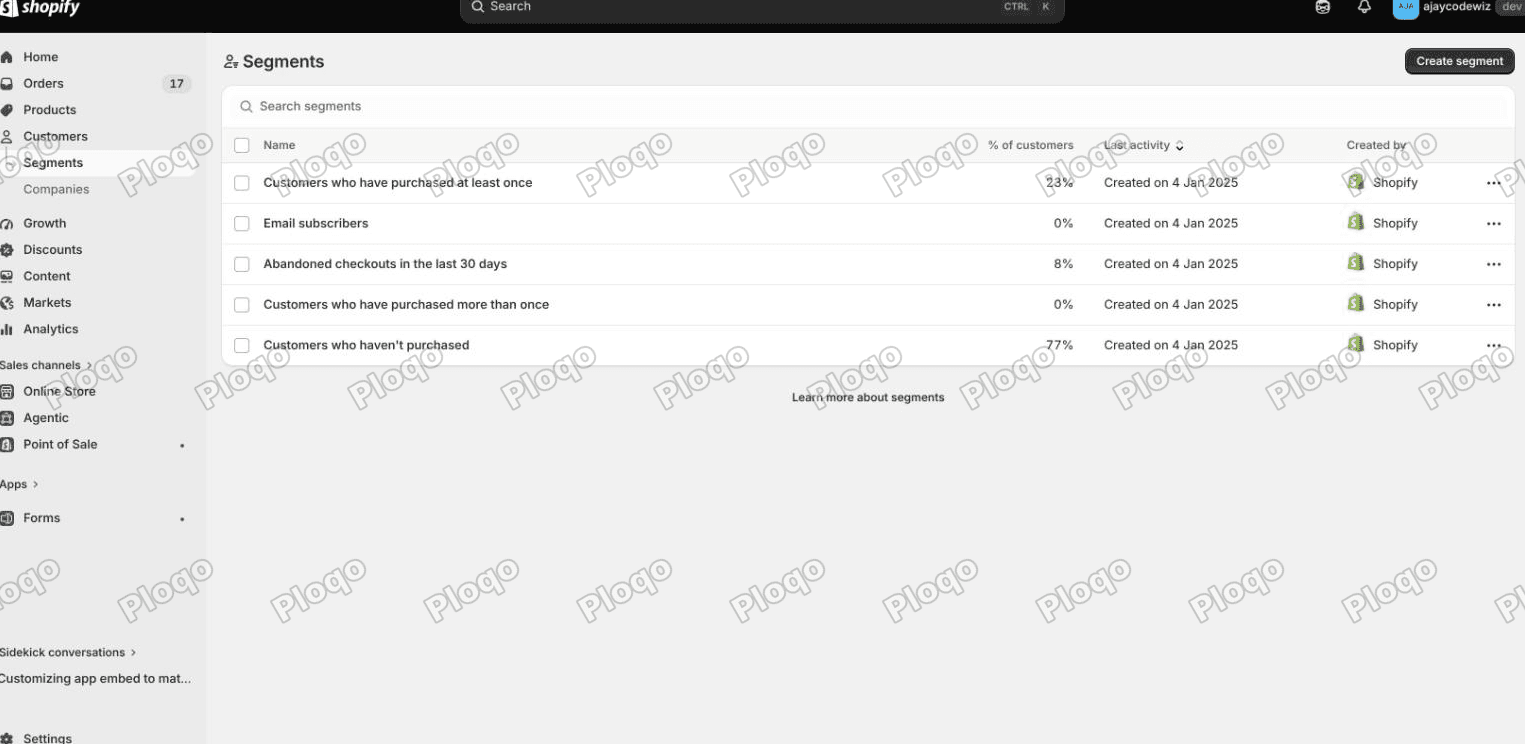 The Segments page under Customers in the Shopify admin, listing saved segments with the Create segment button top right
The box you land on lets you describe the group in ordinary words. It works, but it is vague about what it actually matched. Click Toggle Editor and you get the precise version instead: three lines that say which list to search, which columns to show, and the condition to match on.
On the line that starts WHERE, type:
customer_tags CONTAINS 'vip'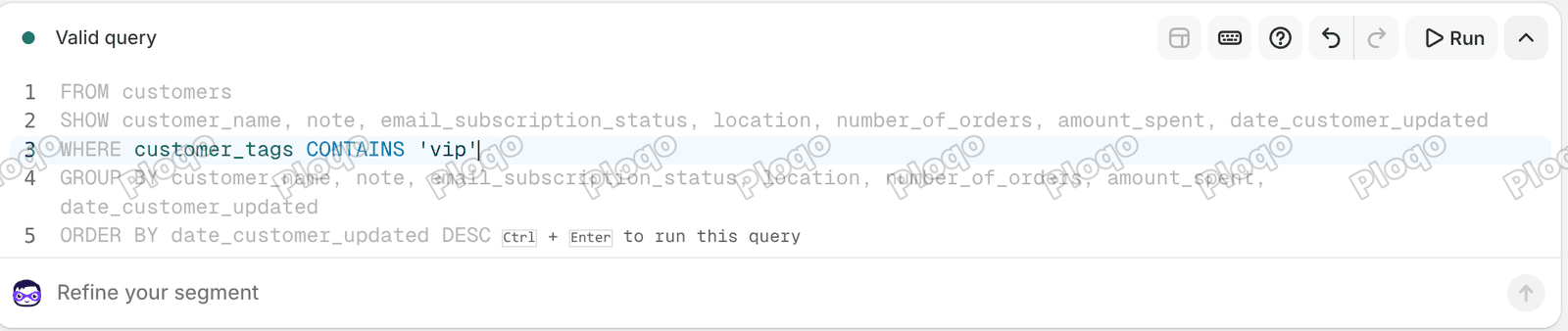 The Shopify segment query editor showing FROM customers, a SHOW clause, and WHERE customer_tags CONTAINS vip, with the status reading Valid query
The status line at the top reads Valid query. Give the segment a name and save it.
A few things about that query language, since it is not documented anywhere obvious in the admin:
- The field is
customer_tags, nottags - The operator is
CONTAINS, and the value goes in single quotes - Combine conditions with
ANDandOR, socustomer_tags CONTAINS 'vip' AND amount_spent > 500is valid - Exclude with
NOT, as inNOT customer_tags CONTAINS 'wholesale'
Segments are live. They are a saved query, not a saved list, so a customer who gets the tag tomorrow is in the segment tomorrow, and a discount pointed at that segment covers them with no further action.
Pointing the discount at it
Back on the discount, open Eligibility (the same dropdown pictured near the top of this article), choose Customer segments, and pick the segment you saved. Save the discount.
That is the chain complete. Tag the customer, the segment picks them up, the discount applies to the segment.
Two consequences worth being clear about:
The customer has to be logged in. Shopify can only know which customer is shopping if they are signed in to their account. A segment-restricted discount cannot work for a guest checkout, because there is no customer to match against. If your buyers do not have accounts, this whole approach does not apply and you need a plain discount code you only send to those people.
The tag is the switch. Untag someone and they leave the segment and lose the discount, with no edit to the discount itself. That is the payoff for the extra step.
Specific customers, and why it backfires
The Eligibility list also offers Specific customers, which lets you name individuals.
It works, and it is the wrong tool almost every time:
- It does not scale past a handful of people
- It does not follow a rule, so a customer who becomes a VIP next week is not added
- Every change means editing every discount
Use it for a one-off, like a goodwill gesture to a single named customer. For anything that describes a kind of customer, use a segment.
Sensible tags to actually use
Tags are only worth the trouble if they mean something. Ones that earn their place:
viporgoldfor a loyalty tier, ideally applied by Flow on a spend thresholdwholesaleortradefor buyers on different termslocalfor customers eligible for local delivery or pickup pricingno-marketingfor people who have asked not to be contacted, so you can exclude them from segments
What tags are not good for is anything Shopify already tracks. Do not tag customers with their order count or total spend; segments can query number_of_orders and amount_spent directly and will always be current, whereas a tag goes stale the moment they order again.
Tagging customers automatically with Flow
Shopify Flow is free on all plans and it is what turns tags from admin busywork into something that maintains itself.
A workflow to promote spenders to VIP is three blocks:
- Trigger: Order paid
- Condition: customer's total spent is greater than your threshold
- Action: Add customer tag
vip
The tag lands on the customer, the segment picks them up on the next evaluation, and any discount pointed at that segment now covers them. The discount itself was never touched.
You can run the reverse too, removing a tag when someone no longer qualifies, though most stores prefer tiers to be sticky.
Customer tags versus product tags
Worth separating, because the words are the same and the behaviour is not.
Product tags can be read by your theme's own code, so it can check whether a product is tagged sale and show a badge. That is how the badge in showing a discount on the product page works.
Customer tags can be read the same way, but only while the customer is signed in. To a shopper browsing as a guest, there is no customer to read, and the check does nothing, and says nothing. Plan for that, because "it works when I test it" usually means you were signed in as yourself.
For discounts, neither kind of tag is selectable on the discount page. A product tag reaches a discount through a collection, and a customer tag reaches one through a segment. Same detour both times, so when a tag seems to be ignored, look for the thing in the middle.
One caveat on what I checked. I set the segment up and confirmed the discount accepts it, but I did not sign in as a tagged shopper and run a real checkout, because that needs a customer account. So treat the steps below as the setup, which is the part people get stuck on.
Common problems
The discount is not applying for a tagged customer. They are almost certainly not logged in. A segment cannot match a guest.
The segment is empty. Check the tag's exact spelling and case. VIP and vip are different strings to CONTAINS.
The segment shows customers who should not be in it. CONTAINS matches substrings, so vip also matches a tag like vip-lapsed. Use a more distinctive tag, or add a NOT condition.
The query editor is not showing. Click Toggle Editor on the segment page. You land on the plain-words box first.
Tags are not appearing on imported customers. The CSV column must be named Tags, and multiple tags are comma separated inside the cell.
What to do
- There is no customer tag option on a discount. Eligibility offers only All customers, Markets, Customer segments and Specific customers.
- The route is tag → segment → discount, and the middle step is the one that gets skipped.
- Build the segment in Customers → Segments → Create segment → Toggle Editor, with
customer_tags CONTAINS 'vip'. The editor confirms Valid query. - The field is
customer_tags, the operator isCONTAINS, values take single quotes. - Segments are live queries, so tagging someone later covers them automatically.
- The customer must be logged in. Guest checkouts cannot match a segment.
- Avoid Specific customers for anything that describes a kind of customer rather than one person.
- Use Flow to apply tags on spend or order events so they maintain themselves.
Spending too long on manual Shopify busywork?
PinFlow turns your Shopify catalog into Pinterest pins and posts them on a schedule, automatically. Same idea as the segment above, let the system handle the repetitive part.
Get PinFlow on the Shopify App StoreMore Shopify fixes
More community-sourced Shopify guides, tested on a live store.
Shopify Admin
Schedule a Black Friday Sale in Shopify (Auto Start and End)
Give the discount its own start and end date and put the sale banner in an Event rollout with the same dates. Both start at midnight and end after Cyber Monday.
Shopify Admin
Shopify Discount Limit: One Code for More Than 100 Products
Shopify stops you at 100 items when a discount applies to specific products. There is no setting to raise it, but you do not need one. Point the discount at a collection and one code covers thousands of products. Tested on a store, with the B2B route too.
Shopify Admin
Shopify Discount Types: Amount Off Products vs Order
Shopify has four discount types, and two of them work out a percentage in different ways. One rounds every single unit, the other rounds the order once. On low unit prices that difference is real money. Tested on a live store.