
Shopify Discount Combinations: How to Stack Discounts
By default a code replaces your automatic discount or is refused at checkout. Tick the other discount's type under Combinations on both. Tested on a live store.
By AjayCodeWiz · September 10, 2026 · 9 min read
The short answer
Both discounts have to allow each other: open each one, go to Combinations, and tick the other one's type.
Watch the 3-minute version, or follow the sections below:
The problem
You have an automatic discount running. A shopper types a code at checkout. You expect the two to add up.
By default they do not. A code worth more than the automatic discount replaces it, and Shopify says nothing about it. In my test, a code worth less was refused with a message (that case is further down).
I set this up on a test store to watch it happen. One product in the cart, a Harbour Cotton Tee at $40.
An automatic discount called "Autumn 10% off apparel" was already running. At checkout it took $4 off. Total savings: $4.
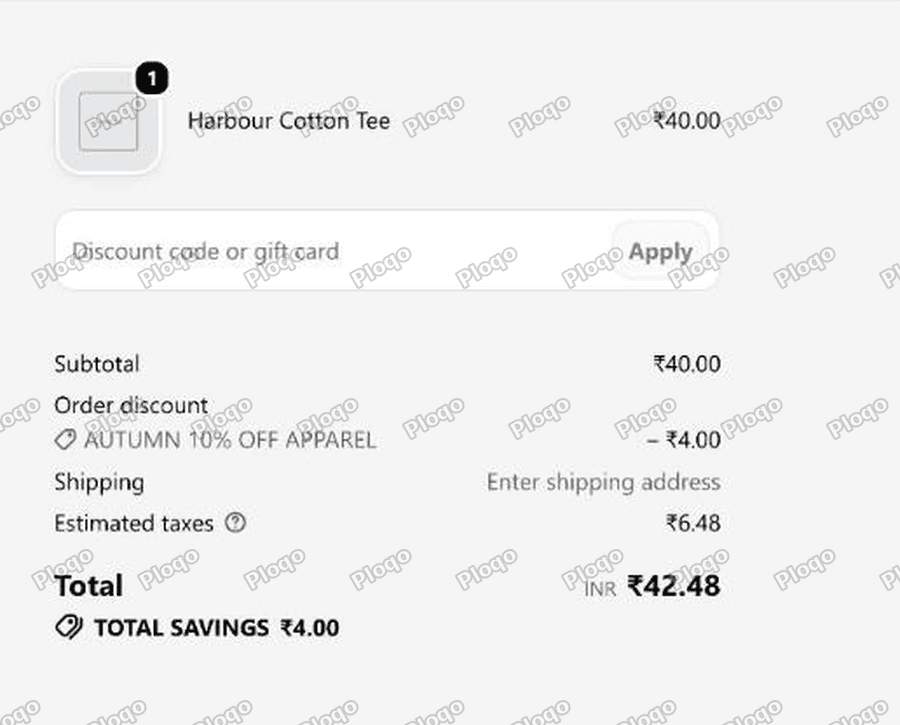 Shopify checkout showing an automatic 10 percent discount taking 4 off a 40 cotton tee, with total savings of 4
Then I applied a $5 code called SAVE5.
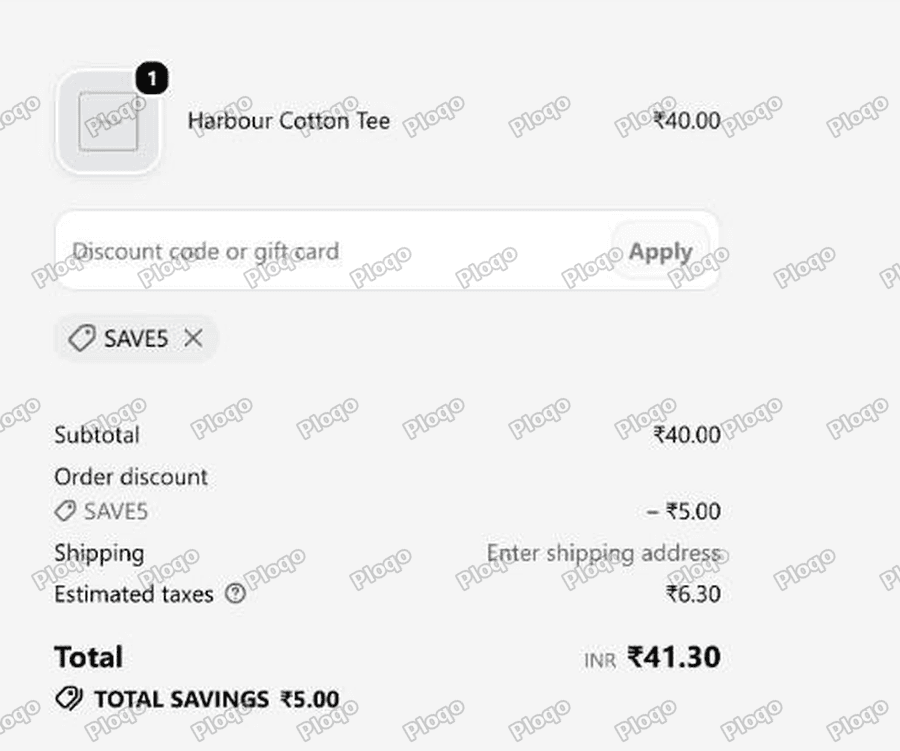 The same checkout after applying the SAVE5 code, showing only the 5 off and no sign of the automatic discount
The automatic discount is not reduced, it is removed, and total savings dropped from a possible $9 to $5. Shopify shows no warning at either step, so the shopper believes they got the better deal and you believe both promotions are running.
Why it happens
Shopify sorts every discount into one of three classes:
- Product discount - takes money off specific items
- Order discount - takes money off the whole order
- Shipping discount - takes money off delivery
By default, a discount refuses to run alongside any other discount. It does not matter whether one is automatic and one is a code. It does not matter that they are different classes. The default answer is no.
When two discounts both want to apply and neither allows the other, Shopify picks one and drops the other. That is the whole mechanism.
The setting that changes this is called Combinations, and it sits on the discount itself.
Where the Combinations setting is
Open Discounts, click a discount, and scroll down. You will find a small card called Combinations with a sentence in it.
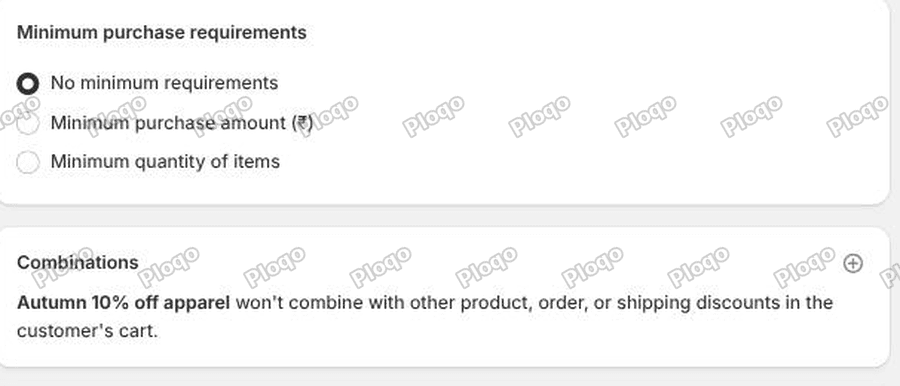 The Combinations card on a Shopify discount, reading that the discount will not combine with other product, order or shipping discounts
The sentence reads: "Autumn 10% off apparel won't combine with other product, order, or shipping discounts in the customer's cart."
That is the default state on every discount you create. The card looks like a status message, so it is easy to read it and move on. It is not a status message. It is a control.
There is a small plus icon in the top right corner of that card. Click it.
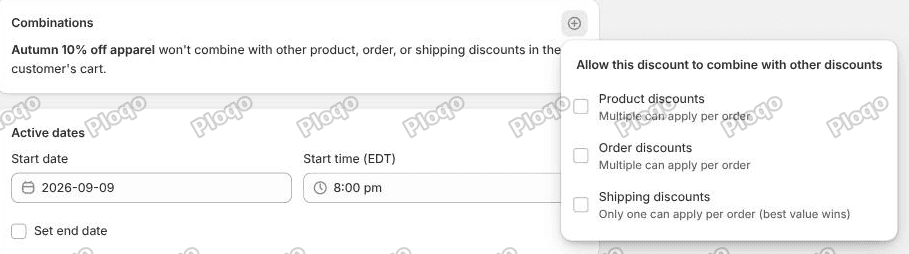 The Combinations popover open, showing checkboxes for Product discounts, Order discounts and Shipping discounts
Three checkboxes, headed "Allow this discount to combine with other discounts":
- Product discounts - Multiple can apply per order
- Order discounts - Multiple can apply per order
- Shipping discounts - Only one can apply per order (best value wins)
Read the small print under each one. Product and order discounts can pile up, except that two product discounts on the same item need Shopify Plus (on other plans a product gets one product discount, and the best value wins). Shipping is different: only one shipping discount ever applies, and the customer gets the best one.
Where the fix usually stalls
Here is where most people stop, and why the fix still does not work for them.
My automatic discount is a product discount. My code SAVE5 is an order discount. So I ticked Order discounts on the automatic discount, saved it, and went back to checkout.
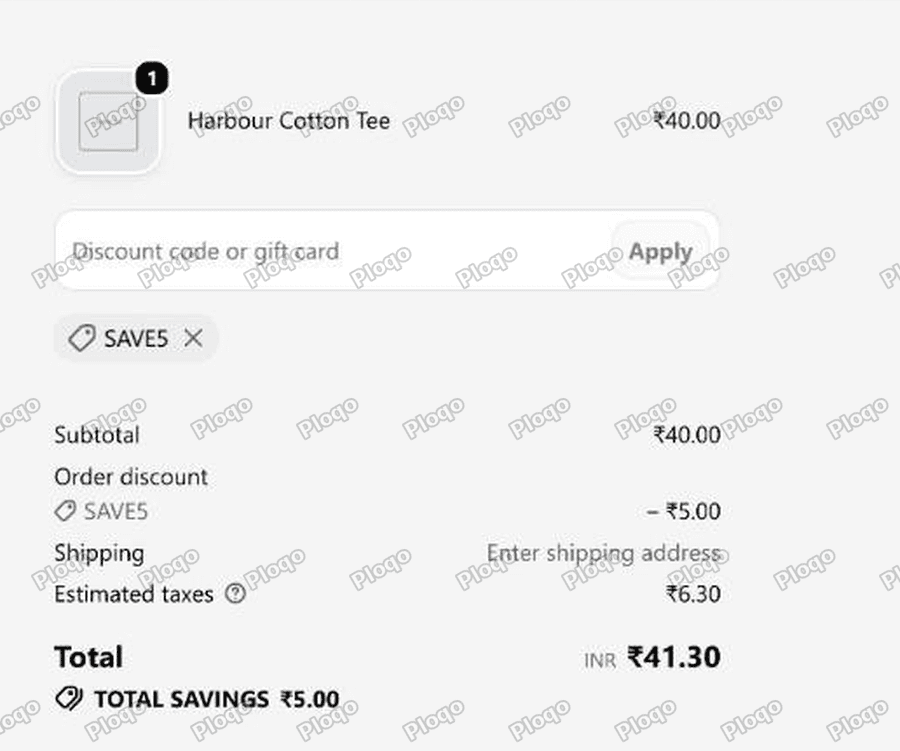 Checkout with the code applied, still showing only the 5 off and no automatic discount
Nothing changed. Still $5 off. Still no automatic discount.
Both discounts have to allow each other. Permission is not one way. Ticking "Order discounts" on the product discount says I am willing to run beside an order discount. It does not give the order discount permission to run beside a product discount.
You can see this in the admin. After ticking one side, the Combinations card shows the class you allowed with a small count badge next to it. Mine read 0. That number is how many discounts on the other side are set to combine back. Zero means the pairing is still broken.
So I opened SAVE5 as well, ticked Product discounts there, and saved. The count badge went from 0 to 2.
What it looks like when it works
Same cart, same code, both sides ticked.
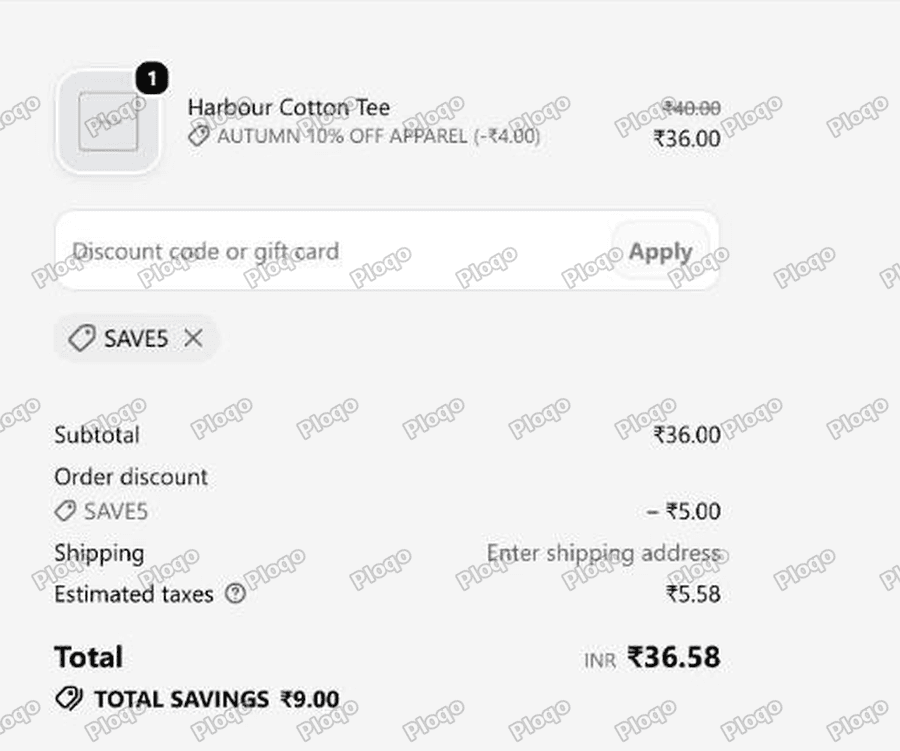 Checkout showing the tee reduced from 40 to 36 by the automatic discount and a further 5 off by SAVE5, with total savings of 9
Now the line item reads $40.00 struck through, "AUTUMN 10% OFF APPAREL (-$4.00)", and $36.00. Below it, the order discount takes another $5.00 off. Total savings: $9.00.
Subtotal went $40 to $36 to $31 before tax. Both discounts ran. That is the fix.
To recap the two edits:
- On the product discount, tick Order discounts.
- On the order discount, tick Product discounts.
Save both.
When the code is worth less, checkout refuses it
The $5 code above was worth more than the $4 automatic discount, so it replaced it. A code worth less behaves differently: in my test it was refused.
For this one I used a Leather Wallet at $45.00, on sale from $60.00. An automatic product discount, "Wallet 20% off", brings it to $36.00. Then I entered EXTRA10, an order discount for 10% off.
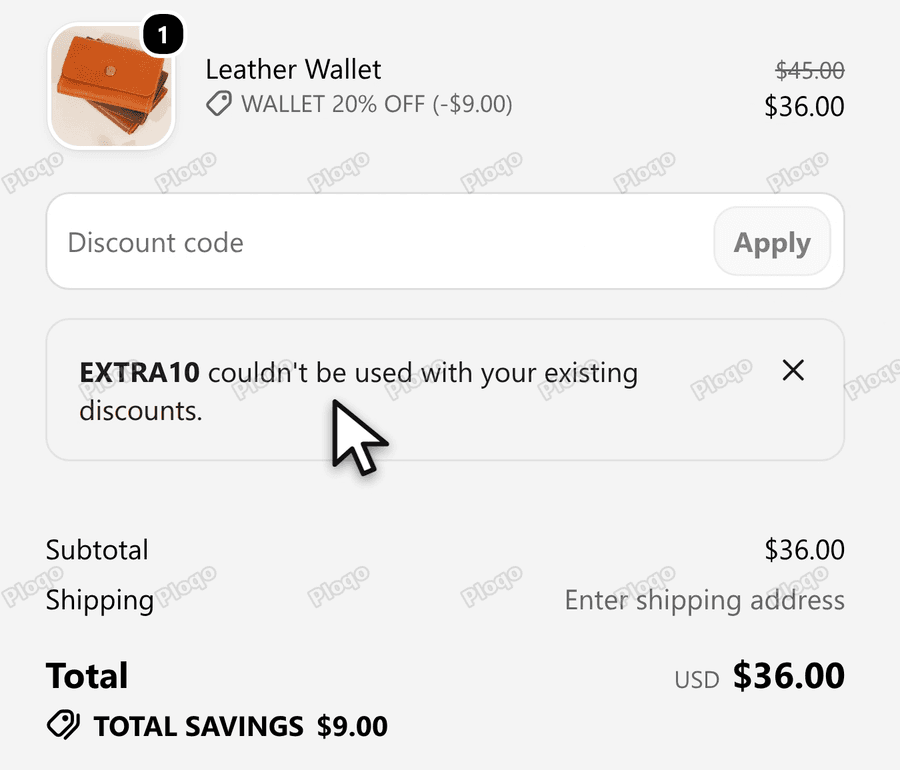 Checkout with the Leather Wallet at 36 after Wallet 20 percent off, and the message that EXTRA10 couldn't be used with your existing discounts
"EXTRA10 couldn't be used with your existing discounts."
With neither discount ticked I got that message. With only one side ticked, on either side, I got the same text. It does not say which discount is missing the tick, so open both and tick the other one's type on each.
Then I entered EXTRA10 again.
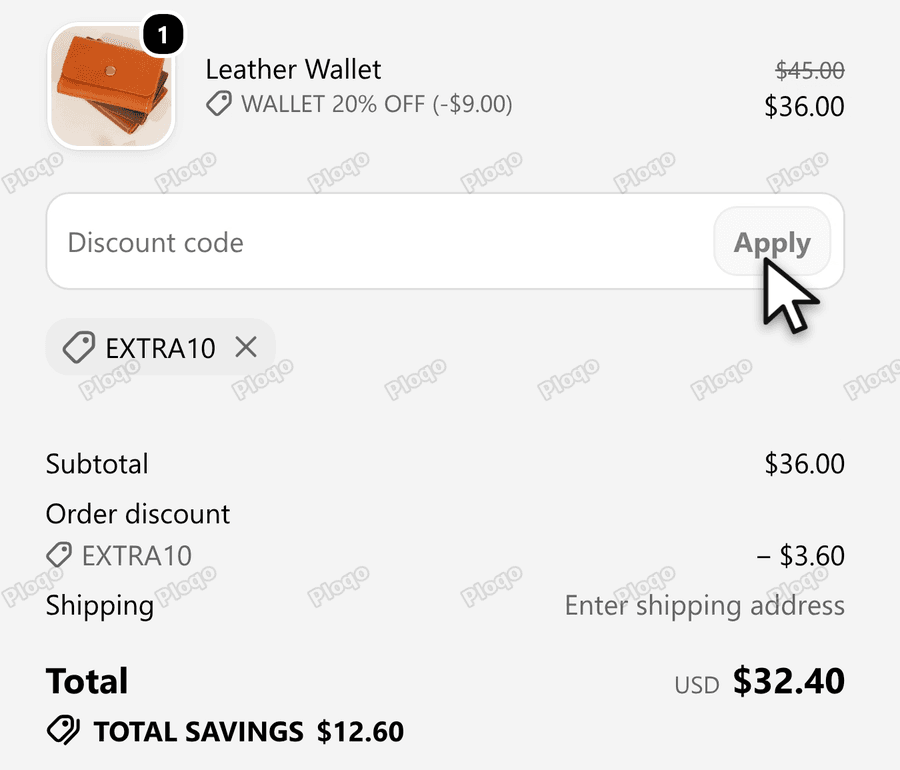 Checkout with EXTRA10 applied: subtotal 36, order discount EXTRA10 minus 3.60, total 32.40, total savings 12.60
Now the Subtotal is $36.00, the Order discount EXTRA10 is - $3.60, and the Total is $32.40, with total savings of $12.60. The product discount comes off first and the order discount comes off the subtotal that is left, so the 10% is taken from $36.00, not from $45.00.
Why is my discount code not working?
This is the same problem wearing a different hat, and it has a visible symptom you can look for.
When a shopper already has a discount applied and tries to add a second one that is not allowed to combine, Shopify does show a message. It looks like this:
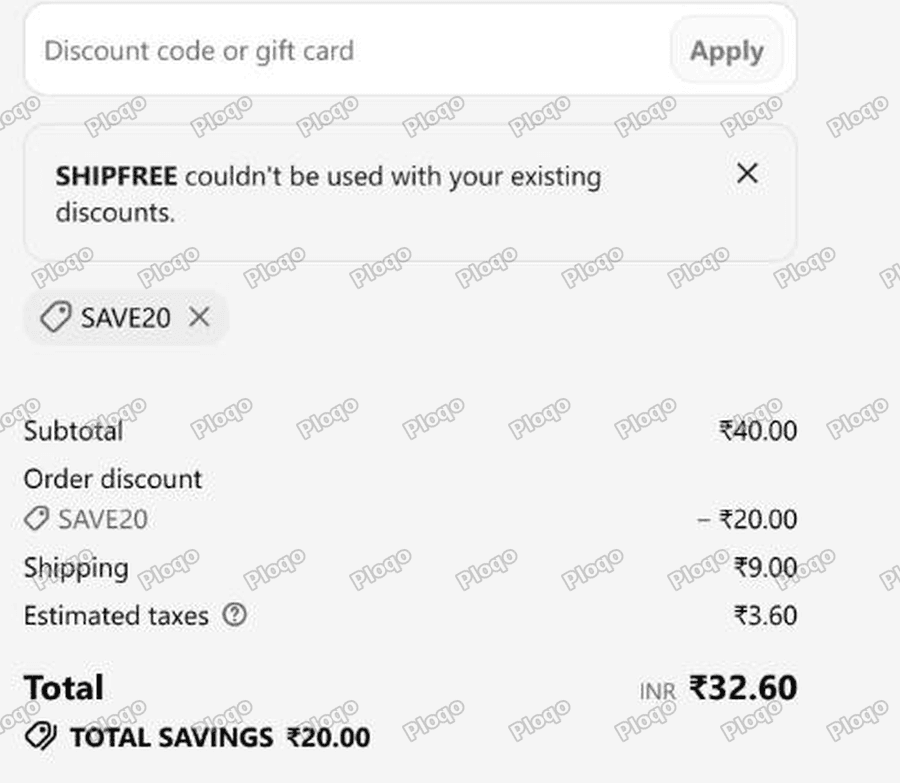 Checkout showing the message that SHIPFREE could not be used with your existing discounts
"SHIPFREE couldn't be used with your existing discounts."
I got that by applying a free shipping code while a $20 order code was already on the cart. The free shipping code was set to combine with everything. The order code was set to combine with nothing. One closed door is enough.
So if a customer tells you a code "does not work", check this before you check anything else:
- Is another discount already on that cart? An automatic discount counts.
- Does each discount tick the other one's class?
That message shows when the shopper adds a second code, and, as the section above shows, when a code worth less than the automatic discount is refused. When a code worth more meets an automatic discount that does not allow it, there is no message at all. The automatic one just disappears, which is exactly the case in the first two screenshots on this page.
Can two discount codes stack on Shopify?
Yes, when both allow each other. Shopify's help page puts the limit at 5 product or order codes and 1 shipping code on the same order.
The help page lists six combinations:
- Order discount + free shipping discount
- Product discount + free shipping discount
- Product discount + product discount, on separate items
- Product discount + order discount
- Order discount + order discount
- Product discount + product discount on the same item, on Shopify Plus only
The two that involve an order discount and a second product or order discount need a store with no customizations in Shopify's older checkout template file, and they do not work with the Licensify app.
When two percentage order discounts both apply, each is worked out on the same subtotal. The help page's example is 10% and 20% on $100, which comes to $70.
If you want a "10% off plus $5 off plus free delivery" promotion, build it as three discounts in three different classes and tick every relevant box on all three. If you have not made the codes yet, start with how to create a discount code in Shopify.
The class change when you pick "All products"
This one cost me a few minutes and it is worth knowing.
I first built the automatic discount as "10% off, applies to all products". Shopify classified it as an order discount, not a product discount. The admin labelled it "Amount off order".
Then SAVE5, also an order discount, could never stack with it.
The rule: a percentage or amount off that targets all products becomes an order discount. Point the same discount at specific products or specific collections and it becomes a product discount.
If two of your discounts refuse to combine and you cannot see why, open both and read the Type line in the right hand sidebar. If they both say product discount and they hit the same item, that is your answer: below Shopify Plus, ticking more boxes will not help, so re-target one of them to make it an order discount.
Do automatic discounts and codes combine?
They follow exactly the same rules. Automatic versus code makes no difference to combining. Only the class matters, and only the Combinations settings decide.
That surprises people because automatic discounts feel like a background setting rather than a discount. They are not. An automatic discount competes with a code the same way two codes compete.
One practical consequence: if you run a permanent automatic discount and then launch a campaign code, you have to go back and edit the automatic discount too. It will not pick up the new code on its own.
How to check what is set, without opening every discount
Each discount page has a Details list in the right hand sidebar. The last-but-one line tells you the combination state in plain words:
- "Can't combine with other discounts" - nothing is ticked
- "Combines with product discounts" - product is ticked
- and so on for order and shipping
That line is faster to scan than opening the Combinations card, and it updates the moment you save. When I ticked Product discounts on SAVE5, the sidebar flipped from "Can't combine with other discounts" to "Combines with product discounts".
Discount combinations and free shipping
Shipping is the one class with a hard limit. The checkbox itself says it: only one shipping discount can apply per order, and the best value wins.
So you cannot stack a "free shipping" code on top of a "$5 off shipping" code. Shopify picks whichever is worth more to the customer and ignores the other.
You can, however, run a shipping discount alongside a product discount and an order discount at the same time, which is what most stores actually want.
On the checkout I filmed for the video, a FREESHIP code was accepted before I had entered an address. It showed as a tag under the code box, and the shipping amount only appeared once the address was in.
There is a second, sneakier interaction between discounts and free shipping that has nothing to do with Combinations: if your free shipping comes from a shipping rate with a minimum order amount, a discount can drag the subtotal under that minimum and take the free shipping away. That one is covered in how to offer free shipping on Shopify.
What to check if it still is not stacking
Work through these in order. In my testing, the first two account for almost everything.
-
Both sides ticked? Open both discounts, not just the one you think is failing.
The Discounts list has a Combinations column, so you can see at a glance which ones are set to stack:
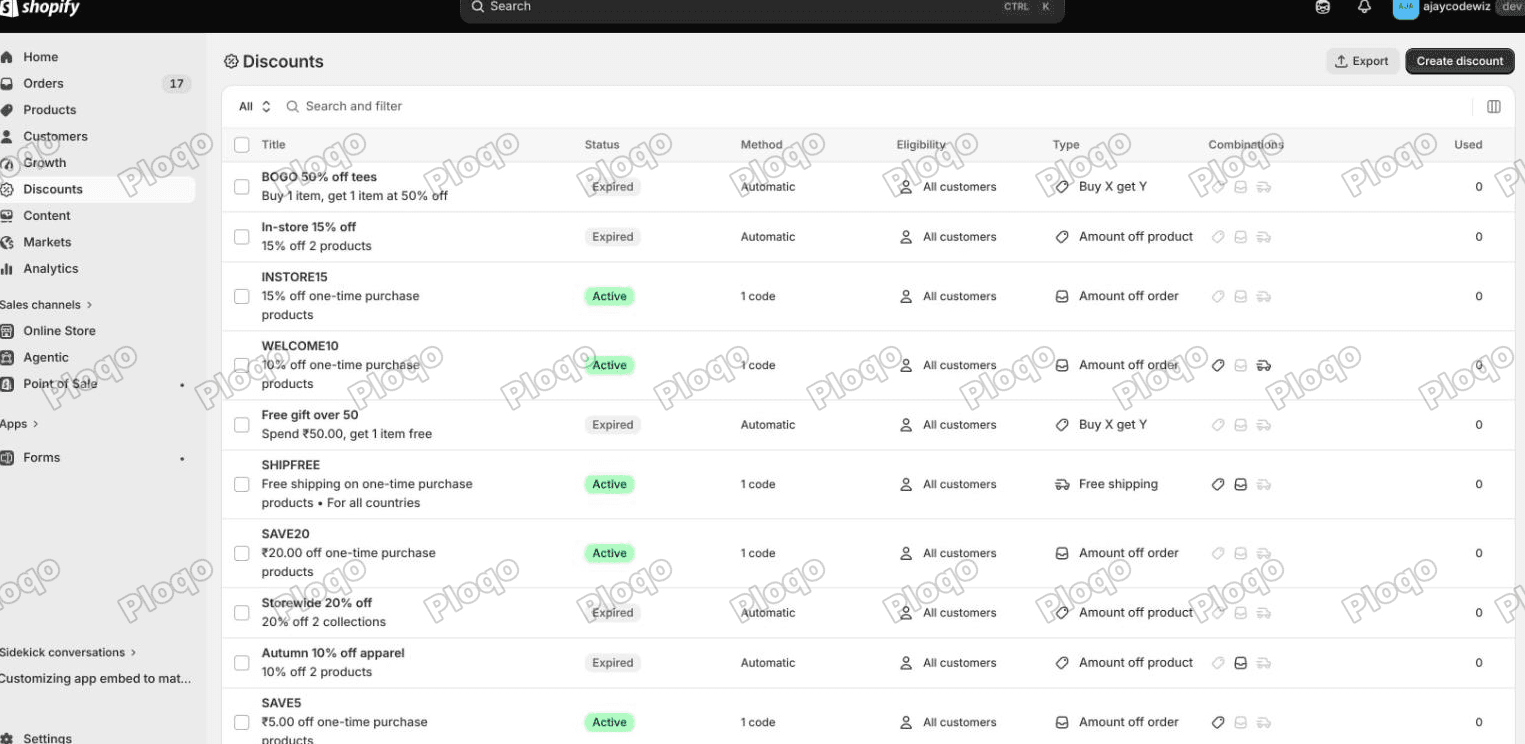 The Shopify Discounts list with a Combinations column, showing which discounts are set to combine with product, order and shipping discounts
2. Same class? Check the Type line. Two order discounts can both apply when each one allows order discounts. Only one shipping discount ever applies. Two product discounts on the same item need Shopify Plus: on other plans a product gets one product discount, and the best value wins.
3. Did you save? The Combinations popover stays open while you tick. The change is not live until you press Save in the top bar.
4. Are both discounts active? An expired or deactivated discount fails with no error, exactly like a blocked one.
5. Do the conditions overlap? A product discount limited to one collection and an order discount with a minimum spend can both be set to combine and still not both apply, simply because the cart does not satisfy both.
6. Is one of them from an app? App discounts follow the same Combinations settings, but the app has to have been built to expose them. If the Combinations card is missing on an app discount, that app does not support stacking.
The Shopify Discounts list with a Combinations column, showing which discounts are set to combine with product, order and shipping discounts
2. Same class? Check the Type line. Two order discounts can both apply when each one allows order discounts. Only one shipping discount ever applies. Two product discounts on the same item need Shopify Plus: on other plans a product gets one product discount, and the best value wins.
3. Did you save? The Combinations popover stays open while you tick. The change is not live until you press Save in the top bar.
4. Are both discounts active? An expired or deactivated discount fails with no error, exactly like a blocked one.
5. Do the conditions overlap? A product discount limited to one collection and an order discount with a minimum spend can both be set to combine and still not both apply, simply because the cart does not satisfy both.
6. Is one of them from an app? App discounts follow the same Combinations settings, but the app has to have been built to expose them. If the Combinations card is missing on an app discount, that app does not support stacking.
Product, order and shipping: which is which
Worth pinning down, because the whole system turns on it.
Product discount. Takes money off named items. In the admin it is created as "Amount off products". It shows on the line item at checkout, struck through, like "$40.00 → $36.00". Use it for "20% off jackets".
Order discount. Takes money off the cart total. Created as "Amount off order". It shows as its own row under the subtotal. Use it for "$10 off orders over $75".
Shipping discount. Created as "Free shipping". It strikes through the delivery charge. Use it for "free delivery this weekend".
Two of these are decided for you by what you target rather than by which menu item you picked, which is the behaviour described earlier. Target specific products or collections to get a product discount. Target everything to get an order discount.
The main points
- By default a code does not stack on an automatic discount. A code worth more replaces it with no warning, and a code worth less is refused with "couldn't be used with your existing discounts".
- The control is Combinations, on the discount page, behind a small plus icon.
- Both discounts must tick each other's class. One side is not enough, and the count badge next to the class shows you when the other side is missing.
- Only one shipping discount ever applies. Product and order discounts can stack, but two product discounts on the same item need Shopify Plus.
- A percentage off "all products" is an order discount. Point it at specific products or collections to make it a product discount.
- When a shopper reports a code "not working", check for another discount already on the cart before anything else.
Tested end to end on a store running Shopify's current admin, with the numbers above taken straight off the checkout.
Spending too long on manual Shopify busywork?
PinFlow turns your Shopify catalog into Pinterest pins and posts them on a schedule, automatically. Same idea as the setting above, let the system handle the repetitive part.
Get PinFlow on the Shopify App StoreMore Shopify fixes
More community-sourced Shopify guides, tested on a live store.
Shopify Admin
Schedule a Black Friday Sale in Shopify (Auto Start and End)
Give the discount its own start and end date and put the sale banner in an Event rollout with the same dates. Both start at midnight and end after Cyber Monday.
Shopify Admin
Shopify Discount Limit: One Code for More Than 100 Products
Shopify stops you at 100 items when a discount applies to specific products. There is no setting to raise it, but you do not need one. Point the discount at a collection and one code covers thousands of products. Tested on a store, with the B2B route too.
Shopify Admin
Shopify Discount Types: Amount Off Products vs Order
Shopify has four discount types, and two of them work out a percentage in different ways. One rounds every single unit, the other rounds the order once. On low unit prices that difference is real money. Tested on a live store.