
Shopify Mix and Match Bundle: Required and Optional Items
Build a mix and match bundle in Shopify where some items are required and some are optional. What the free Shopify Bundles app does, the two walls it hits, and the free discount ladder. Tested, with screenshots.
By AjayCodeWiz · September 6, 2026 · 10 min read
The problem
A merchant asked this on the Shopify Community, and the way they described it is the clearest version of the question I have seen.
They wanted a bundle made of:
- 2 products the customer must take, one of which has a colour choice like red, blue or green
- 5 more products the customer can add if they want to
- a discount that gets bigger the more items they add
Then they gave the example that makes it obvious. Building a sandwich. You have to pick a cheese and you have to pick a meat. After that, the condiments are up to you. Add none, add all five.
That shape has a name. It is a mix and match bundle, sometimes called a build a box or a build your own bundle. It is not the same thing as a normal Shopify bundle, and knowing the difference saves you a lot of wasted setup.
I reproduced the whole thing on a test store to find out exactly where Shopify stops and where you have to reach for an app.
What makes a mix and match bundle different
A normal bundle is a fixed set. Three products, always the same three, sold together at one price.
A mix and match bundle is built out of steps, and each step has a rule about how many items the customer picks:
- Required step: pick exactly 1. The cheese. The meat.
- Optional step: pick anywhere from 0 to 5. The condiments.
That "pick 0 to 5" rule is the entire difficulty. Everything else about the merchant's request is easy, and two thirds of it is free. The optional step is the part that Shopify has no setting for.
Start with the free Shopify Bundles app
Before paying for anything, install Shopify's own free Shopify Bundles app. It is made by Shopify, it costs nothing, and it handles more of this than most people expect.
Go to the Shopify App Store, install Shopify Bundles, then open it and choose Create bundle. Give the bundle a title, then add your products.
Here is what my sandwich looked like after adding all seven products.
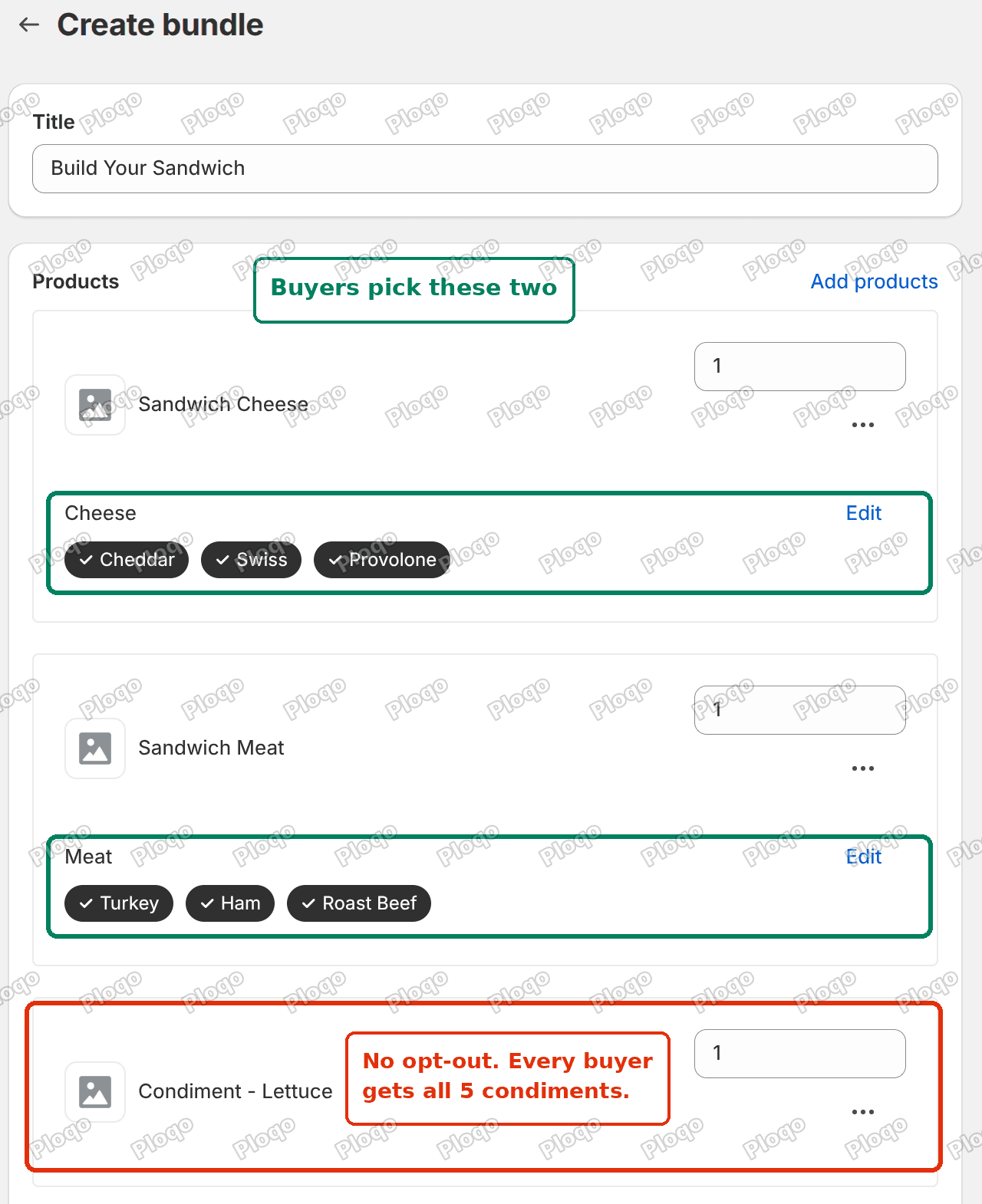 The Shopify Bundles create screen, showing the cheese and meat products with buyer-facing option chips and a condiment added as a fixed component
Look at the two green boxes. My Sandwich Cheese product has three variants, Cheddar, Swiss and Provolone, and Shopify Bundles turned that straight into a picker the customer uses. Same for Sandwich Meat with Turkey, Ham and Roast Beef.
So the merchant's first requirement is done, for free. A bundle component with variants becomes a choice the buyer makes. No app fee, no code.
Now look at the red box. That is Condiment - Lettuce, and it looks nothing like the other two.
Wall one: there is no such thing as an optional component
The condiment went in as a plain component with the quantity locked at 1. There is no checkbox next to it. There is no "optional" toggle anywhere on the screen. There is no minimum or maximum.
That means every single person who buys this bundle gets lettuce, tomato, pickles, mayo and mustard, whether they wanted them or not.
This is not a setting I failed to find. Shopify Bundles builds a fixed bundle, and a fixed bundle is fixed by definition. Every component is in every sale.
Here is what the customer sees on the storefront.
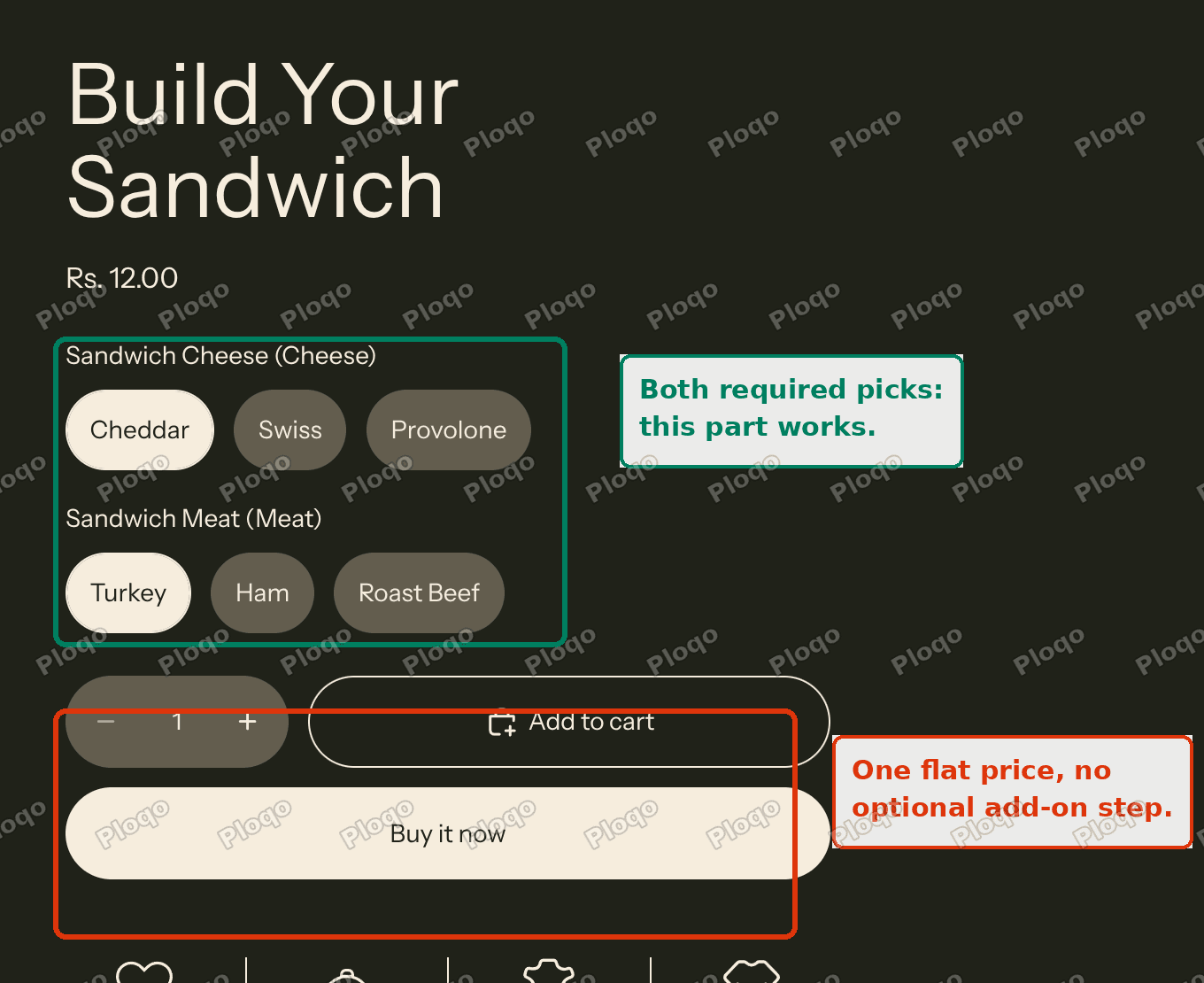 The bundle product page showing two variant pickers, a single price and an add to cart button, with no optional add-on section
Two pickers, one price, add to cart. That is the whole page. There is no add-on section, because there is nothing in Shopify that would generate one.
Wall two: a bundle stops at three pickers
The second limit is less obvious and it catches people later, once their bundle has grown.
A Shopify bundle is still a single Shopify product underneath. Products are capped at 3 options, and a bundle inherits that cap. The Bundles app even counts it for you in the sidebar.
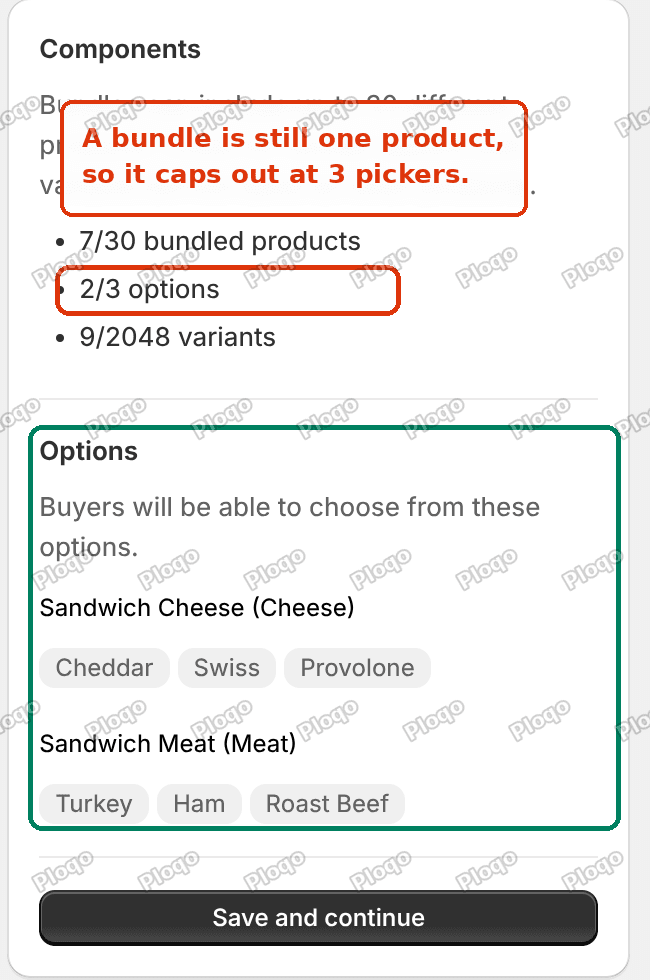 The Components panel in Shopify Bundles showing 7 of 30 bundled products but only 2 of 3 option slots used
Mine reads 2/3 options. I have used two of my three picker slots on cheese and meat. I have one left.
Now count what a real sandwich shop needs. Bread, meat, cheese, sauce. That is four choices and you are already over the limit before you get anywhere near the interesting toppings.
Note the other numbers on that panel too. You get up to 30 bundled products and 2048 variants, which sound generous, but the 3 that matters is the small one. Options are the bottleneck, not products.
The discount ladder is free, and this surprised me
The merchant's third requirement was a discount that grows as you add more items. I expected this to need an app. It does not.
Go to Discounts, create a discount, and choose Amount off products. Set it to Automatic rather than a discount code. Then set a minimum quantity of items and pick the products or the collection it applies to.
Make one discount per tier. I made two:
- Bundle tier 3+, 10% off, minimum 3 items
- Bundle tier 5+, 20% off, minimum 5 items
Then I added items to the cart one at a time and watched what happened.
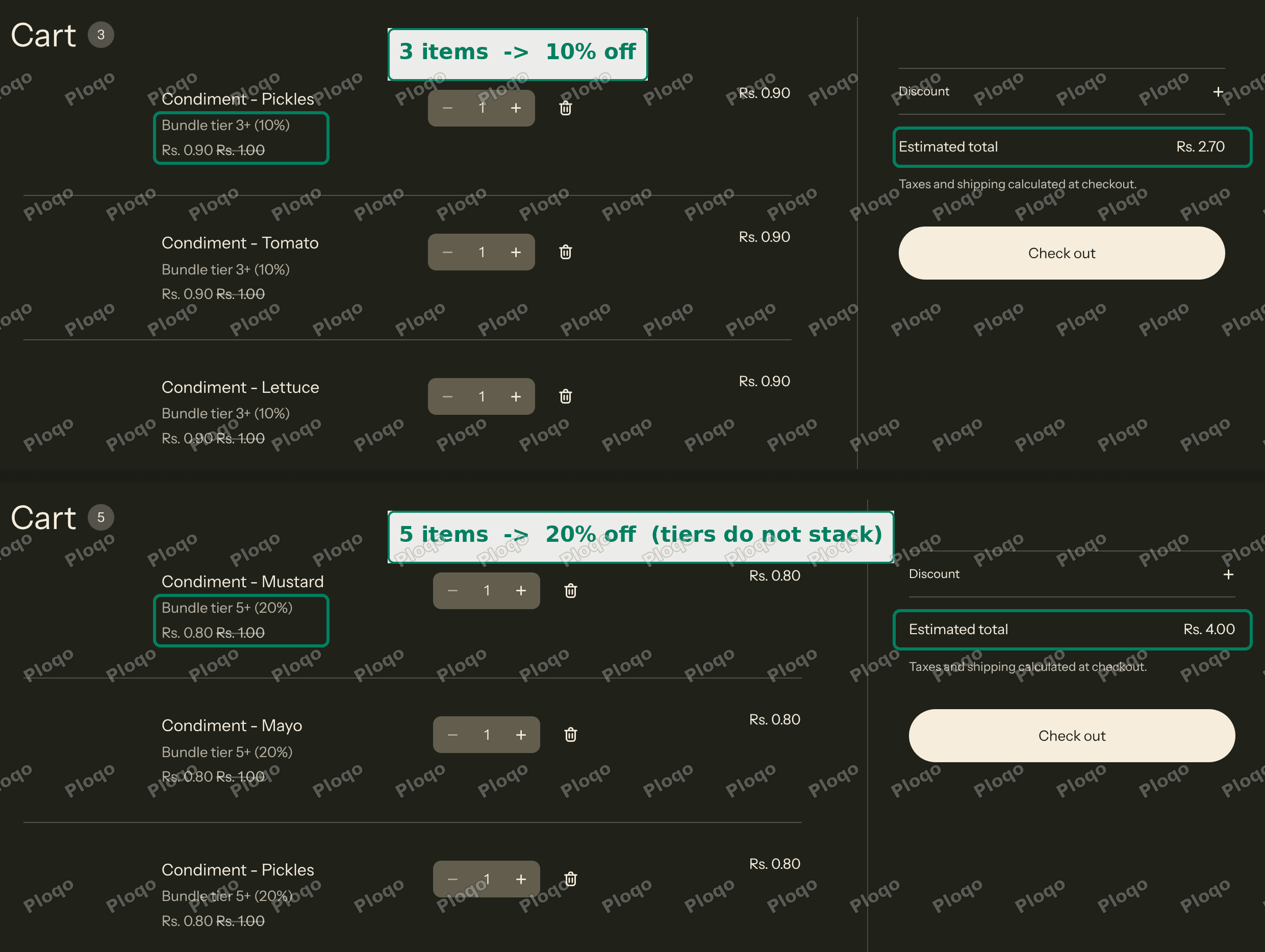 Two carts side by side, one with 3 items getting 10 percent off and one with 5 items getting 20 percent off
With 3 items the cart went from Rs. 3.00 to Rs. 2.70. Every line showed "Bundle tier 3+ (10%)".
With 5 items the cart went from Rs. 5.00 to Rs. 4.00, and every line switched to "Bundle tier 5+ (20%)".
The important detail is what did not happen. At 5 items both discounts technically qualified, but they did not stack into 30%. Shopify applied the better single tier and left it there. That is exactly the behaviour you want from a ladder, and you get it for free.
There is one catch worth knowing before you build on this. The discount counts cart quantity, not "items chosen in a builder". So it fires on any cart that reaches the threshold, even if the customer added those products one by one from your normal collection pages. If that is a problem, scope the discount to a collection that only contains the bundle parts.
If you want the full version of this, including a price table on the product page, I wrote that up separately in Shopify tiered pricing and quantity breaks.
So what actually needs an app
Two of the merchant's three requirements are free. The variant picks work in Shopify Bundles. The growing discount works with automatic discounts.
The optional step is the one thing with no native equivalent. Nothing in Shopify lets you say "pick 0 to 5 of these", and no combination of settings fakes it.
For that you want a bundle builder app. These build a multi-step page where each step has its own selection rule and its own discount. Step 1 is required and takes exactly one. Step 3 is optional and takes up to five. That maps directly onto the sandwich.
When you shop for one, the features to check are:
- Per-step minimum and maximum, which is what makes a step optional instead of required
- Tiered discounts based on how many items were picked, so the ladder lives inside the builder instead of the whole cart
- Whether it gets past the 3 option cap, since that is the wall a fixed bundle hits
- What lands in the order, one bundle line or the real products as separate lines
That last one matters more than people expect, and I covered why in how to pick a Shopify bundle app. It decides whether your stock stays accurate and whether you can edit the order later.
Is there a Shopify build a box app?
Build a box is the same pattern under a different name, and it is what most of these apps call themselves. A gift box, a snack box, a six pack of your choice.
The mechanics are identical to the sandwich. One or more required steps, one or more optional steps, a discount that scales with the count. If an app advertises build a box, mix and match, or BYOB, it is describing the same feature set.
The naming is worth knowing because it changes what you find. Searching for "Shopify bundle" mostly returns fixed bundle apps. Searching for "build a box" or "bundle builder" returns the multi-step kind, which is the kind that does optional items.
Can you make one product optional in a Shopify bundle?
Not in a fixed bundle, no. Not with the free Bundles app and not with any fixed-bundle app, because the component list is the definition of the product.
There are two workarounds that get close without a builder app, and both have real downsides.
Make separate bundle variants. Build the bundle with an extra option called something like "Add condiments" with values Yes and No. This works, but each combination multiplies your variants, and you only have one option slot left after the cheese and the meat. It gives you one yes or no question, not five independent choices.
Sell the add-ons as normal upsells. Keep the bundle to the required items only, then use a cart or product page upsell to offer the condiments as ordinary products. The customer picks them freely and the automatic discount ladder still counts them. The downside is that it does not feel like one builder, and the add-ons arrive as separate order lines.
Neither is as clean as a real optional step. They are worth knowing if you want to launch this week without adding an app.
Fixed bundle, discount bundle, bundle builder
Three different things, and mixing up the names is the main reason people buy the wrong app.
Fixed bundle. A new product made of other products. One price, one line in the order, one stock number calculated from the parts. Shopify Bundles is this. Good for a boxed set. Cannot do optional items.
Discount bundle. The real products stay in the cart as normal lines and a discount applies when the right combination is there. Shopify's automatic discounts and Buy X get Y do this for free. Good for stock accuracy and editable orders. It does not give the customer a guided picking experience. I went through the native version in creating an automatic bundle discount.
Bundle builder. A guided multi-step page where the customer assembles the bundle. This is the only one of the three that does required and optional steps. It always needs an app.
The merchant's sandwich is a bundle builder. Once you know that, the shopping list gets short.
What to check if it is not working
A few things that trip people up on this setup.
The bundle shows as out of stock. Bundle inventory is calculated from the components, so if any component has no stock the whole bundle is unavailable. Check every part, not just the bundle.
The discount does not apply. Automatic discounts need a start date that has already passed, and they only count products inside the collection or product list you selected. If you added new bundle parts later, add them to that collection too.
You cannot add a third picker. You have hit the 3 option cap. Check the Components panel in the Bundles app, it tells you your current count. The only real fix is a builder app that works around the limit.
The bundle does not appear on your storefront. New bundle products are created as drafts. Set the status to Active and confirm the Online Store sales channel is selected under Publishing.
The short version
If you want a mix and match bundle in Shopify:
- The required picks with variants are free. Use the Shopify Bundles app.
- The discount that grows with item count is free. Use automatic discounts with minimum quantities, one per tier. They do not stack, Shopify takes the better tier.
- The optional "pick 0 to 5" step is the only part with no native option. That is what a bundle builder app is for.
Install the free app first and see how far it carries you. If the add-ons genuinely have to be optional, skip the experiment and go straight to a builder.
Spending too long on manual Shopify busywork?
PinFlow turns your Shopify catalog into Pinterest pins and posts them on a schedule, automatically. Same idea as the rule above, let the system handle the repetitive part.
Get PinFlow on the Shopify App StoreMore Shopify fixes
More community-sourced Shopify guides, tested on a live store.
Shopify Admin
Shopify New Admin (2026): Where Search, Sidekick and Settings Went
Shopify's new admin moved search, alerts, the store switcher and Settings into the black sidebar, and Sidekick to a bar at the bottom. Where each one is now.
Shopify Admin
How to Use the New Shopify Admin (2026): Every Main Screen
A tour of the new Shopify admin: the black sidebar, search and Ctrl K, Home, Orders, Products, Settings and Sidekick, with where to click on each screen.
Shopify Admin
Schedule a Black Friday Sale in Shopify (Auto Start and End)
Give the discount its own start and end date and put the sale banner in an Event rollout with the same dates. Both start at midnight and end after Cyber Monday.