
Shopify Shipping Rates Wrong for Multiple Items (Fixed)
A customer adds a second item and the shipping quote drops. Here is why Shopify stops using the package you assigned to a product, and the two settings that put the rate back where it belongs. Tested with live USPS rates.
By AjayCodeWiz · September 17, 2026 · 10 min read
The problem
A customer buys one heavy item and Shopify quotes a sensible shipping price. The same customer adds a small item to the cart and the quote goes down. Not up, down. You are now shipping more weight for less money, and the difference comes out of your margin.
I ran into this while answering a merchant on the Shopify Community. They sell around 6,000 products, from quarter ounce packets of herbs up to five pound crystal specimens. They had carefully set a package on every single product. Mixed orders were still being priced in a bubble mailer.
I reproduced it on a test store with USPS rates turned on, shipping from California to New York.
- One 5 lb specimen on its own, with a 12 x 10 x 8 inch box assigned to it: USPS Ground Advantage $16.85
- The same specimen plus one 0.25 oz packet of herbs: $9.54
Adding a second item made shipping $7.31 cheaper.
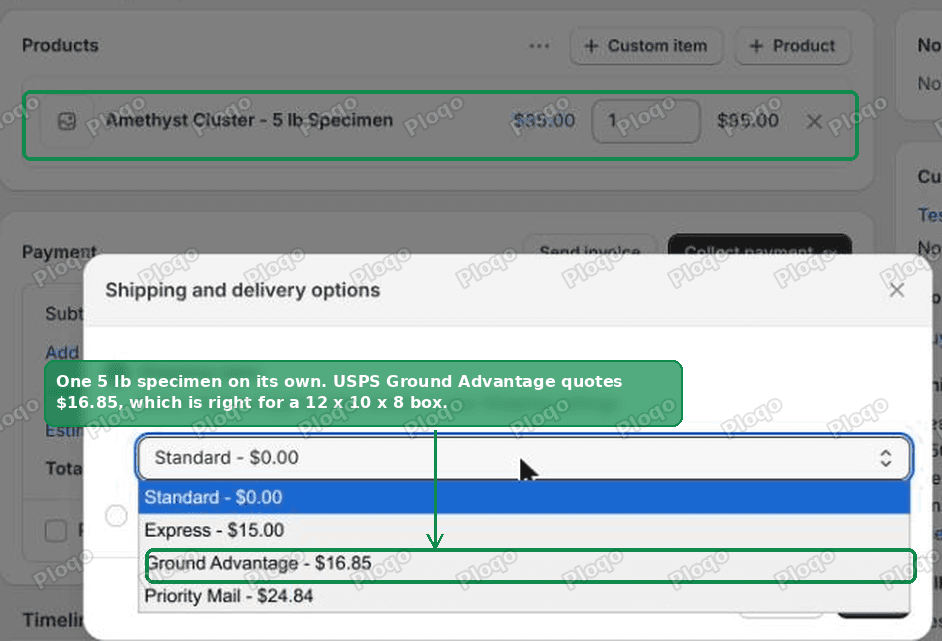 One heavy item on its own quotes $16.85 on USPS Ground Advantage
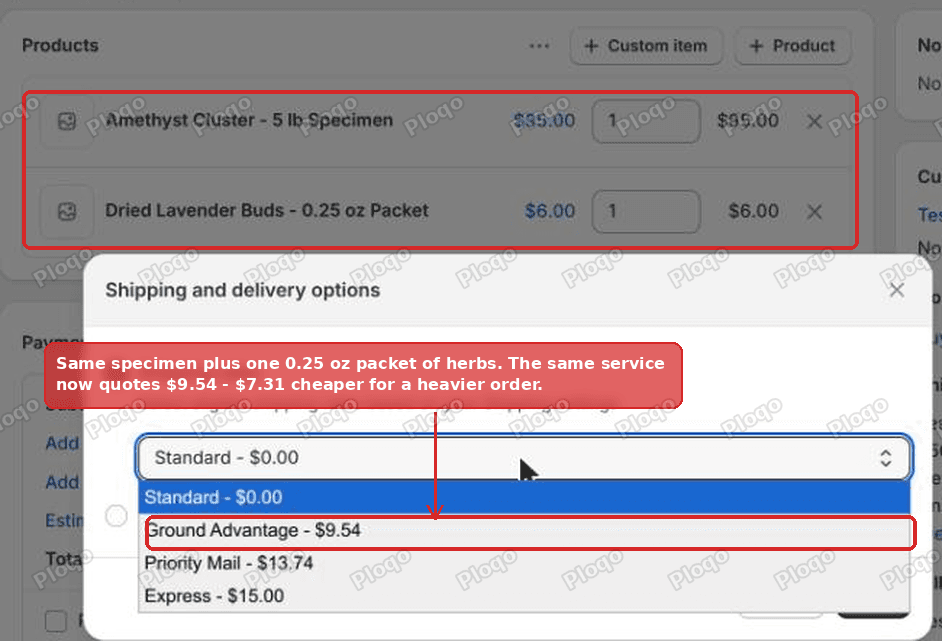 Adding one 0.25 oz packet drops the same service to $9.54
Why it happens
Shopify does have a Package field on each product. Open any product, scroll to the Shipping section, and it sits next to Product weight.
That field only applies when the order contains exactly one item.
Hover the small information icon beside it and Shopify says so in four words: Used for single-item orders containing this product.
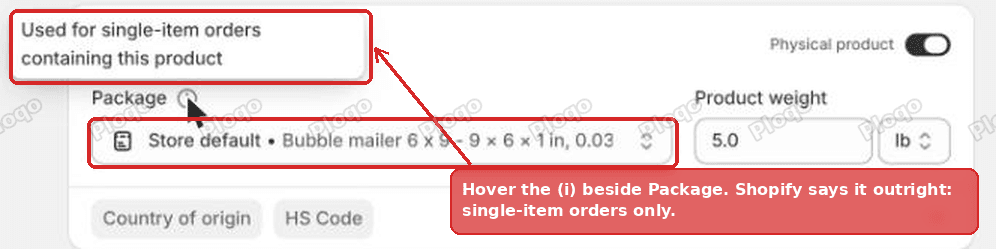 The Package field on a Shopify product, with the tooltip reading "Used for single-item orders containing this product"
The moment an order has more than one item, Shopify ignores every per-product package and prices the whole order in one box: your store default package. That is a single setting for the entire shop.
Two things follow from that, and they catch people out.
Quantity counts as multiple items. Two of the same 0.25 oz packet is a multi-item order. On my test store, one packet quoted 8.13, because the second one pushed the order out of its own mailer and into the store default box.
Setting a package on every product does nothing for mixed carts. If most of your orders contain more than one line, most of your rates never touch those settings. The merchant with 6,000 products had done a lot of work that only ever applies to single-item orders.
Before you change anything: which kind of rate are you on?
The fix only matters if Shopify is working out your shipping price from a box and a weight. Check Settings > Shipping and delivery > Shipping profiles, open your profile and look at the rates in your domestic zone.
- A rate showing a fixed price like $8.00 is a flat rate. You typed that number in and Shopify charges it regardless of what is in the cart. Packages have no effect on it.
- A rate marked Calculated is a live quote from USPS, UPS, FedEx or another carrier. Shopify sends them the order weight and the box dimensions, and they send back a price. This is the one the package feeds.
- A rate set by Package weight is priced from bands you define by weight. Packages affect these too, but only through the weight of the box itself, not its size.
If everything in your domestic zone is a flat rate, your rates are not wrong because of packages. Skip to the weight bands section further down, which is usually the better setup for a catalogue with a wide range of sizes.
The fix: point the store default at the box you actually use
One setting does most of the work.
1. Find your current default
Go to Settings > Shipping and delivery, then open the Packages section. Every saved package is listed, and exactly one carries a Store default badge.
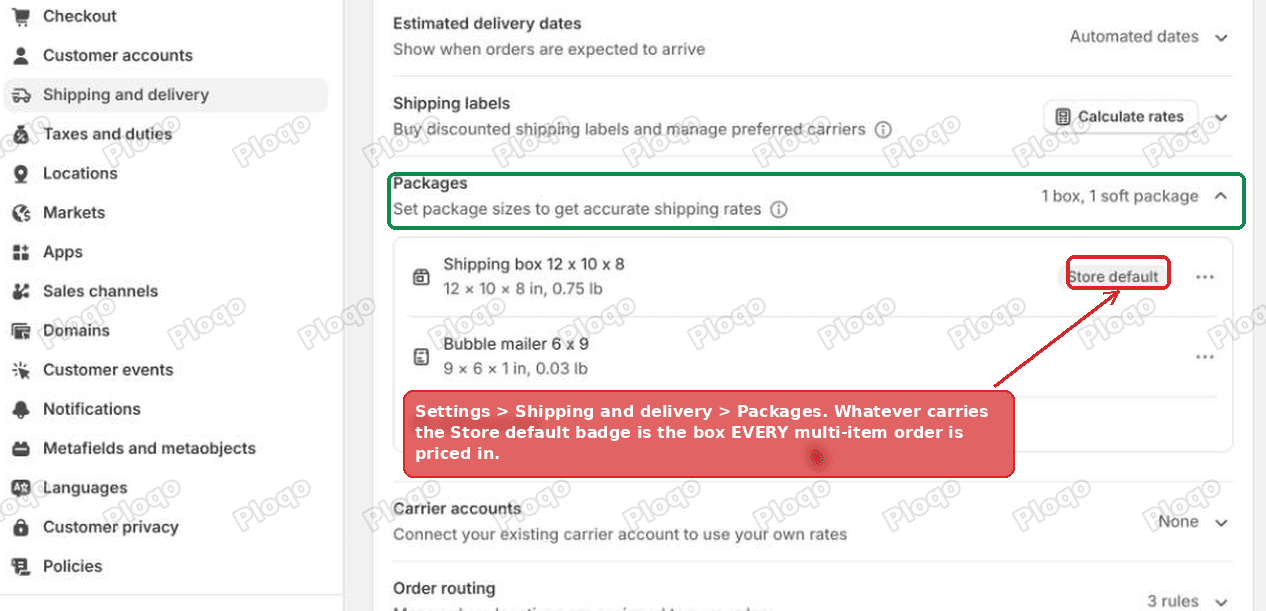 The Packages section of Shopify shipping settings, with the Store default badge on one package
That badge is the box every multi-item order in your shop is priced in. If it is sitting on your smallest mailer, every mixed order is being quoted as though it ships in a mailer.
2. Move the badge to a realistic box
Pick the box you reach for most often on a normal mixed order. Not the smallest mailer, not the largest carton you own. On the package you want, open the ... menu and choose Set as default.
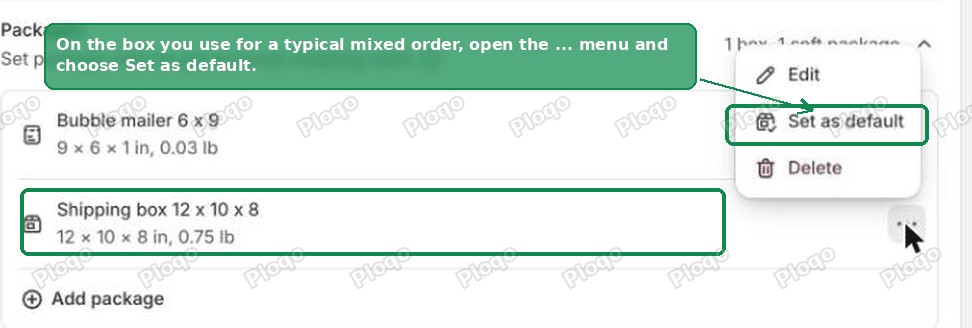 The Set as default option in the package menu in Shopify shipping settings
Saving takes effect immediately. There is nothing to publish.
3. Check that box's empty weight while you are there
Each package stores a Weight (empty) value. Shopify adds it to the order weight before asking the carrier for a price, so a heavy box raises every multi-item quote in the shop.
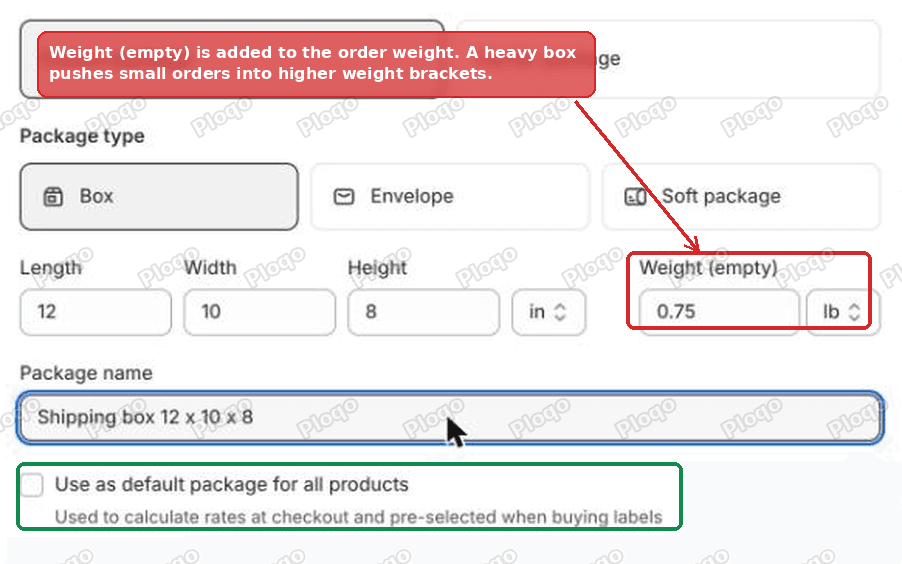 The Weight (empty) field in the Shopify add package dialog
It matters more than it looks. My test box weighed 0.75 lb empty. Two 0.25 oz packets of herbs weigh half an ounce between them, but with that box added the order was treated as weighing over three quarters of a pound. Weigh your box on a kitchen scale and put the real number in.
4. Leave your per-product packages alone
They are not wasted. Single-item orders still use them, and for most catalogues that is a large share of orders. A lone herb packet kept quoting $5.97 after I changed the default, because that order has one item and still uses its own mailer.
Here is the same two item cart after the default was moved to the 12 x 10 x 8 box.
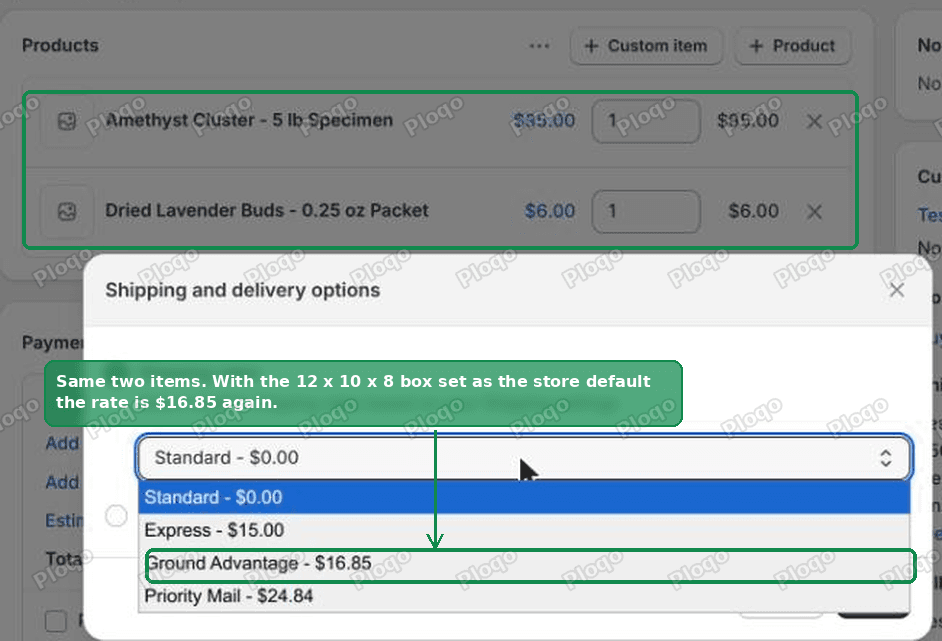 The same cart of two items now quoting $16.85 on Ground Advantage
$16.85 again, matching what the heavy item costs on its own.
The setup that scales: price by weight instead
Changing the default fixes the worst error. It does not fix the underlying problem, which is that one box has to represent every possible mixed order. If your products range from an envelope to a carton, no single box is right for all of them.
The way out is to stop letting the box decide. Price the order on its own weight.
In your domestic zone, choose Add shipping option, set Rate type to Package weight, then add one band per weight range. Each band has a minimum weight, a maximum weight and a price.
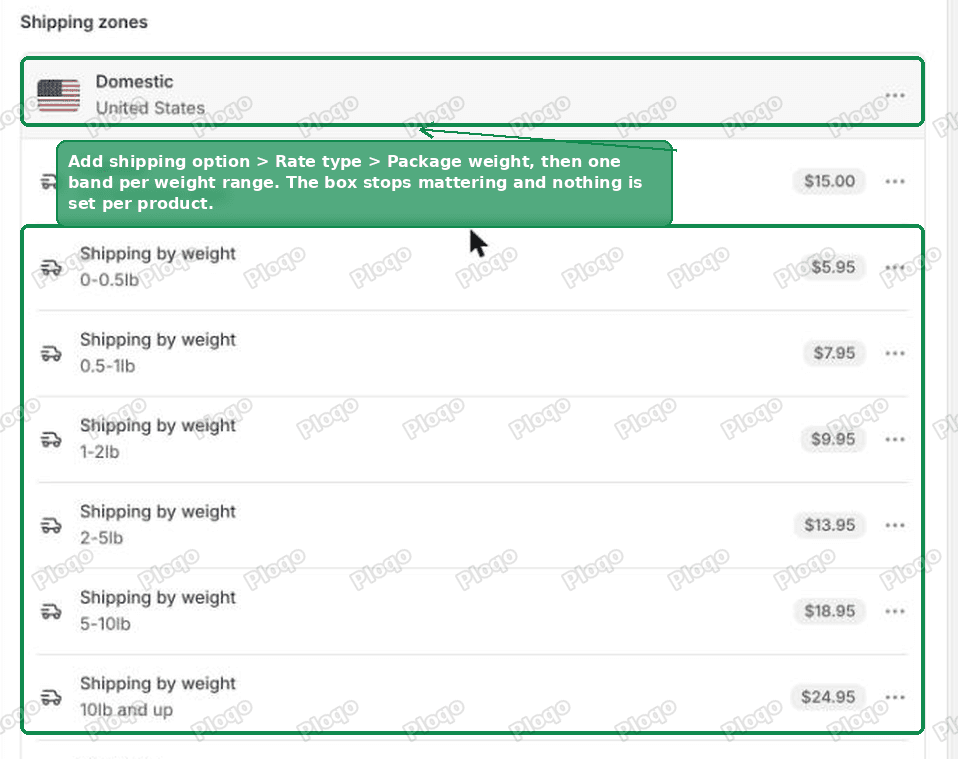 Weight based shipping bands set up on the domestic zone of a Shopify shipping profile
The ladder I used on the test store:
| Order weight | Price |
|---|---|
| 0 to 0.5 lb | $5.95 |
| 0.5 to 1 lb | $7.95 |
| 1 to 2 lb | $9.95 |
| 2 to 5 lb | $13.95 |
| 5 to 10 lb | $18.95 |
| 10 lb and up | $24.95 |
Three things make this worth the setup time on a large catalogue.
- Nothing is configured per product. Six thousand products need six thousand correct weights, which you need anyway, and zero package assignments.
- Every order is priced on what it actually weighs, so a big mixed order costs more than a small one. That is the behaviour merchants expect and rarely get from a single default box.
- The price is yours. Carrier quotes move around, and a customer who sees 9.54 the next loses confidence in the checkout.
The cost is that a weight band charges the same across the country, so a parcel going three states over subsidises one going coast to coast. Set your bands from what you actually pay on an average order rather than a best case, and check them against a month of real labels.
Work out your bands from your own label history before you publish them. Shopify does not suggest numbers.
Splitting heavy items into their own shipping profile
There is a middle option if only a handful of products are the problem, for example if most of what you sell fits in a mailer and a dozen items need a carton.
A shipping profile is a separate set of rates that applies to a chosen list of products. Put the heavy items in their own profile and give them their own rate.
The part worth knowing is how Shopify combines them when a cart contains products from both profiles. Rates with the same name are added together. I tested this with a 7.95 rate in the general profile, both named the same thing. A cart with one product from each quoted $19.95.
One catch to watch for. Any rate name that exists in only one of the two profiles disappears from mixed carts entirely. In my test the carrier rates and the express option were all in the general profile, and the mixed cart showed one option instead of five. Whatever names you use, create them in every profile.
Why a bigger box sometimes costs the same
Worth knowing before you agonise over box sizes. Carriers do not price small parcels purely by weight.
On my test store, USPS Ground Advantage in the 12 x 10 x 8 inch box quoted 16.85 for 10 lb and 82.80. Under a certain size and weight, USPS prices the parcel by how much space it takes up, not what it weighs, so the dimensions you declare matter far more than they seem to.
That is another argument for getting the default package right rather than guessing. The box you declare can move the price into a completely different pricing regime.
Can I assign a package in bulk, or through an app I write?
Not through Shopify's own tools. The package on a product is only editable one product at a time in the admin. There is no bulk editor column and no CSV field for it.
It is not available to developers either. As of the 2025-10 admin API, packages can be updated, deleted or set as default, but not created, and a product has no package field at all. Anyone building an internal tool to push package assignments across a catalogue will find there is nothing to push to.
Given that per-product packages only apply to single-item orders anyway, this matters less than it first appears.
If the rate still looks wrong
The quote did not change after I moved the default. Shipping quotes are cached per cart for a short time. Empty the cart and add the items again, or test in a private window.
No carrier rates appear at all. Carrier quotes need a complete origin address. Under Settings > Locations, open the location that fulfils your online orders and check it has a street, a city, a state and a postcode. Mine returned no carrier options at all until the shop location had a full address.
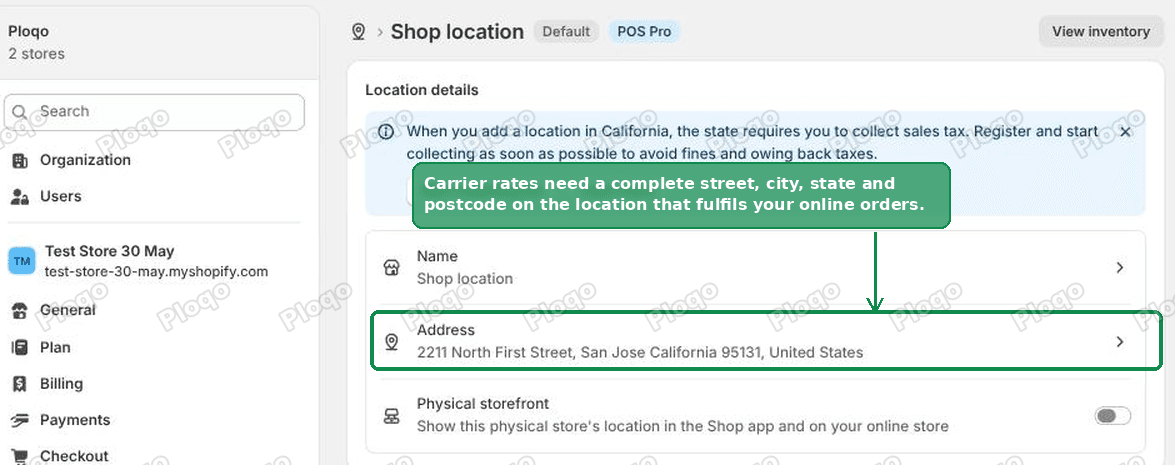 The address on a Shopify location, under Settings then Locations
The rate is right in the cart and wrong at checkout. Cart page estimates on many themes use a simplified calculation. The checkout number is the real one.
A small order is being charged too much. Check the empty weight of your default package. A carton weighing three quarters of a pound will push a two ounce order into a higher band.
I want free shipping over a threshold on top of this. That is a separate setting and it interacts with discount codes in ways that catch people out. We covered it in how to offer free shipping on Shopify.
Package, weight and profile: which does what
These three settings get mixed up constantly, so here is the division of labour.
- Product weight is the weight of the item itself, with no packaging. It is used on every order, single or multiple, and it should be accurate on every product. This is the one worth auditing first.
- Package is a box or mailer with dimensions and an empty weight. A package set on a product is used for single-item orders of that product. The store default package is used for everything else.
- Shipping profile decides which rates a product is eligible for at all. It has nothing to do with boxes, and it is the lever for treating one part of a catalogue differently from the rest.
If only one of those is wrong on your store, it is usually the default package, because it was set once when the shop was new and never looked at again.
What to do
- Find the package carrying the Store default badge, using the steps above.
- Move that badge to the box you use for a typical mixed order.
- Put the real empty weight of that box on it.
- If your catalogue spans envelopes to cartons, add weight bands to your domestic zone and stop depending on the box at all.
- Leave per-product packages in place. They still price single-item orders.
Spending too long on manual Shopify busywork?
PinFlow turns your Shopify catalog into Pinterest pins and posts them on a schedule, automatically. Same idea as the rule above, let the system handle the repetitive part.
Get PinFlow on the Shopify App StoreMore Shopify fixes
More community-sourced Shopify guides, tested on a live store.
Shopify Admin
Shopify Checkout Customization: Change Checkout Text
Change the text on your Shopify checkout, like the Email me with news and offers checkbox, without code or Plus. Why the pop-up in checkout settings will not save, and the route that does.
Shopify Admin
Avalara Shopify Integration vs Shopify Tax: Which to Use
Moving to Shopify with Avalara? Shopify Tax already calculates US sales tax to the street address. What the Avalara Shopify integration adds, what filing costs, and how to decide.
Shopify Admin
Shopify Discount Limit: One Code for More Than 100 Products
Shopify stops you at 100 items when a discount applies to specific products. There is no setting to raise it, but you do not need one. Point the discount at a collection and one code covers thousands of products. Tested on a store, with the B2B route too.