
How to Offer Free Shipping on Shopify (Tested)
Free shipping over a threshold is one checkbox, not two rates. Here is the setup, plus the discount rule that takes free shipping away at checkout. Tested end to end.
By AjayCodeWiz · September 10, 2026 · 8 min read
The problem
Free shipping is the offer shoppers respond to most, and the setup is buried in a settings page most merchants only open once.
Worse, half the guides online describe an older version of the admin where you built two competing rates and hoped Shopify picked the right one. That is not how it works now.
I set the whole thing up on a test store and pushed real carts through checkout to see what actually happens. Below is the current path, the numbers at each step, and one rule that costs stores money without anybody noticing.
Two different mechanisms, and they behave differently
Shopify can give free shipping in two unrelated ways. Choosing the wrong one is the source of most confusion.
A shipping rate lives in Settings → Shipping and delivery. It is part of your delivery pricing. Use it for a standing offer like "free delivery over $50".
A shipping discount lives in Discounts. It is a promotion. Use it for a campaign, a code, or a customer segment, which is a saved search of your customer list that keeps itself up to date.
The important difference: a shipping rate with a minimum is calculated from the cart total at that moment, so a discount can pull the cart under the threshold and remove it. A shipping discount ignores your rates entirely and just makes delivery free.
Set up the rate first. It is the one most stores actually want.
Free shipping over an amount is one checkbox
Go to Settings → Shipping and delivery, open the shipping profile that holds your products, and find the zone you want to change. Click Add shipping option.
You get a small dialog. Give the option a name, set a Rate type of Flat, put in your normal price, and pick a Transit time. Transit time is required now, so a missing one is why Save stays greyed out.
Then tick Offer free shipping. A field appears underneath.
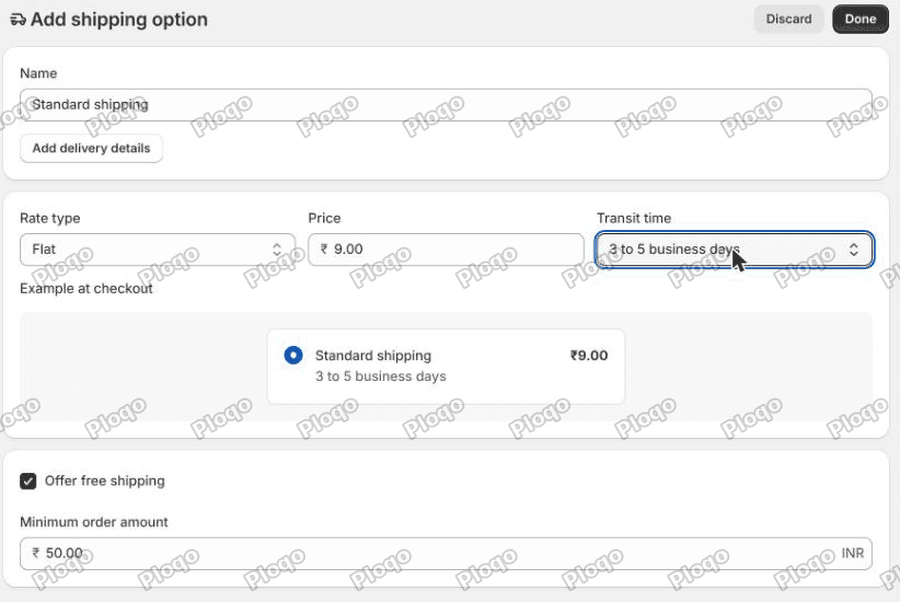 The Add shipping option dialog with Standard shipping at 9.00, transit time 3 to 5 business days, Offer free shipping ticked and a minimum order amount of 50.00
Minimum order amount is your threshold. That is the whole feature.
You do not create a second rate. You do not add price-based conditions. One shipping option carries both prices: it charges the flat rate under the threshold and nothing over it.
Once saved, the zone row summarises it in one line: "Standard shipping - Free for orders $50.00 and up - 3-5 business days - $9.00".
Older tutorials tell you to create two rates with overlapping price conditions. That still works, but it is more to maintain and it is easy to leave a range where a cart matches neither rate and the shopper is told you do not ship to them.
Proving it at checkout
I put one $40 tee in a cart and entered a delivery address.
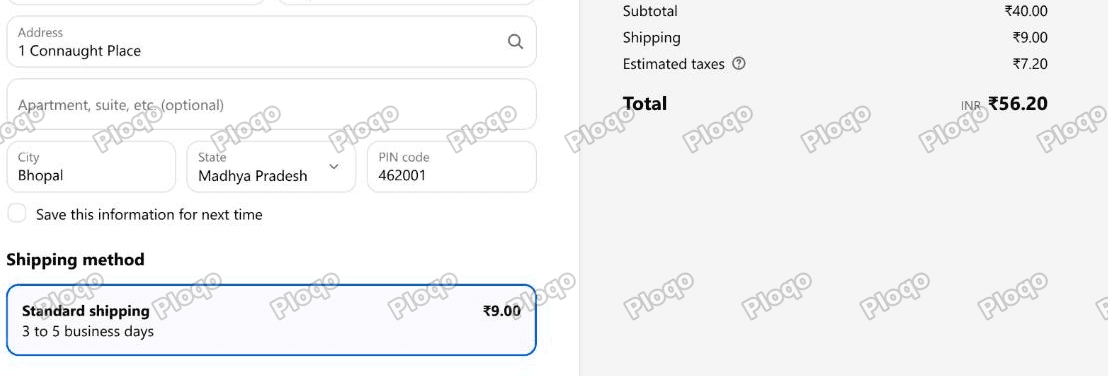 Checkout showing Standard shipping at 9.00 and a total of 56.20 for a 40 cart
Under the threshold: Standard shipping $9.00, total $56.20.
Then I added a $25 tote, taking the cart to $65.
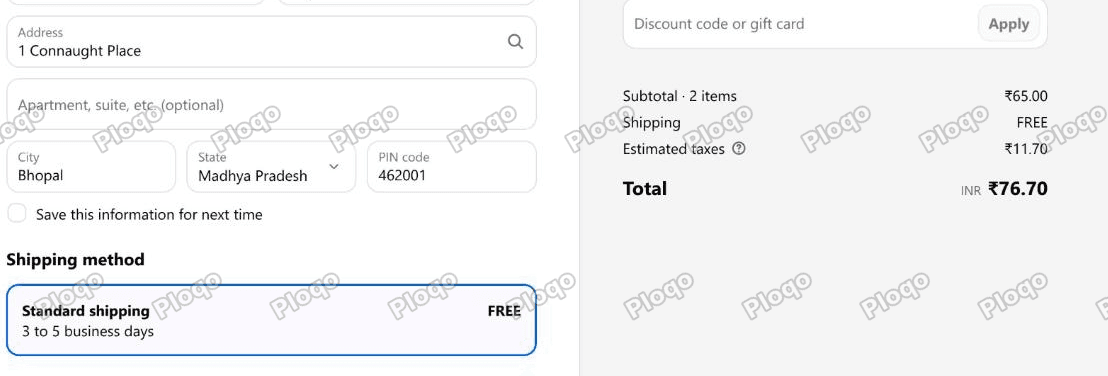 The same checkout at 65, showing Standard shipping FREE and a total of 76.70
Over the threshold: the same shipping option now reads FREE, and the summary line shows FREE instead of a charge. Total $76.70.
One option, two behaviours, no second rate.
The catch: a discount can take free shipping away
This is the part worth knowing before you launch a promotion, and I have never seen it mentioned in a setup guide.
The minimum order amount is measured after discounts.
Same $65 cart, still comfortably over the $50 threshold. Then I applied a $20 discount code.
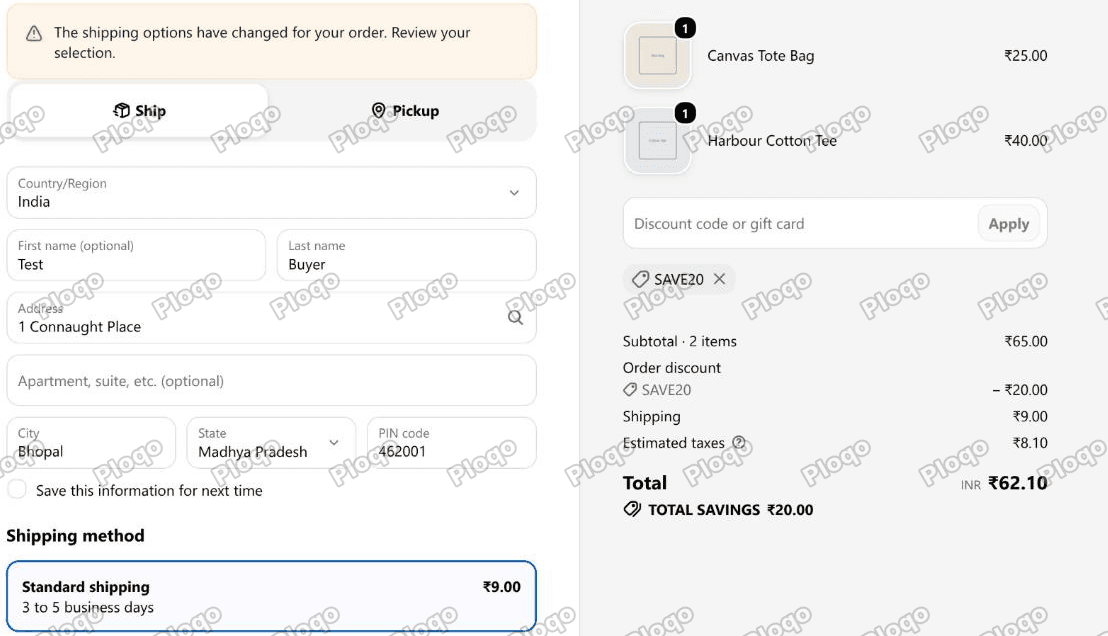 Checkout showing a 65 subtotal with a 20 order discount, shipping back to 9.00, and a banner saying the shipping options have changed
Free shipping is gone. Shipping is back to $9.00. The subtotal after the discount is $45, which is under $50, so the cart no longer qualifies.
Shopify does flag it, with a small banner on the delivery step: "The shipping options have changed for your order. Review your selection." In practice a shopper reads that as noise, or does not read it at all. They applied a coupon and were charged for delivery.
What to do about it:
- Set the threshold below your promotion maths. If you plan to run $20 off, do not put free shipping at $50 and advertise both at once.
- Or hand out free shipping as a discount instead of a rate, since a shipping discount ignores the threshold completely.
- Or make the two discounts non-combinable, so the shopper gets one or the other. That is what Shopify does by default anyway.
If you take one thing from this article, take this one. It is invisible in the admin and only shows up in real carts.
Free shipping as a discount
The second mechanism. Go to Discounts → Create discount → Free shipping.
You choose whether it is automatic or a code, which countries it covers, and optionally a minimum purchase amount of its own.
I made a code called SHIPFREE with no minimum, then applied it to a $40 cart, which is under the rate's $50 threshold and would normally be charged $9.
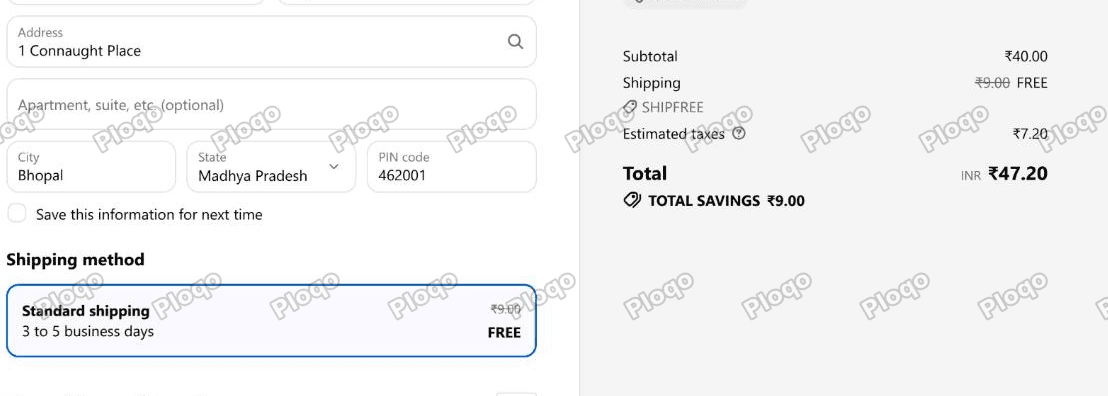 Checkout showing shipping 9.00 struck through and replaced with FREE, credited to the SHIPFREE code, total 47.20 with savings of 9.00
The $9.00 is struck through and replaced with FREE. Total $47.20, savings $9.00.
The shipping discount overrode the rate. It does not care what your minimum was.
That makes it the right tool for a limited campaign, a win-back code, or a specific customer group, and the wrong tool for a permanent policy, because every order gets a discount record attached to it.
One limit to know: only one shipping discount can apply per order, and Shopify picks whichever is worth more. You cannot stack "free shipping" on "$5 off shipping".
Free shipping on certain products only
Shipping rates belong to a shipping profile, and a profile holds a set of products. That is the lever.
Go to Settings → Shipping and delivery and click Add custom profile. Give it a name, add the products that should get free shipping, add a zone, and give that zone a shipping option with Offer free shipping ticked.
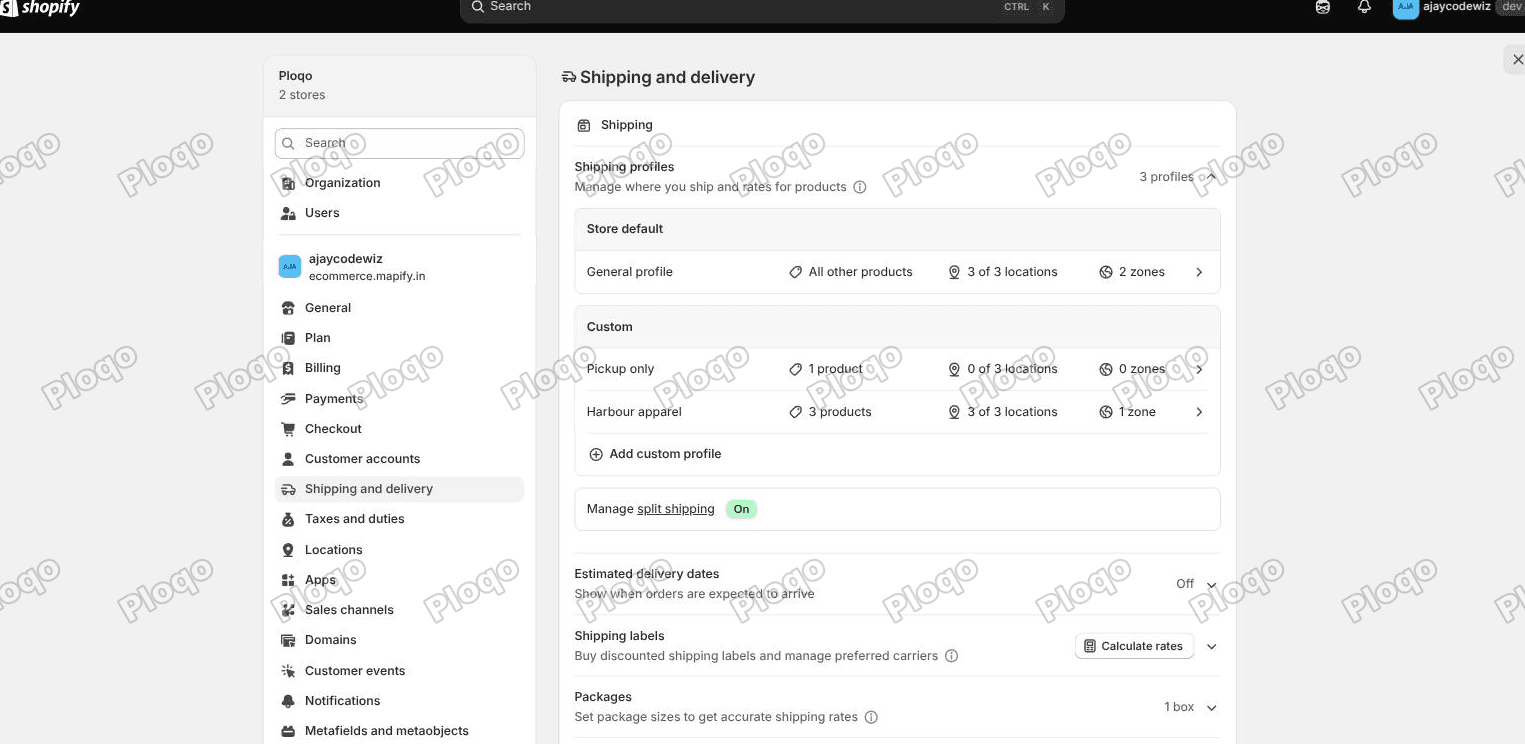 Settings, Shipping and delivery in the Shopify admin, showing the Store default General profile and custom profiles below it, with Add custom profile underneath
Everything you do not move stays in the General profile with its existing rates.
This is how you offer free delivery on small light goods while still charging for a mattress. It is also how I isolated the whole test in this article: I made a profile called "Harbour apparel" with three products in it, so none of the store's other rates changed.
Two things to watch:
- A product can only be in one profile at a time. Moving it into a custom profile removes it from General coverage, so the custom profile needs a zone for every country you ship to or those customers are told delivery is unavailable.
- If a cart mixes products from two profiles, Shopify may split it into two shipments with separate charges. That is usually what you want, but it surprises shoppers, so check a mixed cart before you launch.
Free shipping to certain countries only
That is the zone, not the rate.
Inside a profile, a zone is a list of countries with its own shipping options. Put the countries that get free shipping in one zone with a free option, and the rest in another zone with paid options.
For "free shipping in the contiguous US only", create a zone containing the United States but with Alaska and Hawaii unticked in the state list, then a second zone with just those two states and a paid rate.
The state list is inside the country row in the zone editor. You have to expand the country to see it.
Should the threshold be before or after tax?
Before tax, and before shipping. Shopify compares the subtotal after discounts against your minimum. Tax is added after the shipping decision is made, which is why the $65 cart in the screenshot qualified even though its total with tax was $76.70.
Does free shipping show in the cart?
Not by itself. The cart page does not know the delivery address, so it cannot resolve a rate. Shipping only appears at checkout.
What stores do instead is show a progress message in the cart, of the "you are $10 away from free shipping" kind. That is separate from this setup, and it is built as a free shipping progress bar with no app.
Keep the two ideas apart. The bar is a display. The rate is the actual rule. Changing your threshold means changing both.
What to check if it is not working
Free shipping is not appearing over the threshold. Check that the cart is over the threshold after discounts, and check that the products are in the profile whose rate you edited. If another discount is involved, read discount combinations too.
No shipping options at all at checkout. The address is in a country with no zone in that product's profile. This is the classic side effect of creating a custom profile and forgetting a country.
Two shipping charges on one order. The cart contains products from two profiles. Expected, but worth confirming it is what you want.
The rate shows the flat price even on a big cart. Open the shipping option and check that Offer free shipping is ticked rather than there being a second free rate that lost. Also confirm you edited the right zone.
Save is greyed out in the dialog. Transit time is required. Pick one.
The main points
- Free shipping over an amount is one shipping option with Offer free shipping ticked and a minimum order amount, not two competing rates.
- Transit time is now mandatory on a shipping option.
- Verified: a $40 cart paid $9.00, a $65 cart paid nothing, from the same option.
- The minimum is measured after discounts. A $20 code on a $65 cart dropped it to $45 and took the free shipping away, with only a small banner to warn the shopper.
- A free shipping discount ignores the rate entirely and works on any cart. Good for campaigns, wrong for a permanent policy.
- Free shipping on certain products is a custom shipping profile. On certain countries it is a zone.
- Only one shipping discount can ever apply to an order.
Spending too long on manual Shopify busywork?
PinFlow turns your Shopify catalog into Pinterest pins and posts them on a schedule, automatically. Same idea as the checkbox above, let the system handle the repetitive part.
Get PinFlow on the Shopify App StoreMore Shopify fixes
More community-sourced Shopify guides, tested on a live store.
Shopify Admin
Schedule a Black Friday Sale in Shopify (Auto Start and End)
Give the discount its own start and end date and put the sale banner in an Event rollout with the same dates. Both start at midnight and end after Cyber Monday.
Shopify Admin
Shopify Discount Limit: One Code for More Than 100 Products
Shopify stops you at 100 items when a discount applies to specific products. There is no setting to raise it, but you do not need one. Point the discount at a collection and one code covers thousands of products. Tested on a store, with the B2B route too.
Shopify Admin
Shopify Discount Types: Amount Off Products vs Order
Shopify has four discount types, and two of them work out a percentage in different ways. One rounds every single unit, the other rounds the order once. On low unit prices that difference is real money. Tested on a live store.