
Free Online Receipt Maker & Generator
Make a receipt online in seconds. This free receipt maker lets you add your logo, line items, tax, and payment method to a sales or order receipt. Pick a thermal POS or clean style, preview it live, and download a PDF or PNG. You need no signup.
How to Make a Receipt with This Free Receipt Maker
- Pick a template: Choose an Online Order, In-Store POS, Classic Sales, or Branded Logo receipt.
- Add your store details: Add your store name, optional logo, address, phone, and website.
- Fill in the receipt info: Set the order number, date, time, customer, currency, tax, and payment method.
- Add your products: Enter each product with a quantity and unit price. The total updates automatically.
- Preview live: The right panel updates instantly as you type.
- Download: Download the receipt as a PDF or PNG, or print it straight from your browser.
Why Use an Online Receipt Maker?
You might be wondering how to make a receipt quickly without buying a POS system or expensive software. This tool is the perfect solution. Making receipts by hand is slow and looks unprofessional. A dedicated receipt maker gives you:
- Real receipt styles: Pick a narrow thermal POS roll (58mm or 80mm) or a clean A4 order receipt.
- Your branding: Add your store logo and a custom accent color.
- Built-in barcode: Print a CODE128 barcode of the order number, just like a real till receipt.
- Instant calculations: Subtotal, discount, tax, shipping, tip, total, and change are computed for you.
- Multiple currencies: Over 30 currencies, formatted correctly, including zero-decimal currencies like JPY.
- Auto-saved store profile: Your store name, logo, and address are saved securely in your browser for next time.
- No account needed: Everything runs in your browser. Your data never leaves your device.
A Receipt Generator for Shopify Merchants
Shopify store owners often need a quick receipt outside the normal checkout flow. A dedicated Shopify receipt generator is perfect for:
- Giving a paper or PDF receipt for a manual or wholesale order.
- Replacing a lost order confirmation for a customer.
- Handing a branded receipt to in-person and pop-up shop buyers.
- Keeping clean sales records for your bookkeeping and tax season.
The tool is built for legitimate order and sales receipts. It supports Shopify Payments, cards, cash, PayPal, Apple Pay, and Google Pay, plus a return-policy footer and your store URL.
Receipt vs Invoice: What Is the Difference?
People often mix up a receipt and an invoice. They serve different jobs.
- An invoice is a request for payment. You send it before the customer pays. It lists what they owe and when it is due.
- A receipt is proof of payment. You give it after the customer pays. It confirms what was bought and how much was paid.
If you need to bill a customer before they pay, use our free invoice generator. If you need proof that an order was paid, this sales receipt generator is the right tool.
Thermal POS Receipt vs A4 Order Receipt
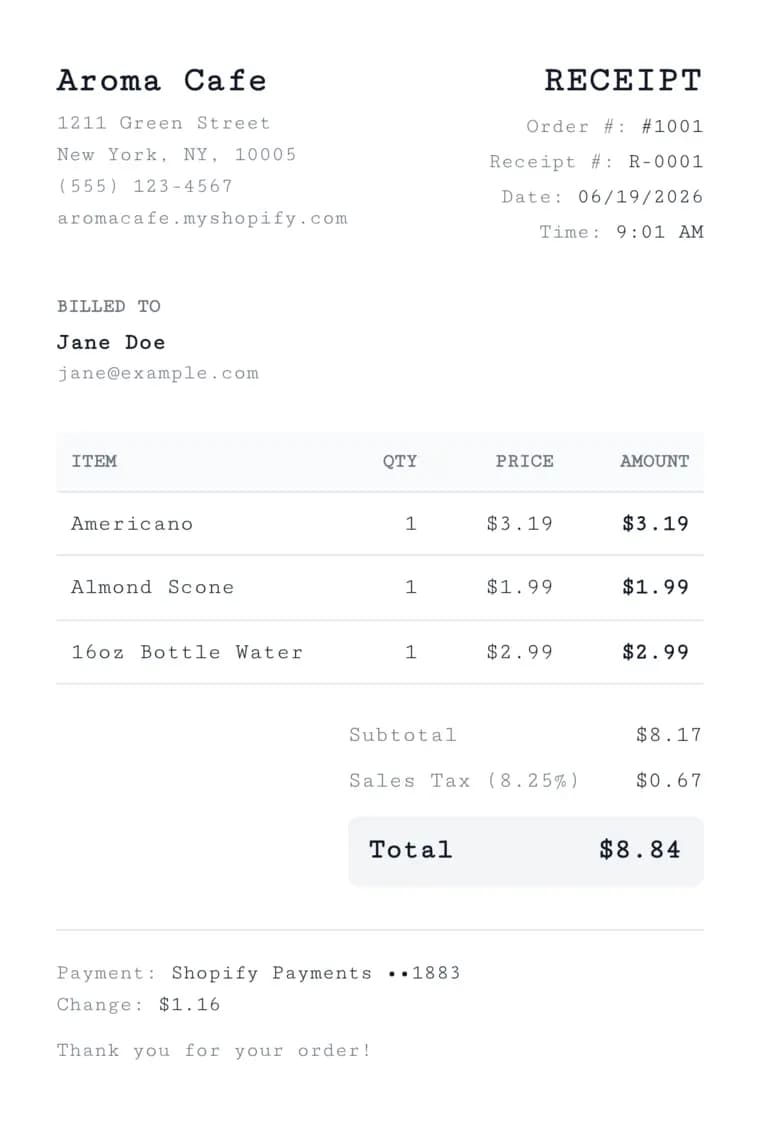 Sample sales receipt made with the free receipt maker, shown in the clean A4 order style
This tool ships two looks so you can match the moment.
- Thermal POS receipt: A narrow 58mm or 80mm roll in a monospace font with a barcode. This is the classic till-receipt look. It is great for in-person sales and sharing as an image.
- A4 order receipt: A wider, clean layout with a logo header and a product table. This is great for emailing a customer or attaching to an order.
You can switch between them at any time. The live preview and the download update instantly.
Frequently Asked Questions
Is this receipt generator free?
Yes. The receipt generator is 100% free. There is no signup, no watermark, and no limit on how many receipts you create.
Can I download my receipt as a PDF?
Yes. You can download your receipt as a PDF or a PNG image. You can also print it straight from your browser. Thermal receipts export at their real paper width so they look authentic.
Can I add my store logo?
Yes. You can upload a PNG, JPG, SVG, or WebP logo, or paste a direct image URL. Your logo appears on both the live preview and the downloaded receipt.
Does the receipt include a barcode?
Yes. You can add a CODE128 barcode of your order or receipt number, the same kind of barcode a real point-of-sale receipt prints. You can turn it off with one click.
What are the transaction codes on the receipt?
When you turn on transaction codes, the receipt shows a few short reference numbers, just like the ones a real shop receipt prints at the bottom. They are not random. The tool creates them from your order or receipt number, so the same receipt always shows the same numbers every time you open or download it. If you change your order number, the codes update to match.
What currencies are supported?
We support over 30 currencies, including USD, EUR, GBP, INR, CAD, AUD, and JPY. Amounts format correctly for each currency, including zero-decimal formatting for currencies like JPY.
Is my receipt data stored on a server?
No. All processing happens locally in your browser. Your receipt data is never sent to PinFlow's servers. Your store profile is saved only in your own browser.
Can I use this as a Shopify receipt generator?
Yes. The tool is built for Shopify merchants and other ecommerce sellers. It supports Shopify Payments, order numbers, customer details, shipping, discounts, and a return-policy footer.
Do I have to re-enter my store details every time?
No. The tool auto-saves your store name, logo, and address securely in your browser. They are ready the next time you open the receipt maker.
Can I add tax, discounts, shipping, and tips?
Yes. Enter a tax rate as a percentage and pick a tax label like Sales Tax, VAT, or GST. Add a percentage or flat discount, plus shipping and a tip. Your totals update automatically.
Is this better than a receipt template?
Yes, for most people. A blank receipt template in Word or Excel makes you format everything by hand and do the math yourself. This online receipt maker fills the layout for you, adds up the totals, and prints a barcode. You just type your details and download a PDF or PNG.
Can I make a receipt online for free?
Yes. You can make a receipt online for free with no signup and no watermark. Add your store details and items, then download the finished receipt as a PDF or PNG in seconds.
What is the difference between a receipt and a sales receipt?
They are the same thing. A sales receipt is simply proof that a sale was paid for. This tool creates sales receipts, order receipts, and POS receipts from one form.
More FREE Receipt Makers tools
Create sales, taxi, gas, parking, pharmacy, and grocery receipts you can download as PDF or PNG.
Free Cash Receipt Generator
Create a cash receipt with the amount auto-spelled in words: general, petty cash, cash sale, and deposit types, with your logo. Two-up Original/Duplicate copies. Download PDF, PNG, or CSV. Free, no signup, no watermark.
Free Donation Receipt Generator
Create IRS-compliant charitable donation receipts: cash, in-kind, year-end, quid pro quo, and church tithe types with your EIN and logo. Download PDF, PNG, or CSV. Free, no signup, no watermark.
Free Itemized Receipt Generator
Build an itemized receipt with per-line tax rates, a tax breakdown grouped by rate, tax-inclusive or exclusive pricing, per-line discounts, and category subtotals. Bulk import from CSV. Thermal 80mm or A4, PDF or PNG. Free, no signup, no watermark.
Free Hotel Receipt & Folio Generator
Build a hotel receipt or guest folio with nights computed from your dates, per-night or flat room rates, incidentals with a taxable toggle, stacked lodging taxes, and payments to a balance due. 8 templates, thermal 58/80mm or A4/Letter, PDF, PNG, or SVG. Free, no signup, no watermark.
Free Taxi Receipt Generator
Create taxi and cab receipts with fare, distance, tip, and a signature line. Download PDF or PNG instantly. Free, no signup.
Free Gas Receipt Generator
Create fuel and gas station receipts with gallons, price per gallon, and card details. Download PDF or PNG instantly. Free, no signup.
Free Parking Receipt Generator
Create parking lot, garage, and valet receipts with duration, rate, and a barcode. Download PDF or PNG instantly. Free, no signup.
Free Pharmacy Receipt Generator
Create itemized pharmacy and drug store receipts for insurance, HSA, and FSA claims. Download PDF or PNG instantly. Free, no signup.
Free Grocery Receipt Generator
Create itemized grocery and supermarket receipts for budgets and reimbursements. Download PDF or PNG instantly. Free, no signup.
Free Rent Receipt Generator
Create monthly rent receipts for tenants and landlords as proof of rent payment. Download PDF or PNG instantly. Free, no signup.