
Free Grocery Receipt Generator
Make an itemized grocery or supermarket receipt online. Add each item with its quantity and price, set the sales tax and payment, then download a PDF or PNG on a 58 mm or 80 mm till roll or an A4 page. It is free, with no signup and no watermark.
How to make a grocery receipt
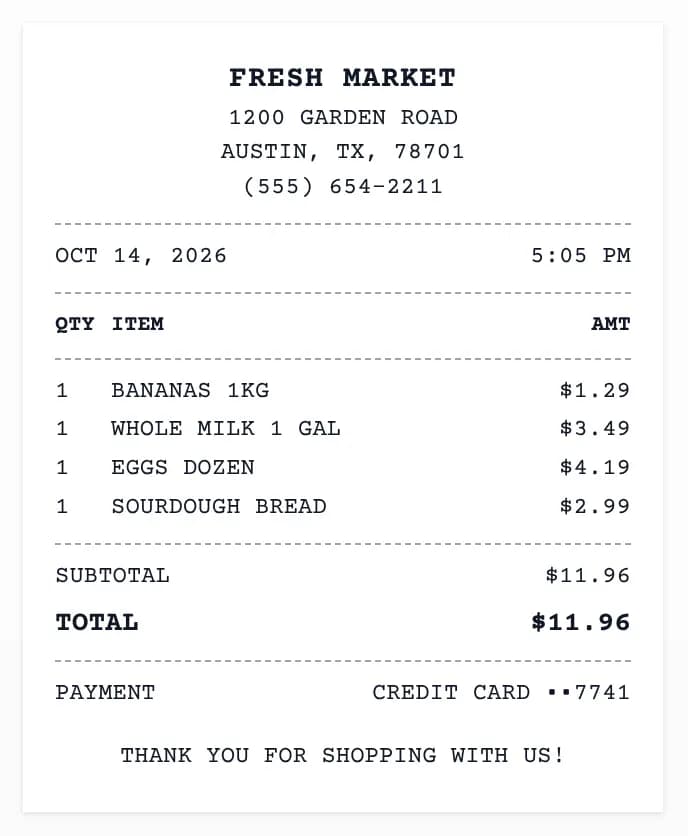 Sample grocery receipt for a store called Fresh Market, with bananas, milk, eggs, and bread in capitals on an 80 mm till roll
The tool opens with a sample grocery receipt already filled in, so you can see the layout before you type. Replace the sample with your own details in five steps.
- Pick a template and paper width. The Classic Sales template is selected, with all-caps text on an 80 mm roll. You can switch to In-Store POS, Branded Logo, or Online Order, and change the paper to 58 mm, 80 mm, or an A4 page. Clicking a template also sets its usual paper width and font.
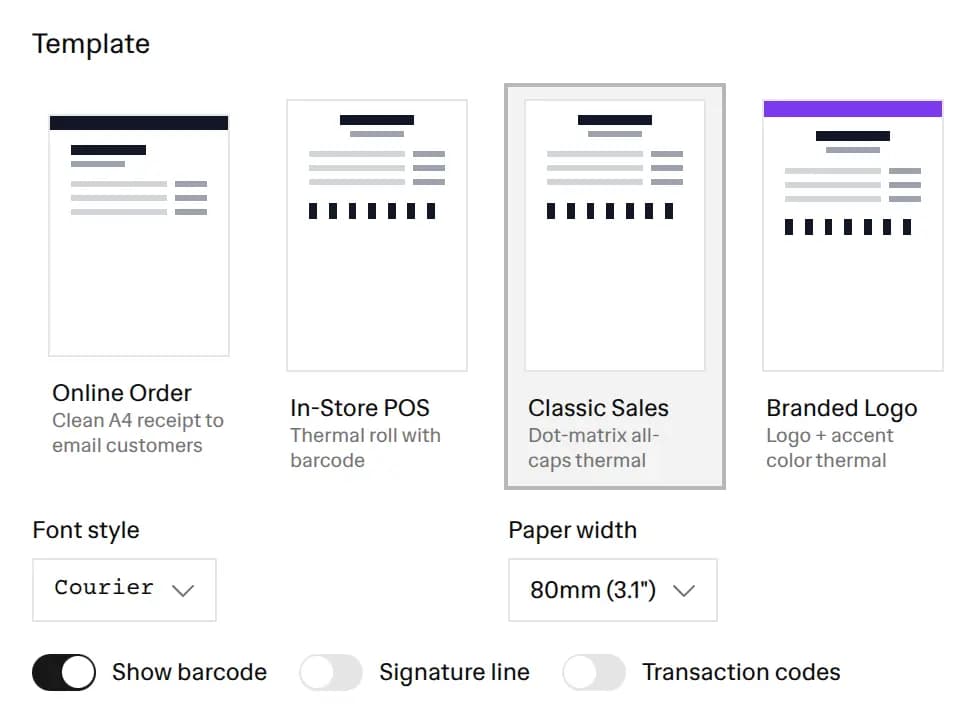 Template picker with Classic Sales selected and the paper width set to 80 mm
- Enter the store. In the Store tab, type the store name, street address, city, state, zip code, phone, and website. You can also upload a logo. The tool remembers these details in your browser, so they are filled in next time.
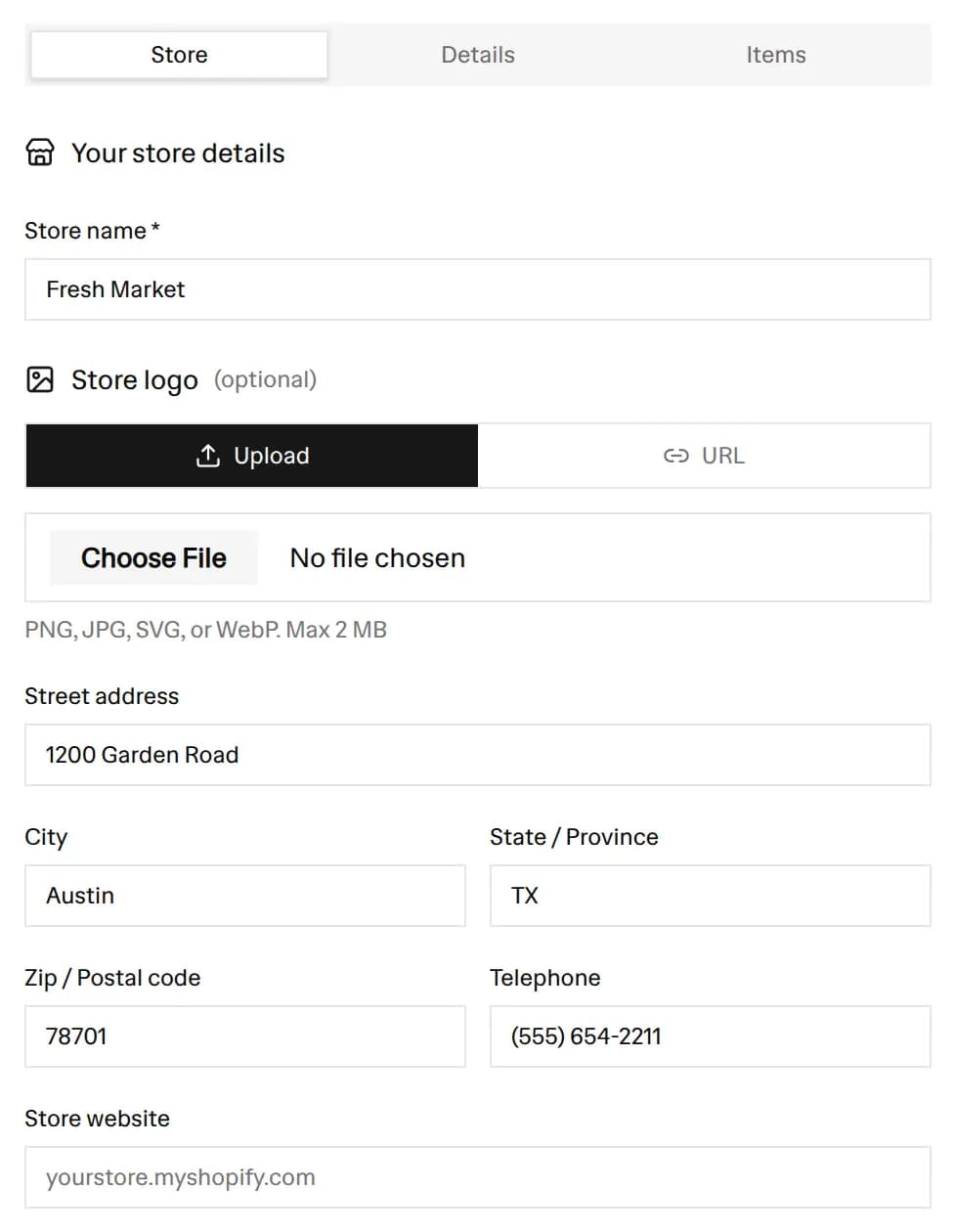 Store tab with the store name, address, phone, and logo upload fields filled in
- List each item. In the Items tab, add a line for every product with its name, quantity, and unit price. The amount for each line and the subtotal update as you type. Add a percentage or flat discount at the bottom if the shopper used a coupon.
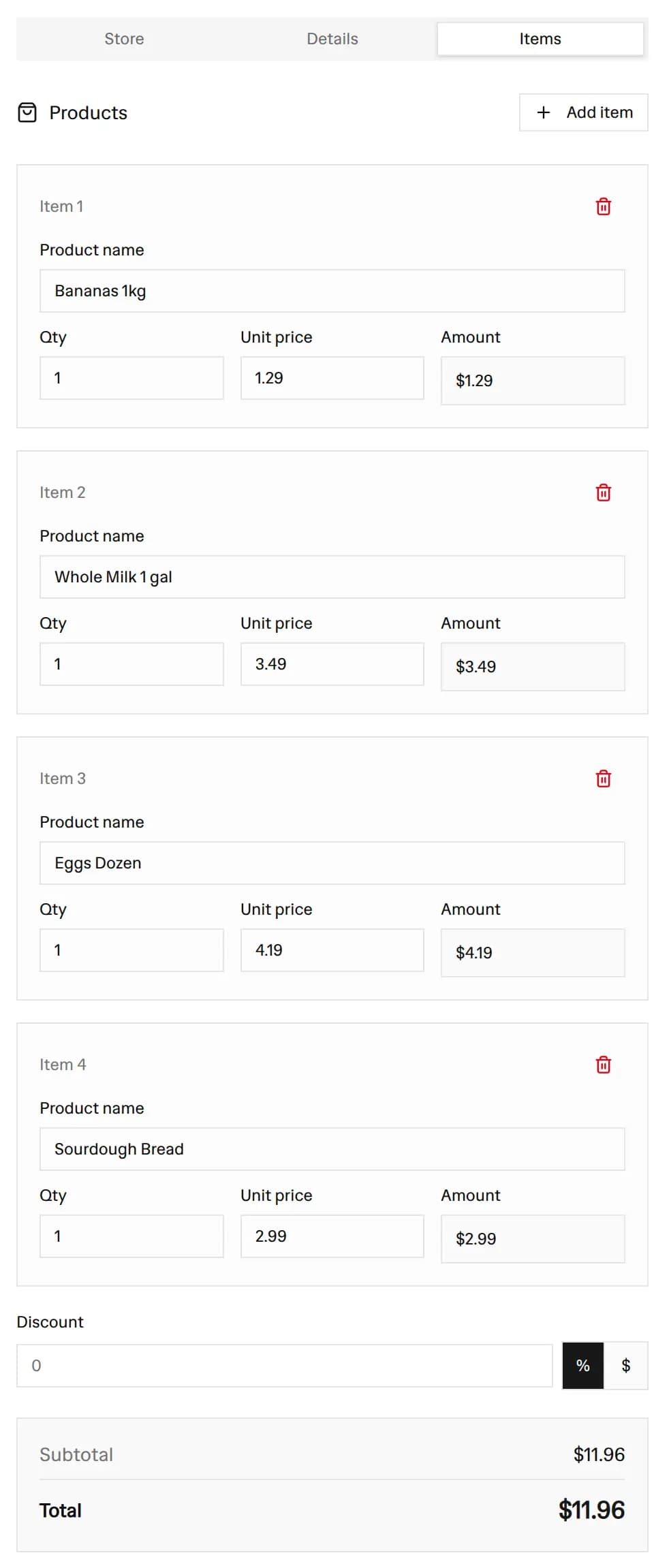 Items tab with four grocery lines, each with a quantity and unit price, and the running subtotal
- Add the date, tax, and payment. In the Details tab, set the date and time, a receipt number, and the cashier name. Choose a tax label such as Sales Tax and enter the rate. Then pick the payment method, add the card's last 4 digits, or enter the cash handed over to show the change.
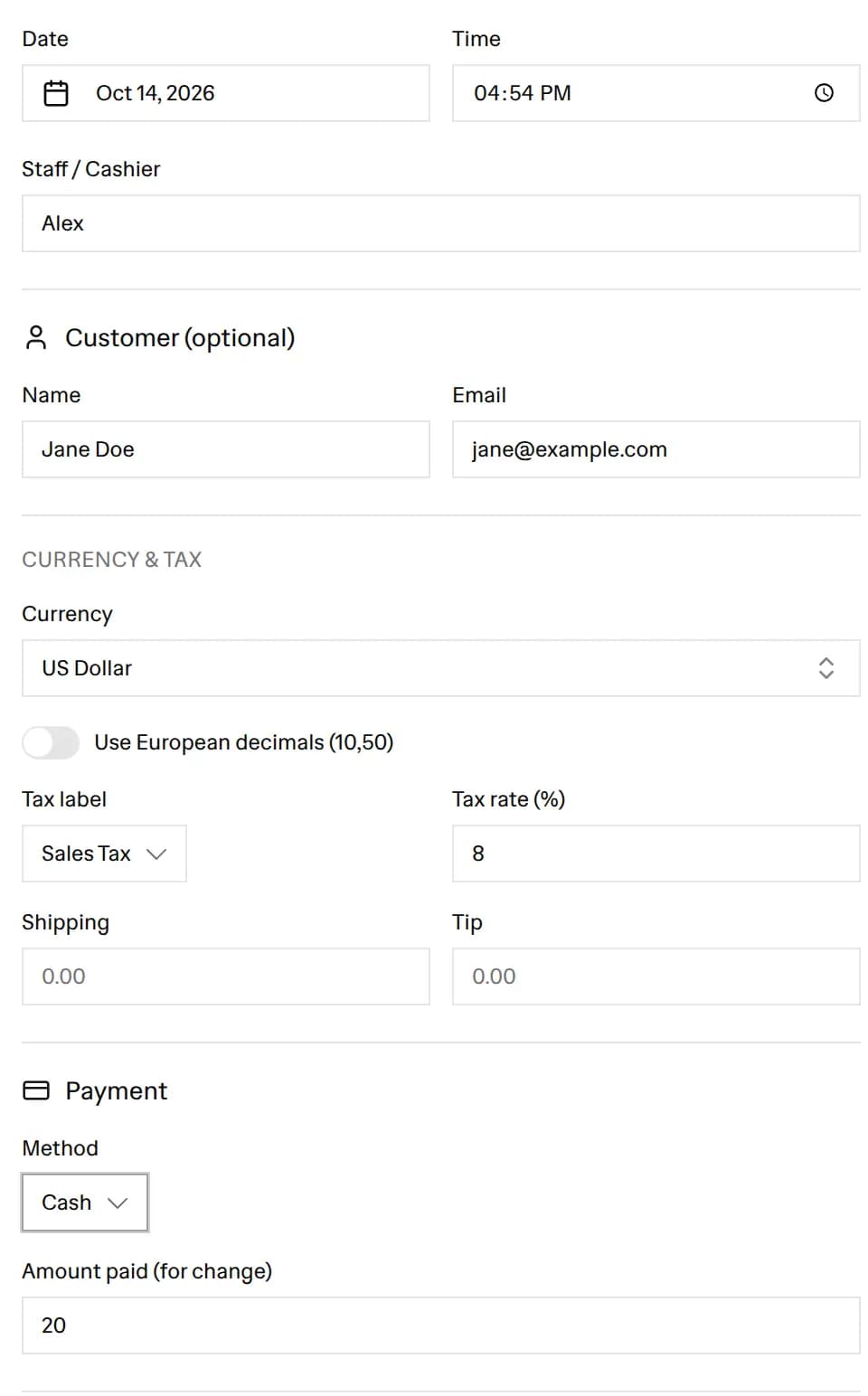 Details tab with the date, sales tax rate, payment method, and amount paid fields
- Download or print. Check the live preview, choose PDF or PNG, and click Download. The Print button opens the PDF in a new tab and starts your browser's print dialog.
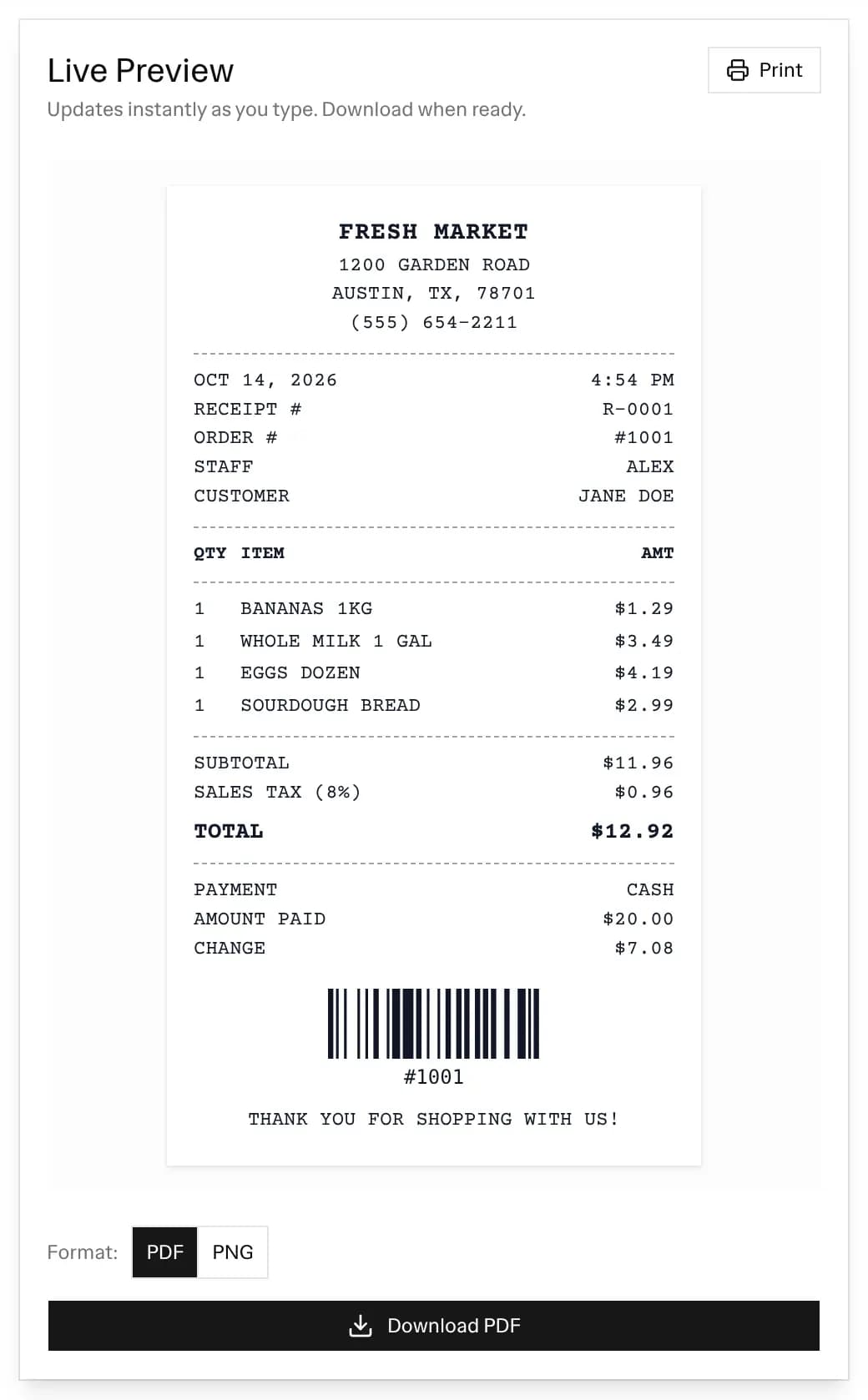 Live preview of the finished grocery receipt with the PDF and PNG options and the Download and Print buttons
What a grocery store receipt shows
A grocery or supermarket receipt reads from top to bottom in a fixed order. The receipt this tool makes follows the same order, and each part comes from a field you fill in.
- Store header. Your logo, the store name, the street address, the city line, the phone number, and the website. These come from the Store tab.
- Date and time. The first line under the header shows the date on the left and the time on the right.
- Receipt and order numbers. A receipt number such as R-0001 and an order number such as #1001. Add only the ones you use. Empty fields do not print.
- Cashier and customer. The Staff / Cashier field prints as "Staff", and the customer name prints if you add one.
- Item lines. Three columns: QTY, ITEM, and AMT. The amount is the quantity times the unit price, so a line of 3 yogurts at $1.25 shows $3.75.
- Subtotal, discount, and tax. The subtotal of all lines comes first. A discount line follows if you set one. The tax line shows its label and rate, for example Sales Tax (8%).
- Total. The grand total in bold, after discount and tax.
- Payment. The payment method, with the card's last 4 digits for card payments. For cash, the receipt adds Amount Paid and Change.
- Barcode. An optional barcode at the bottom that encodes the order number, or the receipt number if there is no order number.
- Footer message. A closing line such as "Thank you for shopping with us!" or your returns policy.
The page opens with a sample grocery receipt for a made-up store called Fresh Market, with bananas, milk, eggs, and bread. Use it as a reference for what goes where, then replace it with your own store.
Items sold by weight, multi-buys, and coupons
Grocery baskets have a few line types that a plain receipt does not. The tool handles them with the fields it has.
- Items sold by weight. To show the weight and the price per pound on the receipt for loose produce or deli items, put them and the price per pound in the item name, such as "Apples 2.4 lb @ 1.49/lb". Then set the quantity to 1 and the unit price to the line total.
- Multi-buys. For 6 cans of the same soup, enter one line with a quantity of 6 and the price of one can. The receipt prints 6 in the QTY column and the full amount in AMT.
- Coupons and store discounts. The Discount field takes a percentage or a flat amount. It comes off the subtotal, and tax is worked out on the discounted amount, the same order a till uses.
- Bottle deposits or bag fees. Add them as their own line, for example "Bag fee" with a quantity of 2.
Sales tax on a grocery receipt
The tool applies one tax rate to the whole subtotal after any discount. Choose the label that matches your area: Tax, Sales Tax, VAT, GST, HST, PST, Service, or IVA. Then enter the rate as a percentage. If you leave the rate at 0, the tax line does not print.
Food is often taxed differently from other goods, and the rules depend on where you sell. Check the rate your local tax office sets before you print receipts for customers.
If only part of the basket is taxable, the tool cannot tax some lines and skip others. Work out the tax on the taxable items yourself, set the tax rate to 0, and add a line called "Tax on taxable items" with that amount.
Till roll or A4 page: 58 mm, 80 mm, and A4
The paper width setting controls both the preview and the size of the PDF.
- 80 mm is the wider thermal till roll (a roll of heat-sensitive paper that a receipt printer marks without ink). It suits a full grocery receipt with many lines. The grocery preset starts here.
- 58 mm is the narrower roll. Pick it if your receipt printer takes 58 mm paper. Long item names wrap onto a second line.
- A4 gives a full-page receipt with the Online Order layout. Use it when you email a receipt to a customer or file it with your paperwork.
The downloaded PDF is as wide as the paper you pick, 58 mm, 80 mm, or 210 mm for A4, and as long as the receipt needs. A receipt with 30 items makes a longer PDF, not a smaller font.
Pick a font to suit the look: Courier, Modern, Space, Typewriter, or Dot Matrix. The page opens on Classic Sales in Courier. When you click a template card, it switches to that template's font. Classic Sales switches to Dot Matrix in capitals, which looks like an older supermarket printer. In-Store POS uses Courier in normal case.
Add your logo and footer
Upload a logo in the Store tab and it prints at the top of every template. The Branded Logo template also adds a colored strip across the top, and you can pick the accent color. Use the footer message for the line you want every customer to see, such as your opening hours or "Returns within 14 days with receipt".
The other switches under the template picker are optional:
- Show barcode prints a barcode of the order or receipt number.
- Signature line adds a line to sign, with the cardholder name above it if you enter one.
- Transaction codes prints sample TRANS, MCC, AUTH, and REF codes made up from the order number (or the receipt number if there is no order number). They are not real card approval codes, so leave this off on a receipt you give to a customer.
Who uses a grocery receipt maker
This tool makes receipts for your own business and your own records. It does not copy any real chain's receipt.
- Small food shops and market stalls. A corner shop, farm stand, or bakery without a till system can hand out a clean itemized receipt.
- Grocery delivery and personal shoppers. Give the customer a receipt that lists what you bought for them and what they owe.
- Household budgeting. Turn a week of shopping into one tidy record you can file with your budget.
- Shared kitchens and offices. Show what was bought for a team pantry or an event, so the cost can be paid back.
How to make an itemized receipt for other purchases
An itemized receipt lists every item with its quantity and price, instead of one total. The steps above work for any shop. PinFlow also has makers set up for other kinds of purchase:
- The itemized receipt generator for general itemized receipts.
- The gas receipt generator for fuel, with gallons and price per gallon.
- The pharmacy receipt generator for medicines and health items.
- The receipt maker for cafes, shops, and online orders.
To split a shared grocery bill between people, use the order bill splitter.
Frequently asked questions
Is the grocery receipt generator free?
Yes. You can make and download as many grocery receipts as you like for free. There is no signup and no watermark.
Can I add many items to a grocery receipt?
Yes. Click Add item for each product. There is no item limit. The subtotal, tax, and total update as you type, and the PDF grows longer to fit every line.
What paper sizes can I use?
You can pick a 58 mm or 80 mm till roll, or an A4 page. The PDF you download is the same width as the paper you pick.
How do I show produce sold by weight?
To show the weight and the price per pound on the receipt, put them in the item name, such as "Apples 2.4 lb @ 1.49/lb". Set the quantity to 1 and the unit price to the line total.
Can I add a coupon or discount?
Yes. The Discount field takes a percentage or a flat amount. It comes off the subtotal before tax is added.
Can the receipt show change for a cash payment?
Yes. Choose Cash as the payment method and enter the amount the customer handed over in the Amount paid field. The receipt prints Amount Paid and Change under the total.
Can I add my store logo?
Yes. Upload a logo in the Store tab. It prints at the top of every template, and the Branded Logo template adds an accent color strip as well.
What formats can I download?
You can download a PDF or a PNG, or click Print to open the PDF and print it from your browser.
Does the tool save my store details?
Yes. Your store name, address, and logo are saved in your browser on this device, so they are filled in the next time you open the page. Nothing is sent to a server.
More FREE Receipt Makers tools
Create sales, taxi, gas, parking, pharmacy, and grocery receipts you can download as PDF or PNG.
Free Cash Receipt Generator
Create a cash receipt with the amount auto-spelled in words: general, petty cash, cash sale, and deposit types, with your logo. Two-up Original/Duplicate copies. Download PDF, PNG, or CSV. Free, no signup, no watermark.
Free Donation Receipt Generator
Create IRS-compliant charitable donation receipts: cash, in-kind, year-end, quid pro quo, and church tithe types with your EIN and logo. Download PDF, PNG, or CSV. Free, no signup, no watermark.
Free Receipt Generator
Create professional sales & order receipts with your logo, line items, tax, and payment method. Thermal POS or clean styles. Download PDF/PNG instantly. Free, no signup.
Free Itemized Receipt Generator
Build an itemized receipt with per-line tax rates, a tax breakdown grouped by rate, tax-inclusive or exclusive pricing, per-line discounts, and category subtotals. Bulk import from CSV. Thermal 80mm or A4, PDF or PNG. Free, no signup, no watermark.
Free Hotel Receipt & Folio Generator
Build a hotel receipt or guest folio with nights computed from your dates, per-night or flat room rates, incidentals with a taxable toggle, stacked lodging taxes, and payments to a balance due. 8 templates, thermal 58/80mm or A4/Letter, PDF, PNG, or SVG. Free, no signup, no watermark.
Free Taxi Receipt Generator
Create taxi and cab receipts with fare, distance, tip, and a signature line. Download PDF or PNG instantly. Free, no signup.
Free Gas Receipt Generator
Create fuel and gas station receipts with gallons, price per gallon, and card details. Download PDF or PNG instantly. Free, no signup.
Free Parking Receipt Generator
Create parking lot, garage, and valet receipts with duration, rate, and a barcode. Download PDF or PNG instantly. Free, no signup.
Free Pharmacy Receipt Generator
Create itemized pharmacy and drug store receipts for insurance, HSA, and FSA claims. Download PDF or PNG instantly. Free, no signup.
Free Rent Receipt Generator
Create monthly rent receipts for tenants and landlords as proof of rent payment. Download PDF or PNG instantly. Free, no signup.