
Free UTM Link Builder
Build trackable campaign URLs for your Shopify store. It features smart ecommerce defaults. It includes a real-time preview and warnings for Safari character limits. It is 100% free and needs no signup.
How to Use the Free UTM Link Builder
This quick video walkthrough shows how to build a UTM-tagged tracking URL from scratch. You will see how to use the smart presets, enable Strict Mode, shorten the URL, and download the QR code.
Every marketing campaign you run sends traffic to your Shopify store. This includes Facebook ads, email newsletters, and influencer partnerships. Without proper tracking, all those visitors blur together in your analytics software. This makes it impossible to tell which marketing efforts drove sales. UTM parameters solve that problem. Our free Google Analytics campaign tagging tool makes it easy.
By adding UTM tracking tags to your URLs, you can identify exactly which traffic sources, marketing channels, and specific UTM campaigns bring visitors and revenue. You might need a simple utm link example. Or you might need a full tracking URL for a multi-channel product launch. Either way, this tool has you covered.
Features of Our Free UTM Link Builder
Our tool is packed with features for Shopify merchants and ecommerce marketers. These features give you reliable UTM tracking in Google Analytics:
- Smart Combobox Inputs with Preset Suggestions: Every UTM field offers a searchable dropdown. These contain curated, ecommerce-ready presets with descriptions. You never have to guess the right value. Our campaign source examples include Shopify-relevant sources like
shopify_email,klaviyo, andpinterest. Mediums includepaid_socialandretargeting. Campaign types includebfcm_2026,abandoned_cart, andback_in_stock. These match real Shopify marketing workflows. You can also type any custom value if needed. - Strict Mode (On by Default): A single toggle automatically lowercases your input. It also replaces spaces with underscores across all fields. This is critical for Shopify merchants. GA4 treats
Facebookandfacebookas separate sources. Without consistent formatting, your revenue attribution data fragments. You cannot accurately calculate ROAS across channels. - Campaign ID (
utm_id) Support: Our builder includes a dedicated Campaign ID field for theutm_idparameter. This goes beyond the standard five Google parameters. It is useful for Shopify merchants running ads on Google, Meta, or Pinterest. You can tie each tracking URL back to a specific campaign ID in your ad platform. This helps with accurate spend-to-revenue reconciliation. - Real-Time Tracking URL Preview: See your generated tracking URL update live as you type. No "generate" button is needed. The preview panel stays sticky on larger screens. This makes it fast to build dozens of tracking URLs. It is perfect for setting up a multi-channel Shopify product launch or BFCM campaign.
- Three-Tier URL Length Warning System: The tool features a real-time character counter with color-coded feedback. It is green when safe and amber when approaching 1,500 characters. It turns red when exceeding the 2,048-character Safari/cross-browser safety limit. This matters for ecommerce. A large portion of Shopify store traffic comes from mobile Safari. A truncated URL means broken tracking and lost attribution on your highest-value traffic.
- One-Click Copy to Clipboard: Copy your generated tracking URL instantly with a single click. A confirmation checkmark appears so you know it worked. You can then paste it directly into your Shopify Email campaigns, Klaviyo flows, Meta Ads Manager, or Pinterest Ad setup.
- Fill Example Button: Not sure how the tool works? Click "Fill example" to populate every field. It uses a realistic tracking URL example with Shopify campaign data. This is perfect for onboarding new team members or marketing agencies.
- Reset Button: Clear all fields and restore defaults with one click. You can start fresh when building your next campaign URL.
- Auto
https://Prepending: If you forget a protocol in your Shopify store URL, the tool helps. It automatically addshttps://for you. This ensures your tracking links always point to the secure version of your store. - Built-in UTM Checker: Our real-time preview acts as a UTM checker. You can instantly verify that your utm_source, utm_medium, and utm_campaign values are correct. Do this before launching a campaign.
- Contextual Tooltips on Every Field: Hover over the info icon next to any label. You will see what that parameter does. You will also see how Strict Mode affects it. This is helpful for Shopify merchants who are new to UTM tracking in Google Analytics.
- Proper URL Parsing & Encoding: The tool uses the browser's native
URLAPI. It provides rock-solid URL construction. It correctly handles existing query parameters, collection filters, and Shopify store URL structures. It does this without breaking your links. - Instant QR Code & Short URL Generation: Every generated tracking URL automatically gets a scannable QR code preview. As your tracking URL gets longer with more parameters, the QR code becomes denser and requires a high-resolution image and a high-quality camera to read it. To solve this, use the built-in "Shorten URL" button! The QR code will automatically use the short URL instead, keeping the pattern simple and easy to scan. Download the QR code as a PNG to use in print materials, packaging inserts, or in-store signage. For advanced QR code customization, try our dedicated Free QR Code Generator.
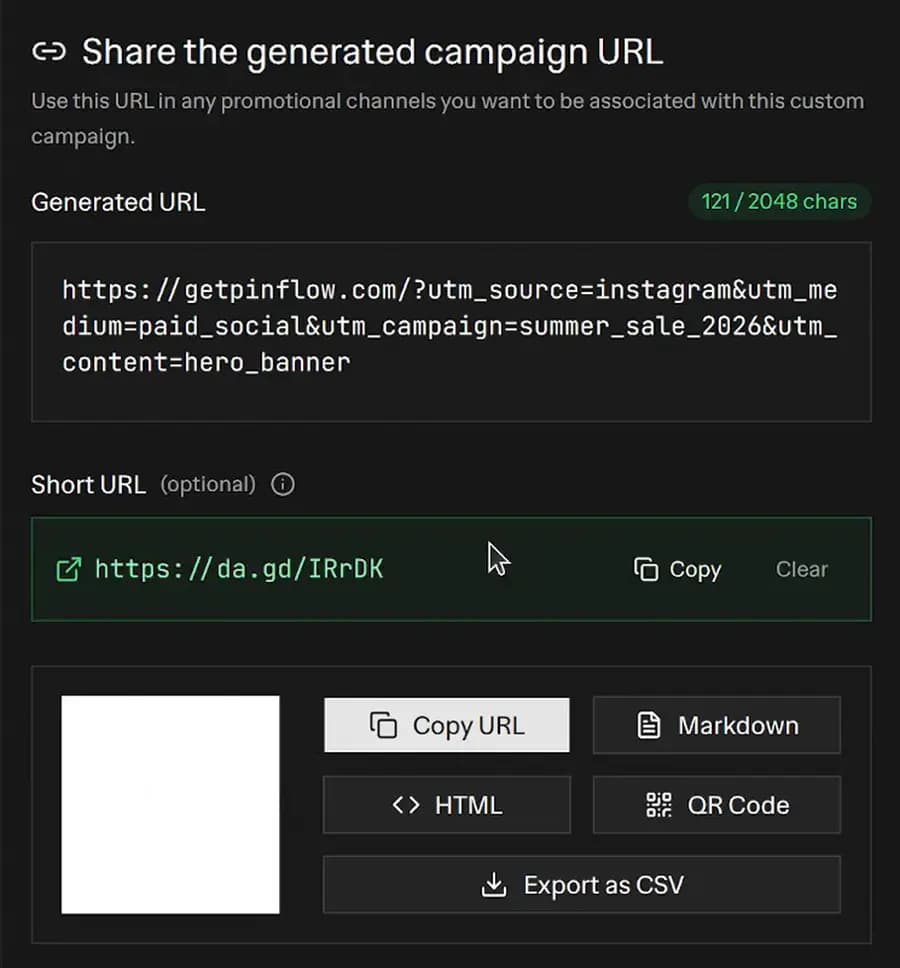 UTM Link Builder output panel showing a generated campaign URL, short URL, and QR code with copy, HTML, Markdown, and CSV export buttons
- Browser-Local Campaign History: Every URL you generate is automatically saved to your browser's local storage. No account needed. The "Recent Links" panel shows your last campaigns with their source, medium, and campaign name at a glance. Restore any previous entry with one click, copy it again, or export your full history as a CSV for your records.
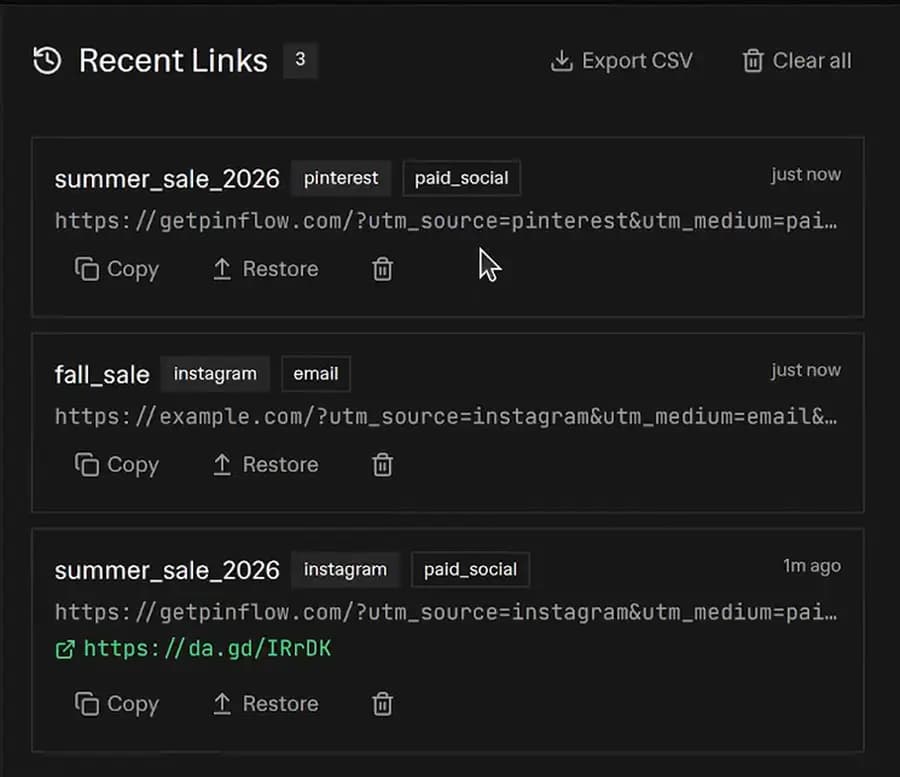 Recent Links panel showing three saved UTM campaigns with copy, restore, and delete actions, plus an Export CSV button
What Does UTM Stand For in Google Analytics?
UTM stands for "Urchin Tracking Module". It was named after Urchin Software. Google acquired this web analytics company in 2005. It eventually became Google Analytics. Today, UTM parameters are the standard way to track marketing campaigns. This includes Google Analytics 4 (GA4) and other platforms.
UTM parameters are short text snippets added to the end of a URL. They tell analytics tools exactly where the click came from. They are sometimes called Google tracking parameters or campaign tags. Think of them as labels. You attach them to each link. Google Analytics then sorts your traffic into meaningful buckets.
A standard link: https://your-store.com/collections/summer
A UTM-tagged link (tracking URL example): https://your-store.com/collections/summer?utm_source=instagram&utm_medium=paid_social&utm_campaign=summer_sale
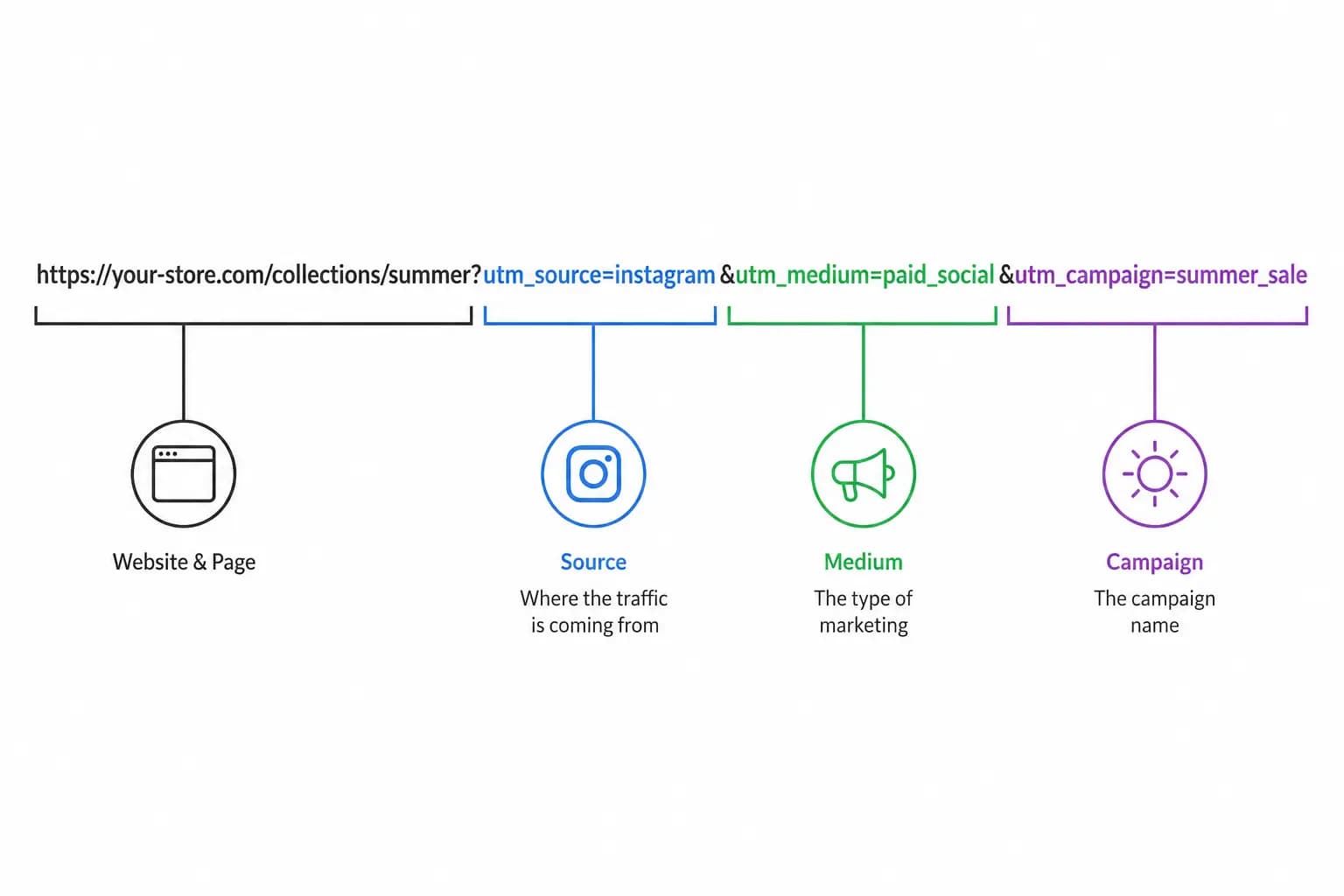 Anatomy of a UTM URL
UTM vs URL - What is the Difference?
A URL is simply a web address. It is the link to your store, product, or collection page. UTM parameters are extra tags appended to that URL. They track where traffic comes from. Creating a Google custom URL requires you to append these specific parameters to your base URL.
| Feature | Standard URL | UTM-Tagged URL (Tracking URL) |
|---|---|---|
| Example | https://store.com/shoes | https://store.com/shoes?utm_source=google&utm_medium=cpc |
| Purpose | Navigate to a page | Navigate AND track the traffic source |
| Analytics | Shows as "Direct" or undifferentiated traffic | Shows exact source, medium, and campaign in GA4 |
| Visibility | Simple and clean | Longer string visible in the address bar |
In short, every UTM link is a URL. However, not every URL has UTM tracking. Adding UTM parameters transforms a plain URL into a trackable link. This is how you create a trackable link in Google Analytics.
Deep Dive: The Six UTM Parameters (Google Parameters) Explained
To build a proper Google custom URL, you need to understand the individual Google parameters. These make up the tracking link.
1. Campaign Source (utm_source) *
This tells you exactly where the traffic came from. It is the origin of your traffic.
Common utm_source examples: google, facebook, instagram, newsletter, klaviyo, pinterest, tiktok, bing.
2. Campaign Medium (utm_medium) *
This tells you how the traffic arrived. Is it paid or organic? It defines the marketing medium.
Examples: cpc (cost per click), organic_social, paid_social, email, affiliate, referral.
3. Campaign Name (utm_campaign) *
This identifies the specific promotion, launch, or overarching marketing initiative. The utm_campaign parameter is how you organize your UTM campaigns in Google Analytics.
Examples: summer_sale_2026, welcome_series, black_friday, spring_collection_launch.
4. Campaign ID (utm_id) [Optional]
This is a unique identifier for your ads campaign. Use this to tie your tracking URLs back to a specific campaign ID in your ad platform (e.g., abc.123). It is particularly useful for Google Ads and Meta Ads campaign reconciliation. It works flawlessly as a Google tracking template variable.
5. Campaign Term (utm_term) [Optional]
This is traditionally used for paid search keywords. It is also highly useful for ecommerce to track audience segments. You can find utm_term in Google Analytics under the traffic acquisition reports.
Examples: retargeting, lookalike_audience, brand_terms, running_shoes_broad.
6. Campaign Content (utm_content) [Optional]
This is used to differentiate creatives or links pointing to the exact same URL. This is critical for A/B testing your creatives.
Examples: hero_banner, video_ad_v2, sidebar_link, red_button_variant.
* Required for meaningful campaign tracking.
How to Track UTM Codes in Google Analytics (GA4)
Once you build your tracking URLs, you need to find UTM data in Google Analytics. Here is how to track UTM codes in GA4:
- Open GA4 and navigate to Reports → Acquisition → Traffic acquisition.
- Change the primary dimension to "Session source / medium". This lets you view UTM in Google Analytics. You will see your
utm_sourceandutm_mediumvalues here. - Add a secondary dimension for "Session campaign". This shows your utm_campaign values alongside source and medium.
- Use the search bar to filter by a specific campaign name, source, or medium. This helps you find UTMs in Google Analytics quickly.
- For utm_term and utm_content, navigate to Explore → Free form. Add "Session manual term" or "Session manual ad content" as dimensions.
Track UTM in GA4 - Pro Tips
- Create custom reports: Build a dedicated GA4 campaign tracking report. This should show utm_source, utm_medium, utm_campaign, and revenue in a single view. This is essential for ecommerce stores relying on Google analytics campaign tagging tool features.
- Use UTM data with Google Tag Manager: Google Tag Manager automatically captures UTM parameters for Shopify stores. You can create custom triggers based on utm_source or utm_campaign values for advanced tracking.
- Connect to Looker Studio: Export your Google Analytics UTM data to Looker Studio dashboards. This is great for client or team reporting.
Advanced Strategies: Sitelink SEO and UTM Tracking
Marketers often ask how UTM parameters affect Sitelink SEO. When you set up Google Ads sitelinks, you should append UTM parameters. This tracks exactly which sitelink extension drove the click. This does not harm your organic sitelink SEO. Google's indexing bots ignore standard UTM parameters. By using a Google tracking template at the campaign level, your sitelink SEO efforts remain separate from your paid tracking data. This gives you a clear view of both.
Tracking URL Examples for Shopify
Here are practical utm link examples for common Shopify marketing scenarios. They showcase a variety of campaign source examples and utm campaigns strategies:
Email Marketing (Klaviyo / Shopify Email)
https://your-store.com/collections/new-arrivals?utm_source=klaviyo&utm_medium=email&utm_campaign=welcome_series&utm_content=hero_banner
Facebook / Meta Ads
https://your-store.com/products/summer-dress?utm_source=facebook&utm_medium=paid_social&utm_campaign=summer_sale_2026&utm_term=lookalike_audience&utm_content=video_ad_v1
Google Ads (using a Google tracking template)
A Google tracking template allows you to automatically append parameters to your Google Ads URLs. A standard Google tracking template looks like this:
{lpurl}?utm_source=google&utm_medium=cpc&utm_campaign={campaignid}&utm_term={keyword}
When resolved, it generates a tracking URL like this:
https://your-store.com/collections/all?utm_source=google&utm_medium=cpc&utm_campaign=brand_search&utm_term=mens_sneakers&utm_id=abc123
Pinterest Ads
https://your-store.com/products/handmade-candle?utm_source=pinterest&utm_medium=paid_social&utm_campaign=holiday_gifts_2026&utm_content=pin_carousel
Instagram Bio Link
https://your-store.com?utm_source=instagram&utm_medium=organic_social&utm_campaign=bio_link
Why Ecommerce Merchants Need UTM Tracking
- Accurate Attribution: GA4 struggles to distinguish dark social or email traffic. Without UTMs, sales from your Klaviyo emails might just show up as "Direct" traffic. UTM tracking in Google Analytics solves this by hard-coding the source.
- Calculate ROI: If you know exactly which Facebook Ad (
utm_content) drove the most sales, you know where to allocate your budget. - A/B Testing Creatives: Test two different images in the same campaign using
utm_content=image_aandutm_content=image_b. - GA4 Campaign Tracking: UTM parameters are the foundation of all campaign tracking in GA4. Without them, your acquisition reports will be incomplete. Your marketing decisions will be blind.
UTM Parameter Best Practices for Shopify Stores
Follow these utm parameter best practices. They keep your Google Analytics data clean and actionable:
- Always use lowercase: UTMs are case-sensitive.
Facebookandfacebookwill appear as two entirely different traffic sources in your analytics. Our tool's Strict Mode handles this automatically. - Use underscores instead of spaces: Spaces break URLs. Our tool's Strict Mode automatically replaces spaces with underscores across all fields.
- Standardize your utm_source values: Decide on canonical campaign source examples. For example, always use
facebook, neverfborFacebook. Stick to them. Our preset suggestions enforce standard naming. - Never tag internal links: Do not put UTMs on your own site navigation or banners. Clicking an internal UTM link will reset the user's session. This destroys the original attribution data. This is a critical error in tracking url setups.
- Document your conventions: Create a shared naming guide. This ensures everyone on your team uses the same utm_source, utm_medium, and utm_campaign values.
- Test before launching: Always click your generated tracking URL. Make sure it loads your Shopify store correctly before spending money on the campaign. Use our "Fill example" button to see a working demo first.
- Use utm_id for ad reconciliation: When running Google Ads or Meta campaigns, include the campaign ID. This helps you reconcile spend data with Google Analytics revenue.
- Leverage a UTM Checker: Always run your final links through a UTM checker like ours. This ensures there are no rogue spaces, capital letters, or missing parameters.
Common Mistakes to Avoid
- Inconsistent Naming: If one team member uses
fband another usesfacebook, your Google Analytics UTM data will be messy. Use our built-in preset suggestions to enforce standard naming conventions across your team. - Ignoring the Safari Length Limit: URLs longer than 2,048 characters risk being truncated by older browsers or Safari. Our tool shows an amber warning at 1,500 characters. It shows a red alert at 2,048 characters to keep you in the safe zone.
- Not using a UTM checker: Always verify your tracking URL before distributing it. Our built-in real-time preview doubles as a UTM checker. You can catch errors before they cost you data.
- Confusing Sitelink SEO: Do not worry about UTM parameters hurting your sitelink SEO. Search engines know how to handle standard Google tracking parameters.
FAQ
What does UTM stand for in Google Analytics?
UTM stands for "Urchin Tracking Module." It is named after Urchin Software. Google acquired this company to build Google Analytics. UTM parameters are now the universal standard for campaign tracking in GA4 and other analytics platforms.
Are UTM parameters case-sensitive?
Yes. Google Analytics treats utm_source=Email and utm_source=email as two completely different traffic sources. Our best practice is to always use lowercase letters. Enable Strict Mode to auto-lowercase all your UTM values. Or use our combobox presets which are all pre-formatted in lowercase.
Do UTM parameters affect SEO?
No. Search engines like Google know to ignore UTM query strings when indexing pages. Adding them will not create duplicate content penalties for your Shopify store. UTM parameters are purely for analytics. They have no impact on search engine rankings or sitelink SEO.
How many UTM parameters should I use?
At a minimum, always use source, medium, and campaign. Add term and content only if you need deeper granularity. This is useful for A/B testing ads or tracking specific audience segments. Use campaign ID when you need to reconcile URLs with ad platform campaign IDs via a Google tracking template.
What is the URL character limit?
Modern browsers support very long URLs. However, the safe limit for cross-browser compatibility is 2,048 characters. Our Free UTM Link Builder includes a real-time character counter. It turns amber at 1,500 characters and red at 2,048 characters. You will always know when your tracking URL is getting too long.
What does Strict Mode do?
Strict Mode is enabled by default. It automatically lowercases all your UTM values and replaces spaces with underscores. This ensures clean, consistent data in Google Analytics. It also prevents common tracking mistakes. You can toggle it off if you need to preserve exact casing or formatting.
Can I use custom values or only the presets?
You can use both! Our smart combobox fields offer curated presets for quick selection. You can also type any custom value you need. If your custom input does not match a preset, a "Use custom" option appears instantly. This makes it more flexible than a standard Google custom URL builder.
How do I view UTMs in Google Analytics?
Navigate to Reports → Acquisition → Traffic acquisition in GA4. Change the primary dimension to "Session source / medium". This shows your utm_source and utm_medium data. Add "Session campaign" as a secondary dimension to view utm_campaign values. For utm_term data, use GA4's Explore feature.
How is this different from the Google Campaign URL Builder?
Our tool offers everything the official Google Analytics campaign tagging tool does. It also includes Shopify-specific presets, a Strict Mode for consistent naming, and a three-tier URL length warning system. It even has a built-in UTM checker. These features are all designed specifically for ecommerce merchants.
More FREE Marketing & Branding tools
Social posts, email signatures, buyer personas, and campaign tracking.
Free Business Card Maker
Design professional business cards with custom templates and your logo. Live preview and instant PDF download. Free, no signup.
Free Gift Certificate Template Maker
Create a printable gift certificate with your business name, logo, amount, and a unique code. Pick from 6 occasion templates, custom colors, and fonts, then download a PNG, SVG, or print-ready PDF. Free, no signup.
Free Gift Tag Template Maker
Design printable gift tags for any occasion. Pick from 20 templates, add To, From, and a message, choose a shape (including a classic punch-hole swing tag) and real-unit size, then download PNG, PDF, or SVG. Bulk-print a personalized sheet from a recipient list. Free, no signup, no watermark.
Free Coupon Template Maker
Create a printable coupon with your business name, logo, discount, headline, and promo code. Pick from 8 coupon templates, add a scannable QR code or barcode, choose size presets, then download a PNG or print-ready PDF. Free, no signup.
Free Bulk Discount Code Generator
Generate thousands of unique, random discount codes in bulk and export a CSV. Set a prefix, length, and character set, attach a percentage, fixed amount, or free shipping rule, and download a Matrixify-ready discounts.csv for Shopify. Free, no signup.
Free Thank You Card Template Maker
Design a printable thank you card for orders. Pick from 20 templates, write your message, add a discount code and a scannable QR, choose a real-unit insert size, then download PNG, PDF, or SVG. Bulk-print a personalized sheet from a customer list. Free, no signup, no watermark.
Free Table Tent Template Maker
Design printable table tents, tent cards, and name tents. Pick a half-fold or tri-fold style, a finished size, and a template, then add a menu special, table number, place card, or scan-to QR. Download a true-size PNG, PDF, or SVG, or bulk-print a tiled sheet. Free, no signup, no watermark.
Free Event Ticket Maker
Design printable event tickets for concerts, galas, sports, conferences, fundraisers, and parties. Pick a template, add your event, date, venue, seat, and price, add a tear-off stub with a matching number, then download a true-size PNG, PDF, or SVG, or a numbered sheet. Free, no signup, no watermark.
Free Raffle Ticket Generator
Make printable numbered raffle tickets for fundraisers, churches, schools, sports 50/50, and holiday draws. Add your prize, drawing date, and price, pick a themed template, and each ticket gets a fill-in Name and Phone counterfoil with a matching number. Draw a winner, then download a true-size PNG, PDF, or SVG, or a numbered sheet. Free, no signup, no watermark.
Free Instagram Post Generator & Creator
Turn 1 product into 1000s of unique Instagram post designs. Select from 36 templates, 28 color palettes, custom fonts, and batch download perfectly sized 1080×1350px posts as ZIP. Built for Shopify merchants. Free, no signup.
Free Shopify Email Signature Generator
Create professional email signatures with store logo, track-order links, returns policy, and promo codes. Copy HTML for Gmail, Outlook, Thunderbird, and Shopify Email. Free, no signup.
Free AI Buyer Persona Generator
Create detailed buyer personas for your Shopify store with AI. Answer guided questions about your customers and get a complete persona with demographics, shopping behavior, and marketing recommendations. Free, no signup.