
Free Coupon Template Maker
Make a printable coupon in minutes. Pick a coupon template, add your business name, logo, discount, and promo code, add a scannable QR code or barcode, then download a free PNG or print-ready PDF. No signup is required.
How to Make a Coupon
A quick walkthrough showing how to pick a coupon template. Add your business name and logo. Set the discount and promo code. Download a print-ready PNG, SVG, or PDF. It is completely free. No sign-up is required.
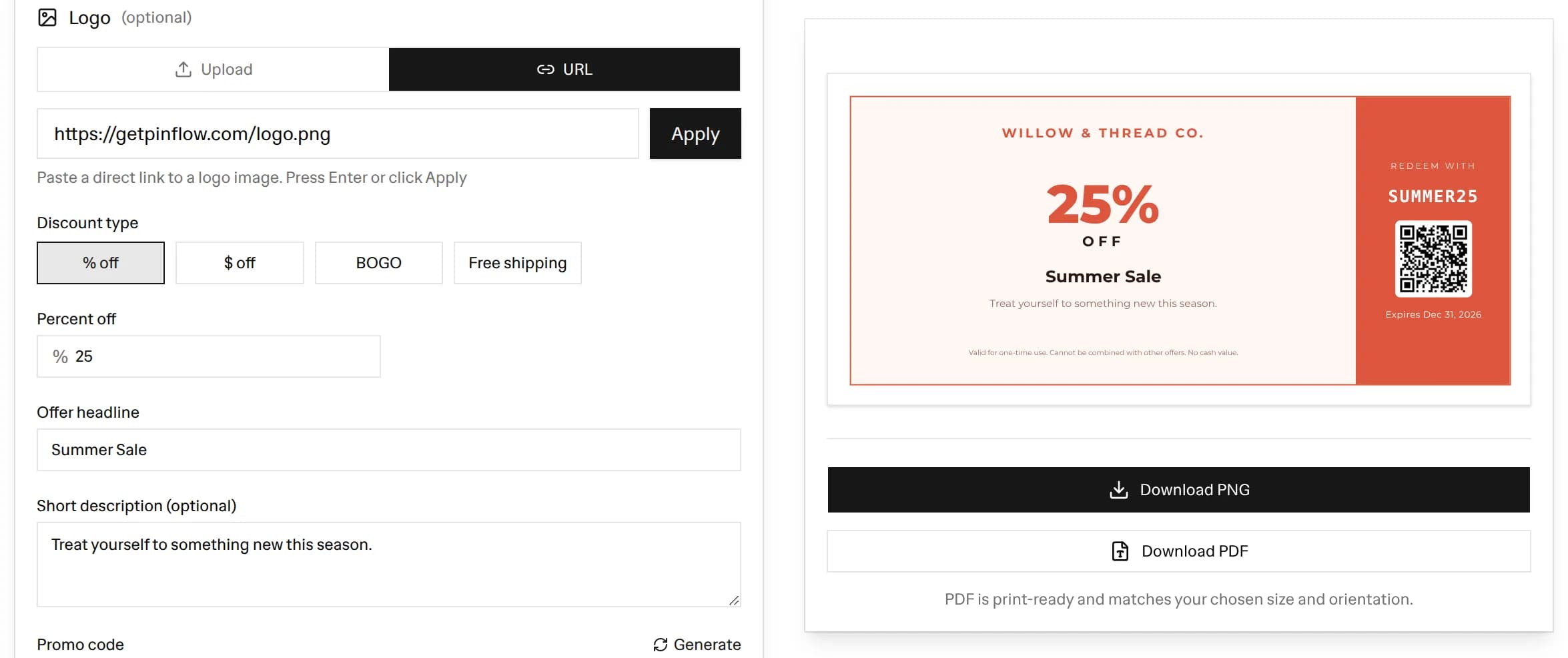 Free coupon maker editor with a 25% off Summer Sale coupon preview, showing the business name, promo code SUMMER25, a scannable QR code, expiry date, and PNG and PDF download buttons
Making a free coupon template takes about a minute. Here is how to use the maker above:
- Enter your business name: This sits at the top of the coupon. Add your logo too if you have one.
- Pick a discount type: Choose percent off, amount off, BOGO, or free shipping. The big number on the coupon updates to match.
- Set the discount value: For a percent or amount discount, type the value. For BOGO or free shipping there is no value to enter.
- Add a headline and description: The headline is the hook, like "Summer Sale". The short description gives one extra line of context.
- Generate a promo code: Click Generate to create a code like SAVE25, or type your own. This is what the customer redeems.
- Choose an expiry date: Set a date, or switch on "No expiry" to hide it.
- Add a scannable code: Turn on a QR code or barcode, built from your promo code, so customers can scan to redeem.
- Pick a template, size, colors, and font: Choose a coupon style, a size preset, a color theme, and a font.
- Download: Export a PNG or a print-ready PDF. Print it, email it, or post it on social.
The live preview updates as you type, so you always see the final coupon before you download.
What to Include on a Coupon
A clear printable coupon has a few standard parts. Include these so the coupon is easy to read and easy to redeem:
- Business name and logo: So customers and your staff know where it is valid.
- The discount: Show the value clearly, for example 25% OFF or $10 OFF. This is the largest element on most designs.
- A headline: A short hook like "Summer Sale" or "Welcome Offer" that sells the deal.
- A promo code: The code the customer enters online or shows in store, like SAVE25.
- An expiry date: A deadline creates urgency and protects your margins.
- Redemption terms: The fine print, such as one-time use or cannot be combined with other offers.
- A scannable code (optional): A QR code or barcode makes redemption fast and trackable.
Choosing a Coupon Template
This maker ships with several coupon styles, so you can match the look to your offer:
- Modern: A clean, versatile layout with a bold discount panel. Good for almost any store.
- Vintage Ticket: A classic ticket look with a perforated tear-off stub for the code.
- Minimal: Airy and elegant, for premium or boutique brands.
- Bold Sale: High-impact with an oversized discount for clearance and flash sales.
- Gift Coupon: A warm ribbon-style header that suits a gift or thank-you offer.
- Food and Dining: A menu-card feel for restaurants and cafes.
- Holiday: Festive bands for seasonal and holiday promotions.
- Black Friday: Dark and loud for your biggest sale of the year.
Pick the one that fits your campaign, then restyle it with your own colors and font.
Coupon Sizes and Printing
Different uses call for different shapes, so the maker has three size presets:
- Coupon strip: A landscape layout that works well in email, on a website, or as a banner.
- Square 1:1: Sized for social posts on Instagram and Pinterest.
- A4 / Letter: A portrait sheet sized for printing at home or at the office.
For printing, download the PDF. It is laid out to match your chosen size and orientation, so it drops onto a standard page cleanly. For sharing online, the PNG is a sharp, high-resolution image you can attach or upload anywhere. If you want a printed coupon book later, print several copies and trim them.
Promo Code Tips
The promo code is the part that connects the coupon to a real discount in your store. A few tips:
- Keep it short and readable: Codes like SAVE25 or WELCOME10 are easy to type and remember.
- Avoid ambiguous characters: Skip letters and numbers that look alike, such as O and 0, to reduce typos. The Generate button does this for you.
- Make it specific: Use a different code per campaign or channel so you can track which one drives sales.
- Match the code to the offer: A code like FREESHIP for a free shipping coupon is clear to the customer.
- Set an expiry: A deadline limits exposure and gives customers a reason to act now.
In Shopify and most ecommerce platforms, create a matching discount code in your admin, then put that exact code on the coupon.
Add a Scannable QR Code or Barcode
A scannable code turns a printed or on-screen coupon into a fast, trackable redemption. Switch the scannable code option to QR or barcode and it is built from your promo code, then baked into the PNG and PDF.
- QR code: Best for phones. A customer scans it to pull up the code or a link.
- Barcode: Best for in-store point-of-sale systems that scan a CODE128 barcode.
If you want more control over the code itself, use our free QR Code Generator to make a standalone QR code, or our free Barcode Generator to make retail-ready barcode labels. Both are free with no signup.
Frequently Asked Questions
Is this coupon template generator free?
Yes, it is 100% free with no signup. Make and download as many coupons as you want as PNG images or print-ready PDF files.
How do I make a coupon?
Pick a coupon template, add your business name, logo, discount, headline, and a promo code, then download it as a PNG or PDF. The live preview updates as you type.
Can I print the coupon?
Yes. Download the PDF for a print-ready page that matches your chosen size, or download a high-resolution PNG. The A4 / Letter preset fits a standard sheet.
What discount types can I show on the coupon?
You can show a percent off (like 25% OFF), an amount off (like $10 OFF), BOGO (buy one, get one), or free shipping. The big number on the coupon updates to match.
Can I add a scannable QR code or barcode to the coupon?
Yes. Switch the scannable code to QR or barcode and it is built from your promo code, so customers can scan it at checkout. The code is baked into the PNG and PDF export.
What size should a printable coupon be?
It depends on use. The coupon strip is a landscape layout that suits email and web, the square 1:1 size fits social posts, and the A4 / Letter preset is sized for a printed page.
Can I use my own colors, fonts, and logo?
Yes. Upload your logo, choose a color theme or set custom accent and text colors, and pick a font. Everything you change shows in the preview and the exported file.
Does the coupon include an expiry date and terms?
You choose. Set an expiry date or switch on No expiry to hide it, and edit the redemption terms fine print to match your store policy.
More FREE Marketing & Branding tools
Social posts, email signatures, buyer personas, and campaign tracking.
Free Business Card Maker
Design professional business cards with custom templates and your logo. Live preview and instant PDF download. Free, no signup.
Free Gift Certificate Template Maker
Create a printable gift certificate with your business name, logo, amount, and a unique code. Pick from 6 occasion templates, custom colors, and fonts, then download a PNG, SVG, or print-ready PDF. Free, no signup.
Free Gift Tag Template Maker
Design printable gift tags for any occasion. Pick from 20 templates, add To, From, and a message, choose a shape (including a classic punch-hole swing tag) and real-unit size, then download PNG, PDF, or SVG. Bulk-print a personalized sheet from a recipient list. Free, no signup, no watermark.
Free Bulk Discount Code Generator
Generate thousands of unique, random discount codes in bulk and export a CSV. Set a prefix, length, and character set, attach a percentage, fixed amount, or free shipping rule, and download a Matrixify-ready discounts.csv for Shopify. Free, no signup.
Free Thank You Card Template Maker
Design a printable thank you card for orders. Pick from 20 templates, write your message, add a discount code and a scannable QR, choose a real-unit insert size, then download PNG, PDF, or SVG. Bulk-print a personalized sheet from a customer list. Free, no signup, no watermark.
Free Table Tent Template Maker
Design printable table tents, tent cards, and name tents. Pick a half-fold or tri-fold style, a finished size, and a template, then add a menu special, table number, place card, or scan-to QR. Download a true-size PNG, PDF, or SVG, or bulk-print a tiled sheet. Free, no signup, no watermark.
Free Event Ticket Maker
Design printable event tickets for concerts, galas, sports, conferences, fundraisers, and parties. Pick a template, add your event, date, venue, seat, and price, add a tear-off stub with a matching number, then download a true-size PNG, PDF, or SVG, or a numbered sheet. Free, no signup, no watermark.
Free Raffle Ticket Generator
Make printable numbered raffle tickets for fundraisers, churches, schools, sports 50/50, and holiday draws. Add your prize, drawing date, and price, pick a themed template, and each ticket gets a fill-in Name and Phone counterfoil with a matching number. Draw a winner, then download a true-size PNG, PDF, or SVG, or a numbered sheet. Free, no signup, no watermark.
Free Instagram Post Generator & Creator
Turn 1 product into 1000s of unique Instagram post designs. Select from 36 templates, 28 color palettes, custom fonts, and batch download perfectly sized 1080×1350px posts as ZIP. Built for Shopify merchants. Free, no signup.
Free Shopify Email Signature Generator
Create professional email signatures with store logo, track-order links, returns policy, and promo codes. Copy HTML for Gmail, Outlook, Thunderbird, and Shopify Email. Free, no signup.
Free AI Buyer Persona Generator
Create detailed buyer personas for your Shopify store with AI. Answer guided questions about your customers and get a complete persona with demographics, shopping behavior, and marketing recommendations. Free, no signup.
Free UTM Link Builder & Campaign URL Generator
Free Google Analytics campaign tagging tool — build trackable UTM campaign URLs for your Shopify store. Set utm_source, utm_campaign, and utm_medium with smart ecommerce presets, real-time tracking URL preview, and GA4 campaign tracking support. No signup.