
Free Gift Certificate Template Maker
Make a printable gift certificate in minutes. Pick a template, add your business name, logo, amount, and a unique code, then download a free PNG, SVG, or print-ready PDF. No signup is required.
How to Make a Gift Certificate
A quick walkthrough showing how to pick a template. Add your business name and logo. Set the gift amount and a unique code. Download a print-ready PNG, SVG, or PDF. It is completely free. No sign-up is required.
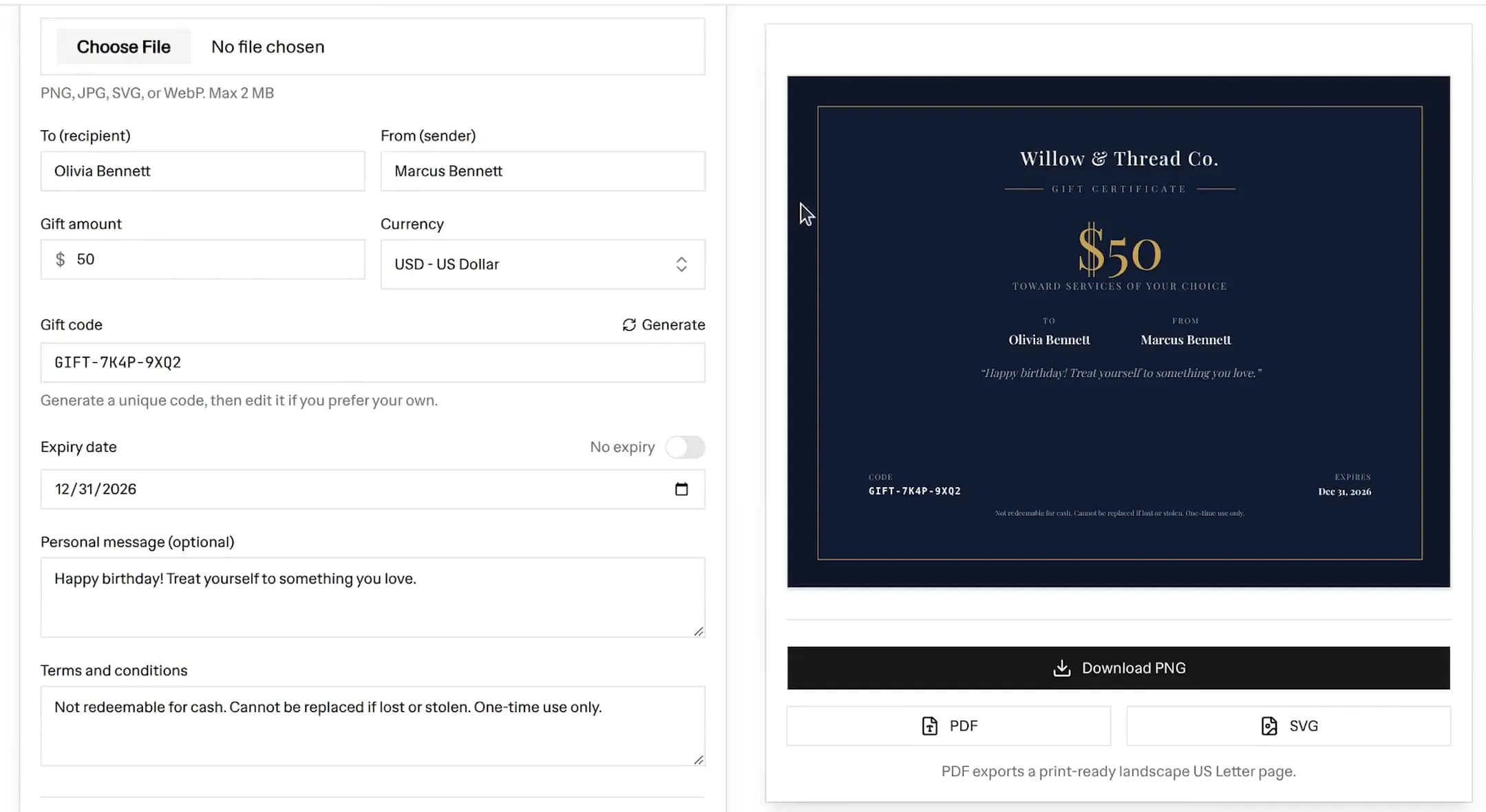 Free gift certificate maker editor with a navy and gold $50 gift certificate preview, showing the recipient, sender, unique code, expiry date, and PNG, PDF, and SVG download buttons
Making a free gift certificate template takes about a minute. Here is how to use the maker above:
- Enter your business name: This sits at the top of the certificate. Add your logo too if you have one.
- Add the recipient and sender: Fill in the "To" and "From" fields so it reads like a real gift.
- Set the gift amount and currency: Type the value, then pick your currency. The symbol updates in the preview.
- Generate a unique code: Click Generate to create a code like GIFT-AB12-CD34. You can edit it or type your own.
- Choose an expiry date: Set a date, or switch on "No expiry" to hide it.
- Add a personal message: A short note makes the gift feel thoughtful. This is optional.
- Pick a template, colors, and font: Choose from 12 occasion designs, set a color theme, and select a font.
- Download: Export a PNG, an SVG, or a print-ready PDF. Print it at home or email it to the recipient.
The live preview updates as you type, so you always see the final result before you download.
What to Include on a Gift Certificate
A clear printable gift certificate template has a few standard parts. Include these so the certificate is easy to read and easy to redeem:
- Business name and logo: So the recipient and your staff know where it is valid.
- The words "Gift Certificate": Make the purpose obvious at a glance.
- The gift amount: Show the value clearly, for example $50. This is the largest element on most designs.
- Recipient and sender: The "To" and "From" lines personalise the gift.
- A unique code: This is how you track and validate redemptions. One code per certificate.
- An expiry date: Optional, but it protects your cash flow. Check your local rules first, since some places limit or ban expiry on gift cards.
- Terms and conditions: A short line like "not redeemable for cash, one-time use only" sets expectations.
The tool prefills sensible terms for you, and you can edit every field.
Gift Certificate vs Gift Voucher
People use these terms in different ways, so it helps to know the difference. A gift certificate usually carries a set cash value that the recipient can spend on anything in your store. A gift voucher template often refers to a specific product, service, or discount, such as "one free haircut" or "20% off your next order".
In practice the two overlap, and many businesses use the words to mean the same thing. This maker can produce either. For a cash-value gift, fill in the amount field. For a service or product gift, put the offer in the personal message and leave the amount blank or set it to the service value.
Sizes and Printing Tips
The certificate is a landscape design sized to fill a US Letter page, which is 11 by 8.5 inches. That makes it easy to print at home or at any print shop. Here are a few tips for clean prints:
- Use the PDF for printing: The PDF places the certificate full-page in landscape, ready to print without resizing.
- Use the PNG for email and screens: The PNG is high resolution, so it stays crisp on phones and in email.
- Print on heavier paper: Card stock around 200 to 300 gsm feels more like a real gift card than plain printer paper.
- Trim to a half-sheet: If you want a smaller card, print two per page or trim the printed page in half.
- Check your margins: Set your printer to "fit to page" or "actual size" and turn off any extra scaling so the design is not cut off.
The SVG export is a vector file. It scales to any size without blur, which is handy if a printer asks for a vector format.
Christmas and Holiday Gift Certificate Ideas
A christmas gift certificate template is one of the easiest ways to capture last-minute holiday shoppers. Pick the Festive template, choose a red or green color theme, and add a short holiday message. A few ideas:
- Sell them in-store and online: A printable certificate is instant, so it works even on December 24th.
- Bundle with a product: Add a small gift certificate to an order as a thank-you that brings the customer back in January.
- Offer a bonus: For example, "Spend $50, get a $10 gift certificate". This lifts your average order value.
- Match your branding: Upload your logo and set custom colors so it looks like part of your shop, not a generic template.
Gift Certificate Ideas by Industry
Different businesses use gift certificates in different ways. The maker includes templates tuned for these niches.
Restaurants and Cafes
Use the Restaurant template for a dining gift certificate. Set a cash value, like $25 or $50, that covers a meal for one or two. Add a line such as "valid for dine-in and takeout" in the terms. Restaurant gift certificates are popular for birthdays, anniversaries, and corporate thank-you gifts.
Spa and Salon
The Spa & Salon template uses a calm, airy layout. You can sell a cash-value certificate, or use the message field to gift a specific service such as "one 60-minute massage". Salon and spa gifts sell strongly around Mother's Day, Valentine's Day, and the holidays.
Fitness, Studios, and Coaches
Gyms, yoga studios, and personal trainers can gift a number of classes or a block of sessions. Put the offer in the message, for example "5-class pass", and add an expiry so unused passes do not sit on your books forever. A unique code lets you track who redeems what.
Gift Certificate Ideas for Shopify Merchants
If you run a Shopify store, a printable gift certificate is a quick win that you can launch today without an app. A few ways to use it:
- Sell store credit: Offer set amounts like $25, $50, and $100, and email the buyer a PDF after checkout.
- Run a promo: Pair a gift certificate with a campaign, such as a giveaway prize or a loyalty reward.
- Drive repeat purchases: A gift certificate gives the recipient a reason to visit your store, and many spend more than the certificate value.
- Keep your branding consistent: Add your logo, brand colors, and font so the certificate matches the rest of your store.
When you are ready to scale, you can move to native Shopify gift cards for automatic balance tracking. The codes you generate here help you keep things organised until then.
Frequently asked questions
Is this gift certificate generator free?
Yes, it is 100% free with no signup. Make and download as many gift certificates as you want as PNG, SVG, or PDF files.
How do I make a gift certificate?
Pick a template, add your business name, logo, the gift amount, a recipient, and a unique code, then download it as a PDF or PNG. The live preview updates as you type.
Can I print the gift certificate?
Yes. Download the PDF for a print-ready landscape US Letter page, or download a high-resolution PNG. Both fit a standard 8.5 by 11 inch sheet.
What size is the gift certificate?
The certificate is a landscape design sized to fill a US Letter page (11 by 8.5 inches). It also prints cleanly trimmed to a half-sheet if you prefer a smaller card.
Do I need to add a unique code?
It is recommended. Click Generate to create a code like GIFT-AB12-CD34, then track redemptions against it. You can edit the code or type your own.
What is the difference between a gift certificate and a gift voucher?
They are mostly the same thing. A gift certificate usually carries a set cash value to spend in your store, while a gift voucher often refers to a specific product, service, or discount. This tool can make either.
Can I add my own logo and colors?
Yes. Upload your logo, choose a color theme or set custom accent and text colors, and pick a font. Everything you change appears in the preview and the exported file.
Does the gift certificate have an expiry date?
You choose. Set an expiry date, or switch on No expiry to hide the date from the certificate entirely.
More FREE Marketing & Branding tools
Social posts, email signatures, buyer personas, and campaign tracking.
Free Business Card Maker
Design professional business cards with custom templates and your logo. Live preview and instant PDF download. Free, no signup.
Free Gift Tag Template Maker
Design printable gift tags for any occasion. Pick from 20 templates, add To, From, and a message, choose a shape (including a classic punch-hole swing tag) and real-unit size, then download PNG, PDF, or SVG. Bulk-print a personalized sheet from a recipient list. Free, no signup, no watermark.
Free Coupon Template Maker
Create a printable coupon with your business name, logo, discount, headline, and promo code. Pick from 8 coupon templates, add a scannable QR code or barcode, choose size presets, then download a PNG or print-ready PDF. Free, no signup.
Free Bulk Discount Code Generator
Generate thousands of unique, random discount codes in bulk and export a CSV. Set a prefix, length, and character set, attach a percentage, fixed amount, or free shipping rule, and download a Matrixify-ready discounts.csv for Shopify. Free, no signup.
Free Thank You Card Template Maker
Design a printable thank you card for orders. Pick from 20 templates, write your message, add a discount code and a scannable QR, choose a real-unit insert size, then download PNG, PDF, or SVG. Bulk-print a personalized sheet from a customer list. Free, no signup, no watermark.
Free Table Tent Template Maker
Design printable table tents, tent cards, and name tents. Pick a half-fold or tri-fold style, a finished size, and a template, then add a menu special, table number, place card, or scan-to QR. Download a true-size PNG, PDF, or SVG, or bulk-print a tiled sheet. Free, no signup, no watermark.
Free Event Ticket Maker
Design printable event tickets for concerts, galas, sports, conferences, fundraisers, and parties. Pick a template, add your event, date, venue, seat, and price, add a tear-off stub with a matching number, then download a true-size PNG, PDF, or SVG, or a numbered sheet. Free, no signup, no watermark.
Free Raffle Ticket Generator
Make printable numbered raffle tickets for fundraisers, churches, schools, sports 50/50, and holiday draws. Add your prize, drawing date, and price, pick a themed template, and each ticket gets a fill-in Name and Phone counterfoil with a matching number. Draw a winner, then download a true-size PNG, PDF, or SVG, or a numbered sheet. Free, no signup, no watermark.
Free Instagram Post Generator & Creator
Turn 1 product into 1000s of unique Instagram post designs. Select from 36 templates, 28 color palettes, custom fonts, and batch download perfectly sized 1080×1350px posts as ZIP. Built for Shopify merchants. Free, no signup.
Free Shopify Email Signature Generator
Create professional email signatures with store logo, track-order links, returns policy, and promo codes. Copy HTML for Gmail, Outlook, Thunderbird, and Shopify Email. Free, no signup.
Free AI Buyer Persona Generator
Create detailed buyer personas for your Shopify store with AI. Answer guided questions about your customers and get a complete persona with demographics, shopping behavior, and marketing recommendations. Free, no signup.
Free UTM Link Builder & Campaign URL Generator
Free Google Analytics campaign tagging tool — build trackable UTM campaign URLs for your Shopify store. Set utm_source, utm_campaign, and utm_medium with smart ecommerce presets, real-time tracking URL preview, and GA4 campaign tracking support. No signup.