
Shopify: Exclude Products From a Discount (Tested)
There is no exclude field on a Shopify discount. You exclude by pointing it at a collection that already leaves those items out. Two ways to build that, both tested.
By AjayCodeWiz · September 10, 2026 · 8 min read
The problem
You want 20% off the store. You do not want 20% off the clearance rail, the gift cards, or the one product that already sits on a wafer-thin margin.
You open the discount, look for a way to say "except these", and there is nothing. Applies to: All products, Specific collections, Specific products. No exclusions anywhere.
I reproduced this on a test store and worked out the two ways to do it. Neither is on the discount page, which is why it is hard to find.
What "All products" actually does
Start with what goes wrong. I made a 20% automatic discount set to All products and put two things in a cart: a $40 cotton tee and a $60 clearance rain jacket.
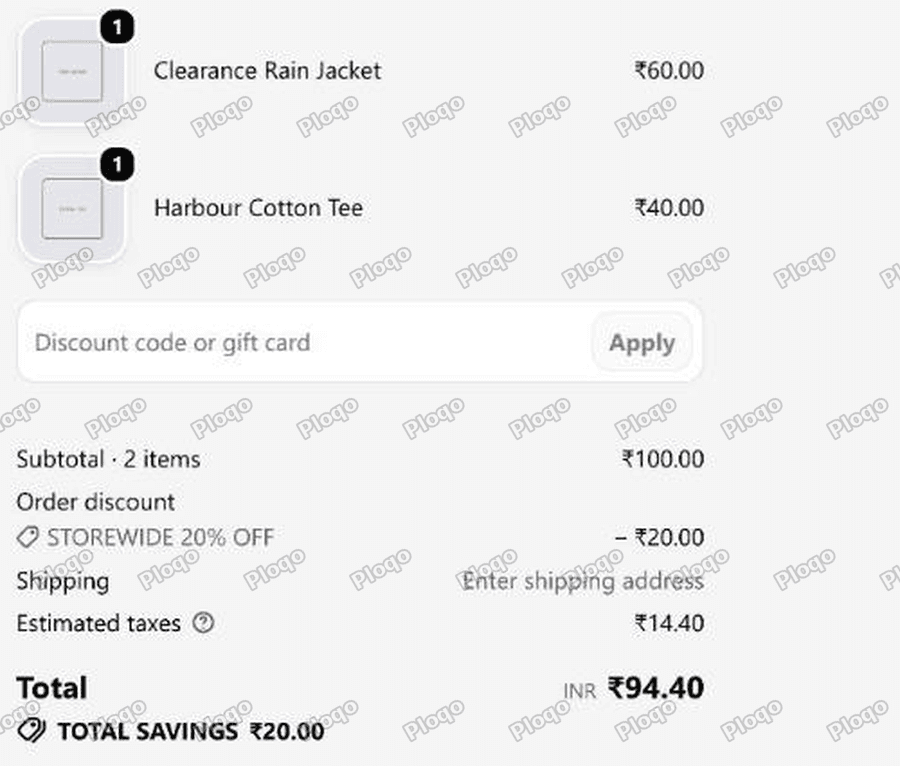 Shopify checkout showing a 100 subtotal with a 20.00 order discount applied across the whole cart
Subtotal $100. Discount $20.00. Total savings $20.00.
The clearance jacket got its 20% along with everything else. That is $12 off an item that had no margin left.
There is a second problem visible in that screenshot. Choosing "All products" turned the discount into an order discount, so it shows as one line against the whole cart. You cannot see which items it hit, because in Shopify's model it did not hit items at all, it hit the order.
That matters for the fix: to exclude anything, the discount has to target products rather than the order.
The idea: exclude in the collection, not in the discount
Shopify has no exclusion field on a discount. What it has is Specific collections.
So you make a collection that already excludes what you want to leave out, and point the discount at that. The discount does not need to know anything about exclusions. The collection does the work.
The current collection builder gives you two ways to build that collection, and both work. Use whichever fits.
Route A: exclude by tag, so it looks after itself
Best when the exclusion is a rule rather than a list. New clearance items should drop out on their own.
Tag every product that must not be discounted. I used no-discount.
Then go to Products → Collections → Create collection, name it something like "Discount eligible", and choose Automated so products match by condition. Set the condition to:
Tag - does not include - no-discount
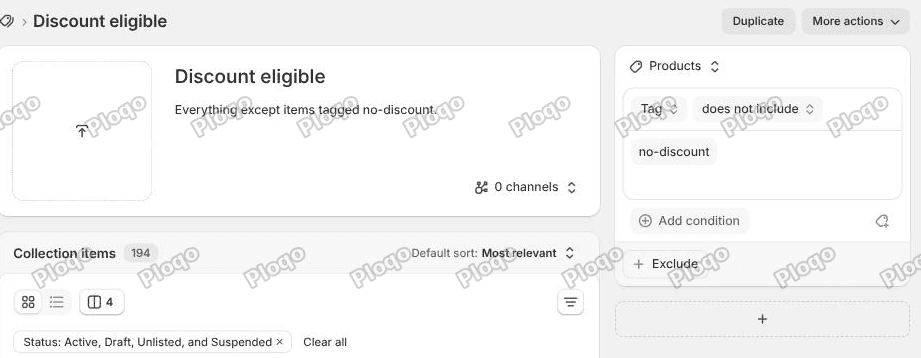 The collection conditions panel showing Tag does not include no-discount, with 194 collection items
That is it. My store has 195 products; the collection picked up 194 and left out the tagged jacket.
Because it is automated, a product you tag next month falls out of the collection by itself, and so falls out of every discount pointed at it. Nothing to remember, nothing to maintain.
A note on wording, since older guides say something different: the API calls this relation NOT_EQUALS, and the current admin words it "does not include". Same rule.
Route B: exclude specific products by hand
Best when the exclusion is a short, fixed list and you do not want to manage tags.
The collection editor now has a dedicated Exclude block. On the collection page, under the conditions, click + Exclude and choose Products (you can also exclude whole collections).
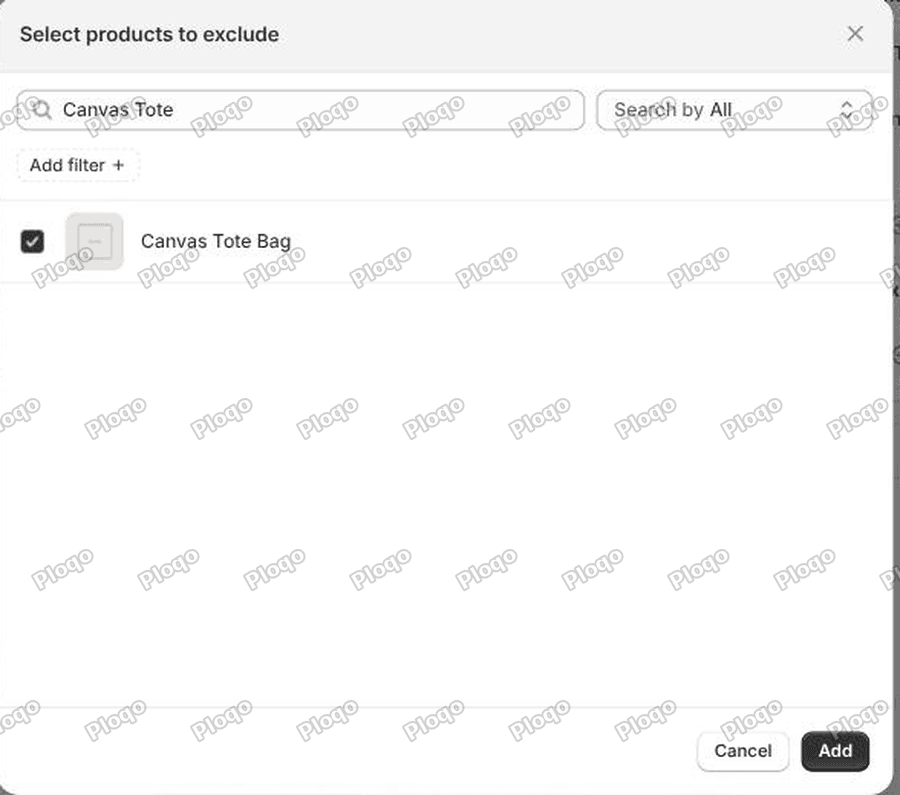 The Select products to exclude dialog with Canvas Tote Bag ticked
Pick the products and click Add.
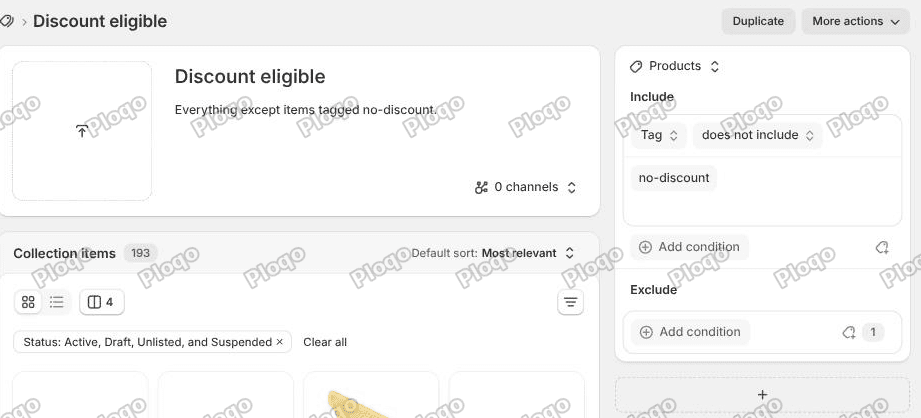 The collection panel showing an Include block with the tag condition and an Exclude block with a count of 1, and the item count down to 193
The panel now has two blocks, Include and Exclude, and the Exclude block shows a count. My collection went from 194 items to 193 the moment I excluded the tote.
The two routes combine, which is what that screenshot shows: a tag condition doing the general rule, plus a hand-picked exclusion on top. Remember to press Save. The Exclude picker closes as if it saved itself, but the collection has unsaved changes until you hit Save in the top bar.
Point the discount at the collection
Now open the discount and change Applies to from All products to Specific collections, then pick the collection you just built.
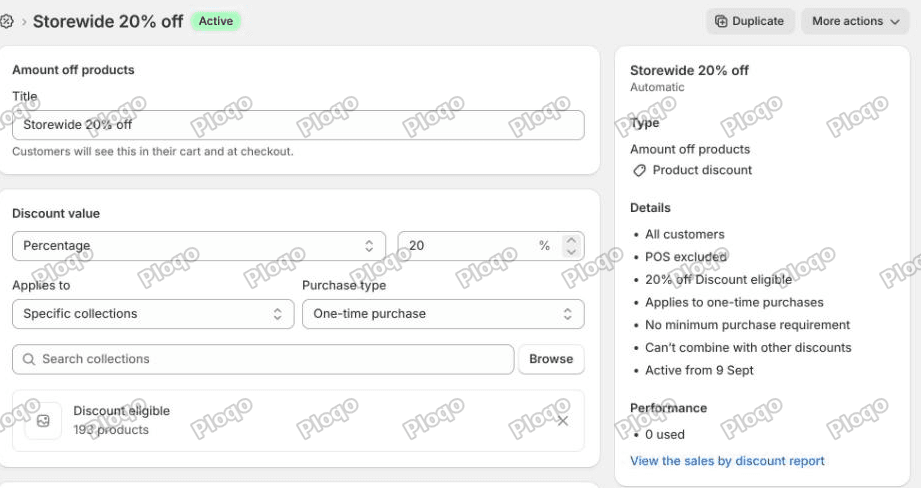 The discount page showing Applies to Specific collections with Discount eligible selected, 193 products, and Type Product discount
Two things to notice in the sidebar. The Type now reads "Amount off products - Product discount" rather than an order discount, which is what makes per-item exclusion possible at all. And the Details list summarises it as "20% off Discount eligible".
The collection does not need to be published to the Online Store for this to work. Mine shows "0 channels" and the discount uses it perfectly well. Keeping it unpublished is usually what you want, since it is a plumbing collection and not something shoppers should browse.
Proving it at checkout
Same 20% discount, now pointed at the collection. Cart: the $40 tee, the $25 tote excluded by hand, and the $60 clearance jacket excluded by tag.
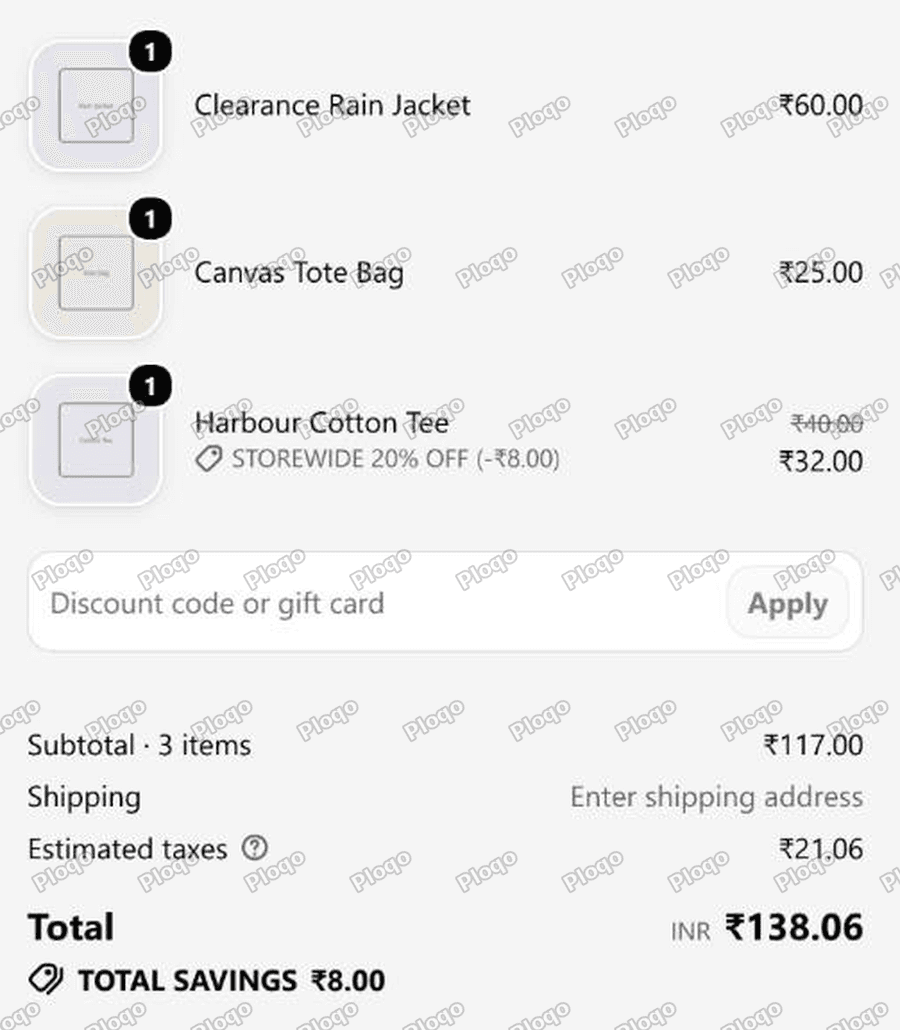 Checkout showing the rain jacket at 60.00 and the tote at 25.00 with no discount, and the tee reduced from 40.00 to 32.00 by the 20 percent discount
- Clearance Rain Jacket $60.00 - untouched, excluded by the tag rule
- Canvas Tote Bag $25.00 - untouched, excluded by the product picker
- Harbour Cotton Tee $40.00 → $32.00 - "STOREWIDE 20% OFF (-$8.00)"
Subtotal $117.00, total savings $8.00.
Compare with the first screenshot on this page, where the same style of cart gave away $20.00. Both exclusion routes hold at checkout, in the same order, at the same time.
Excluding gift cards from a discount
Gift cards are the exclusion almost every store needs and almost every store forgets. A 20% discount that applies to gift cards lets someone buy $100 of store credit for $80, which is a straightforward loss.
Gift cards are not excluded automatically. Handle them like anything else:
- Tag them
no-discountif you are using Route A, or - Add them to the Exclude block if you are using Route B
If you already have discounts running on All products, check right now whether you sell gift cards. This is the cheapest thing on the page to fix.
Excluding sale items from a discount code
The usual ask is "20% off, but not on things already reduced". There is no condition for "has a compare-at price" in the collection builder, so you cannot express it directly.
Two workable versions:
Tag as you discount. When you put something on sale, add the no-discount tag in the same edit. It is one extra field in a bulk edit, and the automated collection does the rest.
Keep a Sale collection and exclude it. If you already group reduced items into a Sale collection for the storefront, use + Exclude → Collections and exclude that whole collection. Then your existing merchandising drives the exclusion and there is nothing new to maintain.
The second is cleaner if your sale process already runs through a collection.
Excluding a whole brand or product type
Same shape, different condition. Instead of a tag, use:
- Product vendor - is not equal to - the brand
- Product type - is not equal to - the type
The collection builder supports several conditions at once with an "all conditions" match, so you can say "does not include tag no-discount" and "vendor is not equal to X" in the same collection.
Tags are still the more flexible tool, because a product has exactly one vendor and one type but any number of tags.
Does this work for Buy X Get Y?
Yes, and it is worth doing. Both Customer buys and Customer gets accept collections, so you can point either at your exclusion collection.
It matters more than it looks. In a free gift promotion, excluded items also stop counting toward the spend threshold when they are outside the Customer buys collection. That is correct behaviour if the exclusion exists because the item has no margin, and a surprise if you were not expecting it.
What to check if excluded items are still discounted
The discount still says All products. Changing the collection does nothing until the discount points at it. This is the most common miss.
The product is not actually tagged. Tags are case sensitive in some places and easy to fat-finger. Open the collection and confirm the item is absent from the list rather than assuming.
Collection membership has not caught up. Automated collections rebuild in the background. Give it a minute and reload the collection page; the item count is the fastest thing to watch.
Another discount is doing it. You fixed one discount, and a second one, possibly an automatic one you forgot, is still set to All products. Check the whole Discounts list, not just the one you were editing, and see discount combinations for how two of them interact.
You meant a quantity break, not an exclusion. "Cheaper by the case" is a different tool. That is tiered pricing.
It is a shipping discount. Shipping discounts do not apply to products at all, so product exclusions have no effect on them. Restrict those by shipping profile or zone instead.
The main points
- Shopify has no exclude field on a discount. You exclude in the collection and point the discount at it.
- Route A, scales by itself: tag the items
no-discount, build an automated collection with Tag - does not include - no-discount. - Route B, fixed list: on the collection, + Exclude → Products and pick them. The item count drops immediately.
- Both work together, and both were verified in the same cart.
- Set the discount's Applies to to Specific collections. That also flips it from an order discount to a product discount, which is what makes item-level exclusion possible.
- The collection does not need to be published to a sales channel.
- Exclude your gift cards. Nothing does it for you.
- Verified: the same cart shape gave away $20.00 on All products and $8.00 with the exclusions in place.
Spending too long on manual Shopify busywork?
PinFlow turns your Shopify catalog into Pinterest pins and posts them on a schedule, automatically. Same idea as the collection rule above, let the system handle the repetitive part.
Get PinFlow on the Shopify App StoreMore Shopify fixes
More community-sourced Shopify guides, tested on a live store.
Shopify Admin
Schedule a Black Friday Sale in Shopify (Auto Start and End)
Give the discount its own start and end date and put the sale banner in an Event rollout with the same dates. Both start at midnight and end after Cyber Monday.
Shopify Admin
Shopify Discount Limit: One Code for More Than 100 Products
Shopify stops you at 100 items when a discount applies to specific products. There is no setting to raise it, but you do not need one. Point the discount at a collection and one code covers thousands of products. Tested on a store, with the B2B route too.
Shopify Admin
Shopify Discount Types: Amount Off Products vs Order
Shopify has four discount types, and two of them work out a percentage in different ways. One rounds every single unit, the other rounds the order once. On low unit prices that difference is real money. Tested on a live store.