
How to Post on Pinterest Without Getting Banned
Pinterest wants a pin every day, but a 50 product store runs dry in weeks. Here is what Pinterest flags when you repeat, and how to repeat safely.
Updated September 7, 2026 · 9 min read
Watch the walkthrough
Ten minutes on the whole problem: why a small catalogue forces you to repeat, what Pinterest treats as spam, and the settings in PinFlow that handle each one.
Why a small catalogue forces you to repeat
Pinterest rewards consistency. It wants something new from you every day, and an account that posts daily beats one that posts thirty pins on a Sunday and nothing for a fortnight.
That is easy advice to give and hard to follow with a real Shopify store. If you have 50 products and you post one pin a day, you are out of products in 50 days. At five pins a day you are out in ten.
Put a year on it and the arithmetic gets blunt. Five pins a day is 1,825 pins in twelve months. Spread across 50 products, that is 36 pins pointing at every single product page.
So the question was never whether to repeat. You have no choice. The question is how to repeat without Pinterest minding.
 Fifty products, 1,825 pins a year at five a day, and 36 pins needed per product
Can Pinterest ban you for repeating pins?
Not for repeating the product. Pinterest has a name for a new image on a link you have used before. It calls it a fresh pin, and it wants them.
The same link is fine. What is not fine is the same picture. Post a byte for byte copy of an image you have already posted and Pinterest quietly stops showing it, because it de-duplicates on the image itself.
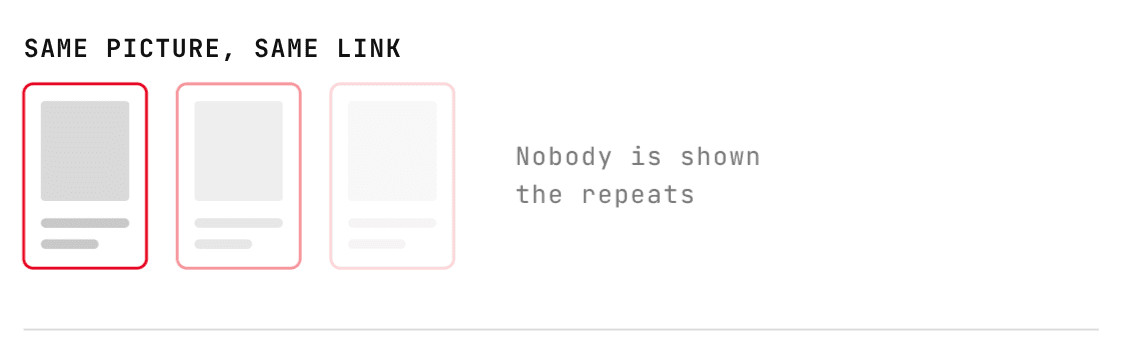 The same pin posted three times, each copy fainter than the last, because nobody is shown the repeats
There are three things that actually get an account throttled, and posting a lot is not one of them:
- The picture. The same image again, even weeks later.
- The rhythm. A posting pattern no person could keep: same count every day, same window, same gaps.
- The links. A brand new domain that starts firing out a hundred outbound links in week one.
The rest of this article takes them in that order.
Change the picture, not the product
A repeat only reads as a repeat when it looks the same. Change any one of these and it counts as a new pin:
- A different layout or crop of the same photo
- A different colour behind the same product
- A different headline, and that means different words, not just a different font
- A different description
The description matters most. It is the part Pinterest actually reads, so rewrite it rather than pasting the old one.
 Three pins for the same link with different layouts and colours, all counting as new
If you are doing this by hand, that is the work: build several templates, several colour treatments, and write fresh copy each time. PinFlow does it for you, which is the next section.
Do not post like a clock
This is the one most scheduling tools get wrong, and it is the easiest signal to spot.
Ten pins a day. Every day. Always nine in the morning to six in the evening. Always the same gap between pins. No person posts like that. Scripts do, and an account that looks scripted is the one that picks up a Pinterest shadow ban, where your pins still publish but almost nobody is shown them.
What a real account looks like is messier. Some days six pins, some days three. Times that drift. Gaps that are never identical. Same volume across the week, completely different shape.
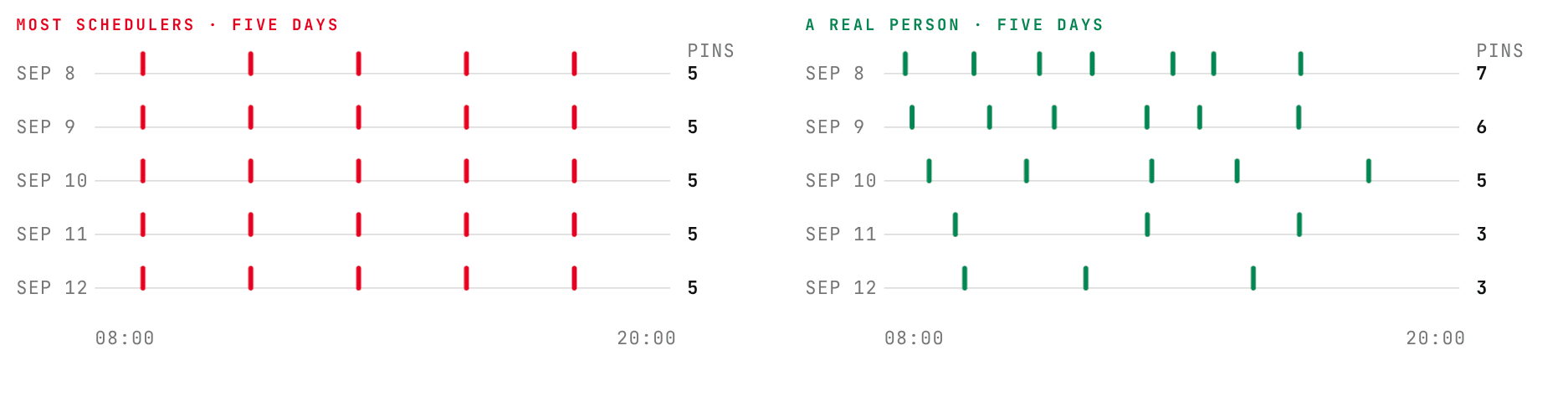 Five days from a typical scheduler, five pins at identical times each day, next to five days from a real account with counts of seven, six, five, three and three at varying times
Go slow with links on a new store
Pinterest keeps a trust level for every website, and a domain nobody has ever clicked starts at zero.
If your store is new, do not point a hundred pins at it in your first fortnight. That pattern is indistinguishable from affiliate spam, because it is the same pattern. Build up presence first, then start sending traffic.
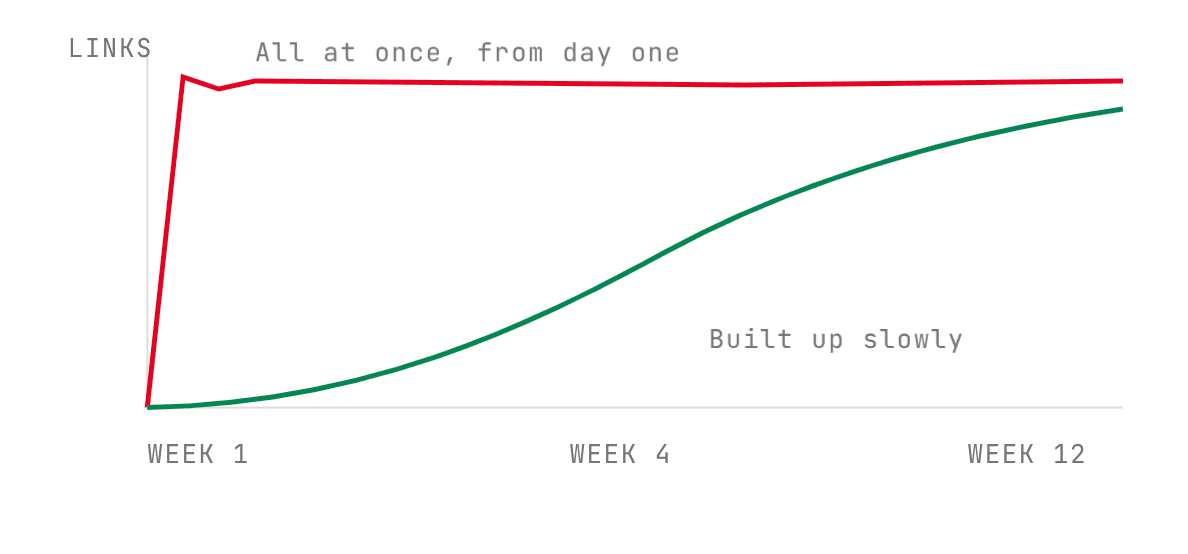 Outbound links against time: a red line jumping to full volume in week one, and a green line building up gradually to week twelve
How PinFlow keeps every pin different
Templates, colour palettes and product images are all picked per pin, so two pins for the same product months apart share nothing but the link.
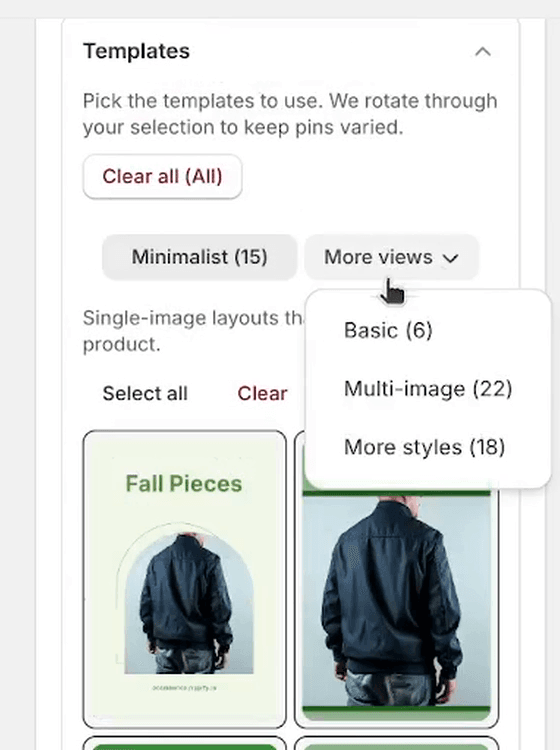 The Templates panel in Pin Studio, with Minimalist, Basic, Multi-image and More styles groups and their counts
The template sets are grouped by style, and PinFlow rotates through whatever you have selected rather than working down the list in order. Going in order would put the same product on days that sit next to each other; stepping through the list instead means every product still gets used, but never twice in a row.
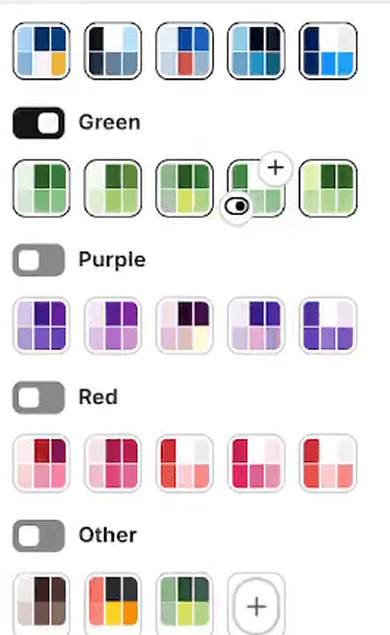 Colour palette groups in Pin Studio: Green, Purple, Red and Other, each with a toggle and five palettes
Colours work the same way, and they step by a different amount from the templates, so the two sequences never fall into step with each other.
How PinFlow varies the schedule
Three layers, all on the Pin Scheduling page.
The daily count moves. Set five a day with a range of two and you get somewhere between three and seven, decided per date rather than per run.
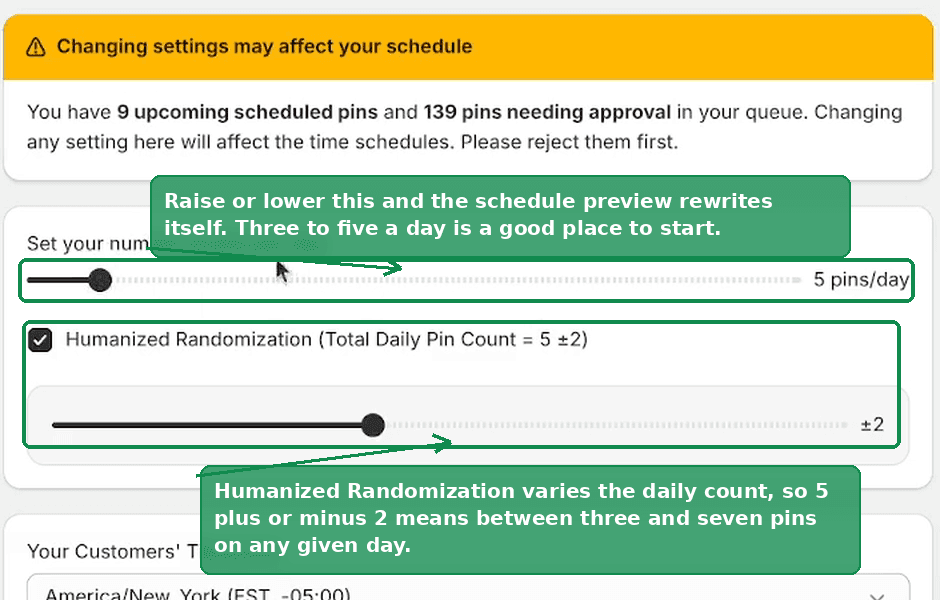 The pins per day slider set to five, with Humanized Randomization enabled at plus or minus two
The window drifts. Start and end flex independently, so a nine to six window opens a little earlier one day and later the next.
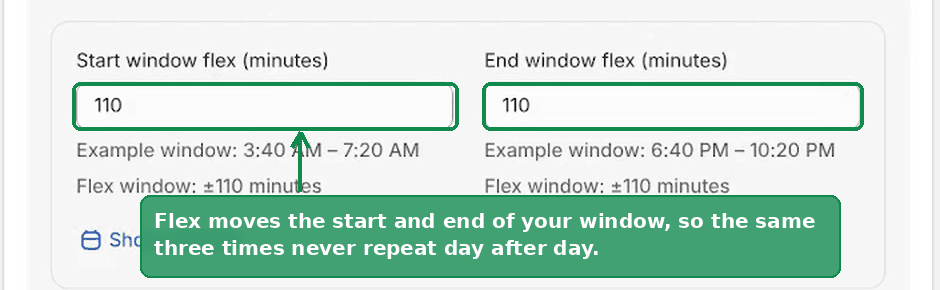 Start window flex and end window flex fields, with the resulting example window shown underneath
Each pin is nudged. The day is cut into equal slices with a pin in the middle of each, then floating minutes move it by up to fifteen minutes either way, so the gaps stop being identical.
Stack all three and no two days come out the same shape.
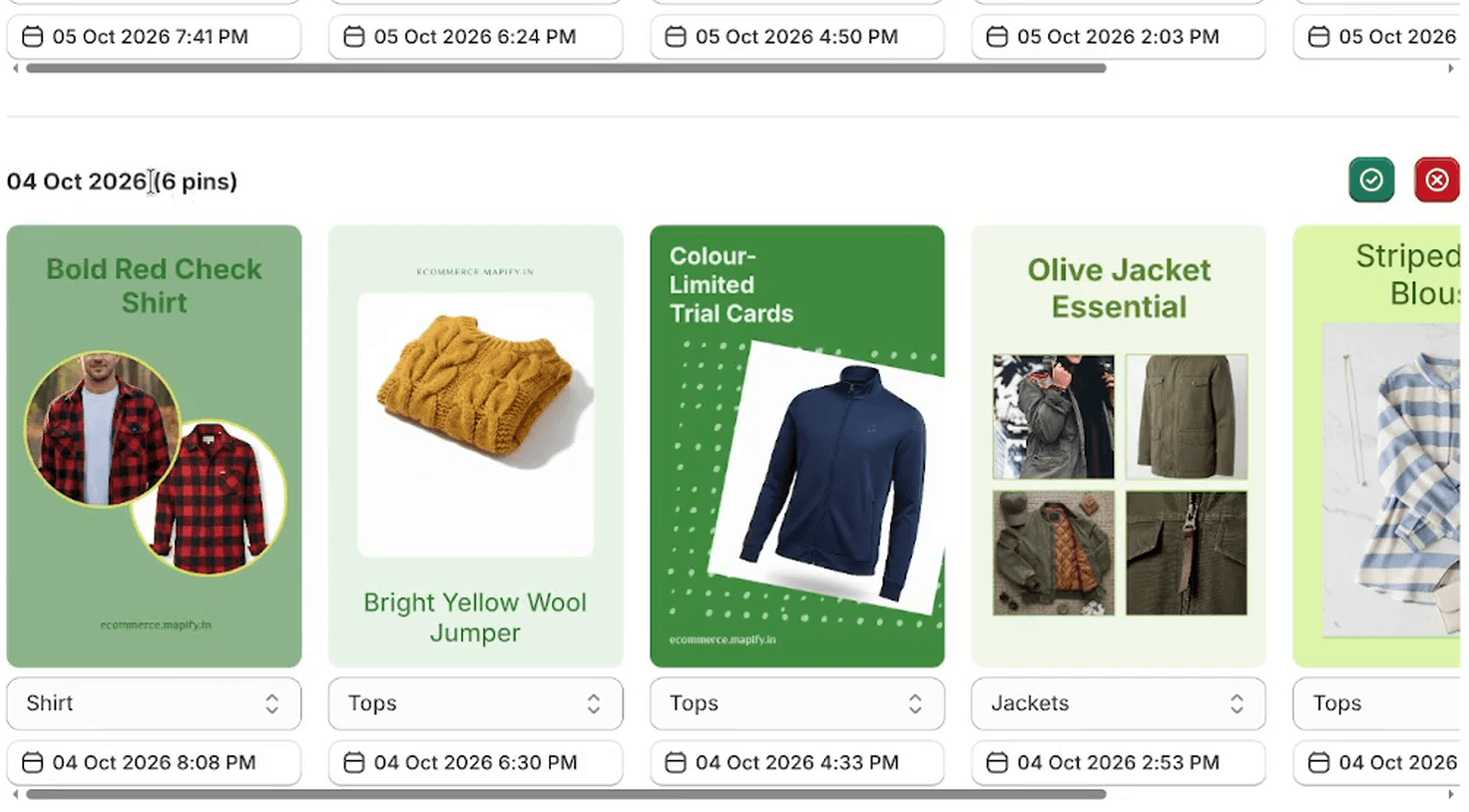 One day in the PinFlow calendar showing six pins and their publish times, none on a round number
Look at the times along the bottom. 8:08 PM, 6:30 PM, 4:33 PM, 2:53 PM. Not one round number and not one equal gap.
Why the randomness is seeded, not truly random
None of that variation is actually random.
Every date is turned into a number, and that number decides all three layers. Same date in, same schedule out. Regenerate a batch and the days you already reviewed come back with the same counts and the same times.
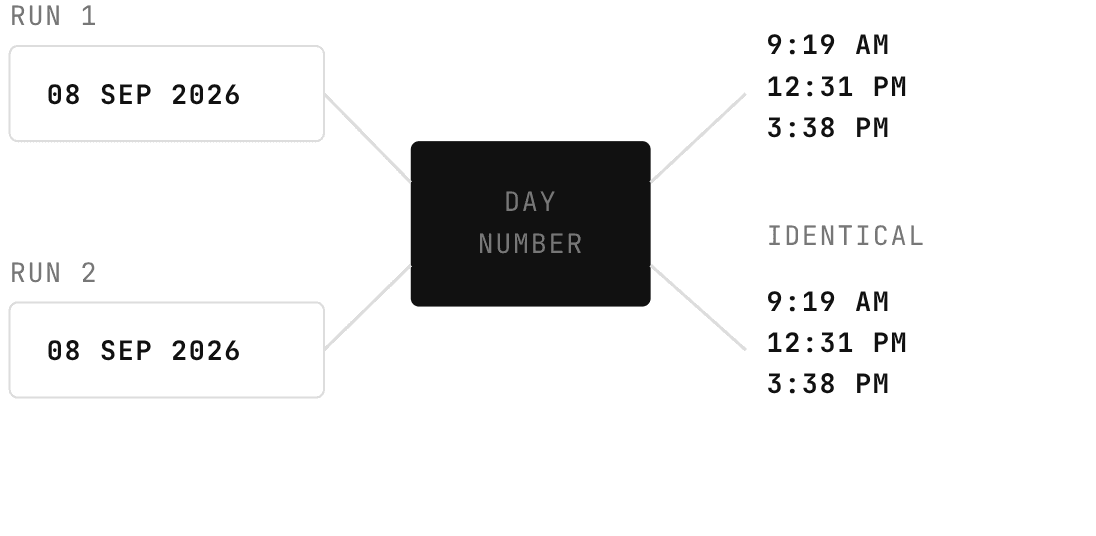 The same date fed through the day number on two separate runs, producing identical times both times
That is deliberate. If it were truly random, every regeneration would reshuffle your whole calendar and move pins you had already approved.
URL limits: a hard cap per product
Two caps live on Settings, on the URL Limits tab, and both are switched off when you install.
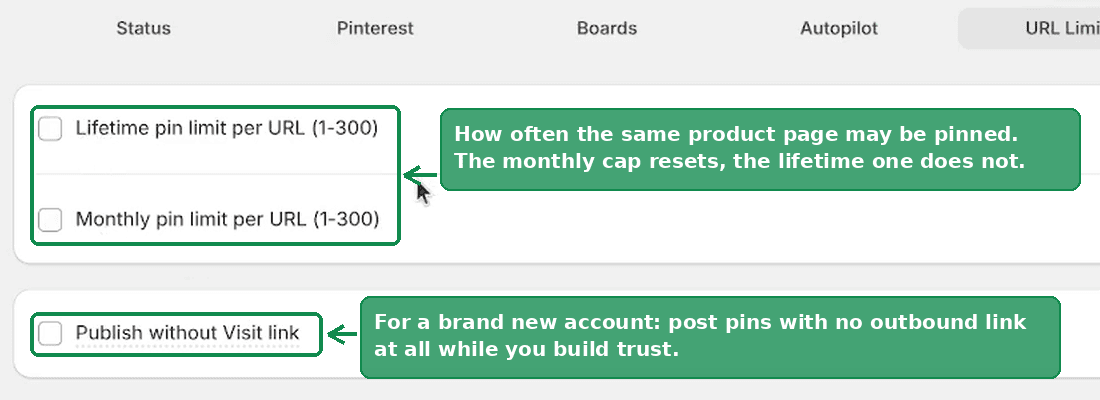 The URL Limits tab, showing the lifetime and monthly pin limit checkboxes and the publish without visit link option
Lifetime is absolute. Once a product reaches it, PinFlow never creates another pin for that product.
Monthly resets on the first. Four a month means four in September, then four more in October. If you only turn on one of these, make it the monthly one.
One catch worth knowing: a lifetime cap is also a countdown on your catalogue. Fifty products with a cap of twenty each, at five pins a day, is 200 days of content and then it stops. PinFlow runs that sum while you move the slider and warns you when it drops under a month.
Publishing without a visit link
Also on the URL Limits tab: Publish without Visit link.
 The Publish without Visit link checkbox, for posting pins with no outbound link while a new account builds trust
Turn it on and your pins go out as images only, with no outbound link at all. You build up saves and impressions on a clean account, then switch the link back on and start sending traffic. Pins you have already published are not affected.
It is a slow play, but if your domain is only a few weeks old it is worth the first stretch.
Numbers worth writing down
- Three to fifteen pins a day. Being steady beats being loud. Twenty-five a day from a new account is worse than five.
- Leave a few weeks between pins pointing at the same product page, and never reuse the picture.
- Build up for the first few weeks on a new domain before you push links hard.
Pinterest publishes no official thresholds, so these are the working conventions rather than documented limits. They are the ones the settings above are built around.
Related
Not using PinFlow yet?
PinFlow turns your Shopify catalog into Pinterest pins and posts them on a schedule, automatically. Install it and follow this guide to get your first month of pins live.
Get PinFlow on the Shopify App StoreRelated articles
Scheduling & Autopilot
How Often to Post on Pinterest: Setting Your Schedule
How many pins a day, in which time zone, between which hours, and how much randomness so your account never posts on a robotic timetable.
Pin Studio
Upload Your Own Pin Image Instead of a Template
PinFlow used to stamp its own frame, text and graphics on every pin. Two new options skip that: a frameless template, and your own Canva uploads.
Pin Studio
Pinterest Pin Description Character Limit: What Actually Fits
The Pinterest pin description character limit is 500, and the title limit is 100. Mobile cuts both sooner. Here is what fits and how to make AI respect it.