
How to Set a Minimum Order on Shopify (Tested)
Shopify has no minimum order setting, and the one that looks like it only gates a discount. Here is a cart guard that blocks checkout below your minimum, tested on Dawn.
By AjayCodeWiz · September 10, 2026 · 8 min read
The problem
You want a minimum order. Ten pounds, or five items, or whatever number makes an order worth packing.
You go looking for the setting. You find Minimum purchase requirements on the discount page, with radios for a minimum amount and a minimum quantity, and it looks exactly right.
It is not. Those radios decide when a discount applies. They have no effect on whether someone can check out.
Shopify has no native minimum order setting. That is the starting point, and it is why this question has been asked on the forums for years without a satisfying answer. Below is what the real options are and a free one that works today, tested on a live store.
Why the discount setting is not the answer
It is worth being precise, because the mix-up costs people an afternoon.
On a discount, Minimum purchase requirements means "only give this discount when the cart is at least X". Under the minimum, the shopper still checks out. They just do not get the discount.
What you want is the opposite: under the minimum, the shopper cannot check out at all. Nothing on the discount page does that, because a discount is a reward, not a gate.
The three real routes
A Cart and Checkout Validation Function. This is Shopify's proper answer. A Function runs server side and can block checkout. It cannot be bypassed. It needs an app, either one from the App Store that installs a validation function for you, or a custom one you build and deploy with the Shopify CLI.
B2B quantity rules. If you sell wholesale through B2B, products support minimum quantity and increment rules per catalog. Real, server side, and unavailable unless you are on a plan with B2B.
A cart guard in the theme. Free, no app, works today on any theme. It shows a message and disables the checkout button below your minimum. It is client side, which is a real limitation covered below.
The third is what most stores actually want, so that is what I built and tested.
The cart guard
One Custom Liquid section on the cart page. A Custom Liquid block is an empty box in the theme editor where you paste your own code. No theme file edited.
Go to Online Store → Customize, switch the top dropdown to Cart, click Add section, choose Custom Liquid, drag it above the cart footer, and paste this in.
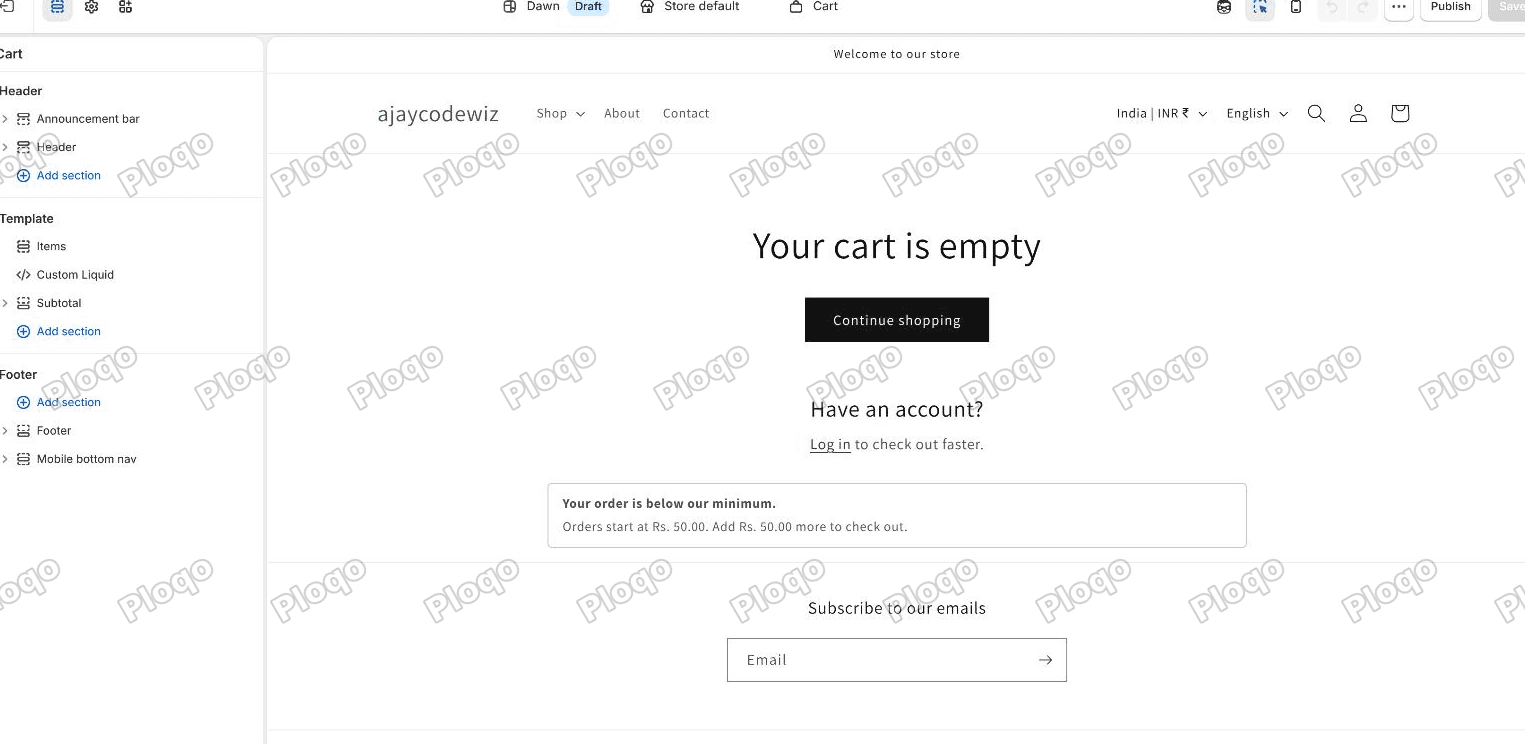 The Shopify theme editor on the Cart page, with a Custom Liquid section in the list on the left and the below-minimum message showing on the cart
{%- assign min_spend = 5000 -%}
{%- assign min_items = 0 -%}

{%- assign spend_ok = true -%}
{%- assign items_ok = true -%}
{%- if min_spend > 0 and cart.total_price < min_spend %}{% assign spend_ok = false %}{% endif -%}
{%- if min_items > 0 and cart.item_count < min_items %}{% assign items_ok = false %}{% endif -%}

{%- unless spend_ok and items_ok -%}
  <div class="min-order" role="status">
    <strong>Your order is below our minimum.</strong>
    {%- unless spend_ok -%}
      {%- assign short = min_spend | minus: cart.total_price -%}
      <span>Orders start at {{ min_spend | money }}. Add {{ short | money }} more to check out.</span>
    {%- endunless -%}
    {%- unless items_ok -%}
      {%- assign short_n = min_items | minus: cart.item_count -%}
      <span>Orders start at {{ min_items }} items. Add {{ short_n }} more to check out.</span>
    {%- endunless -%}
  </div>
  <style>
    .min-order { margin: 0 auto 1.5rem; max-width: 74rem; padding: 1rem 1.5rem;
      border: 1px solid rgba(var(--color-foreground), 0.25); border-radius: 0.5rem;
      font-size: 1.4rem; line-height: 1.6; }
    .min-order strong { display: block; margin-bottom: 0.2rem; }
    .cart__ctas button[name="checkout"],
    .cart__dynamic-checkout-buttons { opacity: 0.4; pointer-events: none; }
  </style>
  <script>
    document.querySelectorAll('[name="checkout"]').forEach(function (b) { b.disabled = true; });
  </script>
{%- endunless -%}
Two settings at the top, and you can use either or both:
min_spendis your minimum order value in cents. $50 is5000. Set it to0to switch the rule off.min_itemsis a minimum item count, a plain number.0switches it off.
The cents thing catches people. Shopify holds every price in cents, so writing 50 would set your minimum to fifty cents and the guard would never fire.
The style block also greys out the accelerated checkout buttons (Shop Pay, PayPal and friends), which sit outside the normal checkout button and would otherwise stay live.
What it looks like
Tested on Dawn. One tee in the cart:
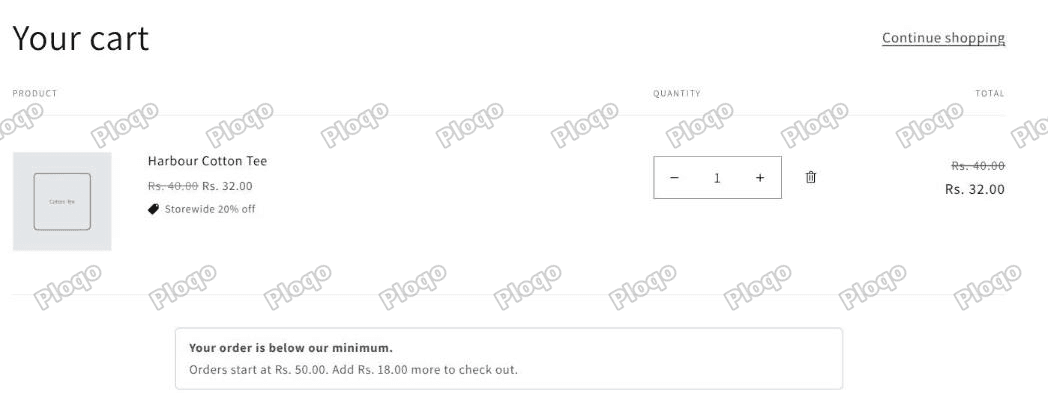 A Dawn cart with a single item, a message reading your order is below our minimum, orders start at Rs. 50.00, add Rs. 18.00 more to check out, and a greyed out Check out button
The message reads "Your order is below our minimum. Orders start at Rs. 50.00. Add Rs. 18.00 more to check out." and the Check out button is greyed out. Reading the button state directly in the browser confirmed disabled = true.
Add a second product to cross the line:
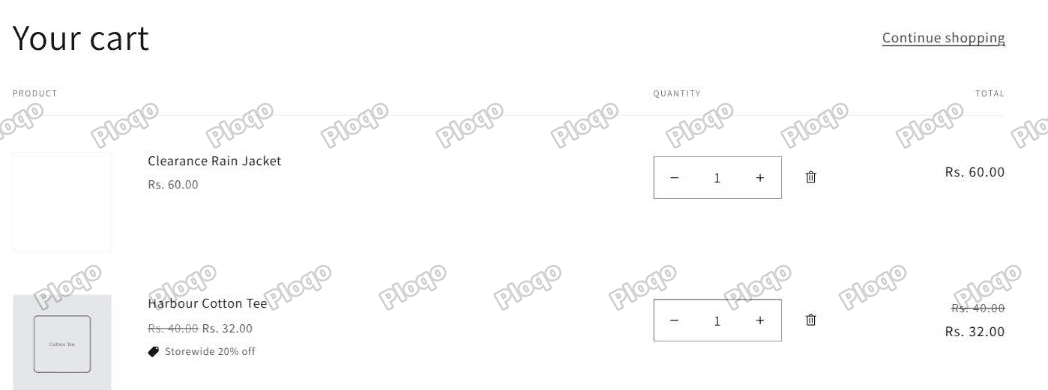 The same cart with two items and no guard message, the Check out button live again
The guard disappears and the button comes back. Verified in the same way: the guard element is gone and the button is no longer disabled.
The detail that will surprise you
Look at the arithmetic in that first screenshot. The minimum is Rs. 50.00. The tee costs Rs. 40.00. So it should ask for Rs. 10.00 more.
It asked for Rs. 18.00.
That is because the tee had a 20% automatic discount on it, so the cart total was Rs. 32.00, not Rs. 40.00. cart.total_price is the discounted total.
Your minimum is measured after discounts. A shopper with a generous coupon can fall below a minimum they had cleared before applying it. This is the same rule that catches free shipping thresholds, which is covered in how to offer free shipping on Shopify.
If you want the minimum measured on the pre-discount value instead, swap cart.total_price for cart.original_total_price in both places. Decide which one you actually mean before you launch.
Where this guard stops
The guard is client side. It stops the normal shopping flow: the button is disabled and the message explains why.
It does not stop someone who navigates straight to /checkout, or who has JavaScript disabled, or who uses a link they saved earlier. For a shop with ordinary customers this is fine, and it is what most stores that advertise a minimum are running. For a wholesale operation where the minimum is a contractual thing, it is not enough, and you want a Cart and Checkout Validation Function, which runs on Shopify's servers and cannot be sidestepped.
Say that out loud to yourself before choosing. "Nudge" and "enforce" are different jobs.
Minimum quantity per product
A different question that gets asked in the same breath: "customers must buy at least 6 of this item".
The guard above counts the whole cart, not one product. For a per-product rule you have two options.
Sell in packs. Make the product a pack of six and price it accordingly. No code, no rules, and the shopper cannot get it wrong. This is the right answer far more often than people expect.
Set the quantity input's minimum. Dawn renders a quantity input on the product page, and you can force a floor on it with a small Custom Liquid block on the product template that sets min and value on the input, gated by a product tag the same way the promo badge is in showing a discount on the product page. It is a nudge, not enforcement, for the same reason as above.
Proper per-product minimums with enforcement are B2B quantity rules or a Function.
Minimum order for wholesale customers only
The guard applies to every shopper who sees the cart. To make it apply to one group, gate it on the logged-in customer.
Liquid can see the customer on the storefront, so wrapping the guard in a tag check works:
{%- if customer and customer.tags contains 'wholesale' -%}
  ... the guard ...
{%- endif -%}
Note this only works for customers who are logged in, since customer is empty otherwise. If your wholesale buyers do not log in, there is nothing to key on. Tag-based customer targeting is covered in Shopify customer tags.
Common problems
The guard never appears. The minimum is in cents. Check 5000, not 50.
The guard appears but checkout still works. Your theme's checkout button is not named checkout. Inspect the button and adjust the selector. Some themes wrap it in a form with a different name.
Accelerated checkout buttons are still live. They render in their own container. The CSS above targets Dawn's .cart__dynamic-checkout-buttons; other themes use a different class.
It fires on an empty cart. An empty cart is below any minimum, so the message shows on a cart with nothing in it. Add {%- if cart.item_count > 0 -%} around the whole block if that bothers you.
The number asked for looks wrong. It is measured after discounts. See above.
The main points
- Shopify has no minimum order setting. The Minimum purchase requirements radios on a discount only gate the discount, not the checkout.
- The enforceable route is a Cart and Checkout Validation Function, which needs an app. B2B quantity rules cover wholesale on plans that have B2B.
- The free route is one Custom Liquid section on the cart that shows a message and disables the checkout button. Verified on Dawn: blocked at Rs. 32.00, allowed at Rs. 92.00.
- The minimum is in cents, and it is measured on the discounted cart total. My Rs. 50.00 minimum asked a Rs. 40.00 tee for Rs. 18.00 more, because a 20% discount had already taken it to Rs. 32.00.
- The guard is a nudge, not enforcement. Someone can still reach /checkout directly.
- For "must buy 6 of this", selling a pack of six beats every technical answer.
Spending too long on manual Shopify busywork?
PinFlow turns your Shopify catalog into Pinterest pins and posts them on a schedule, automatically. Same idea as the cart guard above, let the system handle the repetitive part.
Get PinFlow on the Shopify App StoreMore Shopify fixes
More community-sourced Shopify guides, tested on a live store.
Shopify Admin
Schedule a Black Friday Sale in Shopify (Auto Start and End)
Give the discount its own start and end date and put the sale banner in an Event rollout with the same dates. Both start at midnight and end after Cyber Monday.
Shopify Admin
Shopify Discount Limit: One Code for More Than 100 Products
Shopify stops you at 100 items when a discount applies to specific products. There is no setting to raise it, but you do not need one. Point the discount at a collection and one code covers thousands of products. Tested on a store, with the B2B route too.
Shopify Admin
Shopify Discount Types: Amount Off Products vs Order
Shopify has four discount types, and two of them work out a percentage in different ways. One rounds every single unit, the other rounds the order once. On low unit prices that difference is real money. Tested on a live store.