
Shopify Quick Add Button Broken on Out-of-Stock Variants
On Shopify's free Horizon and Dwell themes, the Quick Add button gets clipped and stops working on products that have an out-of-stock variant. Here is why it happens and the one-line theme fix, tested on Horizon.
By AjayCodeWiz · August 3, 2026 · 8 min read
The problem: your Quick Add button is cut off and dead on some products
A merchant reported this on the Shopify Community, and it is a real bug in Shopify's own free themes.
Here is the short version. You turn on Quick Add so shoppers can add items to the cart straight from the collection page. On most products the little Quick Add button looks fine. But on a few products the button is sliced down to a thin sliver stuck against the right edge of the photo. Clicking it does nothing. It will not open the size picker either.
Turning Quick Add off makes the broken button disappear, but then you lose the feature on every product. That is not a fix, that is giving up.
I reproduced the whole thing on a clean Horizon store, found the exact cause, and there is a one-line change that fixes it. This post walks through what is happening and how to repair it.
What you actually see
On the affected products, three things go wrong at once:
- The Quick Add button is clipped to a sliver about four pixels wide, jammed against the right edge of the product image.
- The button is dead. Clicking it does nothing, because the theme has marked it disabled.
- It never opens the "Choose options" popup, so a shopper cannot pick a size or colour.
All three look like separate problems. They are not. They are the same single mistake, which I will get to below.
Why some people cannot reproduce it
This part matters, because it is why the bug slips through.
The problem only appears on a very specific kind of product: one that has a single option (say just Size) with several variants, where the variant that gets selected is out of stock.
The trigger is usually the "Out of stock" filter on the collection page. When a shopper filters to see sold-out items, that is what tips the product into the broken state.
If you test with a normal in-stock product, or a product with two options like Size and Colour, you will not see it. That is exactly why one person in the thread tried repeatedly and could not reproduce it. The conditions have to line up. Once they do, it happens every time.
So if you want to see it on your own store: turn on Quick Add, open a collection, apply the "Out of stock" filter, and look at a product that comes in one option with at least one sold-out value.
Why it happens
Here is the mechanism in plain English. You do not need to be a developer to follow it.
Shopify themes give the Quick Add button two possible jobs. For a product with only one version, the button says "Add" and drops it straight in the cart. For a product with several versions, the button instead says "Choose options" and opens a little menu so the shopper can pick. The theme looks at each product and decides which of the two to show.
The out-of-stock filter pre-selects a variant for you. This is normally a helpful feature. If a shopper filters a collection by "Red", Shopify selects the red variant so the card can show the red photo and price. Filtering by "Out of stock" runs the same machinery, so it selects the sold-out variant. That is reasonable on its own.
The theme then trusts that selection too much. Because a variant is now selected, the theme decides it can show the simple one-click "Add" button, as if this were a single-version product. But the product actually has several variants, and the one that got selected is sold out.
That is when the button collapses. The "Add" button only draws its cart icon when the item can actually be bought. The selected variant is sold out, so no icon is drawn. The button's text is hidden until you hover. With no icon and no text, the button has nothing inside it, so its width shrinks to almost nothing. That is your four-pixel sliver. On top of that, because the variant is unavailable, the theme marks the button disabled, which is why clicking does nothing. And the real "Choose options" button is hidden, which is why the size picker never opens.
One wrong decision at the start, three broken symptoms at the end.
The fix: one line in the theme code
The fix is to stop the theme from switching to the "Add" button for products that have more than one variant. Those should always show "Choose options", which is a normal-sized button that opens the picker and does not care whether one specific variant is in stock.
Go to Online Store > Themes > Edit code, open snippets/quick-add.liquid, and find the block that decides the button. Change it to this:
assign quick_add_button = 'choose'
if product.variants_count == 1
  assign quick_add_button = 'add'
endif
The important part is what you remove. The original code also flips to "Add" when a product has one option and a variant is selected. That is the exact line the out-of-stock filter abuses. Once it is gone, only genuinely single-variant products get the compact "Add" button. Everything with multiple variants gets "Choose options" and behaves.
I tested this on a Horizon store with the same product and the out-of-stock filter on. Before the change, the button is a four-pixel clipped sliver you cannot click. After the change, it is a full "Choose options" button that opens the picker.
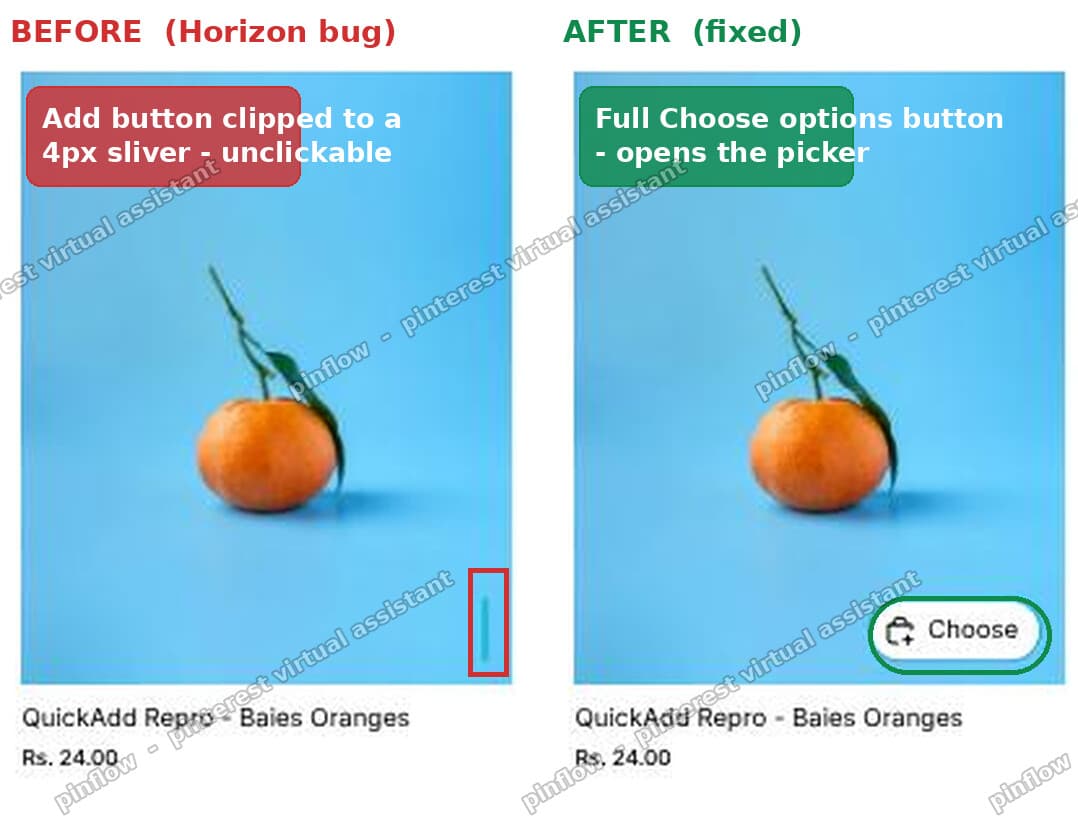 Before and after on a Horizon store: the clipped four-pixel Add sliver versus the restored Choose options button
Single-variant products are unaffected. They still get the quick one-click "Add" button, because product.variants_count == 1 is still true for them.
Is this my store's fault or a Shopify bug?
It is a Shopify bug, not something you broke.
The merchant who reported it confirmed it on a fresh, unmodified copy of the Dwell theme, and on Horizon. Both are Shopify's own free themes. When a bug shows up on a clean install with no apps and no custom code, it is coming from the theme itself.
That means two things for you:
- The code change above fixes it on your store today.
- Every new install of these themes still ships with the bug until Shopify patches the base theme.
So it is worth reporting to Shopify as well, so they fix it at the source. Report it on the Shopify Developer Community Forums under Online Store and Theme Development, and include your store URL, the theme version, and the exact trigger (single-option product, out-of-stock filter on). Well-documented reports get picked up faster.
Prefer to hide out-of-stock variants instead?
Some merchants would rather the sold-out variants not show up at all, so the whole situation never arises. That is a fair approach, and it is a slightly different job.
If that is what you want, see our guide on how to hide out-of-stock variants in Shopify. It covers why filtering a collection by, say, "Medium" can still show products where Medium is sold out, and the Liquid fix for it. Hiding the sold-out variants and fixing the Quick Add button are not mutually exclusive. Many stores want both.
While you are cleaning up variant behaviour, two related fixes come up a lot on multi-variant products: making the product page shorter when a product has many variants, and getting the gallery to show only the selected variant's images.
What to check if the fix did not work
If you made the change and the button is still broken, run through these:
- You edited the wrong theme. Make sure you are editing the live theme, not an old duplicate. Check the theme name at the top of the code editor.
- The browser cached the old file. Hard refresh the storefront, or view it in a private window, so you are not looking at a stale copy.
- Your product uses swatches. If the single option is shown as clickable colour swatches on the card, the theme has a second place in its JavaScript that can flip the button back. In that case the same rule needs applying there too. Most stores hit the filter version first, which the code change above covers.
- You are on a different theme. This specific fix is for Horizon and Dwell, which share the same Quick Add code. Other themes have their own Quick Add files and may need a different edit.
Quick Add, Quick View and Quick Buy are not the same thing
These get mixed up, so a quick note.
- Quick Add adds a product to the cart from the collection page. It is the feature this post is about.
- Quick View opens a popup preview of the product without leaving the collection page. It is about looking, not buying.
- Quick Buy or dynamic checkout is the "Buy it now" button that skips the cart and goes straight to checkout.
The clipped-button bug is a Quick Add problem. If your issue is a popup preview or a "Buy it now" button, you are looking at a different feature.
Wrapping up
The clipped, unclickable Quick Add button on Horizon and Dwell is not random and it is not your fault. It shows up when a single-option product has an out-of-stock variant that gets selected, usually by the out-of-stock filter. The theme then wrongly shows the one-click "Add" button, which collapses to a sliver and disables itself.
The repair is a single change in snippets/quick-add.liquid that keeps multi-variant products on the "Choose options" button. I tested it on Horizon and the sliver turns back into a working button that opens the size picker.
Make the change so your store works today, and report the bug to Shopify so it gets fixed in the theme for every store.
Spending too long on manual Shopify busywork?
PinFlow turns your Shopify catalog into Pinterest pins and posts them on a schedule, automatically. Same idea as the fix above, let the system handle the repetitive part.
Get PinFlow on the Shopify App StorePart of a complete guide
Shopify Variants: The Complete Guide
Variants are one product sold in several forms. How they work, the 2,048 and 3-option limits, and where each variant fix lives - images, swatches, sorting, hiding and the theme-specific bugs.
More Shopify fixes
More community-sourced Shopify guides, tested on a live store.
Collections & Products
Shopify Unit Pricing: Show a Price per Unit on Each Variant
Set a unit price on every variant and Dawn shows the price per 100 ml or per kg, and updates it when a shopper picks another size. No code needed.
Themes & Storefront
Square Size Buttons on Shopify Dawn (Custom CSS)
Dawn draws size options as round pills. Here is the Custom CSS that turns them into square boxes matching the Add to cart button, tested on Dawn 16.0.0.
Themes & Storefront
Remove the Variant ID From Your Shopify Product URL
Your product link keeps turning into /products/name?variant=43176780890281, before the customer has touched anything. One theme setting stops it, a second switch covers Dawn, and a short snippet cleans the links that already carry the ID.