
EU Product Identifiers: Barcodes for Parcels to the EU
From 1 November 2026 the EU asks for identifiers on items in parcels of €150 or less. What they are, what GS1 is, and how the app helps fill the barcodes.
By AjayCodeWiz · Updated October 30, 2026 · 6 min read
The rule
From 1 November 2026, the EU asks for three product identifiers for each item in a parcel sent from outside the EU to a customer in the EU, when the parcel is worth €150 or less. Shopify's changelog post of 24 October 2026 and its help page, Adding product identifiers for shipments to the European Union, are the source for everything below. Check them before you ship, because the details can change.
The three identifiers
- M-PID, your own product identifier. Shopify uses the variant itself for this, so there is nothing to add.
- S-PID, a standard barcode. A GTIN, EAN, UPC or ISBN: the internationally issued number on retail packaging. Shopify asks for it "with the matching barcode type", and also accepts the Custom type for a valid GTIN of 8, 12, 13 or 14 digits. A product with none gets a declaration instead (below).
- NS-PID, a manufacturer code. The maker's model, part or style number, saved as a barcode of the NS-PID type. Your own product code or SKU can count, and without one Shopify falls back to the standard barcode, then the SKU.
So for most products, the one you have to fill is the standard barcode.
If a product has no standard barcode
Handmade and one-of-a-kind products often have no GTIN, EAN, UPC or ISBN. Declare it on the product: open the product (or the variant), and in Shipping, with Physical product on, click More details. Under EU customs declaration, turn on Has no standardized identifier, then Save.
Customs knows this declaration as code Y081. Make it only when the product has no standard barcode, never to skip one you have.
What happens when one is missing
For labels you buy through Shopify Shipping or Managed Markets, Shopify copies the identifiers from your products onto the customs documents. If an item worth €150 or less has no standard barcode and no declaration, Shopify says the label can't be bought until the item is updated. You can fix it on the label page with Edit customs declaration.
Parcels that reach customs without the information may be held or rejected, and return fees may apply. If you buy labels outside Shopify, ask your carrier how they want the identifiers.
Some goods are exempt, decided by the product's HS code (its customs category): unprocessed farm and perishable goods in HS chapters 01 to 15, some handmade goods, antiques, art, stamps and coins. You can't mark a product exempt yourself, so keep your HS codes right.
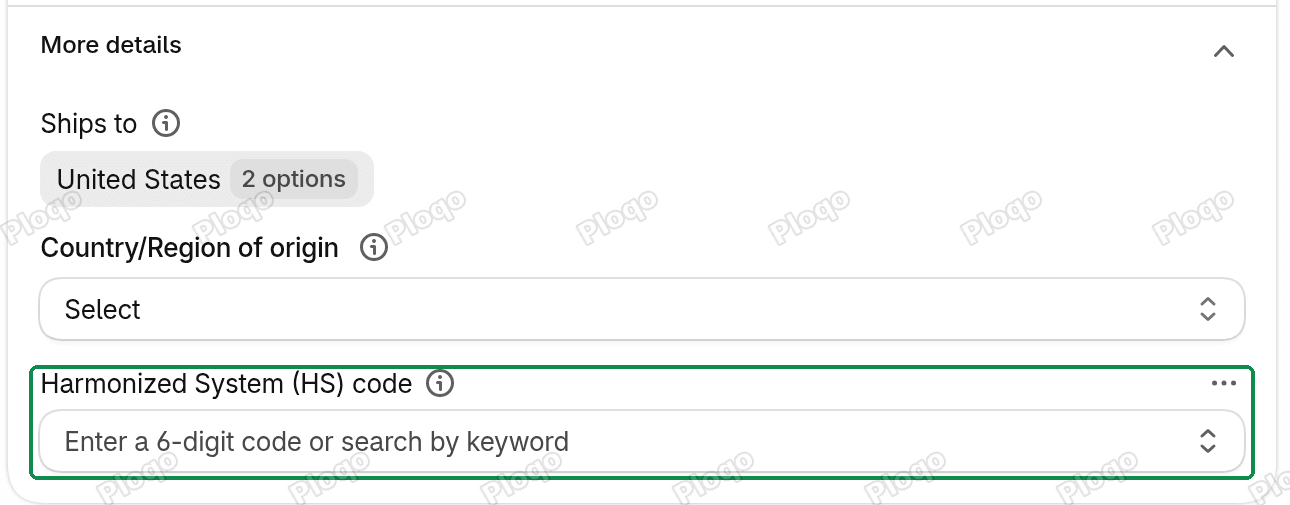 The HS code field in a product's Shipping section, under More details
GS1 and company prefixes
GS1 is the organisation that issues product barcodes. For real EAN or UPC numbers, a business licenses a company prefix from its local GS1 office: a block of digits that marks the number as yours. Each product number is your prefix, an item number you choose, and a check digit worked out from the others, so it is unique worldwide. A number you make up, or one bought second-hand without a licence, isn't registered to your business and may already belong to someone else's product.
Never use in-store numbers as the product barcode
EAN-13 numbers that start with 20 to 29 are "restricted circulation" numbers. GS1 keeps them for use inside one shop: shelf labels, weighed goods, items you make yourself. Any shop can use the same number for something else, so they don't identify a product outside your shop.
Ploqo Labels can make these numbers (In-store EAN-13), and its Generate box warns: "Amazon, Google Shopping and EU customs don't accept in-store numbers as product barcodes. Use them only on your own shelves and tills." For an item you ship to the EU, use an EAN-13 or UPC-A from your own GS1 prefix, or declare that it has none.
Where Ploqo Labels helps
Find the variants with no barcode. Open Barcodes in the app. The No barcode view lists every variant in your store with an empty Barcode field, with a count. Filter it by product, variant or SKU.
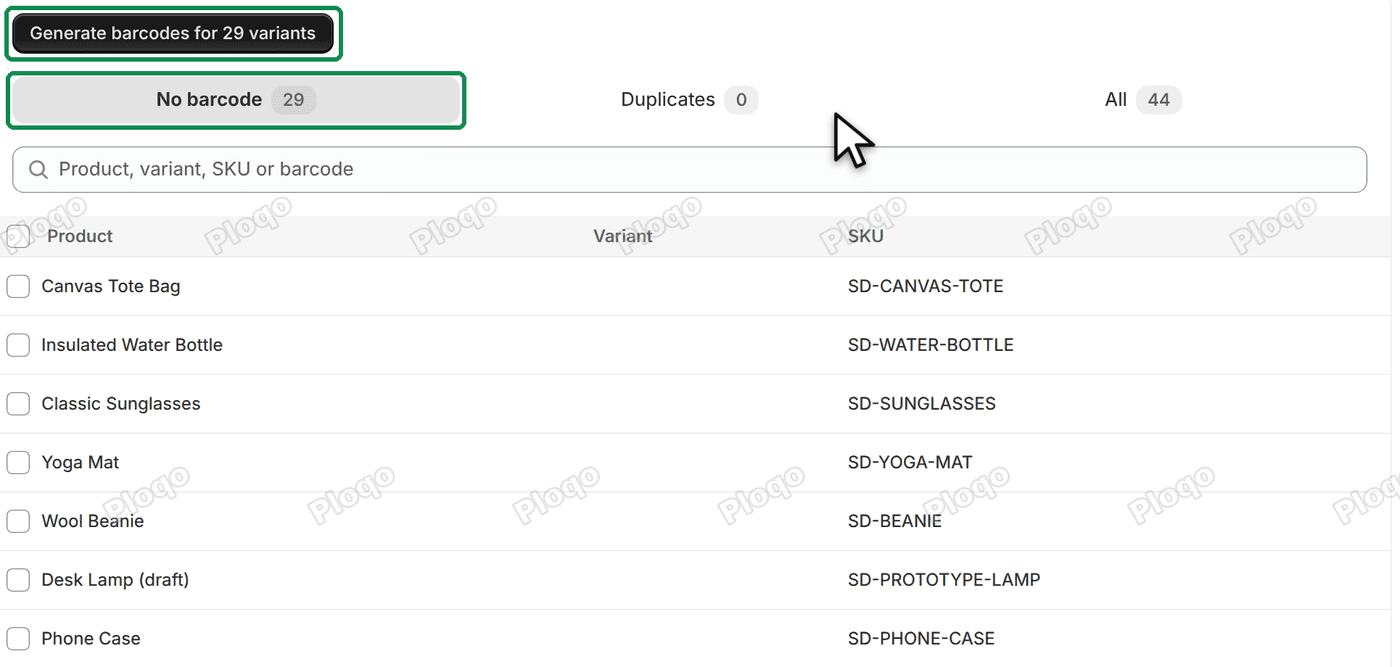 The Barcodes page on the No barcode view: Generate barcodes for 29 variants, the views No barcode 29, Duplicates 0 and All 44, and the list of variants
Fill real numbers in bulk. Click Generate barcodes for 29 variants (with your count), or tick rows and generate for those. In Format, choose EAN-13 from a GS1 company prefix or UPC-A from a UPC company prefix, and type the prefix GS1 gave you. The app numbers your items after it and adds the check digit.
 The four Format options for new barcodes: Code 128 sequence, EAN-13 from a GS1 company prefix, UPC-A from a UPC company prefix and In-store EAN-13
Each new number is checked against every barcode already in your store, so it can't repeat one, and each is read back from Shopify after it's saved. If you change your mind, the Barcodes page can clear the last run's new barcodes (Clear the 29 new barcodes, with your count).
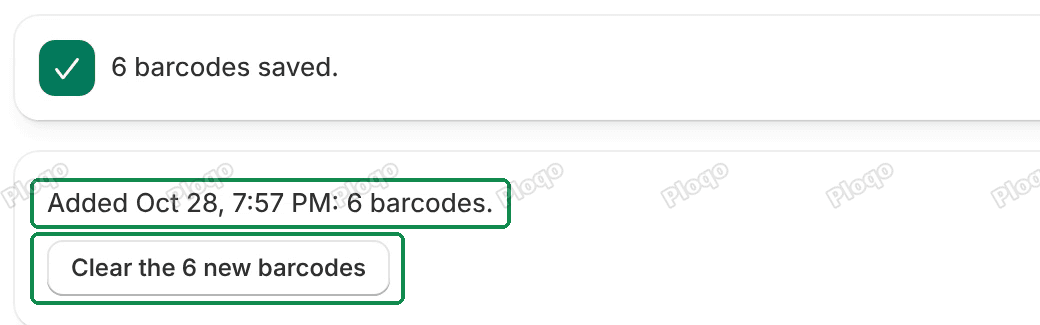 The Barcodes page after a run: 6 barcodes saved., the line Added Oct 28, 7:57 PM: 6 barcodes. and the Clear the 6 new barcodes button
Generate barcodes and the Barcodes page have the details. Then print the barcodes on labels for your stock with any template.
Check the barcode type before you ship
The app saves each number in the variant's Barcode field. Shopify's guide asks for the barcode's type as well (EAN or UPC). Shopify doesn't say whether a barcode saved without a type counts as a standard barcode for EU parcels.
So after a run, open one of the variants in your Shopify admin and look at its barcode. If it has no type, set the type that matches the number (an EAN-13 is an EAN, a UPC-A is a UPC) before you ship to the EU.
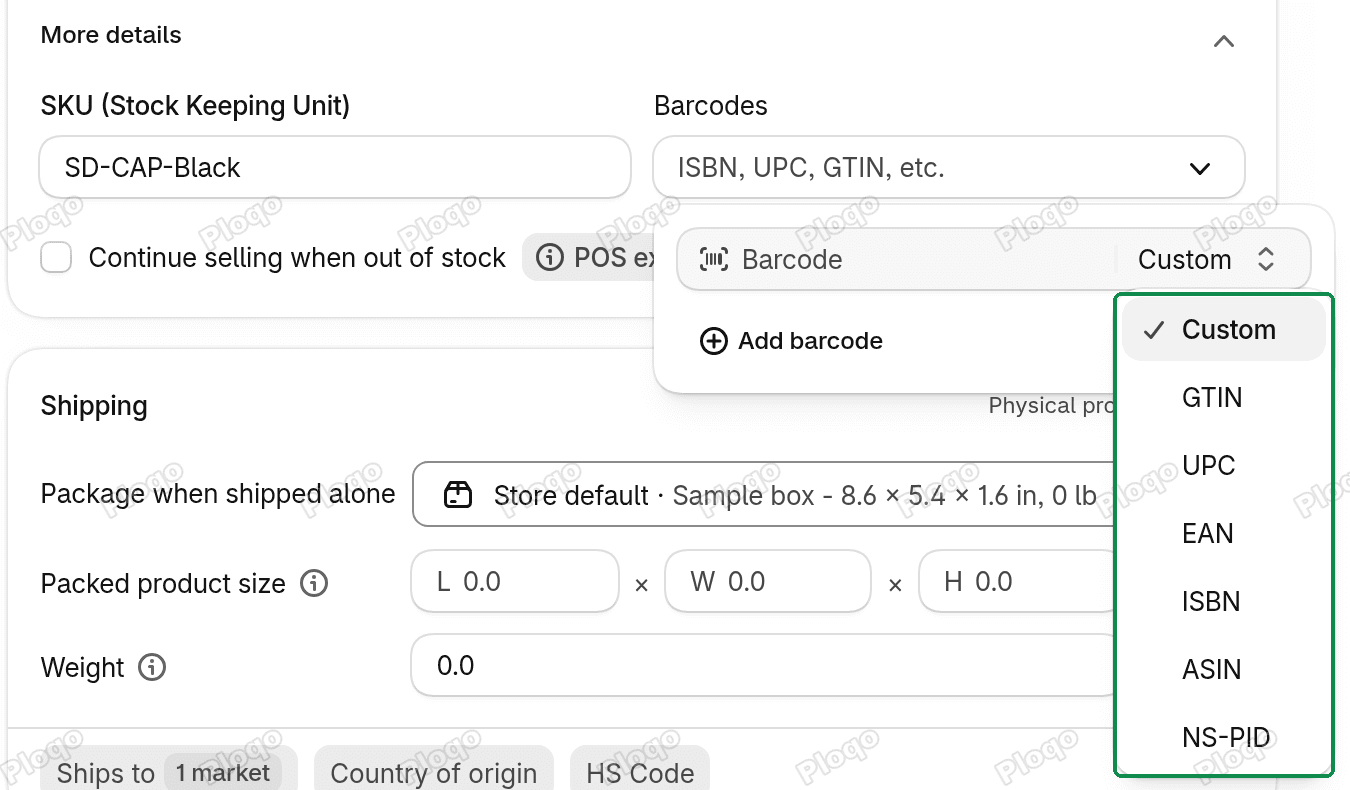 A variant's Barcodes section in the Shopify admin with the barcode type list open
Shopify's help page explains how for one product; for many, it points to a CSV import or the bulk editor.
The app can't tell you whether a parcel will clear customs or whether Shopify will sell you a label. What it does is find the variants with no barcode and fill them with numbers from your own prefix.
Common questions
Do I need GS1 numbers if I only sell in my own country? Not for this EU rule. It applies to parcels into the EU from outside it. Marketplaces may still ask for GS1 numbers.
Can I use my SKU as the NS-PID? Shopify says your own product code or SKU can count. If you don't add an NS-PID, Shopify falls back to the standard barcode, then any other barcode, then the SKU, and finally the variant ID.
Can a Code 128 number from the app be the standard barcode? No. A Code 128 sequence is not issued from a GS1 prefix, so it isn't a GTIN. Use it inside your own shop only.
All Ploqo Labels guides·Shopify EU product identifiers, explained
More Ploqo Labels guides
Getting Started
Get Started with Ploqo Labels: Print Your First Labels
Open the app, add products to the Print page, choose how many labels each variant needs and print with a ready-made template. No template to make first.
Printing Labels
Label Templates and Sizes: Rolls, Sheets and Your Own Size
Customize a ready-made template, pick your roll or sheet size or your own, and choose what each line prints, how the price looks and what the barcode holds.
Printing Labels
Print Labels from Your Shopify Products List
Tick products in your Products list and choose Print labels from the Actions menu, or from More actions on a product's page. The Print page opens with them.
Barcodes
Generate Barcodes for Variants: Code 128, EAN-13 and UPC-A
Give variants with no barcode a new one: a Code 128 sequence, or EAN-13 or UPC-A from your GS1 prefix. Each is checked against every barcode in your store.