
Bulk Coupon & Discount Code Generator
Generate up to 5,000 unique, random coupon, promo, or discount codes in one click. Attach a percentage, fixed amount, or free shipping rule and download the codes as a .txt, a codes.csv, or a Matrixify-ready discounts.csv for Shopify. Free, no signup.
How to Generate Bulk Discount Codes
A batch of unique codes takes about a minute. The generator above has two cards on the left and the list of codes on the right.
- Set the code format and quantity. In the Code format card, add a prefix like SAVE, an optional suffix, and the random length (3 to 16 characters). Pick a character set: letters and digits, letters only, or digits only. Leave Avoid ambiguous characters on to remove 0, O, 1, I, and L. Turn on Group into blocks to split a code like SAVE-8F3K-2QP9. Then set the Quantity, anywhere from 1 to 5,000 codes.
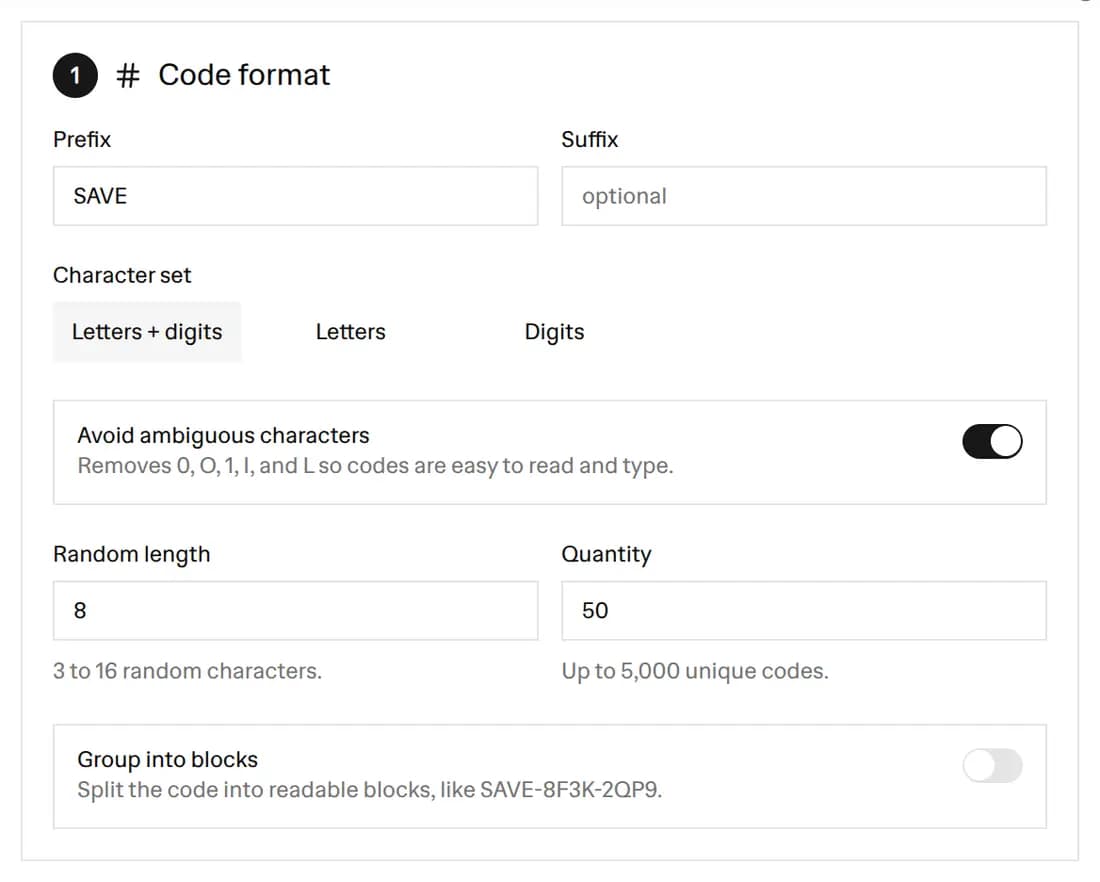 The Code format card with the prefix SAVE, an 8-character random length, Letters and digits selected, Avoid ambiguous characters switched on, and a quantity of 50
- Attach a discount rule. In the Discount rule card, pick percentage off, a fixed amount off, or free shipping. You can add a minimum purchase amount or a minimum quantity of items, a total-use cap, one use per customer, a start date, and an end date. A campaign title is optional and goes into the Title column of the Shopify file.
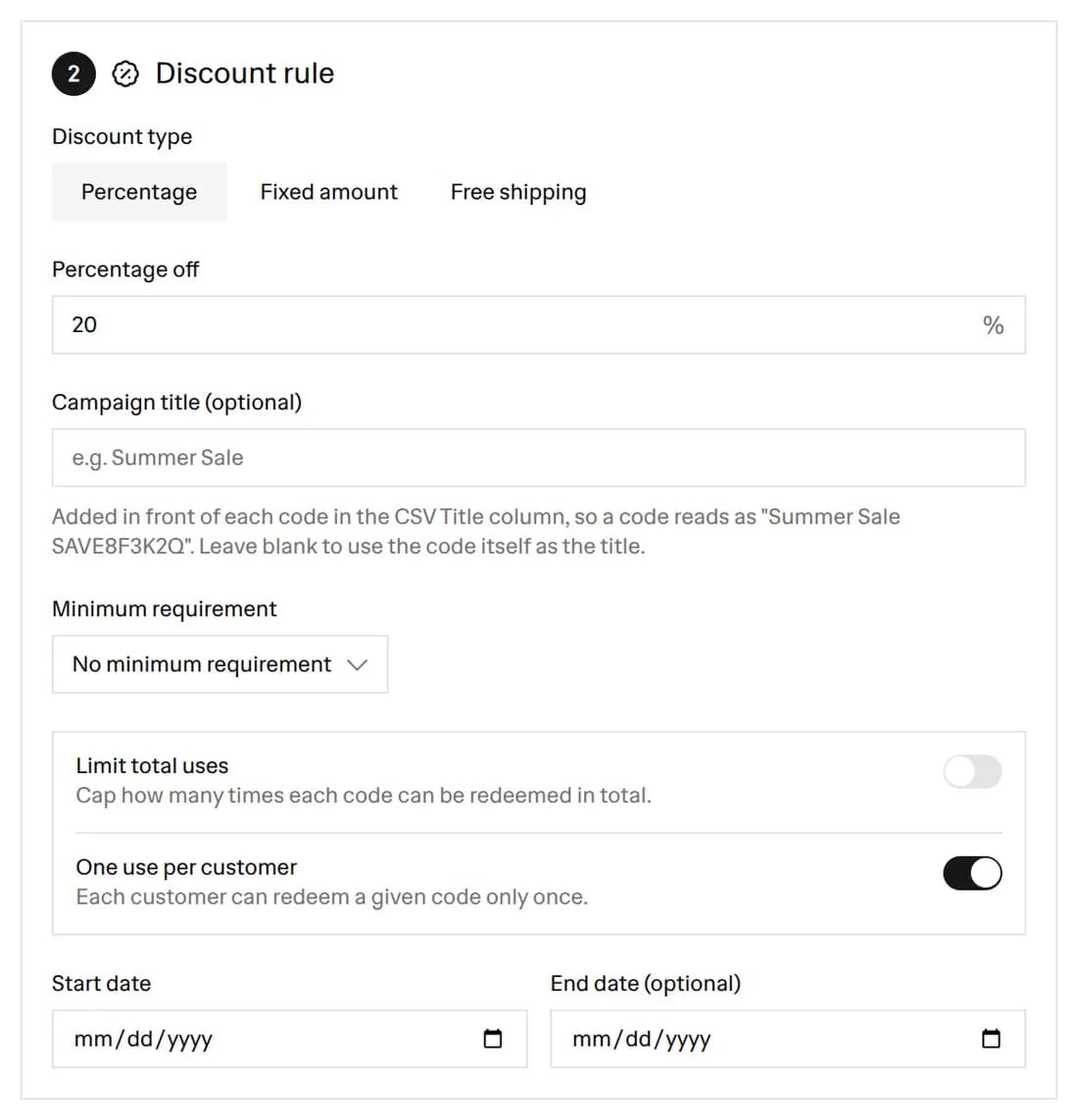 The Discount rule card set to Percentage off at 20, no minimum requirement, and One use per customer switched on
- Check the preview. The Generated codes panel lists the first 50 codes with a count and a one-line summary of the rule, such as "20% off, 1 use per customer, no end date". The rest of the batch is in every download. Press Regenerate for a fresh batch.
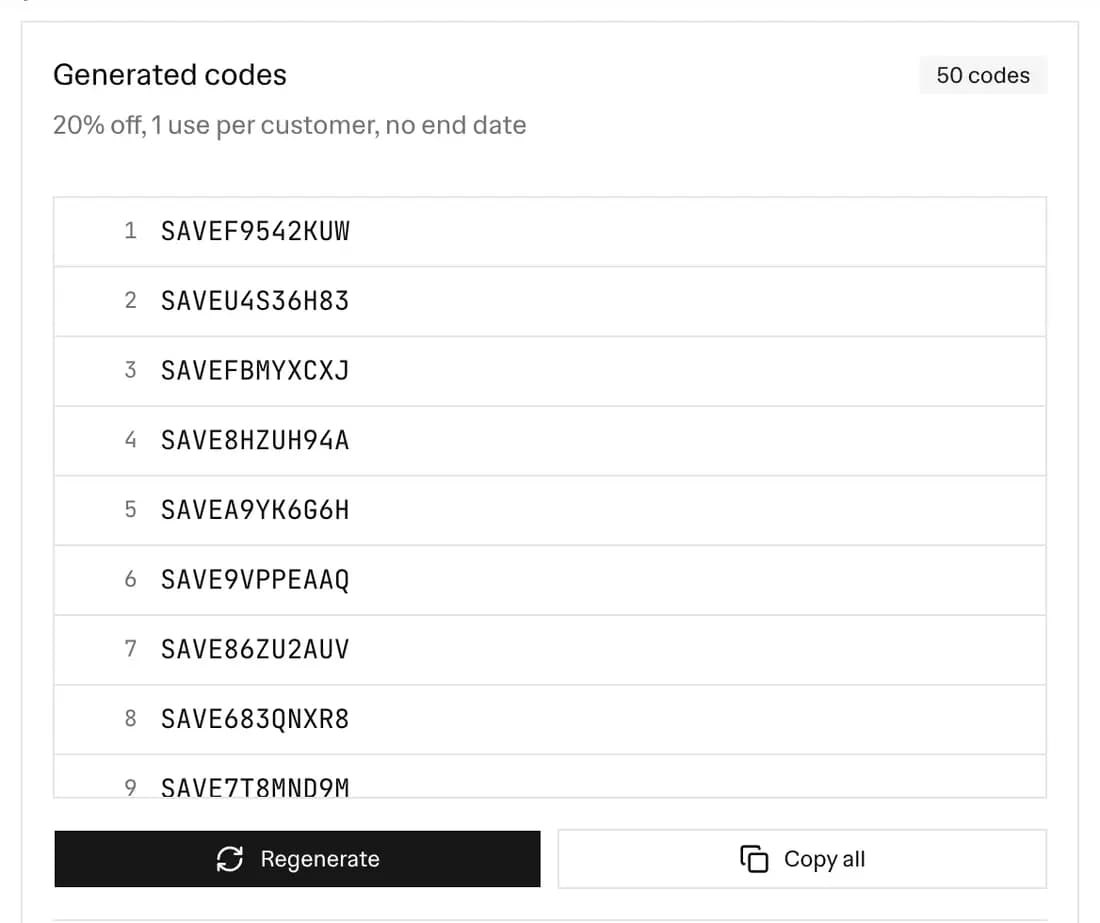 The Generated codes panel showing 50 SAVE codes, the rule summary line, and the Regenerate and Copy all buttons
- Export the codes. Click Copy all, or download one of three files: .txt (one code per line), codes.csv (a single Code column), or discounts.csv (every code with its discount rule, in the column layout the Matrixify app imports).
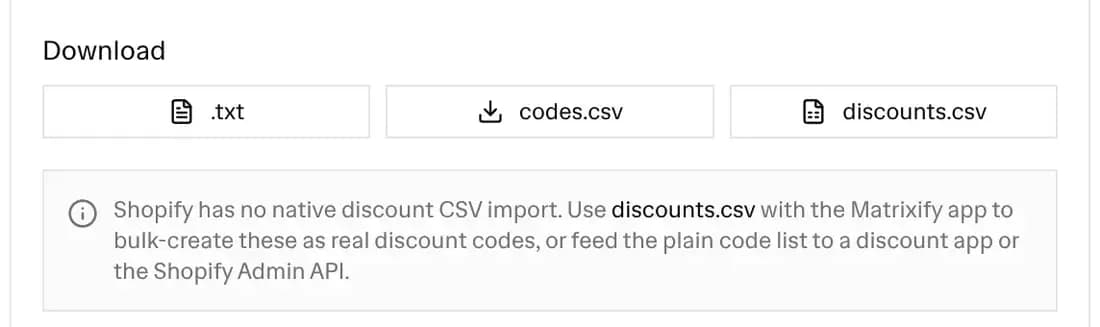 The Download row with the .txt, codes.csv, and discounts.csv buttons and the note about importing discounts.csv with Matrixify
The preview changes as you edit the format, so you see the codes before you download them.
A coupon code generator, promo code generator, and discount code generator in one
Stores use three names for the same thing: a short string a shopper types at checkout to get money off. A coupon code, a promo code, a voucher code, and a discount code all work the same way. This tool makes all of them, so it is a coupon code generator, a promo code generator, and a discount code generator at once. The only difference is the word you use in your emails and on your flyers.
What the tool makes:
- Random codes in bulk. One click makes up to 5,000 codes, each different from the others in the batch.
- Codes in your own style. A prefix such as SPRING, a suffix such as 25, and blocks such as SPRING-K7Q3-M9XA.
- A file your store can read. The discounts.csv carries each code with its discount type, value, dates, limits, and minimum.
What the tool does not make is the coupon itself, the card or flyer a customer holds. For that, use the Coupon Maker. It designs a printable coupon and can print a different code from this batch on each one (see the next section).
A random generator is safer than making codes up by hand. Hand-made codes such as SAVE10 or SUMMER are easy to guess, and once one leaks to a coupon site it works for anyone. Random codes from a large pool are impractical to guess, and with One use per customer or a total-use cap, a leaked code only works a limited number of times.
Print each code on its own coupon
A code only reaches a customer if it is printed, emailed, or posted somewhere. To print a stack of coupons with a different code on each one:
- Make the codes here first. Generate the batch and download the .txt file or click Copy all. Import the discounts.csv with Matrixify (see below), so every code works at checkout.
- Open the Coupon Maker and design the coupon. Pick a template, add your offer and store name, then open the Print sheet tab and choose a coupon size and paper.
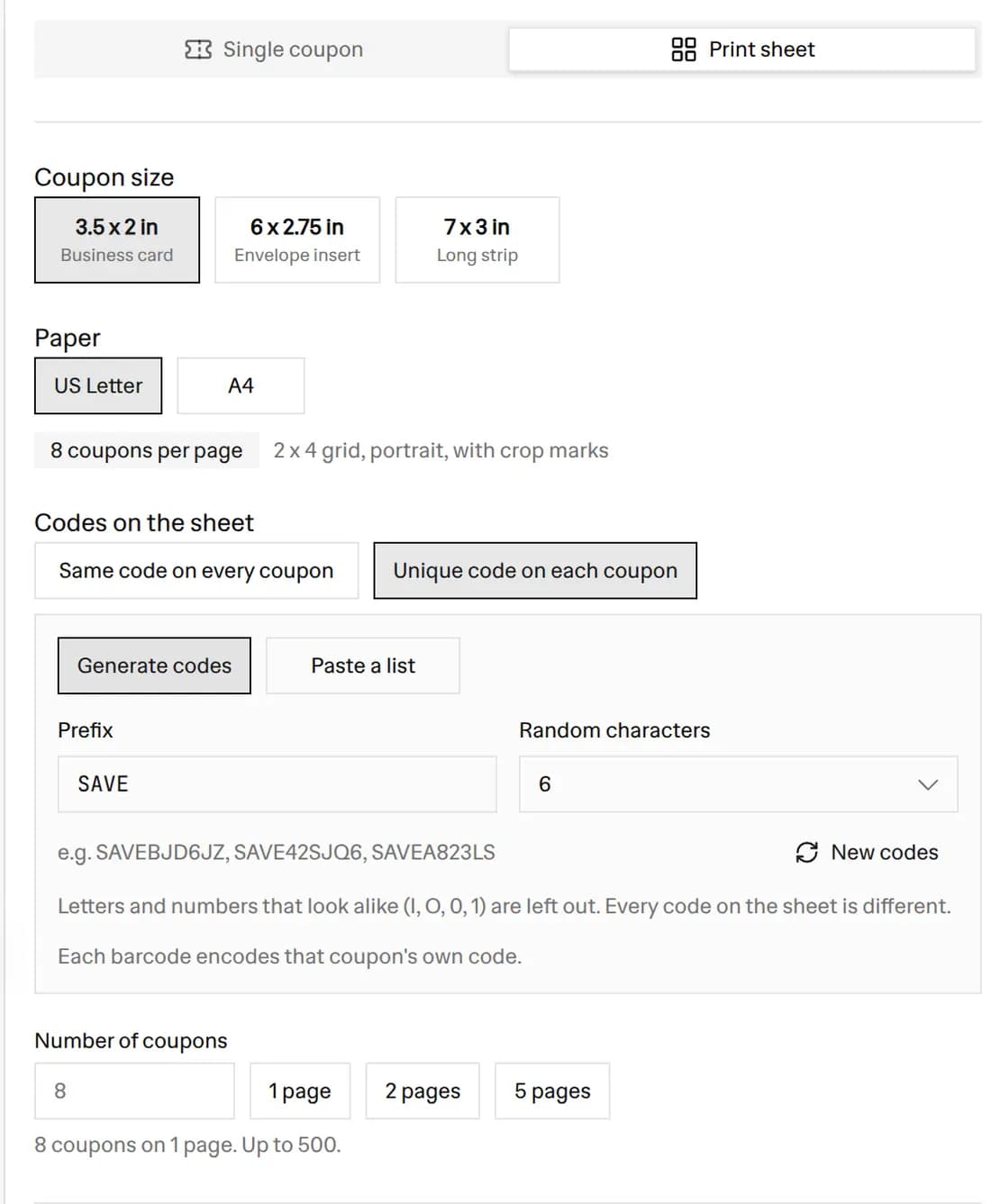 The Coupon Maker Print sheet controls with the 3.5 x 2 in size, US Letter paper, and Unique code on each coupon selected, here set to generate codes; Paste a list is the option beside it
- Paste your codes. Choose Unique code on each coupon, then Paste a list, and paste the codes from this tool, one per line. Each coupon prints its own code in list order, and its barcode holds the same code.
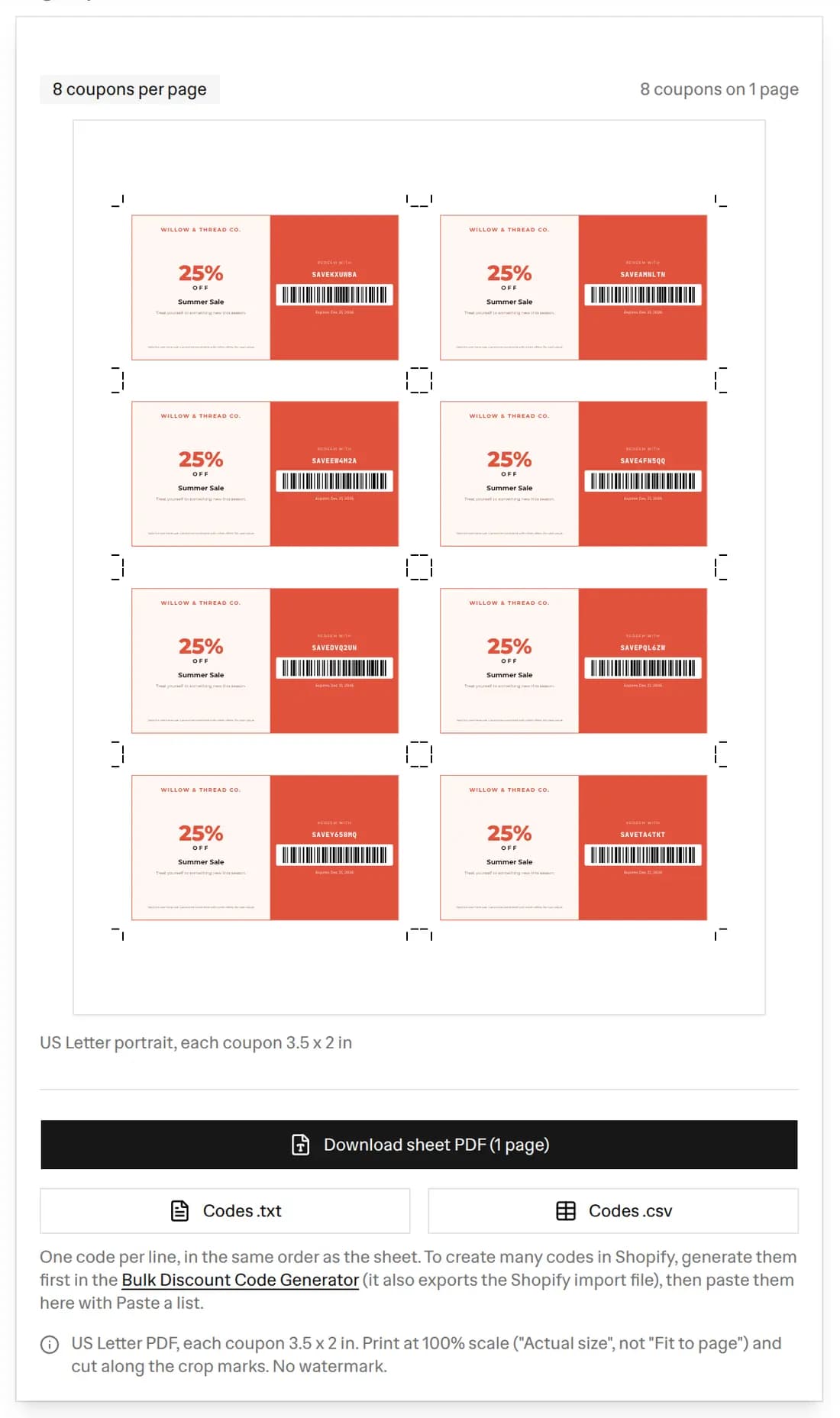 The Coupon Maker print sheet preview with 8 coupons on a US Letter page, each with its own SAVE code and barcode, and crop marks at the corners
The Coupon Maker prints up to 500 coupons per sheet PDF. If your batch is bigger, paste the codes in groups of 500. Making the codes here first keeps one list in both places: the codes in your store and the codes on paper match.
Unique Codes vs Shared Codes
There are two ways to run a promotion with codes.
A shared code is a single string, like WELCOME10, that every customer types. It is quick to set up, but it has downsides. It can end up on coupon sites within hours. You cannot tell one customer from another. A cap of "first 100 people" is hard to enforce, and one buyer can use it many times unless you limit it.
A unique code gives each customer their own string. This is what bulk generation is for. With a batch of unique codes you can:
- Give every influencer or affiliate their own code and see who drove sales.
- Send a single-use code to each newsletter subscriber, so a leak only burns one code.
- Run a loyalty reward where each member gets a personal code that expires.
- Print unique codes on packaging inserts, event flyers, or scratch cards.
How Uniqueness and the Character Set Work
Every code has a fixed part (your prefix and suffix) and a random part. The random part is what makes each code different. The generator draws random characters from your chosen pool and throws away any code it has already produced, so a batch of 500 has exactly 500 distinct codes.
The size of the pool matters. With digits only and Avoid ambiguous characters on, the pool is just 8 characters (2 through 9). A 3-character random part then has only 8 x 8 x 8 = 512 possible codes. Ask for 5,000 codes at that size and there are not enough to go around. The tool then caps the batch at 512 and shows a warning, instead of freezing while it looks for codes that do not exist. To get more room, add letters to the pool or increase the length.
The default is 8 characters from letters and digits with the ambiguous ones removed. That pool has 31 characters, so there are 31 to the power of 8, or over 850 billion, possible codes. With the ambiguous characters allowed, the pool is 36 characters and the count passes 2.8 trillion. Either is far more than any promotion needs, and far too many for someone to guess a working code.
Can You Import Discount Codes into Shopify?
Shopify's own CSV import does not cover discount codes. You can export your discounts to a CSV from the Shopify admin, but the admin has no matching import. A plain list of codes in a spreadsheet will not create discounts by itself.
There are three common ways to get bulk codes into a store, and this tool feeds all of them:
- The Matrixify app. Download discounts.csv from this tool and import it in Matrixify, an app from the Shopify App Store that imports and exports store data with spreadsheets. It reads the columns and creates every code as a Shopify discount with your rule attached.
- A bulk discount app. Several apps in the Shopify App Store accept a list of codes. Use the plain .txt or codes.csv for those.
- The Shopify Admin API. If a developer works on your store, the codes.csv is a ready source list. The
discountRedeemCodeBulkAddmutation adds up to 250 codes per call to an existing discount.
Whichever route you take, the codes and the file come from this page for free.
The Matrixify discounts.csv Columns
The discounts.csv download follows the column layout in Matrixify's discounts documentation. Each row is one discount code. The columns are:
- Code: the generated code.
- Title: a readable name. With a campaign title of "Summer Sale" it reads like "Summer Sale SAVE8F3K2QP9". Without one, the code is its own title.
- Type: "Amount off Order" for percentage and fixed amount, or "Free Shipping".
- Method: always "Code", for a discount the customer types in.
- Value Type: "Percentage", "Fixed Amount", or blank for free shipping.
- Value: a plain number like 20 for a percentage, a decimal like 10.00 for a fixed amount, or blank for free shipping.
- Command: always "NEW", so the import creates the discount.
- Starts At and Ends At: the date you pick, written as YYYY-MM-DD with 00:00:00 for the start and 23:59:59 for the end. A blank date stays blank.
- Limit Total Times: a whole number, or blank for no limit.
- Limit One Use Per Customer: TRUE or FALSE.
- Minimum Requirement and Minimum Value: "Amount" with a subtotal such as 50.00, or "Quantity" with a number of items. Blank when there is no minimum.
Any field with a comma or a quote mark is wrapped in quotes, so the file opens cleanly in Excel, Numbers, or Google Sheets.
Tips for Running a Bulk Code Campaign
- Brand the prefix. A prefix with your store name or campaign makes codes easy to recognize and easy to search for in reports.
- Keep codes short enough to type. 6 to 10 random characters is long enough to be hard to guess and short enough to type on a phone.
- Avoid ambiguous characters for print. If codes go on paper or get read aloud, keep the switch on.
- Set an end date. An expiry date gives customers a reason to act and stops old codes from working forever.
- Cap total uses. For a "first 100 customers" offer, generate 100 codes and set one use each.
- Track by channel. Give each channel its own prefix or batch so you can see which one converts.
- Match the coupon to the code. Design a printable coupon in the Coupon Maker and print or email it with the code.
Codes are not the only option. If the discount should grow as the customer adds more items, you do not need codes or an app. Automatic discounts with a minimum quantity give you a tier ladder for free, and Shopify applies the better tier rather than stacking them. I tested that setup alongside a build-your-own bundle and wrote it up in how to build a Shopify mix and match bundle. For a single code made by hand in the Shopify admin, see how to create a discount code in Shopify.
Frequently asked questions
Is this bulk discount code generator free?
Yes, it is free with no signup. Generate up to 5,000 unique codes at a time and download them as a .txt file, a codes.csv, or a Matrixify-ready discounts.csv as often as you want. Everything runs in your browser, so your codes are never uploaded to a server.
Can I use this as a coupon code generator or promo code generator?
Yes. Coupon codes, promo codes, voucher codes, and discount codes are the same thing at checkout: a string the shopper types to get a discount. Set a prefix that fits your campaign, such as PROMO or VIP, pick a length, and generate up to 5,000 random codes at once.
Are the generated discount codes unique?
Yes. Every code in a batch is different. The tool draws random characters and throws away any duplicate, so a batch of 500 has 500 different codes. If you ask for more codes than the character set and length can produce, the tool caps the batch and shows a warning instead of hanging.
How do I print each code on its own coupon?
Generate the codes here and copy them or download the .txt file. Then open the Coupon Maker, design your coupon, open the Print sheet tab, choose Unique code on each coupon, and paste the codes with Paste a list. Each coupon prints its own code, up to 500 coupons per sheet PDF.
Can I import these discount codes into Shopify with a CSV?
Not with Shopify's own CSV import, which does not cover discount codes. The most common route is the Matrixify app: download the discounts.csv file here, then import it in Matrixify to create every code as a Shopify discount. You can also give the plain code list to a bulk discount app or add the codes through the Shopify Admin API.
What is the Matrixify discounts.csv format?
It is the column layout the Matrixify app reads to create discounts. Each row has Code, Title, Type, Method (Code), Value Type, Value, Command (NEW), Starts At, Ends At, Limit Total Times, Limit One Use Per Customer, Minimum Requirement, and Minimum Value. A percentage writes the value as a plain number like 20, a fixed amount writes a decimal like 10.00, and free shipping writes the Free Shipping type with no value.
What is the difference between a unique code and a shared code?
A shared code, like WELCOME10, is one code that every customer uses. It is easy to set up but easy to leak to coupon sites, and you cannot tell customers apart. A unique code gives each customer their own single-use string, so you can cap redemptions, limit one use per customer, and see which channel or person redeemed it.
How do I avoid confusing characters in the codes?
Keep the Avoid ambiguous characters switch on. It removes 0, O, 1, I, and L from the pool, so a customer cannot mistake a zero for the letter O or a one for the letter I. This matters most for printed coupons and codes read aloud over the phone.
Can I add a prefix, suffix, or dashes to every code?
Yes. Add a prefix like SAVE or a suffix so codes are branded and searchable, and turn on Group into blocks to split the code into parts such as SAVE-8F3K-2QP9. Turning grouping off gives you one unbroken string. The prefix and suffix are the same on every code, so each code differs only in its random middle.
What discount types can I attach to the codes?
Percentage off, a fixed amount off, or free shipping. You can also set a minimum purchase amount or a minimum quantity of items, cap total uses, limit each code to one use per customer, and set start and end dates. All of that goes into the Matrixify discounts.csv columns, so Matrixify can create the rule on import. Run a test import with a few codes first and check one discount in your admin.
More FREE Marketing & Branding tools
Social posts, email signatures, buyer personas, and campaign tracking.
Free Business Card Maker
Design professional business cards with custom templates and your logo. Live preview and instant PDF download. Free, no signup.
Free Gift Certificate Template Maker
Create a printable gift certificate with your business name, logo, amount, and a unique code. Pick from 6 occasion templates, custom colors, and fonts, then download a PNG, SVG, or print-ready PDF. Free, no signup.
Free Gift Tag Template Maker
Design printable gift tags for any occasion. Pick from 20 templates, add To, From, and a message, choose a shape (including a classic punch-hole swing tag) and real-unit size, then download PNG, PDF, or SVG. Bulk-print a personalized sheet from a recipient list. Free, no signup, no watermark.
Free Coupon Maker
Make your own coupons with your logo, discount, and promo code. Pick from 12 coupon templates, add a QR code or barcode, then download a PNG or PDF, or print a sheet of coupons with crop marks and a unique code on each. Free, no signup.
Free Thank You Card Template Maker
Design a printable thank you card for orders. Pick from 20 templates, write your message, add a discount code and a scannable QR, choose a real-unit insert size, then download PNG, PDF, or SVG. Bulk-print a personalized sheet from a customer list. Free, no signup, no watermark.
Free Table Tent Template Maker
Design printable table tents, tent cards, and name tents. Pick a half-fold or tri-fold style, a finished size, and a template, then add a menu special, table number, place card, or scan-to QR. Download a true-size PNG, PDF, or SVG, or bulk-print a tiled sheet. Free, no signup, no watermark.
Free Event Ticket Maker
Design printable event tickets for concerts, galas, sports, conferences, fundraisers, and parties. Pick a template, add your event, date, venue, seat, and price, add a tear-off stub with a matching number, then download a true-size PNG, PDF, or SVG, or a numbered sheet. Free, no signup, no watermark.
Free Raffle Ticket Generator
Make printable numbered raffle tickets for fundraisers, churches, schools, sports 50/50, and holiday draws. Add your prize, drawing date, and price, pick a themed template, and each ticket gets a fill-in Name and Phone counterfoil with a matching number. Draw a winner, then download a true-size PNG, PDF, or SVG, or a numbered sheet. Free, no signup, no watermark.
Free Instagram Post Generator & Creator
Make up to 980 Instagram post designs per download from your product photos. Select from 35 templates, 28 color palettes and custom fonts, and batch download 1080×1350px posts as a ZIP. Built for Shopify merchants. Free, no signup.
Free Shopify Email Signature Generator
Create professional email signatures with store logo, track-order links, returns policy, and promo codes. Copy HTML for Gmail, Outlook, Thunderbird, and Shopify Email. Free, no signup.
Free AI Buyer Persona Generator
Create detailed buyer personas for your Shopify store with AI. Answer guided questions about your customers and get a complete persona with demographics, shopping behavior, and marketing recommendations. Free, no signup.
Free UTM Link Builder & Campaign URL Generator
Free Google Analytics campaign tagging tool — build trackable UTM campaign URLs for your Shopify store. Set utm_source, utm_campaign, and utm_medium with smart ecommerce presets, real-time tracking URL preview, and GA4 campaign tracking support. No signup.