
Free Table Tent Template Maker
Make a printable table tent in minutes. Pick a half-fold or tri-fold style and a finished size such as 4 x 6 or 5 x 7 inches, choose a template, then add a menu special, table number, name tent, place card, or scan-to QR. The fold lines are drawn for you. Download a true-size PNG, PDF, or SVG, or bulk-print a tiled sheet. No signup and no watermark.
Make a printable table tent template in minutes
A table tent is a folded card that stands upright on a table or desk. You see them in many places: the menu special card on a restaurant table, the number that marks your table while you order at the counter, the place card at a wedding, the name tent at a conference, and the little card that says "scan to leave a review." This free table tent template maker builds all of them. You pick a fold style and a finished size, choose a template, type your text, and download a print-ready file. There is no signup and no watermark.
Most "table tent template" results are static gallery files you have to open in Word or a design app and edit by hand. This is a real generator. The live preview updates as you type, the fold and score lines are drawn for you, and the export is sized so the folded tent comes out at its true finished size.
How to make a table tent
You need the file from this page, a printer, card stock, a ruler, and scissors or a paper cutter. The first six steps happen in the tool.
- Choose a template. In the Template gallery, pick the style that fits the job: Menu Special, Table Number, Place Card, Name Tent, Retail Callout, Scan-to QR, Reserved, Wedding Elegant, or a plain layout. The form relabels its fields to match, so a menu template asks for a dish name and a price.
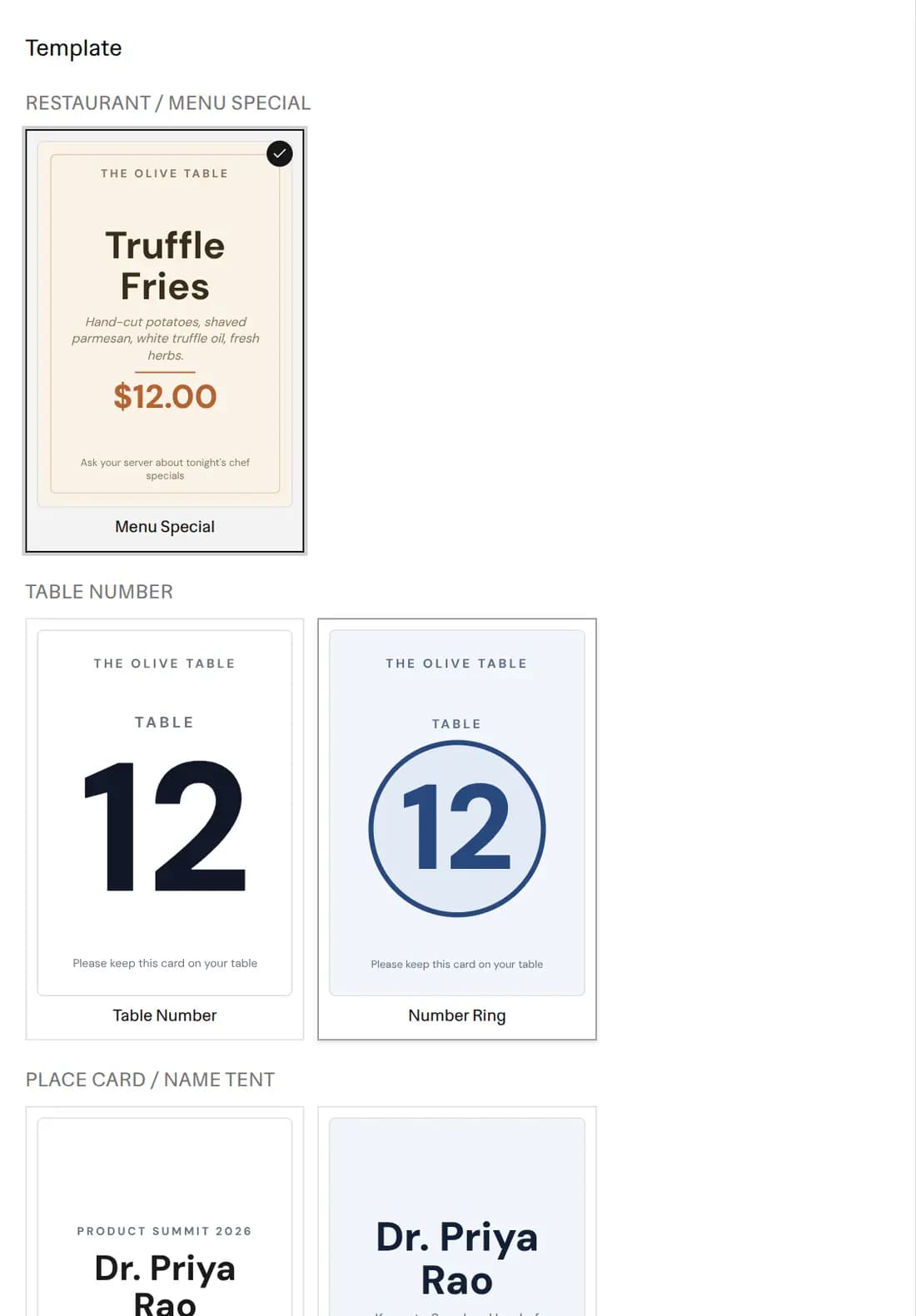 The Template gallery grouped by use case, with the Menu Special template selected under Restaurant / menu special
- Pick the fold style. Under Fold style, choose Half-fold tent for the classic A-frame with one fold, or Tri-fold triangle for a self-standing triangle with two folds and a glue tab. The preview redraws the flat card with its FOLD lines.
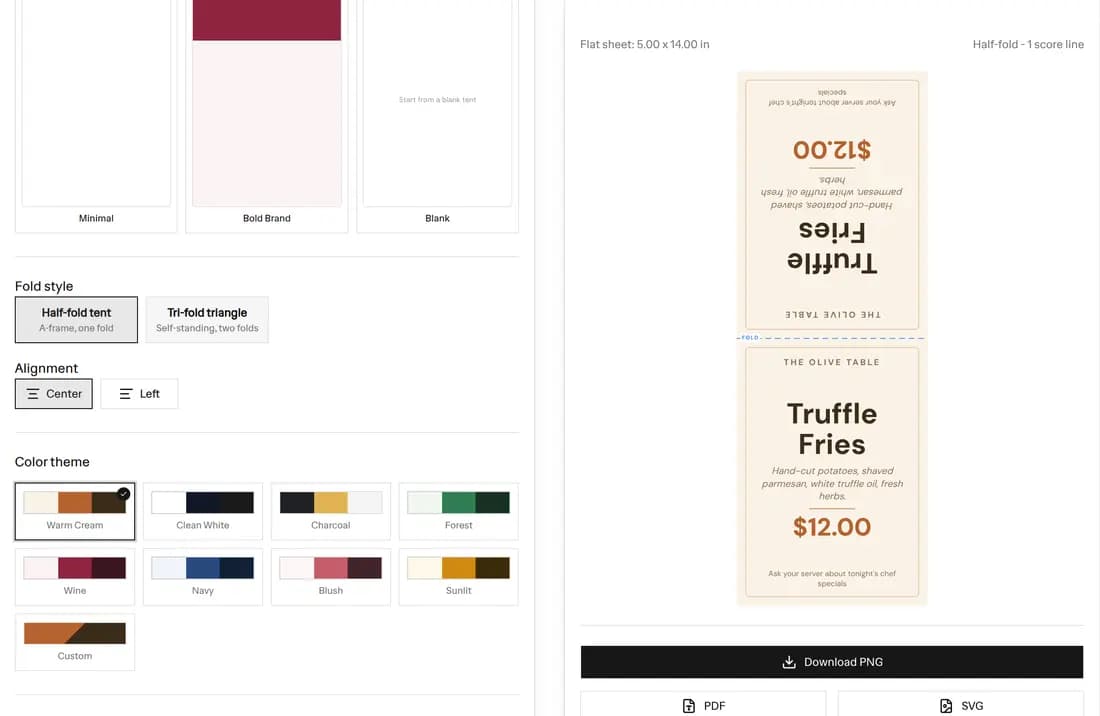 The Fold style control with Half-fold tent selected and the flat card preview showing one dashed FOLD line across the middle
- Type the front face. Fill in the Front face fields, such as the restaurant name, the dish, a short description, and the price, or click Fill example to load sample text. Fields you leave empty are hidden on the card.
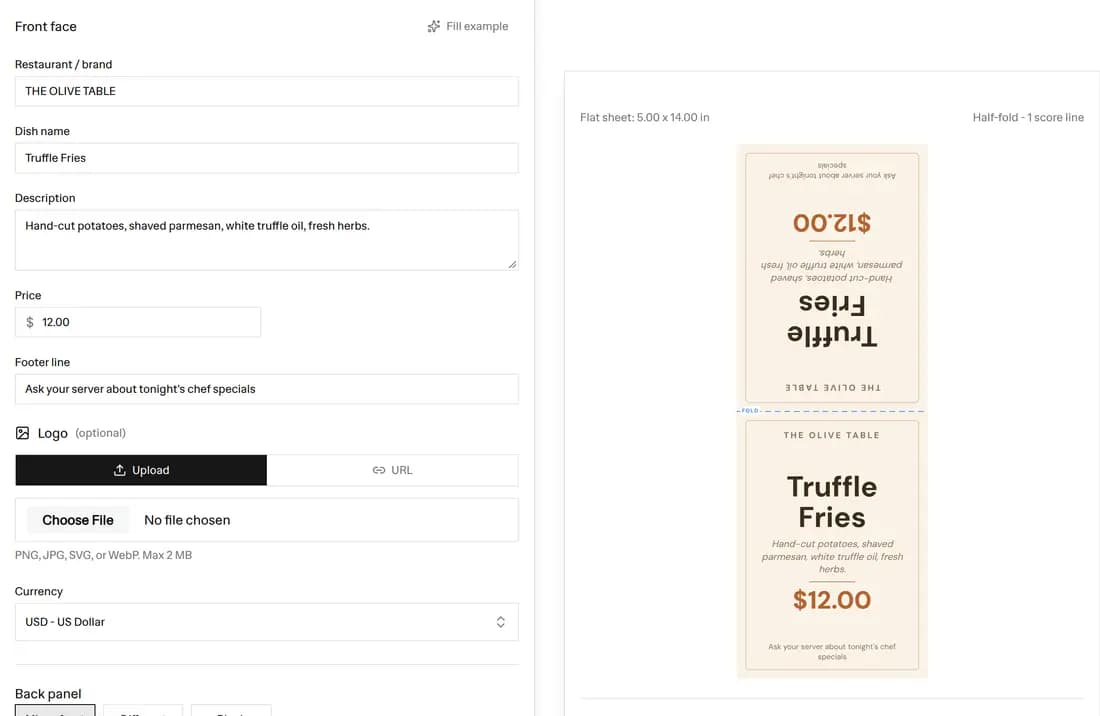 The Front face form filled with The Olive Table, Truffle Fries, a short description, and a $12.00 price, next to the live preview
- Set the back panel. Under Back panel, choose Mirror front to show the same text on both sides, Different to type a second message for the back, or Blank for a one-sided tent. The tool turns the back upside down on the flat card so it reads the right way up after folding.
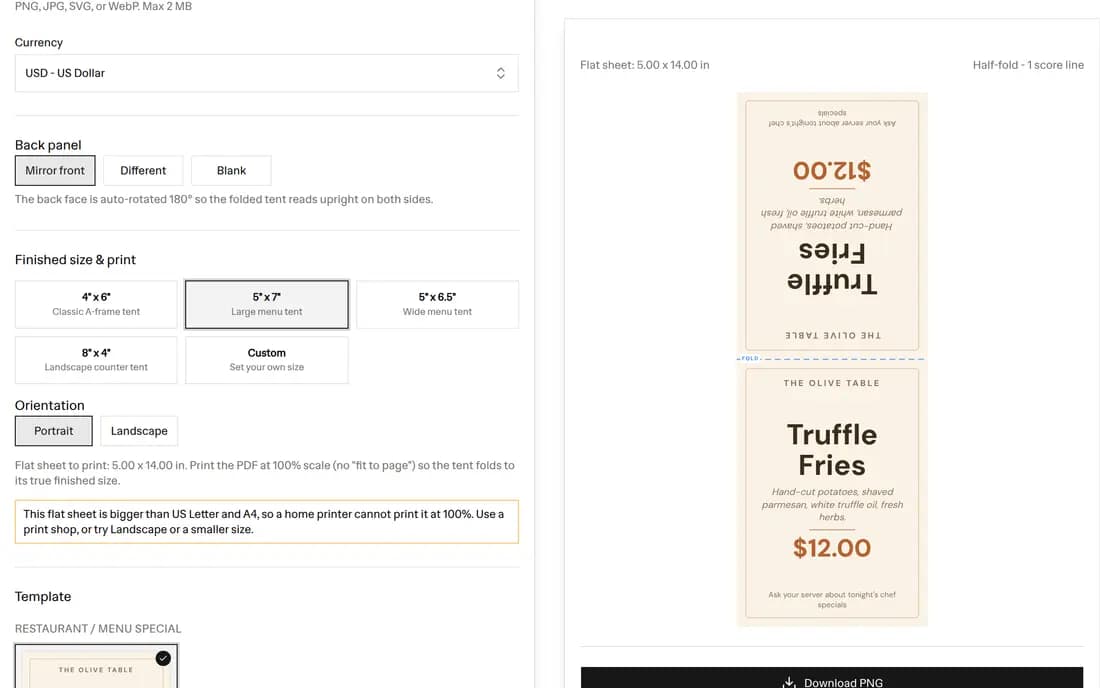 The Back panel buttons with Mirror front selected and the preview showing the back half of the card printed upside down above the FOLD line
- Choose the finished size. Under Finished size & print, pick a size such as 4 x 6 or 5 x 7 inches and set Portrait or Landscape. The line under the buttons shows the flat sheet you will print, for example 5.00 x 14.00 in for a 5 x 7 portrait tent.
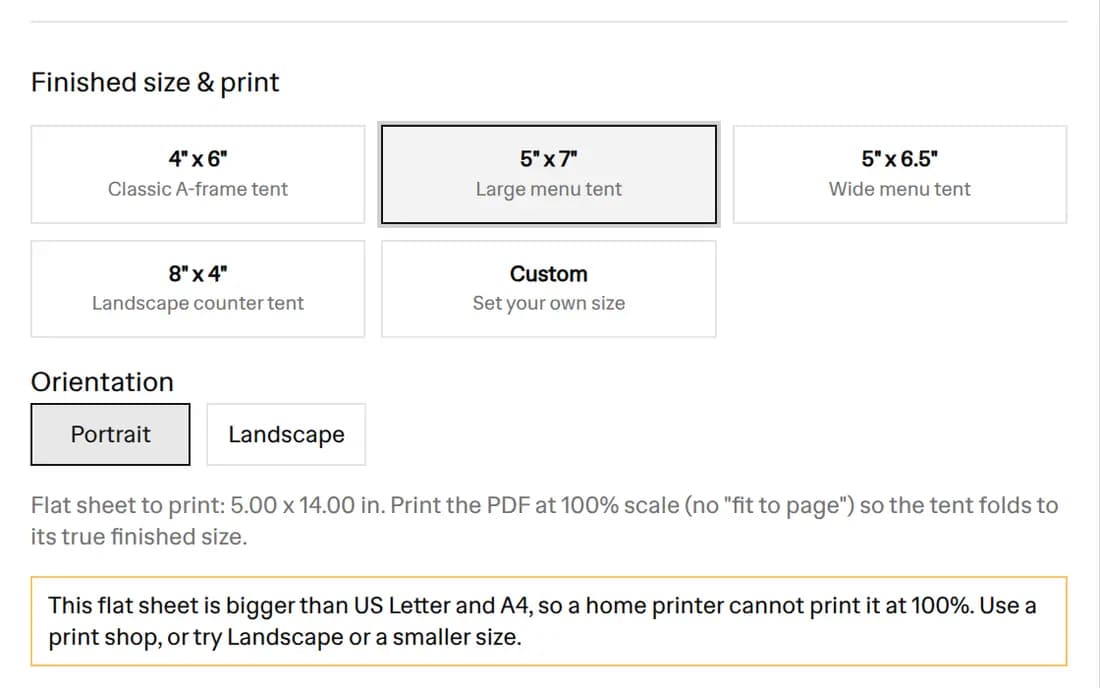 The Finished size and print picker with the 5 x 7 inch Large menu tent selected and the helper line reading Flat sheet to print: 5.00 x 14.00 in
- Download and print. Click the PDF button, open the file, and print it at 100 percent scale, also called Actual size, with no "fit to page" option. The PDF page is the flat card at its true size. PNG and SVG files are there too if you want to place the design somewhere else.
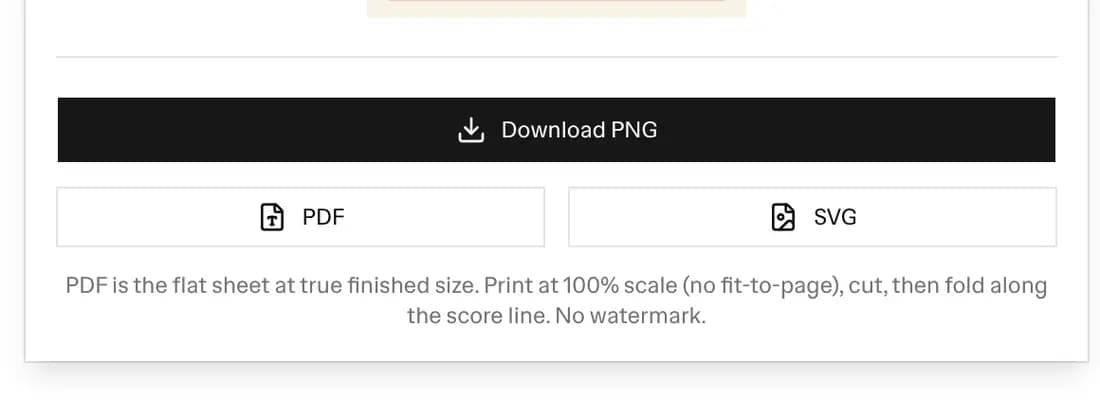 The download buttons under the preview: Download PNG, PDF, and SVG, with the note to print at 100% scale with no fit-to-page
How to cut and fold a half-fold tent
- Cut the card out along the edge of the printed design. The single-tent PDF has no cut line because the page edge is the card edge, so if your design has a white background, measure the flat size from step 5 with a ruler and mark the corners first.
- Lay a ruler along the dashed FOLD line and press along it with a bone folder or the back of a butter knife. This is called scoring, and it gives card stock a clean bend instead of a cracked one.
- Fold the card in half along the scored line with the printed side facing out. The front panel and the back panel now face away from each other.
- Open the fold slightly and stand the tent on its two bottom edges. Both faces read upright because the back panel was printed upside down on purpose.
How to cut and fold a tri-fold triangle tent
- Cut the card out along its edge, including the small glue tab at the bottom.
- Score both FOLD lines and the tab crease with a ruler and a bone folder.
- Fold along the two FOLD lines so the back panel, the front panel, and the panel labelled "Base - rests on table" form a triangle, with the printed faces outward.
- Fold the glue tab in, add a thin line of glue to it, and press it against the inside of the back panel along its free edge. Hold it until the glue sets, then stand the triangle on its base.
5x7 table tent template
5 x 7 inches is one of the built-in half-fold sizes, listed as the large menu tent. Pick Half-fold tent, then the 5" x 7" button, and the tool builds the flat card for you. You do not need to set a custom size.
Check the paper before you print. In Portrait, a 5 x 7 tent is 5 inches wide and 7 inches tall when it stands, so the flat card is 5 x 14 inches (360 x 1008 points) with the fold at 7 inches. That is longer than a US Letter sheet (11 inches) and an A4 sheet (297 mm, about 11.7 inches), so it does not fit on standard home printer paper. You have two options:
- Switch to Landscape. The tent is then 7 inches wide and 5 inches tall, and the flat card is 7 x 10 inches, which fits on US Letter and A4.
- Keep Portrait and use a print shop. Send the 5 x 14 inch PDF and ask for it on card stock at 100 percent scale.
The same check applies to the 4 x 6 tent. In Portrait its flat card is 4 x 12 inches, which is also longer than Letter and A4. In Landscape it is 6 inches wide and 4 inches tall, and the flat card is 6 x 8 inches. That is why the tool starts every size in Landscape; switch to Portrait when you print at a shop.
The Bulk sheet tab uses smaller sizes made to tile several tents on one page: a 3.5 x 2 inch name tent, a 3 x 3 inch table number, a 4 x 2.5 inch place card, and a 2.5 x 2 inch mini tent. A 5 x 7 tent is made one at a time on the Single tent tab.
Free table tent template for Word
This tool does not export a Word file. It exports a PDF, a PNG image, and an SVG vector file, all free and without a watermark. For printing, the PDF is the simplest choice: open it in any PDF reader and print it at 100 percent scale. You do not need Word at all, and the size cannot drift the way a resized picture in a Word page can.
If you need the design inside a Word document, for example to add it to a handout, download the PNG and insert it as a picture. Then select the picture and type the exact height and width in the Size group on the Picture Format tab, using the flat sheet size shown under the size picker. Microsoft's guide to changing the size of a picture in Word shows where those boxes are. Make the Word page at least as large as the flat card, or the picture will not fit.
The fold engine: half-fold tent vs tri-fold triangle
A table tent is different from a flat tag or a flyer because it folds. This tool has a fold engine that turns your finished panel size into the correct flat sheet, draws the score line where you fold, and rotates the back panel so it reads upright once folded.
There are two fold styles.
A half-fold tent has one fold at the top. Two equal panels lean together into an A-frame and stand on their two bottom edges. This is the classic restaurant table tent. On the flat sheet, the front panel is the bottom half and the back panel is the top half, with a single score line across the middle.
A tri-fold triangle has two folds that split the card into three equal panels, plus a small glue tab. Folded, it forms a self-standing triangular prism with a flat base that sits on the table, a front face, and a back face. The two score lines are drawn between the panels, and the glue tab is marked with a hatch so you know where to add glue.
Both styles show your front design on one side and a back on the other. Pick the one that matches how you want the card to stand.
Why the back panel is rotated
When you fold a tent card made by hand, the back panel ends up upside down relative to the front. If you print the same design on both halves of the flat sheet, one side comes out inverted.
This tool fixes that automatically. The back panel is rotated 180 degrees on the flat sheet, so once you fold the card, the back reads upright too. You get three back-panel options:
- Mirror front shows the same content on both faces, auto-flipped. This is the default and is what you want for a table number or a name tent that has to read from both sides.
- Different lets you put a different message on the back, such as a drink special on the front and a dessert special on the back.
- Blank leaves the back empty for a single-sided tent.
Finished sizes that match print shops
The size you pick is the finished (folded) panel size, the way you would measure the standing tent. These presets follow common print-shop conventions.
For half-fold A-frame tents:
- 4 x 6 inches, the classic A-frame tent
- 5 x 7 inches, a large menu tent
- 5 x 6.5 inches, a wide menu tent
- 8 x 4 inches, a landscape counter tent
For tri-fold triangle tents:
- 4 x 4 inches, a square triangle tent
- 6 x 4 inches, a wide triangle tent
- 8 x 4 inches, a long triangle tent
You can also set a custom size in inches and switch between portrait and landscape. The helper line under the size picker always shows the resulting flat sheet size, so you know before you print whether it fits your paper.
True-size printing
The export is built so the folded tent measures its real size. The rule is simple: 1 inch equals 72 points, so a US Letter page is 612 x 792 points and A4 is 595.28 x 841.89 points.
For a half-fold tent, the flat card is the panel width wide and twice the panel height tall, with the score line at the vertical midpoint. A 4 x 6 portrait half-fold exports a flat 4 x 12 inch card, which is 288 x 864 points, with the fold score line at 6 inches (432 points). A 5 x 7 tent exports a flat 5 x 14 inch card, which is 360 x 1008 points, with the score line at 7 inches (504 points).
To get that exact size on paper, print the PDF at 100% scale with no "fit to page" or "shrink to fit" option. Then cut on the outline and fold on the score line.
Use cases: one tool for the whole table
The templates are grouped by use case, and each one relabels the fields so the form fits the job.
Menu special. Put a dish name, a short description, and a price on a warm, appetite-forward card. Set it on the table to push the truffle fries at $12 or the barrel-aged negroni at $13.
Table number. Show one large numeral. In Bulk mode you set a start number and a count, and the tool auto-generates a numbered sequence, one tent per number, ready to tile and print.
Place card and name tent. Show a large guest or attendee name with a title or organisation line. The name mirrors onto the back so it reads from both sides of a banquet or conference table. This is the same item people search for as a "name tent," so you do not need a separate tool. For a badge that clips to a shirt instead, use the name tag generator.
Retail product callout. Feature a product name, a price, and a NEW or SALE flag for a shelf or counter display.
Scan-to QR. Turn a URL into a real QR code that decodes to exactly that link. Guests scan the printed tent to order, tip, or leave a review. The code is baked into the export so it scans off the paper. If you only need the code itself, the QR code generator makes a standalone image.
Reserved. A clean, centered "RESERVED" card for a held table.
Wedding and event. A serif, decorative card for table names, seating, and event signage.
Blank. Start from an empty card with every field available and hidden until you fill it.
Bulk mail-merge for a whole set
Single mode designs one tent. Bulk mode makes a set. Choose Table numbers to auto-generate a numbered sequence, or paste a list where each line is one tent (heading, description, price, copies). You can also import a CSV and download a sample CSV to match the columns. Every tent tiles onto a US Letter or A4 sheet with cut and fold guides. Multi-page sets download as a ZIP of PNGs or a single multi-page PDF.
Tips for a clean print
- Use card stock, ideally 80 lb cover or heavier, so the tent stands without sagging.
- Score the fold line with a bone folder or the back of a butter knife before folding for a crisp edge.
- For a triangle tent, add a thin line of glue to the tab and press it to the inside of the back panel.
- Keep the darkest backgrounds for card stock you can print edge to edge, or add a small margin.
- Proof one tent on plain paper before you print the whole set on card stock.
Frequently asked questions
Is this table tent template maker free?
Yes, it is 100% free with no signup and no watermark. Design and download as many table tents as you want as PNG, PDF, or SVG files, one at a time or as a tiled printable sheet.
What is a table tent?
A table tent, also called a tent card or name tent, is a folded card that stands upright on a table or desk. Restaurants use them for menu specials and table numbers, events use them for place cards and name tents, and retailers use them for product callouts and scan-to-review QR codes.
How do you make a table tent?
Pick a template, a fold style, and a finished size in the tool, type your text, and download the PDF. Print it at 100% scale on card stock, cut the card out, score the dashed FOLD line with a ruler and a bone folder, and fold it with the printed side out. A half-fold tent stands as an A-frame. A tri-fold triangle also needs its glue tab glued to the inside of the back panel.
Is there a 5x7 table tent template?
Yes. 5 x 7 inches is a built-in half-fold size, listed as the large menu tent. In Portrait the flat card is 5 x 14 inches, which is longer than US Letter or A4, so print it at a print shop or switch to Landscape, where the tent is 7 x 5 inches and the flat card is 7 x 10 inches and fits on a Letter or A4 sheet.
Can I get a free table tent template for Word?
This tool does not make a Word file. It exports a PDF, a PNG, and an SVG for free. The PDF prints at true size from any PDF reader, so you do not need Word. If you want the design in a Word document, insert the PNG as a picture and set its height and width to the flat sheet size shown under the size picker.
What is the difference between a half-fold tent and a tri-fold triangle?
A half-fold tent has one fold at the top, so two panels lean together into an A-frame that stands on its two bottom edges. A tri-fold triangle has two folds that make three panels plus a glue tab, so it forms a self-standing triangular prism with a flat base. Both show the front on one side and the back on the other, and this tool draws the score lines for you.
How does the back of the tent read the right way up?
When a tent folds, the back panel ends up upside down relative to the front. This tool rotates the back panel 180 degrees on the flat sheet, so once you fold the card the back reads upright too. You can mirror the front onto the back, give the back different content, or leave the back blank.
What size should a table tent be?
Common A-frame finished sizes are 4 x 6 inches, 5 x 7 inches, 5 x 6.5 inches, and a landscape 8 x 4 inches. Triangle tents are often 4 x 4, 6 x 4, or 8 x 4 inches. These are the finished (folded) panel sizes and all are built-in presets, plus a custom size in inches.
Will the printed tent be the correct size?
Yes. The PDF page is sized to the flat unfolded card at true scale, where 1 inch equals 72 points. A 4 x 6 portrait half-fold exports a flat 4 x 12 inch card (288 x 864 points) with the fold score line at 6 inches (432 points). Print at 100% scale with no fit-to-page and the folded tent comes out at its exact finished size.
Can I make a whole set of numbered table tents at once?
Yes. In Bulk mode, choose Table numbers and set a start number and a count to auto-generate a numbered sequence, or paste a list and import a CSV for names, dishes, or place cards. Every tent tiles onto a US Letter or A4 sheet with cut and fold guides, and multi-page sets export as a ZIP of PNGs or a single PDF.
Can I add a scannable QR code?
Yes. The Scan-to QR template turns a URL into a real QR code that decodes to exactly that link. It is baked into the PNG, PDF, and SVG export, so guests can scan the printed tent to order, tip, or leave a review.
Can I use this for name tents and place cards?
Yes. The Place Card and Name Tent templates show a large guest or attendee name with a title or organisation line, and mirror the name onto the back so it reads from both sides of a conference table. That makes this the same tool for table tents, name tents, and place cards.
More FREE Marketing & Branding tools
Social posts, email signatures, buyer personas, and campaign tracking.
Free Business Card Maker
Design professional business cards with custom templates and your logo. Live preview and instant PDF download. Free, no signup.
Free Gift Certificate Template Maker
Create a printable gift certificate with your business name, logo, amount, and a unique code. Pick from 6 occasion templates, custom colors, and fonts, then download a PNG, SVG, or print-ready PDF. Free, no signup.
Free Gift Tag Template Maker
Design printable gift tags for any occasion. Pick from 20 templates, add To, From, and a message, choose a shape (including a classic punch-hole swing tag) and real-unit size, then download PNG, PDF, or SVG. Bulk-print a personalized sheet from a recipient list. Free, no signup, no watermark.
Free Coupon Maker
Make your own coupons with your logo, discount, and promo code. Pick from 12 coupon templates, add a QR code or barcode, then download a PNG or PDF, or print a sheet of coupons with crop marks and a unique code on each. Free, no signup.
Free Bulk Discount Code Generator
Generate up to 5,000 unique coupon, promo, or discount codes in bulk. Set a prefix, length, and character set, attach a percentage, fixed amount, or free shipping rule, and download a CSV for Shopify import. Free, no signup.
Free Thank You Card Template Maker
Design a printable thank you card for orders. Pick from 20 templates, write your message, add a discount code and a scannable QR, choose a real-unit insert size, then download PNG, PDF, or SVG. Bulk-print a personalized sheet from a customer list. Free, no signup, no watermark.
Free Event Ticket Maker
Design printable event tickets for concerts, galas, sports, conferences, fundraisers, and parties. Pick a template, add your event, date, venue, seat, and price, add a tear-off stub with a matching number, then download a true-size PNG, PDF, or SVG, or a numbered sheet. Free, no signup, no watermark.
Free Raffle Ticket Generator
Make printable numbered raffle tickets for fundraisers, churches, schools, sports 50/50, and holiday draws. Add your prize, drawing date, and price, pick a themed template, and each ticket gets a fill-in Name and Phone counterfoil with a matching number. Draw a winner, then download a true-size PNG, PDF, or SVG, or a numbered sheet. Free, no signup, no watermark.
Free Instagram Post Generator & Creator
Make up to 980 Instagram post designs per download from your product photos. Select from 35 templates, 28 color palettes and custom fonts, and batch download 1080×1350px posts as a ZIP. Built for Shopify merchants. Free, no signup.
Free Shopify Email Signature Generator
Create professional email signatures with store logo, track-order links, returns policy, and promo codes. Copy HTML for Gmail, Outlook, Thunderbird, and Shopify Email. Free, no signup.
Free AI Buyer Persona Generator
Create detailed buyer personas for your Shopify store with AI. Answer guided questions about your customers and get a complete persona with demographics, shopping behavior, and marketing recommendations. Free, no signup.
Free UTM Link Builder & Campaign URL Generator
Free Google Analytics campaign tagging tool — build trackable UTM campaign URLs for your Shopify store. Set utm_source, utm_campaign, and utm_medium with smart ecommerce presets, real-time tracking URL preview, and GA4 campaign tracking support. No signup.