
Free ROAS Calculator
Calculate your return on ad spend, find your break-even and target ROAS, and see the ad budget needed to hit a revenue goal. Built for Shopify and DTC media buyers on Meta, Google, and TikTok. No signup is required.
How to Use the ROAS Calculator
This free return on ad spend calculator needs just two numbers to start, plus three optional inputs that unlock the advanced metrics. Here is how to use it:
- Enter your ad spend: The total amount you spent on this ad, campaign, or channel.
- Enter your ad revenue: The revenue attributed to that ad spend. The tool instantly shows your ROAS as a ratio and a percent, plus your ACoS.
- Add your gross margin % (optional): Revenue minus product cost (COGS), as a percent. This unlocks your break-even ROAS, gross and net profit, net margin, and ROI.
- Add your target net margin % (optional): The profit margin you want to keep after ad spend. This unlocks your target ROAS.
- Add a monthly revenue goal (optional): We show the ad budget needed to hit that revenue at your target ROAS.
- Read your results: The hero number is your ROAS. The cards below show break-even ROAS, target ROAS, net profit, and the budget to hit your goal. A verdict line tells you if the campaign is profitable.
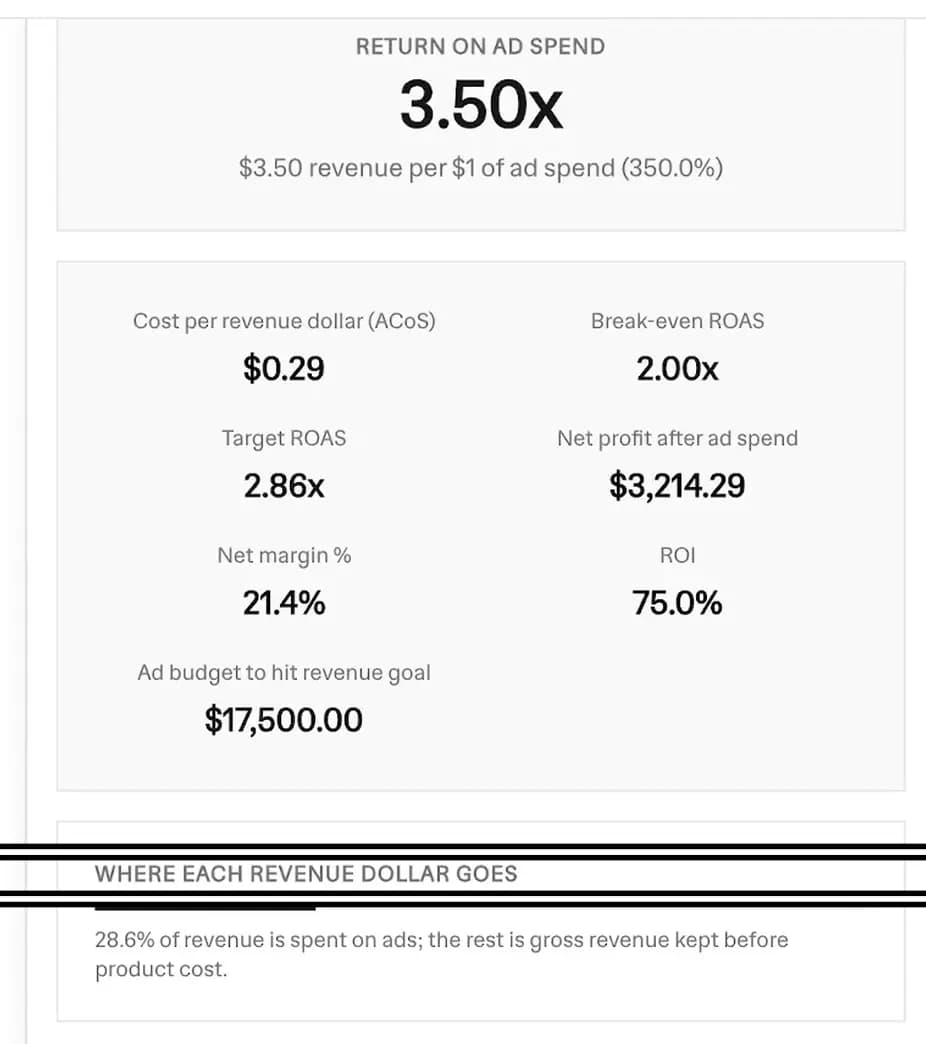 ROAS calculator results showing 3.50x return on ad spend, ACoS, break-even ROAS, target ROAS, net profit, net margin, ROI, and the ad budget to hit a revenue goal
How to Calculate ROAS by Hand
If you want to know how to calculate ROAS without a tool, it is a single division. Follow these steps:
- Find your ad revenue: Total the revenue your ads drove over a date range. Use your ad platform or analytics attribution.
- Find your ad spend: Total what you paid the platform over the same range.
- Divide revenue by spend: ROAS = ad revenue / ad spend.
- Express it two ways: As a ratio like 4.0x, and as a percent by multiplying by 100, so 4.0x is 400%.
That is the whole roas calculation. The hard part is not the math, it is judging the number against your margins, which is why this tool layers break-even and target ROAS on top.
The ROAS Formula
This is the core ROAS formula, used by every tool in this space:
To read it as a percent, multiply by 100. A ratio of 4.0x is the same as 400%.
There is also a conversion-based version of the roas equation when you do not have a single revenue figure but you do know your orders and average order value:
Both formulas give the same answer. Use whichever inputs you have on hand. In a spreadsheet, if ad revenue is in cell A1 and ad spend is in B1, your ROAS is =A1/B1.
Worked Example
Say you spent $1,000 on a Meta campaign and it drove $4,000 in revenue:
Now a fuller example with margins. You spend $4,285.71 and earn $15,000, so your ROAS is 3.50x. With a 50% gross margin, your break-even ROAS is 2.00x. If you want to keep a 15% net margin after ad spend, your target ROAS is 2.86x. Since 3.50x beats both, the campaign is profitable.
Break-Even ROAS
Your break-even ROAS is the point where ad revenue exactly covers product cost plus ad cost. Below it you lose money, above it you profit. The formula is simple:
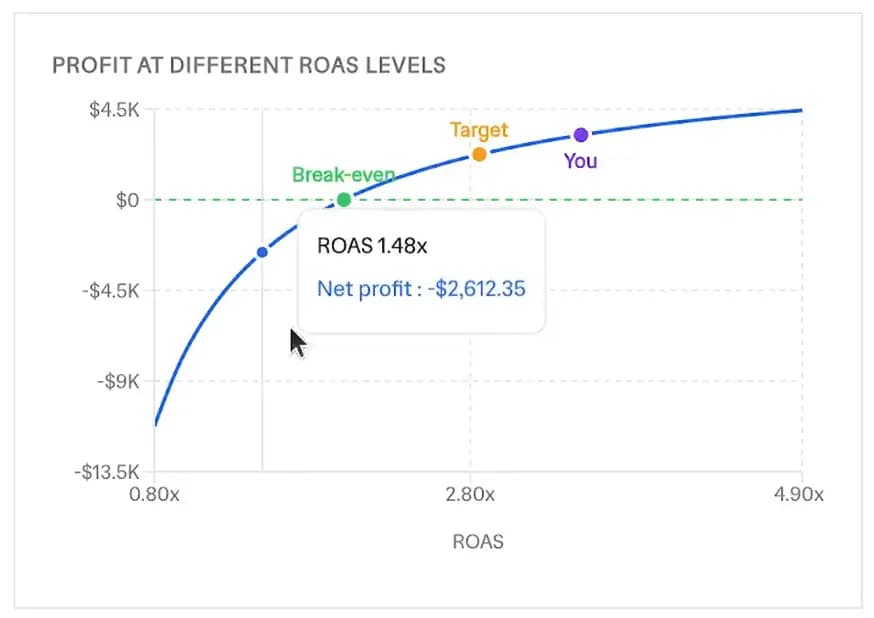 Profit at different ROAS levels chart plotting net profit against ROAS, with the break-even, target, and your current ROAS points marked on the curve
Use your gross margin as a decimal. This is why a break even roas calculator only needs your margin, not your spend. Here is how it scales:
| Gross margin | Break-even ROAS |
|---|---|
| 30% | 3.33x |
| 50% | 2.00x |
| 70% | 1.43x |
A high-margin brand breaks even at a low ROAS. A thin-margin brand needs a much higher ROAS just to avoid losing money. Always compare your actual ROAS to this number first.
Target ROAS: Build In Your Profit Margin
Break-even keeps you at zero. Target ROAS is the ROAS you need to hit a profit goal after ad spend. It builds your desired net margin into the number:
With a 50% gross margin and a 15% target net margin, your target ROAS is 1 / (0.50 - 0.15) = 2.86x. Set that figure as your target roas (tROAS) bidding goal in Google or Meta so the platform optimizes toward profitable spend, not just any conversion.
What Is a Good ROAS?
The honest answer to what is a good ROAS is: it depends on your margins. There is no single industry number that fits every store. Use this scale as a rough guide:
- Below your break-even ROAS: a loss. Every sale costs more than it earns.
- 2x to 4x: common for many ecommerce brands. Often profitable on healthy margins.
- 4x and up: strong. Comfortable profit on most DTC margins.
- 8x or higher: excellent, but may signal you are under-spending and leaving growth on the table.
By platform, DTC brands often see Meta land around 1.8x to 3.0x and Google Search around 3.5x to 6.0x, though this varies widely. The rule stays the same: compare your ROAS to your own break-even, not to an average.
ROAS vs ROI vs ACoS vs MER
These four metrics get mixed up constantly. Here is the one-line version of each:
- ROAS: ad revenue / ad spend. Revenue earned per ad dollar.
- ROI: net profit / total cost. Profit per dollar after all costs. The roas vs roi difference is that ROAS ignores product and overhead cost, so a high ROAS can still mean a low ROI on thin margins.
- ACoS: ad spend / ad revenue. The inverse of ROAS, shown as a percent. A 4x ROAS is a 25% ACoS. If you came here for an acos calculator, the cost-per-revenue-dollar card above is your ACoS.
- MER: total revenue / total ad spend, also called blended ROAS. It judges all your ad spend together instead of one campaign.
A common related metric is roas vs cpa: CPA (cost per acquisition) is spend per order, while ROAS is revenue per ad dollar. They answer different questions.
How to Improve Your ROAS
If your ROAS is below your target, a few levers move it the most:
- Raise your average order value with bundles, upsells, and free-shipping thresholds.
- Lift your conversion rate with faster pages, better product photos, and clearer offers.
- Cut the worst-performing ad sets and shift budget to your winners.
- Refresh creative before fatigue drives your costs up.
Small gains on AOV and conversion rate compound, because both raise revenue without raising ad spend.
Why ROAS Matters for Shopify Sellers
ROAS ties your ad budget directly to your product margin. Your gross margin sets a hard ceiling on how much you can pay to acquire a sale, and your break-even ROAS is that ceiling expressed as a ratio. Knowing it stops you from scaling a campaign that looks busy but loses money on every order.
Pair this with the rest of your store math. Use our Profit Margin Calculator to set the margins that feed this tool, the Break-Even Calculator to find the units and revenue you need to cover costs, and the Facebook Ads Calculator and Instagram Ads Calculator to forecast spend on each platform. This marketing roi calculator turns those margins into a clear go or no-go for your ads.
Frequently Asked Questions
What is ROAS?
Return on ad spend: the revenue you earn for every dollar spent on ads. ROAS = ad revenue / ad spend. A 4x ROAS means $4 of revenue for every $1 of ad spend.
How do I calculate ROAS?
Divide the revenue from your ads by the amount you spent on them. Example: $4,000 revenue / $1,000 spend = 4.0x (400%).
What is a good ROAS?
It depends on your margins. Many ecommerce brands aim for 4x or higher, but a high-margin brand can profit at 2x while a low-margin brand may need 8x. Compare it to your break-even ROAS, not an industry average.
What is break-even ROAS?
The ROAS where ad revenue exactly covers product cost plus ad cost, so you make no profit and no loss. Break-even ROAS = 1 / gross margin. A 50% margin needs 2.0x.
What is target ROAS?
The ROAS you need to hit a desired profit margin after ad spend. With a 50% gross margin and a 15% target net margin, your target ROAS is 1 / (0.50 - 0.15) = 2.86x.
What is the difference between ROAS and ROI?
ROAS measures revenue per ad dollar. ROI measures net profit per dollar after all costs. A campaign can have a high ROAS but low ROI if margins are thin.
What is the difference between ROAS and ACoS?
They are two sides of the same ratio. ROAS is revenue / ad spend; ACoS is ad spend / revenue. A 4x ROAS equals a 25% ACoS.
Is this ROAS calculator free?
Yes, 100% free, no signup, unlimited calculations.
More FREE Store Finance & Documents tools
Price products, forecast ad profit, bill customers, and create invoices, purchase orders, packing slips, and other order documents.
Free Expense Report Template Generator
Build a professional expense report. Add line items, mileage, and a cash advance, pick from 20 templates, and download a print-ready PDF, PNG, or CSV. Free, no signup, no watermark.
Free Timesheet Template Generator
Fill in a weekly, bi-weekly, or monthly timesheet template with live overtime and pay totals, pick from 12 templates, and download a print-ready PDF, PNG, or CSV. Free, no signup, no watermark.
Free Profit Margin Calculator
Calculate your product's selling price, gross margin, and net profit instantly. Factor in shipping and acquisition costs. Free, no signup.
Free Dropshipping Profit Calculator
Enter product cost, markup, ad spend per sale, and shipping to see your selling price, gross margin, and true net profit per dropshipping order. Free, no signup.
Free Print on Demand Profit Calculator
Enter provider base cost, markup, ad spend per sale, and shipping to see your selling price, gross margin, and true net profit per print on demand order. Free, no signup.
Free Markup Calculator
Turn cost and markup into your selling price, gross profit, and margin. Convert markup to margin, see your revenue multiplier, and price in bulk with CSV export. Free, no signup.
Free Etsy Fee Calculator
See every Etsy fee and your exact net payout, then switch to Stripe, Shopify, Square, Depop, Mercari, Poshmark, Reverb, or PayPal. Line-by-line breakdown, profit and margin, and a reverse net-to-price mode. Free, no signup.
Free Stripe Fee Calculator
See Stripe's processing fee and your exact net payout - 2.9% + $0.30 online, 2.7% + $0.05 in person. Line-by-line breakdown, profit and margin, and a reverse net-to-charge mode. Free, no signup.
Free Square Fee Calculator
See Square's processing fee by acceptance method - 2.6% + $0.15 in person, 2.9% + $0.30 online, 3.3% + $0.30 invoice, 3.5% + $0.15 keyed - and your exact net deposit. Profit, margin, and a reverse mode. Free, no signup.
Free Shopify Fee Calculator
See Shopify Payments processing by plan (Basic, Grow, Advanced), the transaction fee a third-party gateway adds, and your exact net payout. Profit, margin, and a reverse mode. Free, no signup.
Free Depop Fee Calculator
See what you keep on a Depop sale under the 2024 US structure - no seller selling fee, just 3.3% + $0.45 processing. Profit, margin, and a reverse net-to-price mode. Free, no signup.
Free Mercari Fee Calculator
See what a Mercari sale leaves you under the 2025 US structure - a flat 10% selling fee on item plus shipping, no seller processing fee. Profit, margin, and a reverse mode. Free, no signup.
Free Poshmark Fee Calculator
See your exact Poshmark earnings with the real US tiered fee - a flat $2.95 under $15, otherwise 20%. Profit, margin, and a reverse net-to-price mode. Free, no signup.
Free Reverb Fee Calculator
See what a Reverb sale leaves you: a 5% selling fee on item plus shipping (capped at $500) plus processing of 3.19% + $0.49 (2.99% + $0.49 Preferred). Profit, margin, and a reverse mode. Free, no signup.
Free Reverse Sales Tax Calculator
Back the sales tax out of any total. Find the price before tax and the tax amount from a gross total, with US state and Canada rate presets. Free, no signup.
Ecommerce Conversion Rate Calculator
Turn visitors and orders into your conversion rate, see revenue per visitor, and project the extra revenue from hitting a target rate. Free, no signup.
Free Break-Even Calculator
Find the units and revenue you need to cover costs. Calculate your break-even point, contribution margin, and the sales needed to hit a profit goal. Free, no signup.
Free Customer Lifetime Value Calculator
Calculate customer lifetime value (CLV) two ways - historic and predictive - see net value after acquisition cost, and get a plain-English CLV:CAC health verdict. Built for Shopify and ecommerce. Free, no signup.
Free Customer Acquisition Cost Calculator
Calculate customer acquisition cost (CAC), compare blended vs paid CAC by channel, and get an LTV:CAC health verdict plus the CAC payback period. Built for Shopify and ecommerce. Free, no signup.
Free Shopify Profit Calculator
Calculate net profit and margin per order after COGS, shipping, ads, returns, and real Shopify plan and payment fees. See break-even CPA and ROAS, a profit waterfall, and the order volume where each Shopify plan becomes the cheapest. Free, no signup.
Free Invoice Generator
Create professional invoices with your logo, line items, tax, and discounts. Live preview and instant PDF download. Free, no signup.
Free Packing Slip Generator
Create a clean packing slip for any order. Add your logo, ship-to address, and items, then download a print-ready PDF. No prices, no signup.
Free Purchase Order Generator
Create a purchase order to send your supplier. Add the vendor, line items with agreed prices, and a delivery date, then download a PDF. Free, no signup.
Free Commercial Invoice Template
Create a customs-ready commercial invoice for international shipping. Add HS codes, country of origin, Incoterms 2020, weights and the declaration, then download a PDF. Free, no signup.
Free Proforma Invoice Template
Create a quote-style proforma invoice you can send before the sale is final. Add a valid-until date, itemised freight, and optional customs fields and Incoterms 2020, then download a PDF. Free, no signup.
Free Credit Memo Template
Create a print-ready credit memo that reduces what a customer owes on a prior invoice. Reference the original invoice, list the credited items, and the tool computes the credit total, then download a PDF. Free, no signup.
Free Bill of Lading Template
Create a print-ready straight bill of lading for domestic LTL freight. Add the shipper, consignee, carrier, freight lines with weight and NMFC class, and freight charge terms, then download a PDF. Free, no signup.
Free Work Order Template
Create a print-ready work order for a service call, preventive maintenance, HVAC, plumbing, construction or auto repair job. Add the service location, equipment, task checklist, labor and parts, then download a PDF with technician and customer sign-off. Free, no signup.
Free Order Form Generator
Create a professional order form template with line items and live totals. Add your logo, customer, and prices, then download a PDF. Free, no signup.
Free Quote Generator
Create a professional price quote with your logo, client details, line items, and a valid-until date. Live preview and instant PDF download. Free, no signup.
Free Estimate Generator
Create a professional job estimate with your logo, client details, line items, and an estimated total. Live preview and instant PDF download. Free, no signup.
Free Packing List Generator
Create an itemized packing list for ecommerce, wholesale, and freight shipments. Add shipper, consignee, and contents, then download a PDF. Free, no signup.
Free Delivery Note Generator
Create a delivery note with a signature line for proof of delivery. Add your details, the deliver-to address, and items, then download a PDF. Free, no signup.
Free Return Form Generator
Create a printable return form or RMA form for ecommerce returns. Add the return-from address, items, and reason, then download a PDF. Free, no signup.
Free Shipping Label Generator
Make a printable shipping label with From / To and package details. Pick a 4x6, half-sheet, or Avery template, add a barcode or QR, bulk-generate from CSV, and download PDF, PNG, or SVG. No email, no signup, no watermark.
Free Shopify Order Bill Splitter
Split a group Shopify order fairly. Import items from a product link, assign who shares what, split shipping, tax, and discounts, and see who pays whom with the fewest payments. Free, no signup.
Free Facebook Ads Calculator
Forecast your Facebook ad profits with real industry benchmarks, interactive sliders, and reverse budgeting. See ROAS, CPA, and net profit instantly. Free, no signup.
Free Instagram Ads Calculator
Forecast your Instagram ad costs and profits with real Instagram benchmarks, interactive sliders, and reverse budgeting. See ROAS, CPA, and net profit instantly. Free, no signup.