
Free Reverse Sales Tax Calculator
Back the sales tax out of any total. Enter a gross price and your tax rate to see the price before tax and the exact tax amount. Perfect for bookkeeping and payout reconciliation. No signup is required.
How to Use the Reverse Sales Tax Calculator
This quick video walkthrough shows how to back the sales tax out of a total. You will learn to enter your gross price, set the tax rate or pick a state preset, and instantly read the price before tax using our free calculator.
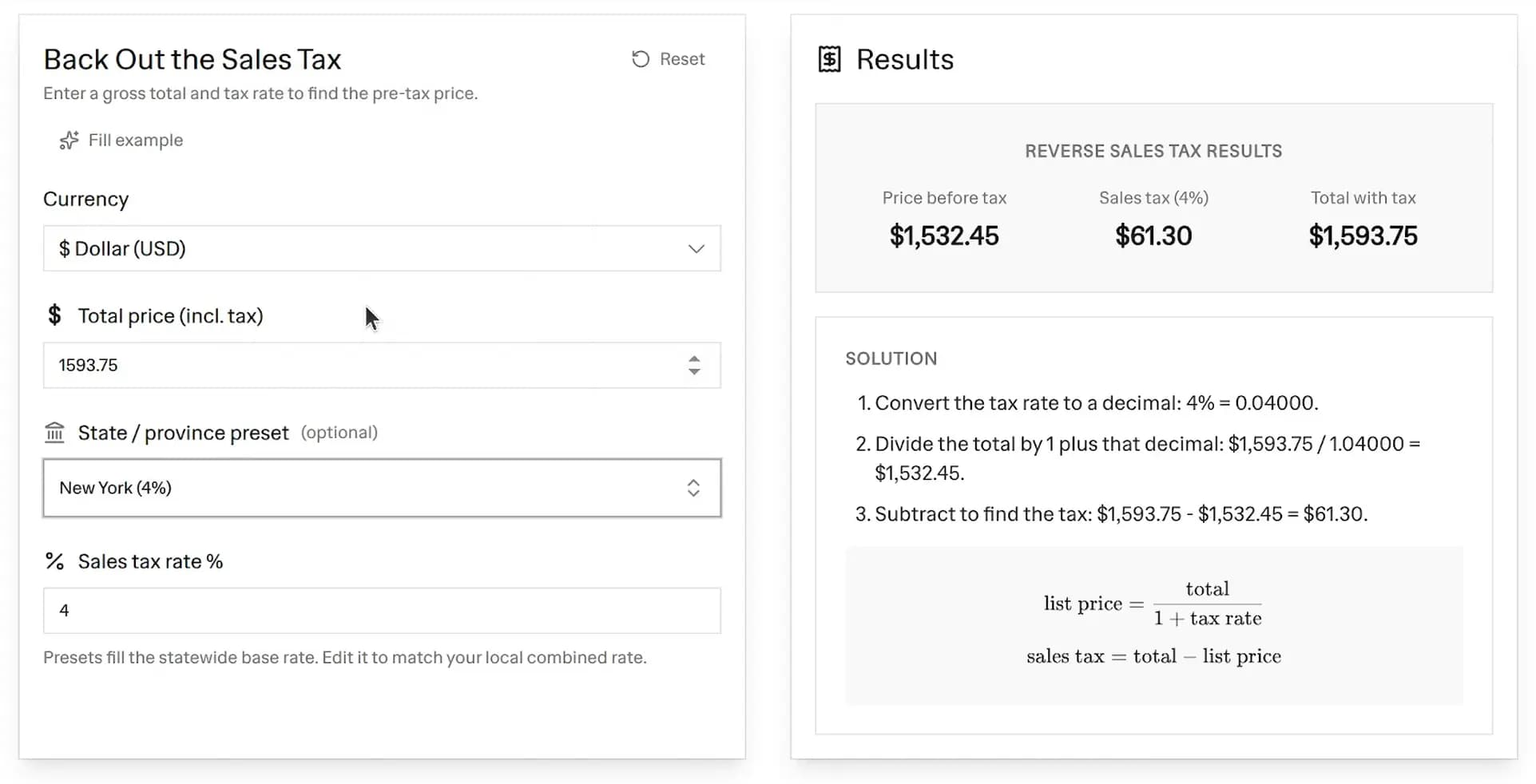 Free reverse sales tax calculator backing a 4% New York tax out of a 1,593.75 total to show 1,532.45 before tax and $61.30 sales tax, with a step-by-step solution
This reverse tax calculator needs just two numbers. Here is how to use it:
- Enter the total price: This is the gross amount the customer paid, with tax already included.
- Set the sales tax rate: Type the rate as a percent, like 6.25. You can also pick a state or province preset to fill the statewide base rate for you.
- Adjust the rate if needed: The preset fills the base rate, but the field stays editable. Add your local city or county rate to match your real combined rate.
- Read your results: The tool instantly shows the price before tax, the sales tax amount, and a step-by-step solution.
The Reverse Sales Tax Formula
The math for backing tax out of a total is simple. This is the reverse sales tax formula:
The key step is dividing, not subtracting. A common mistake is to take the tax percent off the total directly. That gives the wrong answer because the tax was charged on the smaller pre-tax price, not the larger gross total.
Worked Example
Say a customer paid a total of $858 and your sales tax rate is 7.25%.
First convert the rate to a decimal, then divide the total by 1 plus that decimal:
Then subtract the pre-tax price from the total to find the tax:
So the price before tax is $800 and the sales tax is $58. As a shortcut, dividing by 1.0725 backs out a 7.25% tax in one step.
How to Calculate Tax From a Total
If you want to know how to calculate tax from total by hand, follow the same two steps. First divide the total by to get the list price. Then subtract the list price from the total to get the tax. The calculator above does this for you and shows every step in the solution panel.
Why Ecommerce Sellers Back Tax Out of Gross Sales
Online sellers often see one gross number and need to split it apart. Here is why that matters:
- Bookkeeping: Your accounting records need revenue and tax recorded separately. The reverse calculation gives you both from a single payout figure.
- Tax remittance: When you file, you owe the tax you collected, not a slice of your total sales. Backing the tax out tells you the correct amount to remit.
- Payout reconciliation: Shopify, Stripe, and PayPal often report gross totals. A reverse sales tax calculator helps you reconcile those payouts against your real product revenue.
- Pricing checks: If you sell tax-inclusive prices, this tells you the true product price hiding inside the sticker.
If you sell a mix of taxable and non-taxable products on Shopify, the harder job is splitting your revenue before you ever get to the tax. Shopify has no taxable or non-taxable field in its reports, but you can build the split yourself in about five minutes: how to build a Shopify sales tax report for taxable and non-taxable sales.
US State and Canada Sales Tax Rate Notes
The presets in this tool use base statewide rates in the US and combined federal plus provincial rates in Canada. Local city, county, and district taxes can push the real rate higher, so always confirm your combined rate.
- Popular US lookups include reverse sales tax calculator NJ (New Jersey 6.625%), NY (New York 4% state, often around 8% combined), CA (California 7.25%), TX (Texas 6.25%), FL (Florida 6%), and OH (Ohio 5.75%).
- Canadian sellers can pick Quebec (14.975%), British Columbia (12%), or Ontario (13% HST).
Here are the base rates behind some of the most searched presets:
| Region | Base rate | Type |
|---|---|---|
| California (CA) | 7.25% | State base |
| Texas (TX) | 6.25% | State base |
| Florida (FL) | 6% | State base |
| New York (NY) | 4% | State base |
| New Jersey (NJ) | 6.625% | Statewide |
| Ohio (OH) | 5.75% | State base |
| Quebec, Canada | 14.975% | GST + QST |
| Ontario, Canada | 13% | HST |
| British Columbia | 12% | GST + PST |
Because rates change and local rates vary, treat the presets as a starting point and edit the rate field to match the exact rate on the order.
FAQ
How do I calculate sales tax from a total?
Divide the total by 1 plus the tax rate as a decimal. That gives the price before tax. Then subtract that price from the total to get the sales tax. For example, a $107 total at a 7% rate is before tax, and in tax.
Is there a free reverse sales tax calculator?
Yes. This is a 100% free reverse sales tax calculator. There is no signup, no account, and no limit on how many calculations you run.
What is the reverse sales tax formula?
The formula is . Then . You divide first, then subtract.
Why can I not just subtract the tax percent from the total?
Because the tax was applied to the smaller pre-tax price, not the larger total. Subtracting the percent from the gross total overstates the tax. Dividing by is the correct way to reverse it.
Can I use this for any state or country?
Yes. Pick a US state or Canadian province preset to fill the base rate, or type any rate manually. The tool works for any sales tax, VAT, or GST percentage you enter.
Does the calculator handle local and combined rates?
Yes. The presets load the statewide base rate, but the rate field stays editable. Enter your full combined rate, including city and county tax, for an exact result.
How do I reverse sales tax in Excel?
Use the same formula in a spreadsheet. If the total is in cell A1 and the tax rate percent is in B1, the price before tax is =A1/(1+B1/100) and the sales tax is =A1-A1/(1+B1/100). This calculator runs that reverse sales tax formula for you, so you do not need an Excel sheet at all.
More FREE Store Finance & Documents tools
Price products, forecast ad profit, bill customers, and create invoices, purchase orders, packing slips, and other order documents.
Free Expense Report Template Generator
Build a professional expense report. Add line items, mileage, and a cash advance, pick from 20 templates, and download a print-ready PDF, PNG, or CSV. Free, no signup, no watermark.
Free Timesheet Template Generator
Fill in a weekly, bi-weekly, or monthly timesheet template with live overtime and pay totals, pick from 12 templates, and download a print-ready PDF, PNG, or CSV. Free, no signup, no watermark.
Free Profit Margin Calculator
Calculate your product's selling price, gross margin, and net profit instantly. Factor in shipping and acquisition costs. Free, no signup.
Free Dropshipping Profit Calculator
Enter product cost, markup, ad spend per sale, and shipping to see your selling price, gross margin, and true net profit per dropshipping order. Free, no signup.
Free Print on Demand Profit Calculator
Enter provider base cost, markup, ad spend per sale, and shipping to see your selling price, gross margin, and true net profit per print on demand order. Free, no signup.
Free Markup Calculator
Turn cost and markup into your selling price, gross profit, and margin. Convert markup to margin, see your revenue multiplier, and price in bulk with CSV export. Free, no signup.
Free Etsy Fee Calculator
See every Etsy fee and your exact net payout, then switch to Stripe, Shopify, Square, Depop, Mercari, Poshmark, Reverb, or PayPal. Line-by-line breakdown, profit and margin, and a reverse net-to-price mode. Free, no signup.
Free Stripe Fee Calculator
See Stripe's processing fee and your exact net payout - 2.9% + $0.30 online, 2.7% + $0.05 in person. Line-by-line breakdown, profit and margin, and a reverse net-to-charge mode. Free, no signup.
Free Square Fee Calculator
See Square's processing fee by acceptance method - 2.6% + $0.15 in person, 2.9% + $0.30 online, 3.3% + $0.30 invoice, 3.5% + $0.15 keyed - and your exact net deposit. Profit, margin, and a reverse mode. Free, no signup.
Free Shopify Fee Calculator
See Shopify Payments processing by plan (Basic, Grow, Advanced), the transaction fee a third-party gateway adds, and your exact net payout. Profit, margin, and a reverse mode. Free, no signup.
Free Depop Fee Calculator
See what you keep on a Depop sale under the 2024 US structure - no seller selling fee, just 3.3% + $0.45 processing. Profit, margin, and a reverse net-to-price mode. Free, no signup.
Free Mercari Fee Calculator
See what a Mercari sale leaves you under the 2025 US structure - a flat 10% selling fee on item plus shipping, no seller processing fee. Profit, margin, and a reverse mode. Free, no signup.
Free Poshmark Fee Calculator
See your exact Poshmark earnings with the real US tiered fee - a flat $2.95 under $15, otherwise 20%. Profit, margin, and a reverse net-to-price mode. Free, no signup.
Free Reverb Fee Calculator
See what a Reverb sale leaves you: a 5% selling fee on item plus shipping (capped at $500) plus processing of 3.19% + $0.49 (2.99% + $0.49 Preferred). Profit, margin, and a reverse mode. Free, no signup.
Free ROAS Calculator
Calculate return on ad spend, break-even ROAS, and target ROAS, plus the ad budget needed to hit your revenue goal. Free, no signup.
Ecommerce Conversion Rate Calculator
Turn visitors and orders into your conversion rate, see revenue per visitor, and project the extra revenue from hitting a target rate. Free, no signup.
Free Break-Even Calculator
Find the units and revenue you need to cover costs. Calculate your break-even point, contribution margin, and the sales needed to hit a profit goal. Free, no signup.
Free Customer Lifetime Value Calculator
Calculate customer lifetime value (CLV) two ways - historic and predictive - see net value after acquisition cost, and get a plain-English CLV:CAC health verdict. Built for Shopify and ecommerce. Free, no signup.
Free Customer Acquisition Cost Calculator
Calculate customer acquisition cost (CAC), compare blended vs paid CAC by channel, and get an LTV:CAC health verdict plus the CAC payback period. Built for Shopify and ecommerce. Free, no signup.
Free Shopify Profit Calculator
Calculate net profit and margin per order after COGS, shipping, ads, returns, and real Shopify plan and payment fees. See break-even CPA and ROAS, a profit waterfall, and the order volume where each Shopify plan becomes the cheapest. Free, no signup.
Free Invoice Generator
Create professional invoices with your logo, line items, tax, and discounts. Live preview and instant PDF download. Free, no signup.
Free Packing Slip Generator
Create a clean packing slip for any order. Add your logo, ship-to address, and items, then download a print-ready PDF. No prices, no signup.
Free Purchase Order Generator
Create a purchase order to send your supplier. Add the vendor, line items with agreed prices, and a delivery date, then download a PDF. Free, no signup.
Free Commercial Invoice Template
Create a customs-ready commercial invoice for international shipping. Add HS codes, country of origin, Incoterms 2020, weights and the declaration, then download a PDF. Free, no signup.
Free Proforma Invoice Template
Create a quote-style proforma invoice you can send before the sale is final. Add a valid-until date, itemised freight, and optional customs fields and Incoterms 2020, then download a PDF. Free, no signup.
Free Credit Memo Template
Create a print-ready credit memo that reduces what a customer owes on a prior invoice. Reference the original invoice, list the credited items, and the tool computes the credit total, then download a PDF. Free, no signup.
Free Bill of Lading Template
Create a print-ready straight bill of lading for domestic LTL freight. Add the shipper, consignee, carrier, freight lines with weight and NMFC class, and freight charge terms, then download a PDF. Free, no signup.
Free Work Order Template
Create a print-ready work order for a service call, preventive maintenance, HVAC, plumbing, construction or auto repair job. Add the service location, equipment, task checklist, labor and parts, then download a PDF with technician and customer sign-off. Free, no signup.
Free Order Form Generator
Create a professional order form template with line items and live totals. Add your logo, customer, and prices, then download a PDF. Free, no signup.
Free Quote Generator
Create a professional price quote with your logo, client details, line items, and a valid-until date. Live preview and instant PDF download. Free, no signup.
Free Estimate Generator
Create a professional job estimate with your logo, client details, line items, and an estimated total. Live preview and instant PDF download. Free, no signup.
Free Packing List Generator
Create an itemized packing list for ecommerce, wholesale, and freight shipments. Add shipper, consignee, and contents, then download a PDF. Free, no signup.
Free Delivery Note Generator
Create a delivery note with a signature line for proof of delivery. Add your details, the deliver-to address, and items, then download a PDF. Free, no signup.
Free Return Form Generator
Create a printable return form or RMA form for ecommerce returns. Add the return-from address, items, and reason, then download a PDF. Free, no signup.
Free Shipping Label Generator
Make a printable shipping label with From / To and package details. Pick a 4x6, half-sheet, or Avery template, add a barcode or QR, bulk-generate from CSV, and download PDF, PNG, or SVG. No email, no signup, no watermark.
Free Shopify Order Bill Splitter
Split a group Shopify order fairly. Import items from a product link, assign who shares what, split shipping, tax, and discounts, and see who pays whom with the fewest payments. Free, no signup.
Free Facebook Ads Calculator
Forecast your Facebook ad profits with real industry benchmarks, interactive sliders, and reverse budgeting. See ROAS, CPA, and net profit instantly. Free, no signup.
Free Instagram Ads Calculator
Forecast your Instagram ad costs and profits with real Instagram benchmarks, interactive sliders, and reverse budgeting. See ROAS, CPA, and net profit instantly. Free, no signup.