
Free SKU Generator
Create consistent, human-readable SKU codes for your product catalog. Set a format once, then generate one SKU, a whole pasted list, or every size and color combination at once. Export as CSV. No signup, no watermark.
How to Use the Free SKU Generator
This quick video walkthrough shows you how to set your SKU format, generate a single SKU, a pasted list, or a full variation matrix, and export them all as a CSV in seconds.
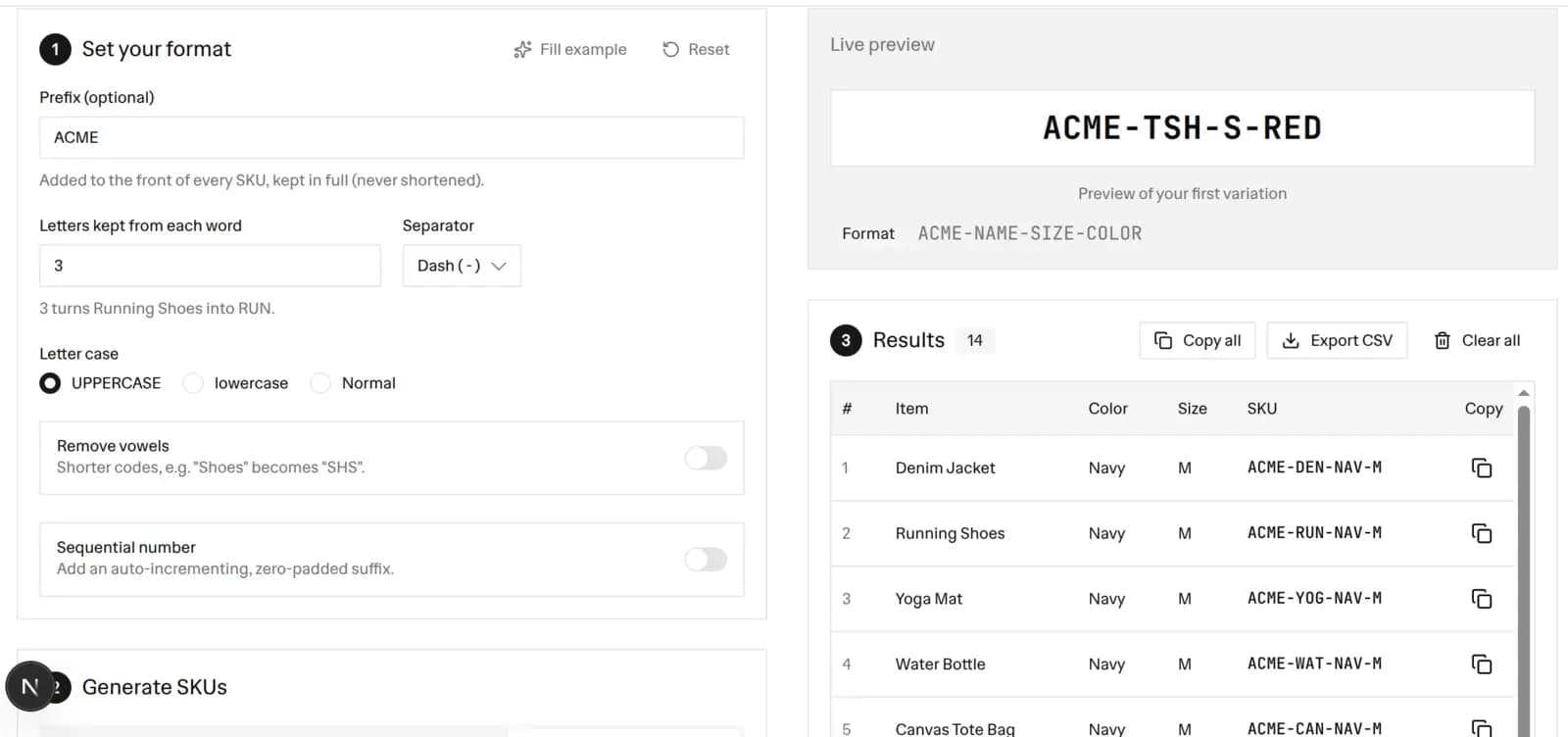 Free SKU generator with a format panel showing an ACME prefix, 3 letters kept per word, and a dash separator, a live preview of the SKU ACME-TSH-S-RED, and a results table of generated SKU codes such as ACME-DEN-NAV-M for a Denim Jacket, ready to copy or export as CSV
What Is a SKU?
A SKU (Stock Keeping Unit) is a short code you assign to each product or variant so you can track it across your store, your point of sale, and your reports. You create it yourself, so a good SKU is readable by your team. For example, SHOE-RED-42 tells you at a glance that this is a red shoe in size 42.
A SKU is different from a barcode. You design and control a SKU, while a UPC or EAN barcode is a standardized number used by scanners and retailers. Most stores keep both: a readable SKU for the team and a barcode for the register.
How to Create a SKU
Making a SKU takes about a minute with the generator above.
- Set a prefix (optional): Add a brand or store code like
ACMEthat goes in front of every SKU. - Choose characters per segment: Decide how many leading letters each word contributes. The default is 3, so "Running Shoes" becomes
RUN. - Pick a separator: Join segments with a dash, underscore, slash, dot, or nothing at all.
- Add attributes: Add up to four attributes such as color, size, category, or material. Each one extends the SKU.
- Set the case and options: Choose UPPERCASE, lowercase, or Normal, and turn on remove-vowels for shorter codes.
- Add a running number (optional): Turn on the sequential suffix to append a zero-padded number like
001,002. - Generate: Add one SKU, paste a list of names, or build a variation matrix, then export the table as a CSV.
The live preview updates as you type, so you always see the format before you generate. A short reading of the format, such as ACME-NAME-COLOR-001, shows the structure at a glance.
Single, Bulk, and Variation Modes
One keyword covers a few different needs, and this generator handles all of them.
- Single: Enter one product name and its attributes to add a single SKU to the table. Good for one-off products.
- Bulk paste: Paste many product names, one per line, and get one SKU per line, all at once. The shared attributes apply to every line, and the sequential number keeps counting.
- Variation matrix: Enter up to three axes, for example Size (S, M, L) and Color (Red, Blue), and the tool creates a SKU for every combination. Two axes with 3 and 2 values give you 6 SKUs, one per variant.
Every generated SKU is added to a results table with a running total. You can copy a single code, copy all of them, clear the table, or export a CSV.
What Makes a Good SKU
A good SKU is short, consistent, and easy to read. Follow these rules and your whole catalog stays uniform.
- Keep it short: Aim for a code that is easy to type and scan by eye. Two or three characters per segment is usually enough.
- Start with letters: Begin with a letter, not a zero, so spreadsheets do not drop leading zeros.
- Be consistent: Use the same segment order and the same separator for every product.
- Avoid spaces and symbols: Stick to letters and numbers. This tool removes spaces, punctuation, and emoji automatically so every SKU is valid.
- Do not encode data that changes: Never bake the price or the supplier into a SKU, because those change over time.
- Make it meaningful: Encode stable traits like brand, category, color, and size so the code is readable at a glance.
SKU vs Barcode vs UPC
These three terms are often mixed up, so here is the quick version.
- SKU: An internal code you design. It can carry meaning and is unique inside your own store.
- UPC or EAN: A standardized barcode number, often bought from GS1, used across retailers and scanners worldwide.
- Barcode: The scannable image of bars. It can encode a UPC, an EAN, or even your own SKU using a format like Code 128.
Once you have your SKUs, you can turn any of them into a scannable label with our free Barcode Generator, or print shelf tags with the built-in code using the Price Tag Generator.
A Few SKU Examples
Here are common formats you can build with the generator.
- Name only: "Yoga Mat" at 3 characters becomes
YOG. - Prefix plus name: Prefix
ACMEplus "Yoga Mat" becomesACME-YOG. - Name plus attributes: "Running Shoes" with Color Red and Size 42 becomes
RUN-RED-42. - Compact with remove-vowels: "Shoes" becomes
SHSinstead ofSHO. - With a running number: Add a 3-digit suffix to get
RUN-RED-42-001, then-002, and so on.
There is no cost for any of this. You can generate and export as many SKUs as you like for $0.
Frequently Asked Questions
What is a SKU?
A SKU (Stock Keeping Unit) is a short, unique code you assign to each product or product variant so you can track it in your inventory, point of sale, and reports. Unlike a barcode number, a SKU is created by you and is meant to be readable by your team, for example SHOE-RED-42.
How do I create a SKU?
Pick a consistent format made of segments. A common pattern is an optional prefix, the product name, one or two attributes like color and size, and an optional running number. This tool builds that format for you: set the rules once, then generate one SKU or hundreds at a time.
Is this SKU generator free?
Yes, it is 100% free with no signup and no watermark. Everything runs in your browser, so your product names never leave your device. Generate as many SKUs as you want and export them as a CSV file.
Can I bulk-generate SKUs?
Yes. Use Bulk paste to drop in a list of product names, one per line, and get one SKU per line. Or use the Variation matrix to enter axes like Size (S, M, L) and Color (Red, Blue) and generate a SKU for every combination automatically.
What is the difference between a SKU and a barcode or UPC?
A SKU is an internal code you design and control, so it can carry meaning like brand, color, and size. A UPC or EAN barcode is a standardized number, often bought from GS1, used by retailers and scanners worldwide. Many stores keep both: a readable SKU for the team and a barcode for the register. You can turn a SKU into a scannable code with our Barcode Generator.
What makes a good SKU?
Keep it short, consistent, and human-readable. Start with letters, not zeros, avoid spaces and special characters, use one separator throughout, and do not encode data that changes often like price. This tool sanitizes text and applies your rules to every SKU so the whole catalog stays uniform.
Can I add a sequential number to each SKU?
Yes. Turn on the sequential number suffix, set a start value and the number of digits, and each generated SKU gets a zero-padded, auto-incrementing number, for example 001, 002, 003. It increments across every row you generate until you clear the table.
Can I export the SKUs to Excel or Google Sheets?
Yes. Press Export CSV to download a spreadsheet-ready file whose columns match the on-screen table (item, attributes, and the generated SKU). Open it in Excel, Google Sheets, or import it into Shopify or your inventory system.
More FREE Product & Catalog tools
Barcodes, QR codes, image optimisation, and AI-readiness for your product catalog.
Free QR Code Generator
Instantly create free, downloadable QR codes for links, phone numbers, texts, and SMS messages without any email signups.
Free WiFi QR Code Generator
Make a WiFi QR code guests scan to join your network. Handles WPA and WPA2, open and hidden networks, and passwords with special characters. No signup.
Free vCard QR Code Generator
Make a QR code that saves your name, phone, email, company and website to a phone in one tap. Handles names and companies with commas or semicolons. No signup.
Free SMS QR Code Generator
Make a QR code that opens a text message with the number and a pre-written message filled in. Works on iPhone and Android. No signup, no watermark.
Free WhatsApp QR Code Generator
Make a QR code that opens a WhatsApp chat with your number and an optional pre-written message. Built on a wa.me click-to-chat link. No signup.
Free Business Card QR Code Generator
Make a QR code for your business card that saves your name, title, company, phone, email and website to a phone as a contact in one tap. No signup.
Free Image Resizer & Optimizer
Resize, compress, and convert images for your Shopify store, Pinterest pins, and social media. Shopify-specific presets, batch downloads, and no signup required.
Free Barcode & Label Generator
Create professional barcode labels with templates for retail, shipping, jewelry, and more. Supports EAN-13, UPC, CODE128 formats. Free, no signup.
Free Address Label Template Maker
Make an Avery-compatible address label sheet. Pick a product number (5160, 5167, L7160, and more), type one address or mail-merge a list, then download a print-ready PDF, PNG, or SVG at true size. Free, no signup, no watermark.
Free Name Tag Generator
Make printable name tags and event badges on an Avery sheet. Pick a size (5395, 5390, 5392, 5384, or A4), type one badge or mail-merge a roster, color-code by department, add a scan-to-connect QR, then download a true-size PDF, PNG, or SVG. Free, no signup, no watermark.
Free Price Tag Template Maker
Design printable price tags and shelf labels with a built-in barcode or QR code. Retail and boutique sale templates, real-unit sizes, bulk sheet printing, and PNG/PDF/SVG export. Free, no signup, no watermark.
Free Hang Tag Template Maker
Design printable hang tags (swing tags) with a real punch hole, a built-in barcode or QR code, and real-unit sizing. Apparel, price-sale, and specialty templates, a car parking-permit mirror-slot shape, bulk mail-merge sheets, and PNG/PDF/SVG export. Free, no signup, no watermark.
Free Luggage Tag Template Maker
Design a two-sided printable luggage tag: a name front and an "if found, please return to" contact back, laid out side by side for one-print, cut, and fold. 14 templates (travel, corporate, wedding, kids, medical ID, boarding pass), a reinforced grommet shape, a return QR, real-unit sizing, and bulk family/team sheets. Free, no signup, no watermark.
Free Candle Labels Maker & Warning Label Generator
Design custom candle labels and print an ASTM F-2058 candle warning label carrying all three cautionary statements and all three pictograms. Measure your jar and the tool computes the wrap size (pi x diameter + overlap) and the dual-unit net weight. 6 label types, 14 templates, bulk scent sheets, true-size PDF, transparent PNG and SVG. Free, no signup, no watermark.
Free Soap Label Maker & Custom Soap Labels
Design custom soap labels and build an INCI ingredient list in correct descending order, with saponified oil names (olive oil -> Sodium Olivate) and a true-soap vs cosmetic toggle. Bar, round, oval, belly-band and bottle shapes, 14 templates, dual-unit net weight (oz/g and fl oz/mL), bulk sheets, true-size PDF, transparent PNG and SVG. Free, no signup, no watermark.
Free Care Label Template Maker & Generator
Design a sew-in garment care label with the correct ISO 3758 / ASTM D5489 care symbols, FTC-compliant care text, fibre-content composition, and RN / size / origin fields. Pick a fibre preset, override any axis, and the symbols and text always match. 12 templates, real-unit sizing, bilingual EU option, bulk size-run sheets, true-size PDF, transparent PNG and SVG. Free, no signup, no watermark.
Free Warranty Card Template Maker & Generator
Design a printable warranty card or certificate with the product, warranty period, coverage, and support details, plus a scan-to-register QR. Batch a whole run of cards each with a unique serial and a per-card register QR that pre-fills the serial on your registration page. 12 templates, 16 themes, real insert sizes, fill-in ruled lines, true-size PDF, PNG and SVG, plus Letter and A4 bulk sheets. Free, no signup, no watermark.
Free Nutrition Label Maker & Generator
Create a pixel-accurate FDA Nutrition Facts or Supplement Facts label. Pick from 20+ formats, type your amounts, and get auto %DV and FDA rounding. Download a print-ready PNG or PDF, or copy embed HTML. Free, no signup, no watermark.
Free Size Chart Maker & Generator
Build a branded product size chart. Pick from 13 category presets, edit the table inline, toggle cm and inch, and style it. Copy a self-contained HTML embed for your product page or download a PNG. Free, no signup, no watermark.
Free Price List Template Maker
Build a polished price list one-pager. Paste or import your products, group them into sections, pick from 20 templates, and download a print-ready PNG, PDF, or CSV. Free, no signup, no watermark.
Free Rate Sheet Template Maker
Build a professional service rate sheet one-pager. List services with a rate and a per-service unit like /hr or /project, group them into sections, pick from 20 templates, and download a print-ready PNG, PDF, or CSV. Free, no signup, no watermark.
Free Line Sheet Maker
Build a wholesale line sheet template with product photos, wholesale and MSRP prices, colors, sizes, and MOQ. Pick a grid, list, or lookbook layout and download a print-ready PDF, PNG, or CSV. Free, no signup, no watermark.
Free Meta Description Generator
Write, measure, and preview meta titles and descriptions with a live Google SERP snippet. Pixel-accurate truncation, character and pixel counters, copy-ready meta tags, and bulk CSV export. Free, no signup.
Free llms.txt Generator & Validator
Generate and validate llms.txt files for your ecommerce store. Make your Shopify or Etsy store AI-ready for ChatGPT, Gemini, and Claude. Free, no signup.