
Free Care Label Template Maker & Generator
Design a sew-in clothing care label in your browser. Pick a fibre and the tool suggests care symbols in the ISO 3758 / ASTM D5489 style plus plain care instruction text, then adds your fibre-content composition and RN, size and country of origin. Download a true-size PDF, a transparent PNG, or an SVG. No signup and no watermark.
Make a clothing care label the right way
A care label is a small sew-in tag that tells the buyer how to wash, dry, iron and clean a garment, what it is made of, who made it, and where. It is easy to get wrong. A wool sweater with a tumble-dry-high symbol is a shrunken sweater and a refund. A fibre list that reads 40% Cotton 60% Polyester when the garment is mostly cotton is a labelling error. This tool removes the guesswork: you pick a fibre, suggested care symbols and matching text are filled in for you, and you can override any part of it and download a print-ready label.
This page explains the care-symbol system, the US rules (the FTC Care Labeling Rule and the Textile Fiber Products Identification Act), and the EU rule (Regulation 1007/2011), so you know what each field on your label is for.
How to use the generator
I tested this maker with a cotton and polyester t-shirt label for a made-up brand, Northwind Apparel, on the Classic Sew-In template at 40 x 60 mm. I downloaded the PDF and checked it: the page measured 40 x 60 mm, the care symbols matched the care sentences under them, and the checklist showed all five label elements present.
- Pick a fibre preset. Cotton, Linen, Wool, Cashmere, Silk, Viscose, Polyester, Nylon, an Elastane / Spandex blend, Denim, Leather trim or Down. The preset fills the care controls with a sensible starting point. Wool and Cashmere never prefill tumble-dry-high, because heat shrinks them.
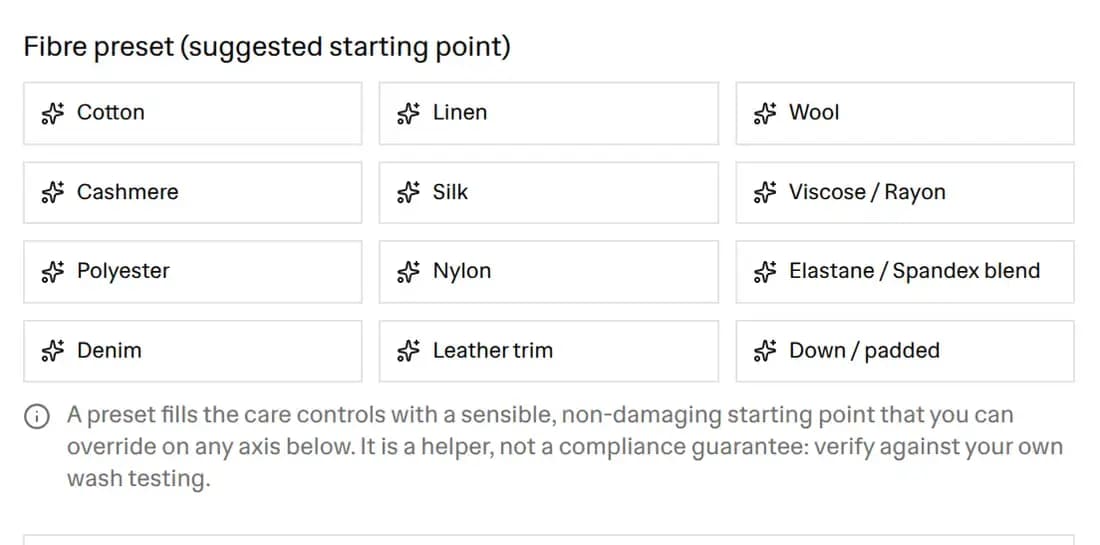 The fibre preset picker with presets for cotton, linen, wool, cashmere, silk, viscose, polyester, nylon, an elastane and spandex blend, denim, leather trim, and down
- Adjust any care axis. Wash method and temperature, mechanical action, bleach, drying, ironing and professional care are all editable. Each choice updates its symbol and its sentence at the same time, so they always agree.
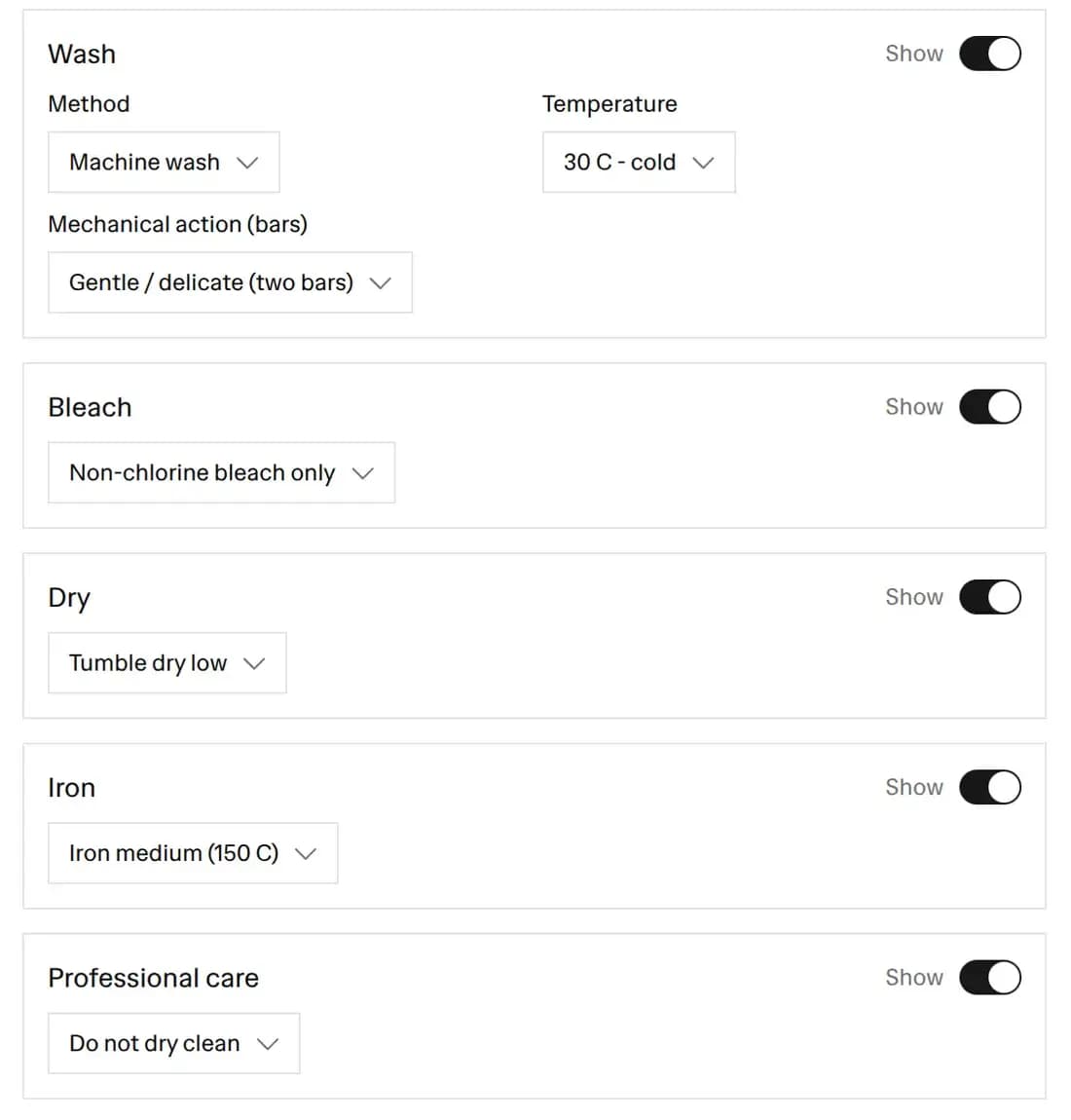 The care controls for wash, bleach, dry, iron, and professional care, each with a Show switch, set to a 30 degree gentle machine wash, non-chlorine bleach, tumble dry low, iron medium, and do not dry clean
- Build the fibre content. Add each fibre with a percentage. The tool checks that the total is 100 and that the fibres are in descending order. Fibre names depend on the market: US labels use Spandex and Rayon, EU labels use Elastane and Viscose, and the dropdown shows a market note beside each name. A fibre under 5% gets an amber warning, because US labels group those as "other fiber". Picking Leather, Down or Feather shows an EU animal-origin note.
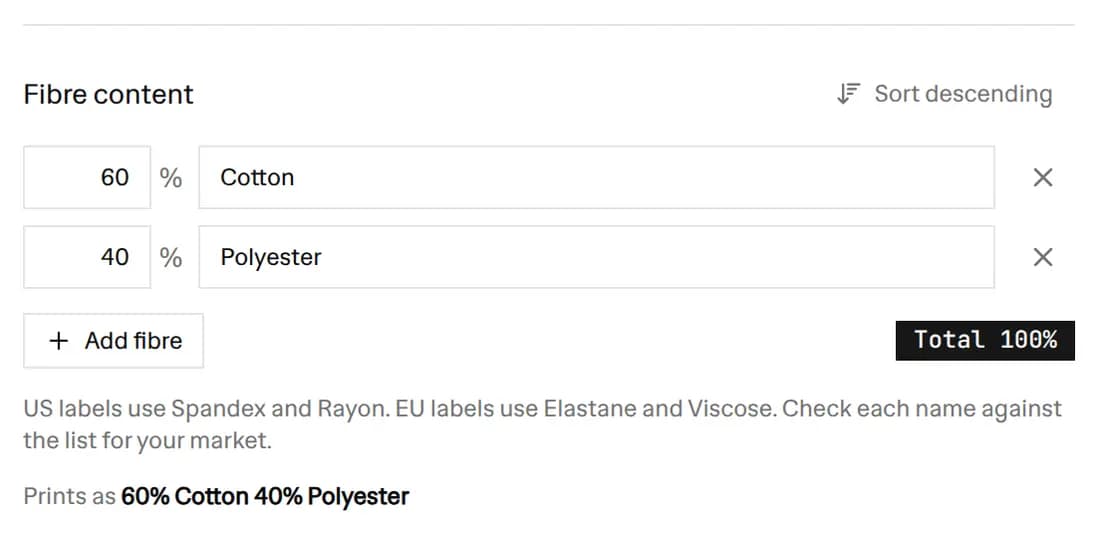 The Fibre content builder with 60% cotton and 40% polyester
- Add the compliance fields. Your brand, size, RN number or company name, country of origin and style.
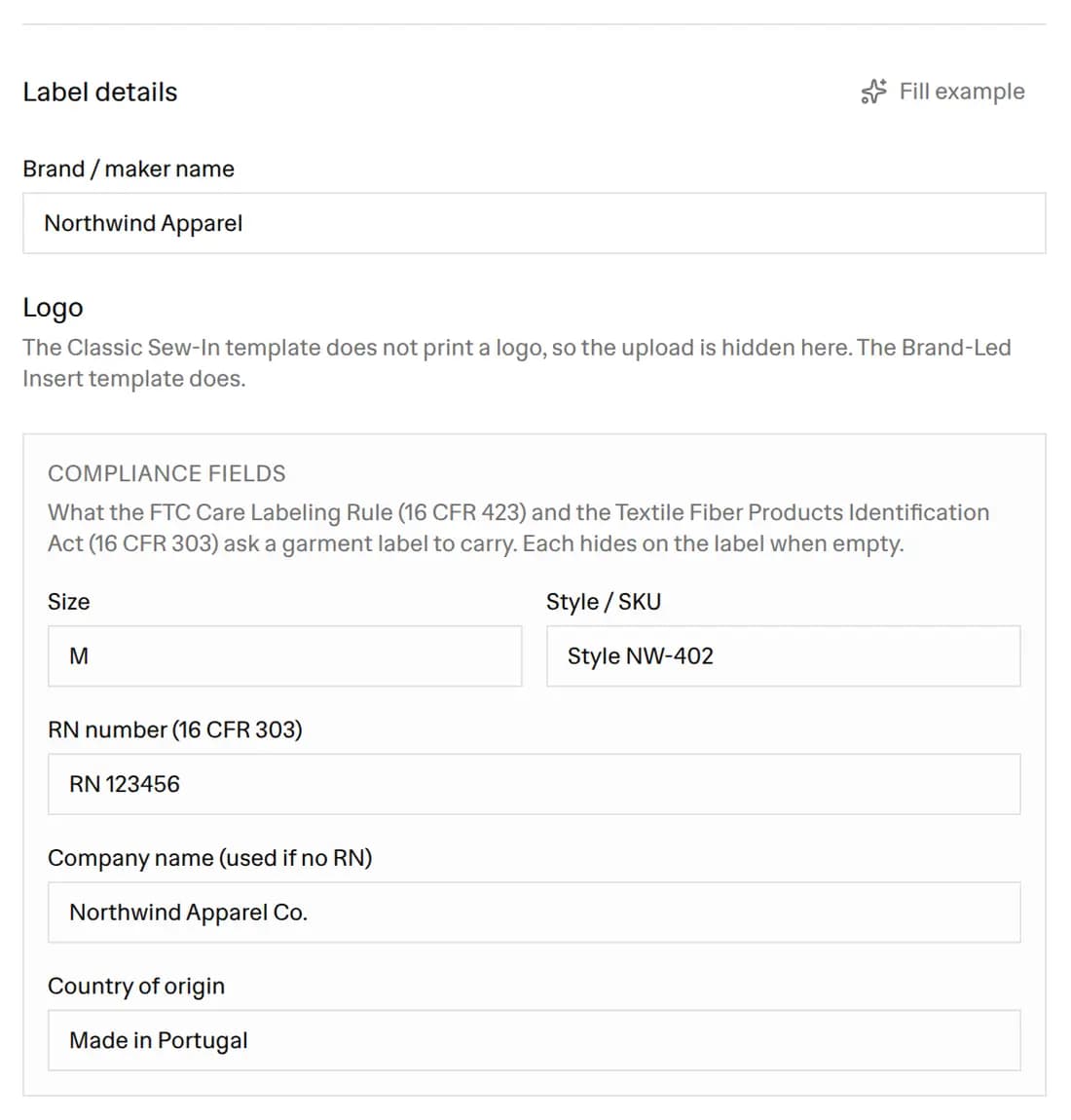 The Label details section with the brand Northwind Apparel, size M, RN 123456, the company name, Made in Portugal, and the style number
- Pick a template, a size and a colour, then download a PDF, a transparent PNG or an SVG. Or switch to Bulk sizes and tile a whole size run onto one sheet.
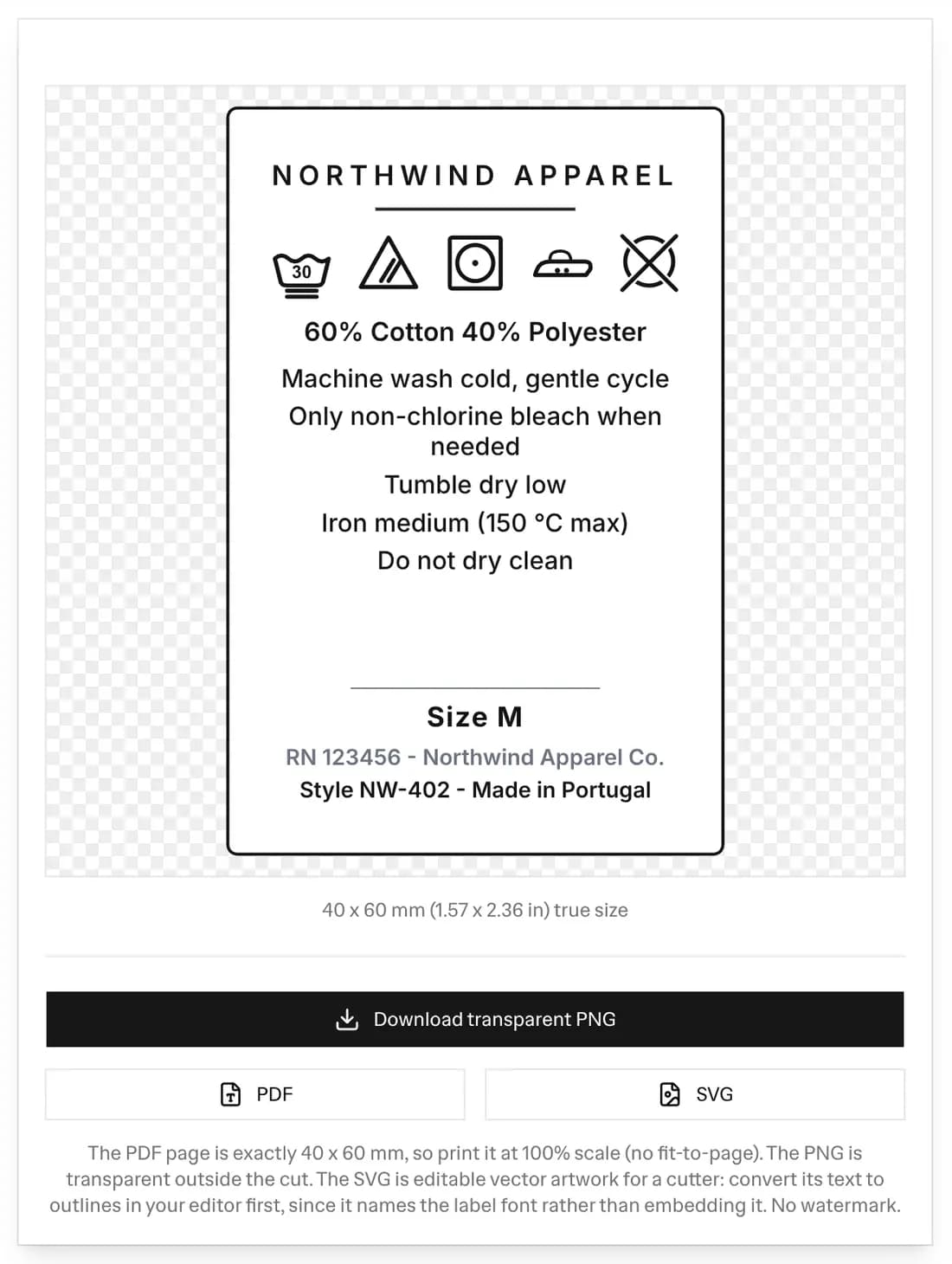 The care label preview for Northwind Apparel at 40 x 60 mm with care symbols, fibre content, care text, size, RN and origin, above the download buttons
The checklist under the preview shows which of the five label elements are on your label: care instructions, fibre content, the manufacturer, the country of origin, and the size. It checks that each one is there and that the fibre percentages add up. It does not check fibre names against the legal list for your market.
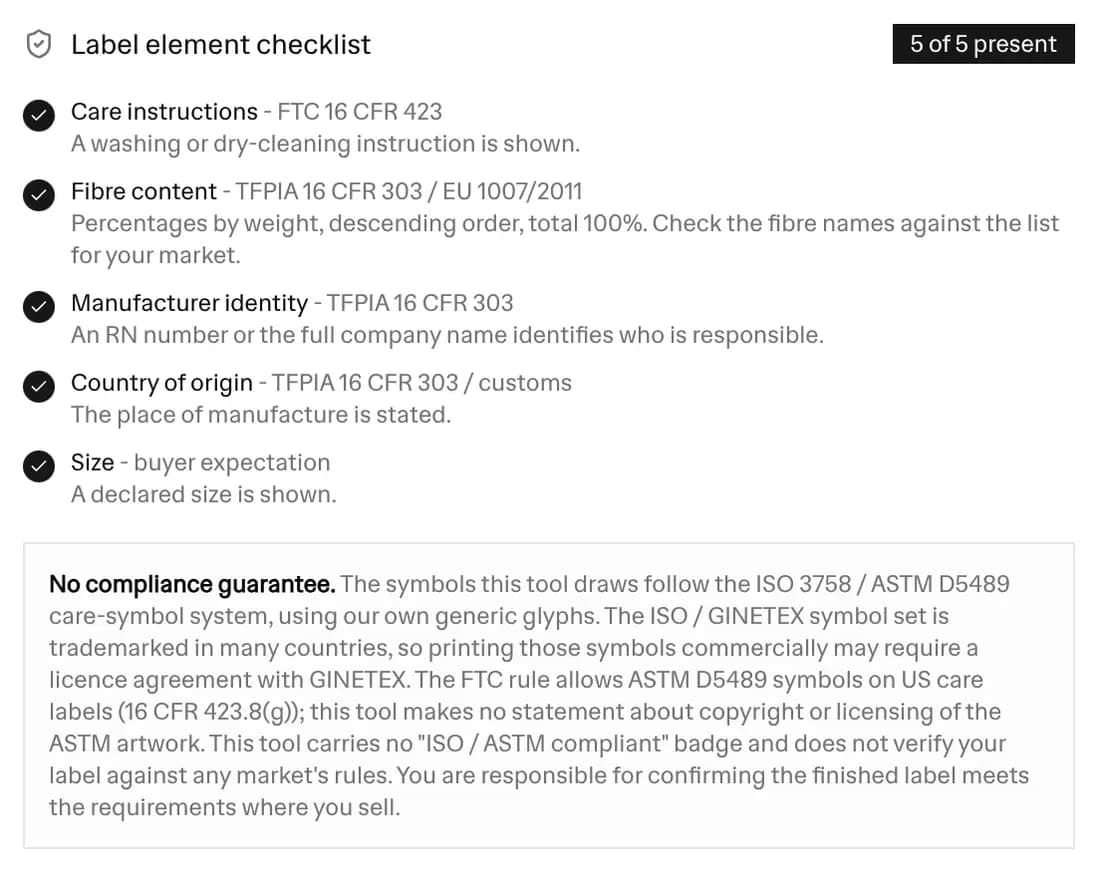 The label element checklist showing 5 of 5 present: care instructions, fibre content, manufacturer identity, country of origin, and size
The tool saves your work in your browser as you go, and the Start new button clears it back to a blank label.
How to design a care label
A care label is read in a few seconds, often inside a seam, so the design job is to keep it short and in a fixed order.
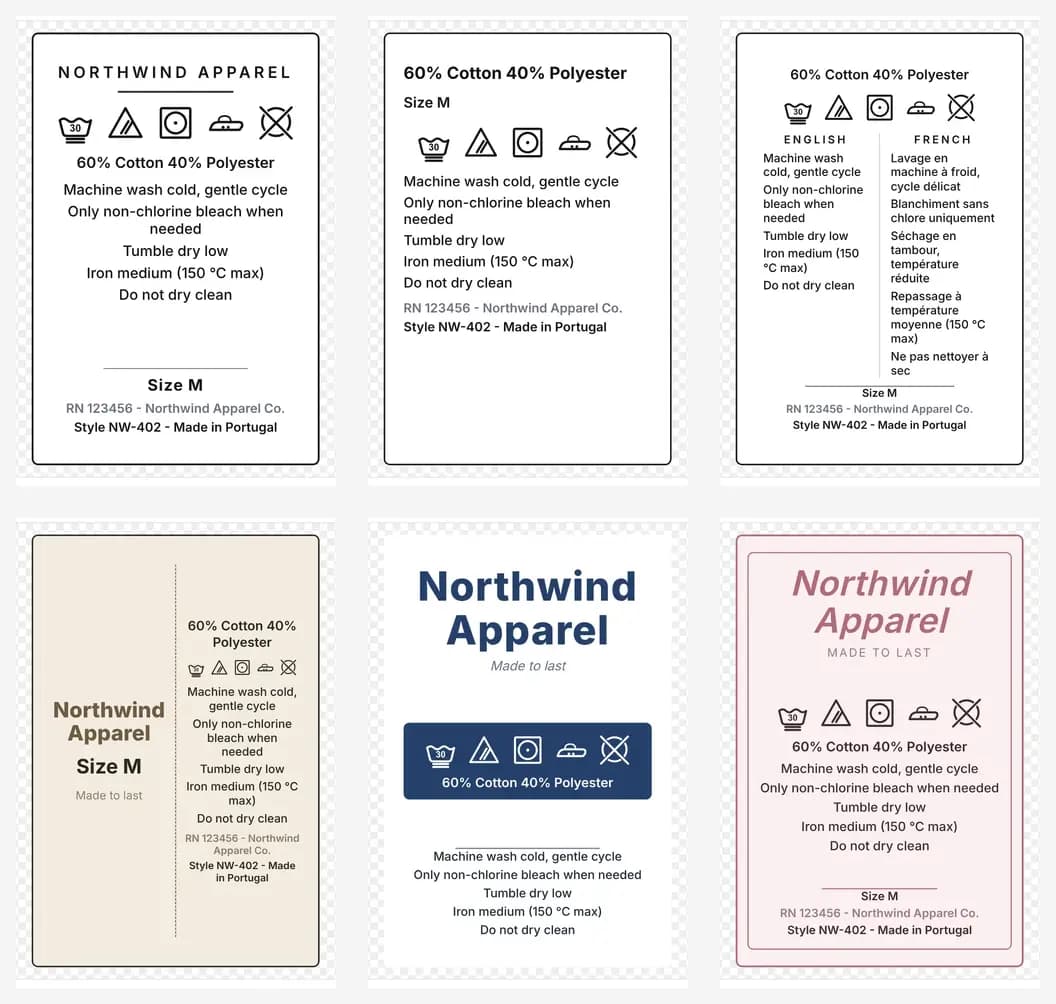 Six care label designs for the same Northwind Apparel t-shirt: Classic Sew-In, Compliance Stack, Bilingual (EU), Folded Two-Panel, Brand-Led Insert, and Boutique Serif
- Pick the size for where it is sewn. 40 x 60 mm and 30 x 50 mm suit a side-seam label. 20 x 55 mm is a loop label folded over the neck seam. 25 x 40 mm and 35 x 35 mm suit small items and a printed neck tag.
- Put the parts in the order a shopper looks for them. Brand, fibre content, the care symbols with their words, then size, the RN or company name, and the country of origin. Most of the templates above follow that order.
- Keep the symbols and words together. Each symbol sits next to the sentence that says the same thing, so a buyer who does not know the symbols can still read the instruction.
- Give a second language its own column. The Bilingual (EU) template splits the care text into two columns, which is how labels for more than one market are usually laid out.
- Choose a template by how much text you have. Classic Sew-In and Compliance Stack fit the most text. Brand-Led Insert and Boutique Serif give the brand name more room and suit a short care list.
The care symbol reference
There are five base care symbols. Every laundry care label uses the same five, in the same left-to-right order: wash, bleach, dry, iron, professional care. Here is what each one means, so you can read any care instructions label as well as make one.
The washtub (washing)
The washtub is the washing symbol. A number inside the tub is the maximum wash temperature in degrees Celsius: 30 is cold, 40 is warm, 50 and 60 are hot, and 95 is very hot. A hand in the tub means hand wash only. Bars under the tub set the mechanical action: no bar is a normal cycle, one bar is a mild or permanent-press cycle, and two bars mean a very mild, gentle or delicate cycle. A cross through the whole tub means do not wash.
The triangle (bleaching)
The triangle is the bleach symbol. An empty triangle means any bleach may be used. A triangle with two diagonal lines inside means only non-chlorine, oxygen based bleach may be used. A triangle with a cross through it means do not bleach at all. The two-line triangle is a common source of error: it is not the same as the empty triangle, and it is not the same as the crossed one.
The square (drying)
Drying uses the square. A square with a circle inside is the tumble-dry symbol: one dot in the circle is low heat, two dots are normal heat, and a cross through it means do not tumble dry. The square on its own, with line marks, means natural drying. One vertical line is line dry. Two vertical lines are drip dry in current ISO 3758, though the older US convention draws three. One horizontal line is dry flat, which is what you want for knitwear that would stretch on a line. Diagonal lines in the top-left corner of the square add "in the shade", to keep colours from fading in sunlight.
The iron (ironing)
The iron symbol is an iron outline with dots for heat. One dot is a cool iron, up to about 110 degrees Celsius, for synthetics and stretch fibres such as elastane or spandex. Two dots are a medium iron, up to about 150 degrees, for wool, silk and polyester blends. Three dots are a hot iron, up to about 200 degrees, for cotton and linen. A cross through the iron means do not iron.
The circle (professional care)
The circle is the professional-care symbol, for dry cleaners. A letter P means the garment can be dry cleaned with the usual solvents. A letter F means only a gentler hydrocarbon solvent. A letter W means professional wet cleaning. A bar under the circle asks for a mild, gentle process. A crossed circle means do not dry clean. Home users can ignore the letters; they are instructions for the cleaner.
What US law requires: FTC 16 CFR part 423
In the United States the care instructions themselves are set by the FTC Care Labeling Rule at 16 CFR part 423. The rule covers textile wearing apparel (not footwear, gloves or hats) and certain piece goods. The label must give either a washing instruction or a dry-cleaning instruction, plus the drying, bleach and warning details the rule lists. Some items are exempt, such as totally reversible garments without pockets (16 CFR 423.8). The label has to stay legible for the useful life of the garment, which is why it is sewn in rather than printed on a hang tag that gets thrown away.
The rule lets a label use the ASTM D5489 symbols instead of words (16 CFR 423.8(g) names the D5489-96c edition; check ASTM for the current one). This tool draws generic ISO 3758-style symbols, so print the words with them unless you have confirmed your symbols match the ASTM D5489 set the rule names.
You do not have to list every possible way to clean the garment. You have to give a washing or dry-cleaning method that works and will not damage it, and warn about anything that would. If a garment can only be dry cleaned, the label has to say so and warn against washing.
What US law requires: fibre content, TFPIA 16 CFR part 303
The Textile Fiber Products Identification Act, at 16 CFR part 303, governs the rest of the label. It requires three things. First, the fibre content by generic name and percentage by weight, in descending order, totalling 100. Second, the identity of the company responsible, shown either as the full name the business trades under or as a Registered Identification Number (an RN) issued by the FTC. Third, the country of origin, such as "Made in Portugal". Wool products follow the Wool Products Labeling Act rules (16 CFR part 300) instead of part 303. They ask for the same three things, plus rules of their own, for example on when you can use the words cashmere and mohair (300.19).
Generic names matter. The law has a fixed list of generic fibre names. In the US the list is in 16 CFR 303.7 and includes cotton, silk, wool (under the Wool Act), polyester, nylon, rayon and spandex. In the EU the names are in Annex I of Regulation 1007/2011 and include viscose and elastane. Check which list applies where you sell. You cannot substitute a trade name for the generic name.
Fibres under 5% of the weight cannot use their own name on a US label and are grouped as "other fiber" (16 CFR 303.3), unless they have functional significance. The EU allows "other fibres" for up to 5% of weight, or up to 15% in total, when they cannot easily be stated (Article 9(2)).
The composition builder in this tool checks the percentages for you, so a 60/40 cotton-polyester shirt prints "60% Cotton 40% Polyester" with cotton first, and a total that does not add up to 100 is flagged before you print. It also warns about fibres under 5%. It does not check each name against the legal list, so check the names for your market.
What EU law requires: Regulation 1007/2011
The European Union rule is Regulation (EU) No 1007/2011. It makes the fibre composition mandatory, using the regulated generic names in Annex I, and it must appear in the official language or languages of the Member State where it is sold, unless that Member State provides otherwise (Article 16(3)). That is why a garment sold across the EU often carries the fibre content in several languages.
If a product has non-textile parts of animal origin, such as leather trim, EU labels must say "Contains non-textile parts of animal origin" (Article 12).
One difference surprises people: Regulation 1007/2011 does not require care symbols or instructions. Individual countries may have their own rules, so check where you sell. In practice almost every brand includes care symbols, because buyers expect them and retailers ask for them. The bilingual template in this tool prints the care text in English plus French, Spanish or German, so a single label can serve more than one market.
Tips for a clean, correct label
- Match the symbols to the fibre, not to habit. Delicate fibres such as wool, cashmere, silk and viscose lose out to heat and agitation, so lean toward hand wash or a gentle cycle, flat or line drying, and a cool iron.
- Keep the fibre list in descending order and total 100. This is a common care-label error, and the tool checks it for you.
- Decide RN or company name. Either is fine. An RN is compact for a small sew-in label; the full company name needs no registration.
- Do not overpromise cleaning methods. Listing "machine wash" on a garment that cannot survive it is worse than listing "dry clean only".
- Proof at true size. Set your printer to 100% scale with no fit-to-page so a 40 x 60 mm label prints 40 x 60 mm and the symbols stay legible.
A note on symbol licensing
The care-symbol system is standardised, but the artwork carries different terms in different places. The FTC rule allows ASTM D5489 symbols on US care labels (16 CFR 423.8(g)); this tool makes no statement about copyright or licensing of the ASTM artwork. The ISO / GINETEX symbols used across much of the world are trademarked, and using them can require a licence agreement with GINETEX. This tool draws its own generic versions of the standard glyphs so you can design and proof a label. It makes no compliance guarantee and carries no compliance badge. Confirm the licensing and the labelling rules that apply where you sell before you print at scale.
Frequently asked questions
Is this care label maker free?
Yes. It is completely free, needs no signup, and adds no watermark. Design and download as many clothing care labels as you like as a true-size PDF, a transparent PNG, or an SVG, one at a time or tiled onto a US Letter or A4 sheet for a whole size run.
What has to be on a clothing care label?
In the United States two rules apply. The FTC Care Labeling Rule (16 CFR part 423) covers textile wearing apparel (not footwear, gloves or hats). The label must give either a washing instruction or a dry-cleaning instruction, plus the drying, bleach and warning details the rule lists. Some items are exempt, such as totally reversible garments without pockets (16 CFR 423.8). The Textile Fiber Products Identification Act (16 CFR part 303) requires the fibre content by generic name and percentage by weight, the identity of the maker or seller (the full name the business trades under, or an RN issued by the FTC), and the country of origin. Wool products are labelled under the Wool Products Labeling Act (16 CFR part 300) instead. This tool lets you fill in all of these elements and shows a checklist of which are present.
Are the care symbols ISO 3758 or ASTM D5489?
ISO 3758 is the international care-symbol standard, and the FTC Care Labeling Rule names ASTM D5489 for the United States (16 CFR 423.8(g) names the D5489-96c edition; check ASTM for the current one). This tool draws generic ISO 3758-style glyphs: the washtub, the bleach triangle, the tumble-dry square, the iron, and the professional-care circle. It keeps them in sync with the written care instructions, because both are generated from the same care choices. Confirm that your symbols match the set your market requires before you print.
Do I have to write out the care instructions, or can I use symbols?
In the United States the FTC rule lets a label use the ASTM D5489 symbols instead of words. This tool draws generic ISO 3758-style symbols, so print the words with them unless you have confirmed your symbols match the ASTM D5489 set the rule names. Many markets prefer both, which is why this tool prints the symbol row and the matching sentences together. Regulation (EU) No 1007/2011 does not require care symbols or instructions, but the fibre composition it does require must appear in the official language or languages of the Member State where it is sold, unless that Member State provides otherwise (Article 16(3)). That is what the bilingual template is for.
How do I write the fibre content correctly?
Use the generic fibre names for your market, give each a percentage by weight, list them in descending order with the largest first, and make sure the percentages total 100. So a shirt that is more cotton than polyester reads 60% Cotton 40% Polyester, not the other way round. US labels use names such as Spandex and Rayon (16 CFR 303.7), and EU labels use names such as Elastane and Viscose (Annex I of Regulation 1007/2011). Fibres under 5% of the weight cannot use their own name on a US label and are grouped as "other fiber" (16 CFR 303.3), unless they have functional significance. The EU allows "other fibres" for up to 5% of weight, or up to 15% in total, when they cannot easily be stated (Article 9(2)). The composition builder checks the total and the order, warns about fibres under 5%, and can sort the fibres into descending order for you. It does not check each name against the legal list, so check the names for your market.
What is an RN number and do I need one?
An RN (Registered Identification Number) is a number the FTC issues to qualified businesses residing in the United States, so the business can be identified on a label instead of printing its full name. You are not required to have one: you may print the full name the business trades under instead. An RN is compact, which is useful on a small sew-in label, and there is no charge to apply on the FTC website. Businesses outside the United States cannot get one. This tool lets you print either the RN or the company name.
Does the EU need a different care label from the US?
Yes, the rules differ. In the EU, Regulation (EU) No 1007/2011 makes the fibre composition mandatory, using the Annex I names, in the official language or languages of the Member State where the product is sold, unless that Member State provides otherwise (Article 16(3)). If a product has non-textile parts of animal origin, such as leather trim, EU labels must say "Contains non-textile parts of animal origin" (Article 12). Regulation 1007/2011 does not require care symbols or instructions, and individual countries may have their own rules, so check where you sell. In the US, the care instructions (16 CFR 423), the fibre content, the maker identity and the country of origin (16 CFR 303) are all required. The bilingual template prints the care text in English plus French, Spanish or German so one label can serve more than one market.
Can I use these care symbols commercially?
The FTC rule allows ASTM D5489 symbols on US care labels (16 CFR 423.8(g)); this tool makes no statement about copyright or licensing of the ASTM artwork. The ISO / GINETEX symbol set is trademarked in many countries, and using those symbols can require a licence agreement with GINETEX. This tool draws its own generic versions of the standard glyphs so you can design and proof a label, but it makes no compliance guarantee and carries no compliance badge. Check the licensing that applies where you sell before you print at scale.
Will the label print at the right size?
Yes. You pick a real sew-in size in millimetres (40 x 60 mm is the default) or set a custom size, and the PDF page and the PNG are exactly that size. Print at 100% scale with no fit-to-page and a 40 x 60 mm label comes out 40 x 60 mm. The SVG carries the real physical dimensions too, so it opens at true size in a cutter or a vector editor.
Can I print a whole size run at once?
Yes. Switch to Bulk sizes, paste one label per line (Size, Style, Copies) or import a CSV with a sample file provided, and the tool tiles every label onto a Letter or A4 sheet with cut guides. The care symbols, care text, fibre content, RN and origin are shared across the run, while each row prints its own size and style, so an XS to XXL run comes out correctly on one sheet.
Will the PNG have a transparent background?
Yes. The PNG export keeps real transparent alpha outside the cut, so the label drops onto your own artwork or a tech pack without a white box around it. The PDF is a true-size page for printing, and the SVG is a vector version of the same label with the care symbols as real geometry.
Sources for every figure on this page
Check them yourself rather than taking our word for it.
- 16 CFR part 423 (FTC Care Labeling Rule) - the requirement for a permanent care label with a safe cleaning method, in words or ASTM D5489 symbols
- 16 CFR part 303 (Textile Fiber Products Identification Act) - generic fibre names, percentages by weight in descending order, the RN / company identity, and country of origin
- 16 CFR part 300 (Wool Products Labeling Act) - the additional labelling rules that apply to wool products
- Regulation (EU) No 1007/2011 - mandatory EU fibre composition using regulated generic names, in the language of the country of sale
- ISO 3758:2023 - the international care-labelling code using symbols (the five base symbols and their variants)
- ASTM D5489 - the US care-symbol guide the FTC Care Labeling Rule accepts (the rule at 16 CFR 423.8(g) names the D5489-96c edition; check ASTM for the current one)
More FREE Product & Catalog tools
Barcodes, QR codes, image optimisation, and AI-readiness for your product catalog.
Free QR Code Generator
Instantly create free, downloadable QR codes for links, phone numbers, texts, and SMS messages without any email signups.
Free WiFi QR Code Generator
Make a WiFi QR code guests scan to join your network. Handles WPA and WPA2, open and hidden networks, and passwords with special characters. No signup.
Free vCard QR Code Generator
Make a QR code that saves your name, phone, email, company and website to a phone in one tap. Handles names and companies with commas or semicolons. No signup.
Free SMS QR Code Generator
Make a QR code that opens a text message with the number and a pre-written message filled in. Works on iPhone and Android. No signup, no watermark.
Free WhatsApp QR Code Generator
Make a QR code that opens a WhatsApp chat with your number and an optional pre-written message. Built on a wa.me click-to-chat link. No signup.
Free Business Card QR Code Generator
Make a QR code for your business card that saves your name, title, company, phone, email and website to a phone as a contact in one tap. No signup.
Free Image Resizer & Optimizer
Resize, compress, and convert images for your Shopify store, Pinterest pins, and social media. Shopify-specific presets, batch downloads, and no signup required.
Free Barcode & Label Generator
Create professional barcode labels with templates for retail, shipping, jewelry, and more. Supports EAN-13, UPC, CODE128 formats. Free, no signup.
Free Address Label Template Maker
Make an Avery-compatible address label sheet. Pick a product number (5160, 5167, L7160, and more), type one address or mail-merge a list, then download a print-ready PDF, PNG, or SVG at true size. Free, no signup, no watermark.
Free Name Tag Generator
Make printable name tags and event badges on an Avery sheet. Pick a size (5395, 5390, 5392, 5384, or A4), type one badge or mail-merge a roster, color-code by department, add a scan-to-connect QR, then download a true-size PDF, PNG, or SVG. Free, no signup, no watermark.
Free Price Tag Template Maker
Design printable price tags and shelf labels with a built-in barcode or QR code. Retail and boutique sale templates, real-unit sizes, bulk printing on plain sheets or Avery label sheets (5160, 5163, 22806, 5164, L7160), and PNG/PDF/SVG export. Free, no signup, no watermark.
Free Hang Tag Template Maker
Design printable hang tags (swing tags) with a real punch hole, a built-in barcode or QR code, and real-unit sizing. Apparel, price-sale, and specialty templates, a car parking-permit mirror-slot shape, bulk mail-merge sheets, and PNG/PDF/SVG export. Free, no signup, no watermark.
Free Luggage Tag Template Maker
Design a two-sided printable luggage tag: a name front and an "if found, please return to" contact back, laid out side by side for one-print, cut, and fold. 14 templates (travel, corporate, wedding, kids, medical ID, boarding pass), a reinforced grommet shape, a return QR, real-unit sizing, and bulk family/team sheets. Free, no signup, no watermark.
Free Candle Labels Maker & Warning Label Generator
Design custom candle labels and print an ASTM F-2058 candle warning label carrying all three cautionary statements and all three pictograms. Measure your jar and the tool computes the wrap size (pi x diameter + overlap) and the dual-unit net weight. 6 label types, 14 templates, bulk scent sheets, true-size PDF, transparent PNG and SVG. Free, no signup, no watermark.
Free Soap Label Maker & Custom Soap Labels
Design custom soap labels and build an INCI ingredient list in correct descending order, with saponified oil names (olive oil -> Sodium Olivate) and a true-soap vs cosmetic toggle. Bar, round, oval, belly-band and bottle shapes, 14 templates, dual-unit net weight (oz/g and fl oz/mL), bulk sheets, true-size PDF, transparent PNG and SVG. Free, no signup, no watermark.
Free Warranty Card Template Maker & Generator
Design a printable warranty card or certificate with the product, warranty period, coverage, and support details, plus a scan-to-register QR. Batch a whole run of cards each with a unique serial and a per-card register QR that pre-fills the serial on your registration page. 12 templates, 16 themes, real insert sizes, fill-in ruled lines, true-size PDF, PNG and SVG, plus Letter and A4 bulk sheets. Free, no signup, no watermark.
Free Nutrition Label Maker & Generator
Create a pixel-accurate FDA Nutrition Facts or Supplement Facts label. Pick from 20+ formats, type your amounts, and get auto %DV and FDA rounding. Download a print-ready PNG or PDF, or copy embed HTML. Free, no signup, no watermark.
Free Size Chart Maker & Generator
Build a branded product size chart. Pick from 13 category presets, edit the table inline, toggle cm and inch, and style it. Copy a self-contained HTML embed for your product page or download a PNG. Free, no signup, no watermark.
Free SKU Generator
Create consistent, human-readable SKU codes for your product catalog. Build a SKU format, bulk-generate from a product list or a size and color variation matrix, and export a CSV. Free, no signup.
Free Price List Template Maker
Build a polished price list one-pager. Paste or import your products, group them into sections, pick from 20 templates, and download a print-ready PNG, PDF, or CSV. Free, no signup, no watermark.
Free Rate Sheet Template Maker
Build a professional service rate sheet one-pager. List services with a rate and a per-service unit like /hr or /project, group them into sections, pick from 20 templates, and download a print-ready PNG, PDF, or CSV. Free, no signup, no watermark.
Free Line Sheet Maker
Build a wholesale line sheet template with product photos, wholesale and MSRP prices, colors, sizes, and MOQ. Pick a grid, list, or lookbook layout and download a print-ready PDF, PNG, or CSV. Free, no signup, no watermark.
Free Meta Description Generator
Write, measure, and preview meta titles and descriptions with a live Google SERP snippet. Pixel-accurate truncation, character and pixel counters, copy-ready meta tags, and bulk CSV export. Free, no signup.
Free llms.txt Generator & Validator
Generate and validate llms.txt files for your ecommerce store. Make your Shopify or Etsy store AI-ready for ChatGPT, Gemini, and Claude. Free, no signup.