
Free Price List Template Maker
Build a polished price list in minutes. Paste or import your products, pick a template, and download a print-ready PNG, PDF, or CSV. Faster than Canva, prettier than a spreadsheet, and free with no signup and no watermark.
How to make a price list
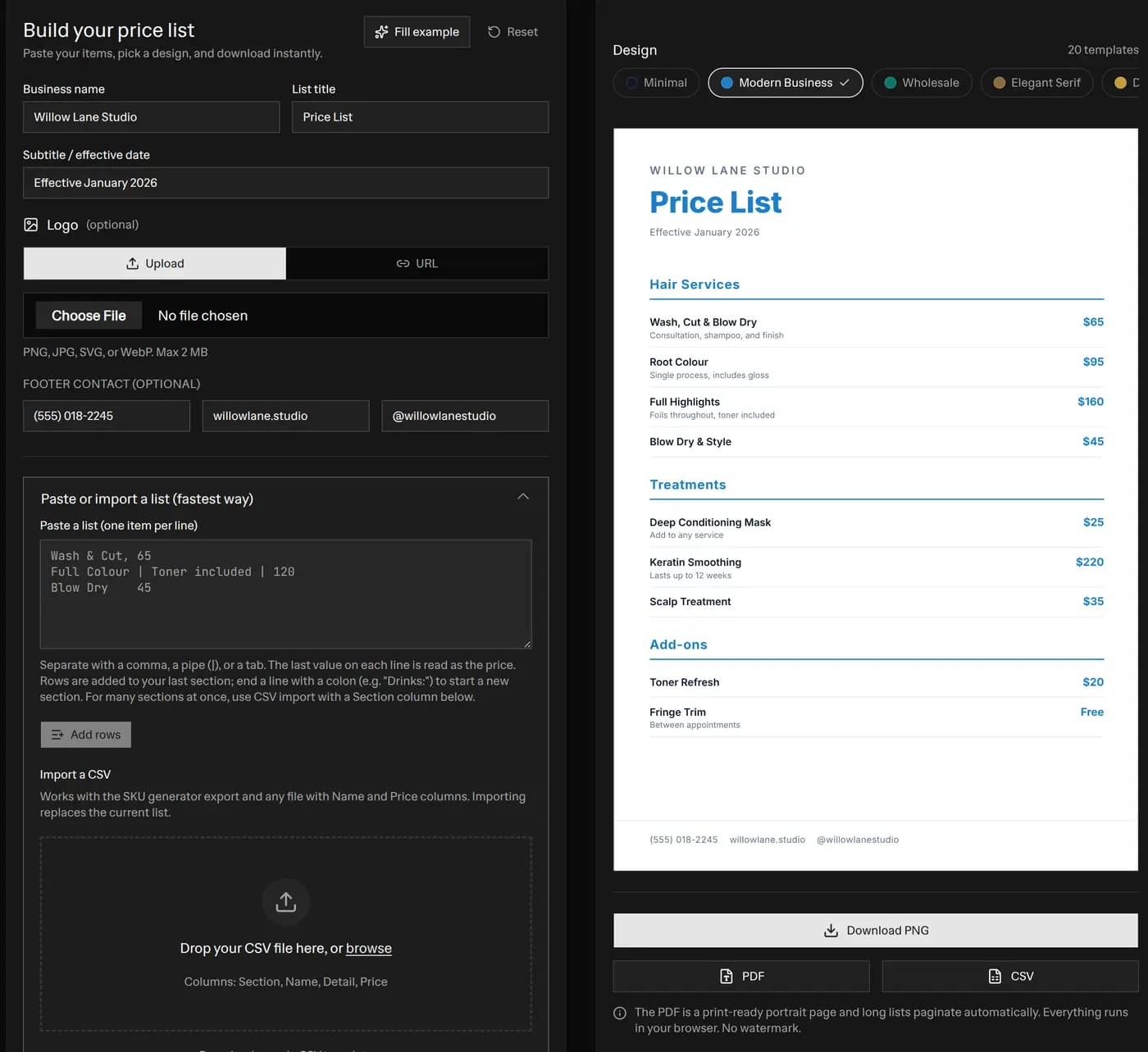 Free price list generator with the editor on the left and a live preview of a styled Willow Lane Studio price list on the right, showing a strip of 20 template designs and buttons to download the price list as a PNG, PDF, or CSV
Making a price list with this tool takes four short steps.
- Add your items. Type each product or service, an optional detail line, and a price. Prices are optional, so a line like "Call for quote" renders cleanly with no stray "$0".
- Group into sections. Add a section heading such as "Hair Services" or "Wholesale Tiers" to organise long lists. Every template renders the heading in its own style.
- Pick a template and style. Choose from 20 templates, spanning clean business tables, elegant serif and boutique looks, bold branded headers, warm artisan menus, dark premium styles, and vibrant tinted designs. Then set an accent color, a font, one or two columns, and your currency.
- Download. Export a crisp PNG for the web, a print-ready PDF for A4 or US Letter, or a CSV that opens in Excel and Google Sheets.
The live preview updates as you type, so the page you see is the page you download.
What to include on a price list
A good price list is easy to scan and quick to trust. Include these parts.
- Business name and logo. Put your brand at the top so the page is clearly yours.
- A clear title. "Price List" works, or name it "2026 Rates" or "Wholesale Price Sheet".
- An effective date or subtitle. This tells customers the prices are current and sets expectations if they change.
- Sections. Group related items so a long list does not read as one wall of text.
- Item names, details, and prices. Keep names short. Use the detail line for the small print, like pack size or duration.
- A contact footer. Add a phone number, website, or social handle so a reader knows how to buy.
Price list vs price sheet vs pricing sheet
These terms mostly mean the same thing. A price list, a price sheet, and a pricing sheet all describe a single document that lists what you sell and what it costs. Some businesses use "price sheet" for an internal or wholesale document and "price list" for the public one, but the format is the same. This tool builds all three from the same editor. Pick a clean template for a public menu of services, or the Wholesale template for a stockist-facing price sheet.
How to make a wholesale price list
A wholesale price list helps stockists and buyers order from you quickly. Use the Wholesale template for a businesslike striped table, then group products into sections by category or order tier. Add a detail line for the pack size, the case quantity, or the minimum order. Set your currency, keep the layout to one column for a formal look, and export the PDF to email to buyers. Keep the CSV as your own master copy so you can re-import and update prices later.
Price list vs price tag vs invoice
It is easy to mix these up, so here is the difference.
- A price list shows many products and their prices on one shareable page. Use it to publish your prices. If you need to label a single product on a shelf instead, use our price tag generator.
- A price tag labels one item with its price, and often a barcode, for a shelf or product.
- An invoice is a billing document for one sale, with the buyer, quantities, taxes, and a total due.
Use the price list to publish, the price tag to label, and the invoice to charge.
Import your products instead of typing them
You do not have to type a long catalog by hand.
- Bulk paste. Paste a block with one product per line. Separate the fields with a comma, a pipe, or a tab. The tool reads the last value on each line as the price, so
Wash and Cut, 65andFull Colour | Toner included | 120both work. - CSV import. Upload a spreadsheet with Name and Price columns. Extra columns are ignored, so the file does not need to be perfect. It even accepts the export from our SKU generator, so you can turn a product catalog into a price list in seconds.
Once your items are in, style the list and export. If you also print shelf labels with barcodes, our barcode generator creates scannable EAN, UPC, and Code 128 labels from the same product data.
Tips for a price list that sells
- Lead with value, not just numbers. A short detail line under each item explains what the price includes.
- Round your prices for a premium look. A whole number like $120 often reads cleaner than $119.99 on a services list.
- Use two columns for long lists. It keeps the page short and easy to scan.
- Match the template to your brand. Dark Luxe suits a boutique or salon, Modern Business suits a studio or agency, and Wholesale suits a supplier.
- Keep it current. Update the effective date whenever prices change, then re-export.
Frequently asked questions
What is a price list?
A price list is a single, one-page document that shows every product or service you sell next to its price. Merchants share it with customers, print it for a counter or notice board, and attach it to quotes and emails. Unlike a price tag, which labels one item, a price list presents your whole range in one place.
How do I make a price list?
Type or paste your products, add a price to each line, and group them into sections if you want headings. Then pick a template, choose an accent color and font, and download. The live preview updates as you type, so you can see the finished page before you export it.
Is this price list generator free, with no watermark?
Yes. It is 100% free with no signup and no watermark on the export. You can download as many price lists as you like as PNG, print-ready PDF, or CSV. Your product and price data never leaves your browser.
What is the difference between a price list, a price tag, and an invoice?
A price list shows many products and their prices on one shareable page. A price tag labels a single item with its price for a shelf or product. An invoice is a billing document for one specific sale, with the buyer, quantities, taxes, and a total due. Use the price list to publish your prices, the price tag to label stock, and the invoice to charge a customer.
Can I make a wholesale price list?
Yes. Use the Wholesale template for a clean, businesslike table, group items into sections such as categories or order tiers, and add a detail line for pack sizes or minimum order notes. Export the PDF to email to stockists or the CSV to keep your own copy.
Can I export the price list to Excel or CSV?
Yes. The Export CSV button downloads a spreadsheet file with Section, Name, Detail, and Price columns that opens in Excel, Google Sheets, or Numbers. You can also import a CSV, including the export from our SKU generator, to fill the list in seconds.
Can I import my products instead of typing them?
Yes. Paste a list with one product per line, separated by a comma, a pipe, or a tab, and the tool splits each line into a name, an optional detail, and a price. You can also upload a CSV file and map the columns automatically, so a long catalog takes seconds to load.
Will the price list print correctly?
Yes. The PDF is a print-ready portrait page in A4 or US Letter. A short list fits one page, and a long list paginates automatically so rows are not cut in half. Print at 100% scale for a crisp, professional result.
More FREE Product & Catalog tools
Barcodes, QR codes, image optimisation, and AI-readiness for your product catalog.
Free QR Code Generator
Instantly create free, downloadable QR codes for links, phone numbers, texts, and SMS messages without any email signups.
Free WiFi QR Code Generator
Make a WiFi QR code guests scan to join your network. Handles WPA and WPA2, open and hidden networks, and passwords with special characters. No signup.
Free vCard QR Code Generator
Make a QR code that saves your name, phone, email, company and website to a phone in one tap. Handles names and companies with commas or semicolons. No signup.
Free SMS QR Code Generator
Make a QR code that opens a text message with the number and a pre-written message filled in. Works on iPhone and Android. No signup, no watermark.
Free WhatsApp QR Code Generator
Make a QR code that opens a WhatsApp chat with your number and an optional pre-written message. Built on a wa.me click-to-chat link. No signup.
Free Business Card QR Code Generator
Make a QR code for your business card that saves your name, title, company, phone, email and website to a phone as a contact in one tap. No signup.
Free Image Resizer & Optimizer
Resize, compress, and convert images for your Shopify store, Pinterest pins, and social media. Shopify-specific presets, batch downloads, and no signup required.
Free Barcode & Label Generator
Create professional barcode labels with templates for retail, shipping, jewelry, and more. Supports EAN-13, UPC, CODE128 formats. Free, no signup.
Free Address Label Template Maker
Make an Avery-compatible address label sheet. Pick a product number (5160, 5167, L7160, and more), type one address or mail-merge a list, then download a print-ready PDF, PNG, or SVG at true size. Free, no signup, no watermark.
Free Name Tag Generator
Make printable name tags and event badges on an Avery sheet. Pick a size (5395, 5390, 5392, 5384, or A4), type one badge or mail-merge a roster, color-code by department, add a scan-to-connect QR, then download a true-size PDF, PNG, or SVG. Free, no signup, no watermark.
Free Price Tag Template Maker
Design printable price tags and shelf labels with a built-in barcode or QR code. Retail and boutique sale templates, real-unit sizes, bulk sheet printing, and PNG/PDF/SVG export. Free, no signup, no watermark.
Free Hang Tag Template Maker
Design printable hang tags (swing tags) with a real punch hole, a built-in barcode or QR code, and real-unit sizing. Apparel, price-sale, and specialty templates, a car parking-permit mirror-slot shape, bulk mail-merge sheets, and PNG/PDF/SVG export. Free, no signup, no watermark.
Free Luggage Tag Template Maker
Design a two-sided printable luggage tag: a name front and an "if found, please return to" contact back, laid out side by side for one-print, cut, and fold. 14 templates (travel, corporate, wedding, kids, medical ID, boarding pass), a reinforced grommet shape, a return QR, real-unit sizing, and bulk family/team sheets. Free, no signup, no watermark.
Free Candle Labels Maker & Warning Label Generator
Design custom candle labels and print an ASTM F-2058 candle warning label carrying all three cautionary statements and all three pictograms. Measure your jar and the tool computes the wrap size (pi x diameter + overlap) and the dual-unit net weight. 6 label types, 14 templates, bulk scent sheets, true-size PDF, transparent PNG and SVG. Free, no signup, no watermark.
Free Soap Label Maker & Custom Soap Labels
Design custom soap labels and build an INCI ingredient list in correct descending order, with saponified oil names (olive oil -> Sodium Olivate) and a true-soap vs cosmetic toggle. Bar, round, oval, belly-band and bottle shapes, 14 templates, dual-unit net weight (oz/g and fl oz/mL), bulk sheets, true-size PDF, transparent PNG and SVG. Free, no signup, no watermark.
Free Care Label Template Maker & Generator
Design a sew-in garment care label with the correct ISO 3758 / ASTM D5489 care symbols, FTC-compliant care text, fibre-content composition, and RN / size / origin fields. Pick a fibre preset, override any axis, and the symbols and text always match. 12 templates, real-unit sizing, bilingual EU option, bulk size-run sheets, true-size PDF, transparent PNG and SVG. Free, no signup, no watermark.
Free Warranty Card Template Maker & Generator
Design a printable warranty card or certificate with the product, warranty period, coverage, and support details, plus a scan-to-register QR. Batch a whole run of cards each with a unique serial and a per-card register QR that pre-fills the serial on your registration page. 12 templates, 16 themes, real insert sizes, fill-in ruled lines, true-size PDF, PNG and SVG, plus Letter and A4 bulk sheets. Free, no signup, no watermark.
Free Nutrition Label Maker & Generator
Create a pixel-accurate FDA Nutrition Facts or Supplement Facts label. Pick from 20+ formats, type your amounts, and get auto %DV and FDA rounding. Download a print-ready PNG or PDF, or copy embed HTML. Free, no signup, no watermark.
Free Size Chart Maker & Generator
Build a branded product size chart. Pick from 13 category presets, edit the table inline, toggle cm and inch, and style it. Copy a self-contained HTML embed for your product page or download a PNG. Free, no signup, no watermark.
Free SKU Generator
Create consistent, human-readable SKU codes for your product catalog. Build a SKU format, bulk-generate from a product list or a size and color variation matrix, and export a CSV. Free, no signup.
Free Rate Sheet Template Maker
Build a professional service rate sheet one-pager. List services with a rate and a per-service unit like /hr or /project, group them into sections, pick from 20 templates, and download a print-ready PNG, PDF, or CSV. Free, no signup, no watermark.
Free Line Sheet Maker
Build a wholesale line sheet template with product photos, wholesale and MSRP prices, colors, sizes, and MOQ. Pick a grid, list, or lookbook layout and download a print-ready PDF, PNG, or CSV. Free, no signup, no watermark.
Free Meta Description Generator
Write, measure, and preview meta titles and descriptions with a live Google SERP snippet. Pixel-accurate truncation, character and pixel counters, copy-ready meta tags, and bulk CSV export. Free, no signup.
Free llms.txt Generator & Validator
Generate and validate llms.txt files for your ecommerce store. Make your Shopify or Etsy store AI-ready for ChatGPT, Gemini, and Claude. Free, no signup.