
Free Nutrition Label Maker
Create a pixel-accurate FDA Nutrition Facts or Supplement Facts label with automatic %DV and FDA rounding. Pick a format, type your amounts, and download a print-ready PNG or PDF.
How to use this nutrition label maker
This short video walks through the whole flow. You pick a format, type your per-serving numbers, let the %DV column fill in on its own, and export a print-ready PNG, PDF, or embed. No signup and no watermark.
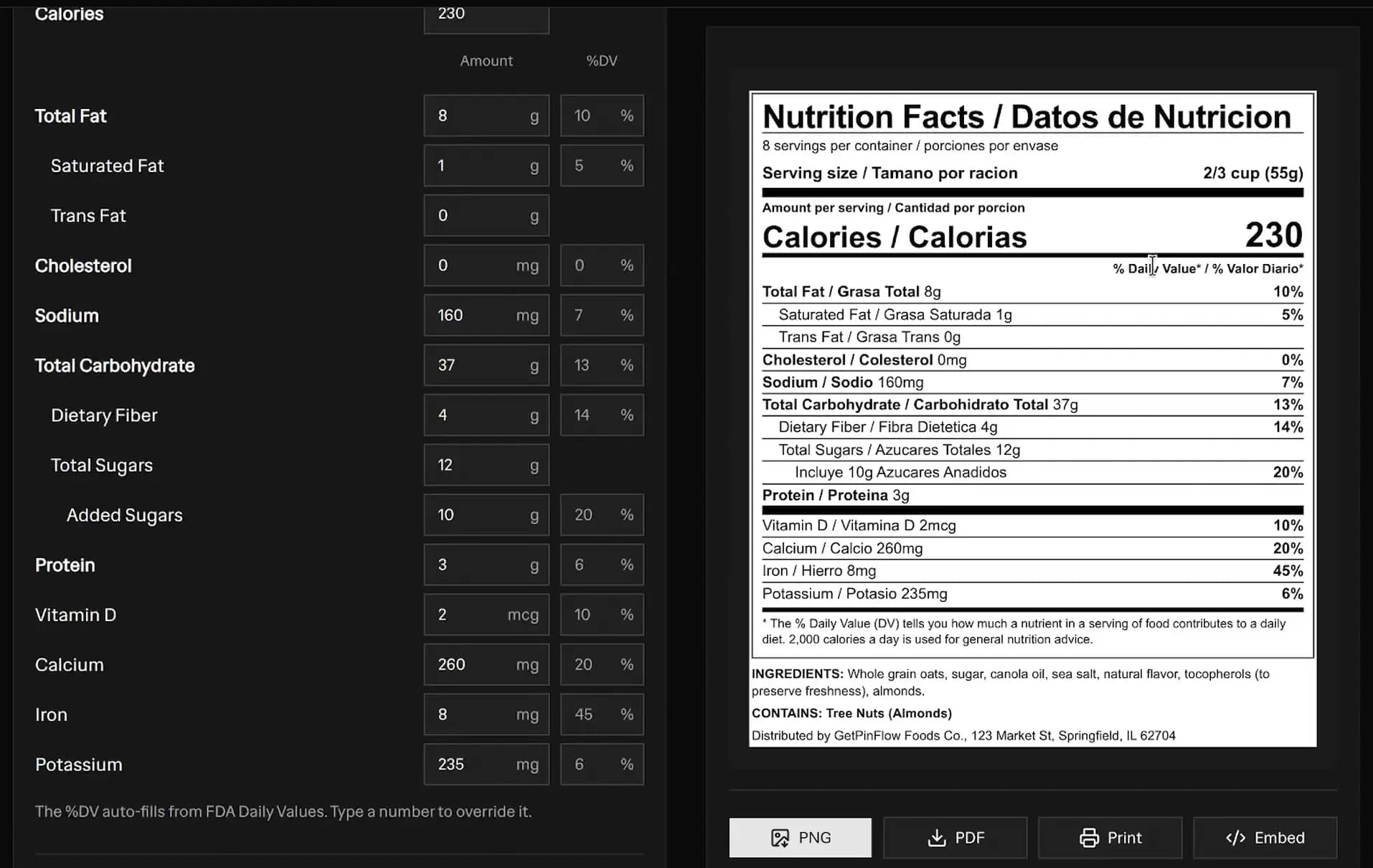 Free nutrition label maker with the editor on the left and a live bilingual FDA Nutrition Facts panel on the right, showing calories, Total Fat, Sodium, Total Carbohydrate, Added Sugars, Protein, Vitamin D, Calcium, Iron, and Potassium with auto-filled %DV, plus PNG, PDF, Print, and Embed export buttons
What this nutrition label maker does
This is a nutrition label formatter and designer, not a recipe calculator. You enter the nutrient amounts for one serving of your product. The tool then does three things for you:
- It draws a pixel-accurate FDA panel with the correct black-on-white typography, heavy title rule, and hairline separators.
- It calculates the % Daily Value (%DV) column automatically from FDA Daily Values, and lets you override any row.
- It applies FDA rounding rules to the amounts that print on the label.
You get more than 20 real FDA formats, a live preview that updates as you type, display toggles, a width slider, and clean PNG, PDF, and embeddable HTML exports. There is no signup and no watermark.
How to make a nutrition facts label
Making a label takes about five minutes once you have your per-serving numbers.
- Pick a format. Start with Standard Vertical for most foods. Choose Tabular or Linear for small packages, Dual Column when you declare both a serving and the whole container, or Supplement Facts for pills and powders.
- Set the serving. Enter servings per container, the household serving size like 2/3 cup, and the metric amount in grams or milliliters.
- Type the amounts. Fill in calories and each nutrient. The %DV fills in on its own. Leave a field blank to hide that row, or type 0 to declare a true zero.
- Add the extras. List your ingredients, a Contains allergen statement, and your manufacturer or distributor line. Add custom vitamin and mineral rows if you need them.
- Adjust the look. Use the toggles and the width slider to match your package, then download the PNG or PDF or copy the embed code.
Which nutrition label format should I choose?
The FDA allows several panel formats so the label can fit different package shapes. Here is when each one is used.
- Standard Vertical. The default panel for most packaged foods with enough label space.
- Compact Vitamins. A vertical panel that runs the vitamins and minerals across one line to save height.
- Simplified. For foods where most nutrients are present in insignificant amounts. It lists fewer nutrients and uses a shorter footnote.
- Dual Column (per serving / per container). Required when a container holds between one and two servings, or two or more servings that people may eat in one sitting.
- As Packaged / As Prepared. Two columns for a food eaten two ways, such as dry cereal and cereal with milk, or a dry mix and the prepared dish.
- Aggregate Display. One panel that declares several foods in a variety pack.
- Tabular and Linear. For small and intermediate packages that are too short for a tall vertical panel. Tabular lays the panel out sideways, and Linear runs the whole declaration as one line of text.
- Infants and Children. Separate panels and Daily Values for infants through 12 months and children 1 through 3 years.
- Per 100g. A reference column expressed per 100 grams.
- Supplement Facts. For dietary supplements. See the section below.
FDA Daily Values, the %DV formula, and rounding rules
The % Daily Value (%DV) tells a shopper how much one serving of your food contributes to a day of eating. This section is the reference chart behind the tool: the Daily Values it compares against, the formula it uses, and the FDA rounding rules it applies. Every number is from 21 CFR 101.9.
FDA Daily Values reference chart
A Daily Value (DV) is the FDA reference amount for one nutrient in one day. Adults and children 4 years and older share one set of Daily Values. Children 1 through 3 years use a separate, lower set. These are the Daily Values the tool uses.
| Nutrient | Unit | Adults and children 4+ | Children 1-3 years |
|---|---|---|---|
| Total Fat | g | 78 | 39 |
| Saturated Fat | g | 20 | 10 |
| Cholesterol | mg | 300 | 300 |
| Sodium | mg | 2,300 | 1,500 |
| Total Carbohydrate | g | 275 | 150 |
| Dietary Fiber | g | 28 | 14 |
| Added Sugars | g | 50 | 25 |
| Protein | g | 50 | 13 |
| Vitamin D | mcg | 20 | 15 |
| Calcium | mg | 1,300 | 700 |
| Iron | mg | 18 | 7 |
| Potassium | mg | 4,700 | 3,000 |
How to calculate % Daily Value
The formula is a single division:
% Daily Value = (nutrient amount / Daily Value) x 100
For example, 460 mg of sodium divided by the 2,300 mg Daily Value is 0.20, so 20%. Eight grams of total fat against 78 g is about 10%. The result is then rounded, and the rounding depends on the nutrient.
Macronutrients round to the nearest whole percent. Vitamins and minerals use the increment rule in 21 CFR 101.9(c)(8)(iii):
| Calculated %DV | Rounds to the nearest |
|---|---|
| Up to and including 10% | 2% |
| Above 10% up to and including 50% | 5% |
| Above 50% | 10% |
So iron at 8 mg / 18 mg = 44.4% rounds to 45%, and potassium at 235 mg / 4,700 mg = 5.0% rounds to 6%. This is why a vitamin or mineral %DV is almost never an odd number.
FDA amount rounding rules
The number that prints next to each nutrient is also rounded, per 21 CFR 101.9(c). Very small amounts print a phrase like "less than 1 g" instead of a number.
| Nutrient | Rounding rule |
|---|---|
| Calories | Under 5 to 0; 50 or less to the nearest 5; over 50 to the nearest 10 |
| Fat (total, saturated, trans) | Under 0.5 g to 0; under 5 g to the nearest 0.5 g; 5 g or more to the nearest 1 g |
| Cholesterol | Under 2 mg to 0; 2 to 5 mg to "less than 5 mg"; over 5 mg to the nearest 5 mg |
| Sodium | Under 5 mg to 0; 5 to 140 mg to the nearest 5 mg; over 140 mg to the nearest 10 mg |
| Carbohydrate, fiber, sugars, added sugars, protein | Under 0.5 g to 0; 0.5 to 1 g to "less than 1 g"; 1 g or more to the nearest 1 g |
| Vitamins and minerals | Rounded to the appropriate figures in the FDA tables under 21 CFR 101.9(c)(8) |
If your lab gives you a different %DV, type it into the %DV box to override the calculation for that row.
Vitamins and minerals and their Daily Values
Beyond the four micronutrients the FDA requires (Vitamin D, calcium, iron, and potassium), you can declare others as custom rows. These are their adult Daily Values.
| Nutrient | Unit | Daily Value |
|---|---|---|
| Vitamin A | mcg | 900 |
| Vitamin C | mg | 90 |
| Vitamin E | mg | 15 |
| Vitamin K | mcg | 120 |
| Thiamin | mg | 1.2 |
| Riboflavin | mg | 1.3 |
| Niacin | mg | 16 |
| Vitamin B6 | mg | 1.7 |
| Folate | mcg | 400 |
| Vitamin B12 | mcg | 2.4 |
| Magnesium | mg | 420 |
| Zinc | mg | 11 |
| Phosphorus | mg | 1,250 |
Nutrition labels for infants and children
A food labeled specifically for infants through 12 months or children 1 through 3 years follows the special rules in 21 CFR 101.9(j)(5), and the tool applies them for you when you pick the Infant or Children format.
- Infants through 12 months. The panel declares the nutrients but shows no % Daily Value for saturated fat, trans fat, cholesterol, sodium, dietary fiber, total sugars, or added sugars, and it carries no footnote. Total fat, total carbohydrate, protein, and the vitamins and minerals still show a %DV against the infant Daily Values.
- Children 1 through 3 years. The panel shows a %DV for every nutrient that has a child Daily Value, and its footnote is based on a 1,000-calorie diet rather than the 2,000-calorie diet used for adults.
Small package and abbreviated label rules
Small packages get relief from the full vertical panel. If your total surface area for labeling is limited, the FDA lets you use the Tabular or Linear format, and very small packages may use abbreviated nutrient terms like Sat. Fat and Total Carb. The Tabular Small Package format in this tool already switches to those shorter terms for you.
If several nutrients are present at insignificant amounts, the Simplified format is the right choice. It declares the core nutrients and swaps the long footnote for the shorter one.
Supplement Facts vs Nutrition Facts
A dietary supplement uses a Supplement Facts panel, not a Nutrition Facts panel. The differences matter.
- The serving is a count, such as 1 capsule or 1 scoop, rather than a household measure with grams.
- Ingredients without an established Daily Value are marked with a dagger symbol and a Daily Value not established footnote.
- A proprietary blend can be declared by its total weight, with the blend ingredients listed underneath without individual amounts.
- The panel can include a Children or a Bilingual variant, both of which are available here.
Add your vitamins and minerals as custom rows, and the Supplement Facts formats will place them in the panel with their %DV or a dagger where no Daily Value exists.
Export options: PNG, PDF, and embed
When your panel looks right, you have three clean ways to use it.
- PNG. A high-resolution image exported at 4x scale so it stays crisp when printed on packaging. Turn on the transparent background toggle to get a cut-out image with no white box.
- PDF. A print-ready page sized to the panel proportions. Print at 100% scale, not fit to page, so it prints at true size.
- Embed HTML. A self-contained snippet built from inline styles only. Paste it onto a product page and it renders anywhere with no external CSS file and no watermark.
Tips for an accurate, compliant label
- Enter amounts per single serving, not per container, unless you are using a per-container column.
- Declare a true zero as 0 so the row prints 0 rather than disappearing.
- Keep your ingredient list in descending order by weight, and mirror it in the Contains allergen line.
- Verify your final numbers and format against current FDA regulations before you print packaging you sell.
Frequently asked questions
Is this nutrition label maker really free?
Yes. Every FDA Nutrition Facts and Supplement Facts format, the auto %DV calculation, and all PNG, PDF, and embed exports are 100% free. There is no signup, no email, and no watermark on the label.
How does the %DV column calculate automatically?
You type the amount of each nutrient and the tool divides it by the FDA Daily Value. For example, 460mg of sodium against the 2,300mg Daily Value is 20%. Macronutrients round to the nearest whole percent; vitamins and minerals use the FDA increment rule (nearest 2% up to 10%, 5% from 10% to 50%, 10% above 50%), so 8mg of iron is 45%. You can type your own number in the %DV field to override any row.
Does the tool apply FDA rounding rules?
Yes. Displayed amounts follow 21 CFR 101.9 rounding: calories over 50 round to the nearest 10, fat under 5g rounds to the nearest 0.5g, sodium rounds to the nearest 5mg or 10mg, and small amounts print phrases like less than 1g. Macronutrient %DVs round to a whole percent, while vitamin and mineral %DVs use the FDA increments (nearest 2% up to 10%, 5% from 10% to 50%, 10% above 50%).
Which nutrition label format should I choose?
Use Standard Vertical for most packages. Use Tabular or Linear when the package is small and short. Use Dual Column when a serving and the whole container both need declaring, or for an as-prepared food. Use the Infant or Children formats for those age groups, and Supplement Facts for pills, powders, and capsules.
What is the difference between Nutrition Facts and Supplement Facts?
Nutrition Facts panels go on conventional foods and beverages and always list calories and the core macronutrients. Supplement Facts panels go on dietary supplements, list the serving as a count like 1 capsule, allow a proprietary blend, and mark ingredients without a Daily Value with a dagger symbol.
Can I put this label on real product packaging?
The tool produces an FDA-styled panel with authentic typography, but you are responsible for the accuracy of the numbers you enter and for meeting current FDA labeling regulations. Verify your values, allergen statement, and format with a qualified expert before printing on packaging you sell.
How do I export a transparent label or embed it on my site?
Turn on the transparent background toggle and download the PNG to get a cut-out image with no white box. To embed on a product page, click Embed to copy a self-contained HTML snippet that uses only inline styles, so it renders anywhere with no external CSS and no watermark.
More FREE Product & Catalog tools
Barcodes, QR codes, image optimisation, and AI-readiness for your product catalog.
Free QR Code Generator
Instantly create free, downloadable QR codes for links, phone numbers, texts, and SMS messages without any email signups.
Free WiFi QR Code Generator
Make a WiFi QR code guests scan to join your network. Handles WPA and WPA2, open and hidden networks, and passwords with special characters. No signup.
Free vCard QR Code Generator
Make a QR code that saves your name, phone, email, company and website to a phone in one tap. Handles names and companies with commas or semicolons. No signup.
Free SMS QR Code Generator
Make a QR code that opens a text message with the number and a pre-written message filled in. Works on iPhone and Android. No signup, no watermark.
Free WhatsApp QR Code Generator
Make a QR code that opens a WhatsApp chat with your number and an optional pre-written message. Built on a wa.me click-to-chat link. No signup.
Free Business Card QR Code Generator
Make a QR code for your business card that saves your name, title, company, phone, email and website to a phone as a contact in one tap. No signup.
Free Image Resizer & Optimizer
Resize, compress, and convert images for your Shopify store, Pinterest pins, and social media. Shopify-specific presets, batch downloads, and no signup required.
Free Barcode & Label Generator
Create professional barcode labels with templates for retail, shipping, jewelry, and more. Supports EAN-13, UPC, CODE128 formats. Free, no signup.
Free Address Label Template Maker
Make an Avery-compatible address label sheet. Pick a product number (5160, 5167, L7160, and more), type one address or mail-merge a list, then download a print-ready PDF, PNG, or SVG at true size. Free, no signup, no watermark.
Free Name Tag Generator
Make printable name tags and event badges on an Avery sheet. Pick a size (5395, 5390, 5392, 5384, or A4), type one badge or mail-merge a roster, color-code by department, add a scan-to-connect QR, then download a true-size PDF, PNG, or SVG. Free, no signup, no watermark.
Free Price Tag Template Maker
Design printable price tags and shelf labels with a built-in barcode or QR code. Retail and boutique sale templates, real-unit sizes, bulk sheet printing, and PNG/PDF/SVG export. Free, no signup, no watermark.
Free Hang Tag Template Maker
Design printable hang tags (swing tags) with a real punch hole, a built-in barcode or QR code, and real-unit sizing. Apparel, price-sale, and specialty templates, a car parking-permit mirror-slot shape, bulk mail-merge sheets, and PNG/PDF/SVG export. Free, no signup, no watermark.
Free Luggage Tag Template Maker
Design a two-sided printable luggage tag: a name front and an "if found, please return to" contact back, laid out side by side for one-print, cut, and fold. 14 templates (travel, corporate, wedding, kids, medical ID, boarding pass), a reinforced grommet shape, a return QR, real-unit sizing, and bulk family/team sheets. Free, no signup, no watermark.
Free Candle Labels Maker & Warning Label Generator
Design custom candle labels and print an ASTM F-2058 candle warning label carrying all three cautionary statements and all three pictograms. Measure your jar and the tool computes the wrap size (pi x diameter + overlap) and the dual-unit net weight. 6 label types, 14 templates, bulk scent sheets, true-size PDF, transparent PNG and SVG. Free, no signup, no watermark.
Free Soap Label Maker & Custom Soap Labels
Design custom soap labels and build an INCI ingredient list in correct descending order, with saponified oil names (olive oil -> Sodium Olivate) and a true-soap vs cosmetic toggle. Bar, round, oval, belly-band and bottle shapes, 14 templates, dual-unit net weight (oz/g and fl oz/mL), bulk sheets, true-size PDF, transparent PNG and SVG. Free, no signup, no watermark.
Free Care Label Template Maker & Generator
Design a sew-in garment care label with the correct ISO 3758 / ASTM D5489 care symbols, FTC-compliant care text, fibre-content composition, and RN / size / origin fields. Pick a fibre preset, override any axis, and the symbols and text always match. 12 templates, real-unit sizing, bilingual EU option, bulk size-run sheets, true-size PDF, transparent PNG and SVG. Free, no signup, no watermark.
Free Warranty Card Template Maker & Generator
Design a printable warranty card or certificate with the product, warranty period, coverage, and support details, plus a scan-to-register QR. Batch a whole run of cards each with a unique serial and a per-card register QR that pre-fills the serial on your registration page. 12 templates, 16 themes, real insert sizes, fill-in ruled lines, true-size PDF, PNG and SVG, plus Letter and A4 bulk sheets. Free, no signup, no watermark.
Free Size Chart Maker & Generator
Build a branded product size chart. Pick from 13 category presets, edit the table inline, toggle cm and inch, and style it. Copy a self-contained HTML embed for your product page or download a PNG. Free, no signup, no watermark.
Free SKU Generator
Create consistent, human-readable SKU codes for your product catalog. Build a SKU format, bulk-generate from a product list or a size and color variation matrix, and export a CSV. Free, no signup.
Free Price List Template Maker
Build a polished price list one-pager. Paste or import your products, group them into sections, pick from 20 templates, and download a print-ready PNG, PDF, or CSV. Free, no signup, no watermark.
Free Rate Sheet Template Maker
Build a professional service rate sheet one-pager. List services with a rate and a per-service unit like /hr or /project, group them into sections, pick from 20 templates, and download a print-ready PNG, PDF, or CSV. Free, no signup, no watermark.
Free Line Sheet Maker
Build a wholesale line sheet template with product photos, wholesale and MSRP prices, colors, sizes, and MOQ. Pick a grid, list, or lookbook layout and download a print-ready PDF, PNG, or CSV. Free, no signup, no watermark.
Free Meta Description Generator
Write, measure, and preview meta titles and descriptions with a live Google SERP snippet. Pixel-accurate truncation, character and pixel counters, copy-ready meta tags, and bulk CSV export. Free, no signup.
Free llms.txt Generator & Validator
Generate and validate llms.txt files for your ecommerce store. Make your Shopify or Etsy store AI-ready for ChatGPT, Gemini, and Claude. Free, no signup.