
Free Size Chart Generator
Build a clean, branded product size chart in your browser. Pick a category preset, edit the table, toggle centimeters and inches, then copy a self-contained HTML embed for your product page or download a PNG. No signup, no watermark.
How to use this size chart maker
This short video walks through the whole flow. You pick a category preset, edit the rows and columns inline, choose a theme and colors, add your logo, then export a self-contained HTML embed or a PNG. No signup and no watermark.
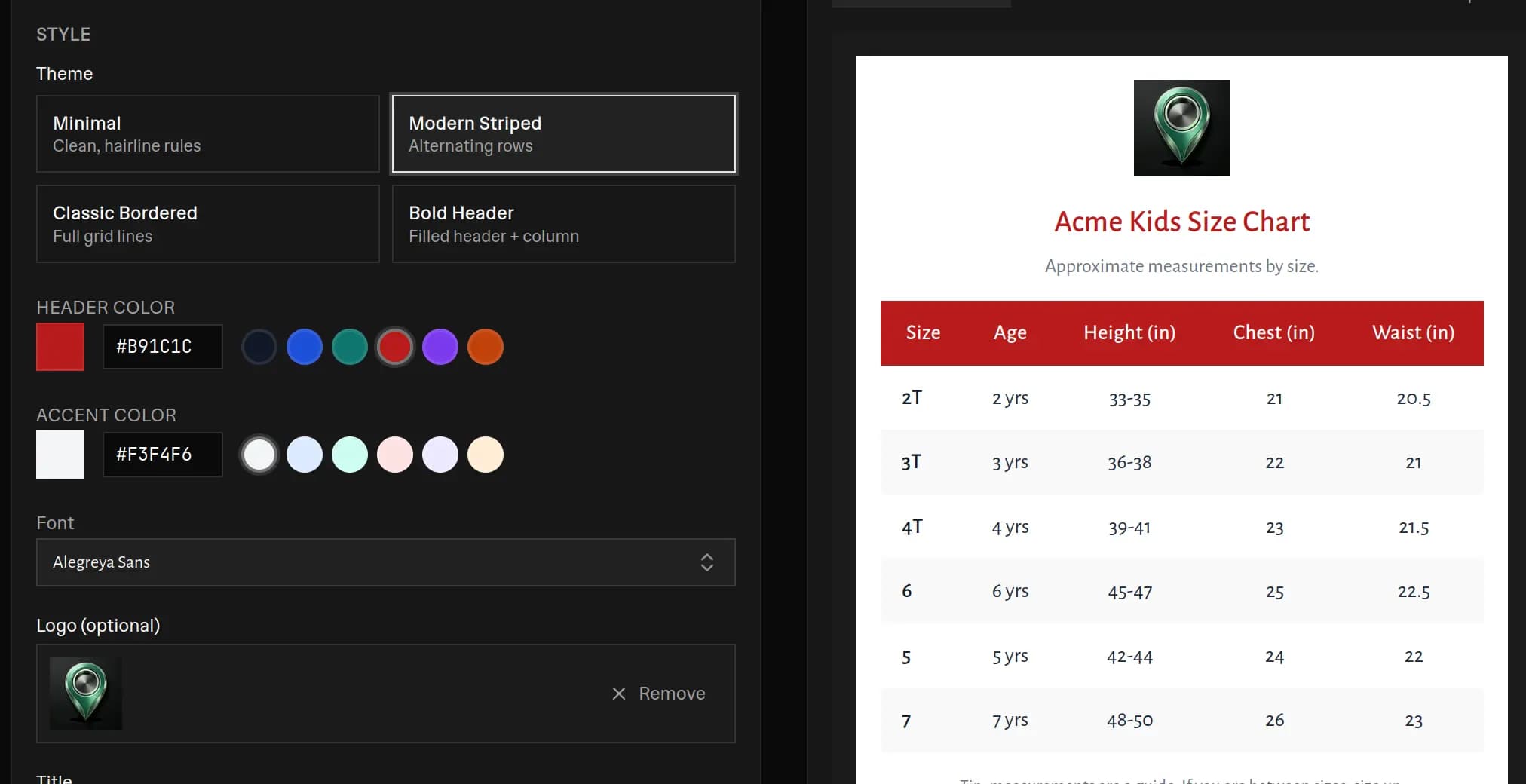 Free size chart maker with the style controls on the left and a live preview of a red Modern Striped Acme Kids size chart on the right, showing Size, Age, Height, Chest, and Waist columns for toddler and youth sizes, plus theme, header color, accent color, font, and logo options
What this size chart generator does
A good size chart cuts returns and answers the one question every shopper asks before they buy. This tool is a size chart maker and size chart template builder in one. You do three things:
- Pick a category preset so the table starts full, not empty.
- Edit the rows, columns, and values inline until they match your product.
- Export a self-contained HTML embed and a PNG, with no watermark.
The chart is a simple table. Each row is a size like S, M, L or a numeric size. Each column is a measurement like Chest, Waist, or Length. The first column always holds the size label. Everything updates in a live preview as you type.
How to make a size chart
Making a size chart template takes about five minutes.
- Pick a category preset. Start with T-shirt, Men's shirt, Women's top, Dress, Pants, Shoes, Kids, Baby, Hat, Ring, Bra, Jacket, or Leggings. The table fills with real sample rows, columns, and values.
- Edit the table. Rename column headers, edit any cell, and add, remove, or reorder sizes and columns. Cells accept ranges like 32-34 and fractions like 16 1/2.
- Set your units. Toggle between inches and centimeters. The numbers convert for you.
- Style it. Choose a theme, set your header and accent colors, pick a font, and add a logo, title, subtitle, and footer note.
- Export. Click Copy HTML embed to grab a paste-ready block, download a PNG, copy a plain table for Google Sheets, or print.
What to put in a clothing size chart
Keep the chart short and useful. A shopper wants to find their size in a few seconds.
- Size labels. Use the labels your customers already know, such as S, M, L or numeric sizes.
- Two or three key measurements. For tops, chest or bust, length, and sleeve. For bottoms, waist, hip, and inseam. For shoes, foot length with US, EU, and UK equivalents.
- Body vs garment. Say whether the numbers are body measurements or flat garment measurements. This is the single most common source of confusion.
- A fit note. A short line like size up if you are between sizes prevents a lot of returns.
You do not need to list every possible measurement. A focused clothing size chart template beats an overloaded one.
Types of size charts you can make
Not every product is measured the same way. A t shirt size chart, a shoe size chart, and a ring size chart each use different numbers, and shoppers expect the ones they already know. The presets below match the 13 categories in the tool, so pick the closest one and edit from there. Each section covers which measurements to include and how to take them.
Clothing and apparel (t-shirts, tops, shirts, dresses)
The core measurements are chest or bust, waist, hip, length, sleeve, and shoulder. Take chest and bust around the fullest point with the tape level and snug but not tight. Waist goes around the natural waistline, hip around the widest part of the seat, and length runs from the shoulder seam down to the hem. The most important choice is body versus garment. Body measurements describe the person, while garment or flat measurements describe the item laid flat on a table. A flat garment measurement is often taken across one side, so a 20 inch flat chest is roughly a 40 inch body circumference. Always label which one you used, because mixing the two is the biggest cause of size confusion in a clothing size chart template.
Pants, jeans, and leggings
Bottoms use waist, hip, inseam, and rise. Waist is measured around where the garment sits, which may be the natural waist or lower. Hip is the widest part of the seat. Inseam runs from the crotch seam to the hem along the inside of the leg and controls the length. Rise is the distance from the crotch seam up to the top of the waistband, and it separates a low rise from a high rise. For leggings, a stretch note helps, since the relaxed and stretched measurements differ.
Shoes
Shoe charts are built from foot length. Have the shopper stand on a sheet of paper, mark the back of the heel and the tip of the longest toe, then measure the distance between the two marks. Measure both feet late in the day and use the larger one. Foot length maps to a size number, but US, UK, and EU numbering all differ, and exact conversions vary by brand, so it is safest to publish a foot length column in cm or inches alongside the US, UK, and EU sizes rather than rely on numbers alone.
Rings
Ring size maps to the inside diameter and inside circumference of the band. To measure, wrap a strip of paper around the base of the finger, mark where it overlaps, and measure that length in millimeters to get the circumference, or measure the inside of a ring that already fits to get the diameter. A ring size chart usually lists the US or UK size next to the diameter and circumference in mm, since circumference equals diameter times pi.
Bras
Bra size is a band plus a cup. The band comes from the underbust measurement, taken snugly around the ribcage directly under the bust. The cup comes from the difference between the bust measurement, taken around the fullest point, and the band. A larger difference means a larger cup letter. Listing both the underbust and bust ranges next to each size helps shoppers land on the right combination.
Hats
Hats are sized by head circumference. Wrap the tape around the head about a finger width above the ears and eyebrows, where the hat will actually sit, and keep it level. Record the number in both cm and inches, since hat sizing labels vary by region and brand.
Kids and baby
Children's items are sized by age, height, and weight rather than a single body measurement, and the ranges overlap. List the age band next to a height range and a weight range so parents can cross-check. Because kids grow quickly and fit between sizes often, a short note suggesting they size up is genuinely useful and reduces returns.
International size conversions (US, UK, EU)
Sizes are not universal. Alpha sizes like S, M, and L map to different body measurements across brands, and numeric sizes differ by region, so a US 8 is not a UK 8 or an EU 8. Shoes and apparel both carry this problem. Rather than trust a single label, the tool lets you add US, UK, and EU columns side by side so shoppers can find their region and read across to a measurement. The most reliable approach is to keep an actual measurement column, in cm or inches, as the anchor and treat the regional size numbers as a guide. That way the chart stays honest even when two brands disagree on what a number means.
Inches or centimeters
Show the unit your customers expect. Shoppers in the US and UK usually think in inches. Most of the rest of the world uses centimeters. The safest move is to publish both.
This tool converts for you. Type your numbers once in inches, then toggle to centimeters to produce a second chart from the same data. One inch equals 2.54 cm, and the tool rounds to one decimal so the numbers stay clean. Columns you mark as text, like Age or EU shoe size, are never converted by mistake.
How to add a size chart to Shopify
The HTML embed is the fastest way to get a chart onto a Shopify product page.
- Build and style your chart, then click Copy HTML embed.
- In Shopify, open the product and find the Description box.
- Click the code icon labeled Show HTML in the description toolbar.
- Paste the block where you want the chart to appear and save.
Because the embed carries its own inline styles, it renders the same on your theme, in a blog post, or inside an Etsy listing. There is no app to install and no external stylesheet to load. On WooCommerce, paste the same block into the product description in the Text or Code editor.
That embed is per product, which is fine until you have a lot of them. If you want one chart that attaches itself to every product of a given type, so new arrivals are covered without you touching them, that is a different setup using Shopify metaobjects. I built and tested it on a Dawn store and wrote up the whole thing, including the French translation and a size recommender: how to add a size chart in Shopify without an app.
Size chart maker vs a paid app
The Shopify App Store has hundreds of size chart apps, and many charge a monthly fee for a feature you can get here for free.
- This size chart maker is free, client side, and gives you a portable HTML block and a PNG you own. Nothing phones home, and there is no watermark.
- A paid app bundles auto-assignment, a fit quiz, and a support team behind one subscription. That is worth paying for if you want someone to call. It also adds a recurring cost and another script on your storefront.
Many merchants start with a free size chart template, paste the embed on their key products, and only move to a paid app once they have hundreds of listings.
Tips for a size chart that reduces returns
- Measure a real sample and round to sensible values.
- Match the size labels on the chart to the labels on the product.
- Add one line telling shoppers how to measure themselves.
- Keep the same measurements across your catalog so charts look consistent.
- Publish the chart as an image and as text, so it is readable and also searchable.
Frequently asked questions
Is this size chart maker really free?
Yes. Every category preset, the cm and inch conversion, the styled themes, the HTML embed, and the PNG download are 100% free. There is no signup, no email, and no watermark on your size chart.
How do I add a size chart to my Shopify or Etsy product page?
Build your chart, click Copy HTML embed, then paste the block into your product description. On Shopify, open the product, switch the description editor to Show HTML with the code icon, and paste. On Etsy or a blog, paste the block into any HTML section. The embed is self-contained, so it renders the same chart anywhere with no extra CSS or apps.
Does the cm and inch toggle actually convert the numbers?
Yes. Switching units converts every numeric measurement using 1 inch = 2.54 cm and rounds to one decimal, then updates the unit suffix in each header. Ranges like 32-34 and fractions like 16 1/2 are converted without breaking. Columns you mark as text, such as Age or EU shoe size, are left exactly as typed.
Can I make a t-shirt size chart with this tool?
Yes. The T-shirt preset is the default and pre-fills sizes S through 2XL with chest, length, and sleeve measurements. Edit any value, add or remove sizes and columns, switch to centimeters, and you have a t shirt size chart ready to paste onto a product page in a couple of minutes.
What size chart templates are included?
There are 13 category presets: t-shirt, men's shirt, women's top, dress, pants and jeans, shoes, kids, baby, hat, ring, bra, jacket, and leggings. Each one loads real sample rows, columns, and values, so you never start from an empty grid. You can rename, add, remove, and reorder everything.
Should I list sizes in cm or inches?
List whatever your customers expect and, ideally, show both. Shoppers in the US and UK usually think in inches, while most of the rest of the world uses centimeters. This tool lets you flip between the two instantly, so it is easy to publish one chart in inches and a second in centimeters from the same data.
Can I download the size chart as an image?
Yes. Click Download PNG to get a crisp raster of the styled chart, including your logo, title, table, and footer note. You can also copy a plain tab-separated table that pastes straight into Google Sheets, or use Print for a clean, chart-only page.
More FREE Product & Catalog tools
Barcodes, QR codes, image optimisation, and AI-readiness for your product catalog.
Free QR Code Generator
Instantly create free, downloadable QR codes for links, phone numbers, texts, and SMS messages without any email signups.
Free WiFi QR Code Generator
Make a WiFi QR code guests scan to join your network. Handles WPA and WPA2, open and hidden networks, and passwords with special characters. No signup.
Free vCard QR Code Generator
Make a QR code that saves your name, phone, email, company and website to a phone in one tap. Handles names and companies with commas or semicolons. No signup.
Free SMS QR Code Generator
Make a QR code that opens a text message with the number and a pre-written message filled in. Works on iPhone and Android. No signup, no watermark.
Free WhatsApp QR Code Generator
Make a QR code that opens a WhatsApp chat with your number and an optional pre-written message. Built on a wa.me click-to-chat link. No signup.
Free Business Card QR Code Generator
Make a QR code for your business card that saves your name, title, company, phone, email and website to a phone as a contact in one tap. No signup.
Free Image Resizer & Optimizer
Resize, compress, and convert images for your Shopify store, Pinterest pins, and social media. Shopify-specific presets, batch downloads, and no signup required.
Free Barcode & Label Generator
Create professional barcode labels with templates for retail, shipping, jewelry, and more. Supports EAN-13, UPC, CODE128 formats. Free, no signup.
Free Address Label Template Maker
Make an Avery-compatible address label sheet. Pick a product number (5160, 5167, L7160, and more), type one address or mail-merge a list, then download a print-ready PDF, PNG, or SVG at true size. Free, no signup, no watermark.
Free Name Tag Generator
Make printable name tags and event badges on an Avery sheet. Pick a size (5395, 5390, 5392, 5384, or A4), type one badge or mail-merge a roster, color-code by department, add a scan-to-connect QR, then download a true-size PDF, PNG, or SVG. Free, no signup, no watermark.
Free Price Tag Template Maker
Design printable price tags and shelf labels with a built-in barcode or QR code. Retail and boutique sale templates, real-unit sizes, bulk sheet printing, and PNG/PDF/SVG export. Free, no signup, no watermark.
Free Hang Tag Template Maker
Design printable hang tags (swing tags) with a real punch hole, a built-in barcode or QR code, and real-unit sizing. Apparel, price-sale, and specialty templates, a car parking-permit mirror-slot shape, bulk mail-merge sheets, and PNG/PDF/SVG export. Free, no signup, no watermark.
Free Luggage Tag Template Maker
Design a two-sided printable luggage tag: a name front and an "if found, please return to" contact back, laid out side by side for one-print, cut, and fold. 14 templates (travel, corporate, wedding, kids, medical ID, boarding pass), a reinforced grommet shape, a return QR, real-unit sizing, and bulk family/team sheets. Free, no signup, no watermark.
Free Candle Labels Maker & Warning Label Generator
Design custom candle labels and print an ASTM F-2058 candle warning label carrying all three cautionary statements and all three pictograms. Measure your jar and the tool computes the wrap size (pi x diameter + overlap) and the dual-unit net weight. 6 label types, 14 templates, bulk scent sheets, true-size PDF, transparent PNG and SVG. Free, no signup, no watermark.
Free Soap Label Maker & Custom Soap Labels
Design custom soap labels and build an INCI ingredient list in correct descending order, with saponified oil names (olive oil -> Sodium Olivate) and a true-soap vs cosmetic toggle. Bar, round, oval, belly-band and bottle shapes, 14 templates, dual-unit net weight (oz/g and fl oz/mL), bulk sheets, true-size PDF, transparent PNG and SVG. Free, no signup, no watermark.
Free Care Label Template Maker & Generator
Design a sew-in garment care label with the correct ISO 3758 / ASTM D5489 care symbols, FTC-compliant care text, fibre-content composition, and RN / size / origin fields. Pick a fibre preset, override any axis, and the symbols and text always match. 12 templates, real-unit sizing, bilingual EU option, bulk size-run sheets, true-size PDF, transparent PNG and SVG. Free, no signup, no watermark.
Free Warranty Card Template Maker & Generator
Design a printable warranty card or certificate with the product, warranty period, coverage, and support details, plus a scan-to-register QR. Batch a whole run of cards each with a unique serial and a per-card register QR that pre-fills the serial on your registration page. 12 templates, 16 themes, real insert sizes, fill-in ruled lines, true-size PDF, PNG and SVG, plus Letter and A4 bulk sheets. Free, no signup, no watermark.
Free Nutrition Label Maker & Generator
Create a pixel-accurate FDA Nutrition Facts or Supplement Facts label. Pick from 20+ formats, type your amounts, and get auto %DV and FDA rounding. Download a print-ready PNG or PDF, or copy embed HTML. Free, no signup, no watermark.
Free SKU Generator
Create consistent, human-readable SKU codes for your product catalog. Build a SKU format, bulk-generate from a product list or a size and color variation matrix, and export a CSV. Free, no signup.
Free Price List Template Maker
Build a polished price list one-pager. Paste or import your products, group them into sections, pick from 20 templates, and download a print-ready PNG, PDF, or CSV. Free, no signup, no watermark.
Free Rate Sheet Template Maker
Build a professional service rate sheet one-pager. List services with a rate and a per-service unit like /hr or /project, group them into sections, pick from 20 templates, and download a print-ready PNG, PDF, or CSV. Free, no signup, no watermark.
Free Line Sheet Maker
Build a wholesale line sheet template with product photos, wholesale and MSRP prices, colors, sizes, and MOQ. Pick a grid, list, or lookbook layout and download a print-ready PDF, PNG, or CSV. Free, no signup, no watermark.
Free Meta Description Generator
Write, measure, and preview meta titles and descriptions with a live Google SERP snippet. Pixel-accurate truncation, character and pixel counters, copy-ready meta tags, and bulk CSV export. Free, no signup.
Free llms.txt Generator & Validator
Generate and validate llms.txt files for your ecommerce store. Make your Shopify or Etsy store AI-ready for ChatGPT, Gemini, and Claude. Free, no signup.