
Free Luggage Tag Template Maker
Design a printable luggage tag template in minutes. Add a name and a return-to contact panel, pick a template and a real-world size, then download a two-sided PNG, PDF, or SVG with the front and back side by side. Personalized bag tags, a return QR, and bulk sheets included. No signup and no watermark.
The free luggage tag template maker for personalized, printable bag tags
I tested this maker with a Classic Travel tag for a trip to Bali, at the default 2.25 x 4 inch size, with a return QR code on the back. I downloaded the PDF and checked it: each side measured 2.25 x 4.00 inches, the front and back sat side by side with a 0.25 inch gap between them to fold along, and the QR decoded to the name, address, phone, and email I typed.
How to make a luggage tag
- Fill in the tag details. Type the owner's name and the trip or destination for the front, then the return-to contact for the back: name, address, phone, and email. A short message such as "Reward if found" goes on the back too. Click Fill example to start from a finished tag.
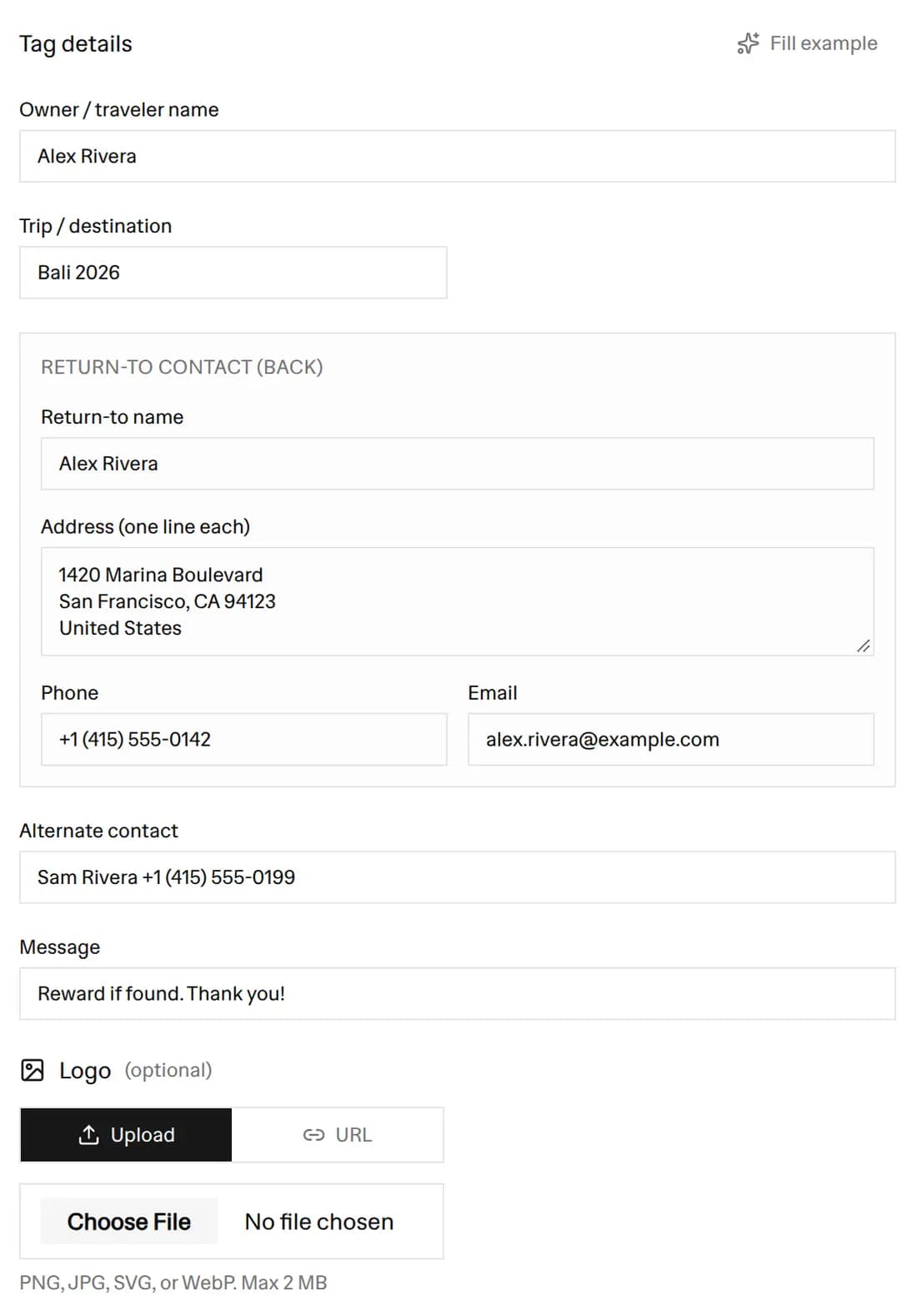 The Tag details form filled in for Alex Rivera, with a Bali 2026 destination, a Reward if found message, and the return-to name, address, phone, and email
- Choose a size. The default is 2.25 x 4 inches. You can also pick 2.5 x 4.25, 3 x 5, 2 x 3.5, or 2 x 4 inches, or a custom size, and turn any of them to landscape. Letter and A4 are the paper choices in Bulk sheet mode.
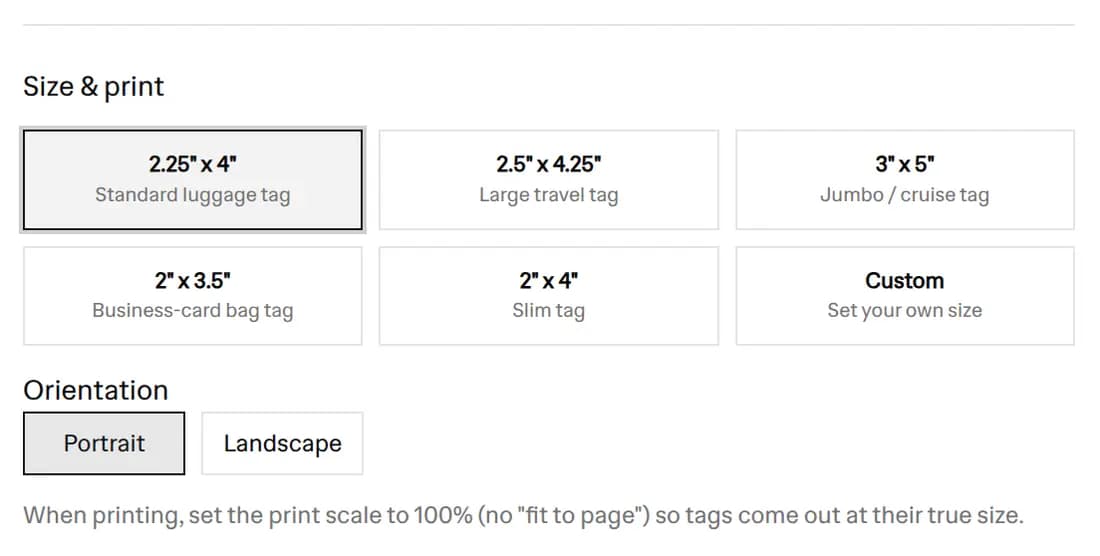 The Size and print section with the 2.25 x 4 inch size selected and the other luggage tag sizes beside it
- Pick a template. There are 14 templates, counting a blank one to build from scratch. Your details stay in place when you switch, so you can try several. The samples in the next section show six of them.
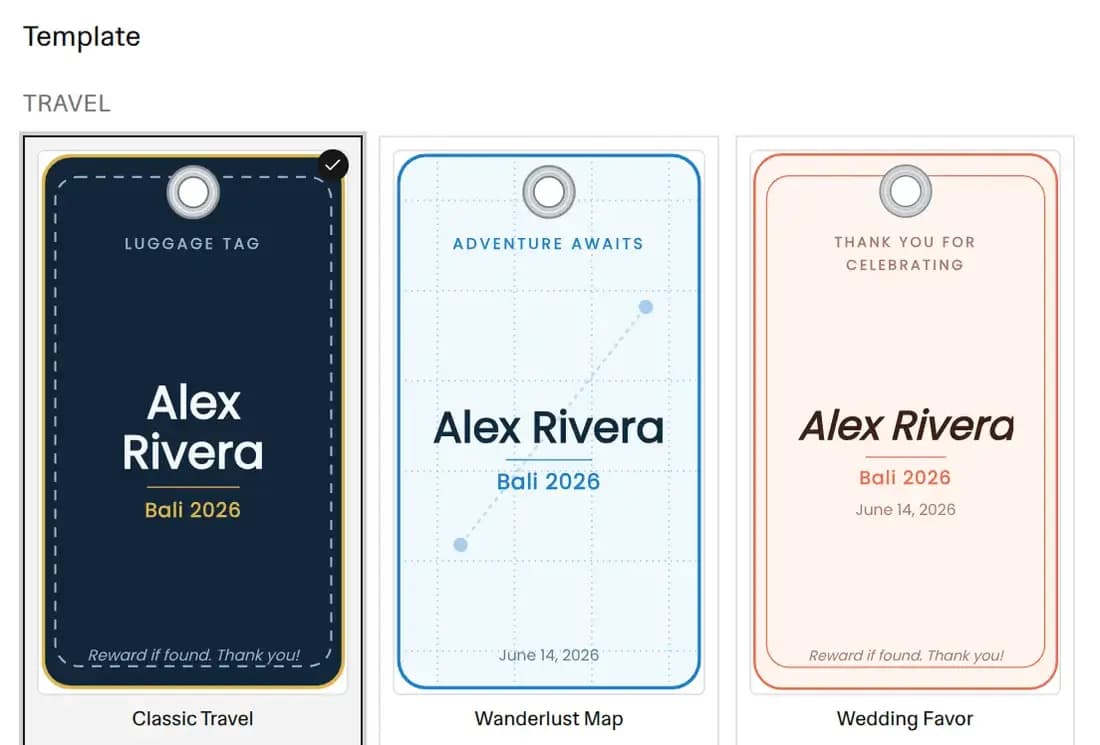 The template picker with the Travel group: Classic Travel selected, Wanderlust Map, and Wedding Favor
- Add a QR code if you want one. Under Scannable code, choose QR code to put your contact details or a link on the tag, or Barcode for the Boarding Pass style. On most templates the code sits on the back. On the QR Contact template it sits on the front.
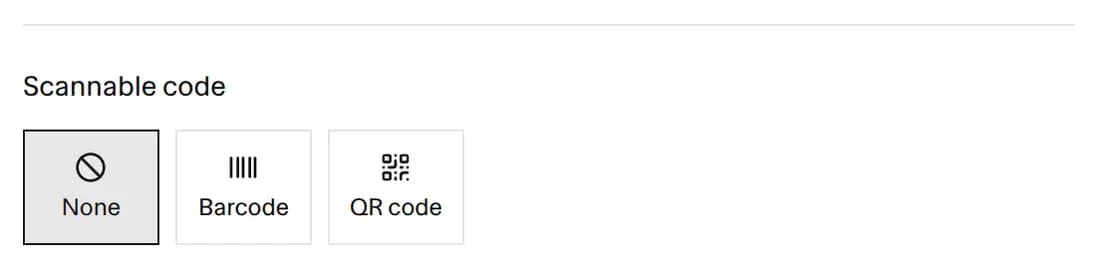 The Scannable code section with the None, Barcode, and QR code options
- Check both sides and download. Use the Front and Back buttons above the preview to check each side, then download a PNG, PDF, or SVG. Every download puts the front and back side by side on one sheet.
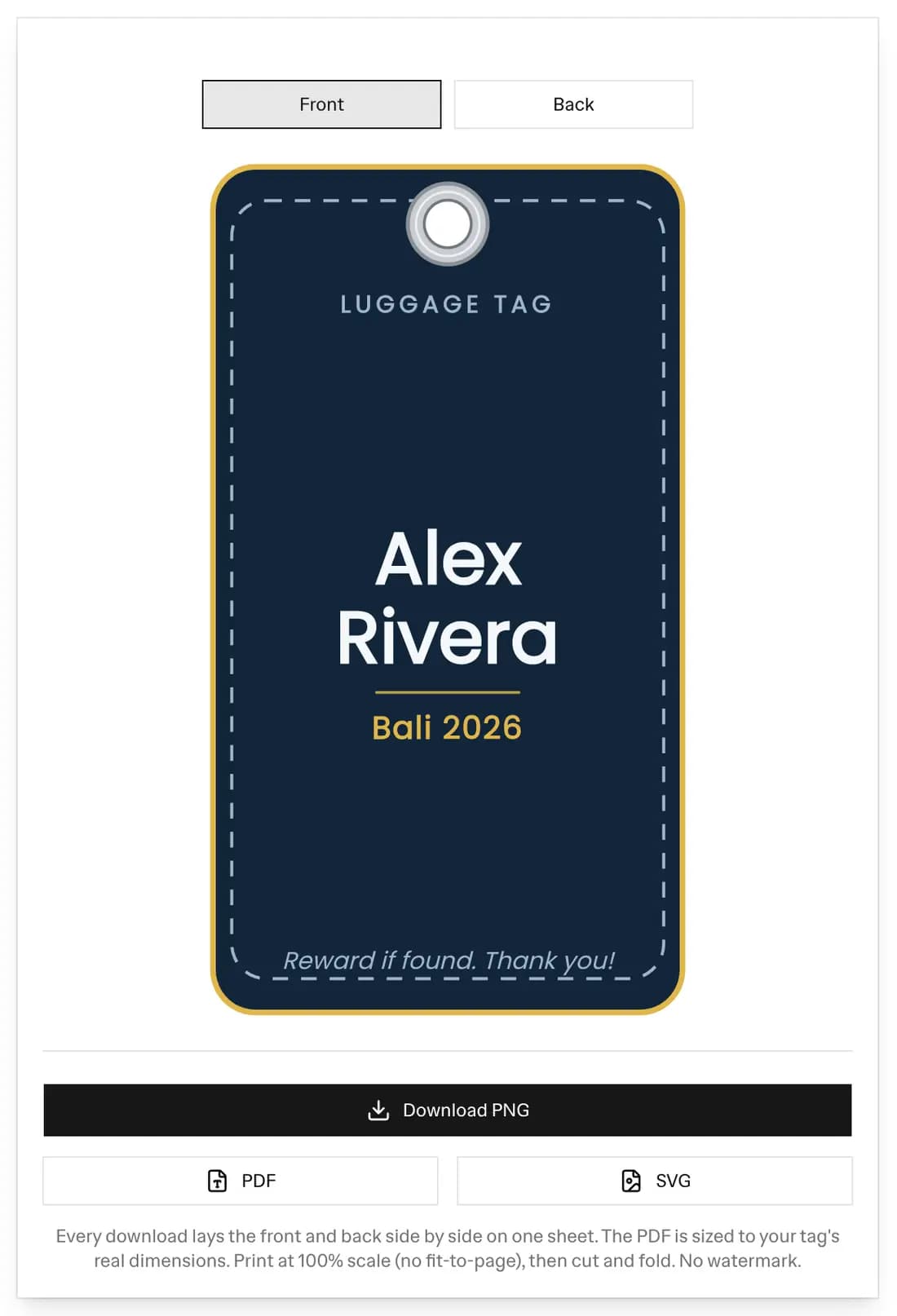 The luggage tag preview with the Front and Back switch, the front of a Classic Travel tag for Alex Rivera, and the Download PNG, PDF, and SVG buttons
Luggage tag samples
These six fronts came out of the maker with the same details filled in. Only the template changed.
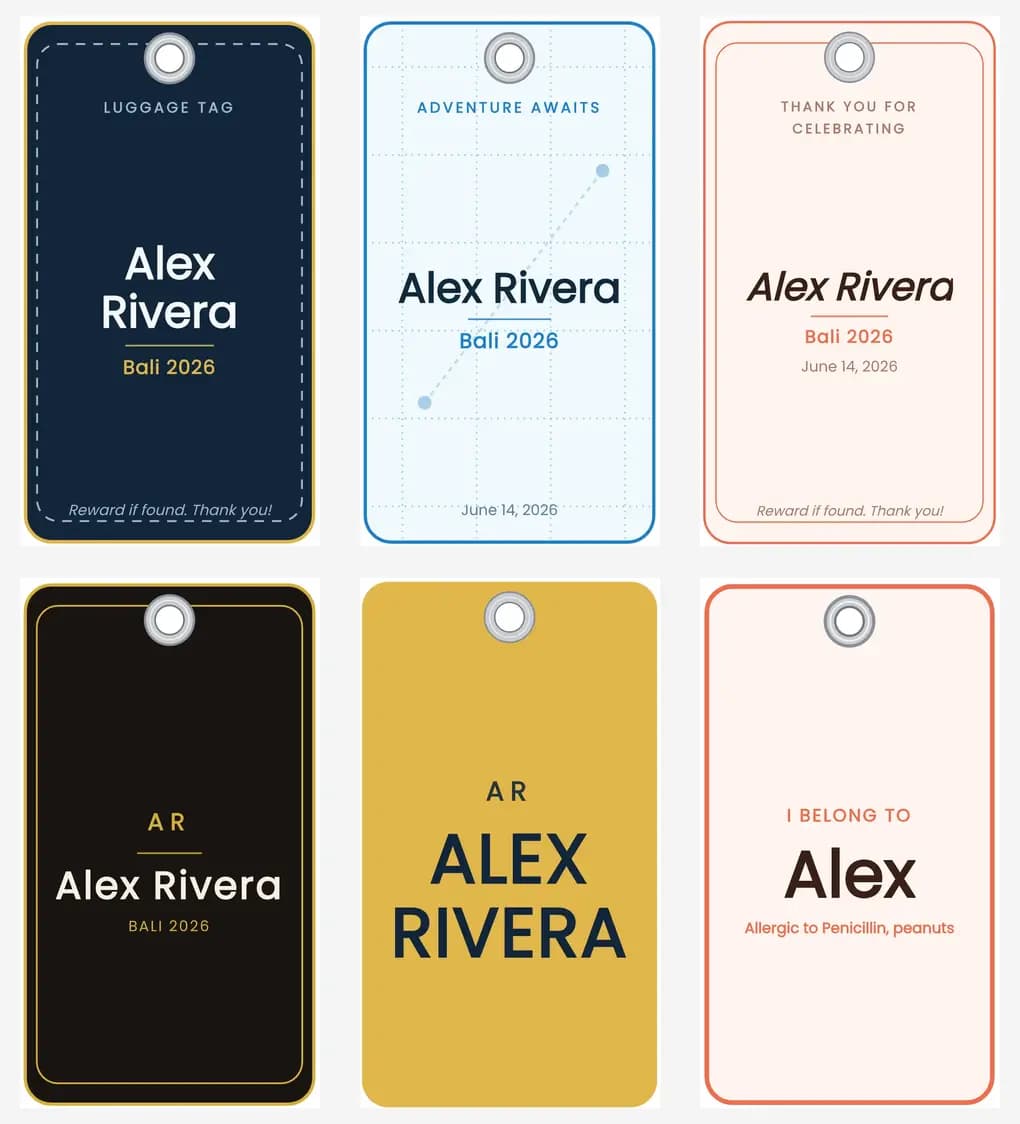 Six luggage tag fronts for Alex Rivera: Classic Travel, Wanderlust Map, Wedding Favor, Leather Luxe, Bold Name, and Kids Bright
Top row: Classic Travel, Wanderlust Map, and Wedding Favor. Bottom row: Leather Luxe, Bold Name, and Kids Bright. Kids Bright shows only the first name, with an "I belong to" line above it and an allergy note for a child's bag.
What to put on a luggage tag
The front only needs enough for you to spot your bag on the carousel: a name, initials, or a bright design. The back is for whoever finds the bag when it goes missing, so put the contact details there.
- Your name, as it appears on your booking.
- A mobile number with the country code, such as +1 555 123 4567, so the finder can call from abroad.
- An email address you check while travelling.
- A destination or hotel address for the trip, if you want the bag sent on rather than home.
- A short message, such as "Reward if found".
Keep your home address off the side that shows. A tag on the handle can be read by anyone in the queue, and an empty home is the last thing to advertise. If you want the address on the tag, put it on the back and use a holder with a flap, or put it in the QR code instead.
Why a luggage tag has a front and a back
A luggage tag is a two-sided card. The front says whose bag it is: a name, a monogram, a destination, or a photo. The back holds the return-to name, address, phone, and email, plus a message such as "Reward if found" or "Fragile - handle with care".
The maker lets you edit and preview each side on its own. When you download, the front and back sit next to each other on one sheet with a 0.25 inch gap between them. Print the sheet at 100% scale, cut around the outside, fold along the middle, punch the hole, and loop it onto a strap. One print gives you a finished two-sided tag.
The 14 luggage tag templates
The templates come in four groups, and each one has its own front and a matching back:
- Travel: Classic Travel (a navy front with gold accents and the full return-to back), Wanderlust Map (a map grid and a dotted route between two pins behind your destination), Wedding Favor (a script style for destination weddings and event favors), and Leather Luxe (a dark look with gold accents).
- Personal: Bold Name (the full name in large capitals, with your initials above it), Kids Bright (a big first name, an "I belong to" line, and an allergy note), Minimal Monogram (large initials with your full name in small capitals underneath), and Photo Tag (your own photo behind the name).
- Specialty: Corporate / Conference (a company logo, attendee name, event, and a slot for a lanyard strap), Boarding Pass (a ticket strip with a scannable barcode), Medical / Emergency ID (a red cross, blood type, allergies, and an emergency contact), Frequent Flyer (an airline program and number), and QR Contact (a plain front with a return QR code).
- Start blank: an empty tag to build from scratch.
Every template uses the same fields, so switching templates keeps what you typed. Each template shows only the fields it uses, and empty fields are hidden. The fields are:
- Owner or traveler name, and a monogram for the initials styles.
- Trip or destination and a date.
- A message such as "Reward if found".
- The return-to contact: name, an address over several lines, phone, and email.
- An alternate or emergency contact.
- Company, event, and role for conference tags.
- Flight number, and a frequent-flyer program and number.
- Blood type, allergies, and an emergency contact for medical tags.
- A logo upload for company tags and a photo upload for photo tags.
- A QR code or a barcode, if you want one.
Standard luggage tag sizes
The default is 2.25 x 4 inches, a typical size for a tag that loops onto a bag handle. The other presets are 2.5 x 4.25 inches, 3 x 5 inches for a large tag, 2 x 3.5 inches (business card size), and 2 x 4 inches for a slim tag. You can also type a custom size, and turn any size to landscape.
Each side of the PDF is the real size you picked, so a 2.25 x 4 inch tag prints at 2.25 x 4.00 inches per side when you print at 100% scale with fit-to-page turned off. The layout shrinks long text to fit inside the cut edge.
The return QR code
The QR code holds the return URL you paste, or the contact block you typed: your name, address, phone, and email as plain text. A finder scans it with a phone camera and sees those details. The preview shows the exact text the code holds, so you can check it before you print. The alternate contact and the message are not in the code, so put anything else important on the back as text.
The Boarding Pass template draws a barcode from your booking or bag code instead, and warns you if the value cannot be encoded in the chosen barcode type.
Print luggage tags at home
Download the PDF and print it at 100% scale on card stock. Cut around the tag, fold along the gap between the front and the back, and punch the hole where the tag shows it. Laminating the card first makes it far more resistant to rain and wear. Punch the hole through the laminate afterwards and add a loop or a steel cable.
For a buckle strap or a lanyard, use the Corporate template. It draws a wide slot instead of a round hole, so the tag threads onto a strap or a clip.
Bulk luggage tags for a family or a team
Switch to Bulk sheet mode to print tags for a group. Paste one traveler per line, or import a CSV using the sample file, and set how many copies each person needs. The maker lays each traveler's front and back side by side onto a US Letter or A4 sheet with a small gap between tags, so you cut around each pair and fold. Each traveler gets their own name, phone, and destination. The email, return address, and alternate contact you type are shared by every tag, which suits a family with one home address. Longer runs download as a ZIP of PNGs or as one PDF with several pages.
A luggage tag template instead of Word
A luggage tag template in Word is usually a fixed table that does not match a real tag size, and it has no return QR code. This maker sizes the tag in inches, adds the QR, and lays out the front and back side by side, so you print once and fold. It works for personal luggage tags, branded tags for a business, kids' backpack tags, wedding favors, and medical ID tags.
Frequently Asked Questions
Is this luggage tag generator free?
Yes. It is free with no signup and no watermark. Make as many luggage tags as you want and download them as PNG, PDF, or SVG files, one at a time or as a bulk sheet for a family or team.
How do I make a luggage tag template?
Pick a template, type the traveler name and your return-to contact details (name, address, phone, email), choose a size in inches, and download. The preview updates as you type, and you can switch between the front and back to check both sides before you print.
Why does the luggage tag have a front and a back?
A luggage tag is two-sided. The front carries the name, monogram, or design, and the back is the "If found, please return to" contact panel. Use the Front and Back buttons to edit and preview each side. Every download puts the front and back next to each other on one sheet, so you print once, cut, and fold.
What size should a luggage tag be?
The default here is 2.25 x 4 inches, a typical size for a tag that loops onto a bag handle. The tool also has 2.5 x 4.25, 3 x 5, 2 x 3.5 (business card size), and 2 x 4 inch presets, plus a custom size. Each side prints at its real size when you print the PDF at 100% scale.
Can I add a QR code or a barcode to my luggage tag?
Yes. A QR code can hold your return URL or the contact details you typed (name, address, phone, and email as plain text), so whoever finds your bag can reach you. The Boarding Pass template draws a barcode from your booking or bag code. The preview shows the exact value the code holds.
Can I make a printable luggage tag in Word?
You do not need Word. A Word luggage tag template is a fixed document that does not resize to a real tag size, has no return QR code, and does not lay the front and back side by side. This maker does all three and downloads a PDF, PNG, or SVG you can print from any program.
How do I print DIY luggage tags at home?
Download the PDF and print it at 100% scale (turn off fit-to-page) on card stock. Cut around the tag, fold along the gap between the front and back, punch the hole, and add a loop or strap. Laminating the tag first makes it far more resistant to rain and wear.
Can I make matching luggage tags for a whole family or team?
Yes. Switch to Bulk sheet mode, paste one traveler per line or import a CSV (a sample file is provided), and set how many copies each person needs. The tool lays each traveler's front and back side by side onto a US Letter or A4 sheet, ready to cut and fold. Each traveler gets their own name, phone, and destination, the email and return address are shared by every tag, and longer runs download as a ZIP of PNGs or one PDF.
What is the difference between a luggage tag and a bag tag?
They are the same thing. A luggage tag, also called a bag tag, is the small two-sided card that loops onto a suitcase, backpack, or duffel, with a name on the front and your contact details on the back. This maker covers both, plus conference, wedding favor, kids, medical ID, and boarding pass styles.
More FREE Product & Catalog tools
Barcodes, QR codes, image optimisation, and AI-readiness for your product catalog.
Free QR Code Generator
Instantly create free, downloadable QR codes for links, phone numbers, texts, and SMS messages without any email signups.
Free WiFi QR Code Generator
Make a WiFi QR code guests scan to join your network. Handles WPA and WPA2, open and hidden networks, and passwords with special characters. No signup.
Free vCard QR Code Generator
Make a QR code that saves your name, phone, email, company and website to a phone in one tap. Handles names and companies with commas or semicolons. No signup.
Free SMS QR Code Generator
Make a QR code that opens a text message with the number and a pre-written message filled in. Works on iPhone and Android. No signup, no watermark.
Free WhatsApp QR Code Generator
Make a QR code that opens a WhatsApp chat with your number and an optional pre-written message. Built on a wa.me click-to-chat link. No signup.
Free Business Card QR Code Generator
Make a QR code for your business card that saves your name, title, company, phone, email and website to a phone as a contact in one tap. No signup.
Free Image Resizer & Optimizer
Resize, compress, and convert images for your Shopify store, Pinterest pins, and social media. Shopify-specific presets, batch downloads, and no signup required.
Free Barcode & Label Generator
Create professional barcode labels with templates for retail, shipping, jewelry, and more. Supports EAN-13, UPC, CODE128 formats. Free, no signup.
Free Address Label Template Maker
Make an Avery-compatible address label sheet. Pick a product number (5160, 5167, L7160, and more), type one address or mail-merge a list, then download a print-ready PDF, PNG, or SVG at true size. Free, no signup, no watermark.
Free Name Tag Generator
Make printable name tags and event badges on an Avery sheet. Pick a size (5395, 5390, 5392, 5384, or A4), type one badge or mail-merge a roster, color-code by department, add a scan-to-connect QR, then download a true-size PDF, PNG, or SVG. Free, no signup, no watermark.
Free Price Tag Template Maker
Design printable price tags and shelf labels with a built-in barcode or QR code. Retail and boutique sale templates, real-unit sizes, bulk printing on plain sheets or Avery label sheets (5160, 5163, 22806, 5164, L7160), and PNG/PDF/SVG export. Free, no signup, no watermark.
Free Hang Tag Template Maker
Design printable hang tags (swing tags) with a real punch hole, a built-in barcode or QR code, and real-unit sizing. Apparel, price-sale, and specialty templates, a car parking-permit mirror-slot shape, bulk mail-merge sheets, and PNG/PDF/SVG export. Free, no signup, no watermark.
Free Candle Labels Maker & Warning Label Generator
Design custom candle labels and print an ASTM F-2058 candle warning label carrying all three cautionary statements and all three pictograms. Measure your jar and the tool computes the wrap size (pi x diameter + overlap) and the dual-unit net weight. 6 label types, 14 templates, bulk scent sheets, true-size PDF, transparent PNG and SVG. Free, no signup, no watermark.
Free Soap Label Maker & Custom Soap Labels
Design custom soap labels and build an INCI ingredient list in correct descending order, with saponified oil names (olive oil -> Sodium Olivate) and a true-soap vs cosmetic toggle. Bar, round, oval, belly-band and bottle shapes, 14 templates, dual-unit net weight (oz/g and fl oz/mL), bulk sheets, true-size PDF, transparent PNG and SVG. Free, no signup, no watermark.
Free Care Label Template Maker & Generator
Design a sew-in garment care label with the correct ISO 3758 / ASTM D5489 care symbols, FTC-compliant care text, fibre-content composition, and RN / size / origin fields. Pick a fibre preset, override any axis, and the symbols and text always match. 12 templates, real-unit sizing, bilingual EU option, bulk size-run sheets, true-size PDF, transparent PNG and SVG. Free, no signup, no watermark.
Free Warranty Card Template Maker & Generator
Design a printable warranty card or certificate with the product, warranty period, coverage, and support details, plus a scan-to-register QR. Batch a whole run of cards each with a unique serial and a per-card register QR that pre-fills the serial on your registration page. 12 templates, 16 themes, real insert sizes, fill-in ruled lines, true-size PDF, PNG and SVG, plus Letter and A4 bulk sheets. Free, no signup, no watermark.
Free Nutrition Label Maker & Generator
Create a pixel-accurate FDA Nutrition Facts or Supplement Facts label. Pick from 20+ formats, type your amounts, and get auto %DV and FDA rounding. Download a print-ready PNG or PDF, or copy embed HTML. Free, no signup, no watermark.
Free Size Chart Maker & Generator
Build a branded product size chart. Pick from 13 category presets, edit the table inline, toggle cm and inch, and style it. Copy a self-contained HTML embed for your product page or download a PNG. Free, no signup, no watermark.
Free SKU Generator
Create consistent, human-readable SKU codes for your product catalog. Build a SKU format, bulk-generate from a product list or a size and color variation matrix, and export a CSV. Free, no signup.
Free Price List Template Maker
Build a polished price list one-pager. Paste or import your products, group them into sections, pick from 20 templates, and download a print-ready PNG, PDF, or CSV. Free, no signup, no watermark.
Free Rate Sheet Template Maker
Build a professional service rate sheet one-pager. List services with a rate and a per-service unit like /hr or /project, group them into sections, pick from 20 templates, and download a print-ready PNG, PDF, or CSV. Free, no signup, no watermark.
Free Line Sheet Maker
Build a wholesale line sheet template with product photos, wholesale and MSRP prices, colors, sizes, and MOQ. Pick a grid, list, or lookbook layout and download a print-ready PDF, PNG, or CSV. Free, no signup, no watermark.
Free Meta Description Generator
Write, measure, and preview meta titles and descriptions with a live Google SERP snippet. Pixel-accurate truncation, character and pixel counters, copy-ready meta tags, and bulk CSV export. Free, no signup.
Free llms.txt Generator & Validator
Generate and validate llms.txt files for your ecommerce store. Make your Shopify or Etsy store AI-ready for ChatGPT, Gemini, and Claude. Free, no signup.